Is ChatGPT Voice free? Yes. The Free plan includes voice chats, with a limit OpenAI doesn’t put a number on: its help page says Free gets “Limited access to GPT-Live-1.1 Quip. Limits may change.” In the US, Go costs $8 a month and Plus $20. On OpenAI’s voice page both list 3 hours of Live voice per rolling 24 hours, Go on the smaller Quip model and Plus on the full GPT-Live-1.1.
Our take: start on Free, because finding out whether your daily talking fits costs nothing. Try Go for $8 only once the free limit has stopped you twice in one week, and know that OpenAI’s Go help page says Go has the same voice limits as Free. On the voice page, Plus at $20 gets the same 3 hours as Go. For voice, what it adds is the bigger model and voice in the desktop app, alongside Plus’s other features.
⚡ TL;DR: The Short Answer
Free: voice is included, with “limited” access to the smaller GPT-Live-1.1 Quip model. OpenAI’s voice, pricing and Go help pages give no minute count.
Go, $8 a month (US): 3 hours of Live voice per rolling 24 hours on Quip, according to OpenAI’s voice help page.
Plus, $20 a month (US): 3 hours per rolling 24 hours on the full GPT-Live-1.1. Plus also gets voice in the ChatGPT desktop app, which draws on your Codex usage at $0.05 a minute.
Pro: 15 hours per rolling 24 hours at $100 a month; unlimited at $200, subject to abuse guardrails, on OpenAI’s voice help page.
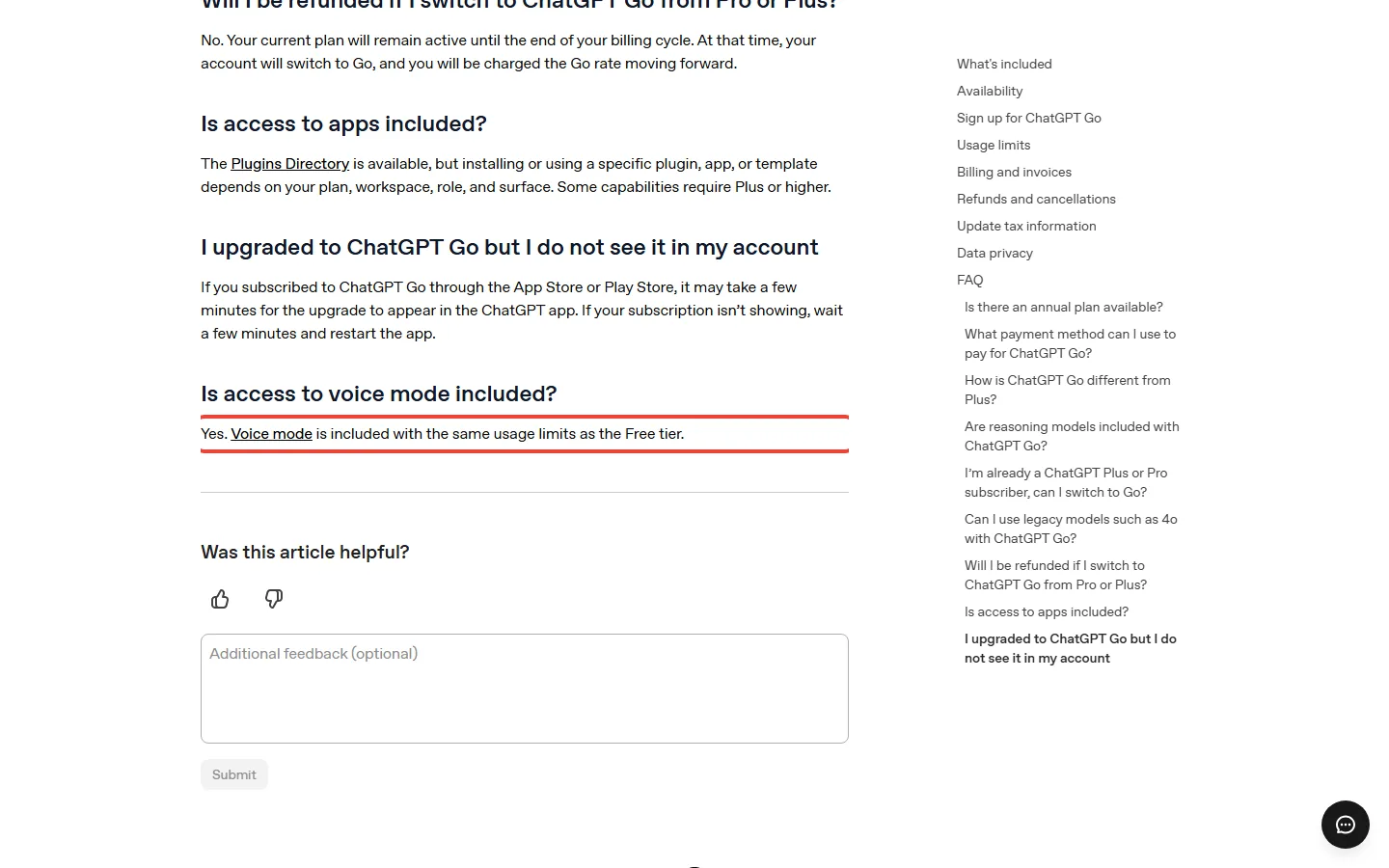
⚠️ The Catch: OpenAI’s Go help page says Go’s voice comes with “the same usage limits as the Free tier”, which contradicts the 3 hours on its voice page.
📑 Quick Navigation
Is ChatGPT Voice free?
Yes, on Free, Go, Plus and Pro.ChatGPT’s pricing page lists “Limited voice chats” on the Free card and “More voice chats” on the $8 Go card. Voice works inside a normal chat: you talk, ChatGPT answers out loud, and its reply also appears as text so you can read along.
What “limited” means is the part OpenAI leaves open. Its voice help page measures voice use over a rolling 24-hour period, so “a day” in this guide means the last 24 hours, not since midnight. For Free it gives no minutes or hours, and neither do OpenAI’s Free tier FAQ, pricing page or Go help page, on the versions we read for this guide.
Typing is counted separately. Free users get unlimited everyday text chats, subject to abuse-prevention safeguards, while voice has its own limit, so running out of voice doesn’t stop you chatting in text.
How to use ChatGPT Voice on the web or your phone
On the web (chatgpt.com)
- Go to chatgpt.com.
- Select the Voice icon in the prompt window, the box where you normally type.
- If your browser asks, allow it to use your microphone.
- Start speaking once Voice opens.
- Use the microphone control to mute yourself and the exit control to end the call.
On iPhone or Android
- Open the ChatGPT app and select the Voice icon in the message bar.
- Allow the app to use your microphone if it asks.
- The first time, pick a voice. Then start speaking.
Voice in Chat works on the web, iOS and Android. On a phone the call keeps going while you use other apps or lock the screen, and a Start with Voice setting opens new chats straight into voice. You can run one voice conversation at a time.
Live, Advanced or Standard: which voice mode can see your camera?
Under Settings > Voice you may see up to three options. Which ones you get depends on your plan, workspace settings, region and app version.
- Live: runs on GPT-Live-1.1 or GPT-Live-1.1 Quip, depending on your plan. It listens while it talks, so you can interrupt it, and it can search the web, use memory and look at images you add to the chat, where your account has those features.
- Advanced: the previous real-time voice. You need it for video or screen sharing in the phone app, which Live doesn’t support.
- Standard: turn by turn. It turns your speech into text first, then answers.
GPT-Live-1.1 and Quip, a mini version of the same model, began rolling out on October 15, 2026. OpenAI says they bring “more natural accents across languages”. On OpenAI’s limits table, Free and Go get Quip, and Plus and Pro get the full GPT-Live-1.1.
How to change ChatGPT’s voice and language
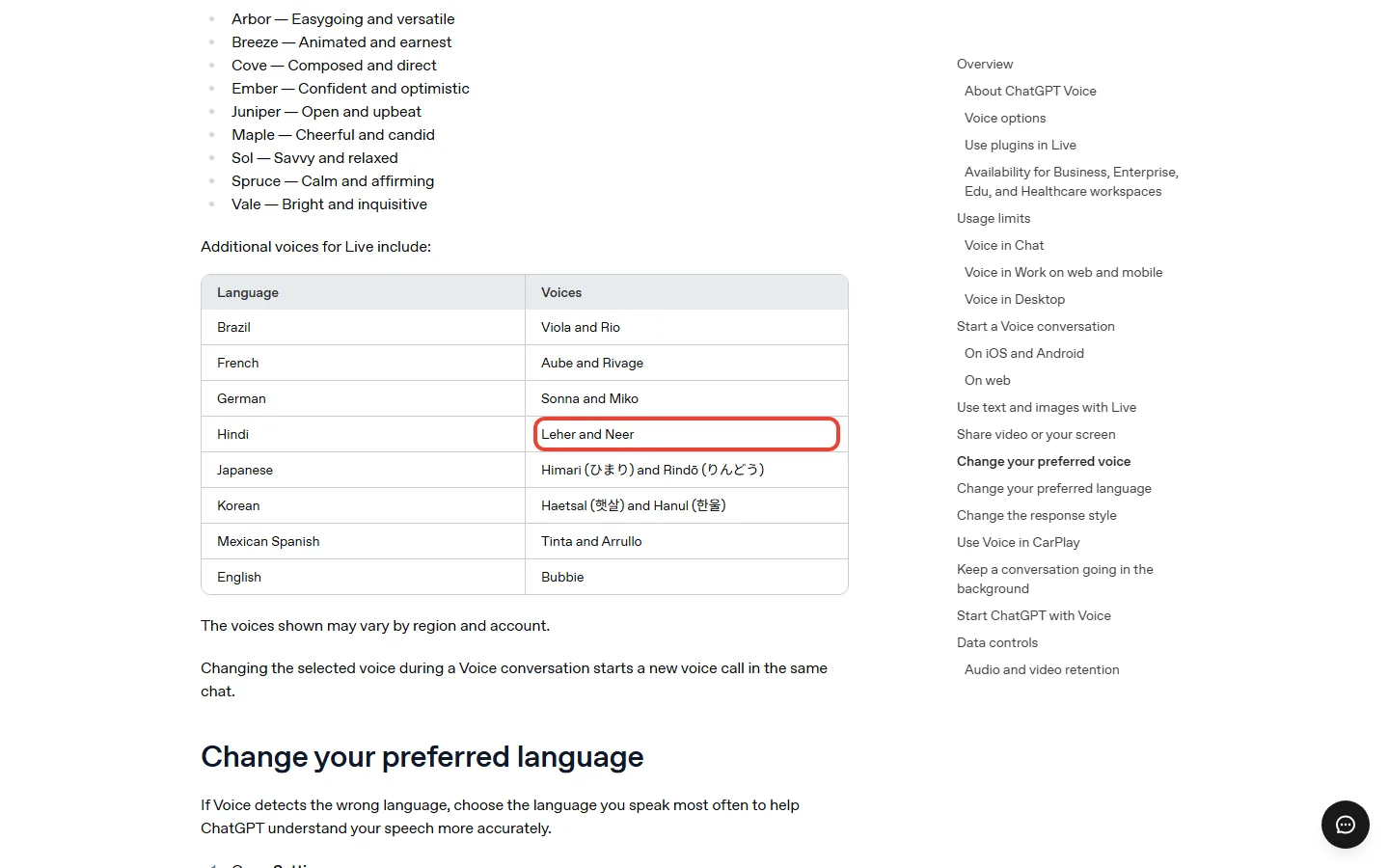
Open Settings > Voice, then select Voice. The help page lists Arbor, Breeze, Cove, Ember, Juniper, Maple, Sol, Spruce and Vale. Switching voices during a call starts a new call in the same chat, so pick before you start.
Practising a language? Live has extra voices for specific languages, such as Hindi (Leher and Neer), Japanese (Himari and Rindō) and Mexican Spanish (Tinta and Arrullo). OpenAI’s list also covers French, German, Korean, Brazil (Viola and Rio, as OpenAI labels it) and Bubbie in English. OpenAI adds that “The voices shown may vary by region and account”, so your list may be shorter than the help page’s.
If Voice keeps mishearing you, set Settings > Voice > Language to the language you speak most. You can also ask ChatGPT, mid-call, to answer in another language. If you want a voice for narrating videos rather than a conversation partner, that is a different kind of tool: see our ElevenLabs pricing guide.
How long can you talk on Free, Go and Plus?
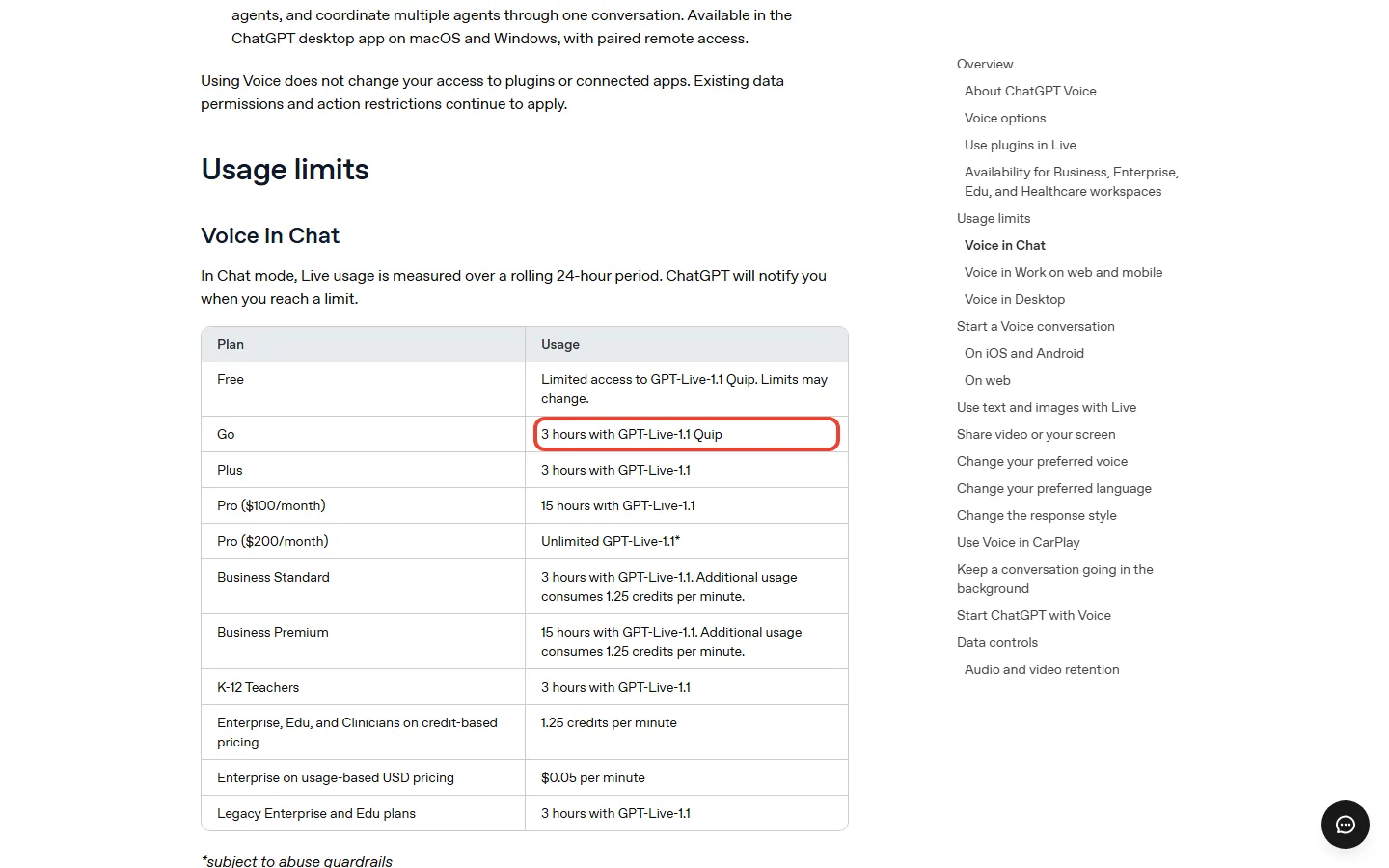
This is OpenAI’s voice limits table for Voice in Chat, with the US prices from OpenAI’s pricing docs and a column we added for the ChatGPT desktop app.
| Plan (US price) | Voice model | Voice time per 24 hours | Voice in the desktop app |
|---|---|---|---|
| Free ($0) | GPT-Live-1.1 Quip | “Limited”, no number published | Not listed |
| Go ($8 a month) | GPT-Live-1.1 Quip | 3 hours (the Go help page says the same as Free) | Not listed |
| Plus ($20 a month) | GPT-Live-1.1 | 3 hours | Yes |
| Pro ($100 a month) | GPT-Live-1.1 | 15 hours | Yes |
| Pro ($200 a month) | GPT-Live-1.1 | Unlimited, subject to abuse guardrails | Yes |
On OpenAI’s voice page, Go and Plus get the same 3 hours (the Go help page disagrees), so for voice the extra $12 a month for Plus buys the full model and desktop voice, not more talking time in the chat. OpenAI’s September 9, 2026 release note also said Plus and Pro would stop switching to the smaller model after a voice limit. That note was written for the earlier GPT-Live-1, and the current voice page doesn’t repeat it.
🔍 REALITY CHECK
What OpenAI’s voice page says: Go gets “3 hours with GPT-Live-1.1 Quip”.
The fine print: OpenAI’s Go help page answers “Is access to voice mode included?” with yes, and says voice mode “is included with the same usage limits as the Free tier”. The September 9 release note, written before the October 15 switch to GPT-Live-1.1, sided with the voice page: “Go: Up to 3 hours with GPT-Live-1 mini”.
Verdict: two OpenAI pages disagree. Our read: the voice page and the release note both say 3 hours, so that is the likelier answer. Until OpenAI fixes the Go page, don’t pay $8 for voice time alone before the Free limit has stopped you twice in one week.
What happens when you hit the voice limit?
ChatGPT tells you when you reach a limit. A call can also end at the maximum session length, or when a long conversation runs out of context (how much of the conversation the model can hold at once). In each case you can carry on typing in the same chat or start Voice again.
OpenAI’s voice help page doesn’t say how long a session can run, or whether Free switches to another voice option at the limit.
On Free you can wait or upgrade. OpenAI’s Free tier FAQ says a Free rate limit (the cap on how much you can use in a set period) resets when you upgrade to Plus, Pro or Business. Go isn’t on that list, and that answer doesn’t mention voice.
Is Free enough, or do you need Go’s 3 hours?
OpenAI’s pages give no Free number, so this section can’t tell you when Free runs out. It shows how far the first paid step stretches on the voice page’s figure: Go’s 3 hours are 180 minutes.
- Say you practise Spanish out loud for 20 minutes a day on your commute. That is about 11% of Go’s 180 minutes, so on the voice page’s figure Go would cover that session 9 times over. Start on Free, and think about Go only if the limit notice stops you twice in one week.
- Say you use voice as a study partner for about 2 hours most days. That fits inside Go’s 3 hours with 1 hour to spare, on the voice page’s figure. At this level, watch for ChatGPT’s limit notice in your first week on Free: it tells you whether Free is enough.
- Say you talk to ChatGPT for 4 hours a day in long work sessions. Go and Plus list 3 hours, and Free publishes no number. Pro at $100 lists 15 hours, $80 a month more than Plus. Our guide to the $100 Pro plan covers what else that tier includes.
Should you pay $8 for Go or $20 for Plus for voice?
For voice alone, our rule: stay on Free until the limit stops you twice in one week, then try Go for a month. In the US, Go costs $8 a month, or $96 over a year, and it’s billed monthly only, so a month is all you commit to.
Pay for Plus if you want the full GPT-Live-1.1 model instead of Quip, voice in the ChatGPT desktop app, or Plus’s other features. It’s $20 a month, $12 more than Go, and $240 over a year. In the desktop app, voice draws on your existing Codex usage budget at $0.05 a minute, and voice and tasks share your plan’s usage limits. That budget is the allowance your plan gives for Codex, OpenAI’s coding agent (an AI that writes and edits code for you). Our ChatGPT Codex review explains that budget.
Weighing Go against Plus for more than voice? Our ChatGPT Go vs Plus comparison covers uploads, images and models, and our ChatGPT review covers every plan.
What happens to your voice recordings?
Audio clips from Live and Advanced calls are stored with the chat’s transcript for 30 days. OpenAI says it doesn’t train on the audio unless you share clips or turn on “Include your audio recordings”. If Improve the model for everyone is on, though, it may train on the transcripts, depending on your plan and settings. Both settings are under Settings > Data Controls.
After each call the transcript lands in the chat, but OpenAI notes that transcripts “are not verbatim records”, so check anything important against what was said.
ChatGPT Voice FAQ
Is ChatGPT voice mode free?
Yes. Voice is included on the Free plan, with limited access to the GPT-Live-1.1 Quip model; OpenAI’s voice help page gives no time limit for Free.
How long can you use ChatGPT voice for free?
OpenAI’s voice, pricing and Go help pages don’t give a number. The voice help page lists Free as “Limited access to GPT-Live-1.1 Quip. Limits may change.”, measured over a rolling 24 hours, and ChatGPT tells you when you reach the limit.
Does ChatGPT Go include voice?
Yes. OpenAI’s voice help page lists 3 hours of Live voice per rolling 24 hours on GPT-Live-1.1 Quip for Go, though its Go help page says Go’s voice has the same limits as Free.
Can ChatGPT Voice see my camera or screen?
Not in Live. Video and screen sharing work in the iPhone and Android apps for “eligible subscribers” using the Advanced option; OpenAI’s voice help page doesn’t say which plans those are.
Can I use ChatGPT Voice on my computer?
Yes, in a browser at chatgpt.com. Voice in the ChatGPT desktop app is listed for Plus, Pro, Business, Edu and Enterprise plans, depending on rollout.
Can I interrupt ChatGPT Voice while it’s talking?
Yes. Live listens and speaks at the same time, so you can cut in while ChatGPT is answering.
Should you pay for ChatGPT Voice?
- You talk to ChatGPT a few times a week: stay on Free and see whether you ever hit the limit.
- The Free limit has stopped you twice in one week: try Go for one month at $8.
- You want the full model or voice in the desktop app: Plus at $20 a month; desktop voice draws on your Codex usage.
- You talk for hours every day: Pro at $100 lists 15 hours; on OpenAI’s voice help page only Pro at $200 is unlimited, subject to abuse guardrails.
If you’re comparing ChatGPT Free with other free plans, our roundup of what 13 free AI plans really give you covers the alternatives.
Sources and how we checked: OpenAI’s ChatGPT Voice help article, the ChatGPT pricing page, OpenAI’s pricing and desktop voice docs, the Go, Plus and Free tier help articles, and the ChatGPT release notes, all read on October 22, 2026. Prices are US prices in USD. This page reports what OpenAI publishes.

Founder of AI Tool Analysis. Reads the pricing pages and help articles behind each claim. See how we research →
Stay Updated on AI Plans and Prices
AI plans and features change every few weeks. Get the changes that affect what you pay, straight from the vendors’ own pages.
- Honest Breakdowns: We read the vendors’ own pricing pages, docs and help centers
- Price Tracking: Know when plans change price or limits
- Comparison Updates: As the market shifts, we update our verdicts
- No Hype: Just the AI news that matters for your wallet
Free, unsubscribe anytime.
Related Reading
- ChatGPT Go vs Plus: Is $8 Enough or Do You Need $20?
- ChatGPT Review 2026: Every Plan Explained
- ChatGPT Dots Pricing: Is the $100 Pro Plan Worth It?
- GPT-6 Astra: Who Can Use It and What It Costs
- ChatGPT Codex Review: What Plus Gets You
- Free AI Tools 2026: What 13 Free Plans Really Give You
- ElevenLabs Pricing 2026: Every Plan, and Is It Worth It?
Last Updated: October 22, 2026
Facts checked: October 22, 2026 (plans, prices and voice limits against OpenAI’s own pages)
Next Review Update: November 6, 2026 (whether OpenAI’s Go help page and voice page agree)
Have a tool you want us to cover? Suggest it here | Questions? Contact us