
The best free AI tools in 2026 do real work, but each one has a limit or a catch the sign-up page does not lead with. This guide covers 13 free AI tools for writing, research, coding, design, voice and images, and for each one it shows what the vendor’s own pages say you get for $0, where the limit bites and what you give up. Every figure comes from a page we read on October 6, 2026.
The short version: Claude has the cleanest free plan (no ads, a written ad-free commitment), ChatGPT has the most tools but shows ads on Free, and Google’s free Gemini app gives the most storage. Best for: students, freelancers and anyone who wants to try AI before paying. Skip if: you need guaranteed capacity, because every free plan below can be throttled, changed or ended by its vendor.

⚡ TL;DR: Free AI Tools in 2026
🧠 Chat and writing: Claude Free (no ads), ChatGPT Free (most tools, ads on Free and Go) and Google’s Gemini app (15 GB of storage) all cost $0.
💻 Coding: GitHub Copilot Free allows 2,000 completions a month, Windsurf lists unlimited Tab completions, and Cursor’s Free plan has limited agent requests.
🎨 Creative: Canva Free (up to 20 AI uses), Leonardo (150 Fast Tokens a day) and ElevenLabs (10k credits a month).
💡 Our take: start with Claude Free plus one tool for your main job, and pay only for the one you hit the limit on every week.
⚠️ The catch: several vendors do not print exact free limits, so the real allowance can change without notice. Treat every number here as a snapshot dated October 6, 2026.
📑 Quick Navigation
🏁 The Bottom Line: What Free AI Tools Give You in 2026
A free AI plan is like a gift card that refills on a schedule: you can spend it on real things, but you rarely see the balance, and the vendor can change the refill. Plan around that and the free tools below cover most everyday work.
Here is how the 13 line up by job, based on the documented features, ad policies and limits (our editorial picks, not benchmark results):
- Writing, documents and general questions: Claude Free first, ChatGPT Free second if you can live with ads.
- If you already live in Google: the free Gemini app, which also lists Deep Research and 15 GB of storage.
- An AI agent that does tasks for you: Meta’s Muse, free with a usage limit, but only in limited US testing so far.
- Coding: GitHub Copilot Free (2,000 completions a month) plus Windsurf’s free Tab completions.
- Research with sources: Perplexity’s free plan.
- Design, images and voice: Canva Free, Leonardo Free and ElevenLabs Free.
If you only pick one, pick Claude. If you want to see what a paid upgrade adds before you commit, jump to the cost table near the end, or read our guides to Google AI Plus and Google AI Pro free offers.
🔄 What Changed Since Our Last Version
The previous version of this guide was written in February. Six things on the vendors’ own pages are different today:
- ChatGPT: OpenAI says ads may appear on the Free and Go plans (the trial began in the US on February 9, 2026), and Free now runs on GPT-5.6 Luna.
- Claude: Free lists web search, file creation, code execution and memory, while Projects, Claude Code and Claude in Chrome now sit under Pro on Anthropic’s pricing page.
- Google AI Studio: Google’s documentation no longer prints per-day request numbers for the free tier. It tells you to check your own limits inside AI Studio.
- GitHub Copilot Free: still 2,000 completions a month, but models are now Auto selection only.
- ElevenLabs: Instant Voice Cloning and the commercial license are listed from the Starter plan, not Free.
- Meta Muse: a new agent that is free with a usage limit.
Where an older number is no longer on a vendor’s current page, this version drops it rather than repeating it.
✅ What Makes a Free AI Plan Worth Using
A free plan earns a place here if it passes four checks, all answerable from the vendor’s own pages:
- It is documented: the vendor lists the free plan on its pricing or help page.
- It starts at $0: you can use it before paying anything.
- It does something useful: a full task, not a one-minute demo.
- Its catch is findable: ads, data use, a usage cap or a regional limit that you can read about before you sign up.
Tools that only offer a time-limited trial are not free plans, so they are left out.
💬 ChatGPT Free: The Most Tools, With Ads
OpenAI’s Free tier FAQ says Free users get GPT-5.6 Luna, plus web search, data analysis, file and image uploads, image creation, GPTs and 500 MB of Library storage. Everyday text chats are “unlimited” in OpenAI’s words, subject to abuse-prevention safeguards.
The limit that bites is on the tools around the chat. File uploads, image generation, voice and data analysis each have their own cap, and OpenAI’s FAQ does not print the numbers, and ChatGPT tells you when you reach one. Free and Go users get GPT-5.6 Luna and do not get GPT-5.6 Sol, according to OpenAI’s model availability page.
The ads on Free and Go
OpenAI’s ads FAQ says ads may appear on the Free and Go plans, below the end of a response and labeled as sponsored. Plus, Pro, Business, Enterprise and Edu accounts have no ads. OpenAI also says ads do not influence ChatGPT’s answers, advertisers do not receive your chats, Temporary Chats show no ads, and you can turn off ad personalization in Settings.
If you want ChatGPT without ads, the entry point is ChatGPT Plus at $20 a month. ChatGPT Go costs $8 a month in the US and adds higher limits, but it is still on the list of plans where ads may appear.
🔍 REALITY CHECK
The claim: “ChatGPT is free to use.”
The fine print: Free means unlimited everyday text chat, with separate caps on file uploads, images, voice and data analysis that OpenAI’s Free tier FAQ does not quantify, on a plan where ads may appear.
✅ Verdict: Genuinely free for chat and light use. Expect to hit the image and upload caps first.
Best for: people who want the widest set of tools in one place and do not mind ads. Skip if: ads in an AI chat bother you. Our full ChatGPT review covers the paid tiers.
🧠 Claude Free: Clean, No Ads, Strong on Documents
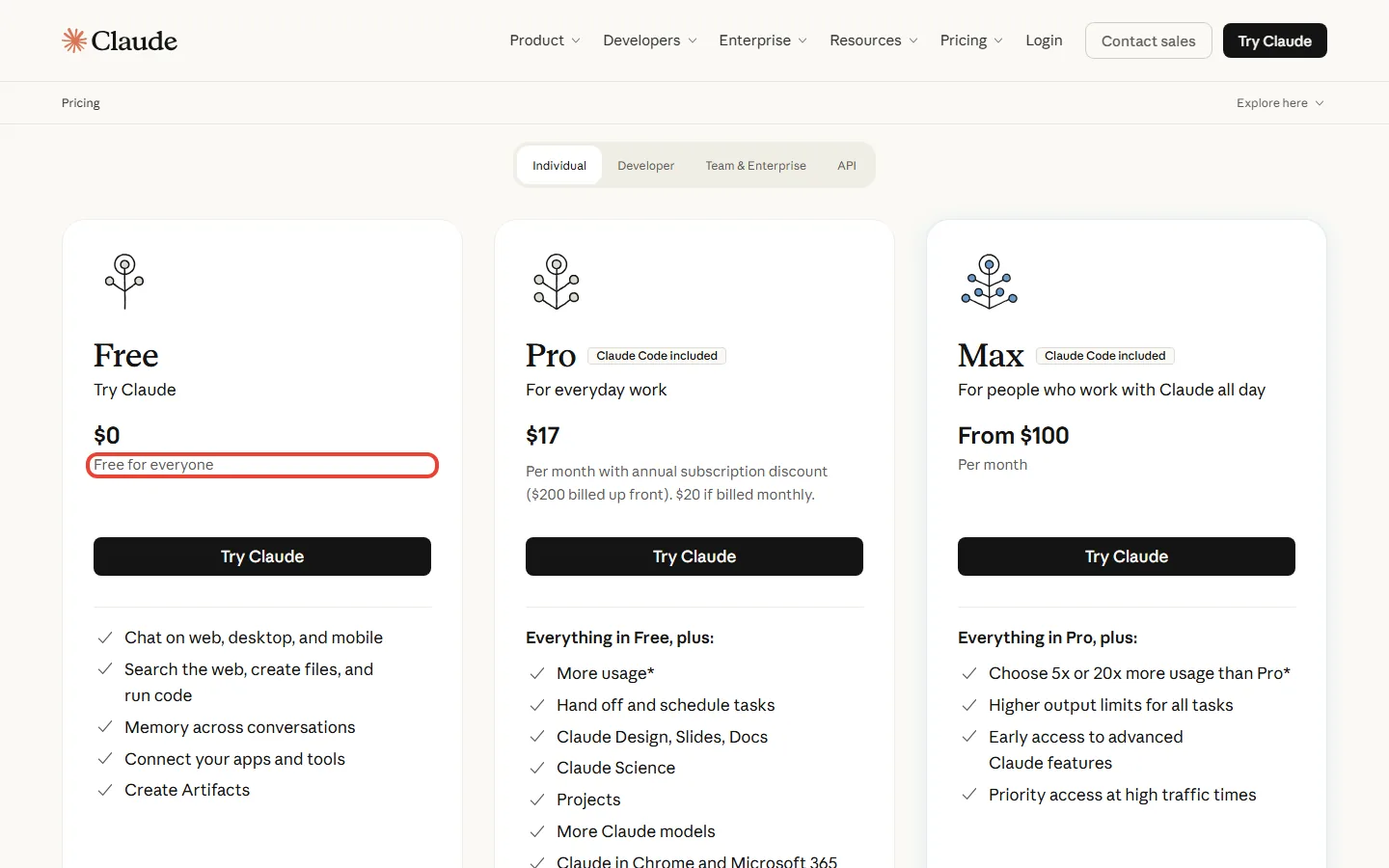
Anthropic’s pricing page lists Claude Free at $0 with chat on web, desktop and mobile, web search, file creation, code execution, memory across conversations, app connections and Artifacts. Its models table shows Sonnet and Haiku on the free plan and Opus on paid plans only.
The limit is time-based. Anthropic’s help pages say the free plan has a session limit that resets every five hours and that the number of messages varies with demand. The pricing page adds that Free “covers everyday questions” and that Pro gives at least 5x more usage per 5-hour session. There is no fixed message count to plan around.

Anthropic has put an ad-free commitment for Claude in writing. In “Claude is a space to think”, Anthropic says Claude will remain ad-free, with no sponsored links next to conversations.
Claude Pro is $20 a month billed monthly, or $17 a month on the annual plan ($200 billed up front). It adds Projects, Claude Code and Claude in Chrome. Our Claude AI review covers the paid models, and Claude Code vs Cursor compares the coding side.
💡 Key Takeaway: If your work is writing, summarizing or working through documents, Claude Free is the plan to try first. Move up only when the five-hour limit interrupts you more than once a week.
Best for: documents, long reading and writing without ads. Skip if: you need Projects or coding tools, which are listed under Pro.
✨ Gemini App Free: The Biggest Free Bundle If You Use Google
Google’s plans page lists the free Gemini app at $0 with a Google Account. It names Gemini 3.6 Flash, “varying access” to Gemini 3.1 Pro, image generation and editing, Deep Research, Gemini Live, Canvas, Gems, limited Google Flow access and Gemini Notebook, plus 15 GB of storage across Gmail, Drive and Photos.
Limits are compute-based. Google’s limits help page says your limit refreshes every 5 hours until you reach a weekly limit, and that without a Google AI plan, features that need more compute, such as Deep Research, can be unavailable when demand is high.
Paying moves you up in steps: Google AI Plus is $4.99 a month for 2x the free usage, and AI Pro is $19.99 a month for 4x. Compare them in our Google AI Plus review and Gemini review, and see how to get Google AI Pro free if you are a student or buying a Pixel.
Best for: people already on Gmail, Docs and Android. Skip if: you need a predictable daily allowance, because Google’s help page gives no daily numbers.
📈 How Much More the First Paid Step Gives, in Each Vendor’s Own Words
Claude’s figure is a floor (“at least 5x”) for usage per session, and Canva’s 10x refers to AI usage specifically. Read them as each vendor’s own claim, not a like-for-like comparison.
🔬 Google AI Studio: Free Gemini API Access, Numbers Unpublished
Google AI Studio is the developer side of Gemini. Google’s API pricing page lists a Free tier with free input and output tokens, limited access to certain models and AI Studio access. It also notes that on the free tier, content is used to improve Google’s products.
What the page does not give you is a daily request count. The rate limits page says limits depend on several factors and can be viewed inside AI Studio. That is why this version no longer repeats the per-day numbers from earlier editions: Google’s current documentation does not print them.

🔍 REALITY CHECK
The claim: “Start building free of charge with generous limits.”
The fine print: “Generous” is not a number. Google’s docs send you to your AI Studio dashboard for the actual limits, and say free-tier content is used to improve its products.
✅ Verdict: Free and useful for prototypes, but check your dashboard before relying on it, and do not paste private data into it.
Best for: developers prototyping with long documents. Skip if: you want a simple chat window (use the Gemini app) or you handle client data. More in our Google AI Studio review.
🤖 Meta Muse: A Free AI Agent, in Limited US Testing
Muse is the newest entry. Meta’s launch post describes a personal agent that can handle tasks such as sending an email or booking travel, and that can open a browser and fill out forms. It is rolling out in the US on iOS, Android and muse.ai.
Meta’s Muse subscription help page says Muse is “available for free with a usage limit”. Paid plans are Power at $20 a month (500M Muse tokens per week) and Maximum at $100 a month (3B Muse tokens per week). Meta does not publish the free allowance, and the same page says Muse and its subscriptions are in limited testing and not available in all locations yet.
🔍 REALITY CHECK
The claim: “It’s free for most of what people need, with subscription plans for people who want to do more.”
The fine print: That line is Meta’s launch wording. The help page gives no free allowance, and Meta’s research post says conversations and tool calls are used for model training by default, with personal details sanitized, unless you switch it off in Muse settings.
✅ Verdict: A free agent worth a look if you are in the US. Turn off training in settings first and keep payments and logins out of it until you have read the controls.
Best for: US users curious about an agent that acts for you. Skip if: you are outside the US, or you do not want your chats used for training.
💻 GitHub Copilot Free: 2,000 Completions a Month
GitHub’s plans documentation says Copilot Free is “limited to 2000 completions per month”. Chat and agents are included in limited form through an allowance of GitHub AI Credits, and the page does not state how many credits that is.
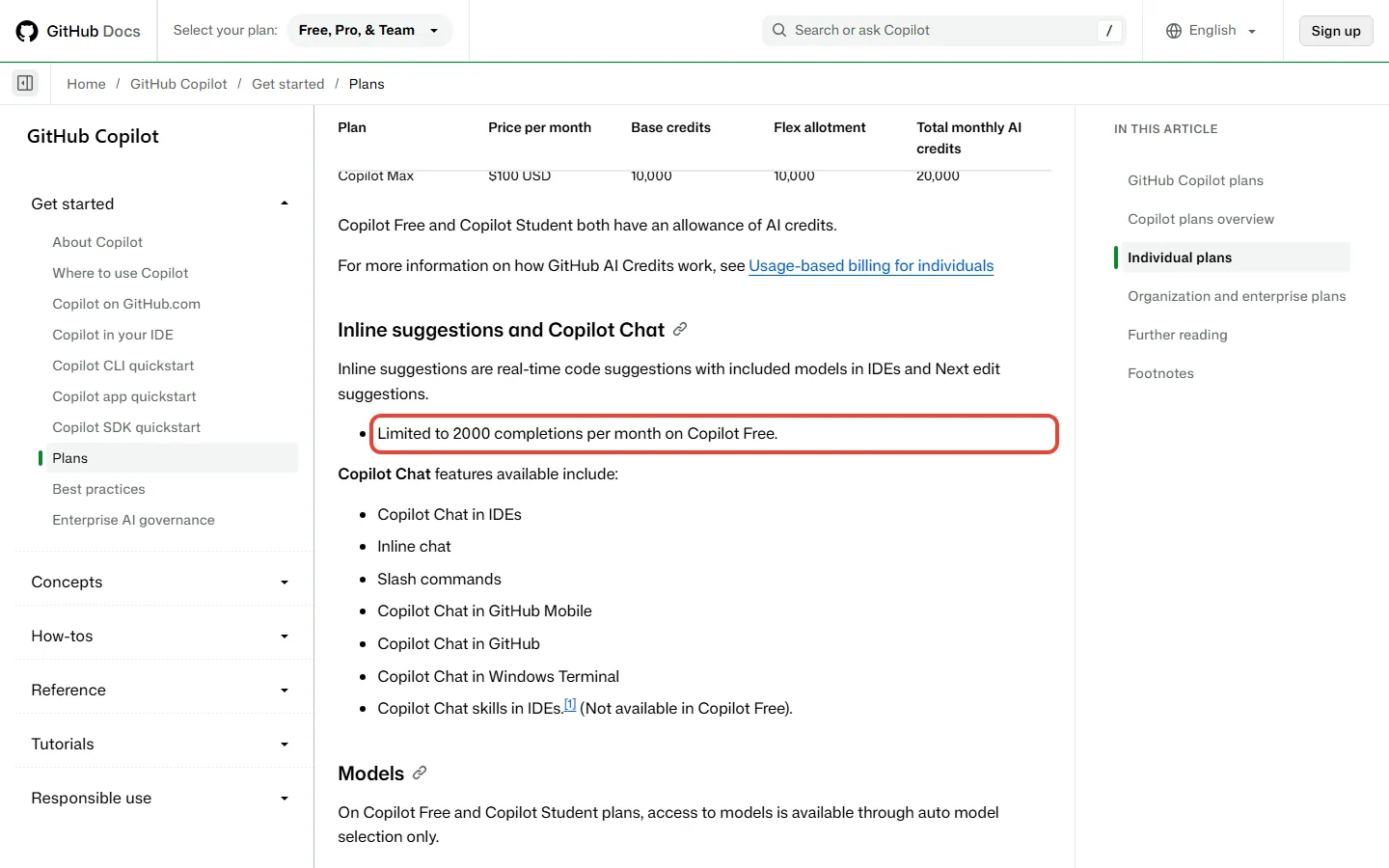
One thing changed from older guides: on Free and Student plans, models are available through Auto model selection only, so you cannot pick which model answers. Copilot Free is for individual developers without Copilot access through an organization, and verified students get Copilot Student free. Copilot Pro is $10 a month; see our GitHub Copilot Pro+ review for the paid ladder.
2,000 completions is about 67 a day if you code every day of a 30-day month (2,000 / 30 = 66.7). That is plenty for a student or a weekend project and tight for a full-time developer.
⌨️ Windsurf and Cursor: Free Coding Editors
Windsurf’s pricing page (the page now sits under the Devin name) lists a $0 Free plan with a light quota to code with agents, limited model availability, unlimited inline edits and unlimited Tab completions. Pro is $20 a month. Our Windsurf review covers the editor.
Since October 12, Cursor’s pricing page shows The X Subscription, the plan xAI now sells for Grok, Cursor and X together. Its Free plan lists limited agent requests and limited chat requests. The cheapest paid plan, Plus, is $8 a month and runs Grok models only; Premium, at $30, adds Claude and GPT models billed at API list price. If you already pay for Cursor Pro, you keep it at $20 for now. Read our Cursor AI review and Claude Code vs Cursor before choosing.
💡 Key Takeaway: For free coding help, the pairing is straightforward: Copilot Free for chat inside your IDE, and Windsurf’s free Tab completions for typing speed. Move to a paid plan only when the agent quota is the part that runs out.
🪟 Microsoft Copilot: Free With a Microsoft Account
Microsoft’s Copilot site says Microsoft Copilot is free with a signed-in Microsoft account, and Microsoft says it is available on the web, desktop and mobile. Microsoft does not print per-day limits on that page, so this guide gives none.
Copilot inside Word, Excel, PowerPoint and Outlook is a different, paid product. Microsoft 365 Personal costs $9.99 a month and includes the desktop apps with Copilot. If you want AI in Office, that is the entry point; if you want a free chat assistant, the standalone Copilot is the one that is free.
Best for: people already signed in to Windows or Microsoft 365. Skip if: you need published limits to plan around.
🔍 Perplexity Free: Research With Citations
Perplexity’s plans page invites you to log in or sign up for free, and says every answer “includes inline citations from trusted sources”. That is Perplexity’s own description; open the sources before you rely on them.
Pro is $17 a month when billed annually and adds Deep research, a choice of AI models, and more usage limits and memory. Perplexity’s help-center pages with the exact free-plan counts sit behind a bot check that we do not bypass, so this guide quotes no daily Pro Search numbers. For the full picture see our Perplexity AI review and Comet browser review.
🖌️ Canva Free: Design With a Small AI Allowance
Canva’s pricing page lists Free with 1.6M+ templates, 4.7M+ photos, videos, graphics and audio, one Brand Kit with three colors, access to Affinity, and 5 GB of cloud storage. The AI line is the one to read: “Up to 20 Standard or Premium AI uses”, with a footnote that different AI tools draw on the allowance at different rates.

Canva says Pro gives 10x more AI than Free and adds more Brand Kits and social scheduling. We do not quote Canva’s paid prices here because the page shows them in local currency from our location. See the Canva Magic Studio review for the AI features.
Best for: social posts, slides and simple branding. Skip if: you need many AI edits a month, because 20 uses goes quickly.
🎙️ ElevenLabs Free: 10k Credits a Month, No Voice Cloning
ElevenLabs’ pricing page lists Free at $0 a month with 10k credits a month, three Projects in Studio, and tools for text to speech, speech to text, sound effects, voice design, music and images.

Two things from older guides no longer hold. Instant Voice Cloning is listed from the Starter plan up, not Free, and so is the Commercial License, so check the license terms before you publish Free output commercially. Our ElevenLabs review covers the paid plans, and Fish Audio and Qwen3-TTS are alternatives.
🖼️ Leonardo Free: 150 Fast Tokens a Day
Leonardo’s pricing page lists Free at $0 a month with 150 Fast Tokens a day, a 150 Token Bank, public creations, basic quality settings and one personal collection. “Public” matters: free creations are visible to others, and private creations start on the paid plans.

The math: used every day for 30 days, Free gives 150 x 30 = 4,500 Fast Tokens. Essential at $12 a month lists 8,500 Fast Tokens a month and private creations, about 1.9x that. Leonardo does not say how many images a token buys, so no image count is claimed here. See our Leonardo AI review and best AI image generators for how it compares.
📬 Tracking free-tier changes?
Get honest AI tool pricing analysis delivered weekly. No hype, no spam.
⚠️ What Free AI Plans Can’t Do
The same four catches turn up across these plans. Check each before you build a workflow on a free tier:
- Ads: ChatGPT Free and Go are the plans on this list where ads may appear. Anthropic has a written ad-free commitment for Claude.
- Data use: Google says free API content is used to improve its products, and Meta says Muse chats train its model by default, with an opt-out.
- Limits in words, not numbers: on the pages we read, Google, Meta, Microsoft and OpenAI describe free limits without daily figures. A number that is not printed can change without a headline.
- Commercial use: ElevenLabs lists its Commercial License from Starter up, so check the license of any free output you plan to publish.
Free storage differs too: Google gives 15 GB across Gmail, Drive and Photos, Canva 5 GB, and ChatGPT’s Library 500 MB (0.5 GB). If you are choosing a free plan to store files, Google’s is 30 times the size of ChatGPT’s.
📊 The Complete Free AI Tools Comparison (October 2026)
| Tool | Best for | What Free gives you | The catch |
|---|---|---|---|
| ChatGPT Free | General tasks | GPT-5.6 Luna, unlimited everyday text chat, web search, image creation | Ads may appear; tool caps not quantified |
| Claude Free | Documents, writing | Sonnet and Haiku, web search, file creation, memory | Five-hour session limit; Projects listed under Pro |
| Gemini app | Google users | Gemini 3.6 Flash, Deep Research, 15 GB storage | No daily numbers; Deep Research can be unavailable |
| Google AI Studio | Developers | Free API tokens, limited models | Limits only in your dashboard; content used by Google |
| Meta Muse | Agent tasks | Free with a usage limit | US limited testing; training on by default |
| GitHub Copilot | Coding | 2,000 completions a month, limited chat and agents | Auto model selection only |
| Windsurf / Cursor | Coding editors | Unlimited Tab completions (Windsurf); limited agent requests (Cursor Free) | Light agent quotas |
| Microsoft Copilot | Windows users | Free chat with a Microsoft account | Office features need a Microsoft 365 plan; no limits listed |
| Perplexity | Research | Free sign-up with cited answers | Exact limits not on its plans page |
| Canva | Design | 1.6M+ templates, 5 GB storage, up to 20 AI uses | Small AI allowance |
| ElevenLabs | Voice | 10k credits a month, 3 Studio projects | No voice cloning or commercial license |
| Leonardo | Images | 150 Fast Tokens a day | Public creations, basic quality |
💰 When to Pay: What the First Paid Step Costs
You do not need to pay for any tool above. When a free plan starts costing you time, this is what the first step up costs, per month, according to each vendor’s own page:
💸 First Paid Step, USD per Month
Pay when you hit the same limit every week, when ads interrupt real work, or when you need a license, privacy or speed that Free does not offer. If none of that is true, the free plan is doing its job. Our DeepSeek vs ChatGPT guide covers another low-cost route.
🛠️ A $0 Stack by Job
If you started from nothing today, this is a sensible free setup, using only plans listed above:
- Writing and documents: Claude Free, with ChatGPT Free as the second opinion.
- Research: Perplexity Free for sourced answers, then open the links it cites.
- Google tasks: the Gemini app for Deep Research, and AI Studio only if you build things.
- Coding: GitHub Copilot Free plus Windsurf’s free Tab completions.
- Design: Canva Free for layouts and Leonardo Free for images.
- Voice: ElevenLabs Free for short personal projects.
Other free tools we have covered separately include NotebookLM, Google Opal and Kimi AI Slides. For video, see our AI video editing tools guide.
❓ Free AI Tools: Your Questions Answered
Q: What is the best free AI tool in 2026?
A: It depends on the job. For writing and documents, Claude Free is the cleanest (no ads). For the widest set of tools, ChatGPT Free, with ads. For Google users, the Gemini app.
Q: Does ChatGPT Free show ads?
A: Yes, ads may appear. OpenAI says ads may appear on the Free and Go plans, below the end of a response and labeled as sponsored. Plus, Pro, Business, Enterprise and Edu accounts have no ads.
Q: Is Claude free and ad-free?
A: Yes. Claude Free costs $0, and Anthropic says Claude will remain ad-free. The free plan has a session limit that resets every five hours, and the message count varies with demand.
Q: What happens when I hit a free limit?
A: It depends on the tool. ChatGPT and Claude say they notify you when you reach a limit. Claude’s limit resets every five hours, Gemini’s refreshes every 5 hours until a weekly limit, and Copilot Free’s cap is 2,000 completions a month.
Q: Do I need a credit card for these free plans?
A: None of the pricing pages we read on October 13 states a card requirement for its free plan. Cursor’s old Hobby plan said “No credit card required”, but its new Free plan card does not, so check the sign-up screen before you start.
Q: Can I use free AI output for client work?
A: Check each license first. ElevenLabs lists its Commercial License from the Starter plan up, not on Free. For the others, read the vendor’s terms before you publish or deliver anything.
Q: What is the best free AI coding tool?
A: GitHub Copilot Free (2,000 completions a month) for chat in your IDE, plus Windsurf’s free plan for unlimited Tab completions. Cursor’s Free plan has limited agent requests.
Q: Is Meta Muse really free?
A: Yes, with a usage limit. Meta says Muse is available for free with a usage limit, but it is in limited US testing and Meta does not publish the free allowance. Chats train Meta’s model by default unless you opt out.
🏆 The Final Verdict: Start Free, Pay for One
You can build a useful AI toolkit for $0 in 2026, and the plans on this list cover writing, research, coding, design, voice and images. What has changed is the fine print: ads on ChatGPT Free, limits described in words at Google, Meta and Microsoft, and features such as voice cloning and Projects that sit behind a paid plan. Pick Claude Free and one tool for your main job, keep an eye on the limit, and pay only for the plan you run out of every week.
✅ What Works
- ✓ Claude Free is ad-free by written commitment
- ✓ ChatGPT Free has unlimited everyday text chat
- ✓ Gemini app includes Deep Research and 15 GB of storage
- ✓ Copilot Free gives 2,000 completions a month
- ✓ Meta’s Muse agent is free to start
❌ What Concerns Us
- ✗ ChatGPT Free and Go can show ads
- ✗ Google, Meta and Microsoft list no daily free numbers
- ✗ Free API content is used by Google; Muse chats train Meta’s model by default
- ✗ Voice cloning and Projects sit behind paid plans
Use these if: you are a student, freelancer or hobbyist trying what AI can do for you at no cost. Pay for one if: you hit the same limit weekly. Start with our Claude AI review, ChatGPT review and Gemini review.

Founder of AI Tool Analysis. Reads every pricing page, help article and footnote so you don’t have to. Covering AI tools since 2025. See how we research →
Related Reading
- Claude AI Review 2026
- ChatGPT Review 2026
- Google Gemini Review 2026
- Google AI Plus Review: The $4.99 Plan
- GitHub Copilot Pro+ Review
- Perplexity AI Review
- Best AI Image Generators 2026
- Canva Magic Studio Review
- ElevenLabs Review 2026
Stay Updated on Free AI Tools
Free plans change fast. Get weekly pricing and plan-change updates, new free tiers and honest reviews delivered to your inbox. No hype, no spam.
- ✅ Price and plan alerts for the AI tools you use
- ✅ New free tiers as they launch
- ✅ Honest comparisons that cut through marketing
Free, unsubscribe anytime.

Last Updated: October 13, 2026 | Facts checked: October 13, 2026 (plans, limits and prices against each vendor’s own pages) | Next Review Update: November 12, 2026.
Have a tool you want us to cover? Suggest it here | Questions? Contact us