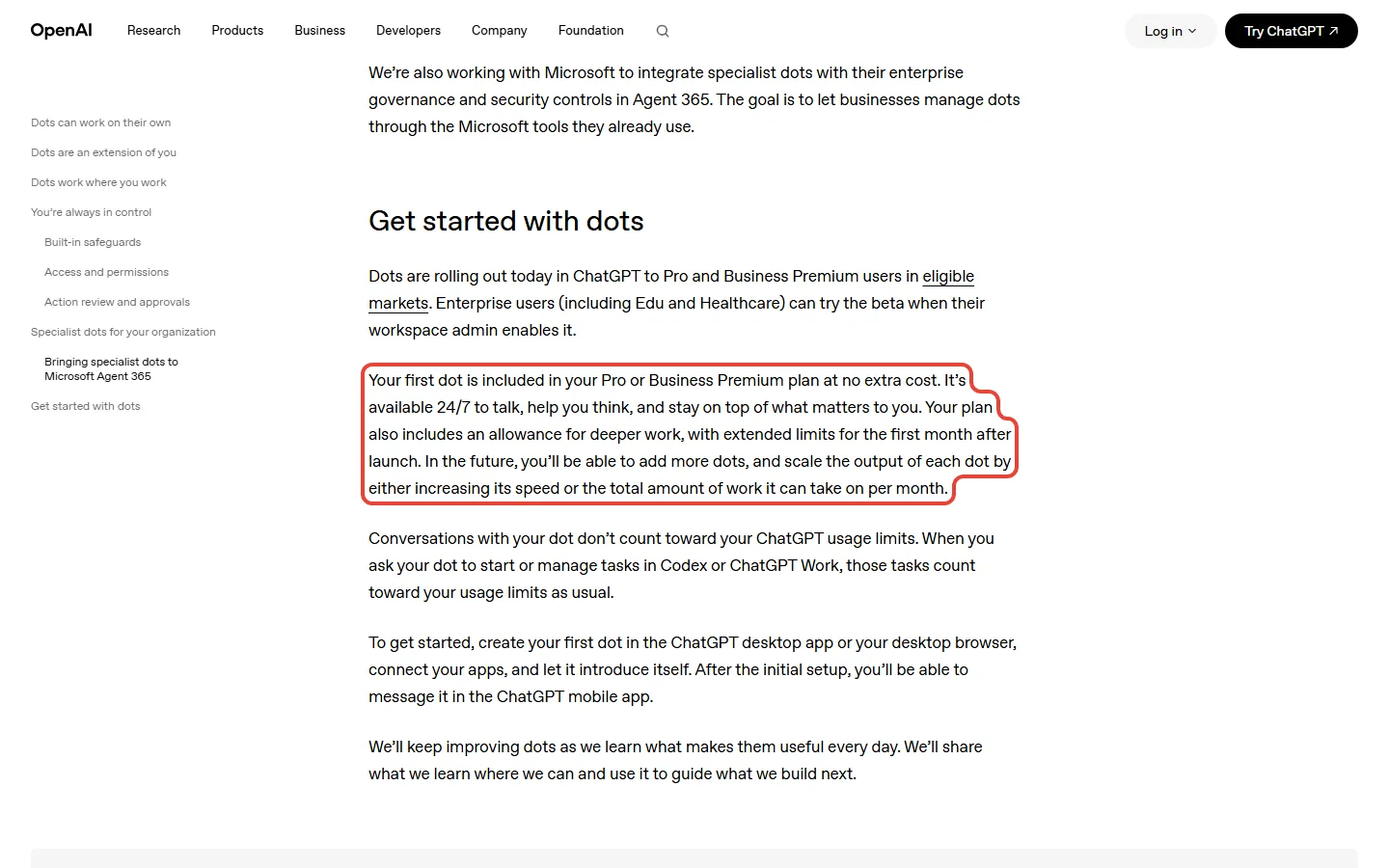
ChatGPT Dots pricing looks like a bargain on OpenAI’s launch page and a $100 decision everywhere else. OpenAI says "your first dot is included in your Pro or Business Premium plan at no extra cost". That is true, and the catch is the door: the cheapest individual ChatGPT plan with a dot is Pro 100 at $100 a month, five times what Plus costs at $20.
This guide answers the question people search for, is ChatGPT Dots worth it?, using OpenAI’s own pages, checked October 7, 2026, and our own maths. The short version: if you already pay for Pro, turn a dot on, because it is free to try. If you are on Plus, do not upgrade to $100 for a dot alone yet: OpenAI has not published the allowance that comes after the first month. No one on our team has a Pro account, so nothing here is a first-hand report, and every feature is described the way OpenAI describes it.

⚡ TL;DR: ChatGPT Dots Pricing in 2026
🤖 What it is: A dot is OpenAI’s always-on agent. OpenAI says it has its own cloud computer and keeps working in the background.
💳 Price: Your first dot costs nothing extra, but it needs Pro (or Business Premium). Pro starts at $100 a month, billed monthly, which is $1,200 a year.
🎯 Best for: People already on Pro outside the EEA, Switzerland and the UK. Everyone else should wait for OpenAI’s post-month-one terms.
💡 Our take: it depends, leaning wait for Plus users. Free if you are on Pro, not a reason to upgrade yet.
⚠️ The catch: conversations with your dot do not count toward your usage limits, but tasks it hands to Codex or ChatGPT Work count against your plan as usual, and OpenAI has not published the allowance after the first month.
📑 Quick Navigation
🔵 What a ChatGPT Dot Is
OpenAI announced dots on September 29, 2026 and describes them on its launch page as "always-on agents" with their own cloud computer. In plain words, an agent is software you hand a job to instead of one you question and then act on yourself. A dot is meant to keep working on your goals in the background, and OpenAI says it can connect to over 4,000 apps through plugins and reach you in ChatGPT, Slack or Teams.
Think of it as a colleague who has their own laptop and a login to your apps. OpenAI says a dot can also do read-only "proactive research" when you are not working with it, using connected apps with tools that cannot send messages, change app content or control your browser. OpenAI says the most sensitive actions, such as changing a password or transferring money, stay with you.
Set-up, according to OpenAI’s Help Center article, happens on the desktop app or desktop web: you cannot currently create a dot on mobile, and dots are not supported on mobile web. After that you can talk to it in the mobile app when mobile access is available.
If you are comparing always-on agents, our Meta Muse vs ChatGPT guide lines Dot up against Meta’s free agent, and our ChatGPT review covers the rest of what each plan includes.
💳 ChatGPT Dots Pricing: The Door Is Pro 100
OpenAI’s pricing page lists "Dot, your always-on agent" on the Pro card, and on no other individual-plan card. The launch page names Pro and Business Premium, and the Help Center adds that dots are rolling out to Pro users outside the European Economic Area, Switzerland and the UK. Plus is not named.
The prices come from OpenAI’s Pro tiers help page: three monthly Pro plans, Pro 100 at $100, Pro 200 at $200 and Pro 500 at $500. OpenAI says Pro is billed monthly and that annual billing is not available.
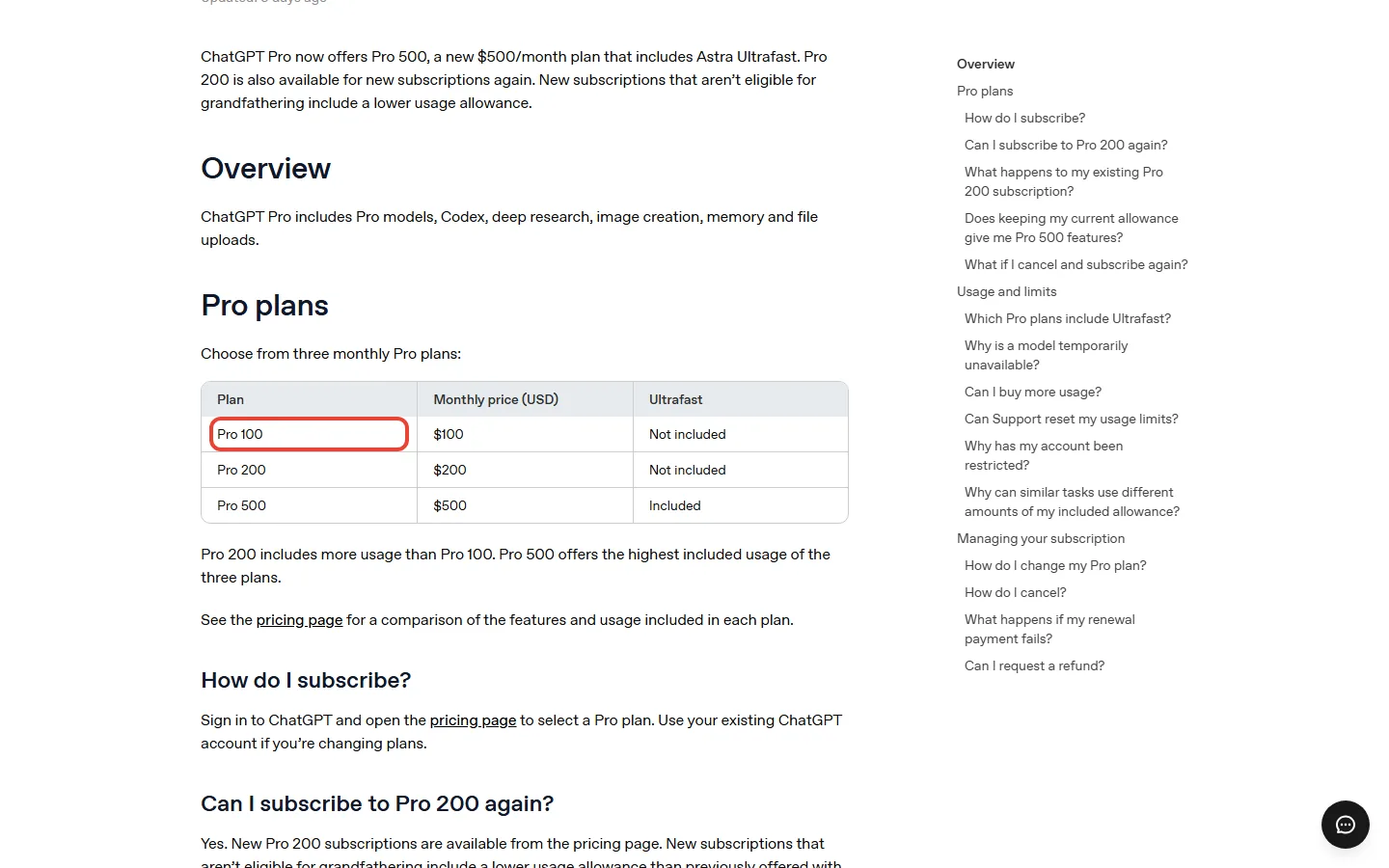
| ChatGPT plan | Monthly price | Includes a dot? | Notes |
|---|---|---|---|
| Free | Free | No | Dots are not on the Free card |
| Go | $8 in the US | No | Not named in the launch post |
| Plus | $20 | No | Not named; OpenAI says it plans to expand dots to more users soon |
| Pro 100 | $100 | Yes | The cheapest individual route to a dot |
| Pro 200 | $200 | Yes | More included usage than Pro 100 |
| Pro 500 | $500 | Yes | The highest included usage |
| Business Premium | Seat price not shown on OpenAI’s Business page | Yes | A Business seat; Premium seats include 5x more usage |
The real-world cost math:
- Plus to Pro 100: $100 against $20 is 5 times the price, or $80 more every month
- Per year at monthly billing: Plus is $240 and Pro 100 is $1,200, so the jump is $960 a year
- Your first dot adds $0 on top of the plan, and OpenAI gives no price for extra dots
💸 What a Year Costs on Each ChatGPT Plan With or Without a Dot (USD, Monthly Billing)
Put plainly, the price of a dot is the price of the plan, and that plan changes your yearly bill by a lot.
💡 Key Takeaway: The price of a dot is the price of the plan, so the question is whether the $80 a month above Plus buys you enough. Pro also lists longer Codex and ChatGPT Work sessions than Plus, which you would be paying for with or without a dot.
🧾 ChatGPT Dots Free? What Is Free and What Still Counts
"Free" is the word most people search next to this launch, so here is exactly what OpenAI says is free and what is not. Three sentences on its launch page do all the work:
- The dot itself. "Your first dot is included in your Pro or Business Premium plan at no extra cost." No add-on fee, but you still need the plan.
- Chatting with it. "Conversations with your dot don’t count toward your ChatGPT usage limits."
- Work it hands off. "When you ask your dot to start or manage tasks in Codex or ChatGPT Work, those tasks count toward your usage limits as usual."
So the free part is the talking. The doing still draws on the same allowance your plan already had. The Help Center explains how a dot reaches that work: with local access switched on, it can create Work or Codex tasks, use local skills and use your local browser when its cloud browser is blocked. Local access starts turned off.
There is also a time limit on one part of the offer. OpenAI says your plan "also includes an allowance for deeper work, with extended limits for the first month after launch." OpenAI gives no number for that allowance and no date for the end of the first month. A month from September 29 lands around the end of October, but that is our reading, not OpenAI’s date.
🔍 REALITY CHECK
The claim: "Your first dot is included in your Pro or Business Premium plan at no extra cost."
The fine print: True as written, because there is no add-on price. But a dot needs Pro, which starts at $100 a month. OpenAI’s page also says that more dots, more speed and more monthly output are coming "in the future", with no price for any of them, and the allowance after month one is unpublished.
✅ Verdict: The dot adds no cost. The plan behind it is not free, and the cost of heavy use after the first month is still unknown.
If you are on Plus, one nearby fact matters: OpenAI’s ChatGPT Work page says Work is available on all plans on desktop and on Plus, Pro, Business, Enterprise and Edu on web and mobile, and that you can schedule one-time or recurring tasks for yourself. Recurring tasks are not unique to a dot, so a dot’s extra value is the always-on cloud computer and the chat, not scheduling alone.
🧮 Is ChatGPT Dots Worth It? The Break-Even Maths
OpenAI publishes no figure for hours saved by a dot, so nobody can honestly tell you what a dot is worth. What we can do is show what has to be true. The table below is our maths, built only from the plan prices above: how many hours of billable work a month must come back for the plan to pay for itself.
| Your hourly rate (example) | Hours to cover Pro 100 ($100) | Hours to cover the $80 extra over Plus |
|---|---|---|
| $25 | 4 hours | 3.2 hours |
| $50 | 2 hours | 1.6 hours |
| $100 | 1 hour | 0.8 hours |
The hourly rates are examples, not claims about any freelancer. Count only hours you would really have billed. Setup, checking a dot’s work and fixing mistakes all come out of the saving, and OpenAI itself says dots "can still make mistakes, so always review consequential work." That last point is our reasoning, said plainly: the more you must review, the longer the break-even.
⏱️ Hours a Month You Need Back to Cover the Plan (Our Maths)
The verdict below leans on one more gap. Pro 100 would also cost you $960 a year more than Plus, and OpenAI says the first month has extended limits and has published nothing for what comes after it. That is a missing piece in a $1,200-a-year decision, and it is why we say wait if you are on Plus.
💼 ChatGPT Dots for Freelancers: What to Check Before You Pay
Freelancers are the group most tempted by a $100 plan, because the break-even looks so small. Three checks come before the maths.
Plus already does some of this
OpenAI’s Work page shows an "Email replies" example: "Find the emails I need to answer. Summarize each one, draft replies, and leave them unsent for review." That is an example prompt on OpenAI’s page, not a result, and Work is available on Plus. The Help Center says you can ask a dot to set a reminder or run a recurring check, for example reviewing your calendar each morning, so walk through the Plus version of a task before you pay for the always-on version.
Client and platform rules
If you sell work on a platform, read its AI rules first. Fiverr’s guidelines say it permits the use of AI across all service categories, that freelancers are fully accountable for the final work, and that a client’s explicit request for non-AI work must be honored. They add that misrepresenting AI use may lead to a cancelled order, a refund and account suspension.
On Upwork, its help page says the Terms of Service contain default non-disclosure terms for you and your client, even without an NDA, and its Terms of Use bar using generative AI or other tools to substantially bolster work product if a client restricts it or it violates a third party’s rights. This is not legal advice, and a client contract can say more than a platform does.
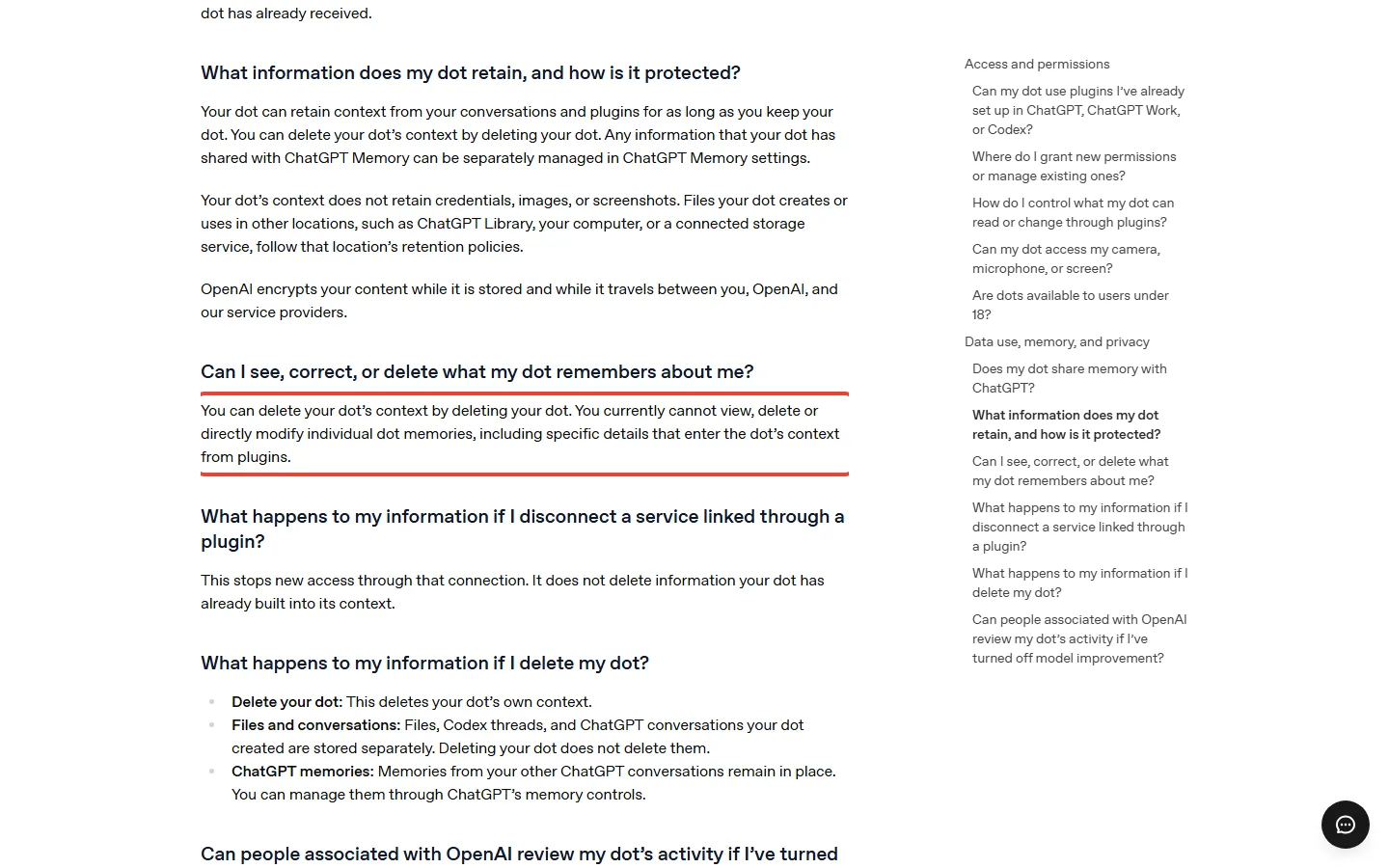
Our advice, not OpenAI’s: if a client’s data sits under a contract, check it before you connect that client’s accounts to a dot. OpenAI’s Help Center says a dot shares memory with ChatGPT, that you currently cannot view, delete or directly modify individual dot memories, and that human review may occur in limited circumstances. Those three facts are the reason for the advice.
One early tester’s report
One agency CEO published a write-up on October 3 after about five hours of using a dot on agency tasks. As reported there, calendar conflicts, a Slack group and analytics data worked, while the dot assumed Gmail when he used another mail service, produced malformed links, and picked up a colleague’s request about fifty minutes late. His advice was to start with read-and-flag work. Treat that as one company’s first-day account, not a benchmark.
A one-week scorecard (our suggestion)
Pick three tasks. Note how long each takes you now. Hand them to a dot and count only the billable hours you got back after setup, checking and fixing. Compare that with $80 a month if you are on Plus, or $100 if you pay for nothing today. This is a method, not a result, and it works best before the first-month limits end, because those are the extended ones.
🔒 What You Hand Over to a Dot
An agent that can act is a bigger privacy decision than a chatbot, and OpenAI’s privacy and safety FAQ is unusually direct about the trade-offs. These are the items that matter for the price decision:
- Memory is shared. A dot can receive memories and recent conversation context from ChatGPT, and your conversations with it can contribute to ChatGPT memory. Turning Memory off stops sharing but does not delete what the dot already received.
- You cannot edit single memories. OpenAI says you currently cannot view, delete or directly modify individual dot memories. Deleting the whole dot deletes its context, but not the files, Codex threads and ChatGPT conversations it created.
- It can buy things, with your approval. A dot can make purchases using a card you have saved on a merchant’s website, and those purchases require your approval, which may be given in advance when it specifically covers the purchase.
- Some actions stay with you. The most sensitive actions, such as changing a password or transferring money, require you to take over. Approving one message does not give a dot ongoing permission to contact people for you.
- Human review is possible. OpenAI says human review may occur in limited circumstances, including safety-related cases, even when model improvement is turned off.
🔍 REALITY CHECK
The claim: OpenAI says dots come with layers of safeguards against malicious instructions.
The fine print: OpenAI lists model safeguards, plugin permissions, Custom Rules, Auto-review and safety monitoring. Its own words are that these protections "help reduce the risk of malicious instructions causing an unwanted action, but they do not eliminate it," and that some actions cannot be undone depending on the app involved.
✅ Verdict: Reasonable safeguards, honestly described. Start a dot on read-and-flag work and keep approvals on for anything that sends or spends.
🌍 Who Can Get a Dot Today
- Pro subscribers outside the EEA, Switzerland and the UK. The Help Center says dots are rolling out to Pro users in those markets, so UK and EU readers on Pro are not on the first list.
- Business Premium seats. Available in all supported ChatGPT regions, according to the Help Center. OpenAI’s Business page says Premium seats include 5x more usage, no five-hour limit and access to dots, and shows no seat price.
- Enterprise workspaces. A beta that is initially turned off by default until a workspace admin enables it.
- Not yet on Free, Go or Plus. OpenAI does not name them, and says it plans to expand dots to more users soon.
- Not for under 18s. The privacy FAQ says dots are not yet available to users under 18.
- Gradual rollout. "Dots are rolling out gradually. Access may take several days to reach your account." A Pro subscriber may not see a dot yet.
- Texting is a limited beta. OpenAI says it is limited to Pro users in the US, uses a third-party provider and is not available in Business or Enterprise workspaces.
🎯 Who Should Pick What
Already on Pro (outside the EEA, Switzerland and the UK)? Turn a dot on. It costs nothing extra, chatting with it does not count against your limits, and the first month has extended limits. Start with read-and-flag tasks and watch how much of your Work and Codex allowance a dot uses.
On Plus ($20)? Do not move to $100 for a dot alone yet. The step up is $960 a year, the deeper-work allowance after month one is not published, and Plus already includes ChatGPT Work. See our Codex review and agent mode review for what the $20 plan already covers.
On Free or Go? A dot is not available to you, and the only individual-plan route today is Pro. Our Meta Muse comparison covers a free agent from another company if you want to try the idea first.
In the UK, EU or Switzerland? Pro does not get dots at launch, according to the Help Center, so wait. Running a small business? Business Premium is the plan OpenAI points to, but get the seat price from OpenAI before you budget.
🔭 What Could Change This
Treat these as signals, not predictions. The biggest is OpenAI’s post-month-one terms: the launch page says the first month has extended limits, so what comes after it is the thing to watch, and it could flip the verdict either way. OpenAI also says it plans to expand dots to more users soon, which could bring Plus into scope, and that more dots and more output are coming "in the future" with no price yet.
Pro prices matter too. OpenAI’s Pro page now lists a Pro 500 plan, and new Pro 200 subscriptions get a lower allowance at the same $200 price, while eligible existing subscribers keep the earlier allowance through October 29, 2026. Check the plan page again before you pay. The update banner at the top shows when we last re-checked.
❓ ChatGPT Dots: FAQs
Q: What is ChatGPT Dots?
A: ChatGPT Dots, also called OpenAI Dots, are always-on agents that OpenAI launched on September 29, 2026. OpenAI says each dot has its own cloud computer, can connect to over 4,000 apps through plugins and can work on your goals in the background.
Q: How much does ChatGPT Dots cost?
A: Your first dot costs nothing extra, but it needs a Pro plan, and the cheapest Pro plan is Pro 100 at $100 a month. Pro is billed monthly, so a year is $1,200, or $960 more than Plus at $20 a month.
Q: Is ChatGPT Dots free?
A: Not on its own. The dot is included in Pro or Business Premium at no extra cost, and chatting with it does not count toward your usage limits, but you still need the plan. Tasks it starts in Codex or ChatGPT Work count toward your limits as usual.
Q: Is ChatGPT Dots worth it?
A: It depends on your plan. If you already pay for Pro in a market where dots are rolling out, yes, because a dot adds no cost. If you are on Plus, wait: the step to $100 is $960 a year and OpenAI has not published the allowance after the first month.
Q: Can I get ChatGPT Dots on Plus?
A: Not at launch. OpenAI names Pro, Business Premium and Enterprise, and says it plans to expand dots to more users soon without naming Plus. Check OpenAI’s plan page for changes.
Q: Do dots count against my ChatGPT usage limits?
A: Conversations with your dot do not, but tasks it starts or manages in Codex or ChatGPT Work do. OpenAI also says your plan includes an allowance for deeper work with extended limits for the first month after launch.
Q: Is ChatGPT Dots available in the UK or EU?
A: Not for Pro at launch. OpenAI’s Help Center says dots are rolling out to Pro users in markets excluding the European Economic Area, Switzerland and the UK. Business Premium users in all supported regions can get them.
Q: Can I set up a dot on my phone?
A: No, not yet. OpenAI says you cannot currently create a dot on mobile and dots are not supported on mobile web. You create it on the desktop app or desktop web, then talk to it in the mobile app when mobile access is available.
Q: Is ChatGPT Dots good for freelancers?
A: It can pay for itself if it returns real billable hours, but the evidence is thin. At $50 an hour you need about 2 hours a month to cover $100, or 1.6 hours to cover the $80 over Plus. Check client contracts and platform rules first.
🏆 Final Verdict: It Depends
Verdict: DEPENDS, leaning wait if you are on Plus. A dot adds no cost if you already pay for Pro in a supported market, so turn it on. If you are on Plus, a dot alone is not a reason to move to $100 a month yet, because the move costs $960 a year more and OpenAI has not said what the deeper-work allowance looks like after the first month. If you are on Free or Go, a dot is not available to you today, and neither is one on Pro in the UK, the EU or Switzerland.
The honest summary: OpenAI’s page tells you what is free, the Help Center tells you what you hand over, and neither tells you what heavy use costs after month one. Check OpenAI’s plan page again when those terms land, because they can change this verdict in either direction.
✅ Where Dots Win
- ✓ Your first dot adds no price to Pro
- ✓ Chatting with it does not count toward limits
- ✓ Own cloud computer and over 4,000 connectable apps, per OpenAI
- ✓ Sensitive actions stay with you
⚠️ Where Dots Fall Short
- ✓ Needs a $100 plan, $80 more than Plus
- ✓ Work it hands off still counts against your plan
- ✓ No published allowance after month one
- ✓ Individual memories currently cannot be edited, and Pro dots are not yet in the UK or EU
Turn it on if you already pay for Pro and live outside the EEA, Switzerland and the UK. Wait if you are on Plus. Related: our Google AI Pro free guide and Perplexity review compare other plans in the same price range.

Founder of AI Tool Analysis. Reads every pricing page, help article and footnote so you don’t have to. Covering AI tools since 2025. See how we research →
Related Reading
- ChatGPT Review 2026
- ChatGPT Codex Review
- ChatGPT Agent Mode Review
- Meta Muse vs ChatGPT
- Gemini Spark Review: Google’s 24/7 AI Agent
- Claude Cowork Review
- Google AI Pro Free: Every Legit Offer
- Perplexity AI Review
Stay Updated on AI Tool Pricing
Don’t overpay for AI tools. Get weekly pricing updates, new tier alerts, and honest reviews delivered to your inbox. No hype, no spam.
- ✅ Price-change alerts for every major AI tool
- ✅ New tier announcements as they happen
- ✅ Honest comparisons that cut through marketing
- ✅ Safety updates on the tools you rely on
Free, unsubscribe anytime.

Last Updated: October 7, 2026 | Facts checked: October 6-7, 2026 (plans, prices and terms against OpenAI’s own pages) | Next Review Update: October 13, 2026, when the rollout, Pro prices and any published Dots terms are re-checked.
Have a tool you want us to cover? Suggest it here | Questions? Contact us