If you already pay $20 a month for ChatGPT Plus, should you use Codex or pay for Claude Code as well? This ChatGPT Codex review says: use Codex first. It is already in your plan, and OpenAI pitches Plus for a few focused coding sessions a week. Consider Claude Code if you code most of the day and want the setup that leads the agent board as of October 17, 2026.
OpenAI Codex is OpenAI’s coding agent: a program that reads your code, runs commands and makes changes for you, in steps, until a task is done. On the Terminal-Bench 4.0 agent board, read on October 17, 2026, Codex with GPT-6 Astra or GPT-6.1 Sol scores 58.2%, tied for third behind Claude Code with Opus 5.5 at 64.8%. Everything below comes from OpenAI’s help, pricing and launch pages and two public leaderboards. Nobody at AI Tool Analysis ran Codex for this review.

TL;DR: ChatGPT Codex in October 2026
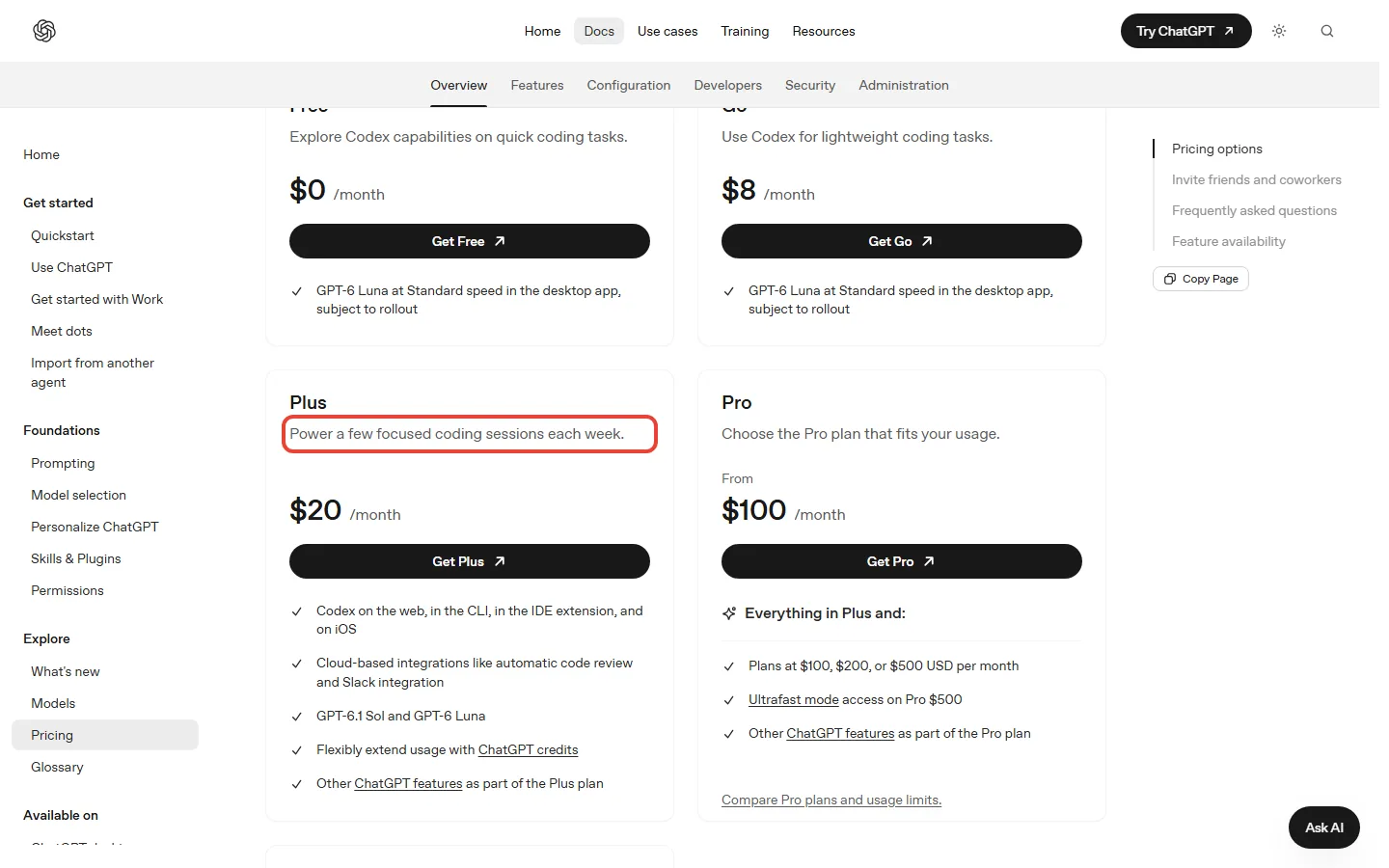
💰 Price: no separate subscription on OpenAI’s pricing page. Codex is included on every ChatGPT plan: Free ($0), Go ($8), Plus ($20) and Pro ($100, $200 or $500 a month).
📏 How much you get: on Plus, OpenAI estimates 15 to 160 local GPT-6.1 Sol messages per five hours. Pro plans currently have no five-hour limit, though an included allowance applies.
🏁 How good it is: tied third on the Terminal-Bench 4.0 agent board at 58.2%. Claude Code with Opus 5.5 leads at 64.8%.
💡 Our take: for a Plus subscriber, Codex on GPT-6.1 Sol is the obvious first try. Heavy daily coders should compare it with Claude Code before paying for Pro.
⚠️ The catch: the limits are estimates, not promises, and GPT-6 Astra uses your allowance much faster than GPT-6.1 Sol.
Quick Navigation
Is ChatGPT Codex Worth It in October 2026?
Yes, if you already pay for ChatGPT Plus. Codex costs you nothing extra there, and it runs GPT-6.1 Sol, the model OpenAI says nearly matches its flagship GPT-6 Astra on coding at a fifth of the token price (tokens are the small chunks of words a model reads and writes). On the public agent leaderboard, Codex with GPT-6.1 Sol scores the same 58.2% as Codex with Astra.
It is not the strongest coding agent right now. Claude Code with Opus 5.5 sits 6.6 points higher on the same board. Claude Code is included from the $20 Claude Pro plan, so trying both costs $40 a month. For all-day use Anthropic pitches Max, from $100 a month, so heavy coders face a $100 step on either side.
One gap in Anthropic’s pricing table: it marks Opus as available on paid plans but does not name the version, so check that your plan offers Opus 5.5, the model behind the 64.8% score. For a Plus subscriber who codes a few evenings a week, Codex is enough.
What Is OpenAI Codex, and Where Can You Use It?
Codex is an agent: you describe a task, such as adding a bookmark button and its database table, and it reads the files, writes the changes and runs the commands on its own, step by step. You can reach it in four places:
- The ChatGPT desktop app, in Codex mode. The easiest start if you don’t live in a terminal.
- The Codex CLI. A program for your terminal that runs locally on your computer. It is open source under the Apache-2.0 license, and its GitHub page showed about 129,600 stars on October 17, 2026.
- The IDE extension. It works in VS Code and most editors built on it.
- Codex web and Codex Cloud. Cloud tasks run on OpenAI’s computers and keep going while your laptop is asleep. Cloud is for eligible Plus, all Pro tiers and business plans, not Free or Go.
One correction to earlier editions of this review: the CLI does not run free without an account. You run codex and sign in with your ChatGPT account, or you set it up with an API key and pay API rates. OpenAI lists the CLI from Plus up; on Free and Go, Codex runs in the desktop app.

Which ChatGPT Plans Include Codex, and What Do They Cost?
All of them. Codex is included on every ChatGPT plan, including Free and Go, and the usage limits change with the plan. OpenAI’s pricing page lists no Codex subscription of its own, and Codex shares its allowance with ChatGPT Work.
| Plan | Price a month | Codex models | OpenAI’s estimate per five hours | Codex Cloud |
|---|---|---|---|---|
| Free | $0 | GPT-6 Luna, desktop app | None on OpenAI’s pages | No |
| Go | $8 | GPT-6 Luna, desktop app | None on OpenAI’s pages | No |
| Plus | $20 | GPT-6.1 Sol, GPT-6 Astra, GPT-6 Luna | Sol 15 to 160, Astra 5 to 45, Luna 350 to 3,000 local messages | Yes, eligible accounts |
| Pro 100, 200, 500 | $100, $200, $500 | Everything in Plus | No five-hour limit; an included allowance still applies | Yes |
| Business | $25 a seat monthly, $20 a seat on the annual plan | As Plus | Same estimates as Plus on a Standard seat | Yes |
Pro is billed monthly only. Pro 200 includes more usage than Pro 100, and Pro 500 has the most, but OpenAI’s help pages give no exact multiple of Plus for any of them. Pro 500 is also the only Pro plan with Ultrafast, a faster mode that uses your allowance at 8 times the Standard rate. On Business, a Premium seat ($125 a month, or $100 on the annual plan) gives 5 times the usage of a Standard seat and no five-hour limit.
⚡ Reality Check: an allowance is not a message count
OpenAI says your Codex allowance does not match a fixed number of messages or tasks, and that its per-plan ranges are estimates. A weekly limit may apply on top of the five-hour window, and the pages we read on October 17 give no number for it.
What to do: check Settings, then Usage, after your first few sessions, or type /status inside the CLI, before you decide to upgrade.
How Far Does Each Plan Go? Four Worked Examples
These examples use the limits OpenAI publishes. (Earlier editions had a Real Test Results section here describing coding tasks nobody at AI Tool Analysis ran; it has been removed.)
Say you code a few evenings a week on Plus
Say you work on a side project three evenings a week and send Codex about 40 messages each evening on GPT-6.1 Sol. That is 120 messages a week (3 x 40). For Plus, OpenAI estimates 15 to 160 local GPT-6.1 Sol messages per five-hour window. So a 40-message evening fits when the tasks are small, and runs out early when each request reads a lot of code.
This is the use OpenAI pitches Plus for: “a few focused coding sessions each week”. If an evening runs dry, Plus lets you buy credits instead of upgrading.
Say you switch to GPT-6 Astra for a hard bug
For a stubborn bug, OpenAI points to GPT-6 Astra, its most capable model, and names investigating a difficult bug as a typical job. Astra drains a Plus allowance much faster: the five-hour estimate drops to 5 to 45 messages, against 15 to 160 on GPT-6.1 Sol.
Credits, which you pay with once an allowance runs out, show the gap as a ratio (what a credit costs depends on your plan). Say one debugging session reads 2 million tokens and writes 200,000, none of them cached. At Standard speed GPT-6.1 Sol charges 50 credits per million input tokens and 250 per million output, so that session costs 150 credits (2 x 50 + 0.2 x 250). GPT-6 Astra charges 250 and 1,250, so the same session costs 750 credits (2 x 250 + 0.2 x 1250), five times as much.
Our rule: start on Sol, and switch to Astra when Sol has missed the same bug twice. OpenAI’s usage guide also says Astra at Low effort can outperform Sol at High effort, without naming the Sol version, so try Astra on Low before raising the effort.
Say you run Codex most of the working day
All-day use is what the five-hour window on Plus gets in the way of. Pro 100, Pro 200 and Pro 500 cost $100, $200 and $500 a month and have no five-hour limit, though each still has an included allowance. Over a year that is $1,200, $2,400 or $6,000 (100 x 12, 200 x 12, 500 x 12).
Ultrafast on Pro 500 buys speed, not more work, because it spends your allowance 8 times faster. If you had Pro 200 at any point from September 22 to 10 a.m. Pacific on September 29, 2026, you keep the previous allowance through October 29, 2026, as long as the subscription stays active, then move to the lower allowance at the same $200. Before your next renewal, open Settings, then Usage, and check whether your weeks would fit Pro 100.
Our upgrade rule for Plus: if you hit the five-hour window more than twice a week, buy credits first. If you are buying credits most weeks, Pro 100 is the next step, and it removes the five-hour window.
Say you want Codex without paying $20
Free and Go both include Codex. Free costs $0 and Go $8 a month, and on both Codex runs GPT-6 Luna at Standard speed in the desktop app, subject to rollout. Codex Cloud is not included on either.
The Codex pricing and help pages we read give no message estimate for Free or Go. For scale, Plus gets an estimated 350 to 3,000 GPT-6 Luna messages per five hours. Free is enough to see whether you like working with an agent on small scripts; for regular project work, Plus is the first plan with GPT-6.1 Sol. The other route is an API key: Codex then bills at API rates, GPT-6.1 Sol at $2 per million input tokens and $10 per million output, without the cloud features.
How Good Is ChatGPT Codex? What the Leaderboards Say
Good, but not first. Two public Terminal-Bench 4.0 boards tell the same story in October 2026: Anthropic’s models are ahead, and OpenAI’s are close behind.
Terminal-Bench 4.0: Codex is tied for third
The agent board on tbench.ai scores each tool with its own agent software, which is how you would use it. Read on October 17, 2026, it puts Claude Code with Opus 5.5 first at 64.8% and Claude Code with Sonnet 5.5 second at 61.8%. Codex with GPT-6 Astra and Codex with GPT-6.1 Sol share third place at 58.2%.
📊 Terminal-Bench 4.0 agent board, top five (tbench.ai, read October 17, 2026)
The model board from Vals AI runs every model through the same simple agent instead, so it compares the models rather than the tools. As of October 16, 2026, it ranks Claude Opus 5.5 first at 65.15%, Claude Sonnet 5.5 second at 64.14% and GPT-6 Astra third at 59.60%. Both boards put Anthropic’s models at the top. One difference: on the Vals board GPT-6.1 Sol is seventh at 55.05%, 4.55 points behind Astra, while on the agent board Codex scores the same with either.

Is the 6.6-point gap worth paying for?
The gap between second and third on the agent board is 3.6 points (61.8 – 58.2), and tbench.ai shows a margin of roughly 3 points on each score, so treat the two as close. The cost column matters more for most readers: tbench.ai lists $3.3k for the Astra benchmark run and $0.6k for the GPT-6.1 Sol run, the same score, with the Astra run costing about 5.5 times as much (3.3 / 0.6). Neither board measures your codebase, your language or how much reviewing the output takes.
Codex or Claude Code If You Already Pay for ChatGPT?
Keep Codex unless you code most of the day. Claude Code leads the agent board and Anthropic’s models lead the model board, but Claude Code needs a separate Claude plan: Pro costs $20 billed monthly or $17 a month on the annual plan ($200 up front), and Claude Code is included in every paid Claude plan. Paying for both doubles your bill for a 6.6-point gain on one leaderboard.
| Question | ChatGPT Codex | Claude Code |
|---|---|---|
| Cheapest plan that includes it | Free ($0), with GPT-6 Luna | Claude Pro, $20 a month ($17 on the annual plan) |
| How limits work | Five-hour window on Plus, plus a possible weekly limit; no five-hour limit on Pro for now | Five-hour session window plus weekly limits; one pool shared with chat |
| Heavy-use plan | Pro, $100, $200 or $500 a month | Max, from $100 a month |
| Terminal-Bench 4.0 agent board | 58.2%, tied third | 64.8% with Opus 5.5, first |
| API price per million tokens, input / output | GPT-6.1 Sol $2 / $10; GPT-6 Astra $10 / $50 | Opus 5.5 $4 / $20 |
| Open-source command-line tool | Yes, Apache-2.0 | Not covered here |
If you build your own tools on the API, the sums flip in OpenAI’s favour: Opus 5.5 costs twice what GPT-6.1 Sol does per token, in and out. GPT-6 Astra is the expensive one, at $10 in and $50 out. For a deeper look at Anthropic’s side, read our Claude Code review and Claude Code vs Cursor; for Google’s terminal agent, see Claude Code vs Gemini CLI.
💡 Key Takeaway: on Plus, pick the model before you pick the tool. GPT-6.1 Sol scores the same 58.2% as Astra on the agent board and leaves far more of your allowance.
Who Should Use Codex, and Who Should Skip It
Use Codex if
- You already pay for ChatGPT Plus: Codex is part of it, with GPT-6.1 Sol and GPT-6 Astra.
- You want to try a coding agent without paying: Codex is included on the Free plan, running GPT-6 Luna in the desktop app.
- You want a command-line tool you can read and audit: the CLI is open source under Apache-2.0.
- You pay per token: GPT-6.1 Sol costs half of Opus 5.5 on the API.
Pick Claude Code instead if
- You already pay for Claude Pro or Max: Claude Code is included in every paid Claude plan.
- You want the tool that leads the Terminal-Bench 4.0 agent board as of October 17, 2026.

Skip coding agents for now if
- You mostly want suggestions while you type; an autocomplete tool such as GitHub Copilot or Cursor fits that better.
- You are learning to code: an agent that writes code you can’t read yet teaches you little.
How to Start Using Codex in Ten Minutes
Install the CLI and sign in
- Install it with npm (
npm install -g @openai/codex) or Homebrew (brew install --cask codex). - Open your project folder in a terminal, run
codexand choose Sign in with ChatGPT (Plus or above), or set up an API key. - Type
/statusat any time to see how much of your limit is left.
Prefer not to use a terminal? Open the ChatGPT desktop app and switch to Codex mode instead.
Give it a clear first task
Run /init first: it writes an AGENTS.md file, a short note that tells Codex how your project is laid out. Then be specific. A request to add a bookmark button to the article page, store bookmarks in a new table, add no new libraries and run the existing checks at the end gets better work than a two-word request. OpenAI’s pricing FAQ also suggests keeping prompts and source material tight to make your allowance last longer.
ChatGPT Codex FAQ: Free Version, Best Model, Claude Code
Is there a free version of ChatGPT Codex?
Yes. Codex is included on the $0 Free plan, where it runs GPT-6 Luna at Standard speed in the desktop app. Codex Cloud is not included on Free or Go. The CLI is free to install; OpenAI lists CLI use from Plus up, or you can use an API key and pay API rates.
Is ChatGPT Codex better than Claude Code?
Not on the boards as of October 17, 2026. On the Terminal-Bench 4.0 agent board, read October 17, 2026, Claude Code with Opus 5.5 scores 64.8% and Codex 58.2%. Codex is the better deal if you already pay for ChatGPT, because it is included in your plan.
What is the best Codex model now that GPT-5.5 is gone?
GPT-6.1 Sol for most work. GPT-5.5 left Codex for ChatGPT sign-ins on October 14, 2026; API-key sessions are not affected. Sol scores the same 58.2% as GPT-6 Astra on the agent board and uses far less of a Plus allowance, so save Astra for the hardest bugs.
What’s the difference between Codex and the Codex CLI?
Codex is the agent; the CLI is one place to use it. The same Codex runs in the ChatGPT desktop app, the CLI, the IDE extension and on the web. The CLI is the open-source terminal version, licensed Apache-2.0.
Does OpenAI train on the code I give Codex?
On Plus and Pro it may, unless you turn training off in ChatGPT’s data controls. On Business, Enterprise and the API, OpenAI does not use your inputs or outputs to train its models by default.
ChatGPT Codex Review: Our Verdict
Try Codex first if you pay for ChatGPT. It comes with the plan, GPT-6.1 Sol matches Astra on the agent board, and the CLI is open source. It loses points for trailing Claude Code on the agent board and Anthropic’s models on the model board and for limits that OpenAI only gives as estimates. Our rating is 4 out of 5.
✅ Where Codex Wins
- ✓ Included in every ChatGPT plan, Free to Pro
- ✓ GPT-6.1 Sol: same agent-board score as Astra
- ✓ Open-source CLI under Apache-2.0
- ✓ Half the API price of Opus 5.5 with GPT-6.1 Sol
⚠️ Where Codex Falls Short
- ✗ Tied third on the Terminal-Bench 4.0 agent board
- ✗ Limits are estimates; OpenAI’s pages give no weekly number
- ✗ Free and Go get only GPT-6 Luna and no Codex Cloud
- ✗ Pro is monthly only, from $100
Sources and how we checked: plan facts come from OpenAI’s Codex pricing page and its Codex plan help article; leaderboard scores from tbench.ai and Vals AI; Claude prices from Anthropic’s pricing page. This review is research-based: nobody at AI Tool Analysis ran coding tasks for it. For the rest of OpenAI’s plans, see our ChatGPT review and ChatGPT Pro and dots pricing guide.

Founder of AI Tool Analysis. Reads every pricing page, help article and footnote so you don’t have to. Covering AI tools since 2025. See how we research →
Related Reading
- ChatGPT Review: every ChatGPT plan and model
- Claude Code Review: Anthropic’s coding agent
- Claude Code vs Cursor: terminal agent or AI editor
- Claude Code vs Gemini CLI: two terminal agents compared
- Cursor Review: an editor with agents built in
- GitHub Copilot Pro: suggestions while you type
- Best AI Developer Tools: the wider field
Stay Updated on AI Coding Tools
Coding agents change plans and prices often. Get weekly pricing updates, new tier alerts and plain-English reviews in your inbox.
- ✅ Sourced reviews: every price and limit checked against the vendor’s own pages
- ✅ Price-change alerts: know when a plan or limit moves
- ✅ Worked examples: plan limits turned into what you can actually do, with the maths shown
Free, unsubscribe anytime.

Last Updated: October 17, 2026 | Facts checked: October 17, 2026, against OpenAI’s Codex pricing and help pages, the GPT-6.1 Sol launch page, Anthropic’s pricing pages, tbench.ai and Vals AI | Next Review Update: October 30, 2026, when the Pro 200 allowance change takes effect.
Have a tool you want us to cover? Suggest it here | Questions? Contact us