Claude video editing runs on words, not on your footage. No Anthropic help page says the Claude chat can watch or hear a video file, and its upload list covers documents and images with no video or audio format. The two creators we quote below work from a transcript with timestamps instead.
We’d start on Free. A script, a cut list and a captions file are all text, and the Free chat makes files like these for $0. Pay $20 a month for Pro only when you want Claude Code, the Claude tool that works in a folder on your own computer, to run free editing tools for you.
Where each video job lands, and what it costs
Script, cut list, captions file: the Free chat, $0 a video. You hand it a transcript; its limits reset every 5 hours and every week.
Cuts made on your own files, the creators’ way: Claude Code on Pro writes the commands, and free tools such as FFmpeg carry them out. At four videos a month that’s $20 / 4 = $5 a video, or $4.17 if you pay for the year up front.
Check first: Anthropic gives two per-file limits on two pages, 30MB and 500MB. Plan on 30MB for anything that goes through file creation.
Quick Navigation
Can Claude watch your video? What it works from instead
Not on anything Anthropic publishes, and that changes what you prepare before you open Claude: a file of words, not the clip.
Picture an editor helping you over the phone who never sees the footage. You read out what’s said and when, they tell you where to cut, and you make the cuts. That is the part of an edit Claude can do from a transcript.
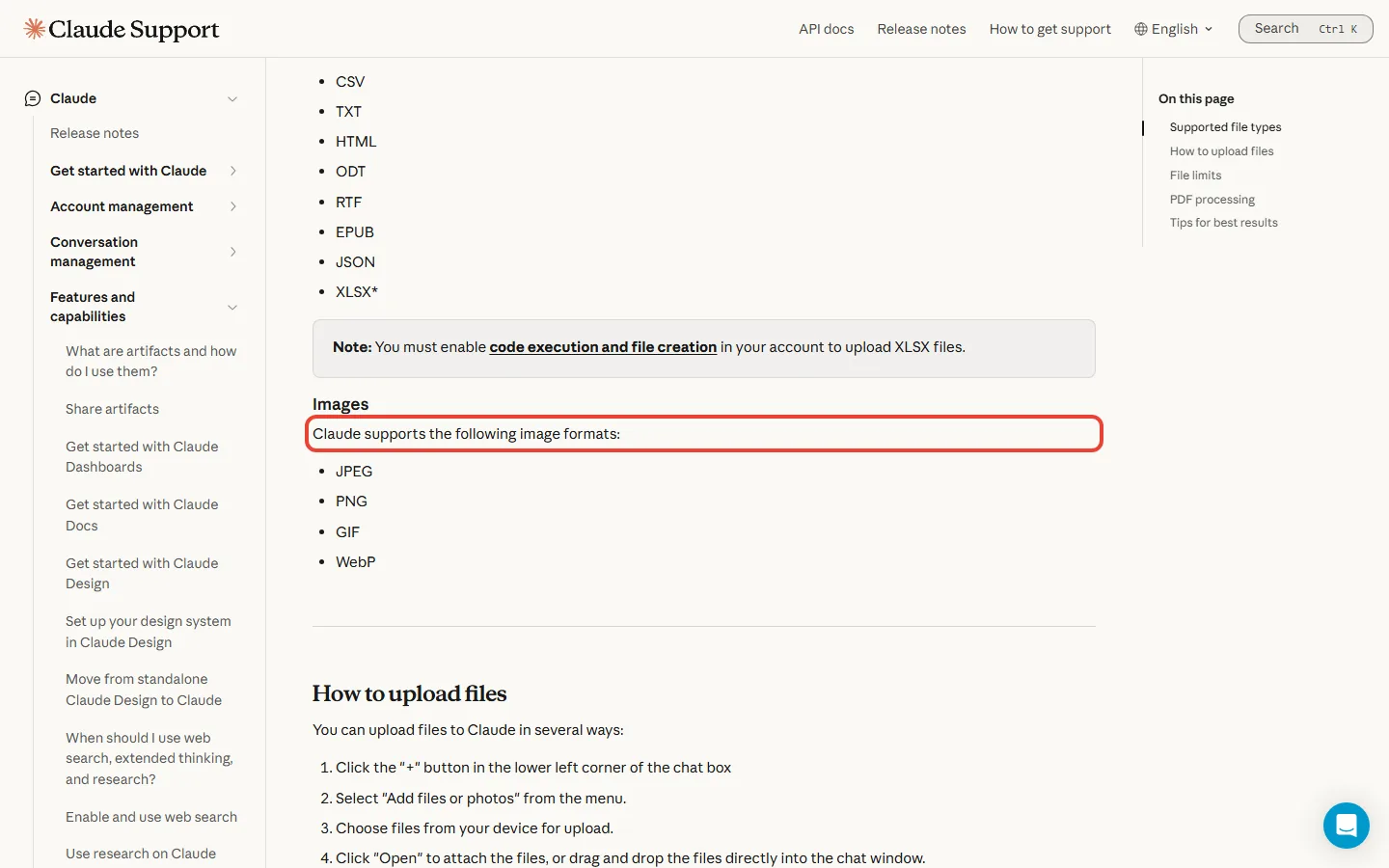
The upload list for Claude chats covers documents such as PDF, DOCX, CSV and TXT, plus JPEG, PNG, GIF and WebP images. It has no video or audio format. Anthropic doesn’t say what happens if you attach a video anyway, so treat your clip as something Claude won’t see.
Two creators who make videos with Claude describe the same gap. Christian Peverelli, who uses Claude Code, says “Claude can’t actually hear my videos”, so a transcriber writes timestamps that Claude reads. Futurepedia, working in a Claude chat, says that if you send the video itself, Claude “can’t watch it” and pieces it together from screenshots.
A screenshot here means a single frame, one still picture out of the many that make up each second of video. So the real input is your transcript: the cleaner it is, the better Claude’s suggestions for what to cut.
Claude does have an animation feature of its own. Motion builds a short animation as code that moves text, charts, shapes and images, with no video generation model, so no realistic footage. None of the four individual plans, Free to Ultra, includes Motion, and its MP4 export, the step that saves it as a normal video file, is listed for Team and Enterprise. Our Claude Motion guide covers it; it’s a different job from cutting your clips.
Claude video editing on Free: the three files you can get for $0
If your edits start from what you said on camera, the Free plan covers most of the thinking.
Free costs $0 and includes creating files, running code and artifacts, the panel beside the chat where Claude builds a document or a small app. Anthropic’s own examples of file creation are a spreadsheet “to track monthly expenses” and “Convert this document into a PowerPoint presentation”. Claude makes the file, and you download it from the chat.
Swap the spreadsheet for your video’s paperwork, and the same pattern gives you three useful files on Free:
- A tighter script. Paste your draft and ask for a version that runs a set length, or a list of lines to drop.
- A cut list. Paste a transcript with timestamps and ask which stretches to keep, as start and end times you can follow on your editor’s timeline, the strip where your clips sit in order.
- A captions file. Ask for an SRT, a plain text file that lists each caption with the moment it appears and disappears. It comes out at the timing your transcript already has.
No transcript yet? If the video is already on your YouTube channel and has captions, YouTube Studio lets you download its caption file, timestamps included, and you can fix the wording in Notepad or TextEdit. Futurepedia points to free online and local transcription tools too.
The sandbox, the walled-off computer Claude uses inside the chat, is pitched for “fun tasks like gif-creation”. A GIF isn’t an edit of your footage, though, and nothing Anthropic publishes says the sandbox can trim a video, so don’t plan on it for cutting your clip.
Say you make two short videos a month and do all of this in the Free chat. Your cost is $0, and what you spend instead is allowance: Free is limited every 5 hours and every week.
Think of that as two clocks running at once: either one can stop you mid-task. If this covers your edits, Free is enough, and you can skip the rest of the plan ladder.
What $20 buys: Claude Code at your own desk
So what does the money change? The work moves from Claude’s side to your computer.
The Claude chat is a shop counter: you hand over text and take files away. Claude Code is Claude at your own desk. It reads and edits files and runs commands, and you can use it in a terminal, the text window where you type commands, or in the desktop app. The desktop app gives you Claude Code with ordinary windows and buttons, pointed at a folder on your computer, so you can work with it without opening a terminal yourself.
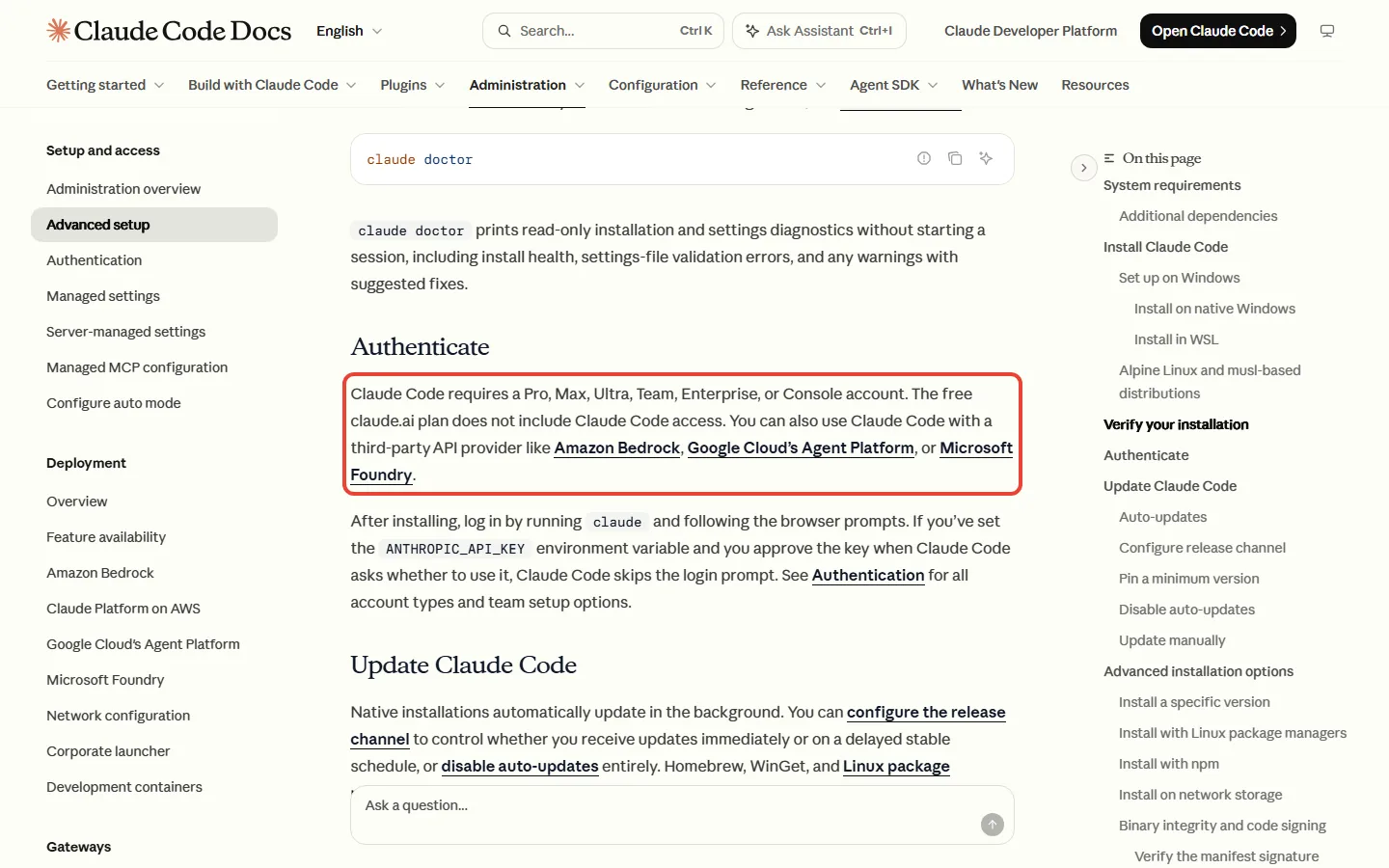
The pricing table includes Claude Code on Pro, Max and Ultra, and not on Free. If you open the Code tab on Free and get an upgrade prompt, that’s why: you need a paid plan first.
Pro costs $20 a month, or $17 a month if you pay $200 for the year up front. If you’re wondering whether there’s any free way into Claude Code, our Claude Code cost guide covers it.
At its simplest, the creators’ route has three parts, and Claude is only one of them:
- A transcriber turns your speech into text with timestamps. Whisper is a free speech-to-text model under the MIT licence, which lets you use it free of charge. faster-whisper is a rebuilt version of it that you install with pip, Python’s package installer.
- Claude reads that transcript, with the timestamps and exactly what’s said, and picks the takes to keep: the same thinking job you can do on Free.
- FFmpeg does the file work. It calls itself a complete solution “to record, convert and stream audio and video”, and in Peverelli’s setup Claude runs it to cut the footage.
Think of FFmpeg as a very literal assistant in a back room. It doesn’t decide what’s worth keeping; it carries out typed instructions to the letter, and in this route Claude writes the instructions for you. It’s a comparison, not how FFmpeg works inside.
Here’s what a session looks like in Peverelli’s demo. He adds a raw clip and types “Please use my YouTube editing skill to edit this hook for my YouTube video.” Claude Code then checks the clip, copies it, transcribes it with Parakeet, another speech-to-text tool, and cuts it up. He says that takes “anywhere from 10 to maybe 20 minutes”. After that he gives notes by timestamp, as you would to a human editor.
That run leans on his own setup: his YouTube editing skill, a saved set of instructions for Claude Code, and seven tools or jobs in all, one of them a sound library he pays for. It also runs on the $200 plan Anthropic now calls Ultra. His advice to viewers is still “I would upgrade to the $20 plan”. Treat the demo as a picture of where the route can go, not a promise of what $20 gets you on day one.
FFmpeg, Whisper and faster-whisper list no price for their standard downloads: all three are free, open-source software. Whisper also needs FFmpeg installed, so you set that up first either way.
Installing them can still take typed commands. faster-whisper installs with pip install faster-whisper, and on Windows FFmpeg can come from winget install ffmpeg. You don’t have to type these yourself: ask Claude Code to run them, and in Manual mode it asks before running commands. Peverelli says Claude Code “should be able to download and install everything that it needs”, though no Anthropic page names these tools.
All of this runs on the computer where your footage lives, so check that machine first. Claude Code needs macOS 13 or later, Windows 10 1809 or later, or Linux such as Ubuntu 20.04 or later, plus 4 GB of RAM and an internet connection. Those are Claude Code’s minimums, not a guide to what editing your footage needs.
What one video costs on each route
Anthropic publishes no video, minute or message count for any plan. So the fairest cost per video we can give you is the plan price divided by your output.
| Your month | Route | Plan price | Cost per video |
|---|---|---|---|
| 2 videos | Free chat, text jobs | $0 | $0 |
| 4 videos | Claude Code on Pro, billed monthly | $20 a month | $20 / 4 = $5 |
| 4 videos | Claude Code on Pro, billed yearly | $200 a year | $200 / 48 videos a year = $4.17 |
| 12 videos | Claude Code on Pro, billed monthly | $20 a month | $20 / 12 = $1.67, if Pro’s limits stretch that far |
| 12 videos | Claude Code on Max | $100 a month | $100 / 12 = $8.33 |
So if you edit about once a week, Pro costs you roughly $5 a video. Max makes sense only once Pro’s limits keep stopping you, and a year of it is $1,200 against $240 for Pro billed monthly. We’d start Pro monthly and move to yearly once the habit sticks, which saves you $40 a year. Our Claude plans guide compares every tier.
If you watched our video: what changed
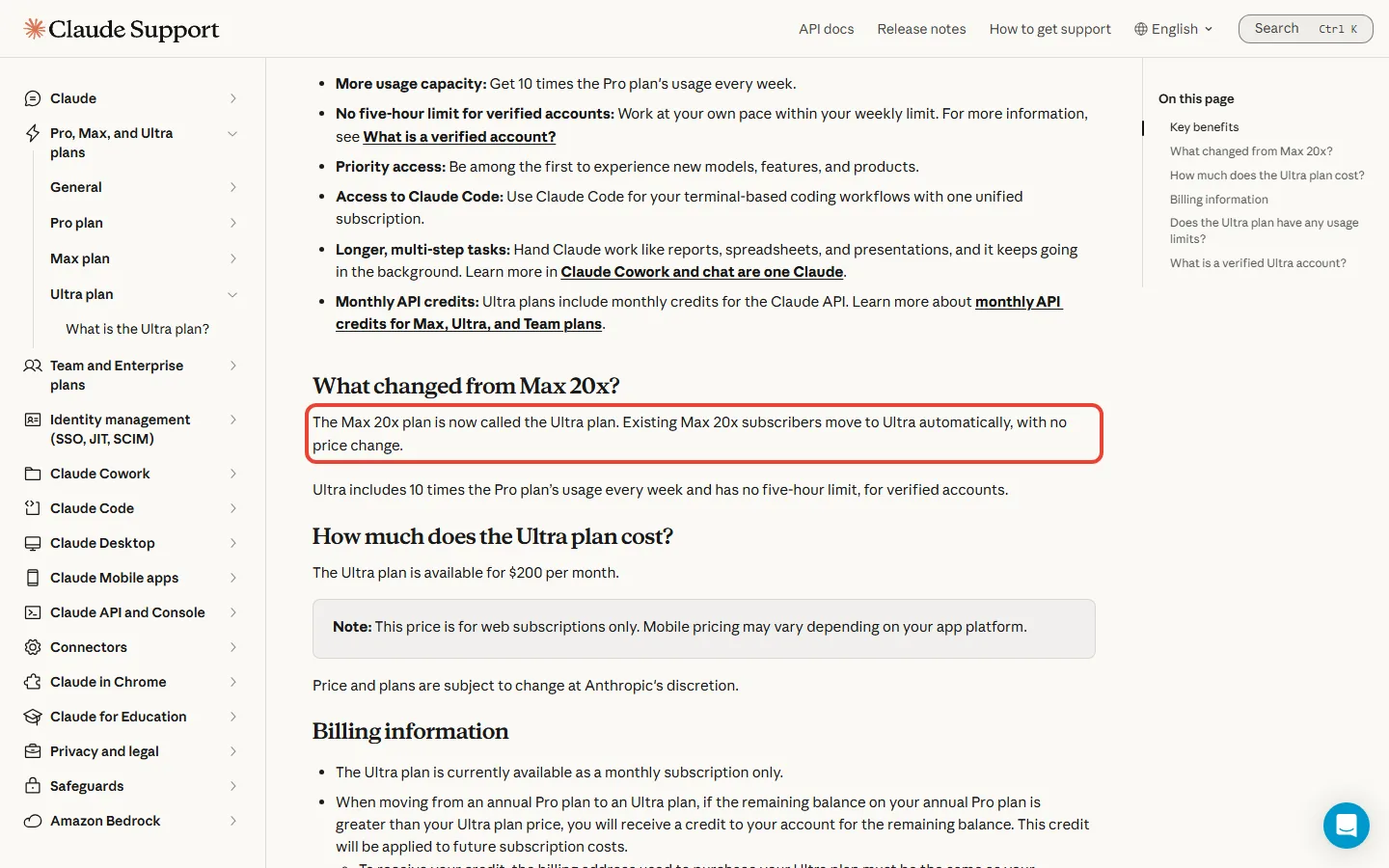
When our video was researched, Max was sold “From $100”, with a choice of 5x or 20x Pro usage. Now Max is one plan at $100 with 5x Pro usage, and the old $200 Max 20x is called Ultra. If you were on Max 20x, you moved to Ultra automatically, with no price change.
The Free card also gained a limit line it didn’t have then: every 5 hours and every week. If you’re on Free, that weekly line is the new thing to watch.
How big a file can you hand over? Two pages, two answers
Video files are big, so the file limit decides whether a clip gets in the door at all.
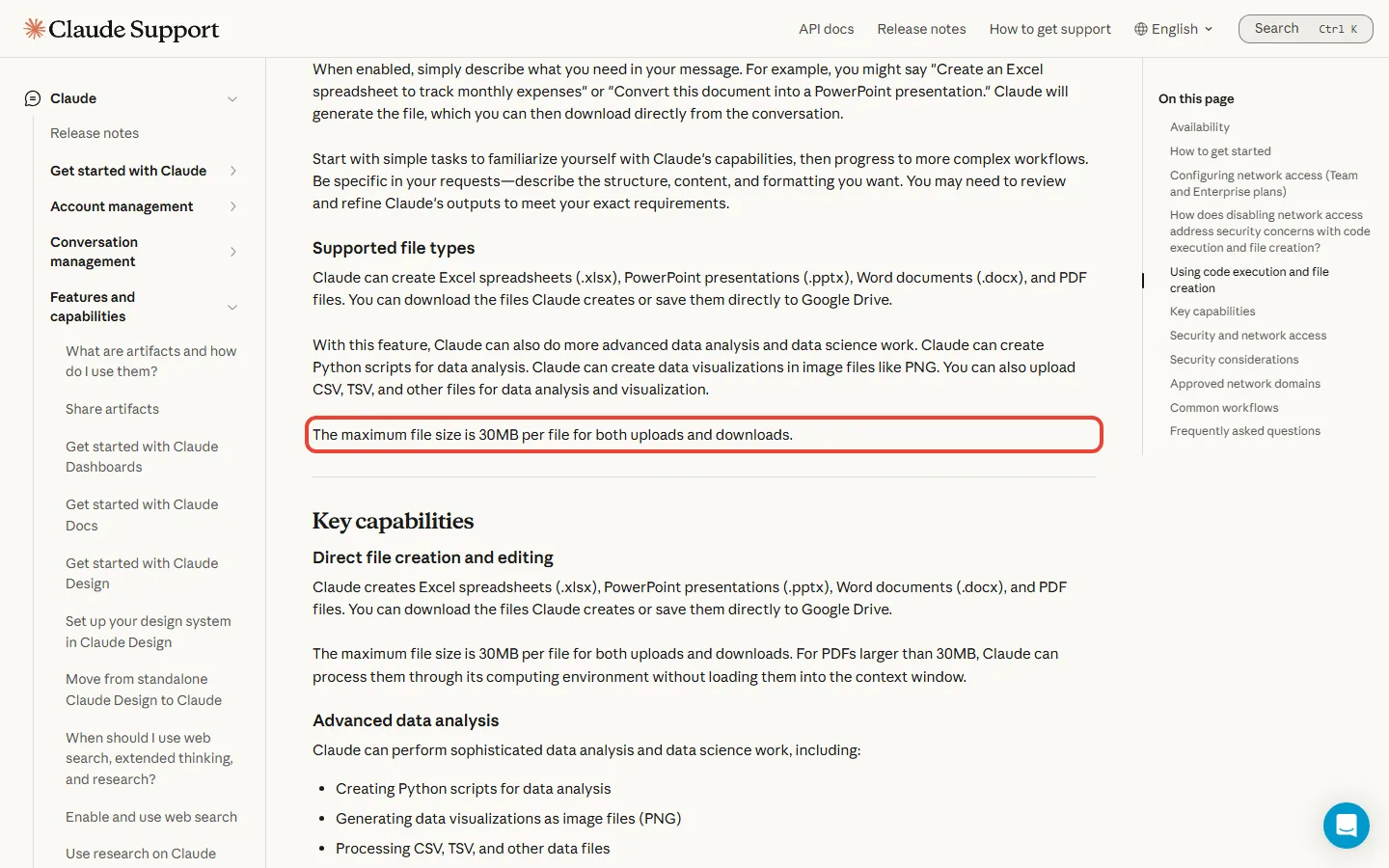
Anthropic gives two different answers. The file-creation help caps files at 30MB per file “for both uploads and downloads”. The upload help allows 500MB per file in a chat, up to 20 files per chat, and 30MB per file for project files.
Neither page explains the gap, and it’s a big one: 500 / 30 = 16.67, so one limit is about 17 times the other. For anything you send through file creation, in either direction, plan on 30MB, because that page applies it to downloads too. On the Free route this matters less than it looks: what you hand over is a transcript, a text file far smaller than the clip it came from.
Claude Code works differently: the clip sits in a folder on your own computer, and the tools that open it run there too. What Claude itself reads is the transcript, which is one more reason the creators’ route runs through Claude Code.
Will editing eat your limit?
How fast you reach a limit depends on the model, the length of your chats and how large your files are. Creating files uses more of your limit than a normal chat, and multi-step jobs such as running code count too. Claude Code also draws from one pool with your chats, so an editing session and your everyday questions spend the same allowance.
Anthropic gives ratios, not counts. Pro gets at least 5x Free’s usage per 5-hour session, and Max 5x Pro. In plain words, whatever one Free window gets you through, a Pro window gets you through at least five times over. On Pro you’re on two clocks: the five-hour limit and a weekly one that resets at a fixed time set for your account.
For Free, the pricing card and table list a limit every 5 hours and every week, while the Free help page names only a five-hour reset. Both say Anthropic may set other limits, so plan as if both clocks apply to you.
Heavy file work shows up in a creator’s report too. For Futurepedia, building a big library of animation styles was “the fastest I have ever burned through my usage”. If you plan a long cutting session, start it on a fresh five-hour window rather than after an afternoon of chat. Claude Code may also finish the step it’s on when you hit the five-hour limit, up to once a week on Pro, but it’s still rolling out, so don’t count on it.
On paid plans you can also turn on usage credits, extra use you pay for on top and spend as you go, at standard API rates. Those are the prices developers pay to build Claude into their own apps, and Free has no usage credits. So $20 is the plan’s price, not a ceiling on what you can spend. For ways to stretch the allowance, read our post on not burning your Pro limit.
What to try first
We’d go in this order, cheapest step first, and stop at the step that gives you enough.
- Get a transcript with timestamps. For a video on your YouTube channel that has captions, open its Subtitles page in YouTube Studio, click Edit next to the language, then Options, then Download subtitles.
- Paste it into the Free chat and ask something like this: Here’s my transcript with timestamps. List the stretches to keep for a 60-second cut, as start and end times, and tell me why you dropped the rest. Then give me an SRT captions file at the timing this transcript already has. If that saves you real time in your editor, you’ve seen what Claude adds.
- If Claude doesn’t offer you a file to download, check that file creation is switched on in Settings, then Capabilities. It’s on by default on every individual plan.
- Want the cuts made on your own computer, the creators’ way? Take Pro billed monthly, and open the Code tab in the desktop app.
- Ask Claude Code to set up FFmpeg and a transcriber such as faster-whisper, or install them yourself. The FFmpeg project provides only source code, the raw form programmers build the program from, and links to ready-built copies, such as the gyan.dev builds for Windows.
- Before the first session, make sure no ANTHROPIC_API_KEY is set on your computer. That’s a secret code that bills a developer account instead of your plan: if Claude Code uses it, you pay API rates rather than drawing on your Pro allowance.
- Run one real video through the whole route before you switch to yearly billing.
If you’d rather keep a normal editor and its built-in AI features, our AI video editor roundup compares what Premiere, DaVinci Resolve, Descript and others cost. Our Descript review and DaVinci Resolve review go deeper on each.
The rule we’d use before paying
Pay for Pro the week you catch yourself copying Claude’s cut list into your editor by hand, clip after clip. That’s when $20 a month buys you something Free doesn’t include: Claude Code on your own computer, writing the commands that FFmpeg carries out, which is how Peverelli’s setup makes its cuts.
Until then, Free does the part Claude is good at. And Max can wait until Pro’s limits stop you mid-edit, week after week.
Sources and how we checked: Anthropic’s pricing page, its help articles on uploads, file creation, artifacts, the Pro and Ultra plans, Claude Code on Pro and Max, and getting started, plus the Claude Code setup docs, the FFmpeg download page and YouTube’s caption help, read on November 7, 2026. The file-creation article said “Updated yesterday” that day, and the upload article is dated July 23, 2026. The Claude Code overview and desktop quickstart, the usage-limits and Motion help, the FFmpeg, Whisper, faster-whisper, gyan.dev and Python pages, the earlier pricing capture, and the two creator videos come from the research for our video, captured October 24 and 25, 2026. Prices are US dollars before tax, and Anthropic’s pages name no video or audio format for uploading to Claude, no video-editing feature, no transcription tool and no fixed usage count for any plan.

Founder of AI Tool Analysis. Every price and limit here is checked against the vendor’s own pages. How we research
Stay Updated on AI Plans and Prices
Get an email when a plan we cover changes its price or limits.
Free, unsubscribe anytime.
Related Reading
- Claude Subscription 2026: Free vs Pro $20 vs Max $100 vs Ultra $200
- Is Claude Code Free? What It Really Costs in 2026
- Claude Dashboards and Motion: Which Plan Do You Need?
- Best AI Video Editor 2026: What Premiere, DaVinci Resolve, Descript, Filmora and VEED Cost
- Claude Projects 2026: How to Use the New Version (and Not Burn Your Pro Limit)
- Descript Review 2026: Worth It vs CapCut and Premiere?
Last Updated: November 7, 2026
Next Review Update: December 7, 2026