ChatGPT Images 2.5 vs Nano Banana 2.1 is the comparison to make right now, because they are two image makers you can try on a free plan, and they have a lot in common: both sit inside a chat app, both edit as well as create, and both keep their free limits vague. If you are choosing between them, or deciding whether a paid plan is worth it, the useful questions are what you get on the free plan, what each paid step adds, and which features differ. This guide answers them from the vendors’ own pages as of October 10, 2026, and leaves the “which looks better” argument to your own prompts.
⚡ TL;DR: The Bottom Line
What It Is: A comparison of ChatGPT Images 2.5 (OpenAI, September 8) and Nano Banana 2.1 (Google, October 6) on free limits, paid plans and features.
Free: ChatGPT Free has “Limited image creation”. Google’s Gemini free plan includes image generation and editing under compute-based limits. On the pages we read, neither publishes a daily or weekly image count.
Paid: ChatGPT Go is $8 a month and Plus $20. Google AI Plus is $4.99 and Google AI Pro $19.99. Both companies sell more expensive tiers too.
Our Take: DEPENDS. Use both free, and pay only when you can name the moment a limit stopped you.
⚠️ The Catch: Every performance number on the pages we read is the vendor’s own. We attribute them and do not rank the pictures.
📑 Quick Navigation
🆕 What’s New in Each (in the Companies’ Own Words)
ChatGPT Images 2.5. OpenAI’s launch post is dated September 8, 2026 and says Images 2.5 is rolling out “across all tiers on desktop, mobile, and web” to ChatGPT, ChatGPT Work and Codex users. It claims image generation latency is cut “by up to 50% compared with Images 2.0”. The new features it lists are Sketch (draw directly in ChatGPT as a visual guide, started by typing @Sketch), templates for formats such as Poster and Merch, comments placed directly on an image for focused edits, and sharing an image with the prompt included. OpenAI also says Images 2.5 “follows specific editing instructions more reliably across multiple edits” in longer conversations, and that people create more than 3 billion images a week across ChatGPT Images and its API image models. It uses C2PA metadata and invisible watermarking to help identify its images.
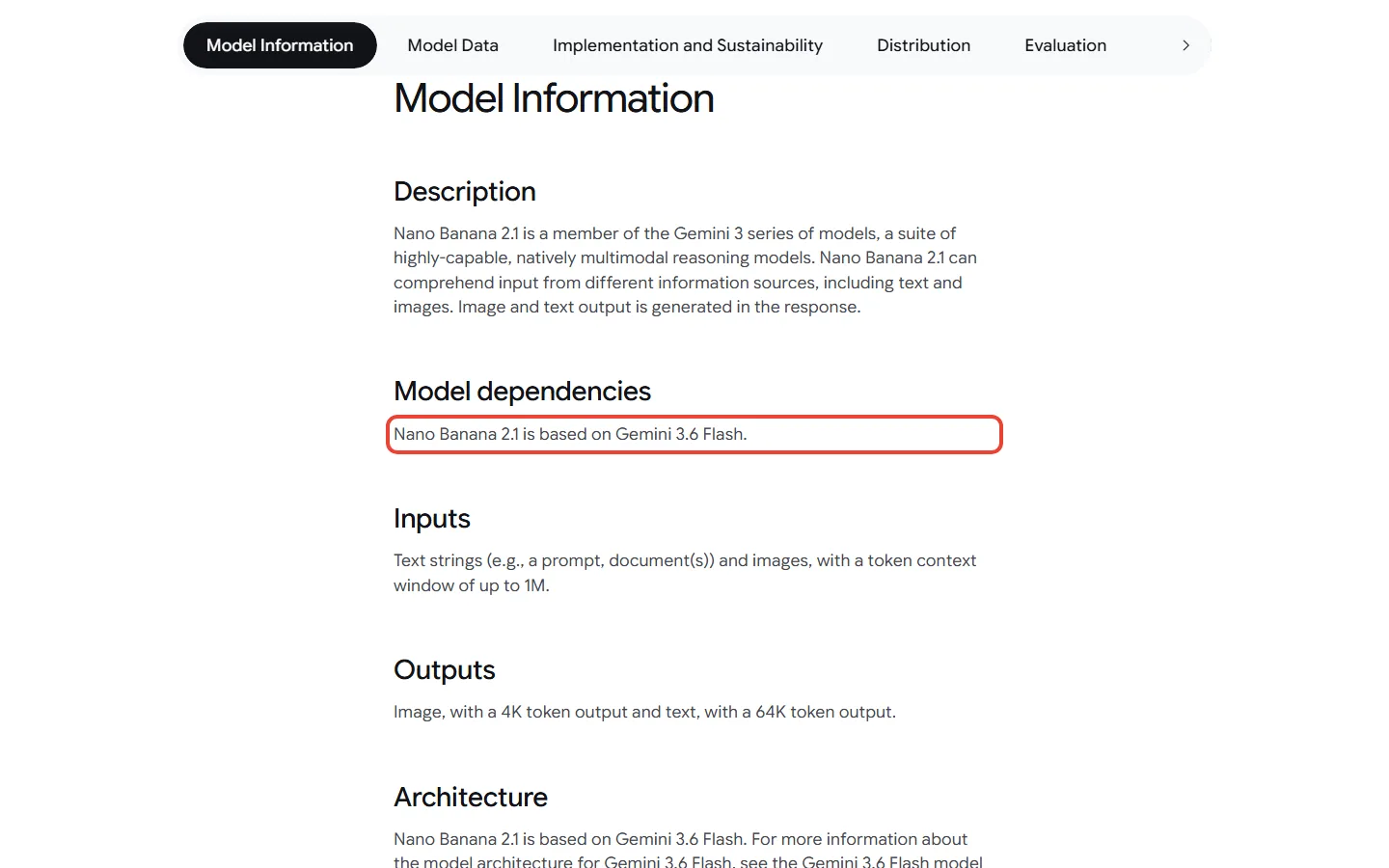
Nano Banana 2.1. Google’s model card is dated October 6, 2026 and says Nano Banana 2.1 is based on Gemini 3.6 Flash and is distributed in the Gemini app, Google AI Studio, the Gemini API, Google Search AI Mode, Google Ads, Google Flow and Google Stitch. The Gemini API changelog says model gemini-nano-banana-2.1 is generally available and that the older gemini-3.1-flash-image is deprecated. One thing to notice: Google’s own Gemini help page, read on the same day, still describes Nano Banana 2, Nano Banana 2 Lite and Nano Banana Pro, so Google’s pages do not say which version a free Gemini user gets. For our other Google image coverage, see our Nano Banana review.
🆓 Free Limits: What Each Company Actually Says
| Question | ChatGPT Images 2.5 (Free) | Nano Banana in Gemini (Free) |
|---|---|---|
| What the company calls it | “Limited image creation” | Image generation and editing included with a Google account |
| Is a number published? | No: OpenAI says image generation has “separate usage limits” | No: limits are “compute-based” |
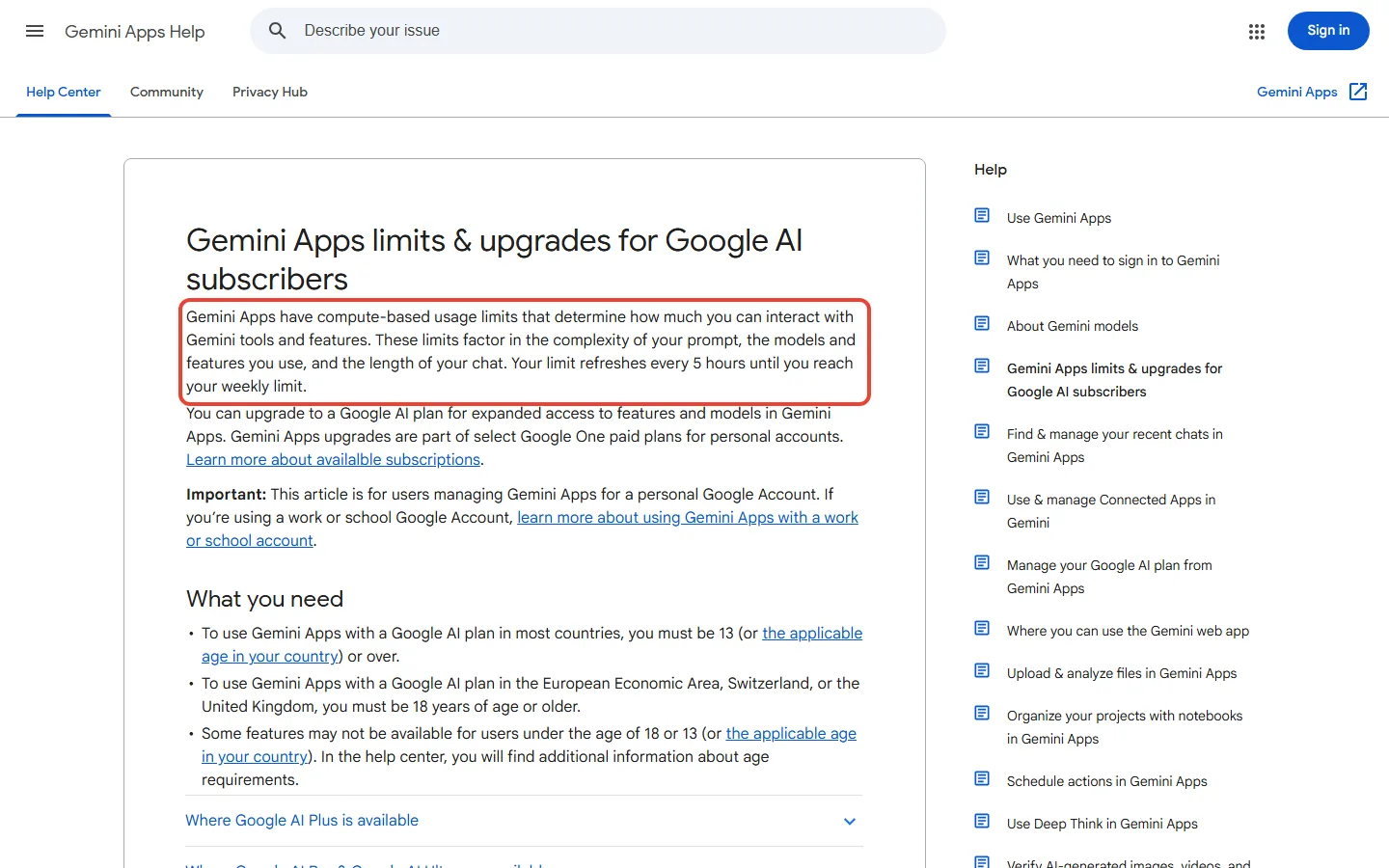
| What happens at the limit | OpenAI says ChatGPT will notify you when you reach a limit | Limits refresh every 5 hours until a weekly limit; separately, the redo help line mentions a daily quota of Nano Banana 2 images |
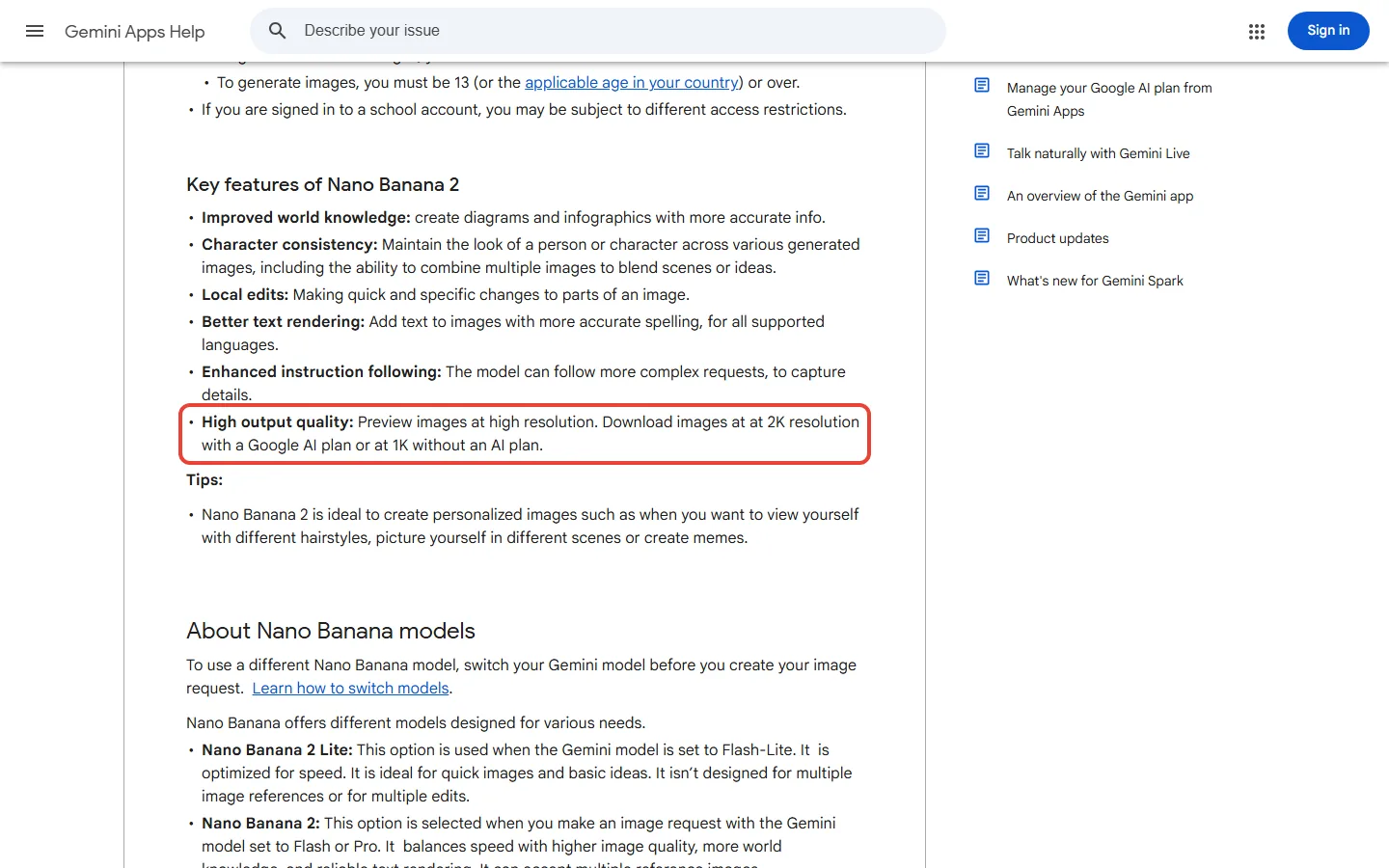
| Resolution on free | Not stated | Downloads at 1K without an AI plan, 2K with a plan |
| Redo with the top model | Not stated | Nano Banana Pro redo is for paid subscribers |
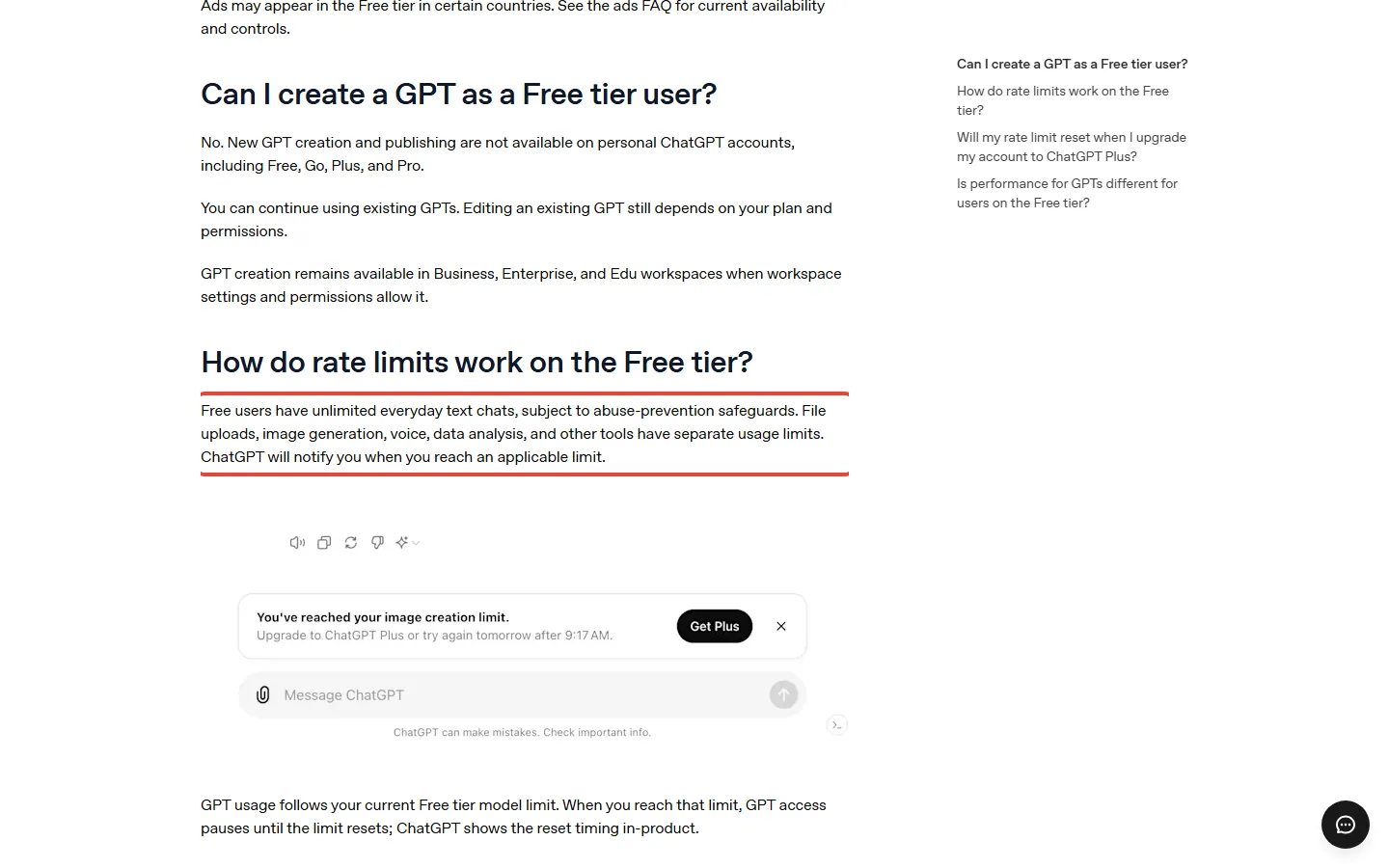
OpenAI’s Free Tier FAQ says free users have unlimited everyday text chats, while “file uploads, image generation, voice, data analysis, and other tools have separate usage limits”, and that ChatGPT will notify you when you reach one. Google’s help page for Gemini says limits “factor in the complexity of your prompt, the models and features you use, and the length of your chat”, refresh every 5 hours until you reach a weekly limit, and may change. If you reach your daily quota of Nano Banana 2 images, Google adds, you cannot redo further images with Nano Banana Pro. By our reading, neither OpenAI’s pricing page, Free Tier FAQ, Images help article and launch post nor Google’s limits page, plans page, help article and model card give a number of images per day or per week for any plan. Figures you see elsewhere for “images per day” are not from these pages, so we do not repeat them.
🔍 REALITY CHECK
Marketing Claims: OpenAI’s pricing page lists “Limited image creation” for Free, “More image creation” for Go, and “Unlimited and faster image creation” for Pro “subject to abuse guardrails”.
What It Really Means: The wording is relative (limited, more, unlimited), not a count. Google’s limits are relative too (2x and 4x the standard limit; Ultra 5x or 20x Pro). On the pages we read, neither company tells you how many pictures a month of $8 or $4.99 buys.
Verdict: Treat any per-plan image count you read on a blog as unverified. Start free and see whether you hit the limit.
💰 Paid Plans Side by Side
| Step | ChatGPT (image wording on OpenAI’s pricing page) | Google (usage vs baseline) |
|---|---|---|
| Free | $0: “Limited image creation” | $0 with a Google account: image generation and editing |
| Entry paid | Go, $8 a month: “More image creation” | Google AI Plus, $4.99 a month: 2x higher usage than Free |
| About $20 | Plus, $20 a month: “More complex and accurate image creation” | Google AI Pro, $19.99 a month: 4x higher usage than Free |
| Top tiers | Pro, $100 and $200 a month tiers: “Unlimited and faster image creation” (subject to abuse guardrails) | Google AI Ultra, $99.99 (5x Pro) and $199.99 (20x Pro) a month |
📊 Monthly Price Ladder: ChatGPT vs Google (USD)
Two notes on the table. ChatGPT’s Pro has several tiers, and our price source lists $100, $200 and a $500 tier, so “Pro” in the chart is the lower two. Chatgpt.com shows local-currency prices from some countries, so the ChatGPT figures come from OpenAI’s help pages, its Go announcement and our fact registry (the Go price was confirmed from a US-dollar view of the pricing page on October 3) rather than a screenshot of the pricing page. On Google’s side, the paid steps matter most for two things the help page states: downloads at 2K resolution with a Google AI plan against 1K without one, and the ability to redo an image with Nano Banana Pro. See our Google AI Plus review for the cheapest Google step, and our ChatGPT review for OpenAI’s.
🎨 Features Compared (Vendor Claims)
| Feature | ChatGPT Images 2.5 (OpenAI) | Nano Banana (Google) |
|---|---|---|
| Drawing as a guide | Sketch: draw in ChatGPT and use the drawing as a visual guide (OpenAI’s help page walks through it in the mobile app) | No Sketch-style drawing feature found on the pages we read; the model card lists ink (doodle) based editing as an evaluated category |
| Templates | Templates such as Poster and Merch | Gemini’s image page offers templates and example prompts |
| Edit parts of an image | Comments placed directly on an image | “Local edits” for quick, specific changes |
| Editing over several turns | OpenAI says instructions are followed “more reliably across multiple edits” | Not framed as multi-turn editing; Google lists multi-image input and character consistency as features |
| Text in images | Not singled out in OpenAI’s launch post | “Better text rendering” listed for Nano Banana 2; the 2.1 card’s known limitations include poor small text and long paragraphs |
| Sharing | Share an image with the prompt included | Export to Docs, download full size |
| Provenance | C2PA metadata and invisible watermarking | Not covered on the pages we read |
Google’s model card lists known limitations. The Nano Banana 2.1 model card’s known limitations include “poor text rendering in small text (often blurry in 1k model), long paragraphs, page length”, character consistency that “is not always perfect”, and “occasional confusion around spatial localisation (e.g. left/right etc.)”. OpenAI’s launch post has no equivalent list, though its system card has an evaluation-limitations section. The difference says more about how the pages were written than about which model is better.
📈 The Numbers Each Company Publishes
Google’s model card includes its own human-preference evaluation (results as of October 2026): an overall preference Elo of 1050 for Nano Banana 2.1 Thinking and 1015 for 2.1 No Thinking, against 990 for Nano Banana 2 (Thinking) and 935 for Nano Banana Pro. It also lists editing results such as 1049 against 965 for Nano Banana 2 on ink-based editing. These are Google’s numbers, chosen and run by Google, and they compare Google’s own models with each other. OpenAI’s launch page gives a speed claim (latency cut by up to 50% against Images 2.0) and no comparable quality table, so there is no like-for-like benchmark between the two products on these pages.
📊 Google’s Own Overall Preference Elo (Vendor-Reported)
The chart’s vertical axis starts at 800 to make small differences visible, which exaggerates the gaps, so read the labels rather than the bar heights.
📬 Enjoying this breakdown?
Get honest AI tool analysis delivered weekly. No hype, no spam.
👤 Which One Should You Use?
Stay free on both if: you make a few images now and then. Run the same prompt in both apps, one try each, and keep the one you like. Our verdict is DEPENDS, not a winner.
Pay for ChatGPT ($8 Go or $20 Plus) if: you already live in ChatGPT and want images, chat and files in one place, and you can name the moment the free image limit stopped you.
Pay for Google ($4.99 AI Plus or $19.99 AI Pro) if: you want 2K downloads and the Nano Banana Pro redo, or you want the extra storage and other Google AI features bundled in. At $4.99 it is the cheapest paid step of the four.
Pay for a top tier only if: images are your daily work. At $99.99 to $200 a month, you are buying volume, and neither company will tell you in advance how many images that is.
❓ FAQs: Your Questions Answered
Q: Is ChatGPT Images 2.5 free?
A: Yes, with limits. OpenAI says Images 2.5 is rolling out to all tiers, and its pricing page lists “Limited image creation” on Free. It does not publish a number of images.
Q: Is Nano Banana 2.1 free in Gemini?
A: Gemini’s free plan includes image generation and editing under compute-based limits. Google’s help page still names Nano Banana 2, so we cannot say which version Free users see. Free downloads are 1K.
Q: How many images do I get on the free plan?
A: Neither company says on the pages we read. OpenAI says image generation has separate usage limits, and Google says limits are compute-based and refresh every 5 hours until a weekly limit. Counts you see elsewhere are not on the official pages.
Q: Is a paid plan worth it for images?
A: Only if the free limit has stopped you. Go is $8 and Plus is $20 on the ChatGPT side, and Google AI Plus is $4.99 and Pro $19.99. Google’s paid plans add 2K downloads and the Nano Banana Pro redo.
Q: What is Sketch in ChatGPT Images 2.5?
A: A feature that lets you draw in ChatGPT and use the drawing as a visual guide. OpenAI says to type @Sketch, then add a description of the style and other details.
Q: Which one is better at text in images?
A: We cannot tell from official pages. Google lists better text rendering for Nano Banana 2 but admits poor small text and long paragraphs in 2.1’s known limitations. OpenAI’s launch post does not single out text.
Q: Can developers use both through an API?
A: Yes. Google says Nano Banana 2.1 is generally available in the Gemini API as gemini-nano-banana-2.1, and OpenAI lists GPT-Image-2.5 models for its API. This guide covers the apps, not API prices.
Q: Which should I choose?
A: Try both free with the same prompt. Pay for whichever one you hit the limit on, and keep the cheaper step ($4.99 on Google, $8 on ChatGPT) unless you need more.
Final Verdict: DEPENDS
ChatGPT Images 2.5 and Nano Banana 2.1 are both with free tiers, both vague about limits, and both priced in similar steps. The official pages let us compare what you pay and which features exist, not which picture is better, and any article that gives you a daily image count or a winner for all prompts is going beyond them. The practical advice is simple: run the same prompts in both, stay free while it works, and when a message tells you that you have reached a limit, pay for the one you were using at the lowest step that removes it.
Verdict: DEPENDS. Check OpenAI’s Free Tier FAQ and Google’s Gemini image help page for current limits before you pay.
Founder of AI Tool Analysis. Reads every pricing page, help article and footnote so you don’t have to. Covering AI tools since 2025. See how we research →
Related Reading
- Nano Banana 2 Review
- Best AI Image Generators 2026
- ChatGPT Review
- Google AI Plus Review
- Midjourney Review
- Adobe Firefly Review
- Free AI Tools 2026
Stay Updated on AI Image Tools
AI image plans and limits change every few weeks. Get the changes that affect what you pay, straight from the vendors’ own pages.
- ✅ Honest Breakdowns: We read the pricing pages and help centers, not press releases
- ✅ Price Tracking: Know when plans change price or limits
- ✅ Comparison Updates: As the market shifts, we update our verdicts
- ✅ No Hype: Just the AI news that matters for your wallet
Free, unsubscribe anytime.
Last Updated: October 10, 2026
Versions Covered: ChatGPT Images 2.5 (September 8, 2026) and Nano Banana 2.1 (October 6, 2026)
Next Review Update: November 10, 2026
Have a tool you want us to cover? Suggest it here | Questions? Contact us