

📹 Watch: Kling AI 2.5 Review: Better Than Runway Gen-3? (And Free?)
Our January 2026 video on Kling 2.5. Limits and prices have changed since; the article below has the October 2026 details.
What is the Kling AI maximum video length? Two numbers answer it. One generation of Kling 3.0 gives you up to 15 seconds. Kling’s Extend feature then adds 4 to 5 seconds at a time until the clip reaches 3 minutes. Everything else, from your plan to your credits to the quality you get, decides how much of that you can actually use. This guide sets out each limit as Kling’s own VIDEO 3.0 guide, extension guide and plans page describe it on October 4, 2026, what free and paid plans unlock, and what a minute of footage costs in credits.
⚡ TL;DR: The Bottom Line
What It Is: Kling 3.0 makes clips of 3 to 15 seconds per generation; Extend adds 4 to 5 seconds per step, up to 3 minutes in total.
Best For: Short scenes and social clips. Kling’s multi-shot storyboard fits several shots into one 15-second generation.
Price: Paid plans run $8.80 to $544.99 a month after a discounted first month. A minute of 1080p footage with sound uses 720 credits.
Our Take: 15 seconds per generation is long for consumer AI video, but plan your story in 15-second shots and treat the 3-minute ceiling as a stretch.
⚠️ The Catch: Kling’s plan table reserves video extension for paid plans, and Kling itself warns that extending may take several tries.
📑 Quick Navigation
📏 Kling AI Video Length: The Basics
Kling’s VIDEO 3.0 guide says the 3.0 models generate “up to 15 seconds of continuous video, with a flexible duration ranging from 3 to 15 seconds”. The older VIDEO O1 model topped out at 10 seconds. Both 3.0 models add Custom Multi-Shot, so you can split those 15 seconds into several shots and set the length, framing and camera move of each one. Here is the length hierarchy at a glance:
| How You Make It | Length | Source |
|---|---|---|
| One generation, VIDEO 3.0 or 3.0 Omni | 3 to 15 seconds | Kling VIDEO 3.0 and 3.0 Omni guides |
| One generation, VIDEO O1 | 3 to 10 seconds | Kling VIDEO 3.0 Omni guide |
| Each extension (Extend with Prompts) | 4 to 5 seconds more | Kling extension guide |
| Longest total with extensions | Up to 3 minutes | Kling extension guide |
| Kling 4.0 | Described as native 30-second generation | Kling plans page (October 17, 2026); 4.0 Flash early access on yearly Ultra+ |
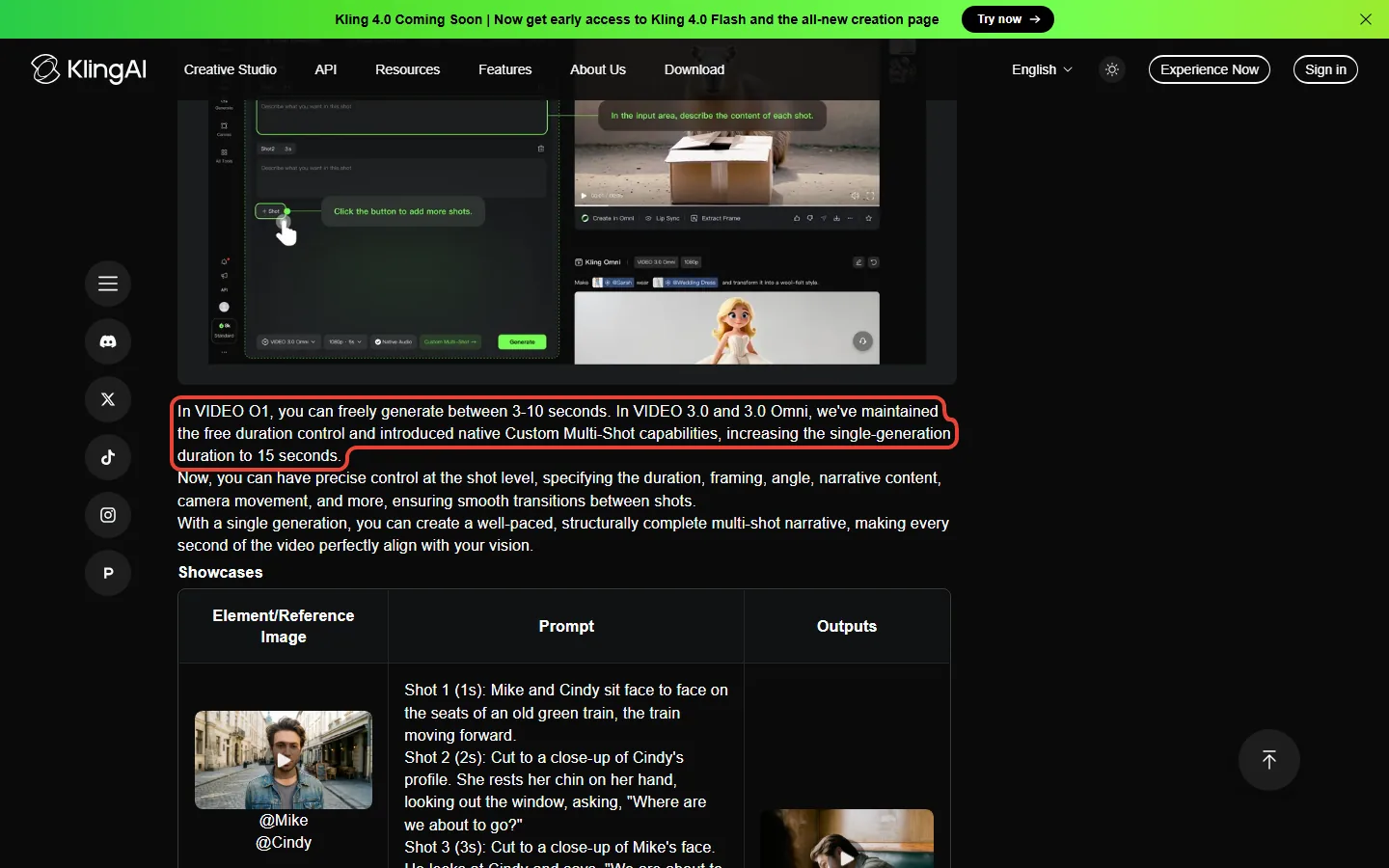
Think of it like building with blocks. Each generation hands you a block of up to 15 seconds. Extend snaps a 4 to 5 second piece onto the end, and you can keep snapping until the clip reaches 3 minutes. Every block and every piece costs credits. For the plan prices behind those credits, see our Kling AI pricing breakdown.
🆓 Free Tier Video Length Limits
Kling’s free plan is called Basic. Its FAQ says non-subscribers can claim monthly free credits when they log in, valid for 31 days, but it doesn’t say how many. The old “66 credits a day” figure you will see quoted around the web isn’t on Kling’s pages any more. Daily bonus credits are now listed as a subscriber perk.
For length, three lines in Kling’s plan comparison table matter. Video extension is marked as a paid feature, so on Basic your clip ends where the generation ends. 1080p and 4K video are paid features too. And Basic makes one video per generation, where paid plans can make four. The table doesn’t list a shorter clip length for Basic. In credits, a 5-second 720p clip without audio costs 30 credits and a full 15-second one costs 90.
🔍 REALITY CHECK
Marketing Claims: “Claim limited-time free credits”, in the sign-in offer on Kling’s plans page.
What It Really Means: Free credits let you see the model, but Basic can’t extend a clip, can’t make 1080p or 4K, and keeps Kling’s watermark. Watermark removal and 4K need an active subscription, by Kling’s own FAQ.
Verdict: Basic is for judging the model in short clips. Length tricks start on a paid plan.
💰 Paid Plan Video Durations
Paying doesn’t make a single generation longer. Every plan works within the same 3 to 15 seconds. What a paid plan adds is extension, 1080p and 4K, four videos per generation, and more credits. So the real question is how many seconds of video your credits buy each month. At Kling 3.0 rates, 1080p with native audio costs 12 credits a second and 720p without audio costs 6.
| Plan | Monthly Price (From Month Two) | Credits/Month | 1080p With Audio | 720p, No Audio |
|---|---|---|---|---|
| Standard | $8.80 | 660 | 55 seconds | 1 min 50 s |
| Pro | $32.56 | 3,000 | 4 min 10 s | 8 min 20 s |
| Premier 8K | $80.96 | 8,000 | 11 min 7 s | 22 min 13 s |
| Premier 18K | $181.99 | 18,000 | 25 min | 50 min |
| Premier 28K | $283.99 | 28,000 | 38 min 53 s | 77 min 47 s |
| Premier 38K | $376.99 | 38,000 | 52 min 47 s | 105 min 33 s |
| Ultra+ | $544.99 | 57,000 | 79 min 10 s | 158 min 20 s |
Those are seconds of footage generated, not seconds you keep. If you keep one take in three, divide by three: Pro’s 4 minutes 10 seconds of 1080p footage with sound becomes about 83 seconds of usable video a month. Each plan’s first month is cheaper ($6.99 on Standard, $25.99 on Pro, $64.99 to $278 on Premier by credit size, $402 on Ultra+) and yearly billing cuts the monthly cost by about 25%, but the credit counts are the same.
📊 Minutes of Video Each Plan’s Monthly Credits Buy
🔄 The Extend Feature: Reaching 3 Minutes
Kling’s Extend with Prompts guide says a generated video “can be further extended by 4-5 seconds and allows for multiple continuations, reaching a total length of up to 3 minutes”. You find it in a tab at the bottom left after a video finishes, in two modes:
- Auto-Extend: no prompt needed. The model continues the video from its own reading of what is happening.
- Customized Extend: you write a prompt for what happens next. Kling suggests a simple formula: subject plus movement.
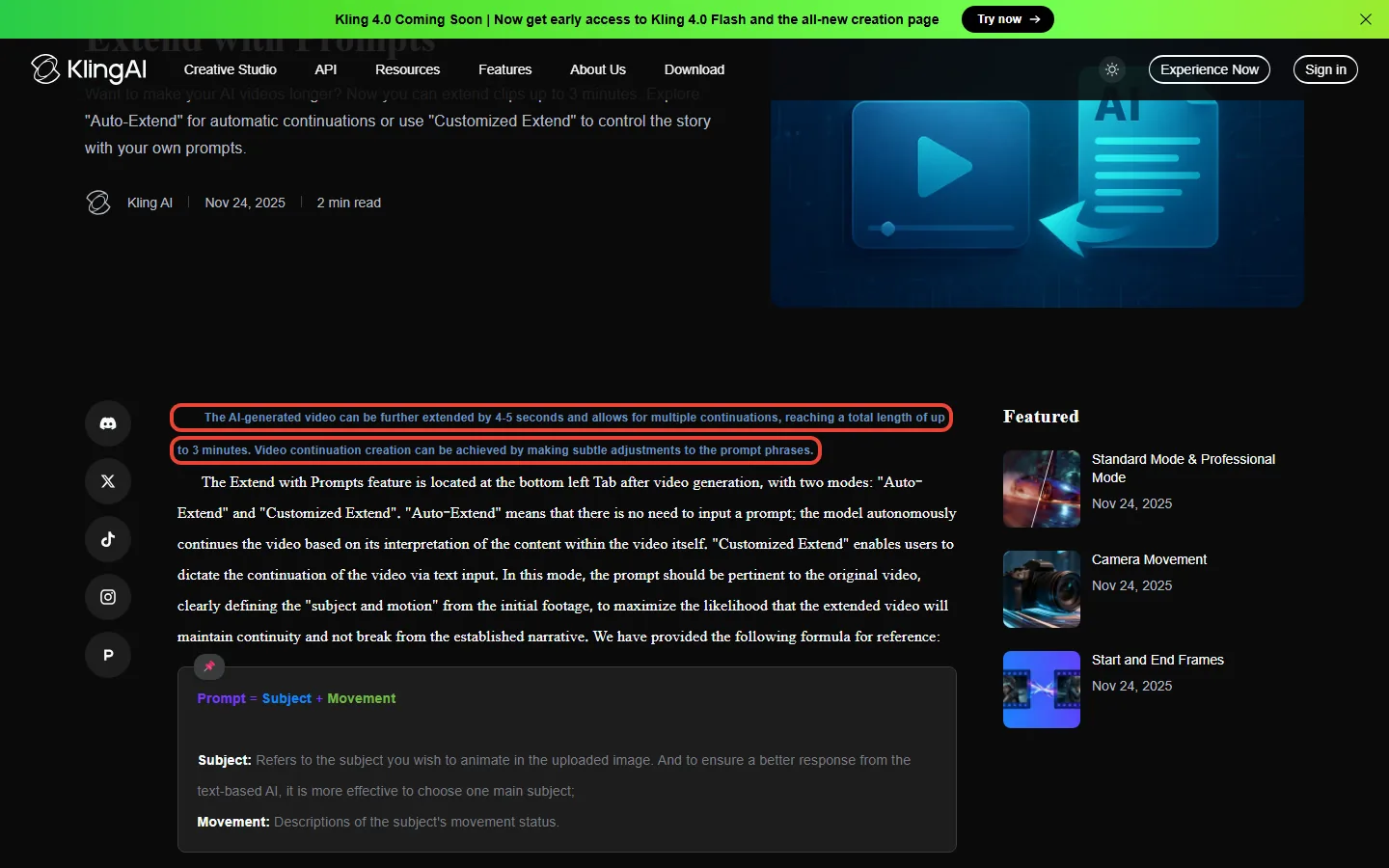
Reaching 3 minutes takes many steps. Starting from a 15-second clip, you would need 165 more seconds, which is 33 extensions at 5 seconds each or about 41 at 4 seconds. Kling’s guide is dated November 24, 2025, before Kling 3.0 launched, and it doesn’t say what an extension costs in credits or list which models support it, so check the credit figure Kling shows before you press the button.
💡 Key Takeaway: Use Customized Extend and keep the prompt about the same subject as the original clip. Kling’s own tips say unrelated text can cause a camera cut or transition.
💳 Credit Cost Per Second (Real Math)
Kling 3.0 charges by the second. These rates come from the VIDEO 3.0 guide, and the 3.0 Omni guide lists the same ones when you don’t feed it a video:
| Mode | 720p | 1080p | 15-Second Clip (1080p) |
|---|---|---|---|
| No native audio | 6 credits/sec | 8 credits/sec | 120 credits |
| Native audio | 9 credits/sec | 12 credits/sec | 180 credits |
| Omni with a video input, no audio | 12 credits/sec | 16 credits/sec | 240 credits |
What one minute of footage costs, built from four 15-second generations (monthly price from month two / yearly renewal price):
- 1080p with native audio (720 credits): Pro $7.81 / $5.86; Premier 8K $7.29 / $5.46; Ultra+ $6.88 / $5.16. Standard’s 660 credits don’t cover one minute.
- 720p without audio (360 credits): Standard $4.80 / $3.60; Pro $3.91 / $2.93; Ultra+ $3.44 / $2.58
That is the price of a minute where every take works. A cheap way to cut it: try ideas at 720p without audio (6 credits a second), then make the keeper at 1080p with sound (12). The draft passes cost half as much per second as the final one.
⚔️ Kling vs Competitors: Video Length Comparison
The old version of this table listed six tools from January. We have kept only the ones whose limits we could check on the vendor’s own pages today, and taken Sora out because it no longer exists as a product. OpenAI’s help center says “the Sora web and app experiences were discontinued on April 26, 2026” and “the Sora API will be discontinued on September 24, 2026”.
| Tool | One Generation | Longer Clips | Credit Rate |
|---|---|---|---|
| Kling 3.0 | 3 to 15 seconds | Kling’s Extend feature: 4 to 5 s at a time, up to 3 minutes (its guide predates 3.0 and doesn’t list models) | 6 to 12 credits/sec (1080p with audio: 12) |
| Runway Gen-4.5 | 2 to 10 seconds, 720p output | No extension listed on its Gen-4.5 help page | 12 credits/sec |
| OpenAI Sora | Discontinued: web and app on April 26, 2026; API on September 24, 2026 | ||
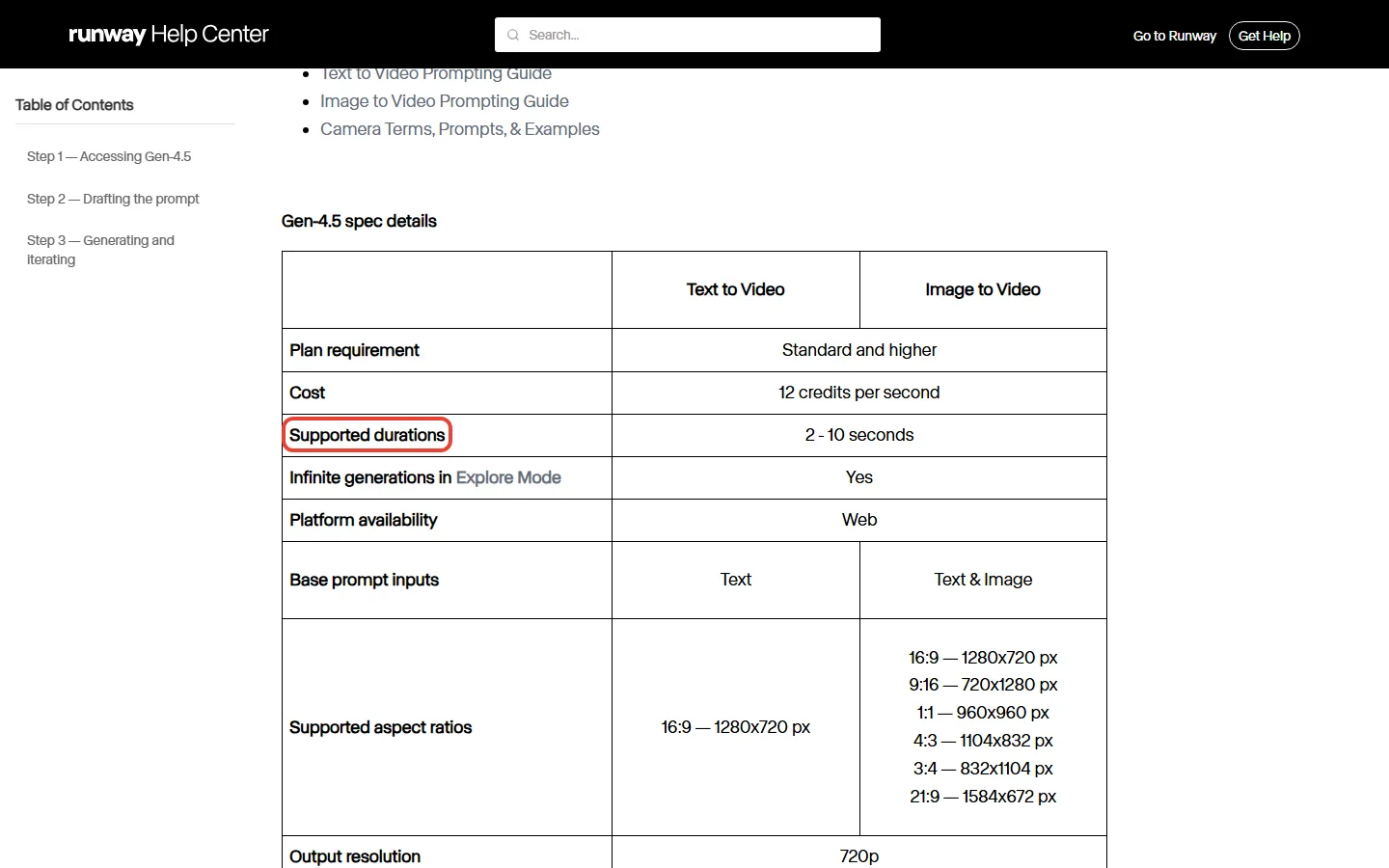
On single generations, Kling 3.0’s 15 seconds is half again as long as Runway Gen-4.5’s 10, and Runway’s help page lists Gen-4.5 output at 720p, where Kling also offers 1080p. Both list a rate of 12 credits a second (for Kling, that is 1080p with sound), but credits cost different amounts on each service; our Kling vs Runway cost comparison does the per-second dollar maths. Runway’s plans also list Kling 3.0 as one of the models you can use there. For the quality side, see our Runway review.
📏 Longest Single Generation (Seconds)
⚠️ Longer vs Better: What Kling Says About Extensions
The old version of this section described quality drifting at 30, 60 and 120 seconds. We removed it because we can’t back it with a source. What Kling itself says is narrower and still useful. Its extension guide warns that “the extending process has a certain degree of probability involved, and it may require multiple extending process to generate a video that meets expectations”. It also says a prompt that strays from the original subject “may cause a camera cut or transition”.
In practice that means two things. Every retry of an extension costs credits, so a 3-minute clip can cost far more than its length suggests. And Kling’s own answer to longer scenes in 3.0 is multi-shot: several planned shots inside one 15-second generation, which you then cut together with other clips in an editor.
✅ Best Practices for Longer Videos
1. Plan in 15-second shots.
Write your video as a list of shots of 15 seconds or less, with natural cut points. Use Custom Multi-Shot in VIDEO 3.0 or 3.0 Omni to fit two or three short shots into one generation.
2. Draft cheap, finish sharp.
Try ideas at 720p without audio (6 credits a second). Make the keeper at 1080p with sound (12 credits a second) only once the idea works.
3. Extend with prompts, not on autopilot.
Use Customized Extend and describe what the same subject does next. Kling’s tips warn that unrelated text can trigger a cut.
4. Check each extension before the next.
Kling says extending involves chance and may take several tries. Redo a weak extension rather than building on it.
5. Stitch the final cut in an editor.
For anything past a minute, join separate clips in an editor rather than relying on one long extended chain. Our best AI video editing tools guide covers the options.
❓ FAQs: Your Questions Answered
Q: What is the maximum video length in Kling AI?
A: One Kling 3.0 generation runs 3 to 15 seconds. With Kling’s Extend feature, which adds 4 to 5 seconds per step, a clip can reach up to 3 minutes in total. Kling’s plan table lists video extension as a paid-plan feature.
Q: How long are Kling AI free tier videos?
A: Kling’s plan table doesn’t list a shorter clip length for the free Basic plan, but it reserves video extension, 1080p and 4K for paid plans. Non-subscribers get monthly free credits valid for 31 days; Kling doesn’t publish how many.
Q: How much does it cost to make a 1-minute Kling AI video?
A: One minute of 1080p with native audio uses 720 credits at Kling 3.0 rates. That is $7.81 on Pro monthly or $5.86 on Pro yearly, if every take works. At 720p without audio it is 360 credits, or $3.91 on Pro monthly.
Q: Can I make videos longer than 3 minutes with Kling AI?
A: Not as one extended clip: Kling’s extension guide caps the total at 3 minutes. For longer videos, generate separate clips and join them in a video editor.
Q: How does Kling AI video length compare to Runway?
A: Kling 3.0 makes up to 15 seconds per generation; Runway’s Gen-4.5 help page lists 2 to 10 seconds. Kling’s Extend feature can take a clip to 3 minutes (its guide doesn’t say which models support it), and Runway’s Gen-4.5 page lists no extension.
Q: What happened to Sora?
A: OpenAI discontinued it. Its help center says the Sora web and app experiences ended on April 26, 2026, and the Sora API on September 24, 2026.
Q: What resolution are Kling AI videos?
A: Kling 3.0 makes 720p and 1080p, and Kling added native 4K for the 3.0 models on April 23, 2026. Kling’s plan table marks 1080p and 4K video as paid-plan features.
Q: Does Kling 4.0 make longer videos?
A: As of October 17, 2026, Kling’s plans page describes Kling 4.0 as supporting native 30-second generation, double Kling 3.0’s 15 seconds, but it shows no Kling 4.0 credit rate yet. Early access to Kling 4.0 Flash comes with the yearly Ultra+ plan ($4,457 for the first year). We will update this answer when Kling publishes a full 4.0 guide.
🎯 Final Verdict: Is Kling Worth It for Long Videos?
Kling AI video length is still a strength. Fifteen seconds per generation is longer than Runway Gen-4.5’s 10, and Kling’s Extend feature can push a clip to 3 minutes. But the 3-minute figure is a ceiling, not a promise: each extension is 4 to 5 seconds, Kling says it may take several tries, and every try spends credits.
Use Kling if: you make social clips, product shots or short scenes you can plan in 15-second blocks. Pro ($32.56 a month, or $24.42 a month yearly) buys a little over 4 minutes of 1080p footage with sound a month.
Look elsewhere if: you need long continuous takes for client work and can’t afford retries, or you want presenter-style video, where a purpose-built tool like HeyGen fits better.
Check the limits yourself in Kling’s official user guides, and see our Kling AI pricing guide before you pick a plan.

Founder of AI Tool Analysis. Reads every pricing page, help article and footnote so you don’t have to. Covering AI tools since 2025. See how we research →
Related Reading
- Kling AI Pricing 2026: Every Plan and What a Video Really Costs
- Kling AI Complete Guide
- Kling AI Review
- Runway Review
- Google Flow Review
- HeyGen Review: AI Avatar Videos Explained
- Best AI Video Editing Tools
- Free AI Tools That Actually Work
Stay Updated on AI Video Tools
Don’t miss the next video generation change. Get weekly pricing changes, new limits and plain-English breakdowns of AI video tools, straight from the vendors’ own pages.
- ✅ Weekly breakdowns from vendor pages, not press releases
- ✅ Price drop alerts when AI tools get cheaper
- ✅ Limit changes as soon as vendors publish them
- ✅ Beginner guides to AI video creation
- ✅ No spam, just useful AI insights
Free forever. Unsubscribe anytime.
Last Updated: October 17, 2026
Kling AI Version Covered: Kling 3.0 (VIDEO 3.0 / 3.0 Omni); Kling 4.0 Flash in early access on yearly Ultra+
Next Review Update: November 16, 2026
Have questions about Kling AI video length? Contact us | Want a tool covered? Suggest it here