
The short version of this ChatGPT review: for most people who pay, ChatGPT Plus at $20 a month is the plan to pick in November 2026. If you only ask quick questions, stay on Free, which includes unlimited everyday text chats within OpenAI’s abuse safeguards.
Pay for Pro, from $100 a month, only if you want a dot (an always-on agent that works on tasks for you), GPT-6 Pro in the chat, or long daily sessions in ChatGPT Work and Codex. Work and Codex are the two places where you hand ChatGPT a longer task, such as a report or a code change, and it works through the steps on its own.
Go at $8 is the plan we would skip for most people. Everyday text chats are already unlimited on Free, so Go’s extra room goes to images, uploads and data analysis, and it may show ads.
Plus has two catches of its own. GPT-6 Astra, its most capable model by OpenAI’s description, works on Plus only inside Work and Codex, not in the chat box. And personal accounts, Plus and Pro included, can no longer create new custom GPTs.
Our October 14 video walks through every plan; its Pro 200 advice predates the October 29 reversal covered below.
TL;DR: Which ChatGPT Plan to Pay For
Price: Free $0, Go $8, Plus $20, and Pro at $100, $200 or $500 a month, all billed monthly.
You mostly ask quick questions: Free, with unlimited everyday text chats within OpenAI’s abuse safeguards.
You keep hitting image or upload limits and don’t mind ads: Go, at $8.
You want Medium and High thinking answers, longer tasks in Work, or Codex for coding: Plus, at $20.
You want a dot, GPT-6 Pro in the chat or all-day Codex: Pro 100, at $100. Move up only when Settings, then Usage shows you need more.
You already pay for the OpenAI API: count Pro’s API credits against that bill first.
The catch: on Plus, GPT-6 Astra works only in Work and Codex, and personal plans can no longer create new GPTs.
Quick Navigation
What every ChatGPT plan costs in November 2026
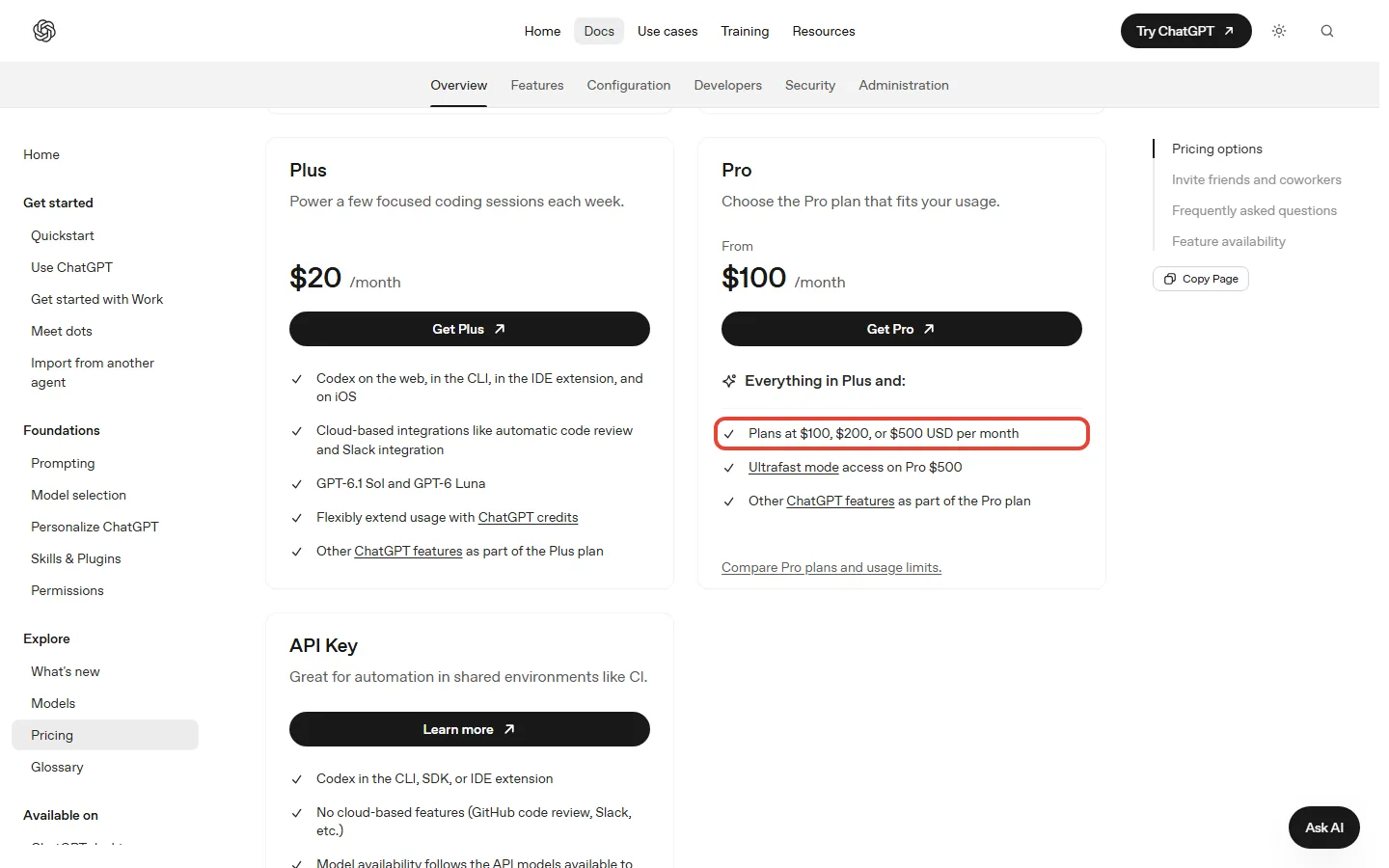
Here is the whole ladder in US dollars. Go, Plus and Pro bill monthly only: OpenAI has no annual plan for them and no way to prepay several months. Business is the one plan on OpenAI’s pricing page with a published yearly price, and it needs at least two users.
| Plan | Price a month | A year at that price | Ads | What it adds |
|---|---|---|---|---|
| Free | $0 | $0 | May show ads | Unlimited everyday text chats; limited uploads, images, voice and Work; 500 MB of Library storage |
| Go | $8 | $96 | May show ads | Higher limits for images, uploads and data analysis; a larger context window (what OpenAI calls longer memory) |
| Plus | $20 | $240 | None | GPT-6 at Medium and High thinking; GPT-6 Astra in Work and Codex; Work on web and mobile |
| Pro 100 | $100 | $1,200 | None | GPT-6 Pro in the chat; a dot, where offered; no five-hour limit in Work and Codex; $100 of API credits a month for eligible accounts |
| Pro 200 | $200 | $2,400 | None | Everything in Pro 100 with more usage; $200 of API credits a month for eligible accounts |
| Pro 500 | $500 | $6,000 | None | The most usage of the three, plus Ultrafast; $500 of API credits a month for eligible accounts |
| Business | $25 per user, or $20 billed yearly | Billed per user | None | A team workspace for 2 or more users |
The jump that matters is from $20 to $100. Plus costs $240 a year, and the cheapest Pro plan costs $1,200, which is $960 more. Between the Pro plans the gaps grow: Pro 200 costs $1,200 a year more than Pro 100.
What a Year of Each Paid ChatGPT Plan Costs (US Prices, Billed Monthly)
Outside the US, check your own checkout price, because OpenAI localizes Go’s price in some markets. The full price list sits on OpenAI’s ChatGPT and Codex pricing page.
Free and Go: what $0 and $8 get you
Free covers more than its $0 price suggests. Free and Go both get unlimited everyday text chats, within OpenAI’s abuse safeguards. The limits fall on uploads, image generation, voice and data analysis. Free also includes 500 MB of Library storage for your files.
OpenAI’s help and pricing pages, as we read them on November 3, give no numbers for those Free and Go limits. Go’s launch post of January 16, 2026 promised 10 times Free’s messages, file uploads and image creation, but it was written when GPT-5.2 Instant was Go’s model, so treat that figure as dated.
Go at $8 raises those tool limits and gives ChatGPT a larger context window (what OpenAI calls longer memory). It does not give you a stronger model: OpenAI’s pages put Free and Go on the same Luna model.
Which Luna depends on the page. The October 7 release note says Free and Go use GPT-6 Luna, and the pricing page’s Free card lists “Unlimited text chats with GPT-6”. Three recently updated help pages still say GPT-5.6 Luna: the models page, the Free tier FAQ (“Free users have access to GPT-5.6 Luna”) and the Go page, which adds that Go’s Think option runs on GPT-5.6 Luna and that Go does not include GPT-5.6 Sol. Check the model menu on your own account.
Then there are ads. They may appear on Free and Go, only in the regions where OpenAI shows them, while Plus and every paid plan above it get none. OpenAI also mentions a free no-ads option with fewer messages a day and no tools such as images.

So the ChatGPT $8 vs $20 choice comes down to what you run out of. Go buys room for tools. Plus buys a stronger model and work tools, for $144 a year more. Our ChatGPT Go vs Plus comparison runs that choice row by row.
Is ChatGPT Plus worth $20 a month?
Yes, if you want answers that think longer, longer tasks handed off in Work, or Codex for coding. Plus moves you onto GPT-6 with the Medium and High thinking levels, which Free and Go don’t get. Thinking levels decide how long ChatGPT works through a question before it answers.
Plus also includes GPT-6 Astra, which OpenAI calls its most capable model, but only inside Work and Codex, where ChatGPT works through a longer task such as a report or a code change on its own. Our ChatGPT Codex review covers what Plus gets for coding.
REALITY CHECK
What the pricing page shows: the Plus card lists “Advanced reasoning models with GPT-6”.
The fine print: OpenAI’s Work and Codex help page says “Plus includes Astra in Work and Codex, but not GPT-6 Pro in Chat.” In the chat, Plus gets the Medium and High thinking levels, not Extra High or Pro.
Verdict: on Plus, Astra is a tool for coding and longer tasks, not a chat upgrade.
Astra on Plus is also metered. OpenAI estimates 5 to 45 Astra local messages, or 15 to 160 with GPT-6.1 Sol, in each five-hour window, and calls those ranges estimates, not guaranteed counts. Cloud tasks may use more, and weekly limits may also apply.
OpenAI’s own pricing page pitches Plus for coding as “a few focused coding sessions each week”. Plus can also cap messages when demand is high.
REALITY CHECK
What the pricing page shows: the Plus card lists “Projects, scheduled tasks, and custom GPTs”.
The fine print: OpenAI’s Free tier FAQ says “New GPT creation and publishing are not available on personal ChatGPT accounts, including Free, Go, Plus, and Pro.” You can keep using existing GPTs.
Verdict: Plus lets you use GPTs, including ones you made earlier. To build new ones you need a Business, Enterprise or Edu workspace.
Who should skip Plus: anyone who mostly chats. Free already covers everyday text chats, and Go covers heavier image and file use for $96 a year.
Pro 100, Pro 200 or Pro 500: what the October 29 change means
All three Pro plans include GPT-6 Pro in the chat. OpenAI’s Pro tiers page says “Pro 100 and Pro 500 keep their current weekly GPT-6 Pro message limits in Chat”, and the pricing page’s Pro card lists “Pro reasoning powered by GPT-6 Astra”. GPT-6 Pro is GPT-6 Astra at the Pro thinking level.
Pro plans also include a dot where dots are offered, and as of November 3, no Pro plan has a five-hour limit in Work and Codex. For Pro users, dots are limited to 18 and older outside the EEA, Switzerland and the UK, and are rolling out gradually.
What separates them is how much you can use. Pro 200 includes more than Pro 100, and Pro 500 the most. Among the Pro plans, only Pro 500 has Ultrafast, a lower-latency mode for GPT-6 Astra and GPT-6.1 Sol that uses your allowance at 8 times the Standard rate.
OpenAI does not say how big any of those allowances is. On the pages we read on November 3, there is no weekly message count for GPT-6 Pro and no multiple of Plus usage for any Pro plan.
What OpenAI changed on October 29
On September 29, OpenAI announced by email a smaller allowance for Pro 200. On October 29 it canceled that reduction. If you had the higher Work and Codex allowance, you keep it; if you had the lower one, it doubled to match; the price stays $200. New Pro 200 subscriptions are open again.
The same day, Pro 100 and Pro 500 got twice their previous Work and Codex allowance, and Plus stayed as it was. In the chat, the weekly GPT-6 Pro limit stays the same on Pro 100 and Pro 500. On Pro 200, the lower weekly limit was raised to match the higher one. OpenAI adds one caution: a bigger allowance does not guarantee twice as many finished tasks.
Key Takeaway: if your Work and Codex use fits Pro 100, Pro 200 costs you $1,200 a year more for room you won’t use. Start at Pro 100 and check Settings, then Usage, before you move up.
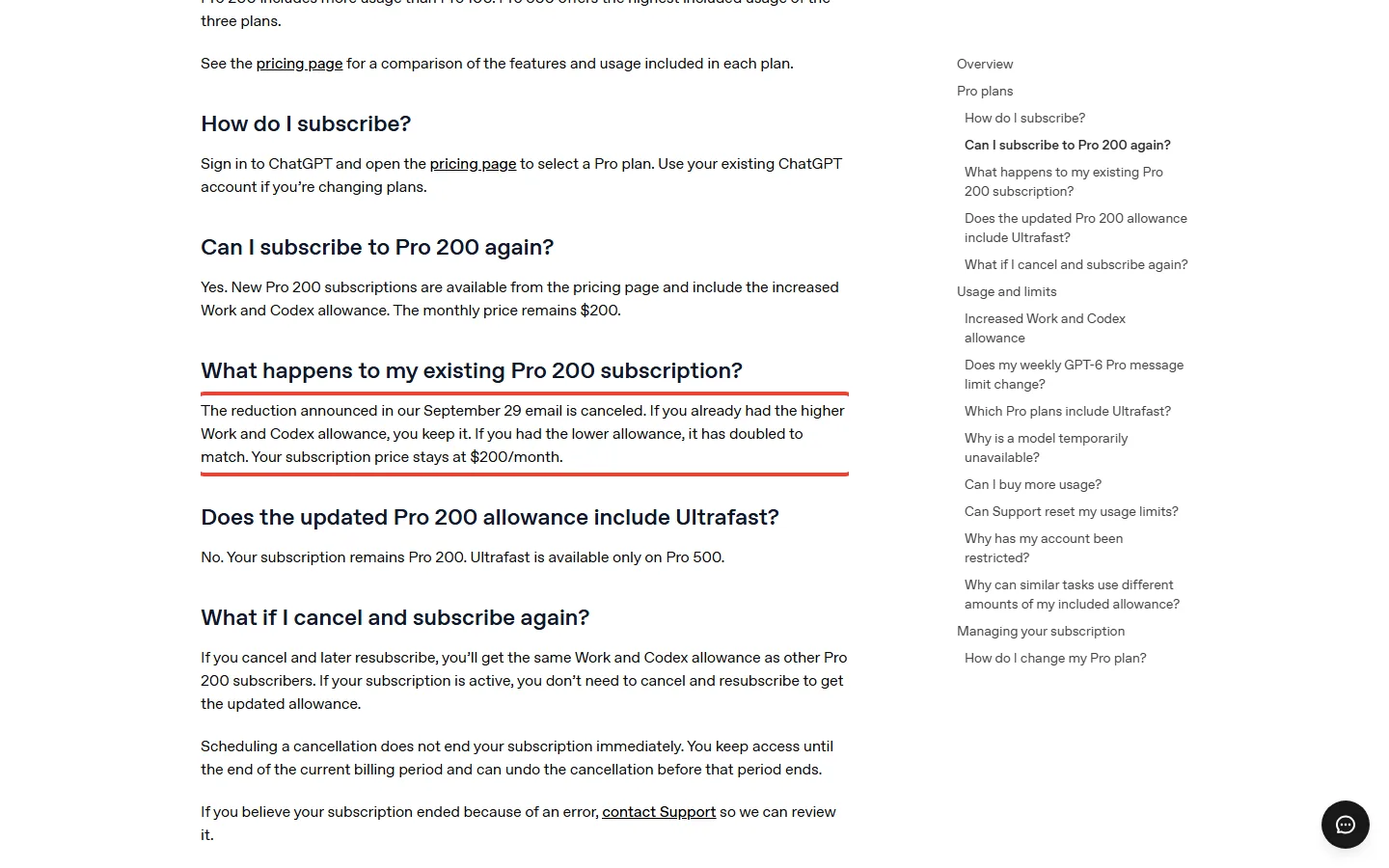
To move between Pro plans, open Settings, then My Plan. If you cancel, you normally keep the plan until the end of the billing period. The full rules are on OpenAI’s Pro tiers help page.
Pro’s API credits: only for developers
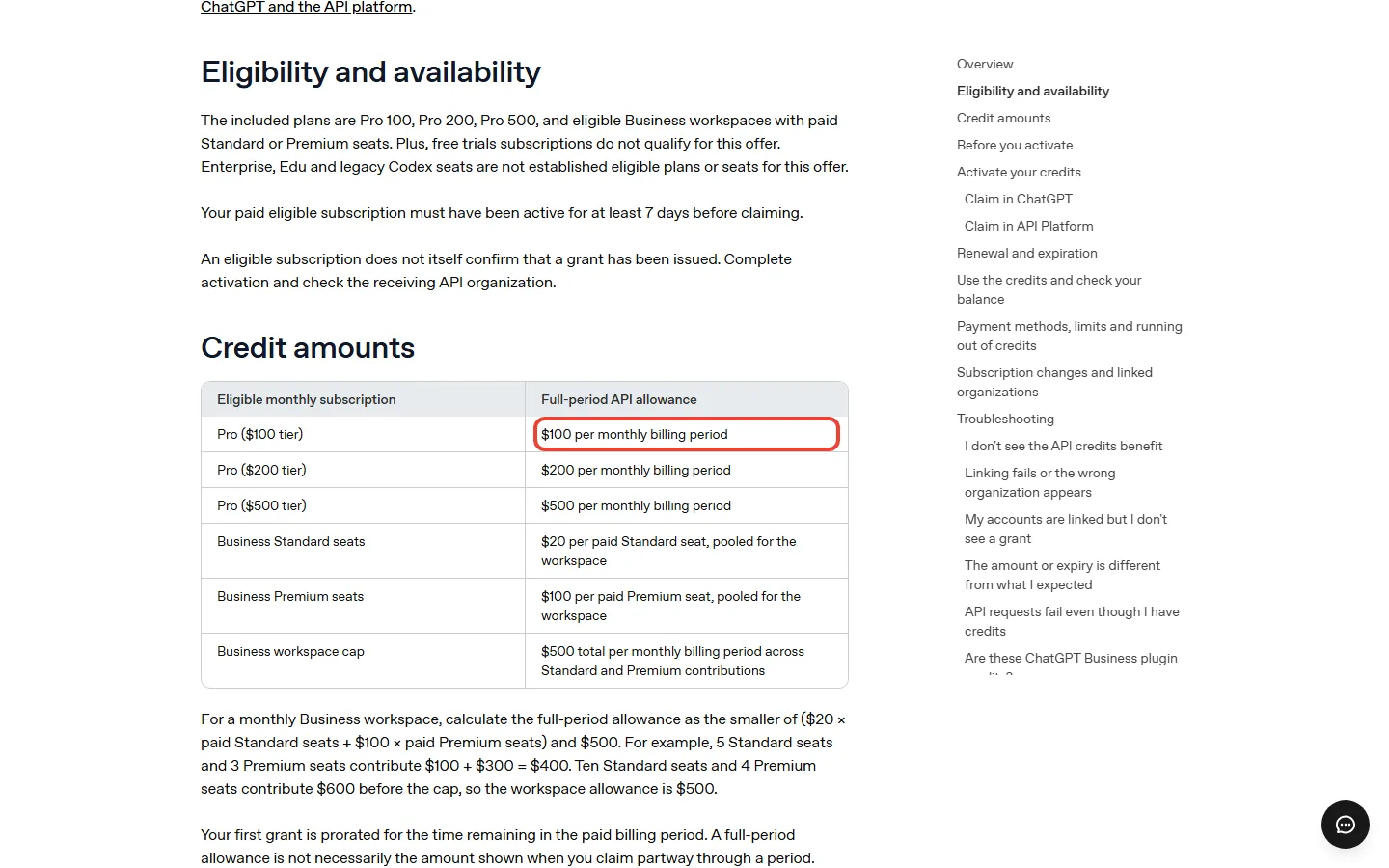
Since October 28, eligible Pro plans can claim API credits each month worth their own price, $100, $200 or $500, where OpenAI offers it; OpenAI says availability depends on the enabled cohort and country. The credits pay only for OpenAI’s API, the paid service developers use to build their own apps, and add no ChatGPT or Codex usage, so if you only use ChatGPT they are worth nothing to you. If you build on the API, the developer example below runs the sums and the conditions, and OpenAI’s API credits help page has the full rules.
Which ChatGPT plan should you pay for? Four worked examples
Each example uses OpenAI’s published prices and limits. The usage in each one is ours, picked to show where each plan starts to pay off.
Light use: stay on Free
Say you ask a handful of questions a day and upload a document now and then. Free covers that. Everyday text chats are unlimited, and only uploads and tools are capped. Your cost is $0.
You hit tool limits twice a week: Go, if ads don’t bother you
Say you hit Free’s image or upload limit a couple of times a week. Go raises those limits for $8 a month, or $96 a year. Plus expands uploads further, for $240 a year. If you don’t need the stronger model, Go saves you $144 a year.
You code every day: Pro 100, not Pro 200
Say you code with Codex most weekdays on Plus and keep running out of the five-hour window. On Plus, OpenAI’s estimate for Astra is 5 to 45 messages per window. Pro 100 has no five-hour limit in Work and Codex, and its allowance doubled on October 29.
Pro 100 costs $80 a month more than Plus, which is $960 a year. Start there. Pro 200 adds another $1,200 a year, and on the pages we read on November 3, OpenAI publishes no figure that tells you how much more work that buys.
You build apps on the API: the credits change the sums
Say you pay $20 for Plus and also spend about $100 a month on the OpenAI API for an app you build. That is $120 a month. Pro 100 costs $100 and includes $100 in API credits, which would cover that API bill once the full monthly grant arrives. From then on you would pay $20 a month less and get Pro on top.
The first month is thinner: your Pro plan must be active for at least 7 days before you can claim, and the first grant is prorated.
The other conditions on OpenAI’s API credits help page:
- Plus does not qualify, and neither do free trials.
- The credits go to one linked API organization, your developer account.
- They do not pay for Codex when you run it with an API key.
- They expire at the end of each billing cycle, with no rollover.
- Drop to Plus, Go or Free and the link ends at the end of that billing cycle. OpenAI also says the benefit may change or be removed.
If your API bill swings from month to month, count only what you spend in a slow month.
Which ChatGPT model you get on each plan
The latest version of ChatGPT runs on GPT-6. OpenAI’s models page says it is rolling out in the chat to eligible Plus, Pro, Business and Enterprise users. On those plans, GPT-6 Sol answers at the Instant, Medium, High and Extra High levels, and the Pro level uses GPT-6 Pro, powered by GPT-6 Astra.
Plus gets Medium and High; Pro plans get every level. Our GPT-6 Astra guide covers who gets Astra where.
For Free and Go, OpenAI’s own pages disagree on the model; the Free and Go section sets out both sides.
GPT-6 answers in the chat can also mix text with visuals and interactive elements, which OpenAI calls Intelligent UI. Our Intelligent UI guide shows how to tone it down. In Work and Codex, Plus and higher also get GPT-6.1 Sol and GPT-6.1 Terra, which has been rolling out since October 26. More detail on every model sits on OpenAI’s models help page.

Can ChatGPT make video? (And what dots, Work and Slides are)
Not on the OpenAI pages we read on November 3: no ChatGPT plan lists a video generation tool. OpenAI shut the Sora app and website on April 26, 2026, and the Sora API on September 24, 2026. Credits you bought there can still be spent in Codex. If you make video, budget for a second app.
A dot is ChatGPT’s always-on agent: a helper with its own cloud computer that keeps working on a goal between your conversations. Every Pro plan lists a dot among its features, and Business Premium seats can use dots too, where dots are offered. OpenAI’s dots help page gives dot prices only for Enterprise workspaces and lists no separate dot price for Pro or Business Premium. In the US, texting your dot is starting to roll out, in beta, to a limited number of Pro users. Our ChatGPT dots pricing guide covers what you get for the $100.
OpenAI’s pricing page says ChatGPT Work and Codex are included on every plan from Free to Enterprise, but Free gets limited Work access on desktop only, while Plus gets it on desktop, web and mobile. Slides is a deck builder OpenAI started rolling out on October 16 to eligible Pro, Business and Enterprise users; the release note does not name Plus.
If you are weighing a dot against Meta’s Muse agent, our video and our Meta Muse vs ChatGPT comparison set the two side by side.
What changed in ChatGPT in October 2026
- October 7: GPT-6 began rolling out in the chat for Plus, Pro, Business and Enterprise; OpenAI’s release note said Free and Go would follow from the next day.
- October 16: Slides began rolling out to eligible Pro, Business and Enterprise users.
- October 26: GPT-6.1 Terra began rolling out in Work and Codex for Plus and the plans above it, Edu included.
- October 28: eligible Pro and Business plans could start claiming API credits, and texting your dot began rolling out in beta to Pro users in the US.
- October 29: OpenAI canceled the Pro 200 cut and doubled the Work and Codex allowance on Pro 100 and Pro 500.
For background, our September video walks through every plan as it stood then; its Pro 200 part predates the October 29 reversal.
When another AI subscription is the better buy
ChatGPT is not the only $20 plan, and the better second choice depends on where your files and work already live.
- Your mail, files and photos are in Google: start with our guide to getting Google AI Pro free, which also covers Google’s paid plans for students and everyone else.
- You want a second model for writing or code: our Claude subscription guide compares Claude’s Free, Pro, Max and Ultra plans.
- You want a lower-cost chatbot: our DeepSeek vs ChatGPT comparison covers the low-cost route.

ChatGPT plan questions people ask
Is ChatGPT free to use?
Yes. OpenAI says the free version of ChatGPT is available to everyone, and it includes unlimited everyday text chats within OpenAI’s abuse safeguards. Uploads, images, voice and data analysis are limited, and ads may appear.
Is ChatGPT Plus worth $20 a month?
Yes, if you want answers that think longer, longer tasks in Work, or Codex for coding. $20 a month buys GPT-6 with Medium and High thinking, Astra in Work and Codex, and no ads; if you only chat, Free covers that.
What’s the difference between ChatGPT Go and Plus?
Go ($8) raises Free’s limits on images, uploads and data analysis and may show ads; Plus ($20) adds GPT-6 with Medium and High thinking, Astra in Work and Codex, and no ads.
Pro 100 vs Pro 200 vs Pro 500: which one do I need?
Start with Pro 100 unless you know you will outgrow it. All three include GPT-6 Pro in the chat and, where dots are offered, a dot; Pro 200 has more usage, and Pro 500 the most plus Ultrafast, at $100, $200 and $500 a month.
How much does ChatGPT dots cost?
Every Pro plan includes a dot where dots are offered; among personal plans, the lowest-priced one with a dot is Pro 100 at $100 a month. Plus is not among the plans OpenAI lists for dots.
Is ChatGPT voice free?
Yes, within limits: the Free plan lists limited voice chats. For Go, OpenAI’s pages disagree: the Go help page says voice has the same limits as Free, while the pricing page’s Go card lists more voice chats. Our ChatGPT voice guide explains when paying makes a difference.
Does ChatGPT have ads?
Only on Free and Go, and only in the regions where OpenAI shows them: OpenAI says it is gradually rolling out ads to eligible Free and Go users in select regions, and that Plus, Pro and its business and education plans have none. Ad testing began in the US on February 9, 2026.
Can ChatGPT still make videos?
Not on the OpenAI pages we read on November 3: no ChatGPT plan lists a video generation tool. OpenAI discontinued the Sora app on April 26, 2026 and the Sora API on September 24, 2026.
ChatGPT review verdict: what we would pay for in November 2026
Plus at $20 a month is the plan most people who pay should pick: it adds the Medium and High thinking answers, Astra in Work and Codex, and no ads. Free covers quick questions, Go only makes sense if you hit tool limits and don’t mind ads, and Pro starts at $100 for a dot, GPT-6 Pro in the chat or all-day Codex. If you already pay for the OpenAI API, count Pro’s credits against that bill first.
Where it falls short: GPT-6 Astra stays out of the chat on Plus, personal accounts can’t create new GPTs, Go may show ads, and no plan lists a video generation tool.
Strengths
- ✓ Free includes unlimited everyday text chats, within abuse safeguards
- ✓ Plus is $20 a month with no ads
- ✓ Pro 100’s Work and Codex allowance doubled on October 29 (size not published)
- ✓ Eligible Pro plans can claim API credits equal to their price
Weak points
- ✗ GPT-6 Astra on Plus only in Work and Codex, not the chat
- ✗ No new custom GPTs on personal plans
- ✗ No size given for any Pro allowance on the pages we read
- ✗ No plan lists a video generation tool since Sora closed

Sources and how we checked: OpenAI’s help pages for Plus, Go, Pro tiers, models, Work and Codex usage, API credits, ads, the Free tier, dots and Sora; learn.chatgpt.com’s pricing page; the plan labels on ChatGPT’s pricing page; and ChatGPT’s release notes, all read on November 2 and 3, 2026. All amounts are US dollars, and OpenAI localizes some prices elsewhere. This page reports what OpenAI publishes.

Founder of AI Tool Analysis. Reads the pricing pages and help articles behind each claim. See how we research →
Stay Updated on AI Plans and Prices
Get an email when a plan we cover changes its price or limits.
- Price Tracking: an email when a plan you read about changes price or limits
- Sources: each change comes from the vendor’s own pricing or help page
- Comparison Updates: when a plan changes, the comparisons that depend on it are updated
Free, unsubscribe anytime.

Related Reading
- ChatGPT Go vs Plus: Is $8 Enough or Do You Need $20?
- ChatGPT Dots Pricing: Is the $100 Pro Plan Worth It?
- GPT-6 Astra: Who Can Use It and What It Costs
- ChatGPT Codex Review: What Plus Gets You
- ChatGPT Voice for Free: How to Use It, and When to Pay
- Claude Subscription 2026: Which Plan?
- Is Google AI Plus Worth It?
Last Updated: November 17, 2026
Next Review Update: December 17, 2026 (Pro allowances, API credits and the Free and Go model)
Have a tool you want us to cover? Suggest it here | Questions? Contact us