
Gemini Gems Review (May 2026): The 1M-Token Free GPT Alternative That Beats $20 Custom GPTs
This Gemini Gems review tests the May 2026 reality of Google’s custom-assistant product — the answer to ChatGPT’s Custom GPTs and Claude’s Projects. Gems have always been Google’s most underrated AI feature; the I/O 2026 pricing reshuffle and the addition of the $7.99 AI Plus tier change the buying decision materially for anyone who was previously weighing Pro at $20 against the free tier. The product itself is roughly the same shape it was in February 2026 — a custom-instruction surface backed by Gemini 3.x with native Workspace and Drive integration — but the cost of getting to the higher-quality models dropped significantly across the lineup.
I’ve used Gems continuously across the free tier, AI Pro, and (briefly) AI Ultra. This rebuild reflects the May 30, 2026 state: every pricing tier verified against Google’s current published pricing, the new compute-based usage limits explained, the head-to-head against ChatGPT Custom GPTs and Claude Projects rerun with current model behavior, and the honest verdict on which tier you actually need.
⚡ TL;DR – The Bottom Line
What This Is: May 30, 2026 review of Gemini Gems — Google’s answer to ChatGPT Custom GPTs and Claude Projects. Custom AI assistants with persistent instructions, live Drive sync, and the 1M token context window.
Best For: Google Workspace users who want a live-synced AI helper, knowledge workers with long-context needs, and anyone who tried Custom GPTs and wished for tighter Drive integration.
Pricing: Free tier is a complete product. AI Plus $7.99/mo (NEW), AI Pro $19.99/mo, AI Ultra $99.99/mo (cut from $249.99). Paid plans now use compute-based limits, not prompt caps.
Our Take: Free Gems is the strongest no-cost custom-AI product on the market for Workspace users. Drive integration is the killer feature; the 1M context is 5x Claude / 8x ChatGPT. For non-Workspace users, Gems is credible but lacks structural dominance — Claude Projects wins on rules, Custom GPTs win on ecosystem.
⚠️ The Catch: Gems’ instruction adherence trails Claude (82% vs 94% on Jan 2026 benchmark) and there’s no dedicated document upload that persists across conversations the way Claude Projects’ does.
📑 Quick Navigation
The Bottom Line (May 2026)
The Gemini Gems review verdict for most readers in May 2026 is simpler than it used to be. The free tier — which gives you full Gems creation, Drive integration, and the 1M token context window backed by Gemini 3.5 Flash — is genuinely the strongest free custom-AI product on the market. For ~70% of people considering paying for a custom-AI subscription, the free Gemini Gems tier is enough and you don’t need to upgrade. AI Plus at $7.99/month is the right next step if you want better model quality with minimal commitment. AI Pro at $19.99/month is the right tier for power users who need Gemini 3.5 / 3.1 Pro at high volume and want Workspace business integration. AI Ultra at the new $99.99/month (down from $249.99) is now defensible for heavy professional use cases — earlier this year it was overpriced for almost everyone.
⏱️ What Just Happened (The May 2026 Gemini Gems Update)
The original Gemini Gems review was written when Gemini Advanced was the only paid consumer tier at $19.99/month and the broader pricing landscape was simpler. The May 2026 picture introduces meaningful changes:
- New Google AI Plus tier at $7.99/month. Slots in below AI Pro. Includes Gems, Deep Research, Canvas, Gemini Live voice, and higher limits than free. Aimed at users who want better model quality than free but don’t need the full AI Pro feature set.
- AI Ultra cut from $249.99 to $99.99/month. 60% price reduction announced at I/O 2026 on May 19. Includes Gems plus Veo video generation, deeper agent integration, and the highest compute allowance. Earlier in 2026 the Ultra tier was overpriced for everyone except enterprise; the new price makes it defensible for serious professional use.
- $200/month higher-usage tier exists (effectively an Ultra Max tier) with 20x the usage limit of AI Pro. Useful for power users running very heavy Gem workflows but overkill for most.
- Compute-based usage limits replaced fixed daily caps. At I/O 2026 Google moved paid plans away from “X prompts per day” toward “Y compute units per period,” where a short text prompt costs less than a long video reasoning task or coding session. The practical effect: most users hit limits less often.
- Gemini 3.5 Flash launched May 19, 2026 at $1.50 / $9 per 1M input/output tokens on the API. Currently the default Gems backbone on free and AI Plus tiers. AI Pro / Ultra unlock the higher-end models.
- Gemini 3.5 Pro reaches general availability in June 2026. Will become the AI Pro / Ultra default for Gems by end of June. The current AI Pro Gems use Gemini 3.1 Pro as a transitional default.
- Gems remain available across every tier including free. No tier locks the feature behind a paywall — quality of the underlying model and usage limits are the only differentiators.
- The 1M token context window holds — still 5x Claude Projects (~200K) and roughly 8x Custom GPTs (~128K). Gemini’s headline advantage in the custom-AI space.
The single biggest change for the Gemini Gems review buying decision is the AI Plus tier filling the $0 → $20 gap. Previously, the only step up from free was the $19.99 Pro tier; now the $7.99 Plus tier is the natural first paid step for users who want quality without full commitment.
⚠️ Reality Check: The 1M Context Window Helps Less Than Marketing Suggests
Gemini’s 1M token context is genuinely 5-8x larger than Claude Projects and Custom GPTs. But for typical Gems use cases — building a Gem with custom instructions plus a Drive folder of reference docs — most users never approach the limit. The 1M context matters when you’re feeding the Gem an entire codebase, a long technical specification, or months of meeting transcripts as ambient context. For “draft me an email” or “summarize this Doc,” you’re using 5,000 tokens of a 1,000,000 budget. The headline number is real; the practical advantage is smaller than it sounds for everyday workflows.
🧠 What Gemini Gems Actually Are (May 2026)
Gemini Gems are custom AI assistants you build inside Gemini — a persistent persona with instructions, context, and (optionally) connected Workspace files. Functionally equivalent to ChatGPT Custom GPTs and Claude Projects, with Google-specific advantages around native Workspace integration and the 1M token context window. The three things every Gem does:
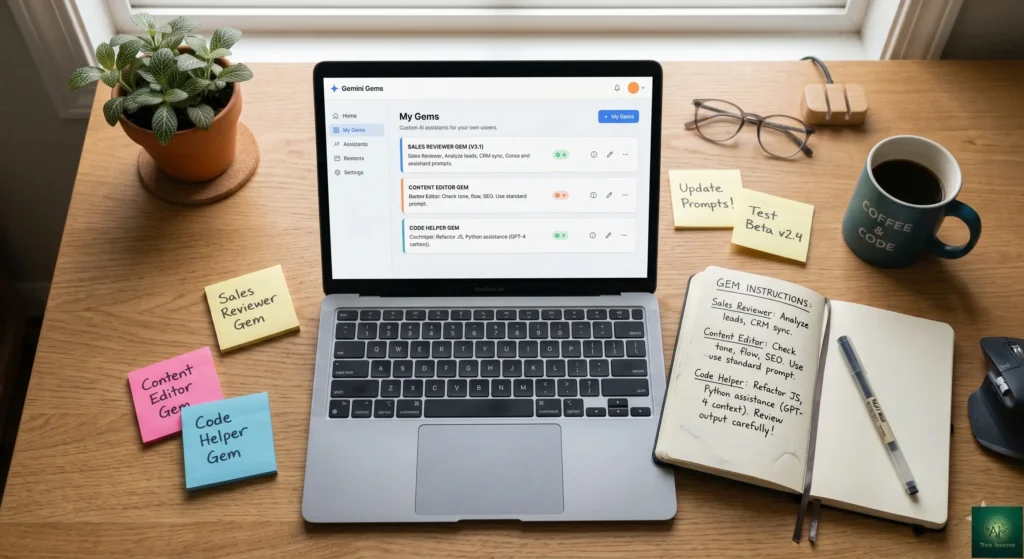
- Persistent custom instructions. Tell the Gem its role (“SEO content editor,” “executive assistant,” “Python tutor”), its tone, and its constraints once. Every subsequent conversation with that Gem starts from that persona without you re-explaining.
- Native Google Workspace + Drive integration. Connect Drive folders, Docs, Sheets, Gmail threads, Calendar events. The Gem reads them live — when you update the source, the Gem sees the update on the next query. This is the integration the source post called the “killer feature” and it remains the most differentiated thing about Gems versus competing custom-AI tools.
- 1M token context window. Roughly 750,000 words of context. Useful when you want to feed a Gem a long document, a multi-file codebase, or a year’s worth of meeting notes as ambient context.
What Gems don’t have, that Custom GPTs and Claude Projects do: a dedicated document upload that persists across conversations. Gems work via live Drive sync (great for documents already in Drive) or by pasting context into each conversation (less great). For document-heavy workflows that aren’t already in Google Drive, Claude Projects is structurally a better fit.
🚀 Getting Started: Your First Gem In 10 Minutes
Building your first useful Gem is a 10-minute exercise. The free tier is the right place to start — you get the full Gem creation surface, Drive integration, and Gemini 3.5 Flash. Upgrade to a paid tier later only if you hit usage limits or want better model quality.
Step 1: Access The Gem Manager
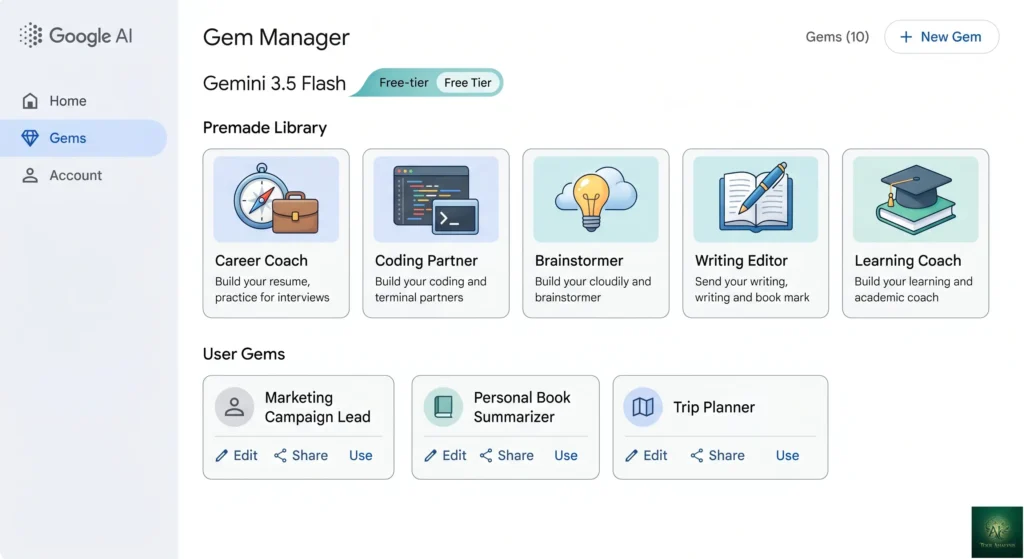
Open gemini.google.com (signed in to your Google account), and look for the “Gems” panel on the left sidebar. From here you can create a new Gem, manage existing ones, or browse Google’s pre-made library. The pre-made library has grown meaningfully through 2026 — current pre-built Gems include Career Coach, Coding Partner, Brainstormer, Writing Editor, Learning Coach, and several others targeted at common workflows.
Step 2: Create A Custom Gem
Pick “Create new Gem” and give it three things: a name, custom instructions (the persona/role/constraints), and optionally a knowledge source (Drive folder, specific files, or pasted reference material). Custom instructions are the most important field — write them as if you’re briefing a new hire on day one. The more specific the brief, the more consistent the Gem.
Example Instructions That Actually Work
A working pattern that consistently produces good Gems: “You are a [specific role] for [specific company / context]. Your job is to [specific outcome]. Always [3-5 specific behaviors]. Never [2-3 things to avoid]. When you respond, structure your output as [specific format]. The most important thing to remember about [user/company] is [key context fact].” Fill the brackets specifically — vague briefs produce vague Gems.
🔑 Features That Actually Matter (May 2026)
🌟 Live Google Drive Integration (Still The Killer Feature)
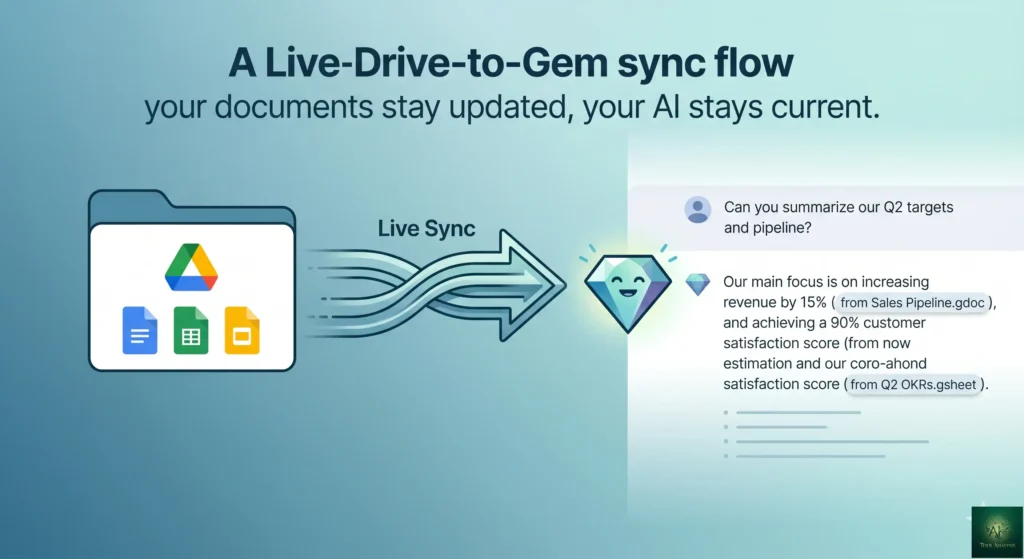
Connect a Drive folder, specific Docs, Sheets, or even Gmail threads as a Gem’s knowledge base. The Gem reads them live — update the source document and the Gem sees the update on the next query. No re-uploading, no stale context. This is the integration that makes Gems uniquely useful inside Google Workspace and the single biggest reason a Workspace-heavy team should pick Gems over Custom GPTs or Claude Projects. ChatGPT GPTs require manual file uploads that go stale; Claude Projects load documents into context at conversation start. Only Gems has true live-sync integration with your actual working files.
🌟 1 Million Token Context Window
Gems inherit Gemini’s 1M token context — roughly 750,000 words. That’s 5x Claude Projects (~200K) and roughly 8x Custom GPTs (~128K). Practical impact: you can feed a Gem an entire codebase, a full quarter of sales call transcripts, or a long technical specification as ambient context and it stays available across the conversation. The 1M context is most useful when paired with Drive integration; less useful for ad-hoc one-off pastes (since the Gem doesn’t persist that pasted context across new conversations the way it persists Drive-linked content).
🌟 Free Creation Across All Tiers
Gem creation isn’t paywalled. Free tier users can build unlimited custom Gems and use Google’s pre-made library. The differences across tiers are model quality (Gemini 3.5 Flash on free → Gemini 3.5 / 3.1 Pro on AI Pro/Ultra), usage limits (now compute-based, not prompt-count-based), and Workspace business integration depth. For most personal and small-team workflows, the free tier is the right starting point.
🌟 Workspace Integration (For Business Plans)
Google Workspace business plans (Standard, Plus, Enterprise) get Gems with additional admin controls, shared organizational Gems, audit logging, and data-residency options. For teams already on Workspace, this is the natural deployment path — the Gems integrate with the organization’s existing Drive structure, the admin gets visibility into Gem usage, and shared Gems can be deployed once and used by everyone on the team.
⚠️ Two Features That Sound Better Than They Are
- Image and video understanding in Gems. The capability is real but inconsistent. Gems sometimes “see” an attached image correctly and sometimes refer to it as if it were text the user pasted. For mission-critical multimodal work, build a focused multimodal Gem and test it heavily; for general-purpose use, expect inconsistency.
- Inter-Gem coordination. Google has hinted at Gems being able to call other Gems for sub-tasks. The capability is partially shipped and partially announced; today, treat each Gem as a standalone persona and don’t depend on Gem-to-Gem handoffs for production workflows.
⚔️ Gemini Gems vs ChatGPT Custom GPTs vs Claude Projects (May 2026)
The honest competitive frame for the Gemini Gems review: this is a three-way race where each product has a structural edge that the other two can’t easily replicate. Custom GPTs lead on ecosystem and API connectivity. Claude Projects lead on instruction adherence and document handling. Gems lead on Workspace integration and context window size.
| Dimension | Gemini Gems | ChatGPT Custom GPTs | Claude Projects |
|---|---|---|---|
| Entry tier price | $0 free / $7.99 AI Plus | $0 free / $20 Plus | $0 free / $20 Pro |
| Context window | 1M tokens (~750K words)5-8x LEAD | ~128K tokens | ~200K tokens |
| Document handling | Live Drive sync (Workspace) + paste-in | Manual upload, retrieval chunking, can go stale | Full document loaded into contextPERSISTENT |
| Instruction adherence (Jan 2026) | 82% | 87% | 94%RULES KING |
| Ecosystem size | Modest pre-made library | 3M+ GPTs in storeMARKETPLACE | No public marketplace |
| External API connectivity | Limited | Strong (Actions, function calling)API LEAD | Limited |
| Workspace integration | Native (Drive, Docs, Sheets, Gmail, Calendar)KILLER FEATURE | None beyond OAuth | None native |
| Sharing | Within Workspace org / shareable link | Public marketplace + private | Within Anthropic team / private |
| Best for | Workspace users, large-context tasks | API integrations, marketplace discovery | Rule adherence, document workflows |
The right pick depends on which structural edge matters more for your work. For most Workspace-heavy teams, Gems wins by default because the Drive integration eliminates a class of “where’s the latest version of this doc?” friction. For developers integrating custom-AI into broader product workflows via API, Custom GPTs win because of Actions. For knowledge workers needing high instruction adherence on complex multi-step rules, Claude Projects win on the benchmark.
📊 Context Window Comparison (May 2026)
Tokens of context each custom-AI product holds. Higher is better for long-document workflows.
📊 Instruction Adherence: 30-Rule Test (Jan 2026)
% adherence to a 30-item instruction set. Higher is better. AI Benchmarks Lab methodology.
💰 Pricing & Plans (May 2026)
The Gemini Gems review pricing picture got meaningfully cleaner at Google I/O 2026 — a new mid-tier ($7.99 AI Plus) filled the $0 → $20 gap, and AI Ultra got a dramatic price cut from $249.99 to $99.99. The result is a four-tier ladder that makes more sense for actual users than the earlier “free or $20 Pro” binary.
| Plan | Price | What You Get |
|---|---|---|
| Free | $0 | Full Gem creation, pre-made library, Drive integration, 1M context window, Gemini 3.5 Flash backbone, compute-based usage limitsCOMPLETE PRODUCT |
| Google AI Plus | $7.99/month | Higher compute allowance, better model quality access (mix of 3.5 Flash + Pro), Deep Research, Canvas, Gemini Live voiceNEW TIER |
| Google AI Pro | $19.99/month ($240/year) | Gemini 3.5 / 3.1 Pro default for Gems, highest priority access, Workspace business integration, advanced Drive syncPOWER USER |
| Google AI Ultra | $99.99/month (cut from $249.99) | Everything in Pro + Veo video + deeper agent integration + highest compute + early access to new features−60% AT I/O |
| AI Ultra Max (rumored) | ~$200/month | 20x AI Pro usage limit — power users onlyOVERKILL |
| Workspace Business Standard | $14/seat/month | Gems with org-wide sharing, admin controls, audit logging, business-grade SLA |
| Workspace Business Plus / Enterprise | Higher tiers (custom) | Full enterprise controls, data residency options, deeper Workspace integration |
Two pricing observations matter most for the Gemini Gems review buying decision. First: free is now a complete product — you don’t need to upgrade to get Gem creation, Drive integration, or the 1M context window. Upgrades buy better model quality and higher usage limits, not new features. Second: the new $99.99 AI Ultra makes the top tier defensible for serious professional use. At $249.99 it was overpriced for almost everyone; at $99.99 it’s a real consideration for power users running daily Gem-heavy workflows.
⚠️ Reality Check: No Dedicated Document Upload Is A Real Gap
The single workflow gap that pushes users toward Claude Projects rather than Gemini Gems: dedicated document upload that persists across conversations. Claude Projects lets you upload a PDF and the document stays in the Project’s context for every future conversation. Gems either rely on Drive integration (great if your doc is in Drive) or paste-in (which doesn’t persist). For document-heavy workflows centered on PDFs, contracts, or research papers that aren’t in your Drive — Claude Projects is structurally better. Gems is genuinely worse here, not just different.
⚙️ The New Compute-Based Usage Model
One of the meaningful I/O 2026 changes that affects Gemini Gems specifically: Google moved paid plans away from fixed daily prompt caps (“X prompts per day”) toward compute-based limits (“Y compute units per period”). The practical effect for typical Gem usage:
- Short text Gem queries cost very little compute. You’ll burn through a small fraction of your allowance for most “draft this email,” “summarize that meeting note,” “explain this concept” use cases.
- Long-context Gem queries (where the 1M context window is filled) cost more compute. A Gem analyzing a 100-page document is meaningfully heavier than a chat-style exchange.
- Multimodal Gem queries (video, image-heavy) cost significantly more compute. Building a Veo-powered video-generation Gem on AI Ultra will eat the allowance faster than text-only equivalents.
- Coding sessions with a Gem that reads multiple files and produces structured outputs cost more than equivalent chat sessions.
Net for most users: the new compute-based limits feel more generous than the old daily caps because typical conversations spend less of the allowance. Heavy users who run video or long-document Gems will hit limits faster than under the old prompt cap. The change favors the typical user at the cost of the heaviest users — a sensible tradeoff for Google.
💡 Key Takeaway: The Drive Integration Is The Only Argument That Matters For Workspace Users
If your work happens in Google Workspace — Drive, Docs, Sheets, Gmail, Calendar — Gemini Gems wins by default for one reason: live Drive sync. When you update a source document, the Gem sees the update on the next query. No re-uploading, no stale knowledge bases, no manual file management. ChatGPT Custom GPTs require periodic re-uploads as documents change. Claude Projects load documents at conversation start and don’t track ongoing edits. Only Gems has true live-sync integration with your actual working files. For Workspace-heavy teams, this single advantage is worth more than the higher instruction adherence Claude offers or the larger marketplace ChatGPT provides. Pick by workflow, not by aggregate quality scores.
💼 Real Business Use Cases (Tested May 2026)
✅ HR Onboarding Automation
Build a Gem with custom instructions like “You are HR onboarding assistant for [Company]. You have access to our employee handbook, benefits guide, and IT setup docs in Drive. Answer new-hire questions accurately. Always cite the source document. Escalate complex policy questions to HR.” Connect the Gem to the relevant Drive folder. Result: every new hire has a 24/7 first-line resource that stays current as docs update. ROI is real and measurable for teams hiring more than a few people per month.
✅ Proposal Generation From Sales Calls
Build a Gem connected to your sales call transcript folder and your proposal template library. Custom instructions: “When given a call transcript, produce a proposal draft following our template. Match the customer’s stated priorities, use their language, and flag any commercial questions that need pricing team input before sending.” The 1M context window lets the Gem cross-reference multiple past proposals + the current call. Quality is genuinely useful for senior sales reps; junior reps still need to edit substantially.
✅ SEO Content Production
Build a Gem connected to your editorial style guide, brand voice doc, and a folder of high-performing past articles. Custom instructions: “Write articles in our voice. Match the structure of our top-performing pieces. Include the keywords I provide. Never use [list of banned phrases].” Drive integration keeps the style guide current; the 1M context lets the Gem read several past articles for tone calibration. Result: faster first drafts that need less editing than generic GPT-4 output.
✅ Customer Support Knowledge Base
Build a Gem connected to your support documentation, FAQ, and resolved ticket database. Custom instructions: “Answer customer questions using our docs. Cite the doc section. Flag tickets that look like edge cases or product bugs. Don’t make up information.” Live Drive sync means the Gem stays current when docs update. Useful as an internal tool for support agents; with care, can also power customer-facing support widgets via Workspace API.
🎯 Who Should Use Gemini Gems (And At Which Tier)
Free Tier — Perfect For:
- Anyone trying out custom-AI assistants for the first time — Gems give you full functionality on day one.
- Personal productivity workflows where you don’t need Gemini 3.5 / 3.1 Pro quality.
- Workspace users who already store work in Drive and want a live-synced AI helper.
- Small-team experimentation before committing to a paid plan.
AI Plus ($7.99/mo) — Perfect For:
- Free-tier users who hit usage limits but don’t need full Pro features. The new $7.99 tier is the right next step.
- Users who want better model quality access (mix of Flash + Pro) without committing to $20/month.
- Students, hobbyists, and casual professional users.
AI Pro ($19.99/mo) — Perfect For:
- Power users who need Gemini 3.5 / 3.1 Pro by default for every Gem query.
- Knowledge workers running Gems-heavy daily workflows.
- Workspace Business teams that want the deeper integration depth.
- Anyone comparing against ChatGPT Plus or Claude Pro at the same $20 price.
AI Ultra ($99.99/mo, post-price-cut) — Perfect For:
- Heavy professional users running Gems daily across multiple high-volume use cases.
- Users who need Veo video generation in addition to Gems.
- Power users who hit AI Pro compute limits regularly and want headroom.
- Early adopters who want first access to new Google AI features.
Skip Gemini Gems If:
- You don’t use Google Workspace and have no Drive content — the integration is the killer feature, and without Workspace it’s just “another custom-AI tool.”
- Your workflow depends on document handling where Claude Projects’ full-context document loading wins (heavy contract analysis, deep PDF review).
- You need to build custom-AI tools that call external APIs at production scale — ChatGPT Custom GPTs Actions is structurally better for that.
- You need the largest possible custom-AI marketplace for discovery — Custom GPTs win at 3M+ pre-built options.
🎯 Get Honest AI Tool Reviews — Free
Gems, Custom GPTs, Claude Projects, Gemini Skills — the custom-AI space moves weekly. Subscribe for honest reviews, pricing changes, and verdicts that actually matter for buying decisions.
Subscribe to the Weekly Brief →💬 Community Sentiment (May 2026)
The Gemini Gems review sentiment picture across r/Bard, Hacker News threads, and X discussions in May 2026 has become more positive through 2026 as the product matured and the AI Plus / AI Ultra price changes landed well.
What Users Consistently Love
- The Drive integration is the single most-praised feature in community discussions. Users consistently describe it as “the thing that makes Gems different from GPTs.”
- The 1M token context window — for the specific use cases where it matters (long documents, multi-file codebases, historical context) it’s a real differentiator.
- The new AI Plus tier at $7.99/month landed well. Multiple commenters described it as “the price point AI Pro should have been from day one.”
- The AI Ultra price cut to $99.99 was met with strong approval. Some commenters described their previous reluctance to upgrade to Ultra at $249.99 as “the only thing keeping me on a lower tier.”
- Compute-based usage limits feel more generous than the old prompt caps for typical conversational use.
Common Complaints
- The instruction adherence benchmark (Gemini 82% vs Claude 94% vs GPT 87% in January 2026 testing) is a real and persistent weakness. Users running rule-heavy Gems often find them drifting from the spec over long conversations.
- No dedicated document upload feature. Workflows centered on documents not in Drive feel clunky compared to Claude Projects’ approach.
- The pre-made Gem library is growing but still meaningfully smaller than ChatGPT’s GPT Store.
- Inter-Gem coordination (Gems calling other Gems) is announced but partially shipped, creating false expectations.
- Workspace Business integration depth still trails what enterprise IT teams want for granular Gem deployment controls.
✅ Final Verdict
The honest Gemini Gems review verdict for May 2026: for Google Workspace users, this is the right custom-AI tool, period. The live Drive integration eliminates a class of friction that no competitor matches, the 1M token context window is genuinely useful for the workflows that need it, and the free tier is a complete product rather than a teaser. For non-Workspace users, Gems is a credible but not dominant choice — Claude Projects wins on instruction adherence, Custom GPTs win on ecosystem and API integration, and Gems lands in the middle without a structural edge that compensates.
If we had to name one default for typical readers: free Gemini Gems for anyone in Google Workspace today, paired with paid ChatGPT Plus or Claude Pro only if your work routinely needs the strengths Gems lacks. The free tier is genuinely complete; the paid tiers buy you better model quality and more compute, not new features. AI Plus at $7.99/month is the right paid step for most users who outgrow free; AI Pro at $19.99 is for power users; AI Ultra at $99.99 (post-price-cut) is for serious daily heavy users.
Overall score: 4.4/5 ⭐⭐⭐⭐½ — up from 4.2/5 in the February 2026 review. The bump is for the AI Plus tier addition, the AI Ultra price cut, the new compute-based limits being more user-friendly, and Gemini 3.5 Flash improving the free-tier model quality. Still a fractional point off for the instruction adherence gap versus Claude and the missing dedicated document upload that Claude Projects gets right.
❓ Frequently Asked Questions
Is there a free version of Gemini Gems?
Yes — free tier gives you the full Gem creation surface, Drive integration, 1M token context window, and Gemini 3.5 Flash as the backbone model. The only differences across tiers are model quality (Pro tiers get Gemini 3.5 / 3.1 Pro), compute allowance, and Workspace business features. For most personal and small-team use cases, free is a complete product.
Can Gemini Gems replace ChatGPT Custom GPTs?
For most Workspace-heavy workflows, yes — Gems’ Drive integration is a meaningful upgrade over Custom GPTs’ manual file uploads. For workflows that depend on the ChatGPT marketplace or external API calls via Actions, Custom GPTs remain the better fit. Many sophisticated users carry both at $20/month each.
How many files can I link to a Gemini Gem?
Gems support Drive folder linking (recursive — includes all files in the folder), specific Doc/Sheet/Slide links, and Gmail thread context. The 1M token context window is the effective limit — you can link as many files as fit within that budget. For most workflows, that means hundreds of typical documents or a small codebase. Linking everything in a giant folder is technically allowed but wastes context the Gem could use for the actual query.
Can I share Gemini Gems with other people?
Yes — Gems can be shared within a Google Workspace organization (most natural for business teams) or via shareable link. The recipient needs a Google account to use the Gem. Workspace business plans add admin controls for org-wide Gem deployment and audit logging.
How does the 1M token context window compare to ChatGPT and Claude?
1M tokens is roughly 5x Claude Projects’ ~200K and roughly 8x ChatGPT Custom GPTs’ ~128K. Translation in practical terms: Gems can hold roughly 750,000 words of context, versus Claude’s ~150,000 and Custom GPTs’ ~96,000. The advantage matters most for use cases involving long documents, multi-file codebases, or historical context (call transcripts, meeting notes spanning months).
What changed with Gemini pricing at Google I/O 2026?
Three things: (1) New AI Plus tier launched at $7.99/month — slots between free and AI Pro. (2) AI Ultra cut from $249.99 to $99.99/month — a 60% price reduction. (3) Paid plans moved from fixed daily prompt caps to compute-based usage limits, where short text prompts cost less than heavy multimodal or long-context tasks. Net effect: the pricing ladder makes more sense than it did pre-I/O.
Which Gemini model powers Gems?
Free and AI Plus tiers use Gemini 3.5 Flash (launched May 19, 2026) as the default Gem backbone. AI Pro and AI Ultra get Gemini 3.5 / 3.1 Pro as the default, with Gemini 3.5 Pro reaching general availability in June 2026 and expected to become the AI Pro default by end of June. Workspace Business plans follow the same model availability as AI Pro.
What’s the difference between Gemini Gems and Gemini Skills?
Gems are persistent custom personas — you build one with instructions and knowledge sources, and use it across conversations. “Skills” has been used by Claude (Anthropic’s Skill marketplace) and recently by other vendors; Google hasn’t formally launched a competing “Gemini Skills” product as of May 2026. If you see references to Gemini Skills, they likely mean either pre-made Gems (which Google sometimes calls “Skill”-style templates) or third-party comparison terminology.
✅ Where Gemini Gems Wins
- ✓ Live Google Drive integration (the killer feature)
- ✓ 1M token context — 5x Claude / 8x ChatGPT Custom GPTs
- ✓ Free tier is a complete product (Gem creation, Drive sync, 1M context)
- ✓ New AI Plus tier at $7.99/mo fills the $0 → $20 gap
- ✓ AI Ultra cut 60% to $99.99/mo — now defensible for power users
- ✓ Native Workspace business integration
- ✓ Compute-based usage limits more generous than old daily caps
- ✓ Gemini 3.5 Flash backbone (free) → 3.5 Pro by end of June
❌ Where Gemini Gems Falls Short
- ✗ Instruction adherence trails Claude (82% vs 94%)
- ✗ No dedicated document upload (Claude Projects wins here)
- ✗ Pre-made library smaller than ChatGPT’s 3M+ GPT Store
- ✗ External API connectivity limited vs Custom GPTs Actions
- ✗ Inter-Gem coordination partially shipped — false expectations
- ✗ Image/video understanding inconsistent in Gems
- ✗ Workspace admin controls less mature than enterprise expects
- ✗ Less useful for non-Workspace users (no structural edge)
Bump for the AI Plus tier addition, the AI Ultra price cut, compute-based limits, and Gemini 3.5 Flash improving free-tier model quality. Still a fractional point off for the instruction adherence gap versus Claude and the missing dedicated document upload that Claude Projects gets right.
📚 Related Reading
- Gemini Review — full review of Google’s Gemini AI flagship
- ChatGPT Review — for Custom GPTs as the obvious alternative
- Claude AI Review — for Claude Projects as the instruction-adherence alternative
- Perplexity AI Review — for research-focused workflows where citations matter
- DeepSeek Review — for cost-sensitive custom AI workloads via API
- Google Antigravity Review — for coding-focused agentic workflows
- NotebookLM Review — for research workflows where Gems aren’t quite right
- Best AI Developer Tools — broader dev-stack context
- The Complete AI Tools Guide — buyer’s guide for 200+ AI tools
Founder of AI Tool Analysis. Reads every pricing page, help article and footnote so you don’t have to. Covering AI tools since 2025. See how we research →
Stay Updated on Custom AI Assistants
Gems, Custom GPTs, Claude Projects, Gemini Skills — the custom-AI space shifts every few weeks. Subscribe for honest reviews of new tiers, model integrations, marketplace launches, and the verdicts that actually matter for buying decisions — delivered every Thursday at 9 AM EST.
- ✅ Honest Reviews: We actually test these products, not rewrite press releases
- ✅ Major Launches: Gemini / ChatGPT / Claude custom-AI feature updates covered within days
- ✅ Pricing Changes: Know when tiers shift
- ✅ Benchmark Updates: Instruction adherence, context window, integration depth tracked
- ✅ No Hype: Just the AI tool news that matters for your work
Free, unsubscribe anytime.

Last Updated: May 30, 2026
Tools Covered: Gemini Gems on free tier, Google AI Plus ($7.99/mo), Google AI Pro ($19.99/mo), and Google AI Ultra ($99.99/mo, post-I/O 2026 price cut from $249.99). All pricing verified against gemini.google.com/subscriptions as of May 30, 2026. Comparison testing against ChatGPT Custom GPTs (Plus $20/mo) and Claude Projects (Pro $20/mo). Verify current pricing before publish — Google occasionally adjusts tiers.
Next Review Update: August 2026 (or sooner if Google ships Gemini 3.5 Pro to AI Pro Gems by end of June as expected, or rolls out additional pricing changes)
Have a tool you want us to review? Suggest it here | Questions? Contact us