
Welcome to Our Google AI Studio Review
🆕 Latest Update (March 2026): Gemini 3.1 Pro replaces Gemini 3 Pro (deprecated today). Nano Banana 2 officially launched with 4K image generation and Google Search integration. New Gemini 3.1 Flash-Lite offers frontier performance at $0.25/1M tokens. Computer Use, Interactions API, and Deep Research Agent now available. Google I/O 2026 confirmed for May 19-20.
The Bottom Line
If you remember nothing else: Google AI Studio is like getting a backstage pass to Google’s AI playground, and the backstage just got a massive renovation. You now get access to Gemini 3.1 Pro (more than double the reasoning performance of its predecessor), Nano Banana 2 for lightning-fast 4K image generation, Veo 3.1 for video creation with native audio, and a growing suite of agentic tools, all without paying a cent. The catch? Google still uses your prompts to train their models on the free tier. For prototyping and experimentation, nothing comes close. For anything sensitive, you’ll need to enable billing.
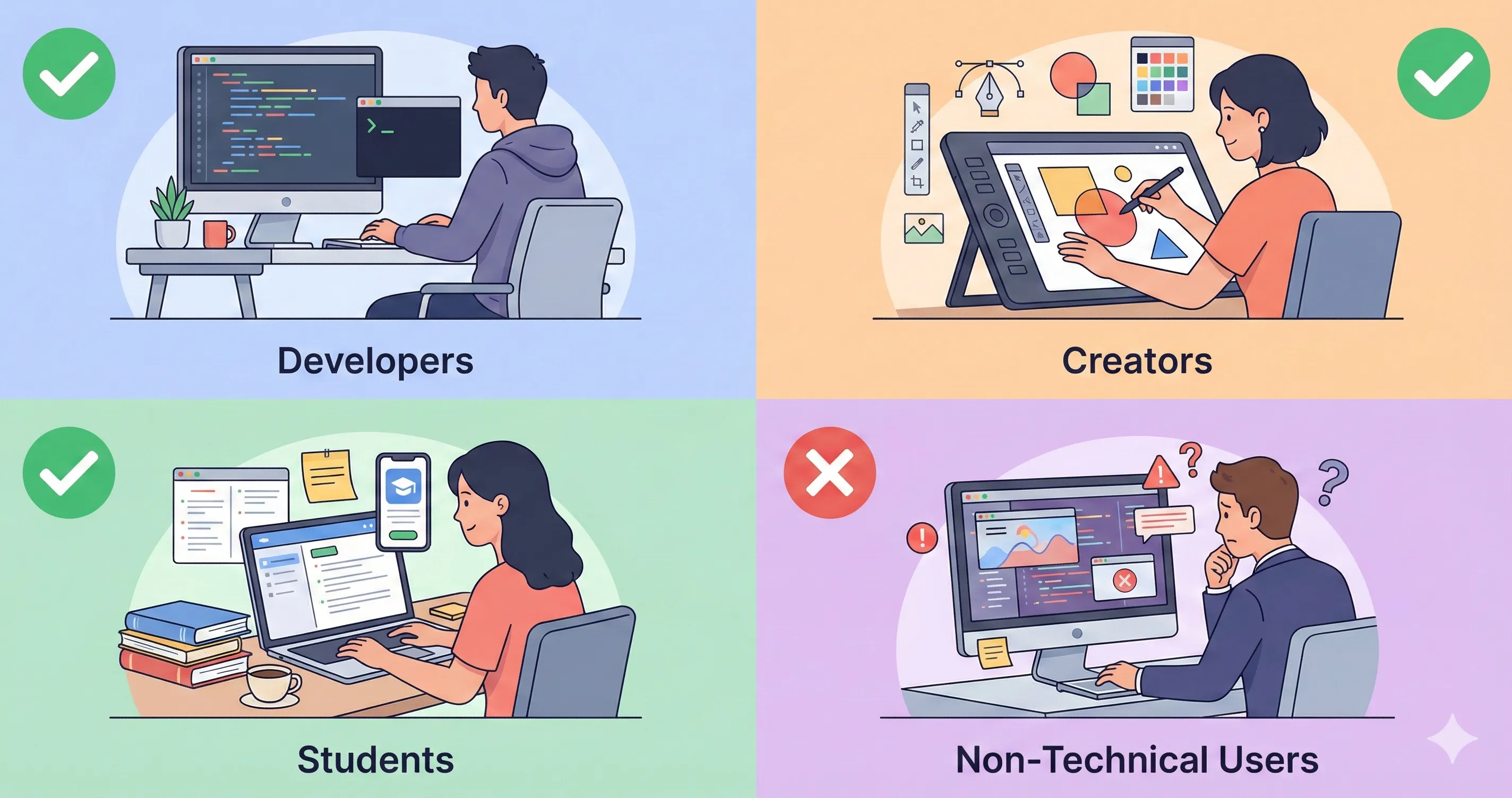
Best for: Developers prototyping AI features, creators experimenting with multimodal AI, students learning prompt engineering, anyone wanting to test Gemini’s latest models before committing to paid plans.
Skip if: You’re working with confidential data, need production-level reliability, or want a polished consumer interface like ChatGPT.
🎯 What Google AI Studio Actually Does (Not What Marketing Claims)
Google AI Studio is Google’s browser-based playground for experimenting with their Gemini AI models. Think of it as a developer sandbox where you can test prompts, generate images, create videos, build entire applications, and even deploy them, all before managing production infrastructure.
Forget the marketing speak. Here’s what it actually does:
The Core Capability: AI Studio gives you direct access to Google’s latest models in one unified interface. You can switch between Gemini 3.1 Pro for complex reasoning, Gemini 3 Flash for speed, the brand-new 3.1 Flash-Lite for budget-friendly bulk tasks, Nano Banana 2 for blazing-fast image generation, Nano Banana Pro for maximum image quality, and Veo 3.1 for video creation with native audio, all without managing API keys or billing on the free tier.
What This Means in Practice: Instead of copying code between ChatGPT and your IDE, you can prototype entire AI workflows, test different model behaviors, build no-code applications with the Build feature, and export working code directly to Google Colab or deploy to Cloud Run with a single click. The February 2026 additions of Computer Use and the Interactions API mean AI Studio is no longer just a prompt tester. It’s becoming a full agentic development environment.
REALITY CHECK
Marketing Claims: “The fastest path from prompt to production with Gemini”
Actual Experience: It’s genuinely fast for prototyping, and the new Build feature makes app creation surprisingly accessible. But the learning curve is still steeper than ChatGPT. The interface assumes you know what you’re doing with model parameters. Documentation remains scattered across multiple Google properties.
Verdict: Excellent for developers and ambitious creators, still intimidating for complete beginners.
Key Capabilities at a Glance (March 2026):
- Text Generation: Gemini 3.1 Pro (1M token context, frontier reasoning), 3 Flash (speed optimized), 3.1 Flash-Lite (cost-efficient at $0.25/1M tokens)
- Image Generation: Nano Banana 2 (fast, 4K, Google Search integration), Nano Banana Pro (highest quality), Imagen 4
- Video Generation: Veo 3.1 with native audio, dialogue, vertical output, and 4K upscaling
- Audio: Text-to-speech with natural voice output via Gemini 2.5 Flash/Pro TTS
- Screen Streaming: Share your screen and get real-time AI guidance via the Live API
- Computer Use: Gemini models can now interact with desktop applications autonomously
- Code Export: One-click export to Python, JavaScript, REST API calls, or deploy directly to Cloud Run
- Build Feature: Create AI-powered apps using natural language, no coding required
- Deep Research Agent: Autonomous multi-step research across hundreds of sources
🆕 What Changed Since January 2026
The AI Studio landscape has shifted dramatically in the past two months. Here’s what matters for your Google AI Studio review workflow:
1. Gemini 3.1 Pro Replaces Gemini 3 Pro (February 19, 2026)
This is the headline upgrade. Gemini 3.1 Pro more than doubles the reasoning performance of 3 Pro on ARC-AGI-2, jumping to a verified 77.1%. It delivers stronger software engineering capabilities, improved agentic reliability, and more efficient token usage. The pricing stays the same ($2/1M input tokens, $12/1M output), but you get dramatically more intelligence per dollar. Gemini 3 Pro is deprecated as of today (March 9, 2026), so if you haven’t migrated, do it now.
2. Nano Banana 2 Officially Launched (February 26, 2026)
Remember when we mentioned “Nano Banana 2 Flash spotted in testing” back in January? It’s now official. Nano Banana 2 (technically Gemini 3.1 Flash Image) combines the high-fidelity output of Nano Banana Pro with Flash-tier speed. Key improvements include 4K resolution support (up to 4096x4096px), Google Search integration for real-time visual knowledge, up to 14 reference images for complex editing, and improved subject consistency. It’s now the default image model in the Gemini app. For your image generation comparisons, this changes the game.
3. Gemini 3.1 Flash-Lite Preview (March 3, 2026)
Google’s most cost-efficient model yet just landed. At $0.25/1M input tokens and $1.50/1M output tokens, 3.1 Flash-Lite delivers 2.5x faster time-to-first-token and 45% faster output than 2.5 Flash, while scoring 86.9% on GPQA Diamond. It’s built for high-volume tasks like translation, content moderation, and generating UI dashboards at scale. Available now in AI Studio with configurable thinking levels.
4. Computer Use, Interactions API, and Deep Research Agent
Three new developer-focused capabilities arrived in February. Computer Use lets Gemini 3 Pro and Flash interact with desktop applications, navigating interfaces the way a human would. The Interactions API provides a unified interface for building agentic workflows with simpler state management. And the Deep Research Agent autonomously plans and executes multi-step research across hundreds of sources, producing cited reports. These features position AI Studio as more than a prompt tester; it’s becoming a full agentic development platform.
5. Google Flow Merges Three Creative Tools (February 25, 2026)
Google merged Flow (video), Whisk (mood boards), and ImageFX (text-to-image) into a single unified creative workspace powered by Veo 3.1, Nano Banana, and Gemini. This matters for AI Studio users because the same models are accessible through the API, and the creative pipeline from concept to finished video now lives in one place. Meanwhile, Veo 3.1 received updates for richer dialogue, native vertical output for YouTube Shorts, and upscaling to 4K resolution. For creators evaluating AI video tools, see how this compares in our Seedance review and Kling AI guide.
6. Agentic Vision and Lyria 3
Agentic Vision turns Gemini 3 Flash from a passive image analyzer into an active investigator. Instead of processing an image in one static pass (which causes hallucinations on small details), the model now “explores” the image, zooming and investigating. This delivers consistent quality improvements across vision benchmarks. Separately, Lyria 3 launched for music generation within the Gemini app, producing 30-second audio tracks from text, photos, or video input.
🚀 Getting Started: Your First 10 Minutes
Getting into Google AI Studio takes about 2 minutes. Here’s the real process:
Step 1: Access AI Studio (30 seconds)
Go to aistudio.google.com and sign in with your Google account. That’s it. No credit card required.
Step 2: Choose Your First Task (1 minute)
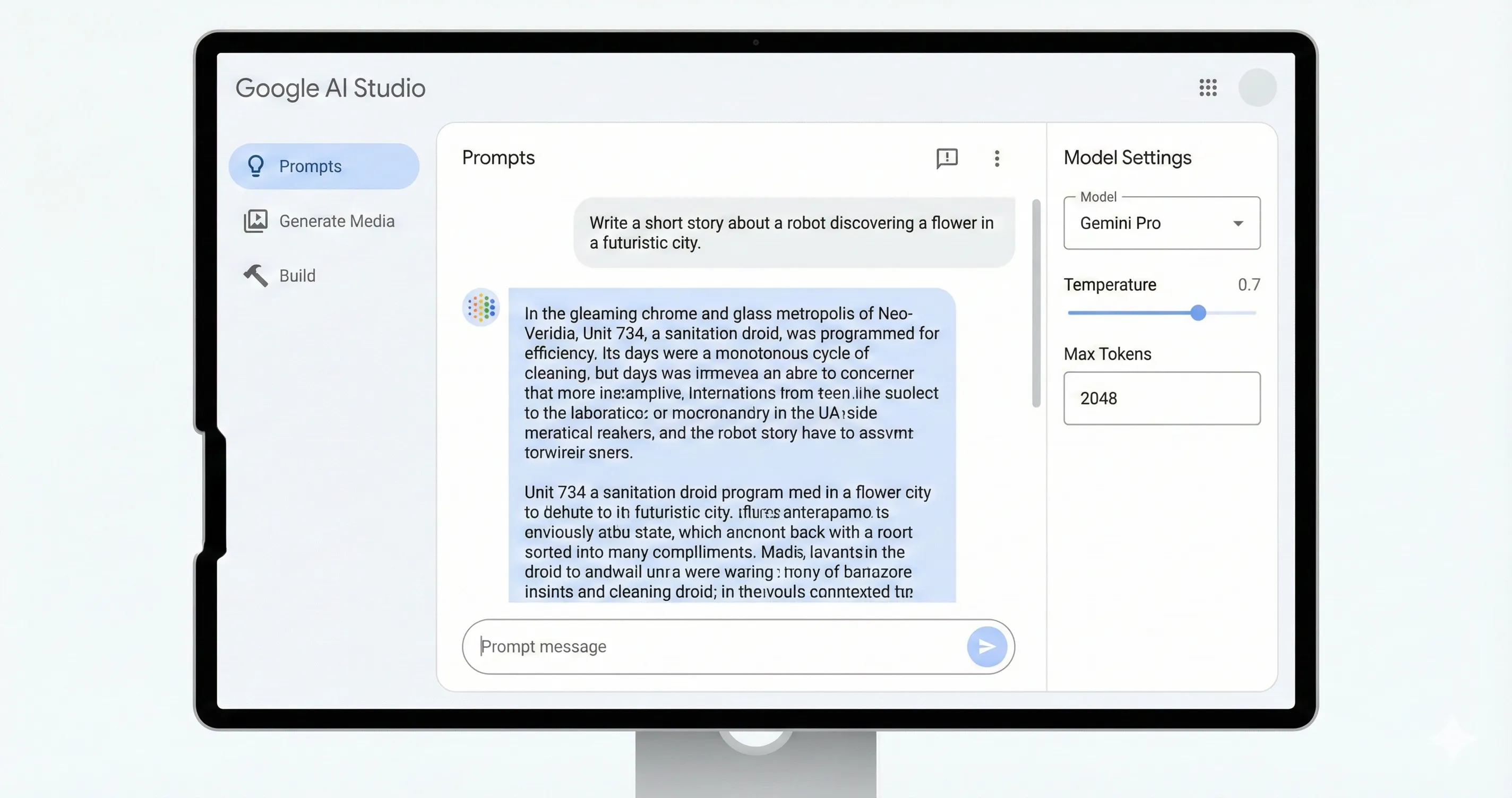
The interface opens to a chat-like prompt window. On the left sidebar, you’ll see options for Prompts (test text generation and conversations), Generate Media (create images, videos, and audio), and Build (create AI-powered apps without code). The Build feature is the sleeper hit here. Describe an app in plain English, and Gemini generates working React + Tailwind code instantly.
Step 3: Select a Model (30 seconds)
In the model dropdown, choose based on your task. Gemini 3.1 Pro for maximum intelligence and complex reasoning. Gemini 3 Flash for fast, capable general use (the default). Gemini 3.1 Flash-Lite for high-volume, budget-conscious tasks. Nano Banana 2 for fast image generation with 4K support. Nano Banana Pro for highest-quality image output. Veo 3.1 for video generation with native audio.
Step 4: Test Your First Prompt (2 minutes)
Type a prompt and hit Enter. You’ll see immediate results. Adjust parameters like temperature (creativity), thinking level (reasoning depth, new in Gemini 3), and max tokens (response length) in the right panel. The new thinking levels feature lets you control how much the model reasons before answering, a powerful tool for balancing speed against accuracy.
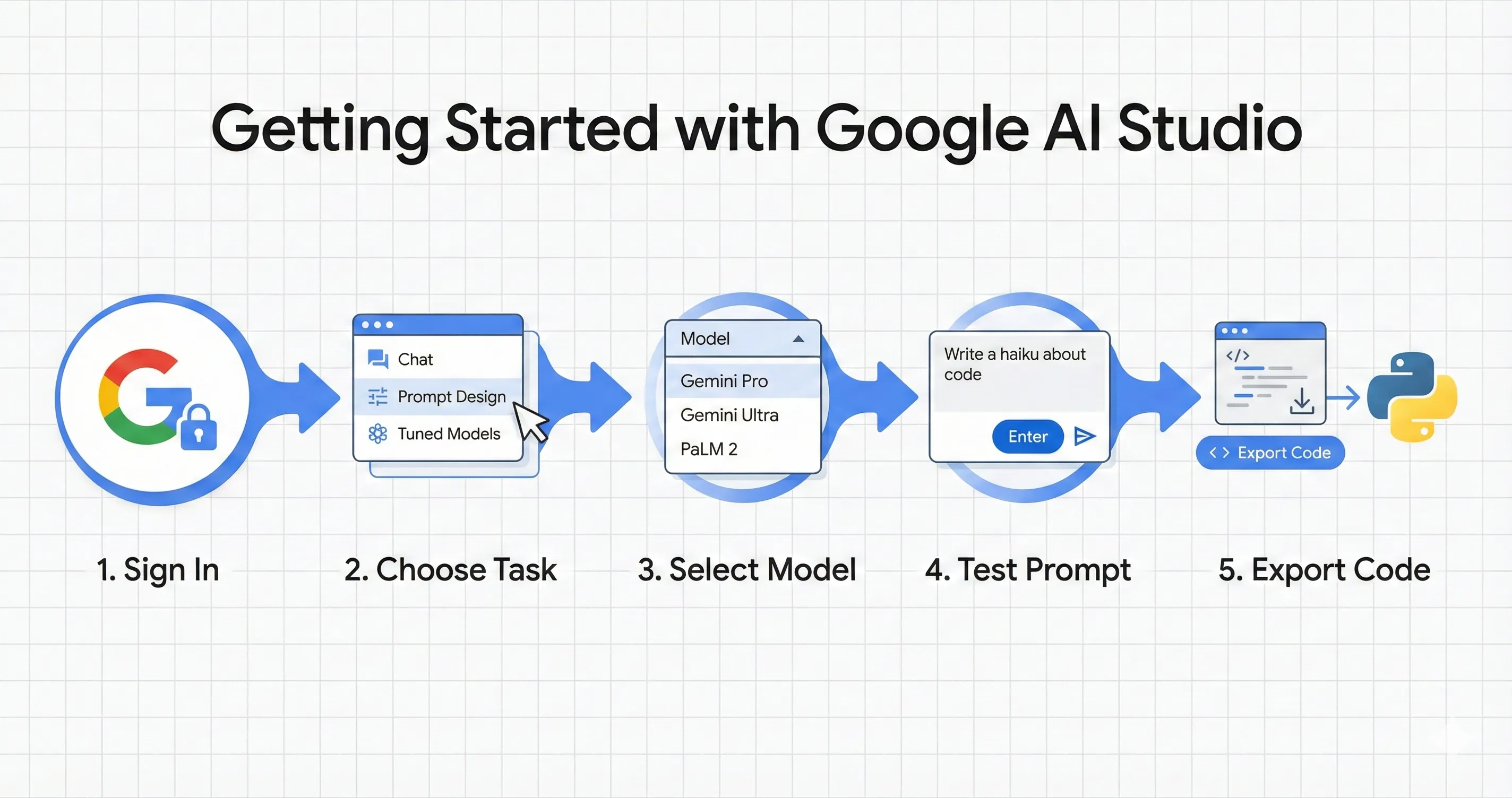
Step 5: Export Your Code or Deploy (1 minute)
Click “Get code” to export your prompt as Python, JavaScript, or REST API calls. You can also open directly in Google Colab for immediate execution, or deploy to Google Cloud Run with a single button click. If you used the Build feature, your entire application can go live in minutes.
Pro Tip: Start with the “Prompt Gallery” to see examples of effective prompts across different use cases. And if you’re building apps, check Google’s new Antigravity platform for more complex multi-file agentic development that picks up where AI Studio’s Build feature leaves off.
⚡ Google AI Studio Review: Features That Actually Matter (And 2 That Don’t)
Features Worth Your Time:
1. Multimodal Input ⭐⭐⭐⭐⭐
Upload PDFs, images, audio, or video files, and the AI processes them together with your text prompt. Gemini 3.1 Pro’s 1M token context window means you can upload entire codebases, book-length documents, or hours of video. With Agentic Vision now active in 3 Flash, the model actively investigates images instead of making single-pass guesses, dramatically reducing hallucinations on visual details.
2. Nano Banana 2 Image Generation ⭐⭐⭐⭐⭐
The February 2026 launch of Nano Banana 2 is a genuine leap forward. It generates 4K images, integrates with Google Search for real-time visual knowledge (so it knows what current brand logos and trending styles look like), supports up to 14 reference images for complex editing, and renders text in images accurately. Images at 512px generate in 3-8 seconds. Even at 4K, you’re looking at 15-40 seconds. For a free tool, this rivals what paid image generators offered just six months ago.
3. Screen Streaming (Live API) ⭐⭐⭐⭐⭐
Share your screen and speak to the AI directly in real-time. The AI sees what you’re working on and guides you through tasks. Developers praise this for routine coding tasks and quick prototyping. The AI can spot mistakes in your code or brainstorm workarounds while watching you work. Combined with the new Computer Use capability, this is evolving from passive guidance to active assistance.
4. Build Feature (No-Code Apps) ⭐⭐⭐⭐⭐
This feature has become a standout since our last Google AI Studio review. Describe what you want in plain English, and Gemini generates working applications with React and Tailwind CSS. One developer reported building 12 programs in relatively little time, most of which he wouldn’t have bothered creating without it. You can now deploy these directly to Cloud Run, making the path from idea to live app remarkably short.
5. Code Export and Colab Integration ⭐⭐⭐⭐
One-click export to Python, JavaScript, or REST API calls. The “Open in Colab” button sends your prompt to a ready-to-run notebook. This bridges the gap between prototyping and production without manual copy-pasting. For developers already in Google’s ecosystem, the friction is minimal.
6. Deep Research Agent ⭐⭐⭐⭐ (New)
Available via the new Interactions API, the Deep Research Agent autonomously plans and executes multi-step research tasks across hundreds of sources, then produces cited, interactive reports. Think of it as Perplexity-level research built directly into your development environment. It’s in preview, and the quality of synthesized reports is impressive for a free tool. For researchers, this competes with tools like Anara AI and NotebookLM.
Features That Sound Better Than They Are:
1. “Free Unlimited Access”
Free tier has rate limits that prevent heavy production usage. Gemini 3.1 Pro is limited to 2 requests per minute and 50 per day on the free tier. 3 Flash is more generous at 15 requests per minute and 1,500 per day. Fine for experimenting, not for building real products at scale.
2. “Same Models as Gemini App”
AI Studio often has less restrictive safety filters than the consumer Gemini app, which can be a pro or con depending on your use case. The parameter controls (temperature, thinking levels, safety settings) give you far more granularity than the consumer interface. But note: there’s no free API tier for Gemini 3.1 Pro, you can only test it for free in the AI Studio interface itself.
🔐 The Privacy Trade-Off Discovered During Google AI Studio Review
This remains the most important section of this review. Google AI Studio’s free tier comes with a significant privacy trade-off that you need to understand before using it.
REALITY CHECK
Marketing Claims: “Free access to powerful AI tools”
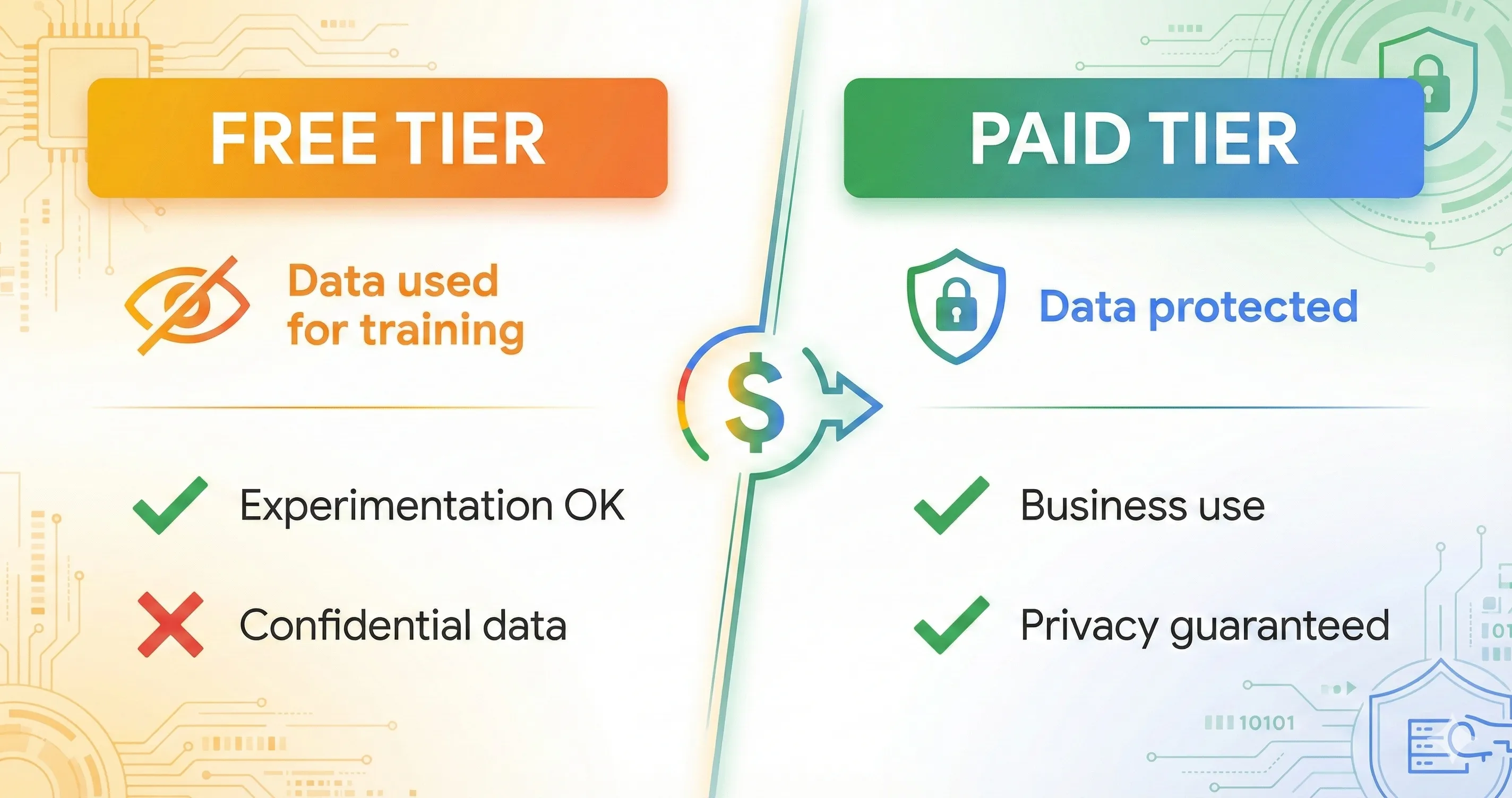
Actual Experience: On the free tier, Google collects and uses ALL your inputs, including prompts, uploaded files, generated content, and even screen content if using screen streaming, to improve their AI models. This data may be reviewed by human evaluators.
Verdict: Fine for public data and experimentation. Never use for confidential information on the free tier.
What Google Collects (Free Tier): Every prompt you type, every file you upload, every image you generate, and screen content if using screen streaming. Human reviewers may see this data.
How to Protect Your Data:
Option 1: Enable Cloud Billing. Switch to pay-as-you-go by enabling Google Cloud billing. Google guarantees that your data won’t be used for training on paid tiers. This is the only way to use AI Studio with sensitive information.
Option 2: Treat It as Public. If you’re just experimenting or prototyping with non-sensitive data, the free tier is perfectly fine. Just don’t enter anything you wouldn’t want Google to see.
Enterprise Consideration: The March 2026 introduction of the Workspace AI Expanded Access add-on adds another layer. Enterprise users now have more granular control over AI data handling, but at additional cost. For organizations in regulated industries, paid tiers with billing enabled remain the only safe option.
💰 Pricing Breakdown: What You’ll Actually Pay
Google AI Studio pricing has gotten more complex with the new model lineup. Here’s the reality as of March 2026:
AI Studio Interface: Free
The AI Studio web interface itself is free to use. You can experiment with prompts, test models, build apps, and prototype without paying anything.
Free Tier Limits (March 2026):
- Gemini 3 Flash: 15 requests/minute, 1,500 requests/day (free API tier available)
- Gemini 3.1 Flash-Lite: Free API tier available with rate limits
- Gemini 3.1 Pro: Free in AI Studio interface only. No free API tier. 2 requests/minute in interface.
- Image Generation: Rate-limited (varies by model)
- Context Window: 1M tokens across all models
Paid Tier (Gemini API via Cloud Billing):
| Model | Input (per 1M tokens) | Output (per 1M tokens) | Best For |
|---|---|---|---|
| Gemini 3.1 Flash-Lite | $0.25 | $1.50 | High-volume, budget tasks |
| Gemini 3 Flash | $0.075 | $0.30 | Fast general tasks |
| Gemini 3.1 Pro (≤200K) | $2.00 | $12.00 | Complex reasoning, agents |
| Gemini 3.1 Pro (>200K) | $4.00 | $18.00 | Long-context reasoning |
| Nano Banana 2 (512px) | ~$0.045/image | — | Quick preview images |
| Nano Banana 2 (4K) | ~$0.151/image | — | Production images |
| Nano Banana Pro | ~$0.134/image (1K) | — | Highest quality images |
Consumer Subscription Alternative:
If you want the models without API complexity, Google offers two subscription tiers. Google AI Pro at $19.99/month gives you higher access to Gemini 3.1 Pro, Nano Banana Pro, and 2TB storage. Google AI Ultra at $124.99/month provides the highest limits, Deep Think mode, Gemini Agent access, and priority access to all new models. For most individual users, AI Pro covers typical needs. Ultra is for power users who hit Pro limits regularly.
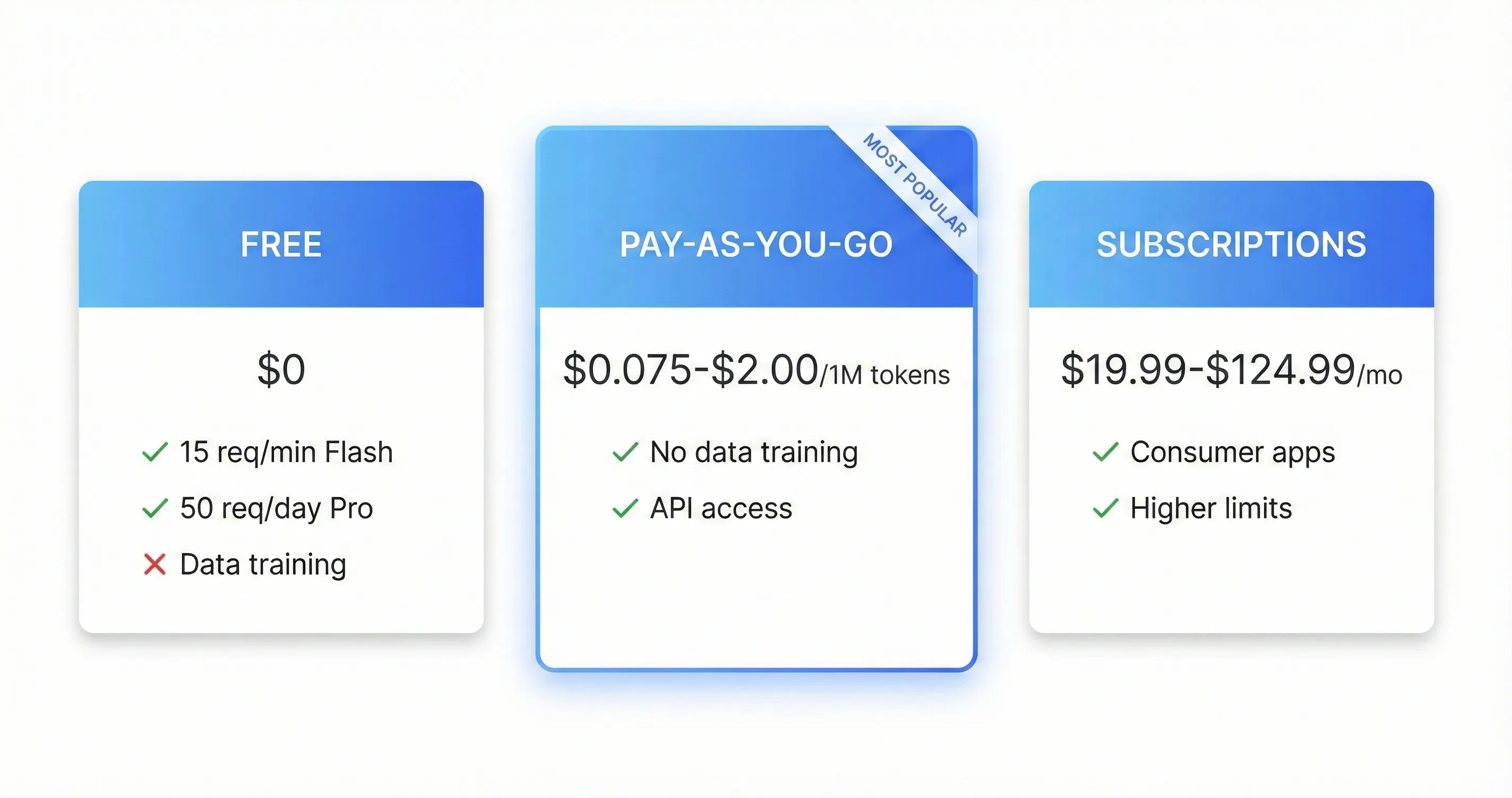
The Bottom Line on Pricing: Start free, upgrade when you hit limits or need data privacy. 3.1 Flash-Lite at $0.25/1M tokens makes high-volume prototyping absurdly cheap. Most developers find the free tier sufficient for testing, then switch to pay-as-you-go for production. For a deeper look at how free AI tools compare across categories, see our free AI tools review.
⚖️ Google AI Studio vs ChatGPT vs Claude: Which Should You Use?
This is the question everyone asks. Here’s the honest breakdown as of March 2026, with all three platforms having received major updates:
| Feature | Google AI Studio | ChatGPT | Claude |
|---|---|---|---|
| Free Tier | ✅ Generous (with data trade-off) | ⚠️ Limited GPT-4o access | ✅ Free Sonnet 4.6 access |
| Best Model (Free) | Gemini 3.1 Pro (in interface) | GPT-4o (limited) | Claude Sonnet 4.6 |
| Image Generation | ✅ Nano Banana 2, Pro (free) | ✅ DALL-E 3/GPT Image (paid) | ❌ No native generation |
| Video Generation | ✅ Veo 3.1 (native audio) | ✅ Sora 2 (limited) | ❌ No |
| Code Export | ✅ One-click Python/JS/Cloud Run | ⚠️ Copy-paste | ⚠️ Copy-paste |
| Context Window | 1M tokens | 128K tokens | 200K tokens (1M Sonnet 4.6) |
| Computer Use | ✅ Gemini 3 Pro/Flash | ✅ GPT-5.3-Codex | ✅ Claude Computer Use |
| Agentic Tools | ✅ Deep Research, Interactions API | ✅ Codex agents | ✅ Claude Code, Cowork |
| Best For | Developers, Prototyping | General Use, Conversation | Writing, Coding, Analysis |
| Learning Curve | Moderate-Steep | Easy | Easy |
Quick Decision Framework:
Choose Google AI Studio if: You’re a developer building AI features. You need free access to frontier models including image and video generation. Multimodal capabilities matter. You want to prototype before committing to an API. You’re comfortable with a technical interface.
Choose ChatGPT if: You want the most polished, beginner-friendly experience. Conversation and general assistance are your primary use cases. You need the broadest plugin ecosystem. Memory and personalization matter most.
Choose Claude if: Writing quality and nuance are priorities. You’re doing professional coding with Claude Code. Long document analysis is frequent. You value the plugin ecosystem and browser agent integration.
REALITY CHECK
Expert Consensus: Every serious AI user in 2026 has accounts with Google AI Studio, ChatGPT, and Claude open in different tabs. The models are finally different enough that task-routing makes both economic and quality sense.
Practical Advice: Use Google AI Studio for prototyping and multimodal work, ChatGPT for general conversation and quick tasks, Claude for writing and complex reasoning. At $0/month for AI Studio’s free tier, there’s no reason not to add it to your rotation.
👥 Who Should Use This (And Who Shouldn’t)
✅ Best For:
1. Developers Building AI Features. If you’re prototyping AI integrations, Google AI Studio is the fastest path from idea to working code. The code export, Colab integration, and new Cloud Run deployment save hours compared to manual API setup. The Interactions API and Computer Use support make building agentic applications significantly easier than rolling your own orchestration. For developer tool comparisons, see our AI agents for developers guide.
2. Content Creators Experimenting with AI Media. Free access to Nano Banana 2 (now with 4K and Google Search integration), Nano Banana Pro, and Veo 3.1 makes this the best free option for image and video generation. The launch of Google Flow as a unified creative workspace further strengthens this advantage. If you’re a creator evaluating tools, also check our Pomelli review for Google’s free AI marketing tool.
3. Students and Researchers. Hands-on experience with frontier models without cost. The Deep Research Agent gives you autonomous research capability that would cost $20-249/month on competing platforms. The interface teaches you prompt engineering, model behavior, and API development simultaneously.
4. Teams Evaluating Google’s AI Ecosystem. If you’re considering Vertex AI for production, AI Studio lets you test everything first. With the upcoming Google I/O 2026 (May 19-20) expected to bring more announcements, now is the ideal time to get familiar with the platform.
❌ Worst For:
1. Non-Technical Users Wanting Simple Chat. If you just want to chat with AI, use the Gemini app or ChatGPT. AI Studio’s interface still assumes developer familiarity, despite the Build feature making app creation more accessible.
2. Anyone Working with Confidential Data (Free Tier). The data collection on the free tier is a non-starter for sensitive information. Either pay for privacy or use a different platform.
3. Teams Needing Collaboration Features. No built-in collaboration features. If you want to share a prompt with a teammate, you’re copy-pasting. No shared workspaces, no commenting, nothing. Google Antigravity offers better team collaboration for complex projects.
4. Users Who Want Predictable Reliability. AI Studio is a development playground. Models change without notice (Gemini 3 Pro just got deprecated), and a recent February update caused the entire platform to go down for over 10 hours. Production applications should use Vertex AI.
💬 What Developers Are Actually Saying
The Positive Reviews:
On Developer Control: Developers consistently praise the level of free customization AI Studio offers. The ability to switch between Gemini versions, adjust creativity settings, configure safety controls, and fine-tune parameters at no cost remains unmatched by competitors.
On the Build Feature: One developer shared that AI Studio allowed them to write roughly 12 programs in relatively little time, most of which they wouldn’t have bothered creating without it. The no-code app builder has become a standout feature for rapid prototyping.
On Creative Work: Users report being surprised by the platform’s depth. What starts as testing Gemini for writing often evolves into generating visuals, translations, and functional prototypes, all in one session.
The Critical Reviews:
On UI/UX: The interface continues to receive criticism. Users describe it as intimidating, unoptimized, and slow. The February 2026 update that crashed the platform for 10+ hours didn’t help confidence.
On Documentation: Documentation remains scattered across AI Studio, the API docs, and various blog posts. Finding best practices often requires bouncing between multiple Google properties.
On Reliability: API errors and timeouts continue to frustrate developers, even on paid tiers. One forum post titled the recent update “a total disaster” and called for the platform to be treated more seriously.
On Privacy Concerns: The data collection policy on the free tier remains a consistent source of distrust, particularly for developers considering production use.
Community Consensus (March 2026):
Developers rate Google AI Studio around 4.3/5 stars, excellent for experimentation and prototyping, with the February/March model upgrades significantly improving the value proposition. The gap between AI Studio and polished consumer tools like ChatGPT is narrowing, but reliability and UX polish remain the biggest areas for improvement.
❓ FAQs: Your Questions Answered
Q: Is Google AI Studio completely free?
A: Yes, the AI Studio interface is free to use with generous rate limits for experimentation. However, the free tier uses your data to train Google’s models. For production API usage or data privacy, you need to enable Cloud Billing, which switches to pay-as-you-go pricing. Note that Gemini 3.1 Pro has no free API tier, only free access through the AI Studio interface.
Q: Does Google AI Studio use my data for training?
A: Yes, on the free tier. Google collects and uses all your inputs to improve their models. Human reviewers may see this data. To opt out, enable Cloud Billing for pay-as-you-go access, which guarantees your data won’t be used for training.
Q: What happened to Gemini 3 Pro?
A: Gemini 3 Pro was deprecated on March 9, 2026. It’s been replaced by Gemini 3.1 Pro, which offers more than double the reasoning performance at the same price. If you have any code or workflows using gemini-3-pro-preview, you need to migrate to gemini-3.1-pro-preview immediately.
Q: How does Google AI Studio compare to ChatGPT?
A: AI Studio is more developer-focused with code export, API testing, multimodal capabilities, and free image/video generation. ChatGPT is more polished for general consumers with better conversation flow and a broader plugin ecosystem. AI Studio offers free access to frontier models but with a steeper learning curve. For a detailed comparison, see our ChatGPT review.
Q: What’s the difference between AI Studio, Vertex AI, and Antigravity?
A: AI Studio is a free playground for testing and prototyping. Vertex AI is Google’s enterprise platform for production deployments with higher reliability and compliance features. Antigravity (launched recently) is Google’s agentic development platform for complex, multi-file applications. Most developers start in AI Studio, move to Antigravity for complex builds, and deploy via Vertex AI for production.
Q: Which Gemini model should I use in AI Studio?
A: Gemini 3 Flash for most tasks, fast and capable. Gemini 3.1 Pro for complex reasoning, coding, or maximum intelligence. Gemini 3.1 Flash-Lite for high-volume, cost-sensitive tasks like translation and content moderation. Nano Banana 2 for fast image generation. Nano Banana Pro for highest-quality images. Veo 3.1 for video creation.
Q: What is Nano Banana 2 and how does it differ from Nano Banana Pro?
A: Nano Banana 2 (Gemini 3.1 Flash Image) launched February 26, 2026. It’s faster than Nano Banana Pro, supports 4K resolution, integrates with Google Search for real-time visual knowledge, and handles up to 14 reference images. Pro still offers the highest quality for detailed work, but Nano Banana 2 is the best choice for most image generation tasks thanks to its speed and new capabilities.
Q: Can Google AI Studio generate images and videos?
A: Yes. Nano Banana 2 and Nano Banana Pro handle image generation with accurate text rendering. Veo 3.1 creates videos from text prompts or images, now with native audio including dialogue, sound effects, and music. Both are available for free in AI Studio, making it one of the best free options for AI media generation in 2026.
Q: Is there an API key required for Google AI Studio?
A: No API key is required to use the AI Studio interface directly. If you want to call Gemini models via code in your own applications, you must create an API key from the Google AI Console.
Q: What’s coming at Google I/O 2026?
A: Google I/O 2026 is confirmed for May 19-20 at Shoreline Amphitheatre. Based on the pace of launches (3.1 Pro in February, Nano Banana 2 in February, 3.1 Flash-Lite in March), expect announcements around stable model releases, new agentic capabilities, and potentially Gemini 4 previews. We’ll cover all AI Studio-relevant announcements as they happen.
📊 Final Verdict: Should You Use Google AI Studio?
Google AI Studio is the best free way to access frontier AI models in 2026. Full stop.
The March 2026 model lineup is staggering. Gemini 3.1 Pro delivers more than double the reasoning of its predecessor. Nano Banana 2 generates 4K images with real-time web knowledge. 3.1 Flash-Lite gives you frontier-class performance at $0.25 per million tokens. Veo 3.1 creates videos with native audio. The Deep Research Agent conducts autonomous multi-step research. And Computer Use lets models interact with desktop applications. All accessible from one browser tab, without a credit card.
The catch is real: Google uses your data to train their models on the free tier, and reliability isn’t production-grade. For experimentation, learning, and prototyping, this trade-off is acceptable. For anything confidential, enable billing or use a different platform.
REALITY CHECK
The Big Picture: In the three months since our original Google AI Studio review, Google has released Gemini 3.1 Pro, Nano Banana 2, 3.1 Flash-Lite, Computer Use, the Interactions API, and the Deep Research Agent. That’s six major launches in one quarter. No other AI platform is iterating this fast on developer tools while keeping the base tier free.
What to Watch: Google I/O 2026 (May 19-20) will likely bring the next wave of announcements. If you’re not already experimenting in AI Studio, now is the time to start.
Use Google AI Studio if:
- You’re a developer prototyping AI features
- You want free access to frontier multimodal models including 4K image generation
- You need agentic tools (Deep Research, Computer Use, Interactions API)
- You’re comfortable with a technical interface
- Data privacy isn’t a concern (or you’ll enable billing)
Look elsewhere if:
- You want a polished, consumer-friendly chat experience
- Team collaboration features matter
- You can’t accept the privacy trade-off
- You need production-grade reliability
Try it today: aistudio.google.com (free, no credit card required)
Stay Updated on Google AI Tools
Don’t miss the next Gemini update. Subscribe for weekly reviews of Google AI tools, pricing changes, and feature launches, delivered every Thursday.
[NEWSLETTER CTA — Added in Phase 2]
Related Reading
Google AI Ecosystem:
- Gemini 3 Review: Google’s Answer to GPT-5
- Nano Banana Pro Review: Google’s Best Image Generator
- Google AI Studio Text-to-Speech Review
- Pomelli Review: Google’s Free AI Marketing Tool
- NotebookLM Review: Slides and DeepThink Features
- Google Workspace Studio Review
Comparisons:
- ChatGPT 5.2 Review: Is OpenAI Still Leading?
- Claude AI Review 2026: The AI That Crashed Wall Street
- GPT Image 1.5 vs Nano Banana Pro: Head-to-Head
- DeepSeek R1 Review: The $5.5M AI That Shook the Industry
- Seedance Review: ByteDance’s AI Video Generator
Developer Tools:
- Claude Code Review 2026: Sonnet 4.6 and Code Security
- ChatGPT Codex Review: OpenAI’s AI Coding Agent
- Top AI Agents For Developers 2026
- Cursor 2.0 Review: $9.9B AI Code Editor
- GitHub Copilot Pro+ Review
Guides:
Last Updated: March 9, 2026
Platform Version: Google AI Studio (March 2026 — Gemini 3.1 Pro, Nano Banana 2, 3.1 Flash-Lite)
Next Review Update: May 2026 (post-Google I/O)