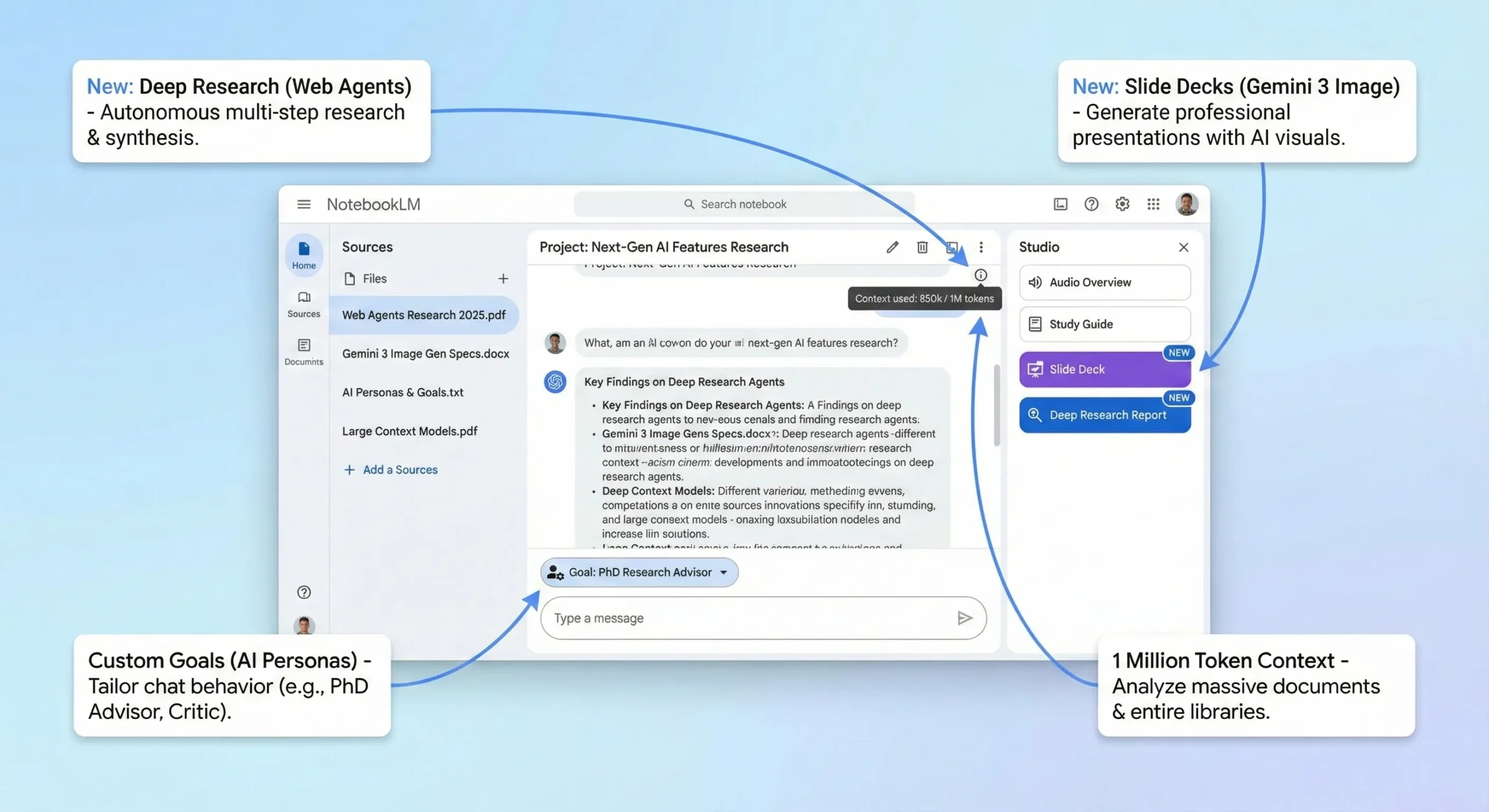
This NotebookLM review starts with the news most readers miss: Google renamed NotebookLM to Gemini Notebook on July 16, 2026, and calls it “the same standalone product”. You still upload your own sources (PDFs, Docs, YouTube links, audio) and get answers, Audio Overviews, slide decks and infographics grounded in them. What changed is how much you get for free, what Google AI Plus, Pro and Ultra add, and how the limits work. This Google NotebookLM review uses Google’s own plans help page and US prices as of October 11, 2026.
⚡ TL;DR: The Bottom Line
What It Is: Google’s source-grounded research notebook, now named Gemini Notebook. It answers from the files and links you add, and turns them into Audio Overviews, Video Overviews, slide decks, infographics, quizzes and reports.
Free: 100 notebooks, 50 sources per notebook, the main Studio outputs (Audio Overviews, slide decks, infographics, reports, quizzes), and a compute-based budget that refreshes every five hours up to a weekly limit.
Paid: Google AI Plus ($4.99 a month) doubles the budget and allows 100 sources. Pro ($19.99) gives 4x, 300 sources and watermark removal. Ultra ($99.99 or $199.99) goes to 500 or 600 sources.
Our Take: Start free. Most students and researchers will not need to pay, and Plus is the cheap step if you hit the weekly cap.
⚠️ The Catch: Google publishes the multipliers but not the size of the weekly limit, so you cannot know in advance how many slide decks or Video Overviews a week your plan buys.
📑 Quick Navigation
🧠 What NotebookLM (Gemini Notebook) Actually Does
Most chatbots answer from what they learned in training. Gemini Notebook answers from the sources you give it. You create a notebook, add up to 50 sources on the free tier, and then chat with them, with citations. Google’s help page lists the source types: PDFs, Word, PowerPoint, CSV, Markdown and text files, Google Docs, Slides (up to 100 slides) and Sheets, images, audio files, web URLs, ePub files, public YouTube videos, eligible Play Books ebooks and even Gemini chats. Each source can hold up to 500,000 words or 200MB for an upload, and Google’s FAQ says there is no page limit.
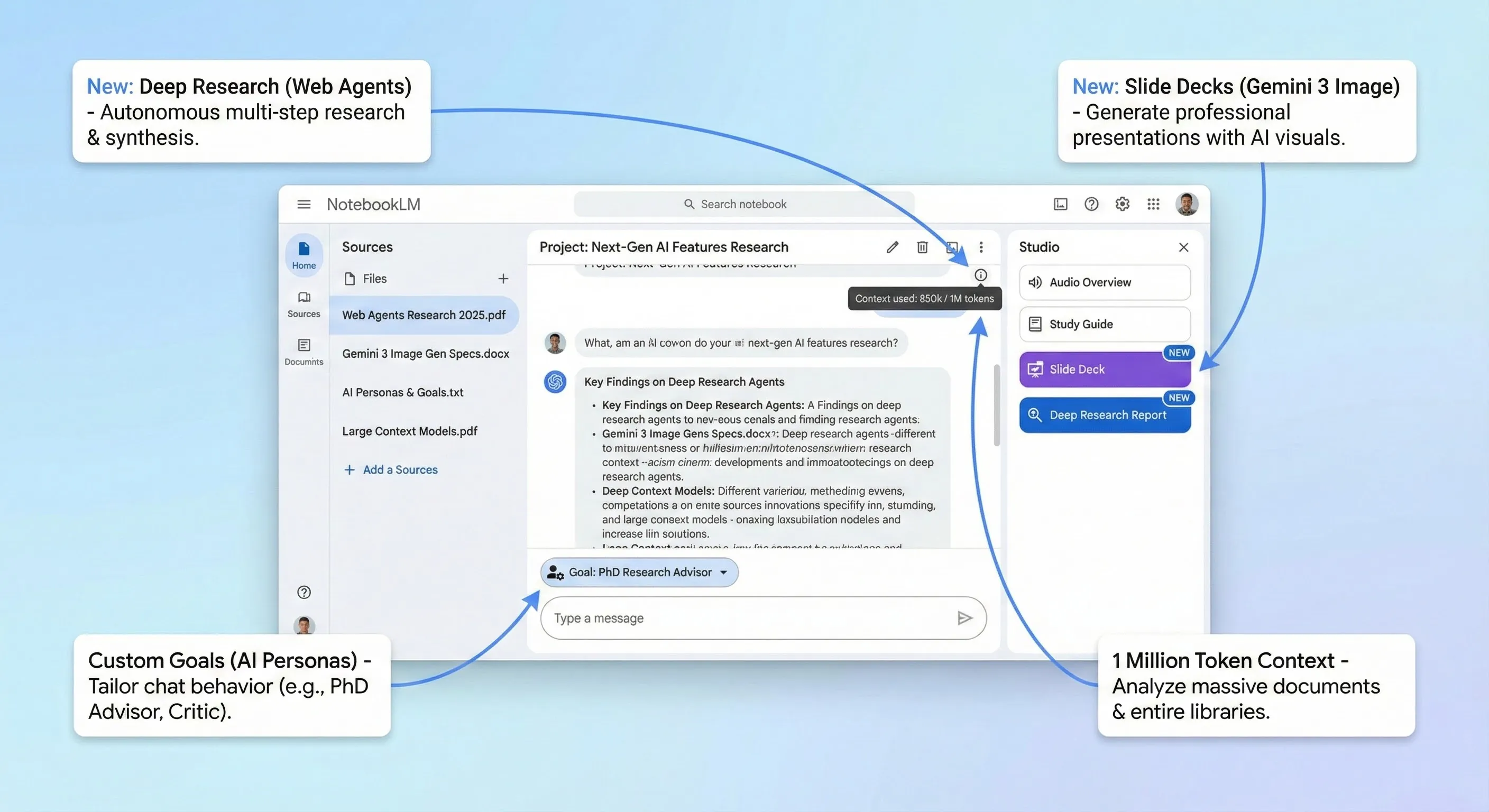
The July rename was more than a new label. Google’s announcement says each notebook now gets “a secure cloud computer” so it can write and run code for data analysis on your sources, that your notebooks show up and sync inside the Gemini app, and that notebooks are coming to AI Mode in Search. Google also says over 30 million people use it. The old notebooklm.google.com address now redirects to notebook.google.com, so existing links and bookmarks still work. The code feature reached Google AI Ultra and some Workspace business plans first, and Google said it would follow for Pro users on the web “over the coming weeks”.
🔍 REALITY CHECK
Marketing Claims: Google’s Workspace page pitches Gemini Notebook as “your AI research and thinking partner, grounded in the information you trust”.
What It Really Means: Grounding in your sources cuts down on made-up answers, but it does not remove them. Google’s own help pages warn that slide decks and infographics “may contain visual or factual inaccuracies”, and an answer is only as good as the sources you add.
Verdict: Treat it as a fast first reader of your material. Click the citations and check anything you will publish, submit or present.
🛠️ Features: What You Can Make From Your Sources
The Studio panel is where Gemini Notebook turns your sources into something new. These are the main outputs on Google’s help pages as of October 2026. Most of them, including Audio Overviews, slide decks and infographics, are on the free tier; Cinematic Video Overviews launched for Google AI Ultra subscribers, and Google’s pages do not say they have reached free users.
Fast Research and Deep Research
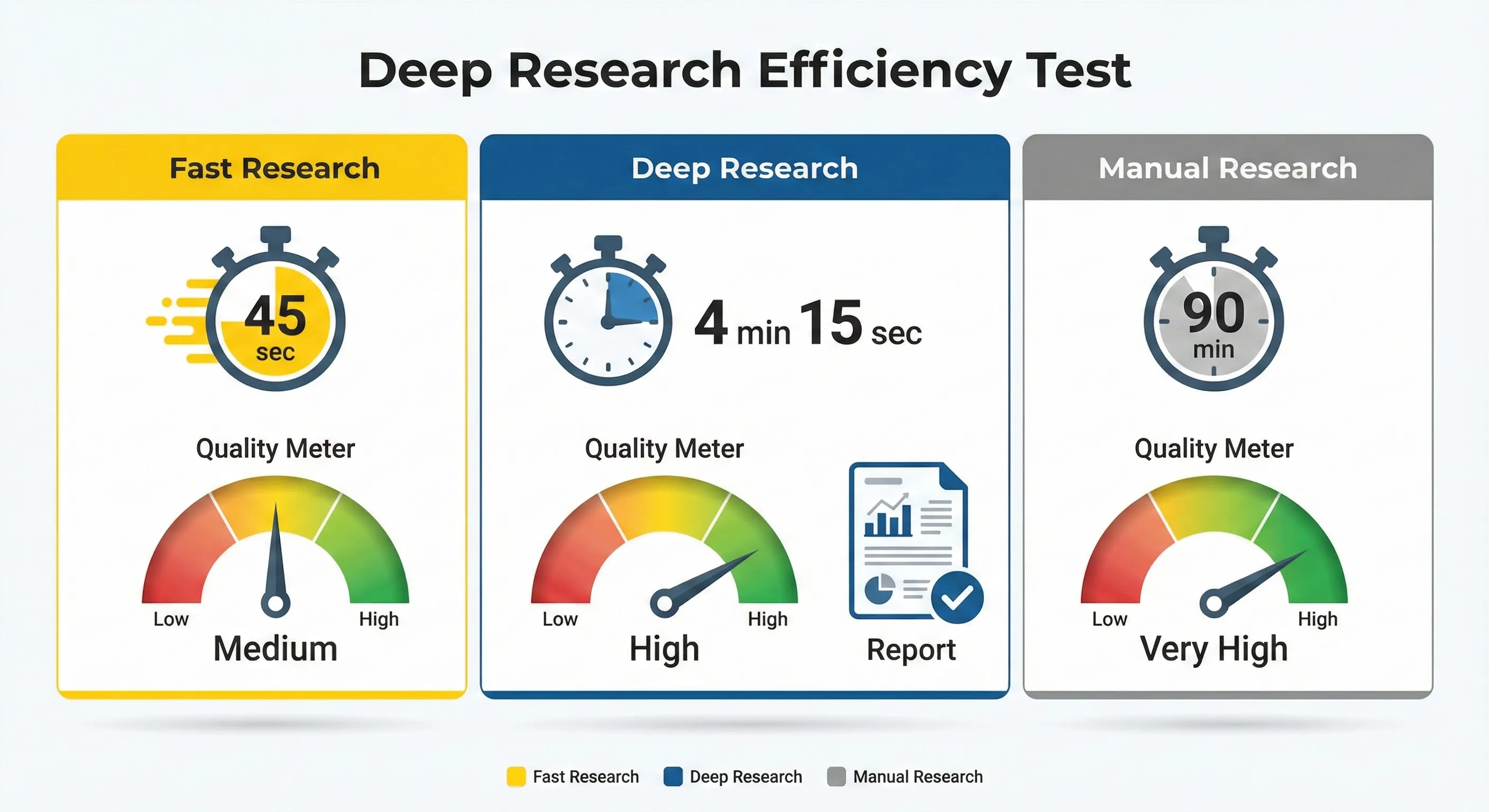
You do not have to find every source yourself. Fast Research searches the web or your Google Drive and lets you pick results to import. Deep Research takes a research question, can take “a couple minutes”, and returns a report plus a list of sources you can add to the notebook in one go.
Slide Decks
Slide Decks launched on November 20, 2025, when Google said Nano Banana Pro in NotebookLM could build “complete and polished slide decks directly from your sources”. Today you choose a Detailed Deck (full text) or Presenter Slides (visual, with talking points), pick a short, default or long length, revise individual slides, and download the result as a PDF or a PowerPoint (.pptx) file. The feature is for users over 18.

Infographics
Infographics turn a notebook into a single image. You choose Concise, Standard or Detailed (beta) detail, a square, portrait or landscape orientation and a visual style, then download it as a PNG. The feature is for users over 18. If you mainly want slides from a prompt rather than from your own files, our Kimi AI Slides review covers a free alternative.
Audio Overviews, Video Overviews and study tools
- Audio Overviews: the podcast-style feature that made NotebookLM famous. Four formats (Deep Dive, The Brief, The Critique, The Debate), 80+ languages, and an interactive mode (English only) where you can ask the hosts a question by voice.
- Video Overviews: Cinematic (18+, English only), Explainer, and Short videos of about 60 seconds. Google warns that generation can sometimes take more than 30 minutes.
- Study tools: reports, quizzes and flashcards. A September 15, 2026 update began rolling out interactive learning overviews, new quiz formats and editable quizzes and flashcards to all users.
- Mobile: the same update added an audio recorder for lectures and real-time voice conversations with your notebooks, which began rolling out to Ultra subscribers (18+) first, with Pro and others “soon”.
- Gemini app: notebooks sync with the Gemini app, but Google says the Gemini app cannot generate Studio items such as slide decks.
💰 Gemini Notebook Price: Free vs Plus vs Pro vs Ultra
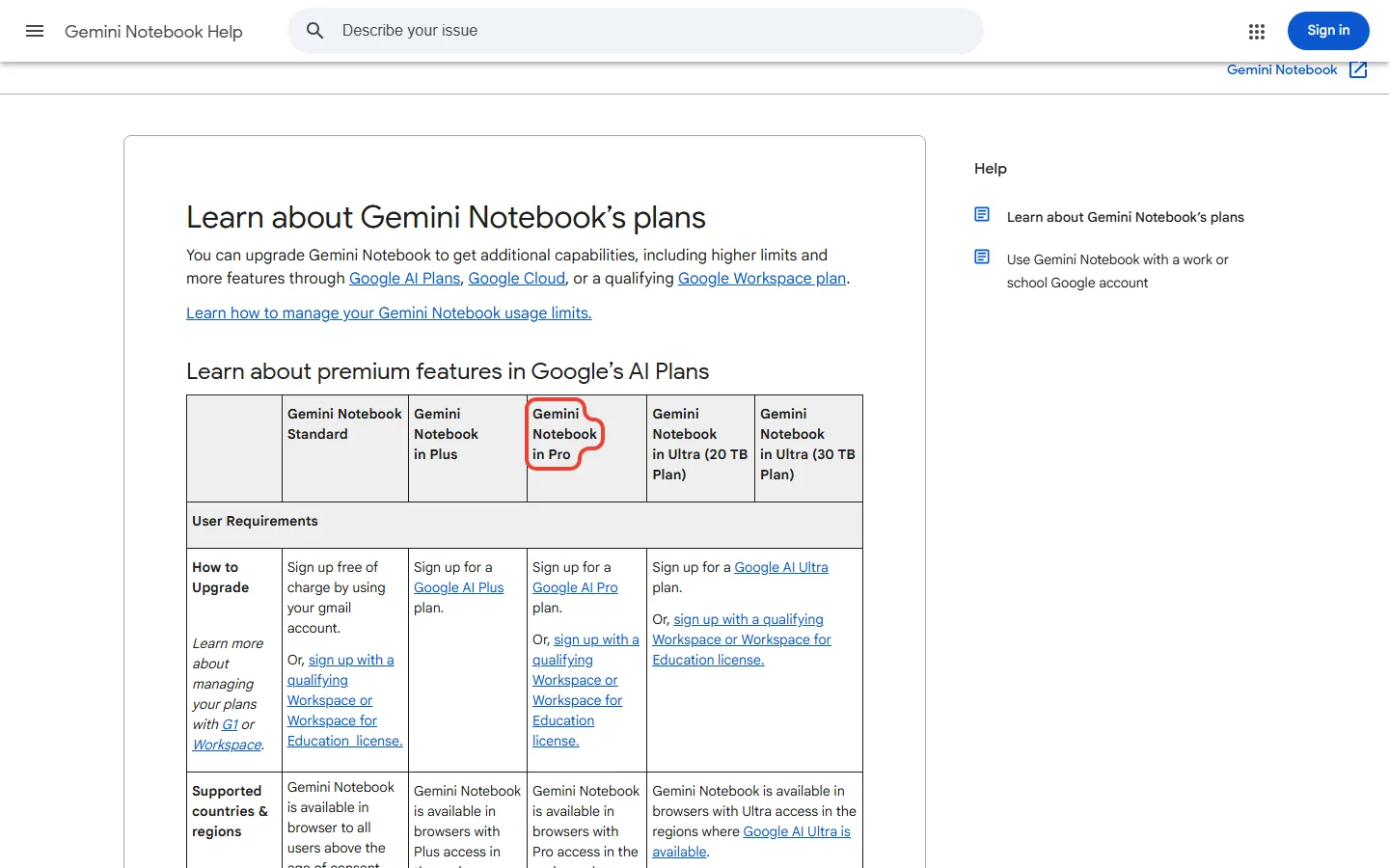
There is no separate NotebookLM subscription any more. The free tier (Google calls it Standard) needs only a Google account, and higher limits come with Google’s AI plans, priced on Google’s plans page in US dollars. The limits below are from Google’s Gemini Notebook plans page, which marks them “Subject to Change”.
| Plan | US price | Notebooks | Sources per notebook | Usage vs free | Watermark removal |
|---|---|---|---|---|---|
| Free (Standard) | $0 | 100 | 50 | Standard | No |
| Google AI Plus | $4.99 a month | 200 | 100 | 2x | No |
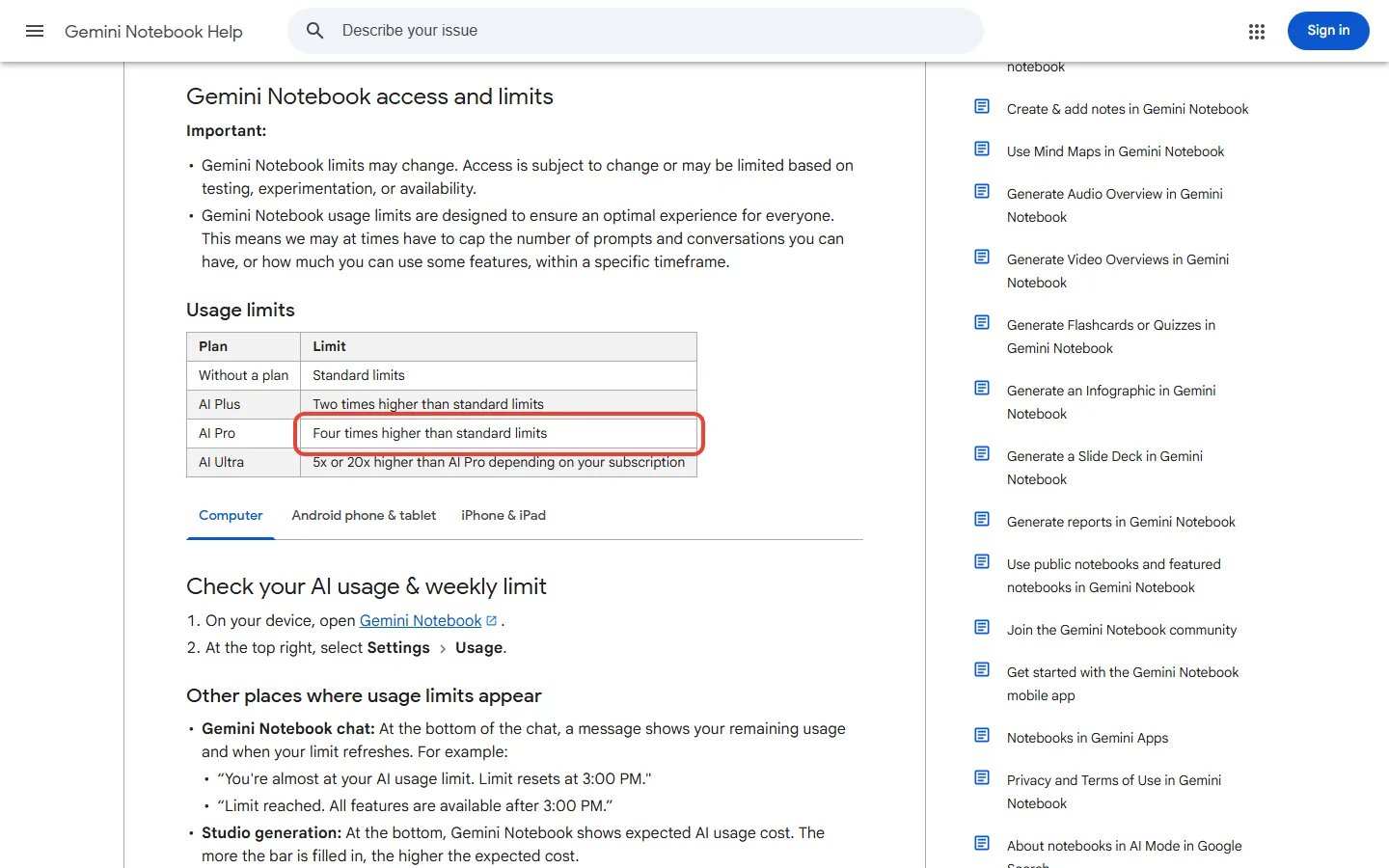
| Google AI Pro | $19.99 a month ($199.99 a year) | 500 | 300 | 4x | Yes |
| Google AI Ultra (20 TB) | $99.99 a month | 500 | 500 | 5x Pro (20x free) | Yes |
| Google AI Ultra (30 TB) | $199.99 a month | 500 | 600 | 20x Pro (80x free) | Yes |
📊 Sources Per Notebook by Plan
Core Studio outputs are on the free tier. What you pay for is more usage, more sources and notebooks, “higher” (Pro) or “highest” (Ultra) Gemini model access, earlier access to new features (Plus) or priority access (Pro and Ultra), advanced sharing, and (on Pro and Ultra) no watermark on generated visuals. Google’s page notes that visible watermarks still apply in India, South Korea and Vietnam. One wrinkle: Google’s subscriptions page markets Pro as “5x more Audio Overviews, notebooks, and more”, while the help page lists 4x usage. The plans also bundle storage and other Google AI benefits, covered in our Google AI Plus review and our Google AI Ultra vs Pro comparison.
Over a year, Plus costs $59.88 and Pro costs $199.99 on the annual plan, or $239.88 at the monthly price. Students should check Google’s offers first: eligible US college students can get one year of Google AI Pro free, and eligible students in 140+ other markets one year of Google AI Plus, if they redeem by December 31, 2026. Our Google AI Pro free guide explains who qualifies. Workspace users get Gemini Notebook in all Workspace plans, with higher limits on qualifying editions.
💡 Key Takeaway: Paying mostly buys a bigger budget and bigger notebooks. Some features reach paid plans first: the cloud computer and real-time voice started with Ultra, and Cinematic Video Overviews launched for Ultra subscribers. If you never hit the cap, the free tier covers the core product.
⏱️ Does Google NotebookLM Have a Limit? How the New Usage Budget Works
Yes. On August 28, 2026, Google announced “flexible, compute-specific usage limits”, rolling out to consumer accounts from September 2. Limits now refresh every five hours rather than daily. Google’s usage limits page says the budget depends on “the complexity of your prompt, the models and features you use”, and that “the quota refreshes every 5 hours until you reach your weekly limit”. Long chats, complex prompts and heavy outputs use more of it. In Studio, a bar shows the expected cost before you generate, and Settings > Usage shows what you have left.
📊 Gemini Notebook Usage Budget vs the Free Tier
📑 NotebookLM Slide Deck Limit: How Many Decks Can You Make?
Google does not publish a fixed number. Since September, slide decks draw on the same compute-based budget as everything else, Google says usage depends on “the complexity of your prompt, the models and features you use”, so a bigger deck is likely to cost more of your budget. The slide deck help page adds two specifics: “there are quota limits to the total number of slide decks you can revise”, but “no limit to the number of individual slides you can revise within a slide deck”. If you hit the cap, you can choose Generate later on the web (it may take a couple of hours) and, if notifications are on, get one when the output is ready. Plus doubles the budget and Pro quadruples it.
📬 Enjoying this breakdown?
Get honest AI tool analysis delivered weekly. No hype, no spam.
⚔️ Anara vs NotebookLM vs Perplexity: Which Research Tool Fits?
These three get compared a lot, but they start from different places. Gemini Notebook works from sources you add. Perplexity searches the live web for you. Anara searches your library, the web and what it says are over 300 million academic papers, with citations to the exact passage.
| Tool | Free tier | Entry paid price | Best at |
|---|---|---|---|
| Gemini Notebook | Yes: 100 notebooks, 50 sources each | $4.99 a month (Google AI Plus) | Studying and presenting your own sources: audio, video, slides |
| Anara | Yes, limited AI usage | $10 a month (Plus), Pro $20 | Academic research with paper search and exact citations |
| Perplexity | Yes, free login | $17 a month billed annually (Pro) | Quick answers from the live web |
Anara’s own benchmark page puts its answer correctness at 97% against 88% for NotebookLM and 84% for Perplexity, but that is a vendor’s self-published test, so read it as a claim rather than a verdict. For most people the deciding question is simpler: if your material is already in hand (lecture slides, papers, reports), Gemini Notebook lets you work with it for free. If you need to find papers, look at Anara. If you need today’s news, use Perplexity.
🎯 Who Should Use It (and Who Should Pay)
✅ What Works
- Core Studio outputs are on the free tier
- Answers cite your own sources
- Wide range of source types, 500,000 words each
- Slides export to PowerPoint and PDF
- Cheap step up: Plus at $4.99 a month
❌ What to Watch
- Weekly limit size is not published
- Deep Research, slides, infographics and Cinematic videos are 18+
- Generated visuals can contain errors
- Watermark removal starts at Pro
- Code execution reached Ultra first
Stay on the free tier if: you are a student, researcher or professional who works with a manageable set of documents and uses Audio Overviews or slide decks now and then. That describes most people.
Pay for Google AI Plus ($4.99) if: you keep hitting the weekly cap or need up to 100 sources in one notebook. It also adds storage and other Gemini perks, so it is the easiest upgrade to justify.
Choose Pro ($19.99) if: you build big notebooks (up to 300 sources), generate a lot of Video Overviews or decks, or need visuals without a watermark. Ultra only makes sense if you already want it for Gemini itself.
Skip it if: you need answers from the live web (Perplexity is built for that), or you would rather not upload confidential files to a Google service your organization has not approved. Google’s Workspace page says “Your uploaded data is never used for model training”, which is worth reading alongside your own company’s rules.
❓ FAQs: Your Questions Answered
Q: Is NotebookLM free?
A: Yes. The free tier gives you 100 notebooks, 50 sources per notebook and the main Studio outputs (Audio Overviews, slide decks, infographics, reports, quizzes), with a usage budget that refreshes every five hours up to a weekly limit. Paid Google AI plans raise those limits.
Q: Is NotebookLM now Gemini Notebook?
A: Yes. Google renamed NotebookLM to Gemini Notebook on July 16, 2026. It is the same standalone product, now with a cloud computer for code-based analysis and notebooks that sync with the Gemini app.
Q: How much does Gemini Notebook cost?
A: It is free with a Google account. Higher limits come with Google AI Plus ($4.99 a month), Pro ($19.99 a month or $199.99 a year) or Ultra ($99.99 or $199.99 a month) in the US.
Q: Does Google NotebookLM have a limit?
A: Yes. Free users get 50 sources per notebook and 100 notebooks, each source can be up to 500,000 words or 200MB, and usage is a compute-based budget that refreshes every five hours until you reach a weekly limit.
Q: What is the NotebookLM slide deck limit?
A: Google gives no fixed number of decks. They use your compute-based budget, there is a quota on how many decks you can revise, and there is no limit on revising individual slides within a deck. The feature is for users over 18.
Q: Anara vs NotebookLM: which is better for research?
A: It depends on where your sources come from. Gemini Notebook is free and best for working with material you already have. Anara ($10 a month for Plus) says it searches academic papers and cites the exact passage.
Q: Does Google train its AI on my NotebookLM uploads?
A: For Workspace accounts, Google says ‘Your uploaded data is never used for model training’. For personal accounts, the consumer FAQ only says ‘Your data will never be shared by Gemini Notebook’ and links to Google’s data protection page; read it before uploading sensitive files.
Q: Can I use my notebooks in the Gemini app?
A: Yes. Notebooks sync between the Gemini app and Gemini Notebook, including sources and custom instructions, but Studio items such as slide decks can only be generated in Gemini Notebook itself.
✅ Final Verdict: The Best Free Research Notebook, Now With a Meter
Gemini Notebook’s free tier is unusually generous: 100 notebooks, 50 sources each and the core Studio outputs cost nothing. Sources are large and varied, and the answers point back to your own material. The rename and the new compute-based limits change how you think about paying: you are mostly buying more room. Our honest take is to start free, move to Google AI Plus at $4.99 if the weekly cap gets in your way, and only consider Pro for very large notebooks, heavy video work or watermark-free visuals.
Use it free if: you study or research from your own documents. Pay for Plus if: you hit the cap. Skip it if: you need live web answers. Check Google’s plans page before you pay, because the limits are marked subject to change. For more free options, see our free AI tools guide.

Founder of AI Tool Analysis. Reads every pricing page, help article and footnote so you don’t have to. Covering AI tools since 2025. See how we research →
Related Reading
- Google AI Plus Review
- Google AI Pro Free for Students
- Google AI Ultra vs Pro
- Anara AI Review
- Perplexity AI Review
- Google Gemini Review
- Gmail AI Features
- Nano Banana Pro Review
Stay Updated on AI Research Tools
Google changes Gemini Notebook’s limits and plans often. Get the changes that affect what you pay, straight from the vendors’ own pages.
- ✅ Honest Breakdowns: We read the help centers and pricing pages, not just press releases
- ✅ Price Tracking: Know when plans change price or features
- ✅ Comparison Updates: As the market shifts, we update our verdicts
- ✅ No Hype: Just the AI news that matters for your studies and wallet
Free, unsubscribe anytime.

Last Updated: October 11, 2026
Features Covered: Gemini Notebook (formerly NotebookLM) plans, limits and Studio features as listed on Google’s pages on October 11, 2026
Next Review Update: November 10, 2026
Have a tool you want us to cover? Suggest it here | Questions? Contact us