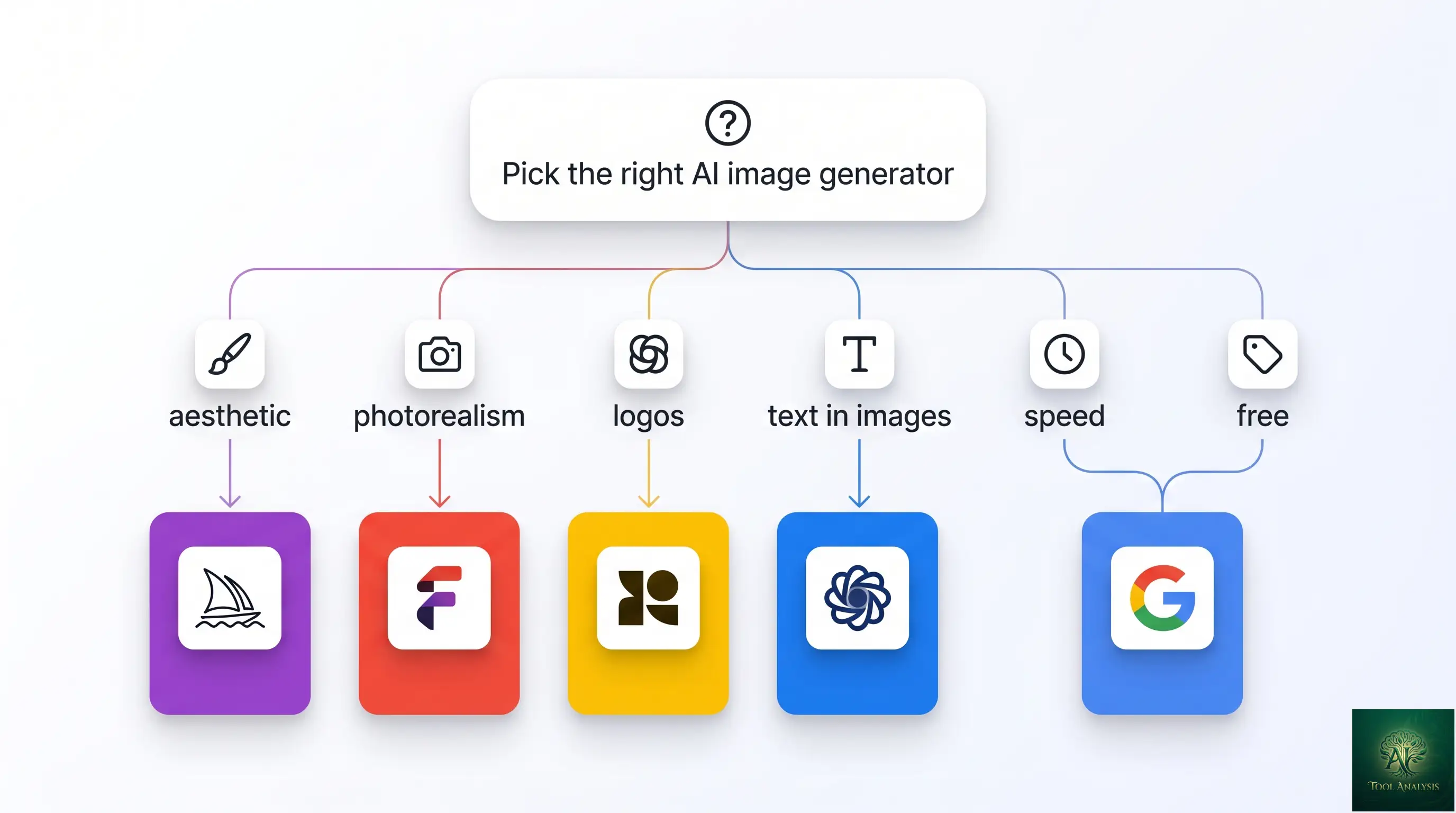
If you already use ChatGPT or Gemini, you already have an AI image generator, and it costs nothing: both make images on their free plans. So the useful question is not which tool is best in general. It is whether you need to pay at all, and if so, for which job.
If you make images now and then, you probably don’t. Pay for a specialist when your work is specific: Midjourney for art with a recognisable look, Ideogram for words inside the picture, Recraft for logos you need as vector files, Krea if you want to watch the image change as you type or draw. And read the ownership rules before you put a free-plan image on a product: on Recraft’s free plan, the images belong to Recraft.
TL;DR: Which AI Image Generator Should You Use?
You make a few images a week for posts, slides or cards: stay free on ChatGPT or Gemini. Both include image generation on the free plan.
You keep hitting the free limit: the cheapest upgrades in the US are Google AI Plus at $4.99 a month and ChatGPT Go at $8.
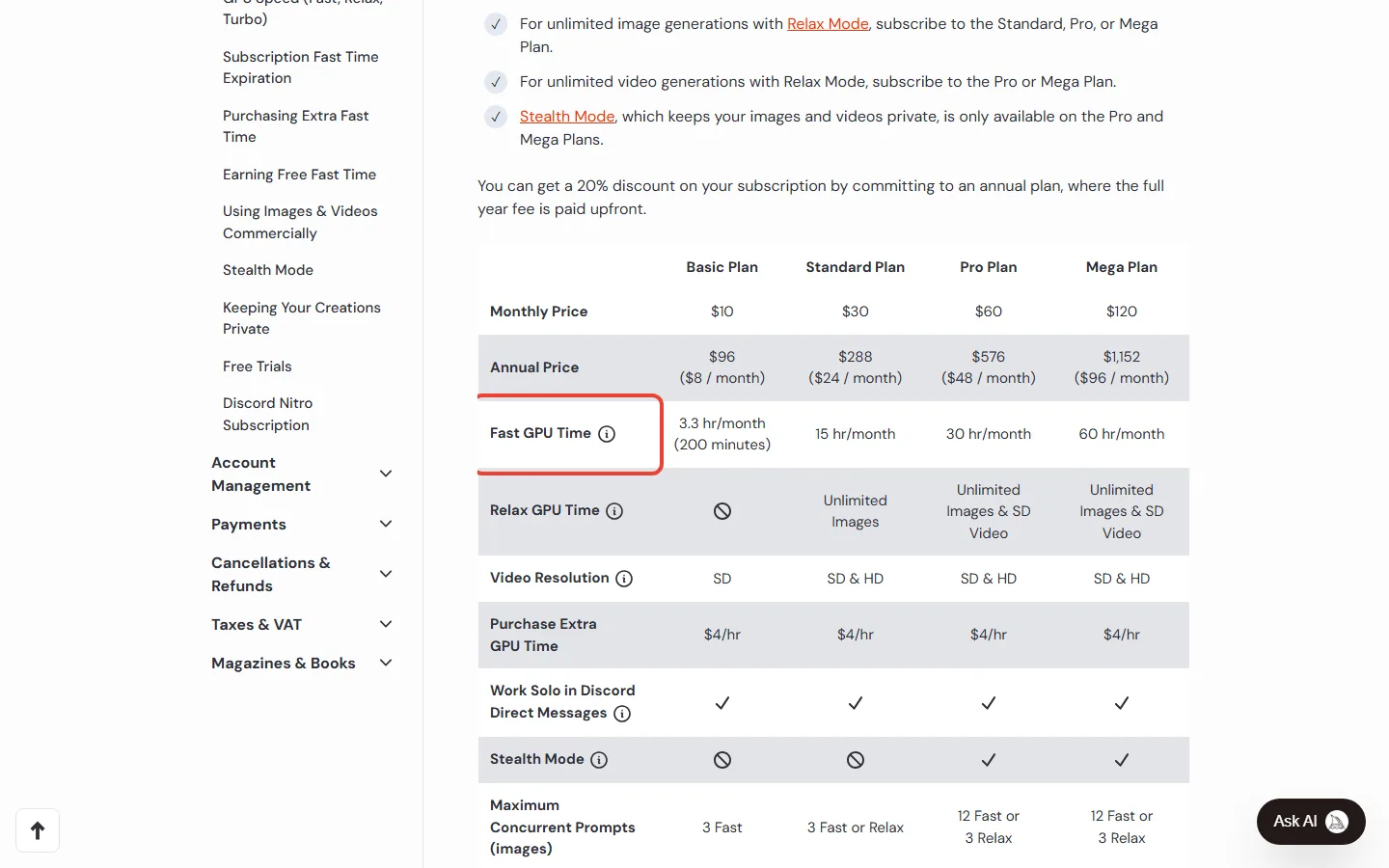
You want art with a distinct style: Midjourney, from $10 a month; Standard at $30 adds unlimited image generation in Relax Mode.
You need readable text in the image: Ideogram, free for 30 credits a week if you sign in with Google, Apple or Microsoft, or $20 a month for Plus.
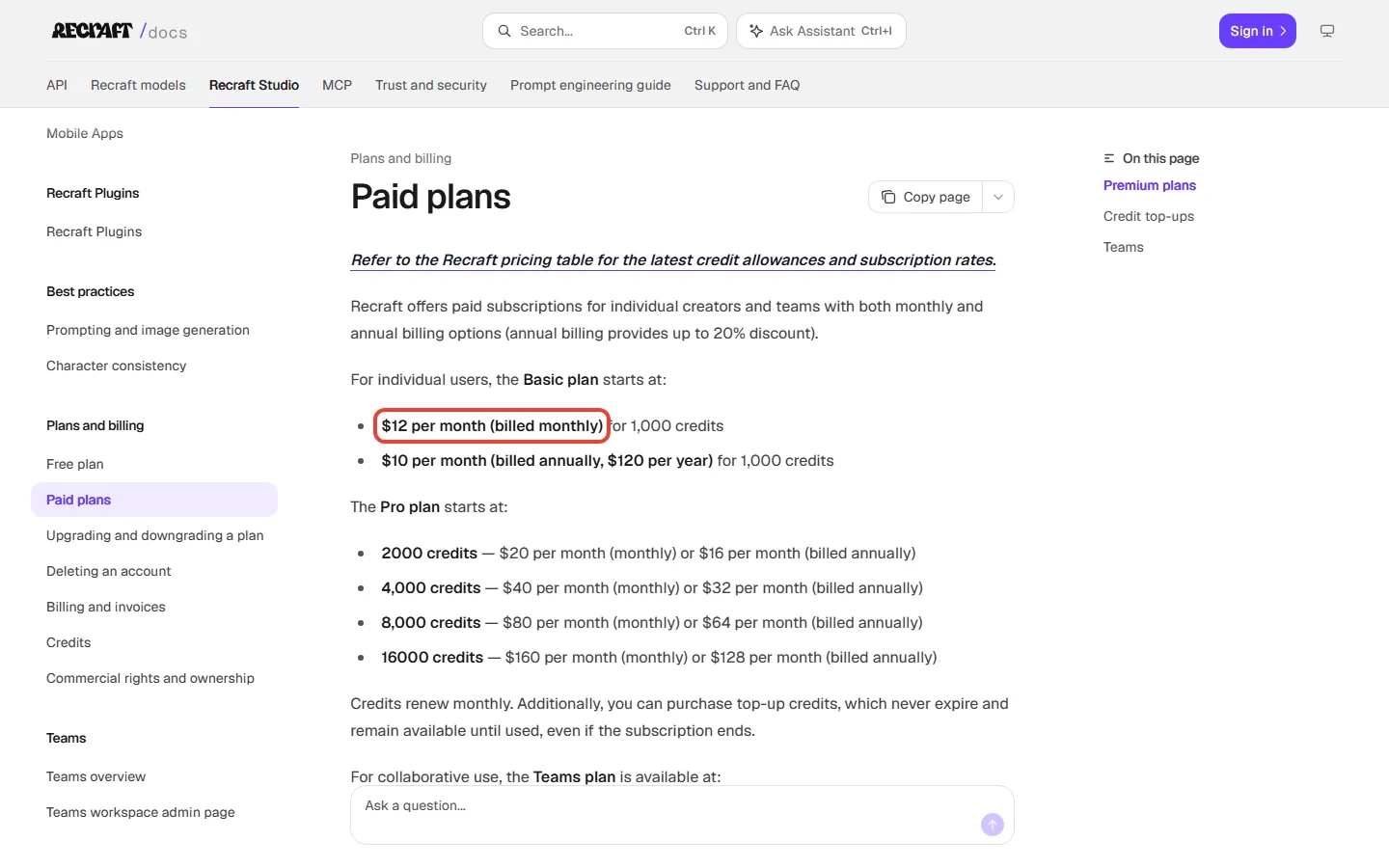
You need a logo as a vector file: Recraft, on a paid plan ($12 a month, or $10 billed yearly), so the images are yours to use commercially.
You are building an app: pay per image through an API, the way software calls a model directly; FLUX 3 Image Klein costs $0.009 and Nano Banana 2.1 $0.0336 per image at 1K resolution.
The catch: neither OpenAI nor Google gives a free image count on the pages we read. ChatGPT tells you when you reach the limit; Gemini mentions a daily quota without its size.
Is the free AI image generator you already have good enough?
For a few images a week, yes. For readable text, vector logos or a particular art style, a specialist does that job better, and the sections below say which one.
ChatGPT Images 2.6 on the free plan
OpenAI released ChatGPT Images 2.6 on November 4, 2026, and it is available on every ChatGPT plan, Free included, on the web, desktop and mobile. OpenAI says it makes images 50% faster than before and keeps details better when you edit an image several times. Two additions matter for everyday use: GIF creation, which OpenAI says is still rolling out, and saved reference images, such as a photo of your product that you reuse in later chats. OpenAI doesn’t say which plans get them.
The free plan has a separate limit for image generation. When you reach it, ChatGPT tells you and you wait until later. Paid plans add more room and one extra mode, “Images with thinking”, which is available on Plus, Pro and Business; OpenAI says Enterprise and Edu get it soon.
Nano Banana in the free Gemini app
Google’s free Gemini plan costs $0 with a Google Account and includes image generation and editing. One detail is easy to miss. The free plan comes with Google’s Flash-Lite model, and free accounts are set to Auto, which sends most prompts there. Google’s help page says that with Flash-Lite, the app makes images with Nano Banana 2 Lite, which is built for speed and isn’t designed for several reference images or repeated edits. Nano Banana 2 is used with the Flash or Pro model, and Flash starts with Google AI Plus.
Free downloads are 1K resolution; with a Google AI plan they are 2K. Paid subscribers can also redo an image with Nano Banana Pro.
How many free images do I get?
On the vendors’ pages we read: no number. OpenAI says image generation has its own limit and ChatGPT will tell you when you reach it; Google mentions a daily quota of Nano Banana 2 images without giving its size. Google’s paid plans are described as multiples instead: AI Plus has 2x the standard limits and AI Pro 4x.
What to do: use the free plan for a week the way you normally would. If you rarely see the limit message, the free plan covers how many images you make. Pay only for a feature you need, such as 2K downloads or images you can use for business.
Say you run a small bakery and want three images a week for Instagram. Either free plan should make those images, and if ChatGPT’s limit stops you on a busy day, you wait and try later. If you see the limit message more than once or twice a week, a US plan at $4.99 a month (Google AI Plus) or $8 (ChatGPT Go) is the cheap fix.
What each AI image generator costs when you pay
Here is the cheapest paid plan of each tool at US prices, what it adds over the free option and which model it runs. Where the vendor gives an image count for the plan, it’s in the third column.
| Tool | Free option | Cheapest paid plan | What that plan gets you | Image model (November 7, 2026) |
|---|---|---|---|---|
| ChatGPT | Yes, limit not published | Go, $8 a month | 10x Free’s image creation (Free’s limit isn’t published), per OpenAI’s January 2026 Go launch post | ChatGPT Images 2.6 |
| Gemini app | Yes, daily quota not published | Google AI Plus, $4.99 a month | 2x Free’s usage, the Flash model (Nano Banana 2), 2K downloads | Free: mostly Nano Banana 2 Lite; Plus and up: Nano Banana 2 |
| Midjourney | No free trial on the website or Discord | Basic, $10 a month or $96 a year | 3.3 hours of fast GPU time a month | V8.2 |
| Ideogram | 30 credits a week, images public | Plus, $20 a month or $15 billed yearly | 2,400 credits a month, private images | Ideogram 4.5 |
| Recraft | Daily credits, public, no commercial use | Basic, $12 a month or $10 billed yearly | 1,000 credits a month, about 250 vector images; commercial rights | Recraft V4.1 |
| Krea | 100 compute units a day | Basic, $9 a month | 5,000 compute units a month, about 200 Nano Banana 2.1 images by Krea’s count; commercial license | Krea 3 (an editing model) plus partner models such as Nano Banana 2.1 |
| Adobe Firefly | 10 free prompts a month, per Adobe’s blog of September 2025 | $9.99 a month, per Adobe’s blog of September 2025 | 2,000 credits for premium features | Firefly Image Model 5; 30+ models in total, including partners |
A note on Adobe: we couldn’t load Adobe’s plans page on November 7, so the Firefly figures above come from Adobe’s own blog of September 2025. Check adobe.com before you buy, or see our Adobe Firefly review for the full plan list.
The bigger plans, for reference: ChatGPT Plus is $20 a month and the Pro plans $100, $200 or $500. Google AI Pro is $19.99 with 4x the standard limits, and Ultra $99.99 or $199.99. Midjourney Standard is $30, Pro $60 and Mega $120 a month. Ideogram Pro is $60, Recraft Pro starts at $20 and Krea Pro is $35.
Which AI image generator fits what you’re making?
Everyday images and quick edits: ChatGPT or Gemini
For a birthday card, a slide illustration or a quick fix to a photo, use the assistant you already have open. ChatGPT is rolling out GIFs and keeps saved reference images, and Gemini’s paid plans let you redo an image with Nano Banana Pro. If you pay for either one already for chat, image generation comes with it.
Art with a distinct look: Midjourney
Midjourney’s default model since July 24, 2026 is V8.2, an update Midjourney says focuses on aesthetics and image quality. There is no free trial on the website or Discord, only a limited one in the niji journey mobile app.
The plan choice comes down to one line. Basic includes 3.3 hours (200 minutes) of fast GPU time a month and no Relax Mode; extra fast time costs $4 an hour. Midjourney gives no image count per plan on the pages we read, because it sells GPU time. Standard, at $30, adds unlimited image generation in Relax Mode. Private images (Stealth Mode) need Pro or Mega.
Say you like Midjourney’s look and want to make art a few evenings a month. Start on Basic at $10. If you run out of the 200 fast minutes before the month ends, Standard at $30 is the plan that stops the meter.
Words inside the picture: Ideogram
Ideogram’s own docs pitch it for text in images: posters, t-shirts, book covers and thumbnails. Ideogram 4.5, the model its docs recommend for new work, can also edit or combine up to five reference images, and every plan, free included, can use all Ideogram models.
The free plan gives 30 credits a week, but only to accounts that sign in with Google, Apple or Microsoft, and everything you make on it is public. Plus costs $20 a month ($15 billed yearly) for 2,400 credits and private images. When those credits run out on Plus, Pro or Team, you can keep going in a slower queue.
Logos and vector files: Recraft
Recraft makes vector images, the kind you can resize for a sign or a website without losing sharpness, and vector generation is included on every plan, Free too. A V4.1 vector image costs 4 credits. The catch is ownership: images made on the free plan belong to Recraft and can’t be used commercially. On a paid plan they are yours, with full commercial rights, and stay yours after you cancel.
Say you need a logo you can resize for a shop sign and your website. Try ideas on the free plan if you like, but make the final version on a paid plan: Basic is $12 for a month, for 1,000 credits, about 250 vector images. If a PNG for Instagram is all you need, a chat app’s image may do; Recraft earns its $12 when you need a file you can resize. This guide doesn’t cover trademarks.
Trying lots of ideas fast: Krea
Krea’s own pitch is real-time generation: the image renders as you type or draw. It released its own image editing model, Krea 3, on October 15, 2026, and says most edits come back in under 8 seconds. The free plan gives 100 compute units a day with no card; Basic is $9 a month for 5,000 units. Krea’s FAQ lists a commercial license for Basic and up; it does not list Free.
If you want Adobe’s own models: Adobe Firefly
Adobe’s own model is Firefly Image Model 5, which Adobe’s March 2026 blog says is generally available. The Firefly app also offers more than 30 models from Adobe and other companies, including Google, OpenAI, Runway and Kling. Adobe calls its own Firefly image and video models commercially safe. In that sentence the phrase is attached to Adobe’s models; it doesn’t mention the partner models, so if licensing matters, pick Adobe’s model in the model menu.
Open models you can run yourself: FLUX and Stable Diffusion
Black Forest Labs released FLUX 3 Image Klein on October 15, 2026, an open-weights model: one whose files you can download and run on your own computer.
Whether you can use it in a business depends on the version. BFL’s launch post says Klein’s license allows free commercial use for people and companies under $5M in annual revenue, while its model page says running Klein inside a product needs a commercial license, so read the license page first. FLUX.2 [klein] 4B uses the plain Apache 2.0 license. To try FLUX without installing anything, BFL has a browser Playground.
Stability AI’s current image family is Stable Diffusion 3.5 (Large, Turbo and Medium). Its Community License keeps the models free for people and organisations under $1,000,000 in annual revenue. For a browser app instead of your own computer, Stability offers Stable Assistant.
Who owns the images, and can you use them for business?
| Tool | What the vendor’s own pages say |
|---|---|
| ChatGPT | OpenAI’s terms: you own the output; it may not be unique to you |
| Gemini | Google’s terms: Google won’t claim ownership of original content you generate |
| Midjourney | You own your images, even after cancelling; a business grossing more than $1,000,000 a year needs Pro or Mega for commercial use |
| Ideogram | Free-plan images are public; the help center points to the Terms of Service for commercial rights |
| Recraft | Free plan: images belong to Recraft, no commercial use. Paid plans: yours, with full commercial rights |
| Krea | Commercial license on Basic and up; the FAQ does not list Free |
Images from ChatGPT carry Content Credentials (C2PA metadata) and a SynthID watermark, and Google’s API docs say every Nano Banana image includes SynthID. OpenAI calls SynthID invisible and says the metadata can be lost through a screenshot or a file conversion, so neither is a guarantee that an image will be labelled as AI-made.
Building an app? What one image costs through the API
If you are a developer, you pay per image instead of a subscription. Black Forest Labs, for example, sells its API pay as you go, with no subscriptions or seat fees.
| Model (API) | Price per image at 1K | 1,000 images |
|---|---|---|
| FLUX 3 Image Klein (BFL) | $0.009 | about $9 |
| Nano Banana 2.1 (Google) | $0.0336 | about $33.60 |
| FLUX 3 Image (BFL) | $0.048 | about $48 |
| Stable Diffusion 3.5 Large (Stability) | 6.5 credits at $0.01 each | about $65 |
| Nano Banana Pro (Google) | $0.134 (1K to 2K) | about $134 |
| GPT Image 2.6 (OpenAI) | No flat per-image price on the pages we read; $30 per 1M image output tokens | Depends on size and quality |
Say you are building an app that makes 1,000 product images a month at 1K. FLUX 3 Image Klein would cost about $9 and Nano Banana 2.1 about $33.60; Nano Banana Pro would cost about $134. OpenAI prices its two Images 2.6 API models by tokens (the units of data a model reads and writes), so the cost depends on size and quality; one is for detailed work, the other for fast iteration.
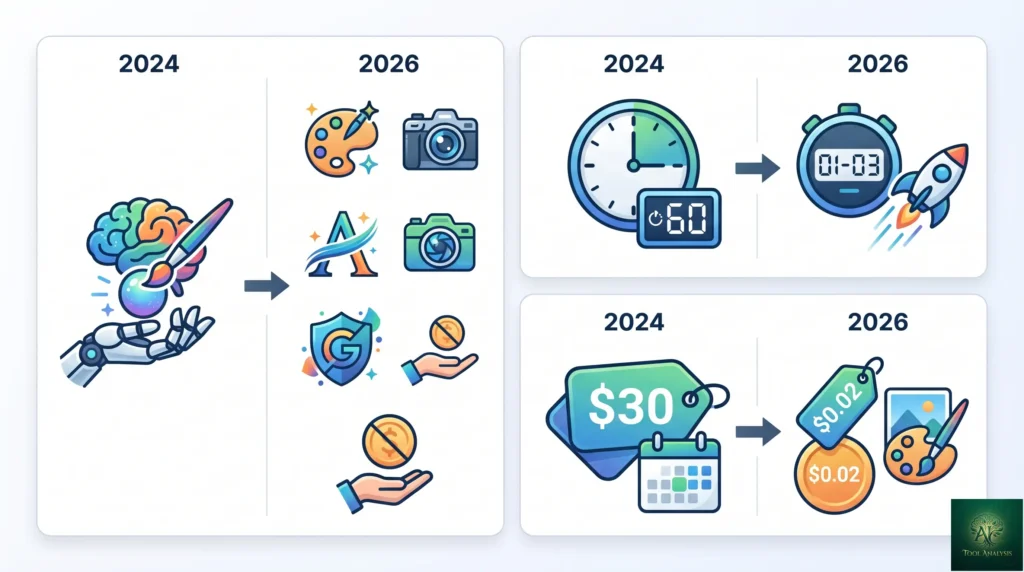
What changed since our May 2026 edition
- Imagen is shut down in Google’s Gemini API. Google’s API docs point developers to Nano Banana instead. In the API, Nano Banana 2.1 is now the main image model, and Nano Banana 2 is deprecated.
- OpenAI retired two older image tools and launched a new one. gpt-image-1 was shut down in the API on October 23, 2026, the DALL-E GPT is retired from ChatGPT, and Images 2.6 arrived on November 4.
- Midjourney V8.2 became the default on July 24; V8.1 (April 14) makes 2K images without upscaling.
- FLUX 3 Image is Black Forest Labs’ newest model family, with an open-weights Klein version; FLUX.2 models are still sold.
- Ideogram 4.5, Recraft V4.1 and Krea 3: Ideogram’s docs recommend 4.5 for new work, Recraft released V4.1 on May 14 and Krea 3 arrived on October 15.
- Stable Diffusion is still on 3.5. The May edition mentioned a “Stable Diffusion 4”; we found none on the Stability pages we read.
FAQ
What is the best free AI image generator?
For most people it’s the one already in their chat app: ChatGPT (Images 2.6) and Gemini (Nano Banana) both make images on their free plans. Recraft’s free plan makes vector images too, but those images belong to Recraft.
Which GPT is best for image generation?
Use regular ChatGPT: image generation runs on ChatGPT Images 2.6 on every plan, including Free, and the old DALL-E GPT has been retired. Plus, Pro and Business also get “Images with thinking”.
Is Midjourney free?
No. Midjourney has no free trial on its website or Discord, only a limited trial in the niji journey mobile app. Basic costs $10 a month.
Which AI image generator is best for text in images?
Ideogram is the one built around it: its docs say it can put text almost anywhere in an image, from posters to t-shirts. The free plan gives 30 credits a week if you sign in with Google, Apple or Microsoft.
How many images can I make for free in ChatGPT?
OpenAI’s help pages we read give no number. Image generation has its own limit, and ChatGPT tells you when you reach it.
Can I use AI-generated images commercially?
It depends on the tool and the plan. OpenAI’s terms say you own the output; Midjourney requires Pro or Mega for businesses grossing over $1,000,000 a year; Recraft’s free-plan images belong to Recraft.
Is Google Imagen 4 still available?
Not in the Gemini API: Google’s API docs say the Imagen models are shut down there and recommend Nano Banana. We did not check Vertex AI or other apps.
Final verdict
Start with the free image generator in ChatGPT or Gemini and use it for a week. If you hit the limit often, the cheapest fix in the US is the plan you’d use for chat anyway: Google AI Plus at $4.99 or ChatGPT Go at $8. Pay for a specialist only for a specific job: Midjourney for a style (Standard at $30 if Basic’s fast hours run out), Ideogram for text, Recraft on a paid plan for logos. Whatever you choose, check who owns the images on that plan before you use them for business.
Sources and how we checked: the pricing, help and model pages of OpenAI (Images 2.6), Google (Gemini image help), Midjourney (plan comparison), Ideogram (plans), Recraft (paid plans), Krea, Black Forest Labs (pricing) and Stability AI, plus Adobe’s blog and newsroom (we couldn’t load Adobe’s plans page), all read on November 7, 2026. Every price here is a US price in dollars from the vendor’s own page.

Founder of AI Tool Analysis. Reads the pricing pages and help articles behind each claim. See how we research →
Stay Updated on AI Plans and Prices
Get an email when a plan we cover changes its price or limits.
- Price Tracking: an email when a plan you read about changes price or limits
- Sources: each change comes from the vendor’s own pricing or help page
- Comparison Updates: when a plan changes, the comparisons that depend on it are updated
Free, unsubscribe anytime.

Related Reading
- Nano Banana Review: Free vs Paid in the Gemini App
- ChatGPT Images vs Nano Banana
- Adobe Firefly Review
- Midjourney Review
- Canva Magic Studio Review
- Google AI Plus Review
Last Updated: November 7, 2026
Next Review Update: December 7, 2026 (plan prices, free allowances and model names)
Have a tool you want us to cover? Suggest it here | Questions? Contact us