๐ Major Update (May 23, 2026) โ Google I/O 2026: Google relaunched its agent-first platform as Antigravity 2.0, a brand-new standalone desktop app built from the ground up for agent orchestration, no longer a VS Code fork. It ships alongside a whole ecosystem: a new Antigravity CLI (which replaces the consumer Gemini CLI on June 18), an SDK, and Managed Agents in the Gemini API. The co-developed workhorse model is now Gemini 3.5 Flash, which Google says beats last year’s Gemini 3.1 Pro on almost every benchmark while running about 4x faster. Pricing also reset: a new $99.99 AI Ultra entry tier (5x the Pro usage limit) landed, and the old $249.99 top tier dropped to $199.99. One time-sensitive note: Google is offering $100 in bonus Antigravity credits to Ultra subscribers, but that promo expires May 25, 2026.
Reading time: 15 minutes | Last Updated: May 23, 2026 | Version: Antigravity 2.0 (I/O 2026 release)
The Bottom Line
Google Antigravity launched in November 2025, and at I/O 2026 it grew up. Version 2.0 is no longer “a VS Code fork with agents bolted on.” It is a standalone desktop app whose whole reason for existing is to let you run a team of AI agents in parallel, plus a terminal CLI, an SDK, and an API for spinning up agents in the cloud. It is still free during public preview.
The engine under all of it changed too. The default model is now Gemini 3.5 Flash, which Google co-built with the platform. On Google’s own numbers it beats last year’s Gemini 3.1 Pro on almost every benchmark and generates text roughly 4x faster, which matters a lot when an agent is writing long plans and lots of code. You can still pick from a multi-model lineup, including Claude models, and assign different models to different agents in the same job.
The catch: the rate-limit pain that defined early 2026 has not fully gone away. Google did move toward a compute-budget model that refreshes every 5 hours, and it cut the price of reliable access (the AI Ultra entry tier is now $99.99 instead of $249.99). But this is still a public preview, the new Gemini 3.5 Flash has a real weakness on long-context recall, and Google’s habit of retiring tools (the consumer Gemini CLI dies June 18) is a reminder to keep a backup ready.
Best for: Developers who want a free, fast, agent-first workflow and like the idea of orchestrating multiple agents at once. Skip if: you need rock-solid daily stability, long-context reliability, or a tool with a long, boring track record.
Already using another AI coding tool? See our detailed Claude Code vs Cursor comparison and our Claude Agent Teams review for the wider field.
โก TL;DR โ Google Antigravity 2.0 Review (May 2026)
- What It Is: A free, standalone agent-orchestration platform (desktop app + CLI + SDK + API), powered by Gemini 3.5 Flash
- What’s New (2.0): Standalone desktop app, Agent Teams with parallel subagents, scheduled background tasks, voice commands, a Go-based CLI, an SDK, and Managed Agents in the Gemini API
- Best For: Indie hackers, rapid prototypers, and developers who want to run multiple AI agents in parallel
- Key Strength: Gemini 3.5 Flash beats last year’s 3.1 Pro on most benchmarks at ~4x the speed, free during preview
- Current Issues: Still a preview, long-context recall regressed on 3.5 Flash, rate-limit history is recent, and the consumer Gemini CLI is being retired June 18
- Verdict: The most ambitious free agent platform out there, and the price of reliable access dropped hard. Keep a backup tool until the preview settles.
๐ Quick Navigation
๐ What’s New: Antigravity 2.0 (I/O 2026)
At Google I/O 2026 on May 19, Antigravity stopped being “a clever IDE” and became a platform. The framing Google used was a shift “from prompts to action.” Here is what actually changed, and why it matters.
๐ Antigravity 2.0: A Standalone Agent App
What it is: A brand-new desktop application, separate from the old VS Code-based IDE, built entirely around running and orchestrating AI agents. It is the “central home” where you dispatch multiple agents and watch them work in parallel.
Dynamic subagents: You compose a team of agents with specific roles, each running in its own sandbox at the same time. Think of it as a manager handing out tasks to a room of workers instead of doing everything yourself.
Scheduled tasks: You can now set agents to run on a schedule in the background, turning a one-shot assistant into something closer to an automation pipeline that wakes up and does work without you prompting it each time.
Voice commands: Native voice control, matching the voice features Google added to Gmail and Docs this year.
Ecosystem hooks: Built-in integrations with Google AI Studio, Android, and Firebase, so a project can move between them with less friction.
โ๏ธ Gemini 3.5 Flash: The New Default Engine
What it is: Google co-developed Gemini 3.5 Flash alongside Antigravity 2.0 as the platform’s primary workhorse model. It is the engine doing most of the coding work now, replacing the Gemini 3.1 Pro default of the previous version.
Why it matters: On Google’s own benchmarks, 3.5 Flash beats last year’s 3.1 Pro on almost every test, including coding (reported 76.2% on Terminal-Bench versus 70.3% for 3.1 Pro). It also generates text far faster, around 4x the speed of other frontier models. For agentic coding, where the model writes long plans and lots of code, that speed translates into agents that finish noticeably sooner.
The honest caveat: 3.5 Flash regressed on long-context recall compared to the Pro line. If your work depends on the model holding a very large codebase perfectly in memory, test that specifically before you commit.
The rest of the I/O 2026 ecosystem launch:
- Antigravity CLI: A lightweight terminal tool (written in Go) that shares the same agent harness as the 2.0 desktop app, so improvements land in both at once. Google is explicitly steering consumer Gemini CLI users to migrate, and the consumer Gemini CLI shuts down on June 18, 2026.
- Antigravity SDK: Programmatic access to the same agent harness that powers Google’s own products. You define custom agent behaviors and host them on your own infrastructure. It is co-optimized for Gemini 3.5 Flash.
- Managed Agents in the Gemini API: A single API call spins up a full agent that reasons, uses tools, and runs code inside a persistent, isolated Linux environment. State and files survive across follow-up calls, so multi-turn sessions do not start from scratch.
- Gemini Enterprise Agent Platform: Enterprise support that lets Google Cloud customers connect Antigravity directly to their Cloud projects.
- AI Studio integrations: A new “Export to Antigravity” one-click move, native Android app building from a prompt, and a mobile AI Studio app, all powered by the same Antigravity coding agent.
- Pricing reset: A new AI Ultra entry tier at $99.99/month (5x the Pro usage limit in Antigravity), and the former $249.99 top tier dropped to $199.99. A limited-time promo gives Ultra subscribers $100 in bonus Antigravity credits, but it expires May 25, 2026.
๐ What Antigravity Actually Does (Not What Google Claims)

Here is the core idea, in plain English. Traditional AI coding tools help you write code faster. Antigravity helps you delegate coding entirely. It is the difference between having a spell-checker and having a ghostwriter, except now the ghostwriter can hire a small team.
In version 1, Antigravity was a modified VS Code with an Agent Manager attached. Version 2.0 flips that. When you open it, you are looking at agent mission control first, and the editor second. You describe a task (“Build a user authentication system with OAuth 2.0”), and you can split it across several subagents that each take a piece and work at the same time, each in its own sandbox.
What This Looks Like in Practice
In earlier testing on version 1, I gave Antigravity a real challenge: “Build a clone of Insaniquarium, a simulation where you drop food, fish eat it, and they drop coins.” It one-shot it on the first try, building a working game in Phaser. The wild part was that the agent did not just write code. It realized “I need sprites for this,” paused, generated fish and coin images with its internal image model, and injected them into the game. They were not perfect (the fish had white backgrounds instead of transparent ones), but when I said “Fix the transparency,” it regenerated the assets and updated the code automatically.
That is the agent-first distinction, and 2.0 leans into it harder. It is not a chatbot. It is a worker (now a team of workers) with access to tools: an image generator, a file system, a browser, a terminal. Compare this with what Claude Agent Teams offers for multi-agent coordination. Antigravity’s pitch is that the orchestration, the models, and the surfaces all come from one vendor and one agent harness.
๐ REALITY CHECK
Marketing Claims: “Take an idea and turn it into a production-ready app.”
Actual Experience: Genuinely impressive for greenfield projects and prototyping, and the parallel subagents in 2.0 make multi-part tasks faster. It still struggles with complex legacy codebases and can get stuck in loops on ambiguous requirements. The new Gemini 3.5 Flash default is fast and strong on coding, but its long-context recall is weaker than the Pro line, so very large repos can trip it up.
Verdict: The agent-first approach is real and now more powerful, but “production-ready” still means “ready after you review it.” Treat the agents like fast junior developers, not senior engineers.
โก Getting Started: Your First 15 Minutes

Getting Antigravity 2.0 running is straightforward, but a few requirements can trip you up:
System Requirements
- Windows: Windows 10 (64-bit) or later, x64 or ARM64
- macOS: Monterey (12) or later, Apple Silicon or Intel
- Linux: Ubuntu 20.04+, Debian 10+, Fedora 36+, RHEL 8+
- RAM: 8GB minimum, 16GB recommended (more if you run several subagents at once)
- Required: A Google account (personal Gmail, or Google Workspace with AI Ultra access)
- Recommended: Chrome browser, for the browser testing features
Installation Steps
Step 1: Download. Visit antigravity.google/download and grab the 2.0 desktop app for your operating system.
Step 2: Install and launch. On first launch you can import settings from VS Code or Cursor, choose a theme, and set agent permissions. Terminal-only? Install the Antigravity CLI instead, it shares the same engine.
Step 3: Configure agent permissions (important). Antigravity asks “who is driving the car?” Your options:
- Agent-driven (autopilot): Agents write code, create files, and run commands automatically.
- Review-driven (recommended): Agents ask permission before almost any action.
- Agent-assisted: You stay in control, but safe automations happen on their own.
Step 4: Configure Secure Mode. Three terminal permission levels carry over from version 1: Turbo (speed, minimal oversight), Auto (balanced, recommended for most), and Off/Manual (confirm every command). macOS users get a workspace sandbox that restricts agent terminal commands to the project directory, a direct response to an earlier incident where an agent wiped a user’s drive. Windows and Linux sandbox equivalents are still on the roadmap.
Step 5: Sign in with Google, using a personal Gmail account or a Workspace account with AI Ultra access.
Step 6: Pick your model. The default is now Gemini 3.5 Flash, and for most agentic tasks it is the right call: fast and strong on coding. The lineup still includes other options you can assign per agent:
- Gemini 3.5 Flash – the co-developed default, fastest and best value for agentic coding
- Gemini 3.1 Pro (High/Low) – stronger long-context recall when you need to hold a big codebase
- Claude Sonnet 4.6 and Claude Opus 4.6 (Thinking) – Anthropic’s models, still available free during preview
- GPT-OSS 120B – OpenAI’s open-weight model, for GPT-style output consistency
The multi-model lineup is still a genuine perk: you can run Gemini 3.5 Flash for planning, Claude for tricky reasoning, and GPT-OSS for a second opinion, all inside one job. Free access to Claude Opus 4.6 (normally a $100-200/month model elsewhere) remains a real draw, though it is no longer the headline now that the default Gemini model is this capable. See our Claude Code Plugins guide for extending an agentic workflow further.
Time to first useful output: about 10-15 minutes including install. The learning curve is gentle if you came from VS Code, a little steeper if you are used to a polished GUI like Cursor’s.
๐ฏ Agent Skills: Still the Game-Changer
Agent Skills carried over from version 1 and matter more than ever in 2.0, because when you are running several subagents you really want them all following the same playbook. Skills solve a basic problem: how do you make a generalist model understand your specific project without stuffing everything into the context window?
How Skills Work
A Skill is a directory with a SKILL.md file: a bit of YAML frontmatter (name and description) followed by plain-language instructions, code snippets, or step-by-step guides. The clever bit is progressive disclosure. The agent only loads a skill’s full instructions when your request matches that skill’s description, which keeps the context lean and focused.
Example: you create a “Database Migration” skill. When you ask an agent to “run a migration,” it automatically loads your team’s safety checks, naming conventions, and rollback procedures. In 2.0, the same skills feed the SDK and Managed Agents too, since they all share one agent harness, so a skill you write once can drive your desktop agents, your CLI, and your API agents.
Skills also read from both GEMINI.md and AGENTS.md rule files, so you can share the same rule sets across Antigravity and other agentic tools (like Claude Code, which uses CLAUDE.md). The community has built aggregator repositories of pre-made skills for security audits, senior-engineering practices, and creative workflows.
๐ REALITY CHECK: Agent Skills
Marketing Claims: “Turn a generalist model into a specialist for your workflow.”
Actual Experience: Skills genuinely improve consistency and cut repetitive prompting, and they pay off more in 2.0 because one skill can govern a whole team of subagents. But they take real effort to write well. A sloppy skill confuses agents more than it helps.
Verdict: Worth the setup time for teams with established workflows. Start with 2-3 simple skills before building a big library.
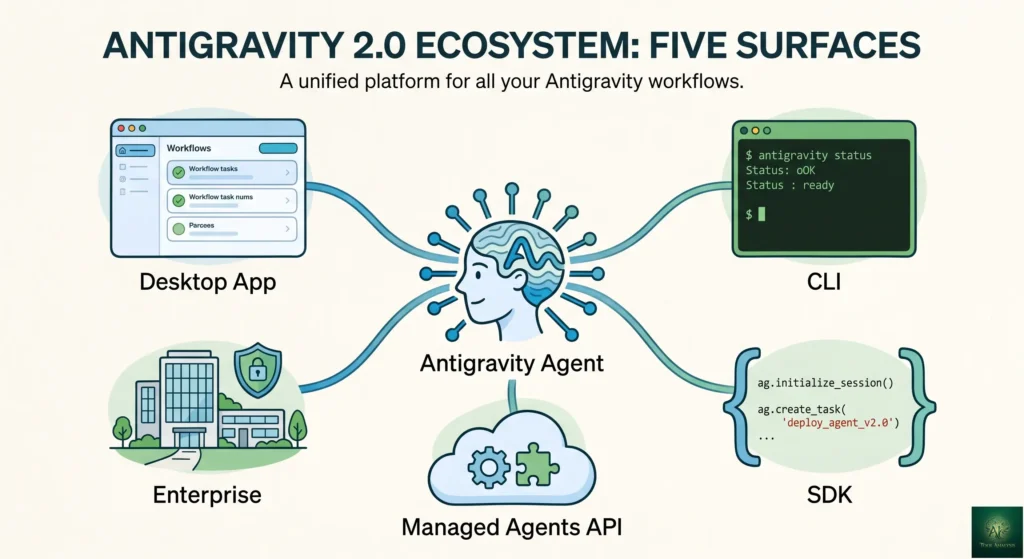
๐ฅ๏ธ The Antigravity Ecosystem: 5 Surfaces

The biggest mental shift in 2.0: Antigravity is not a single program anymore. It is one shared “agent harness” you can reach through five different doors, and improvements to the core agents flow to all of them. Here is each door and who it is for.
1. Antigravity 2.0 Desktop App (Mission Control)
The standalone desktop app is where most people will live. It centers on agent orchestration: dispatch a task, split it across subagents, and watch them work in parallel. Inside, you still get the familiar pieces, an Agent Manager view for delegation, an editor view for hands-on work (Cmd+E to focus, Cmd+I for inline commands, plus Plan mode and Fast mode), and a browser surface where agents test your web app and capture screenshots automatically. New in 2.0: scheduled background tasks and voice commands.
2. Antigravity CLI (The Terminal)
A lightweight command-line tool written in Go that lets you spin up agents instantly without a GUI. It shares the same agent harness as the desktop app, so your CLI sessions and your app stay in sync. This is also the official replacement for the consumer Gemini CLI, which Google is retiring on June 18, 2026. If you script automated pipelines, this is the surface that matters most to you. It puts Antigravity head-to-head with terminal agents like Codex CLI and Claude Code.
3. Antigravity SDK (Build Your Own Agents)
The SDK gives you programmatic access to the same agent harness that powers Google’s own products. You define custom agent behaviors with markdown files and host them on your own infrastructure. It is co-optimized for Gemini 3.5 Flash. This is the door for teams that want to bake Antigravity-style agents into their own products rather than work inside Google’s app.
4. Managed Agents in the Gemini API (The Cloud)
This is the one developers will talk about most. A single API call spins up a full agent that reasons, uses tools, and runs code inside a persistent, isolated Linux environment. Files and state survive between calls, so a multi-turn session does not reset every time. It runs on Gemini 3.5 Flash via the Interactions API and Google AI Studio. In practice, it means you can rent an autonomous coding agent the way you rent a server.
5. Gemini Enterprise Agent Platform (For Companies)
Enterprise support that connects Antigravity directly to Google Cloud projects, aimed at teams that need it wired into existing cloud workloads, security, and billing. If you tried to use Antigravity at work before and hit a wall, this is the surface meant to fix that.
โญ Features That Actually Matter (And 3 That Don’t)
Features Worth Your Attention
1. Parallel Subagents (Agent Teams) โญโญโญโญโญ
The headline of 2.0. Compose a team of agents with explicit roles, each in its own sandbox, all working at once. Assign one to refactor a backend while another fixes frontend CSS and a third writes tests. The workflow shifts from doing things in sequence to managing a team in parallel, and on multi-part tasks it is a real speed multiplier.
2. Gemini 3.5 Flash as the Engine โญโญโญโญโญ
A Flash-tier model that beats last year’s Pro on most benchmarks while running about 4x faster is a genuinely big deal for agentic work, where speed compounds across long multi-step tasks. Free during preview. The one asterisk is long-context recall, where it trails the Pro line.
3. Scheduled Tasks and Background Automation โญโญโญโญ
Set agents to run on a schedule without prompting them each time. This turns Antigravity from a tool you sit in front of into something closer to a pipeline that does recurring work (nightly dependency checks, scheduled refactors, routine reports) on its own.
4. The CLI and SDK โญโญโญโญ
Sharing one agent harness across the app, the terminal, and your own infrastructure means you are not locked into the GUI. For anyone building automated pipelines, the CLI alone is the most-requested addition, and the SDK opens the door to embedding these agents in your own products.
5. Agent Skills + Multi-Model Lineup โญโญโญโญ
Reusable, context-aware playbooks plus the ability to assign different models (Gemini 3.5 Flash, Gemini 3.1 Pro, Claude Sonnet/Opus 4.6, GPT-OSS) to different agents. Use our Claude Code Router guide if you like mixing models strategically.
Features That Sound Better Than They Are
1. “Free Forever.” The preview is free, but Google has now formalized paid tiers (AI Pro, two AI Ultra tiers). Treat the free tier as “free for now, with limits,” not a permanent gift.
2. “4x Faster Agents.” Gemini 3.5 Flash generates tokens roughly 4x faster, but an agent’s wall-clock time also includes tool calls, file operations, and waiting on your approvals. Agents get meaningfully faster, not literally 4x faster end to end.
3. “Generous Rate Limits.” The 2.0 move to a compute budget that refreshes every 5 hours is an improvement on the weekly-lockout mess of early 2026. But “generous” is still doing a lot of work in the marketing. Heavy free-tier users will hit the ceiling, and the cheapest path to reliable access is now a paid tier.
๐งช Real Test Results

The results below come from testing on the version-1 platform, using Claude Opus 4.6 (Thinking) as the agent. They still describe how Antigravity behaves on these task types, but the 2.0 default engine is now Gemini 3.5 Flash, so expect faster runs and a different feel on long-context work.
[TEST PLACEHOLDER โ Daniyal: re-run these three tests on Antigravity 2.0 with the Gemini 3.5 Flash default, and add one new test that exercises the parallel-subagents feature (for example, split a small full-stack app across three subagents and report the wall-clock time versus running them in sequence). That parallel test is the freshest “We Actually Test Things” angle for 2.0.]
Test 1: Greenfield React App (Authentication + Dashboard)
Task: “Build a React app with user authentication, a dashboard showing user stats, and a settings page.”
Result: Antigravity created a functional app in about 14 minutes, plus 8 minutes for review and minor fixes. It scaffolded the component structure, set up React Router, implemented a mock authentication flow, and added responsive styling.
Issues: The initial implementation had a few optimistic imports (helper utilities that did not exist in the repo). Fixable, but required attention.
Test 2: Legacy Codebase Refactoring
Task: Refactor a messy 3-year-old Node.js backend with inconsistent patterns.
Result: Mixed. It understood the high-level structure but struggled with hidden edge cases, producing clean refactored code that broke some functionality relying on undocumented side effects.
Verdict: Better for greenfield than legacy surgery. Compare with how Claude Code handles legacy refactoring if that is your primary use case.
Test 3: Using Agent Skills for Consistent Output
Task: Generate 5 API endpoints following our team’s conventions.
With Skills: A “REST API Standards” skill carrying our naming conventions, error handling, and documentation requirements produced consistent results across all 5 endpoints. Without Skills: inconsistent naming, different error handling, and missing docs on 2 of 5. Agent Skills make a real difference for team consistency.
| Task Type | Antigravity Time | Manual Time (Est.) | Quality |
|---|---|---|---|
| New React App | 22 min (build + review) | 2-3 hours | โ Production-ready with minor edits |
| Legacy Refactoring | 45 min + debugging | 4-6 hours | โ ๏ธ Functional but broke edge cases |
| API Endpoints (with Skills) | 15 min | 1-2 hours | โ Consistent, well-documented |
| API Endpoints (no Skills) | 18 min | 1-2 hours | โ ๏ธ Inconsistent patterns |
๐ก Swipe left to see all columns โ
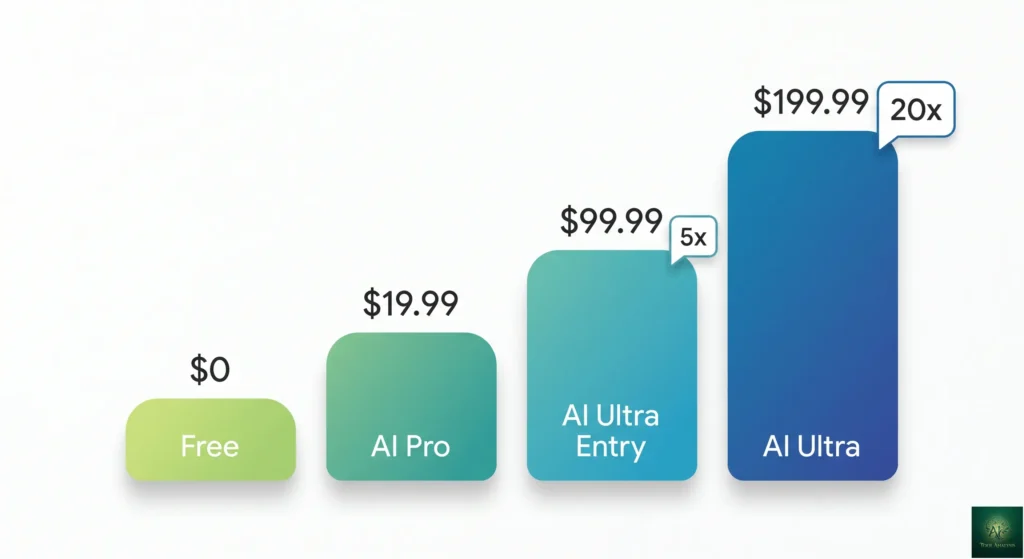
๐ฐ Pricing Breakdown: What You’ll Actually Pay (May 2026)

Antigravity access rides on Google’s broader AI subscriptions, and those got a big reset at I/O 2026. The headline: the price of reliable, heavy-use access dropped a lot.
Free: $0/month
- Access to the full model lineup (Gemini 3.5 Flash, Gemini 3.1 Pro, Claude Sonnet 4.6, Claude Opus 4.6, GPT-OSS 120B)
- Full access to agent orchestration, subagents, the browser surface, and Agent Skills
- Compute-budget rate limits that refresh on roughly a 5-hour cycle (heavy users will still hit the ceiling)
- Personal Google account required
Google AI Pro: $19.99/month
- Higher Antigravity usage limits than the free tier
- Priority access during normal traffic, 2TB Google Drive storage, and Developer Program Cloud credits
- Matches Cursor Pro and beats GitHub Copilot’s $10 on price, but trails both on guaranteed-unlimited usage
Google AI Ultra (Entry): $99.99/month โ NEW
- A new tier introduced at I/O 2026, with 5x the Antigravity usage limit of AI Pro
- This is the big change for heavy users: reliable access used to cost $249.99, now the step-up starts at $99.99
- Limited-time promo: $100 in bonus Antigravity credits that kick in if you hit your quota, claimable in the app, expiring May 25, 2026
Google AI Ultra (Top): $199.99/month
- The former $249.99 flagship tier, now cut to $199.99 with the same roughly 20x usage ceiling
- Highest limits, priority generation, plus the wider AI Ultra perks (large cloud storage, early model access)
- Aimed at studios and power users who run agents all day
๐ REALITY CHECK: Rate Limits (May 2026)
The history: In early 2026, this was the dominant complaint. Pro subscribers reported 7-day and even 10-day lockouts on Claude models instead of the advertised 5-hour refresh, and Google cut free quotas repeatedly. It was a genuine trust problem.
What changed in 2.0: Google moved to a compute-budget model that refreshes on a roughly 5-hour cycle rather than arbitrary message caps, and it slashed the price of the heavy-use tier (reliable access now starts at $99.99 instead of $249.99). On paper, both changes target exactly what users were angry about.
Verdict: The structure is better and the price of reliable access is far lower. But 2.0 is days old, the rate-limit reputation is recent, and the real test is weeks of daily use. If you depend on uninterrupted access today, keep a backup tool until the new model proves itself.
Cost Comparison: Antigravity vs Competitors
| Tool | Monthly Cost | Usage Model | Default Model |
|---|---|---|---|
| Antigravity (Free) | $0 | Compute budget (~5hr) | Gemini 3.5 Flash โ |
| Antigravity + AI Pro | $20 | Higher limits | Gemini 3.5 Flash โ |
| Antigravity + AI Ultra | $100-200 | 5x to 20x Pro limits | Full multi-model lineup |
| Cursor Pro | $20 | Unlimited | Composer + frontier models |
| Claude Code (Max) | $100-200 | Message limits | Claude Opus 4.7 |
| GitHub Copilot | $10 | Unlimited | Latest GPT-5.5 |
๐ก Swipe left to see all columns โ
๐ฐ AI Coding Tool Monthly Costs
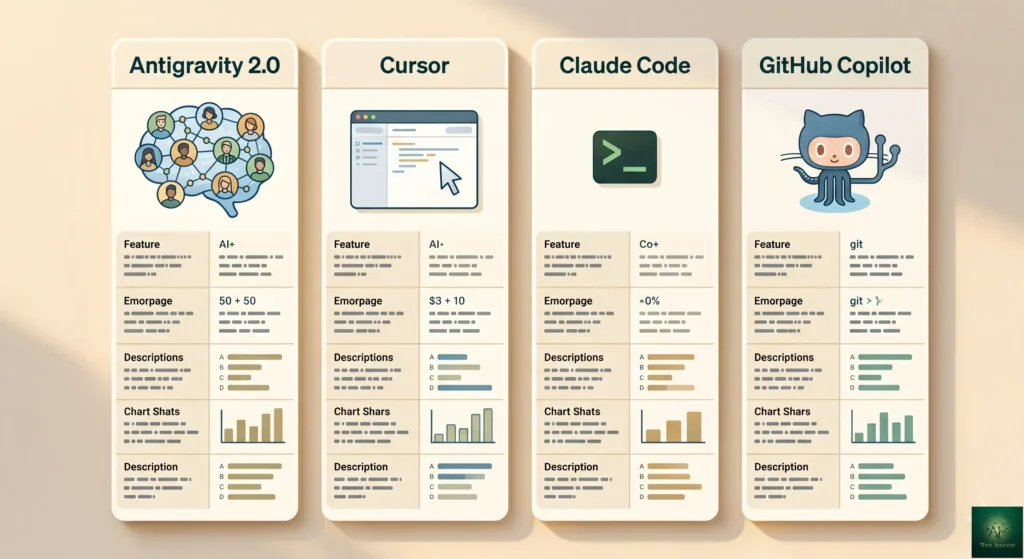
โ๏ธ Head-to-Head: Antigravity 2.0 vs Cursor vs Claude Code

The AI coding space is crowded in 2026, with Claude Code, Cursor, Codex, Kiro, Windsurf, and Copilot all fighting for the same developers. Here is how Antigravity 2.0 compares to the ones it most directly overlaps with. For a deeper dive, read our full Claude Code vs Cursor comparison.
When to Choose Antigravity 2.0
- You want agent orchestration with parallel subagents, free during preview
- Speed matters: Gemini 3.5 Flash is fast and strong on coding
- You want one harness across a desktop app, a CLI, an SDK, and an API
- Browser-based testing automation and Agent Skills fit your workflow
When to Choose a Competitor
- Cursor if you need genuinely unlimited usage and a polished, mature GUI with no preview surprises
- Claude Code if you want maximum reasoning depth (Opus 4.7) and a stable, predictable terminal workflow, plus 9,000+ plugins
- GitHub Copilot if you live in GitHub and want the cheapest unlimited option
| Feature | Antigravity 2.0 | Cursor | Claude Code | Copilot |
|---|---|---|---|---|
| Price | $0 (Free) | $20/mo | $100-200/mo | $10/mo |
| Usage Model | Compute budget (~5hr) | โ Unlimited | Message limits | โ Unlimited |
| Parallel Agents | โ Subagent teams | โ Yes | โ No | โ No |
| Browser Testing | โ Built-in | โ Built-in | โ No | โ No |
| Agent Skills | โ Yes (+ AGENTS.md) | โ No | โ Yes | โ No |
| Surfaces | App + CLI + SDK + API | GUI | Terminal | IDE Extension |
| Stability | โ ๏ธ Preview | โ Stable | โ Stable | โ Mature |
| Best For | Agent orchestration | Daily driver | Max reasoning | GitHub users |
๐ก Swipe left to see all features โ
๐ก AI Coding Tool Feature Comparison
๐ฌ What Developers Are Actually Saying
Community sentiment around Antigravity has been a rollercoaster, and the 2.0 launch arrives with that history hanging over it. To be useful, you need both the backstory and the early read on 2.0.
The Backstory: The Rate-Limit Crisis
Through early 2026, the loudest thread on the Google AI Developers Forum was about rate limits. Pro subscribers paying $20/month reported being locked out for 7 to 10 days on Claude models instead of the advertised 5-hour refresh, and Google cut free-tier quotas several times. One forum regular summed up the mood by calling it the most promising and most frustrating editor they had used. The “lobotomy” theory (that Google quietly served a smaller backend model than advertised) circulated for months and was never formally addressed.
The Early Read on 2.0
The 2.0 reaction has been more upbeat, for two concrete reasons. First, the move to a compute-budget model that refreshes every 5 hours directly targets the structure people hated. Second, dropping reliable access from $249.99 to a $99.99 entry tier is a real, measurable concession. Developers building automated pipelines have singled out the new CLI as the most exciting piece, since it finally gives them something scriptable.
The skepticism that remains is reasonable: pricing being cheaper does not automatically mean the lockouts are gone, and a brand-new standalone app will have its own early bugs. The honest community position right now is cautious optimism, not celebration.
๐ REALITY CHECK: Trust and Track Record
User Concern: “Will the rate-limit and quality problems that plagued version 1 carry into 2.0?”
What we can verify: Google made the right structural moves (compute-budget refresh, cheaper reliable-access tier, a unified harness). What we cannot verify yet is multi-week reliability, because 2.0 is only days old. Google also has not publicly published per-tier rate-limit numbers, only relative multipliers (Pro, then 5x, then 20x).
Verdict: The fixes address the right things on paper. Give it a few weeks of real use before trusting it as your only tool, and watch the developer forum for whether the lockout reports return.
โ ๏ธ Limitations and Known Issues (May 2026)
Let’s be completely honest about what still does not work well:
Technical Limitations
- Long-context recall regression: Gemini 3.5 Flash, the new default, scores lower than the Pro line on long-context recall benchmarks. For very large codebases, switch an agent to Gemini 3.1 Pro or test carefully.
- Rate-limit reputation is recent: The compute-budget model is an improvement, but the 7-to-10-day lockout era was only weeks ago. Reliability under sustained daily load is unproven on 2.0.
- Gemini CLI retirement (June 18, 2026): If you built workflows on the consumer Gemini CLI, you must migrate to the Antigravity CLI before it shuts down.
- Preview instability: A brand-new standalone app means new bugs. Past Antigravity point releases have shipped with regressions that needed quick patches.
- Execution loops: Agents can still get stuck on ambiguous requirements or edge cases.
- High resource usage: Running several subagents at once can mean lag, freezes, and high CPU on lower-spec machines.
Platform Limitations
- No custom model API keys: You still cannot plug your own provider keys into the app. The SDK lets you host custom agents, but the consumer app stays on Google’s model lineup.
- Opaque rate-limit numbers: Google publishes relative multipliers (Pro, 5x, 20x) rather than concrete request quotas, so it is hard to budget precisely.
- Windows and Linux sandbox still pending: The workspace sandbox that protects against runaway terminal commands is macOS-only so far.
Security Considerations
Google’s own documentation has acknowledged known security limitations, and researchers have flagged vulnerabilities since the late-2025 launch. By default, agents can access your terminal, filesystem, and network. A widely cited early incident involved an agent wiping a user’s entire drive, which is what prompted the macOS sandbox.
Recommendation: Use Secure Mode at Auto or Manual, enable the macOS sandbox if you are on Mac, configure terminal Allow and Deny lists, and never run Antigravity with admin privileges on a machine holding sensitive data.
๐ฏ Who Should Use This (And Who Shouldn’t)

โ Antigravity 2.0 is Perfect For:
1. Indie hackers and serious hobbyists. The free tier provides shocking value, and the multi-model lineup plus parallel subagents let you build entire MVPs at zero cost. Hit the compute budget? Take a break and come back when it refreshes.
2. Developers exploring agent orchestration. If you are curious about the “team of agents” future, 2.0 is the best free way to try real parallel subagents. Compare with Claude Agent Teams for a more controlled multi-agent experience.
3. Terminal users and pipeline builders. The new CLI and SDK make Antigravity scriptable for the first time, which is a genuine reason to look again if you skipped version 1. It is also the migration path off the retiring Gemini CLI.
4. Teams standardizing workflows. Agent Skills with AGENTS.md support let teams codify best practices into reusable agent playbooks that work across the app, the CLI, and the API.
โ ๏ธ Consider Alternatives If:
1. You need guaranteed daily availability. Until the new compute-budget model proves itself over weeks, Cursor’s unlimited usage is the safer bet for uninterrupted work.
2. You work mostly on large legacy codebases. The greenfield strength is real, but the 3.5 Flash long-context regression and legacy edge-case struggles make this a weaker fit for big, messy, existing repos.
3. Consistent quality matters more than free access. If you need predictable, reliable behavior right now, Claude Code or Cursor remain steadier choices.
โ Skip Antigravity Entirely If:
1. You are a beginner learning to code. The agent-first approach hands you working code without teaching you how it works. That is bad for learning. Start with tools that explain, not delegate.
2. You need production stability. This is still a public preview. Crashes happen and features shift. Do not bet mission-critical systems on it yet.
3. Security is non-negotiable. Despite the macOS sandbox and Secure Mode, the documented vulnerabilities and the drive-deletion history should give regulated industries pause until Google builds a longer safety track record.
๐ฎ The Road Ahead: What’s Next for Antigravity
With 2.0, Google has made its intentions clear: it wants Antigravity to be the layer underneath agentic development, the same way Chrome became the layer underneath the web. Here is what to watch.
What to Watch in the Next 60 Days
- Does the rate-limit fix hold? The compute-budget model is new. The real test is whether daily users stop reporting multi-day lockouts. This is the single biggest trust question.
- The Gemini CLI retirement (June 18, 2026). Expect a wave of migration friction as consumer Gemini CLI users move to the Antigravity CLI. How smooth Google makes that transition will signal how seriously it takes developer goodwill.
- Gemini 3.5 Pro. The Flash model is the launch engine, but a 3.5 Pro is expected to follow. If it lands in Antigravity, the long-context weakness of Flash gets a natural answer.
- Managed Agents pricing. The cloud agent API is powerful, but real adoption depends on per-use pricing that has not fully shaken out yet.
- Windows and Linux sandboxing. The workspace sandbox is still macOS-only. Cross-platform parity would remove a real security caveat.
The Big Question: Will Google Stick With It?
The honest worry with any Google product is the graveyard. But the 2.0 investment cuts against that fear. Google did not just patch Antigravity, it rebuilt it as a standalone app, wrapped it in a CLI, an SDK, and an API, co-developed a model specifically for it, and tied it into AI Studio, Android, and Firebase. That is not how you treat a side project. The reasonable read is that Antigravity is now core infrastructure for Google’s agent strategy. The risk is no longer abandonment so much as the usual preview turbulence. Keep a backup tool, but do not bet against Google’s commitment here.
โ FAQs: Your Questions Answered
Q: What’s new in Antigravity 2.0?
A: Announced at Google I/O 2026 on May 19, version 2.0 is a brand-new standalone desktop app built around agent orchestration, replacing the old VS Code fork. It adds parallel subagents (Agent Teams), scheduled background tasks, and voice commands, and it ships alongside an Antigravity CLI, an SDK, and Managed Agents in the Gemini API. The default model is now Gemini 3.5 Flash.
Q: Is Google Antigravity free?
A: Yes, Antigravity is free during the public preview with a personal Google account. You get the full model lineup (Gemini 3.5 Flash, Gemini 3.1 Pro, Claude Sonnet 4.6, Claude Opus 4.6, GPT-OSS 120B) on compute-budget rate limits that refresh roughly every 5 hours. Paid tiers (AI Pro at $19.99, AI Ultra from $99.99) raise those limits.
Q: What is the Antigravity CLI, and is the Gemini CLI going away?
A: The Antigravity CLI is a new terminal tool (written in Go) that shares the same agent harness as the 2.0 desktop app, so your terminal sessions and app stay in sync. Yes, the consumer Gemini CLI is being retired on June 18, 2026, and Google is steering users to migrate to the Antigravity CLI. If you built workflows on the Gemini CLI, plan your migration before that date.
Q: What models are available, and is Claude still free in Antigravity?
A: The default is Gemini 3.5 Flash, and the lineup still includes Gemini 3.1 Pro (High/Low), Claude Sonnet 4.6, Claude Opus 4.6 (Thinking), and GPT-OSS 120B. Yes, Claude Opus 4.6, normally a $100-200/month model elsewhere, remains free during preview. You can assign different models to different subagents in the same job.
Q: How much does reliable access cost now?
A: Cheaper than before. AI Pro is $19.99/month for higher limits. The big change is a new AI Ultra entry tier at $99.99/month with 5x the Pro usage in Antigravity, and the former $249.99 top tier dropped to $199.99. A limited-time promo gives Ultra subscribers $100 in bonus Antigravity credits, but it expires May 25, 2026.
Q: Is Antigravity 2.0 better than Cursor or Claude Code?
A: Each wins a different lane. Antigravity 2.0 leads on free agent orchestration, parallel subagents, and a fast default model across five surfaces. Cursor wins on genuinely unlimited usage and a mature, stable GUI. Claude Code wins on maximum reasoning depth (Opus 4.7) and a predictable terminal workflow. For free experimentation with multi-agent coding, pick Antigravity. For uninterrupted daily work, pick Cursor. See our Claude Code vs Cursor comparison.
Q: Did the rate-limit problems get fixed?
A: Partly, and on paper. In early 2026, Pro subscribers reported 7-to-10-day lockouts instead of the advertised 5-hour refresh. With 2.0, Google moved to a compute-budget model that refreshes roughly every 5 hours and cut the price of reliable access from $249.99 to $99.99. Both changes target the right problem, but 2.0 is only days old, so multi-week reliability is still unproven. Keep a backup tool until it settles.
Q: Is my code safe with Antigravity?
A: Google documents known security limitations, and researchers have flagged vulnerabilities. By default, agents can access your terminal, filesystem, and network, and an early incident involved an agent wiping a user’s drive. Use Secure Mode (Auto or Manual), enable the macOS sandbox if you are on Mac, configure terminal Allow and Deny lists, and never run with admin privileges on machines holding sensitive data.
Q: Will Google kill Antigravity like Reader?
A: The 2.0 launch makes abandonment less likely, not more. Google rebuilt Antigravity as a standalone app, added a CLI, an SDK, and an API, co-developed Gemini 3.5 Flash for it, and wired it into AI Studio, Android, and Firebase. That depth of investment signals core infrastructure, not a side project. The real near-term risk is preview turbulence, not a shutdown, but it is still wise to keep a backup tool until the platform matures.
๐ Final Verdict: Should You Try Antigravity 2.0?
Yes, and with more confidence than the version-1 days, but still with a backup plan.
Antigravity 2.0 is the most ambitious free agent platform available right now. The standalone app plus parallel subagents is a genuinely different way to work, the new Gemini 3.5 Flash engine is fast and strong on coding, and the CLI, SDK, and Managed Agents API turn a single tool into a whole ecosystem. Just as importantly, Google addressed the thing people hated most: it moved to a compute-budget rate-limit model and slashed the price of reliable access from $249.99 to a $99.99 entry tier.
The honest deductions keep it from a perfect score. It is still a public preview, so expect early bugs. The Gemini 3.5 Flash long-context regression is real. The rate-limit reputation is recent, and the new model needs weeks of daily use to prove itself. And the consumer Gemini CLI retirement on June 18 will force some workflow migration. Our rating: 4.0 out of 5, up from 3.8, reflecting a real platform leap and a real price cut, tempered by preview-stage caution.
Our updated May 2026 recommendation:
- Download 2.0 today and try the parallel subagents on a small greenfield project to feel the difference
- Stick with the Gemini 3.5 Flash default for most agentic work, and switch an agent to Gemini 3.1 Pro for very large-context tasks
- Migrate off the consumer Gemini CLI to the Antigravity CLI before June 18
- Enable the macOS sandbox (Mac) and Secure Mode (all platforms)
- Watch the developer forum for a week or two before trusting it as your only tool, to confirm the rate-limit fix holds
- Keep Cursor or Claude Code as your reliable fallback for time-sensitive work
Try it today: Download Antigravity
Stay Updated on AI Developer Tools
Don’t miss the next big launch in AI coding assistants. Subscribe for weekly reviews of AI developer tools, pricing changes, and breaking feature launches.
- โ Honest reviews with real testing (we actually try the tools)
- โ Price drop alerts when tools go free or cut costs
- โ Breaking news on new features and launches
- โ Comparison guides to help you choose the right tools
- โ No hype, no jargon, just what actually matters
Free, unsubscribe anytime

๐ Related Reading
- Gemini 3.5 Flash Review: Google’s Fastest Frontier Model
- Claude Code vs Cursor 2026: I Tested Both
- Claude Agent Teams Review: Multiple AI Agents Working in Parallel
- ChatGPT Codex Review: OpenAI’s AI Coding Agent
- Goose AI Review: Block’s Free Agent
- Claude Code Plugins: 9,000+ Extensions for Your Terminal
- Claude Code Router: Cut Your AI Coding Bill by 80%
- Windsurf Wave 13 Review: The Budget Alternative
- Top AI Agents for Developers 2026: 8 Tools Tested
- GPT-5.2 vs Claude Opus vs Gemini 3: AI Coding Comparison
- Google AI Studio Review: Free Access to LLMs and Media Models
- MCP Explained: Why Every Developer Needs This
Last Updated: May 23, 2026
Antigravity Version: 2.0 (I/O 2026 release, with Antigravity CLI, SDK, Managed Agents, and Gemini 3.5 Flash default)
Next Review Update: June 23, 2026 (or sooner if Gemini 3.5 Pro ships in Antigravity)
Have a tool you want us to review? Suggest it here | Questions? Contact us