
Perplexity is still the AI tool to pick when you want answers with sources you can click, and in this Perplexity AI review the free plan comes out as enough for everyday questions. Pro costs $17 a month if you pay for a year on the web, and $20.00 in the US App Store. It is worth it if you keep running into Free’s limit of 3 Pro Searches a day, or if you want to switch between Claude, GPT, Gemini and Grok models in one place.
Max, at $200 a month, is for a small group: people who need the flagship models that Pro doesn’t include, Model Council, which asks three models at once, or Teammates, agents you hand an ongoing job. Everyone else should skip it, including heavy users of Perplexity Computer, its task agent (an AI that carries out multi-step jobs for you): buying credits on Pro costs less than Max.
One catch is new since the last edition of this review. Ordinary searches never spend credits, but Computer tasks do, and if you switch on auto-refill, Perplexity tops up your balance on your card.

TL;DR: Should You Pay for Perplexity?
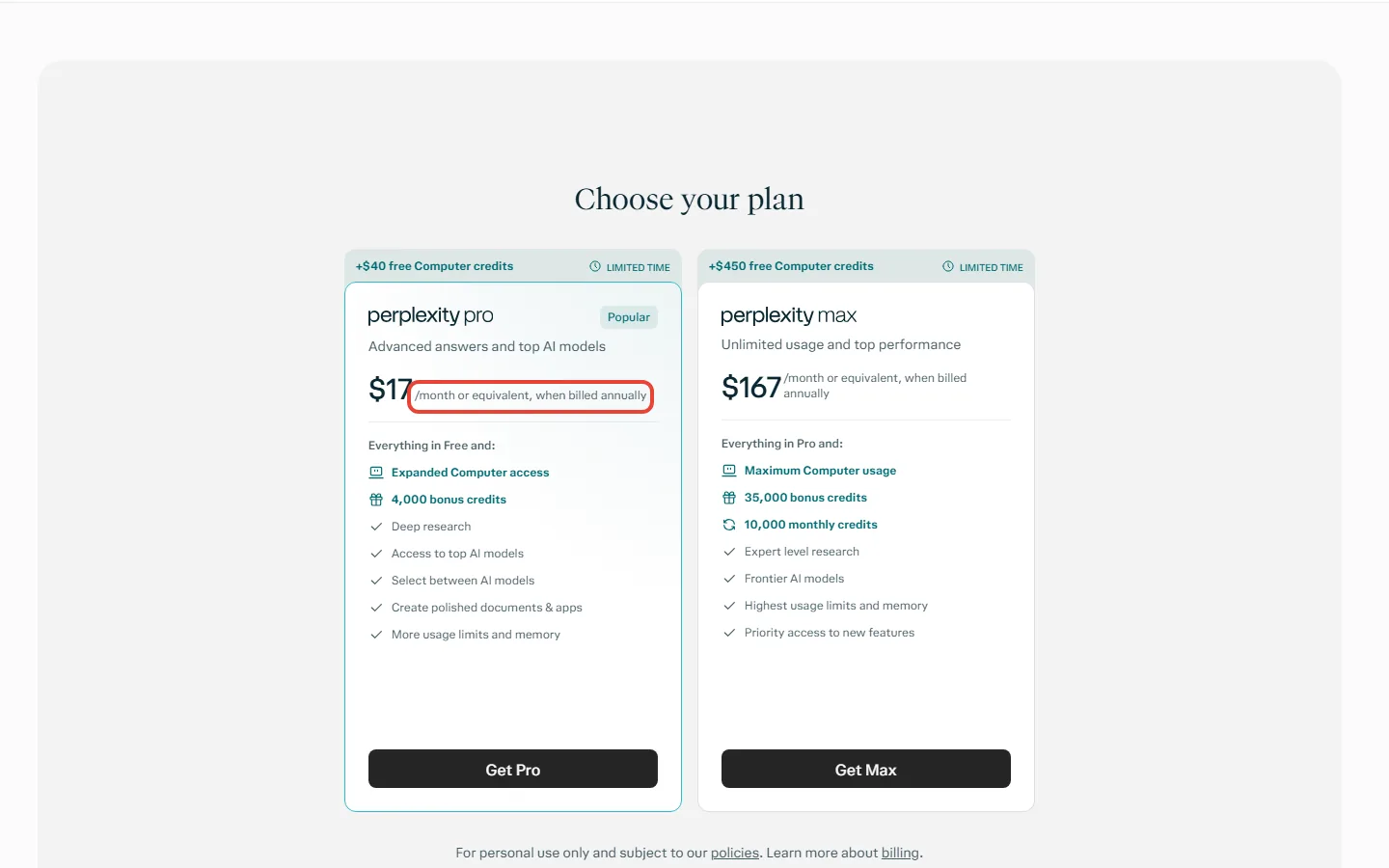
Price: Free costs nothing; Pro is $17 a month billed annually (US App Store: $20.00); Education Pro $10 a month; Max $200 a month or $2,000 a year.
You ask a few questions a day and want sources: stay on Free. It has practically unlimited basic searches and 3 Pro Searches a day.
You hit that daily cap, or want to pick the model: Pro. Perplexity sells it monthly or yearly; buy it where you plan to keep it, web or app store.
You are a verified student or teacher: Education Pro, at $10 a month.
You need GPT-6 Astra, Claude Opus 5.5 or Gemini 4 Argon, Model Council or Teammates: Max.
You already pay for ChatGPT Plus or Claude Pro and mostly write or chat: skip Perplexity.
The catch: Perplexity’s plan pages give no numbers for Pro’s weekly and monthly limits, and Computer work beyond Pro’s included weekly allowance is paid in credits, 100 to the dollar.
Quick Navigation
What every Perplexity plan costs in November 2026
Here is every plan in US dollars, from Perplexity’s own pages.
| Plan | Price (USD) | What it adds |
|---|---|---|
| Free | Free | Practically unlimited basic searches, 3 Pro Searches a day, 1 Research query a month |
| Pro | $17 a month billed annually; $20.00 in the US App Store | Choice of advanced models, more Pro Searches and Research, image and video generation, weekly Computer use (rolling out) |
| Education Pro | $10 a month, after SheerID verification | Everything in Pro, for verified students and educators |
| Max | $200 a month, or $2,000 a year on the web | Max-only models, Model Council, 10,000 Computer credits a month |
| Enterprise Pro | $40 a seat a month, or $400 a year | Pro for teams, with admin controls |
| Enterprise Max | $325 a seat a month, or $3,250 a year | Max for teams |
When we read it, Perplexity’s Pro page showed only annual-billing prices: $17 a month for Pro and $167 for Max. Monthly billing exists too, but the monthly web price for Pro wasn’t on any Perplexity page we read; Apple’s listing has Pro at $20.00 without saying the billing period. At the $17 rate, a year of Pro is about $204. Max’s monthly price is published: twelve monthly payments of $200 come to $2,400, which is $400 more than the $2,000 yearly price. Max’s yearly option only exists on the web app, not in the mobile apps.

What the free plan gives you, and where it stops
Free Perplexity gives you practically unlimited basic searches, each answered with sources. What it rations is the deeper kind of answer: 3 Pro Searches a day, which adds up to 21 a week, and 1 Research query a month. A Pro Search is Perplexity’s deeper, multi-step search, and Perplexity uses it automatically when your plan includes it, up to the plan’s limit.
On Free you also can’t choose the model. Perplexity picks one for each question, and the advanced models, image generation and premium support are paid features. Some free accounts get a few free turns with Computer, Perplexity’s agent for longer tasks, as a one-off trial.
Comet, Perplexity’s AI browser for Mac, Windows, iOS and Android, doesn’t need a subscription. Perplexity says its free version “will always” include Comet. Our Comet browser review covers the browser itself.

Is Perplexity Pro worth paying for?
Pro is worth paying for if one of two things is true for you. The first: you run out of Free’s 3 Pro Searches on more than the odd day, because Pro moves you to weekly limits instead of a daily count. The second: you want to choose the model yourself.
That model choice is Pro’s clearest difference from a single-company chatbot. As of Perplexity’s October 27 table, Pro can use seven models: GPT-6.1 Sol, Gemini 3.8 Flash, Claude Sonnet 5.5, Grok 4.7, Kimi K3, GLM 5.3 and Nemotron 3.5 Super VL. Perplexity warns that these models can behave differently inside Perplexity than in their makers’ own apps, and that the list changes as models come and go.
Pro also adds image and video generation (video access is limited), up to 50 file uploads per project, more Research reports, and a weekly allowance of Computer use. It does not include the Perplexity API, the paid service developers use to build Perplexity into their own apps, which is billed separately.
Two recent features also come with Pro. Computer can run entirely on a supported Apple-silicon Mac, working with your local files and apps like Notes and Mail without sending personal data to the cloud, like doing your paperwork at your own desk instead of posting it out. It needs the Mac app 26.42.0 or later, with 36 GB of unified memory recommended. That is the memory figure on your Mac’s About This Mac screen, so check yours before you count on running anything locally.
The other is the updated Voice mode: you can move around Perplexity and start Computer tasks by speaking, on desktop web and the Mac app. Neither needs Max. Unless your Mac has that much memory or you would rather talk to Perplexity than type, neither is a reason on its own to leave Free.
REALITY CHECK
What one page says: Perplexity’s plan guide describes Education Pro, which has everything in Pro, as including “unlimited Pro Searches”.
What the table on the same page says: Pro and Education Pro get “weekly limits (average use)” for Pro Searches, with no number given. Only the Enterprise plans have published caps, such as 400 a week on Enterprise Pro.
Verdict: plan on Pro having a ceiling you can’t see in advance. The pages we read give no number for any personal plan.
One more mismatch: Perplexity’s “What is Perplexity Pro?” help page still names older models (GPT-5.2, Claude Sonnet 4.6, Gemini 3.1 Pro). This review follows the dated October 27 table, and Perplexity says the model selector in your account is the source of truth.
Computer credits: what a Perplexity task really costs
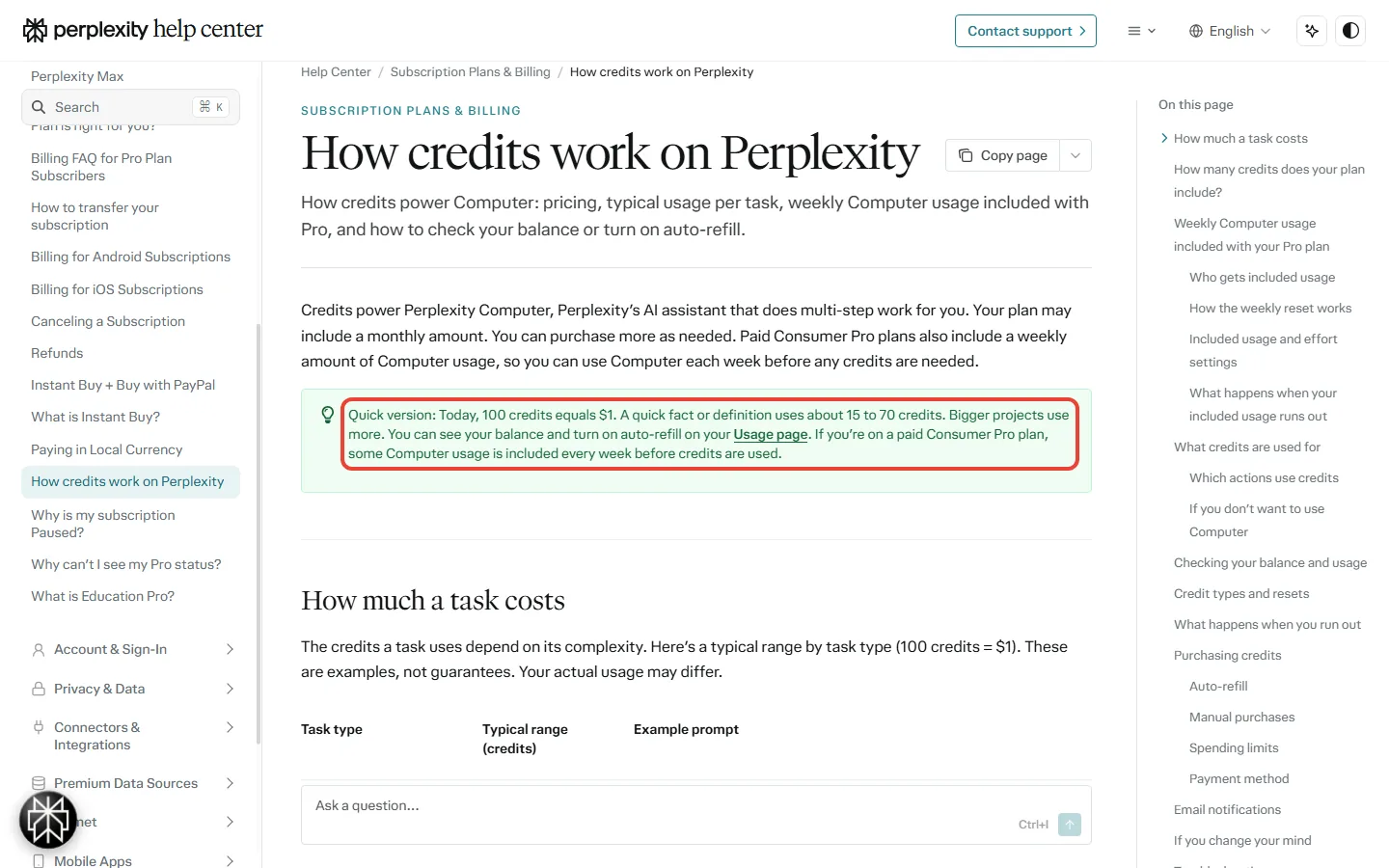
Computer is the part of Perplexity that does the work instead of answering: it can write documents, build slides, send email from your connected account, browse and write code. It runs on credits, and Perplexity’s credits page says 100 credits cost $1. Plain searches never use credits, and neither does Comet’s assistant in Search mode. Computer tasks do, and so does Comet in Work mode, which hands the job to Computer.
Perplexity’s help center gives typical costs, and calls them examples, not guarantees: 15 to 70 credits for a quick fact, 350 to 950 for a multi-step research report, 2,400 to 9,800 for a data dashboard, and 15,000 or more for a whole app.
Say you hand Computer 8 research reports a month. At Perplexity’s typical range, that is 2,800 to 7,600 credits, or $28 to $76 a month. Say instead you build 2 data dashboards a month. That is 4,800 to 19,600 credits, or $48 to $196.
What you pay depends on your plan. Paid Pro plans include a weekly amount of Computer use that is spent before any credits, but Perplexity gives no size for it, it is still rolling out, and it isn’t on promotional Pro plans. Without credits, that allowance runs tasks only on the Light effort setting; the other settings need credits.
New subscribers may also get a limited-time sign-up bonus: 4,000 credits, worth $40, on Pro, expiring in about 30 days. Max includes 10,000 credits a month, worth $100, but not Pro’s weekly allowance.
When the allowance and credits run out, one setting decides what happens next. With auto-refill on, Perplexity charges your card and the task continues; with it off, the task stops until you buy credits or the weekly allowance resets. Auto-refill is off until you turn it on. Max has a monthly cap on credit spending, $200 by default and settable up to $5,000. Pro accounts have a cap too, but the credits page doesn’t give its amount.
Key Takeaway: if you only search, Perplexity costs no more than its plan price, because searches never spend credits. Check the mode toggle before each request: there is no setting to switch Computer off, and the Home page remembers the mode you used last.
Is Perplexity Max worth $200 a month?
For most people, no. At annual-billing rates, Max costs $150 a month more than Pro. Its 10,000 monthly credits cover $100 of that, so the other $50 pays for everything else Max adds.
- Four Max-only models as of October 27: GPT-6 Astra, Gemini 4 Argon, Claude Opus 5.5 and Claude Fable 5.1.
- Model Council as a search mode, which sends one question to three models and merges their answers, showing where they agree and differ. It has a monthly cap. Pro can only run it inside Computer, paid in credits.
- Max Assistant in Comet, with the highest weekly limit on browser agent tasks, and Brain, a memory feature for Computer that is still in research preview, an early version Perplexity can still change.
- Higher limits, which Perplexity describes as “advanced use” without numbers.
- Teammates, agents you hand an ongoing job, still in research preview (who gets them and what they cost).
Back to the reports example: 8 large reports a month, at 7,600 credits, fit inside Max’s 10,000 with 2,400 credits to spare. On Pro, the same work would cost up to $76 in credits once the weekly allowance is used. Even buying a full 10,000 credits a month on Pro comes to $117 at annual rates, against Max’s $167. So credits alone don’t justify Max. The Max-only models, Model Council or Teammates can, but only if you need them.
If you do pick Max, pay on the web. Upgrading from a web Pro plan inside the mobile app creates a second, separate Max subscription on top of your Pro plan. Paying for Max yearly on the web saves $400 against twelve monthly payments.
Do you need Max for Perplexity Teammates?
Yes. Perplexity’s help page says the preview “is for individual Max subscriptions, not Pro”, and Enterprise Pro and Enterprise Max aren’t included by default. If you are on Free or Pro, you upgrade first. Teammates work on the website only; iOS and Android apps are listed as coming, with no date.
A teammate is different from a search. You give it a standing job once, instead of typing a new request each time. It plans the work, runs several tasks at once and hands you the results to review. Think of the gap between asking a colleague a question and putting them in charge of a weekly report. Perplexity’s own example is a teammate that checks your email and calendar every morning and sends what needs a reply with drafts ready.
That standing job is also what makes the cost hard to see. For a promotional period, teammate use is free on Max, and Perplexity gives no end date for it. After it ends, teammates spend your plan’s monthly credits, the same 10,000 the reports example draws on. Bigger jobs cost more, especially ones that run several agents at once, handle large files or codebases, or run frequent automations. A morning job runs about 30 times a month. If you also run reports through Computer, both draw on the same credits, so once the promotion ends, watch your balance for a few weeks before you add a second teammate.
We wouldn’t move from Pro to Max for Teammates alone. It is still a preview, it works only on the website, and what a standing job costs depends on how much it does.
Perplexity vs ChatGPT Plus, Claude Pro and Google AI Pro
If you already pay for one of these, here is how the prices line up.
| Plan | US price |
|---|---|
| Perplexity Pro | $17 a month billed annually; $20.00 in the US App Store |
| ChatGPT Plus | $20 a month, monthly billing only |
| Claude Pro | $20 billed monthly, or $17 a month on the annual plan ($200 up front) |
| Google AI Pro | $19.99 a month |
Perplexity’s own advice is to pick it “for research, factual accuracy, and source verification” and ChatGPT for creative tasks and conversation. That matches how the product is built: every answer comes with inline citations you can open and check. If most of your AI use is drafting, brainstorming or long chats, a single-company plan such as ChatGPT Plus or a Claude subscription is the more direct choice. Our Gemini review covers Google’s side.
The trade-off with Perplexity’s model menu is depth. Pro gives you several companies’ everyday models in one app, but their top models, GPT-6 Astra, Claude Opus 5.5 and Gemini 4 Argon, are Max-only on Perplexity. And a model inside Perplexity runs with Perplexity’s own search, prompts and limits, so it won’t match the maker’s app exactly.

Comparing research tools more widely? See our Genspark review, our Anara review for research on your own documents, and what 13 free AI plans give you.
Refunds, cancelling and the app-store billing traps
Perplexity’s refund windows are short, so decide quickly. This is the fine print from its billing pages:
- Refunds: for Pro, up to 24 hours after buying a monthly plan and within 72 hours for an annual one, outside the regions below. For Max, Perplexity’s Max page gives 24 hours for monthly and 48 hours for annual plans.
- EU, UK or Turkey: 14 days. South Korea or Brazil: 7 days. Both apply to monthly and annual plans.
- Cancel where you paid: on the web in Settings, or in the App Store or Google Play if you subscribed there. You keep the plan until the billing period ends, then drop to Free. App Store refunds go through Apple, not Perplexity.
- Deleting your account does not cancel the subscription. Cancel first.
- Don’t fix a web subscription in an app store. Updating payment details through Google Play or the App Store creates a new, separate subscription, and you will be charged.
- Trials need a card and renew at the standard price unless you cancel before the trial ends.
- No pause: you can’t pause a plan, only cancel it and subscribe again later.
On privacy: by default, searches on the personal plans may be used to improve Perplexity’s AI, and you can opt out in Account Settings. Enterprise and API data is never used for training.

Who should pay for which Perplexity plan
- Stay on Free if you want cited answers to everyday questions and rarely need more than 3 deeper searches a day.
- Pay for Pro if you research for work or study most days, want to pick between Claude, GPT, Gemini and Grok models, or upload files to projects.
- Take Education Pro if you can verify as a student or educator through SheerID: it is Pro for $10 a month.
- Consider Max only if you need GPT-6 Astra, Claude Opus 5.5 or Gemini 4 Argon inside Perplexity, use Model Council, or want Teammates.
- Skip Perplexity if you already pay for ChatGPT Plus or Claude Pro and mostly write or chat rather than look things up.

Perplexity AI review: common questions
Is Perplexity good?
Yes, for looking things up: every answer comes with inline citations, and the free plan has practically unlimited basic searches. For creative writing and long conversations, Perplexity itself points people to ChatGPT.
Is Perplexity Pro worth it?
It is worth it if you regularly use up Free’s 3 Pro Searches a day or want to choose the model. Pro is $17 a month billed annually on the web, and $20.00 in the US App Store.
Is Perplexity free?
Yes. The free plan includes practically unlimited basic searches, 3 Pro Searches a day and 1 Research query a month, and Perplexity says its free version will always include the Comet browser.
What is the difference between Perplexity Pro and Max?
Max costs $200 a month, or $167 a month billed annually against Pro’s $17, and adds four flagship models, Model Council as a search mode, Teammates, 10,000 Computer credits a month and higher limits.
Does Perplexity Pro include the API?
No. Perplexity bills API usage separately from every subscription plan.
Can I get a refund on Perplexity Pro?
Only quickly: within 24 hours of buying a monthly plan, or 72 hours for an annual one, unless you live in the EU, UK or Turkey (14 days) or South Korea or Brazil (7 days). App Store purchases are refunded by Apple.
Final verdict
Start on Free. If you run out of Pro Searches more than once or twice a week, pay for Pro where you plan to keep it, because moving between the app store and the web means cancelling one plan and starting another. Leave auto-refill off until you know what your Computer tasks cost. Max only makes sense for the few people whose work needs its flagship models, Model Council or Teammates.
Strengths
- ✓ Inline citations on every answer
- ✓ A usable free plan, Comet included
- ✓ Seven models from several companies on Pro (October 27 list)
- ✓ Searches never spend credits
Weak points
- ✗ No numbers for Pro or Max limits on the pages we read
- ✗ Flagship models are Max-only
- ✗ 24-hour refund window on monthly plans
- ✗ Help pages that disagree with each other

Sources and how we checked: Perplexity’s Pro page, its plan guide, its help pages on credits, Max, models, Computer, Model Council, refunds and cancelling, the Comet page and Perplexity’s US App Store listing, plus OpenAI’s, Anthropic’s and Google’s own pricing pages, all read on November 4, 2026. The Teammates, local Mac and Voice mode parts come from Perplexity’s November 6 changelog entry, its Teammates help page, the Teammates product page and its launch post, read on November 9, 2026, when we also re-read the Pro page. All prices are US dollars. This page reports what Perplexity publishes.

Founder of AI Tool Analysis. Reads the pricing pages and help articles behind each claim. See how we research →
Stay Updated on AI Plans and Prices
Get an email when a plan we cover changes its price or limits.
- Price Tracking: an email when a plan you read about changes price or limits
- Sources: each change comes from the vendor’s own pricing or help page
- Comparison Updates: when a plan changes, the comparisons that depend on it are updated
Free, unsubscribe anytime.

Related Reading
- Comet Browser Review
- ChatGPT Review 2026: Which Plan to Pay For
- Claude Subscription 2026: Which Plan?
- Grok Review 2026
- Claude in Chrome Review
- Genspark AI Review 2026
Last Updated: November 9, 2026
Next Review Update: December 4, 2026 (prices, the model table, Pro’s included Computer use and who gets Teammates)
Have a tool you want us to cover? Suggest it here | Questions? Contact us