
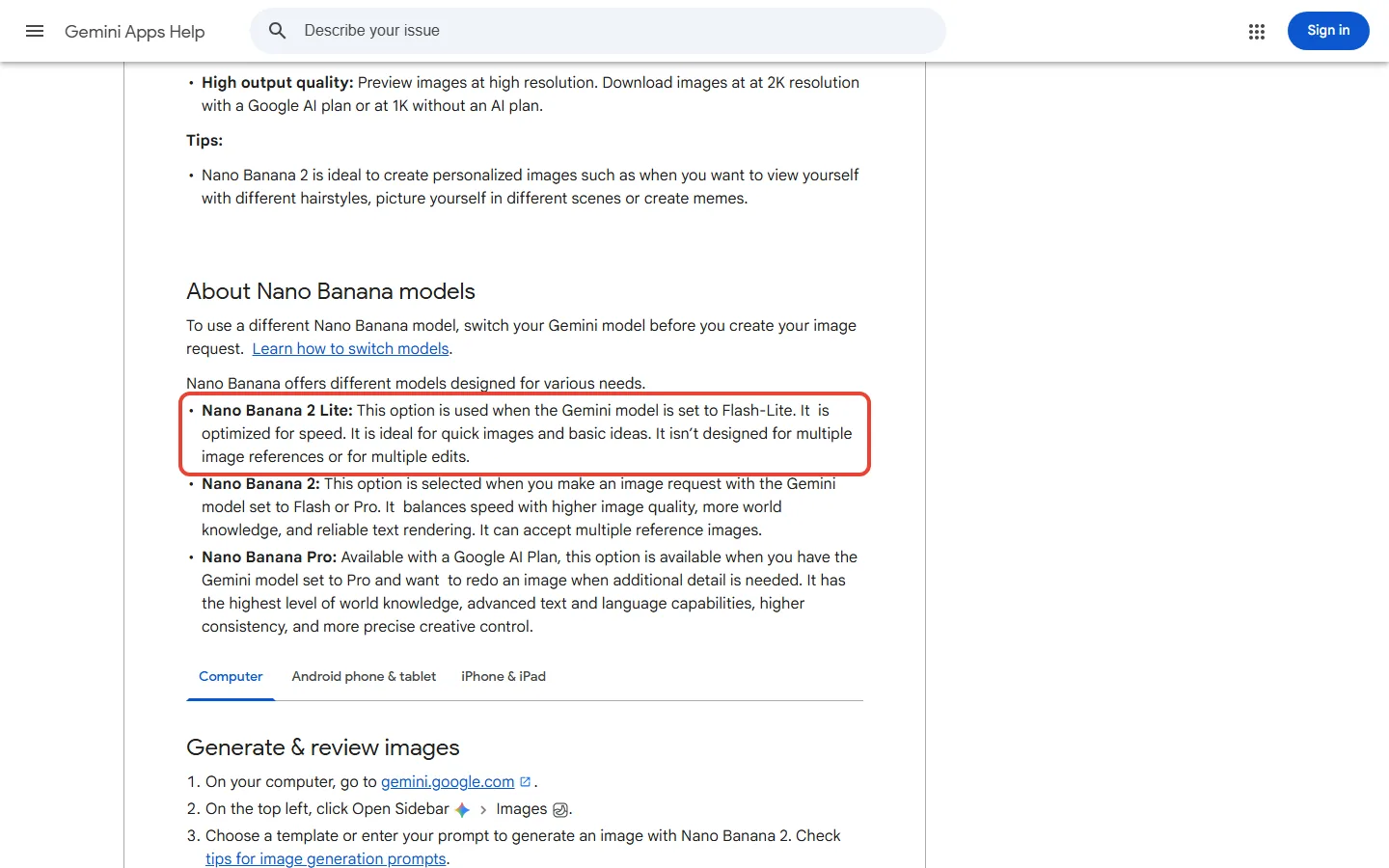
Short version of this Nano Banana 2 review: the AI image generator inside Gemini is free, but a free account doesn’t always get it. Free accounts now default to Auto, which sends most prompts to Flash-Lite, and Google’s help page says a Flash-Lite chat makes its images with Nano Banana 2 Lite, a faster model not built for several reference photos or repeated edits. Free downloads stop at 1K; any Google AI plan gets 2K.
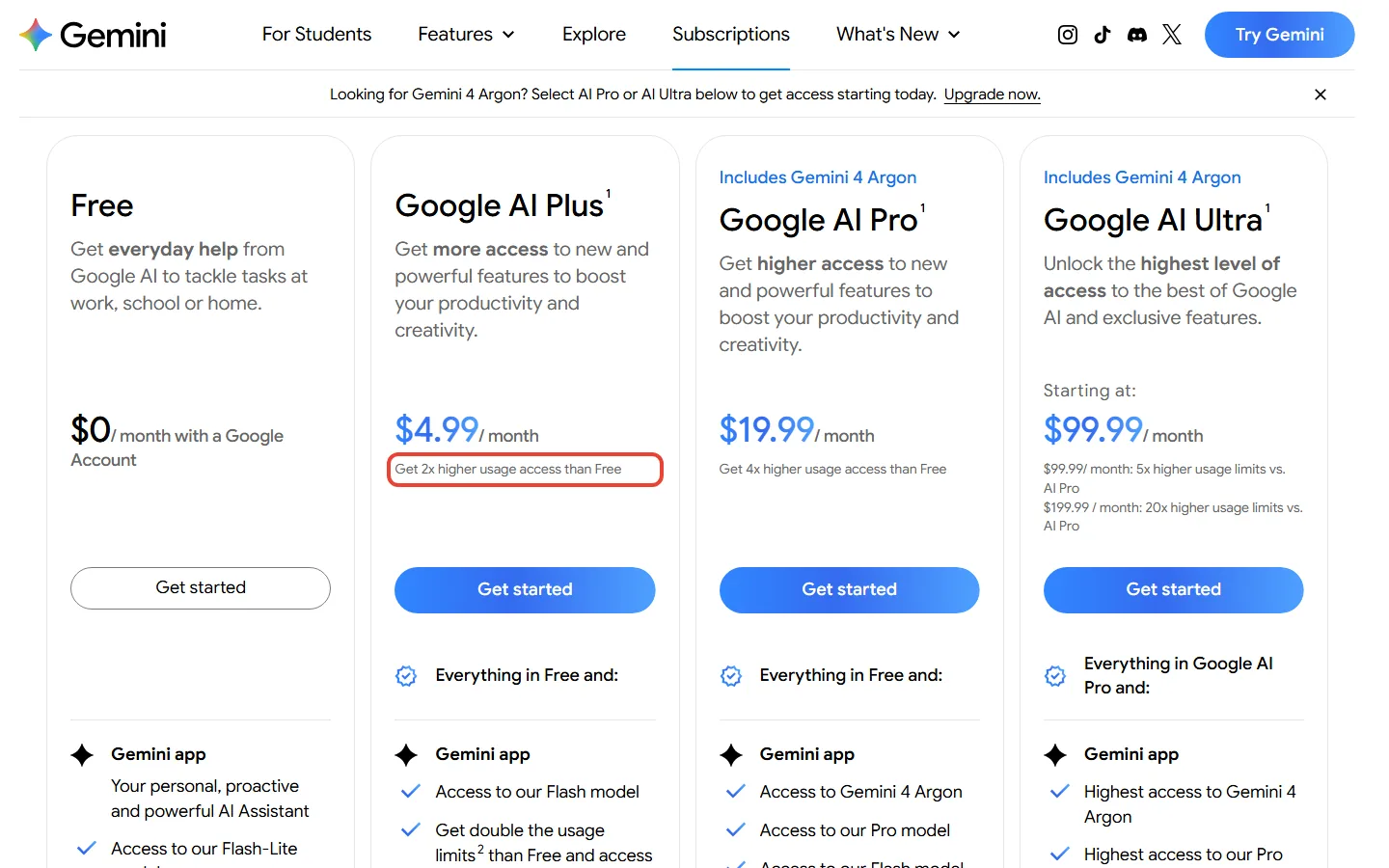
Our take: stay free for casual images. Pay $4.99 a month for AI Plus if you need 2K files, twice the free plan’s allowance (Google gives multipliers, not image counts) or Nano Banana Pro redos, which Google’s limits table ticks for Plus. Pay $19.99 for AI Pro if you want the Pro chat model, four times the free allowance, or the cheapest plan every Google page we read agrees gets Pro redos. If you are building an app, start on Nano Banana 2.1: Google recommends it for new projects, and its images cost about half as much as Nano Banana 2’s at 1K.
TL;DR: Nano Banana 2 in One Minute
What It Is: Google’s everyday image model in Gemini (Gemini 3.1 Flash Image), with a faster Lite version, a premium Pro version and a 2.1 update from October 2026.
Price: Free in the Gemini app; in the US, AI Plus $4.99 and AI Pro $19.99 a month; API from $0.0336 per 1K image with 2.1.
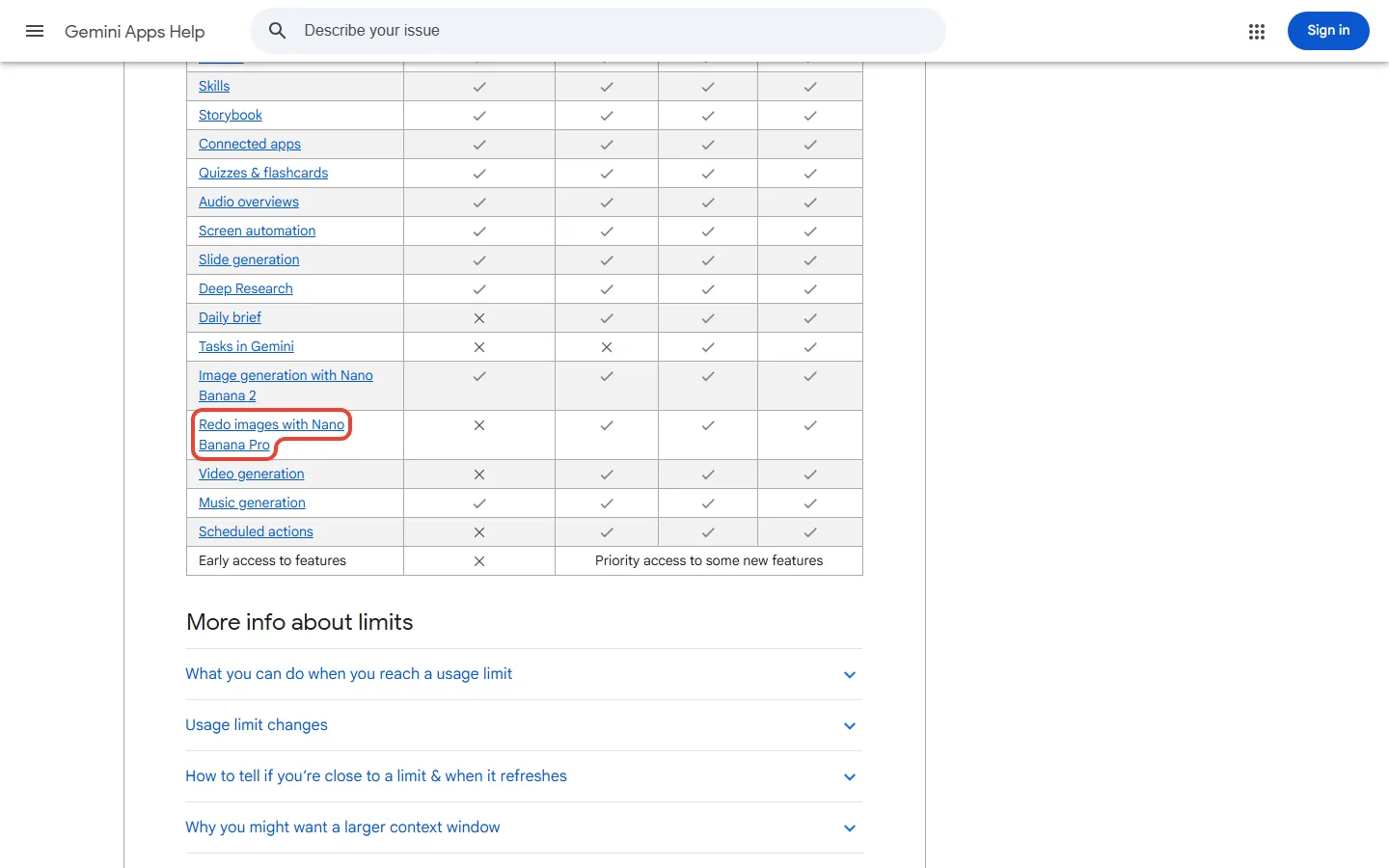
Free vs Paid: Free downloads are 1K, paid plans 2K. Google’s limits table ticks Nano Banana Pro redos for every paid plan, AI Plus included, though one help-page line ties them to the Pro chat model, which Plus doesn’t get.
Our Take: Stay free for casual images, try AI Plus for 2K files and Pro redos, and pay for AI Pro only if you need the Pro chat model or more room. Based on Google’s documentation and prices.
The Catch: Google’s pages we read give no image count for any plan, and a paid chat that hits its limit can continue on Flash-Lite (and its Lite image model).
Quick Navigation
Nano Banana 2, 2.1, Lite and Pro: which one is which
Nano Banana is Google’s name for the image models built into Gemini. Nano Banana 2, officially Gemini 3.1 Flash Image, launched on February 26, 2026, and in the Gemini app it replaced Nano Banana Pro as the everyday model. It followed the original Nano Banana from 2025. As of October 30, 2026, four versions share the name:
- Nano Banana 2 Lite: the model Google calls its fastest and cheapest. It only makes 1K images; for developers using the API, a 1K image costs the same as with 2.1, with cheaper input.
- Nano Banana 2: the one Gemini uses when your chat is set to the Flash or Pro chat model.
- Nano Banana 2.1: an update to Nano Banana 2 built on Gemini 3.6 Flash, with a model card dated October 6, 2026.
- Nano Banana Pro: Google’s premium model for complex images, offered in the app as a redo for paid subscribers (which paid plans, Google’s pages disagree; see the plan table).
Google’s model pages list no Nano Banana 2 Pro; the name most likely mixes up Nano Banana 2 and Nano Banana Pro, which has its own Nano Banana Pro review.
Where 2.1 fits is less tidy. Its model card lists the Gemini App among the places it ships, and Google DeepMind’s Nano Banana 2 page introduces 2.1 with a Try in Gemini button. Yet as of October 30, Gemini’s help pages still name Nano Banana 2 as the app’s image model, and the Gemini release notes have no 2.1 entry. The app may already run 2.1 under the Nano Banana 2 label, or not yet; Google’s pages don’t settle it.

The Nano Banana 2 experience for free Gemini users
The free plan costs $0 with a Google Account and includes image generation and editing, and its plan card lists the Flash-Lite model. Starting October 9, 2026, Google began switching accounts without a plan to Auto by default: most prompts go to Flash-Lite, and prompts that need deeper reasoning may go to Flash or Pro.
That matters for images because Gemini picks the image model from the chat model. A Flash-Lite chat gets Nano Banana 2 Lite; a Flash or Pro chat gets Nano Banana 2. The help pages we read don’t say which one Auto picks for an image prompt, and nothing on them tells you which model made a given image. Turning smart model selection off doesn’t get you Nano Banana 2 either: on a free account it locks every response to Flash-Lite.
One limit is free-only: downloads are 1K instead of 2K. Google’s API pricing page defines 1K as 1024 x 1024 pixels and 2K as 2048 x 2048. If your 1K downloads look fine where you post them, that alone isn’t a reason to pay. The other limits apply to every plan, with paid plans getting more room:
- Per day: a quota of Nano Banana 2 images. None of the help or plans pages we read gives a number.
- Every 5 hours: your usage allowance refreshes. It is measured in computing effort, and images use more of it than a short chat.
- Per week: a cap that the 5-hour refreshes can’t take you past.
To see how much is left, open Settings, then Usage Limits; Gemini also warns you when you get close. Google’s plans page says you can extend your limits by buying AI credits, though the page we read gives no price for them.
Say you’re making party invitations from two of your own photos and want several rounds of edits. That is the kind of job Google says Nano Banana 2 Lite isn’t designed for. If the edits stop matching your photos on a free account, AI Plus is the $4.99 step up: its plan card lists the Flash model, and a Flash chat makes images with Nano Banana 2. Paying doesn’t rule Lite out, though. Google’s model table gives AI Plus both Flash-Lite and Flash, says the October changes reach Plus accounts on a date Google sends by email, and a paid chat that hits its limit can continue on Flash-Lite.
REALITY CHECK
The claim: “You can create captivating images in seconds with Nano Banana 2.” (Gemini Apps Help)
The fine print: The same help page says a Flash-Lite chat uses Nano Banana 2 Lite, free downloads stop at 1K, and a daily quota applies with no number given.
Verdict: Free gets you Nano Banana, not always Nano Banana 2. Judge the free plan on your own prompts before paying.
Nano Banana 2 features and price on each Google AI plan
Google offers four consumer plans (AI Ultra at two prices), shown here in US dollars from its US plans page. On the plans and help pages we read, no plan has a number of images: the limits page gives multipliers of a standard allowance instead. This table shows which Nano Banana each route gets, going by Google’s pages on October 30.
| Route | Price | Chat models | Image model you get | Downloads | Nano Banana Pro redo |
|---|---|---|---|---|---|
| Free | $0 | Auto: mostly Flash-Lite, sometimes Flash or Pro | Nano Banana 2 Lite on Flash-Lite, Nano Banana 2 on Flash or Pro | 1K | No; limited access in Google Flow |
| AI Plus | $4.99 a month, 2x Free | Flash-Lite and Flash | Nano Banana 2 on Flash; Lite on Flash-Lite, including after a limit | 2K | Ticked on the limits table; one help line says it needs the Pro model |
| AI Pro | $19.99 a month, 4x Free | Flash-Lite, Flash and Pro | Nano Banana 2 on Flash or Pro; Lite on Flash-Lite, including after a limit | 2K | Yes |
| AI Ultra | $99.99 (5x AI Pro) or $199.99 (20x AI Pro) | Flash-Lite, Flash and Pro, highest access | Nano Banana 2 on Flash or Pro; Lite on Flash-Lite, including after a limit | 2K | Yes |
| Gemini API | From $0.0336 per 1K image (2.1) | None needed | The model you choose | 0.5K to 4K, by model | $0.134 per 1K or 2K image |
Nano Banana Pro redos are where Google’s pages disagree. On October 30, the feature table on the limits page ticked “Redo images with Nano Banana Pro” for AI Plus, AI Pro and AI Ultra, and the image help page says paid subscribers can use it, with redo steps that start from a Nano Banana 2 or Lite image. One line on that same help page ties Nano Banana Pro to the Gemini model set to Pro, and Google’s model table gives AI Plus Flash-Lite and Flash but not Pro. So two of Google’s three statements put Pro redos on the $4.99 Plus plan, and AI Pro at $19.99 is the cheapest plan every page agrees on. Free accounts do get limited Nano Banana Pro in Google Flow, Google’s AI creative studio for cinematic scenes and stories.
Over a year, AI Plus costs $59.88 and AI Pro $239.88 paid monthly. Both cancel anytime, with no refunds for partial months unless the law requires one. For everything else those plans include, see our Google AI Plus review and Google AI Ultra vs Pro, and if you are a student, our guide to getting Google AI Pro free.
How to make, edit, redo and download a Nano Banana 2 image in Gemini
- Go to gemini.google.com, open the sidebar at the top left and choose Images.
- Pick a template or type your prompt. Name the subject, the setting and the style you want.
- To edit, open the image and type the change. You can also upload your own photo, or several, and ask Gemini to combine them into a new image.
- On a paid plan, click More, then Redo with Pro, when an image needs more detail, especially text or an infographic. If the option isn’t there on AI Plus, that settles the conflict above for your account.
- Hover over the image and click Download full size, or use More, then Export to Docs.
Google pitches Nano Banana 2 for personal images: a new hairstyle, yourself in a different scene, or a meme. It also says text inside images is spelled more accurately in every supported language. On a personal account you must be 13 (or the minimum age in your country) to generate images and 18 to edit them.

What one Nano Banana 2 image costs in the Gemini API, and why 2.1 is cheaper per image
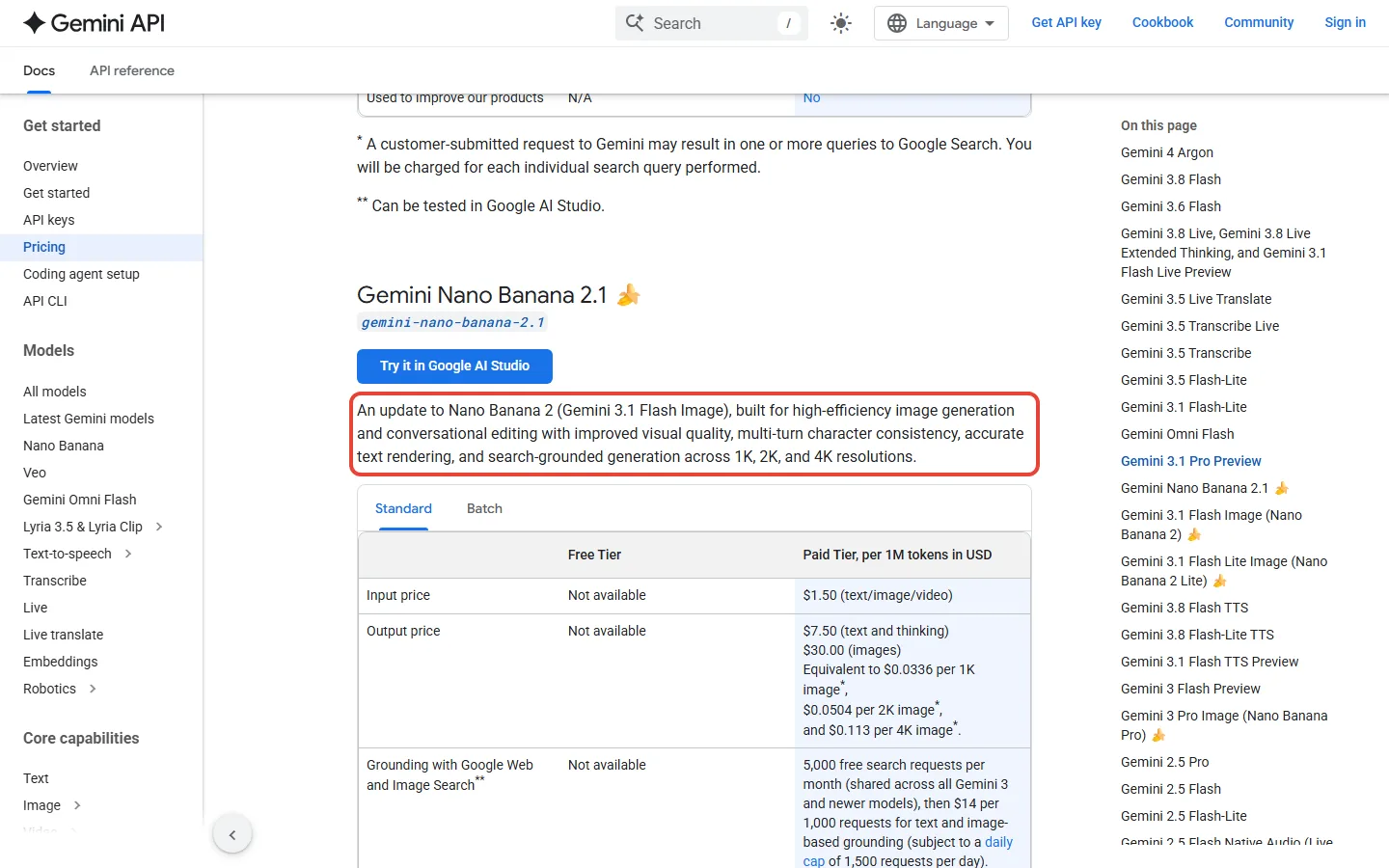
Developers pay per image through the Gemini API, the way apps talk to Google’s models in code, and no Nano Banana model has a free API tier. The surprise on the pricing page is that the newer model’s images cost less. At 1K, a Nano Banana 2.1 image is $0.0336 against $0.067 for Nano Banana 2, about half. At 4K, 2.1 costs about three quarters of Nano Banana 2’s price: $0.113 against $0.151.
Those are image output prices. Your prompt, any reference photos and the model’s thinking are billed on top per token, the small pieces Google counts text and images in, and there 2.1 costs more: $1.50 per million input tokens against $0.50 for Nano Banana 2, and $7.50 per million text and thinking tokens against $3. A 1,000-token text prompt adds about $0.0015 on 2.1 and $0.0005 on Nano Banana 2, small next to the image price, but reference photos and thinking add more tokens.
| Model (API name) | 1K image | 2K image | 4K image | Worth knowing |
|---|---|---|---|---|
| Nano Banana 2.1 (gemini-nano-banana-2.1) | $0.0336 | $0.0504 | $0.113 | Batch: $0.0168, $0.0252, $0.0567; input $1.50 per million tokens |
| Nano Banana 2 (gemini-3.1-flash-image) | $0.067 | $0.101 | $0.151 | Also $0.045 at 0.5K; input $0.50 per million tokens; deprecated in the API |
| Nano Banana 2 Lite (gemini-3.1-flash-lite-image) | $0.0336 | Not offered | Not offered | 1K only; input $0.25 per million tokens |
| Nano Banana Pro (gemini-3-pro-image) | $0.134 | $0.134 | $0.24 | About 4 times 2.1 at 1K |
Gemini API Image Output Price per Image by Size (US dollars)
Counting the image output only, say you make 100 product images a month at 2K. That is 100 x $0.0504 = $5.04 with 2.1, $10.10 with Nano Banana 2 and $13.40 with Nano Banana Pro. Say an app makes 1,000 images a month at 1K: $33.60 with 2.1, $67 on Nano Banana 2 and $134 on Pro at standard prices, or $16.80, $34 and $67 if it can wait for batch.
Two notes for developers. Letting the model look things up in Google Search (grounding) is free for 5,000 requests a month, shared across Gemini 3 and newer models, then $14 per 1,000. And Google deprecated gemini-3.1-flash-image, the Nano Banana 2 API model, on October 6 in favour of 2.1; as of October 30 its deprecations page shows no shutdown date.
Key Takeaway: For anything you build, start on Nano Banana 2.1: Google recommends it for new projects, and on Google’s own table 2.1 with thinking scored above Nano Banana Pro on overall preference and infographic factuality. Google still calls Pro the premium choice for the most complex visual tasks, so keep Pro’s $0.134 an image for jobs where 2.1 falls short.
Best platform to use Nano Banana 2
For most people, the Gemini app. It is free, it is where Google documents the model, and it adds editing, full-size downloads and Export to Docs. The other routes suit narrower jobs:
- Google Search AI Mode: quick images while you search. The 2.1 model card lists it, and the AI Plus, Pro and Ultra cards promise more, higher and highest Nano Banana access in Search; Nano Banana Pro in AI Mode is limited to select countries.
- Google Flow: Google’s AI creative studio for cinematic scenes and stories. The free plan gets limited Nano Banana Pro access there.
- Google AI Studio and the Gemini API: for developers who want to pick the model and the size (0.5K to 4K, depending on the model) and pay per image. Our Google AI Studio review covers what is free there.
- Google Pics: Google DeepMind’s Gemini Image page also links an app called Google Pics for creating and refining images. We found no plan or price for it on the pages we read.
Say you make about 12 images a month and want 2K files. Through the API with 2.1 the image output is 12 x $0.0504, about $0.60, plus the per-token cost of your prompts, far less than AI Plus at $4.99. The API needs a billing account and a little code, though. If you don’t write code, Plus is the simpler route to 2K.
Where Nano Banana 2 falls short, in Google’s own words
Google publishes its own list of weak spots. Its Nano Banana 2 page warns that Gemini can still struggle with small faces, accurate spelling and fine details, and tells you to check data-driven images such as infographics. The 2.1 model card adds small text that is often blurry in the 1K model, trouble with long paragraphs, imperfect character consistency, occasional left-right mix-ups, and occasional slowness or timeouts.
If your job is a poster with fine print, that points to 2K or larger and a proofread of every word. For multi-image work, 2.1 and Nano Banana 2 take up to 10 object photos and 4 character photos in one request, out of 14 references in total. Every image carries SynthID, an invisible watermark that marks it as made by AI.
How does 2.1 compare? Google had human judges compare its own models side by side and turned the votes into an Elo score, the chess-style rating where higher means people preferred it more often. In that vote, 2.1 with its thinking step on came first at 1050, ahead of Nano Banana 2 with thinking at 990 and Nano Banana Pro at 935. Google also had an automated rater score how accurate the facts in an infographic are: 0.521 for 2.1 with thinking, 0.265 for Pro and 0.179 for Nano Banana 2 with thinking.
These are Google’s evaluations of Google’s models, with no rival in the table. Read them as a ranking inside the family, not as proof against ChatGPT or Midjourney.
REALITY CHECK
The claim: “Pro-level image generation and editing. Flash-level speed” (Google DeepMind’s Nano Banana 2 page)
The fine print: On Google’s own table, Nano Banana 2 with thinking scores 0.179 on infographic factuality against 0.265 for Nano Banana Pro, and Google still sells Pro as the premium choice for the most complex images.
Verdict: Fair on Google’s overall-preference vote, where Nano Banana 2 with thinking beat Pro (990 to 935). For fact-heavy infographics, Pro or 2.1 with thinking scores higher.

Which plan to pick for Nano Banana 2
- Casual images, memes and social posts: stay on the free plan and see whether its limits ever bother you.
- You need 2K files or hit the limit often: AI Plus at $4.99 a month, twice the free allowance; Google also sells AI credits to extend a limit.
- Text-heavy posters, infographics and fine detail: try AI Plus first, since Google’s limits table ticks Nano Banana Pro redos for it. If Redo with Pro doesn’t appear, AI Pro at $19.99 is the plan every Google page agrees on.
- You are building an app or a workflow: Nano Banana 2.1 in the API, from $0.0336 an image for the image output, with prompts billed per token on top.
Comparing Gemini with ChatGPT for images? Our ChatGPT Images 2.5 vs Nano Banana 2.1 comparison sets their free and paid limits side by side. Whether Nano Banana is still the best image generator overall is a wider question, and our best AI image generators guide weighs it against Midjourney and the rest.
Nano Banana 2 questions people ask
Is Nano Banana 2 free?
Yes, in the Gemini app with a Google Account, but with limits. Free downloads are 1K, and a chat running on Flash-Lite makes its images with Nano Banana 2 Lite.
Is Nano Banana 2 the same as Gemini 3.1 Flash Image?
Yes. Nano Banana 2 is Google’s name for Gemini 3.1 Flash Image, which is why people also search for “nano banana 2 flash”. Nano Banana 2 Lite is the separate Gemini 3.1 Flash-Lite Image model.
Is there a Nano Banana 2 Pro?
No. Google’s Gemini Image family lists Nano Banana 2, Nano Banana 2 Lite and Nano Banana Pro, which is Gemini 3 Pro Image. Paid subscribers can redo a Nano Banana 2 image with Nano Banana Pro; Google’s limits table ticks AI Plus, AI Pro and AI Ultra for it, though one help-page line ties it to the Pro chat model, which AI Plus doesn’t list.
What is Nano Banana 2.1?
It is an update to Nano Banana 2, based on Gemini 3.6 Flash, which Google made generally available in the Gemini API on October 6, 2026. In the API it costs $0.0336 per 1K image; whether the Gemini app already uses it is not settled on Google’s own pages.
How much does Nano Banana 2 cost per image?
In the Gemini API, a Nano Banana 2 image costs $0.067 at 1K, $0.101 at 2K and $0.151 at 4K. A Nano Banana 2.1 image is cheaper at $0.0336, $0.0504 and $0.113, and Nano Banana 2 Lite is $0.0336 at 1K only; your prompt is billed per token on top.
Can I get unlimited Nano Banana 2?
Not on any plan we read. Limits are compute-based and refresh every 5 hours up to a weekly cap, and AI Ultra’s top tier gives 20x the AI Pro limit, not an unlimited one. Google’s plans page says you can extend a limit by buying AI credits.
Nano Banana 2 review: our rating, pros and cons
Nano Banana 2 costs nothing to try in the Gemini app with a Google Account, and Google publishes its known limitations. It loses points for the fog around what a free account gets, a daily quota with no number, help pages that don’t mention 2.1 yet, and pages that disagree on whether AI Plus gets Nano Banana Pro redos. Our rating is 4 out of 5, based on Google’s documentation and prices; we did not make our own sample images.
What We Liked
- Free in the Gemini app with a Google Account
- 2K downloads from the $4.99 AI Plus plan
- Edits of your own photos and multi-image blends
- API price per image published, from $0.0336 with 2.1
- Google lists its own known limitations
What Fell Short
- Free downloads capped at 1K
- Daily quota with no published number
- Paid chats can continue on Flash-Lite, and its Lite image model, after a limit
- Google’s pages disagree on Nano Banana Pro redos for AI Plus
- Help pages and model card disagree on 2.1 in the app

How we checked: every price, limit and model name here comes from Google’s own pages, read on October 30, 2026: the US plans page, the Gemini Apps help pages on images, limits and model access (including the tick marks in their plan tables), the Gemini API pricing, changelog, deprecations and image docs, the Nano Banana 2.1 model card and Google DeepMind’s Nano Banana pages. We did not make our own sample images for this Nano Banana 2 review.

Founder of AI Tool Analysis. Writes from vendors’ own pricing and help pages. Covering AI tools since 2025. See how we research →
Related Reading
- ChatGPT Images 2.5 vs Nano Banana 2.1: Free vs Paid Limits and Prices
- Nano Banana Pro Review: Pricing, Limits and Is It Still Worth It?
- Is Google AI Plus Worth It?
- Google AI Ultra vs Pro
- Best AI Image Generators 2026
- The Original Nano Banana: What Changed
Get AI Weekly
AI Weekly arrives every Thursday: AI plan price changes, new free tiers and the posts we have updated.
Free, unsubscribe anytime.

Last Updated: October 30, 2026
Facts checked: October 30, 2026 (plans, limits, model names and API prices against Google’s plans, help, API and model card pages)
Next Review Update: November 2026
Have a tool you want us to review? Suggest it here | Questions? Contact us