
Gmail AI features are not one switch you flip on. Google ships a set of Gemini tools in Gmail, and which ones you get depends on your account type, your country, your language and the plan you pay for. This guide sorts the AI features in Gmail using Google’s own availability table as of October 10, 2026: what is free, what needs Google AI Plus, Pro or Ultra, what is US-only, and what Google says about your email and AI training.
⚡ TL;DR: The Bottom Line
What It Is: A set of Gemini features inside Gmail: AI Overview thread summaries, Help me write, Suggested Replies, AI Overview in search, Proofread, AI Inbox and Gmail Live.
Free: Personal Gmail accounts get conversation summaries (listed globally), plus Help me write and Suggested Replies (US only).
Paid: Search answers, Proofread, AI Inbox and Gmail Live need Google AI Plus ($4.99 a month), Pro ($19.99) or Ultra ($99.99 or $199.99), or an eligible Workspace plan for some of them.
Our Take: Try the free ones first. Plus at $4.99 is the cheapest paid step Google’s help page lists. Skip Ultra for Gmail alone.
⚠️ The Catch: AI Inbox and Gmail Live are limited by plan and, for AI Inbox, to US English, and AI Inbox is still in beta.
📑 Quick Navigation
🧭 AI Features in Gmail: Who Gets What (Google’s Table)
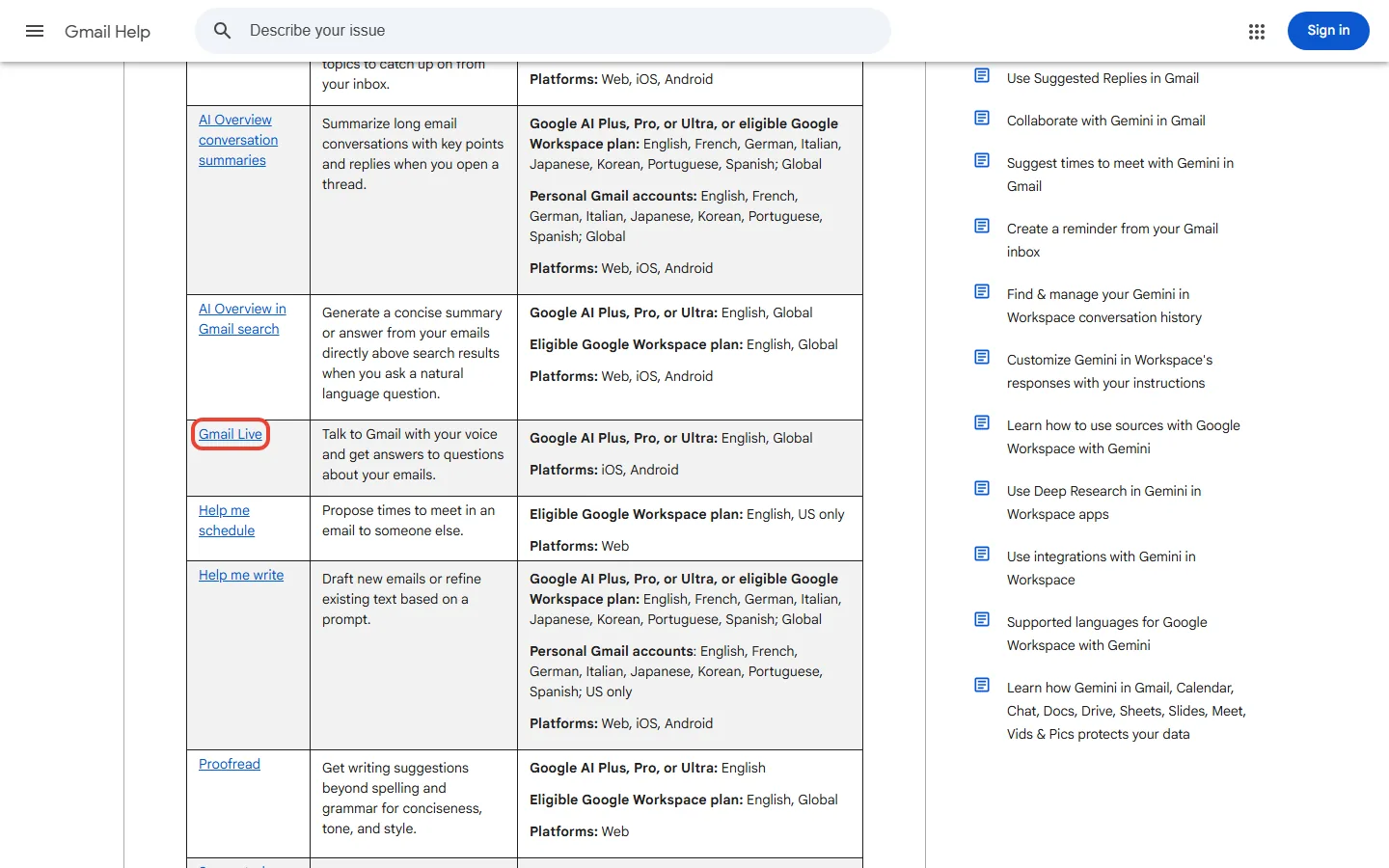
Google’s help page opens with a warning: “Access to Gemini features in Gmail varies based on account type”, and availability is “currently limited to the US for users with personal Gmail accounts without a paid plan”. Here is the table in plain terms. “Plan” means Google AI Plus, Pro or Ultra.
| Feature | Personal Gmail, no plan | With a Google AI plan | Workspace plan | Where |
|---|---|---|---|---|
| AI Overview conversation summaries | Yes (8 languages, global) | Yes (global) | Eligible plans (global) | Web, iOS, Android |
| Help me write | US only (8 languages) | Yes (global) | Eligible plans (global) | Web, iOS, Android |
| Suggested Replies | US only, English | Yes (English, global) | Eligible plans (English, global) | Web, iOS, Android |
| AI Overview in search | Not listed | Yes (English; the help table says global, the plans page says US only) | Eligible plans (English, global) | Web, iOS, Android |
| Proofread | Not listed | Yes (English) | Eligible plans (English, global) | Web only |
| AI Inbox (beta) | Not listed | Yes (English, US only) | Needs Enterprise Plus with Gemini Beta | Web, iOS, Android |
| Gmail Live (voice) | Not listed | Yes (English; the help table says global, the plans page says US only) | Needs an eligible plan with Gemini Beta (per the Gmail Live page) | iOS, Android |
| Help me schedule | Not listed | Not listed | Eligible plans (English, US) | Web |
| Ask Gemini in Gmail (summarize, draft, suggest) | Not listed | Not listed | Eligible plans (29 languages) | Web, iOS, Android |
📊 How Many of the 9 Listed Gmail Gemini Features You Get (US, English)
This table has changed since Google’s launch. On January 8, 2026 the company said conversation summaries, Help Me Write and Suggested Replies were rolling out “for everyone at no cost”, that asking your inbox questions and Proofread were for Google AI Pro and Ultra, and that AI Inbox was with trusted testers. Today Google AI Plus is also listed on the paid features, AI Inbox is in the paid list, and the help page ties free access to account type and country. Our February version’s “free for everyone” no longer describes what the help page shows.
⚙️ What Each Gmail AI Feature Does
- AI Overview conversation summaries. Google says it will “summarize long email conversations with key points and replies when you open a thread”. It is the broadest of the free features.
- AI Overview in Gmail search. When you ask a natural-language question in search, it generates “a concise summary or answer from your emails directly above search results”. It needs a Google AI plan or an eligible Workspace plan.
- Help me write. It drafts new emails or refines existing text from a prompt.
- Suggested Replies. Detailed, context-aware reply suggestions at the bottom of a thread.
- Proofread. Writing suggestions beyond spelling and grammar, for conciseness, tone and style. Web only.
- AI Inbox. A view with two sections: Suggested to-dos and Topics to catch up on. Google’s help page says it is in beta, reads only your Primary tab, filters out spam and mail you archive, delete, mute or snooze, and does not support attachments, delegated inboxes or encrypted emails. You must turn on Smart features, and the first to-dos can take up to 7 days to appear.
- Gmail Live. A voice conversation with Gemini about your inbox, on the Gmail mobile apps for iOS and Android. Google’s help page calls it a beta, and it is not available on Android tablets.
- Workspace extras. Help me schedule and “Ask Gemini in Gmail” are listed only for eligible Workspace plans.
🔍 REALITY CHECK
Marketing Claims: Gemini features “turn Gmail into your personal, proactive inbox assistant”, in Google’s help text.
What It Really Means: The assistant you get depends on the account. A free US account has three of nine features, AI Inbox is a beta that only reads your Primary tab, and Gmail Live is mobile-only. We found no accuracy or time-saved figures for any of them on Google’s pages.
Verdict: Treat the free features as helpful shortcuts, check any summary of an important email against the email itself, and do not expect a promised number of hours back.

💰 Gmail AI Features Pricing: What You Pay in 2026
Gmail itself is free. The AI features beyond the free set come with Google’s AI plans, priced on Google’s subscriptions page in US dollars:
| Plan | Price | Gmail AI features listed | Storage |
|---|---|---|---|
| Free | $0 | Summaries; Help me write and Suggested Replies (US) | 15 GB |
| Google AI Plus | $4.99 a month | Google’s help page lists search answers, Proofread, AI Inbox and Gmail Live (its plans page names only Proofread) | 400 GB |
| Google AI Pro | $19.99 a month ($199.99 a year) | Same Gmail features, with higher Gemini limits | 5 TB |
| Google AI Ultra | $99.99 or $199.99 a month | Same Gmail features, with the highest Gemini limits | 20 TB or 30 TB |
Google’s help page lists the same Gmail features for Plus, Pro and Ultra, so for Gmail alone Plus at $4.99 a month is the cheapest paid step it lists. Google’s plans page is less generous: its Plus card names only Proofread in Gmail, and it marks inbox AI Overview and Gmail Live as US only, so check the plans page for your country before you buy. Pro and Ultra add higher Gemini limits and other Google AI benefits, covered in our Google AI Plus review. Students can also get Google AI Pro free for a year in the US, explained in our Google AI Pro free guide. Our February version put Ultra at $249.99 a month and Pro at 2 TB, which does not match Google’s pages now.
💡 Key Takeaway: If a free feature is all you need, pay nothing. If you want search answers, Proofread or AI Inbox, Google AI Plus at $4.99 a month is the cheapest paid step Google’s help page lists, and Pro or Ultra are for people who also want higher limits and more storage.
🔒 Privacy: What Google Says About Your Email and AI
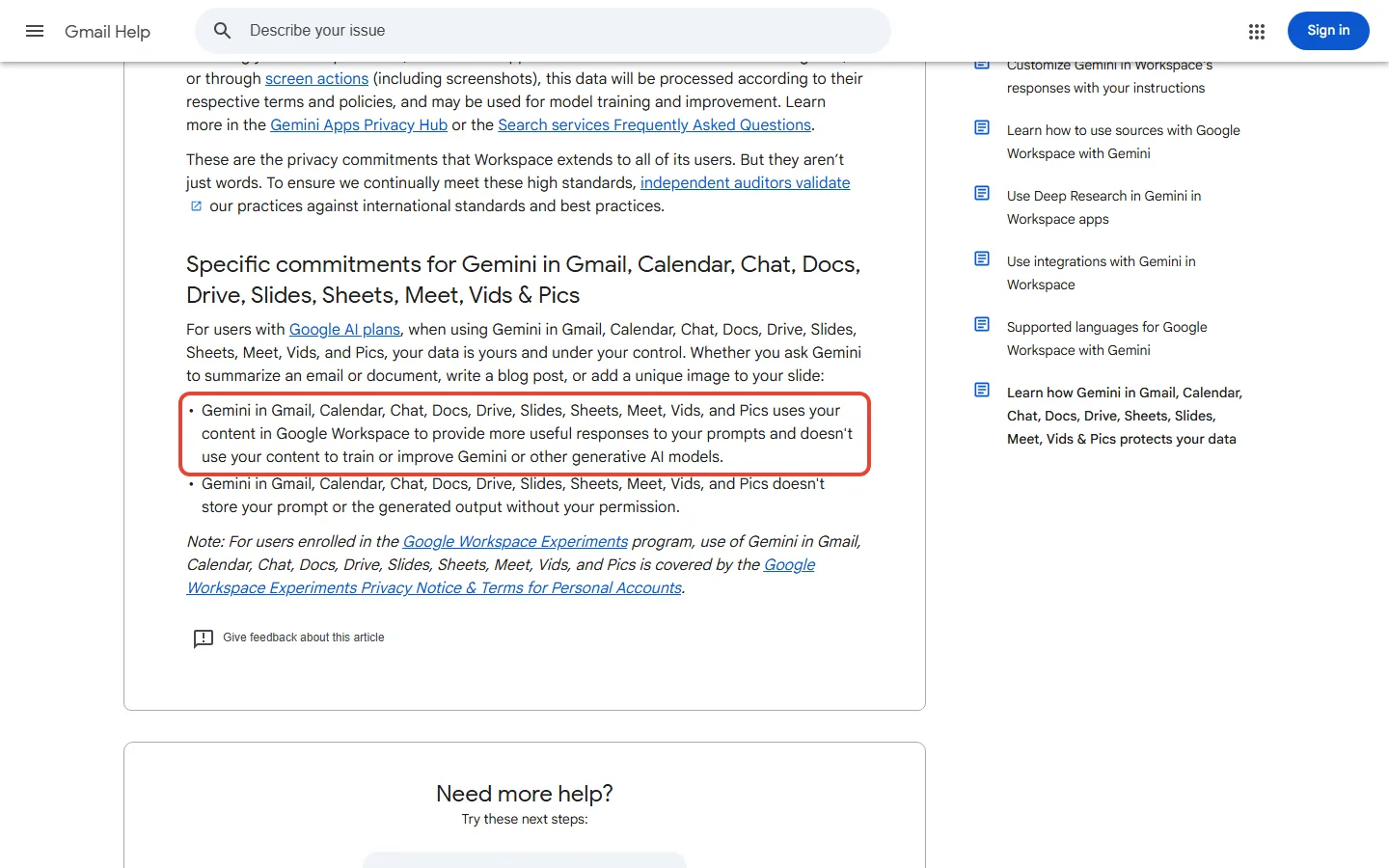
Gmail AI works by reading your messages, so the question is what Google does with them. Google’s privacy page for Gemini in Gmail says, for users with Google AI plans, that Gemini in Gmail “uses your content in Google Workspace to provide more useful responses to your prompts and doesn’t use your content to train or improve Gemini or other generative AI models”, and that it “doesn’t store your prompt or the generated output without your permission”. It also says Google does not use your Workspace data to train the underlying models outside Workspace without permission, and does not collect, scan or use your content in Workspace services for advertising.
Two details are worth knowing. That page states these specific commitments for users with Google AI plans and does not separately describe free personal accounts. And it carves out one case: if you are a Workspace user with a personal account and you choose to share data with Gemini Apps or Search for Personal Intelligence, or through screen actions, that data follows those services’ terms and “may be used for model training and improvement”. AI Inbox also needs the Smart features settings turned on in Gmail.
📬 Enjoying this breakdown?
Get honest AI tool analysis delivered weekly. No hype, no spam.
👤 Who Should Use Gmail’s AI Features (and Who Shouldn’t)

Use the free features if: you get long email threads or write routine replies, and you are comfortable with Gemini reading your mail. Conversation summaries are the one most people can use today.
Pay for Google AI Plus ($4.99) if: you want to ask your inbox questions in search, proofread, or try AI Inbox, and you are in the US for AI Inbox.
Choose Pro or Ultra only if: you also want higher Gemini limits and storage. For the full ladder, see our Google Gemini review.
Skip the AI features if: you do not want an AI to read your mail, your organization has not approved them (regulated industries should check), or you are outside the US on a free account and need Help me write. If you are looking for automation across Gmail and Sheets, see our Google Workspace Studio post.

❓ FAQs: Your Questions Answered
Q: What are the AI features in Gmail?
A: Gemini features that summarize threads (AI Overview), draft and refine emails (Help me write), suggest replies, answer questions from your inbox in search, proofread, organize priorities (AI Inbox) and let you talk to Gmail by voice (Gmail Live).
Q: Are Gmail AI features free?
A: Some are. Google’s help page lists conversation summaries for personal accounts globally, and Help me write and Suggested Replies for personal accounts in the US. Search answers, Proofread, AI Inbox and Gmail Live need a Google AI plan.
Q: Is Gmail’s AI paid?
A: Partly. The paid route is Google AI Plus ($4.99 a month), Pro ($19.99) or Ultra ($99.99 or $199.99), or an eligible Workspace plan, which unlock the features that are not in the free set.
Q: What is Gmail AI Overview?
A: It is a Gemini summary. In a long email thread it lists the key points and replies, and in search it shows a concise answer from your emails above the results when you ask a natural-language question.
Q: Which Gemini feature in Gmail helps with a long email thread?
A: AI Overview conversation summaries. When you open a long thread, Gmail summarizes the key points and replies so you can see them before reading each message, then confirm them against the thread.
Q: Does Google use my emails to train its AI?
A: For users with Google AI plans, Google says Gemini in Gmail does not use your content to train or improve Gemini or other generative AI models. The page does not separately describe free personal accounts.
Q: Do the features work outside the US?
A: Some do. Google’s help table lists summaries for personal accounts globally and several paid features globally, but its plans page limits inbox AI Overview and Gmail Live to the US, and Help me write and Suggested Replies for free accounts and AI Inbox are US only.
Q: What is AI Inbox in Gmail?
A: A beta view that shows suggested to-dos and topics to catch up on from your Primary tab. On a personal account it needs Google AI Plus, Pro or Ultra (work or school accounts need Workspace Enterprise Plus with Gemini Beta), English and the US.
Final Verdict: Worth Trying, Not Worth Paying for Blindly
Gmail’s AI features are useful and mostly cheap to try, and the free set (summaries, Help me write, Suggested Replies) is enough for many people. The paid features add real capability, but they are tied to a plan, an account type, a language and, for AI Inbox, a US-only beta. The honest summary is that you should start free, pay $4.99 for Google AI Plus only if you reach for search answers or Proofread, and check the help page and the plans page for your country before you buy.
Try the free features if: you read long threads. Pay for Plus if: you want inbox Q&A and Proofread. Skip it if: you do not want AI reading your mail. Check Google’s availability page for your account before you pay.

Founder of AI Tool Analysis. Reads every pricing page, help article and footnote so you don’t have to. Covering AI tools since 2025. See how we research →
Related Reading
- Google AI Plus Review
- Google AI Pro Free: Student Offer Explained
- Google Gemini Review
- Google Workspace Studio
- Google Flow Review
- ChatGPT Review
- Free AI Tools 2026
Stay Updated on AI Productivity Tools
AI features change plans and regions often. Get the changes that affect what you pay, straight from the vendors’ own pages.
- ✅ Honest Breakdowns: We read the help centers and pricing pages, not press releases
- ✅ Price Tracking: Know when plans change price or features
- ✅ Comparison Updates: As the market shifts, we update our verdicts
- ✅ No Hype: Just the AI news that matters for your inbox and wallet
Free, unsubscribe anytime.

Last Updated: October 10, 2026
Features Covered: Gemini features in Gmail as listed on Google’s help pages on October 10, 2026
Next Review Update: November 10, 2026
Have a tool you want us to cover? Suggest it here | Questions? Contact us