

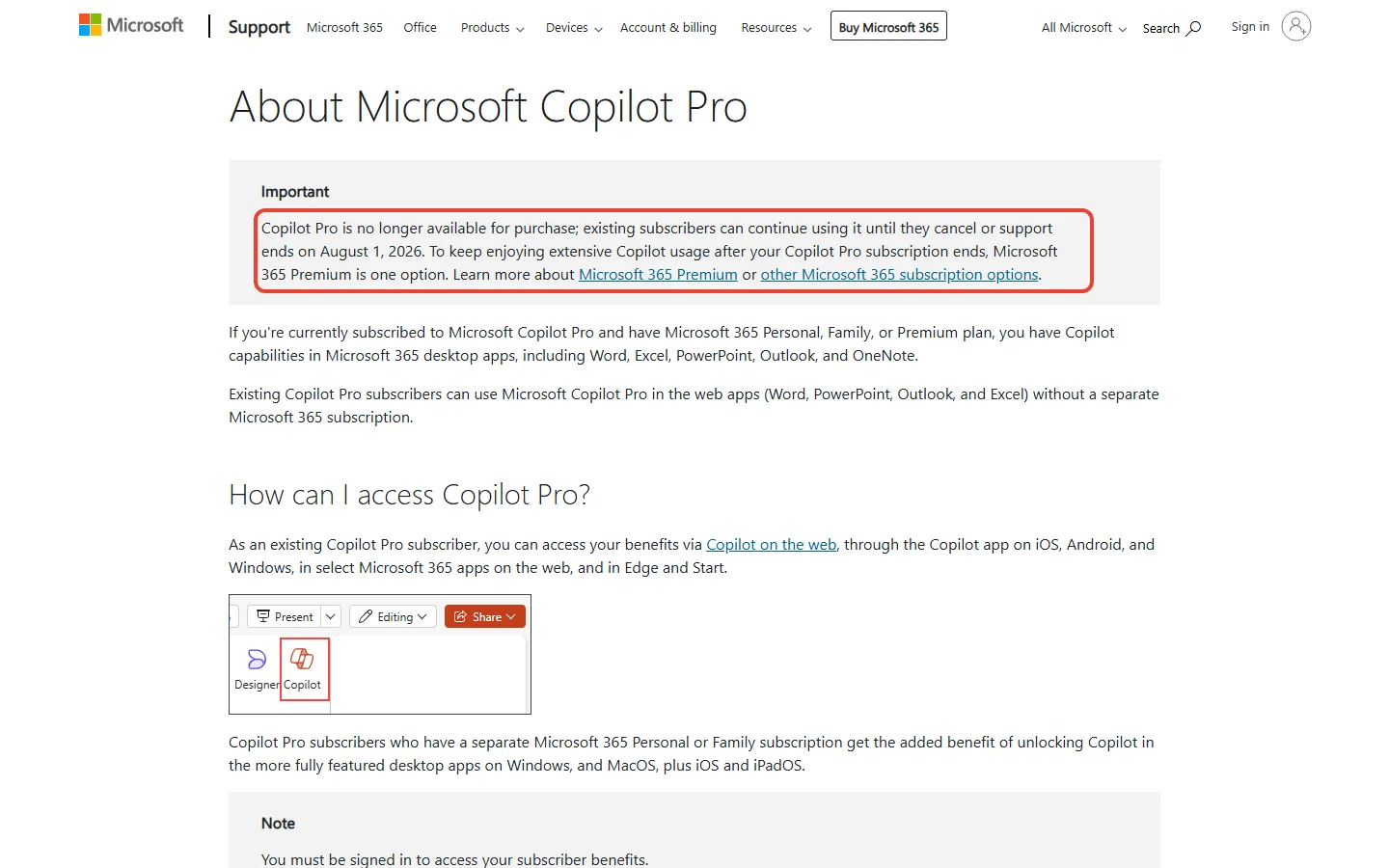
Copilot Pro is gone, and Microsoft 365 Premium is the replacement Microsoft names first: $19.99 a month or $199.99 a year in the US. Before you pay that, know that the cheaper plans already put Copilot inside Word, Excel, PowerPoint, Outlook and OneNote. Personal costs $99.99 a year and Family $129.99.
Our take: if you used Copilot Pro to draft emails and tidy documents, Personal or Family is likely enough for light drafting. Microsoft’s compare page does rate their usage for that “Higher than free”, against “Extensive” on Premium.
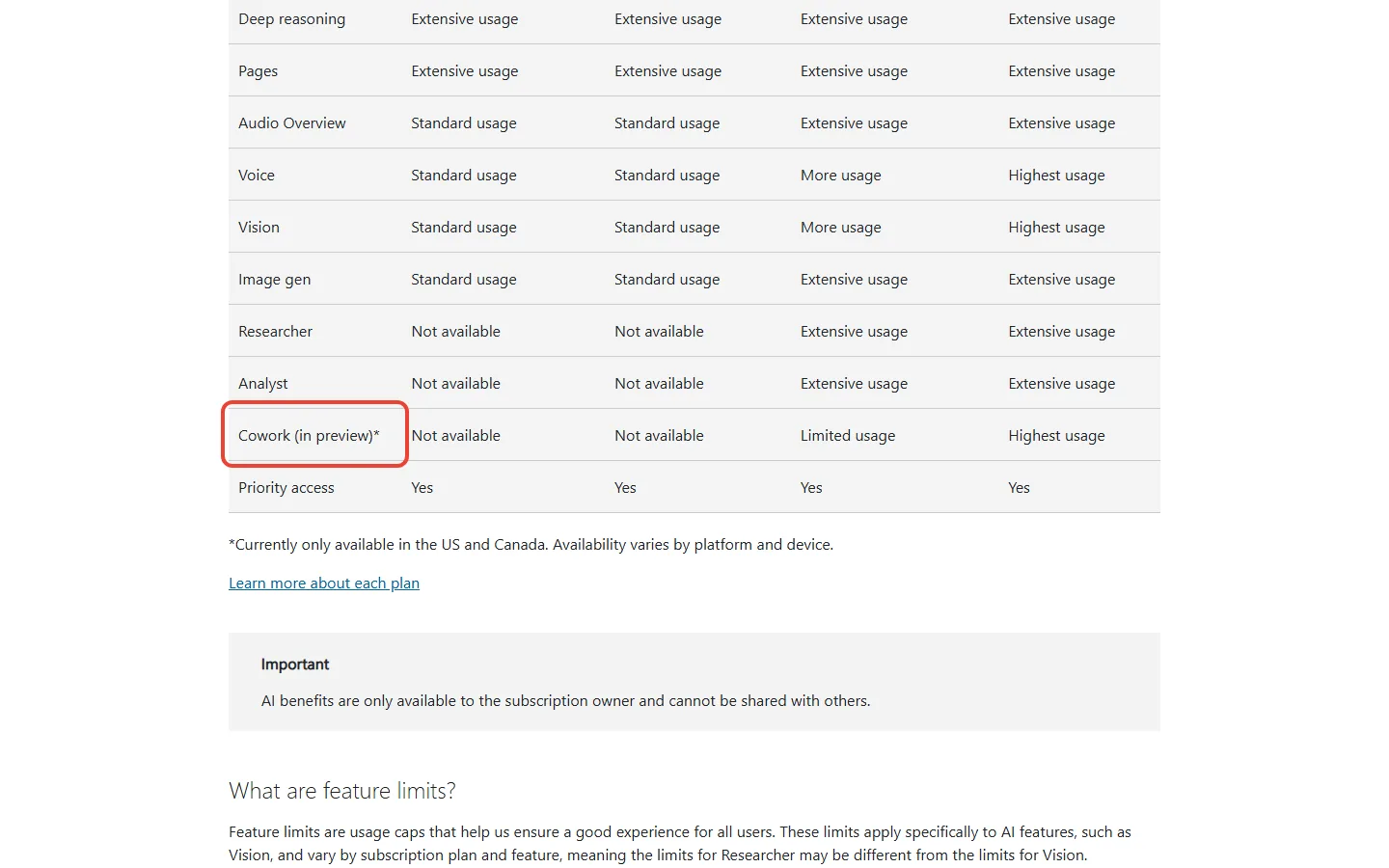
Premium earns its extra $70 a year over Family (on yearly billing) mainly if you will use Researcher or Analyst. These are two agents, Copilot features that carry out a multi-step job for you, and Personal and Family don’t get them. Premium also gives more voice, vision, image and Audio Overview use, and limited use of Cowork. Microsoft 365 Pro, at $99.99 a month, is for heavy users of Cowork, a preview feature available only in the US and Canada as of November 3, 2026.
TL;DR: Which Microsoft 365 Plan to Pay For
Copilot Pro: no longer sold, and support for existing subscribers ended on August 1, 2026.
Personal ($99.99 a year) and Family ($129.99 a year): Copilot in Word, Excel, PowerPoint, Outlook and OneNote, for the subscription owner.
Premium ($19.99 a month or $199.99 a year): adds Researcher and Analyst, plus more voice, vision, image and Audio Overview use and limited Cowork (preview).
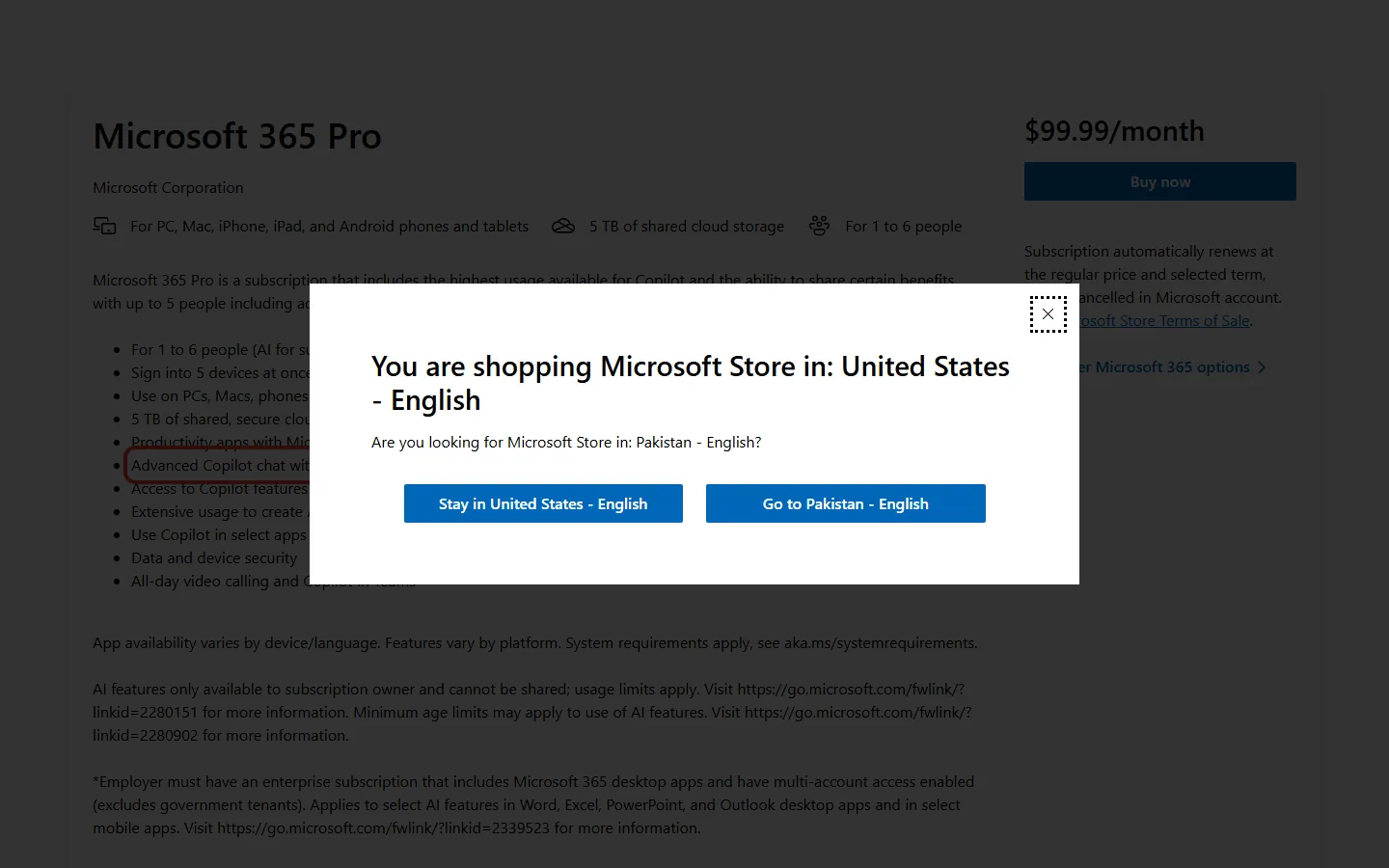
Pro ($99.99 a month): the highest usage for voice, vision and Cowork (preview), and 5 TB of storage.
The Catch: on Family, Premium and Pro, Copilot is for the subscription owner only, and Family and Premium plans bought since October 8, 2026 share one 2 TB storage pool.
Quick Navigation
What happened to Copilot Pro?
Microsoft announced Microsoft 365 Premium on October 1, 2025, and said in the same post that it would no longer sell Copilot Pro. Its pitch was that Premium combines everything in Family and Copilot Pro for $19.99 a month.
People who already had Copilot Pro could keep using it until they cancelled or until support ended on August 1, 2026, according to Microsoft’s Copilot Pro support page. That page, read on November 3, 2026, doesn’t say whether billing stopped or the features switched off on that date. To check yours, open the subscriptions page of your Microsoft account and see whether Copilot Pro still shows there.
If you searched “copilot pro” hoping to upgrade, there is nothing left to buy. Microsoft calls Premium “one option” for keeping extensive Copilot use and points to its other plans: Personal, Family and the $99.99-a-month Pro.
Copilot Pro, per the same support page, put Copilot in the web versions of Word, PowerPoint, Outlook and Excel. You got Copilot in the desktop apps only if you also paid for Personal or Family. Today Personal and Family include Copilot in the desktop apps themselves, and Premium adds Researcher and Analyst on top. The page lists no Copilot Pro usage limits, so we can’t compare those.
Copilot Pro cost about $20 a month on its own, according to PCWorld’s launch coverage. If you paid for it on top of Family at $12.99, the pair came to about $33 a month. Premium at $19.99 is about $13 a month less.
Looking for GitHub Copilot Pro, the coding assistant? That is a separate product from GitHub, covered in our GitHub Copilot Pro+ review.
How much does each Microsoft 365 plan cost?
| Plan | Monthly | Yearly | People | Cloud storage | Copilot |
|---|---|---|---|---|---|
| Personal | $9.99 | $99.99 | 1 | 1 TB | In Word, Excel, PowerPoint, Outlook and OneNote; standard voice, vision and images |
| Family | $12.99 | $129.99 | 1 to 6 | 2 TB, shared (new subscribers since Oct 8, 2026) | Same as Personal, for the owner only |
| Premium | $19.99 | $199.99 | 1 to 6 | 2 TB, shared (new subscribers since Oct 8, 2026) | Adds Researcher and Analyst; more voice, vision, images and Audio Overview; limited Cowork (preview); owner only |
| Pro | $99.99 | No yearly price shown | 1 to 6 | 5 TB, shared | Highest usage for voice, vision and Cowork (preview); owner only |
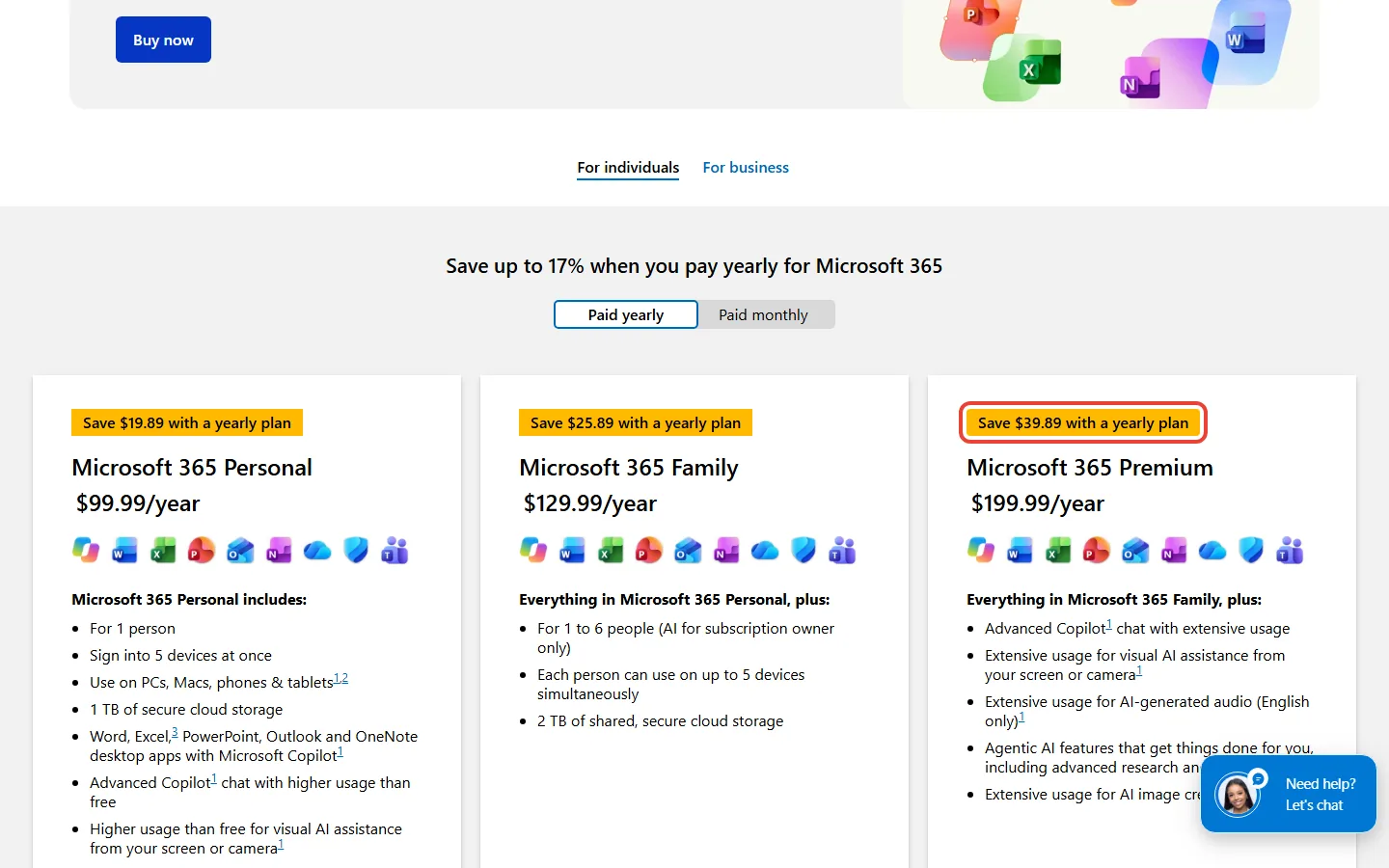
Paying yearly saves money. On Premium it is $199.99 a year instead of $239.88 for twelve monthly payments, a saving of $39.89.
What does Microsoft 365 Premium add over Personal and Family?
Microsoft’s compare page sells Premium as everything in Family plus more Copilot use and agentic AI for research and analysis. Its AI credits and limits page, last updated in October 2026, breaks that down by feature.
| Copilot feature | Personal and Family | Premium | Pro |
|---|---|---|---|
| Chat, deep reasoning, Pages | Extensive | Extensive | Extensive |
| Researcher and Analyst | Not available | Extensive | Extensive |
| Image generation, Audio Overview | Standard | Extensive | Extensive |
| Voice and Vision | Standard | More | Highest |
| Cowork (preview, US and Canada only) | Not available | Limited | Highest |
Two of those names need a gloss. Vision lets you share your screen or phone camera during a voice chat and ask Copilot about what it sees. Audio Overview turns content into AI-generated audio you can listen to.
The labels carry no numbers: on the plan, store and support pages we read on November 3, 2026, Microsoft gives no message counts or credit amounts for any plan. It also says limits may change as new AI models become available. So “Extensive” tells you Premium gets more than “Standard”, not how much more. Your own limits and AI credits show under Services & subscriptions in your Microsoft account.
Reality Check
The short version: for chat alone, Premium may add nothing, and Microsoft’s own pages disagree on that. Pay for Premium because of Researcher or Analyst, not for chat.
What Microsoft says: Premium “includes extensive AI usage and access to exclusive Copilot features”.
The fine print: the compare page rates Personal and Family “Higher than free” and Premium “Extensive”, both for overall usage and for drafting, editing and summarizing documents and emails, and it words chat as “higher usage than free” on Personal against “extensive usage” on Premium. The limits page, updated in October 2026, lists chat as “Extensive usage” on all four plans, and no page we read on November 3, 2026 puts a number on any of these words.
The clearest difference is Researcher and Analyst, which Personal and Family don’t get. Microsoft’s help page describes Researcher as an agent that takes on complex, multistep research and hands back a structured report with its sources cited. Analyst is an assistant for data analysis: you ask a question about your data, and it calculates statistics, spots trends and shows outliers. The Researcher help page and the October 2026 limits page both list these agents for Premium and Pro.
In its October 2025 launch post, when both agents were still coming soon to the Office apps, Microsoft said Researcher in Word lets you “gather, analyze, and summarize web or file-based insights in minutes”. Microsoft has since retired Deep Research and made Researcher the in-depth research tool for Premium and Pro. Personal and Family subscribers find their old Deep Research reports in chat history.
So here is the test for Microsoft 365 Premium’s extra $70 a year over Family on yearly billing. Would you hand Copilot a research report or a spreadsheet analysis at least a few times a month? If not, Family covers you.
Which Microsoft 365 plan should you get?
- Say you live alone and use Copilot a few times a week for emails and documents. Personal at $99.99 a year covers that, with Copilot in Word, Excel, PowerPoint, Outlook and OneNote. Premium would cost $100 a year more for agents you may never open.
- Say you share Microsoft 365 with your household and you are the one who uses Copilot. Family at $129.99 a year, $30 more than Personal, covers up to six people, but only you get the AI. Move up to Premium only if you would use Researcher or Analyst at least a few times a month.
- Say you paid for Personal plus Copilot Pro. That pair used to cost about $30 a month: $9.99 for Personal and about $20 for Copilot Pro. Personal on its own now includes Copilot in the desktop apps, so it may be all you need. Premium, at $19.99 a month, is about $10 a month less than the pair used to cost and adds Researcher and Analyst.
- Say you paid for Family and Copilot Pro separately before Copilot Pro ended. Premium replaces both for about $13 a month less than the pair used to cost, about $156 a year on monthly billing. Microsoft said in October 2025 that people with both could switch and “get everything they had before”. New Premium plans now share one 2 TB storage pool instead of 1 TB per person.
- Say you hand Copilot long, multi-step jobs every day and you live in the US or Canada. That is the case for Pro at $99.99 a month, $80 a month more than Premium billed monthly. Start with Premium’s free month and move up only if its limits stop you.
Three other routes exist if you barely use the AI. A free Microsoft account gets limited Copilot use, and Microsoft 365 Basic includes no AI features. Office Home 2024 is a one-time $179.99 purchase for a PC or Mac, with only the free version of Copilot chat.
What a Year of Each Microsoft 365 Plan Costs (US, USD)
Our pick, plan by plan
- One person, light Copilot use: Personal, $99.99 a year.
- A household where one person uses Copilot: Family, $129.99 a year.
- You will use Researcher or Analyst, or you had Family plus Copilot Pro: Premium, $199.99 a year.
- Daily long Cowork jobs in the US or Canada: Pro at $99.99 a month, but only after a month on Premium has shown you its limits.
Students should also check our guide to getting Google AI Pro free before paying for any AI plan. Our ChatGPT review covers every OpenAI plan if Copilot isn’t your main assistant.
Is Microsoft 365 Pro worth $99.99 a month?
For most households, no: Pro costs $80 a month more than Premium, and on November 3, 2026 neither Microsoft’s Pro store page nor its compare page showed a yearly price. The extra buys the highest usage for voice, vision and Cowork, plus 5 TB of storage instead of 2 TB. Every other feature on Microsoft’s limits table rates the same as on Premium. So you would mostly pay for Cowork, a home-plan preview in the US and Canada that the consumer pages we read on November 3, 2026 don’t describe.
The catches: Copilot for one person, and a smaller storage pool
Your family members don’t get Copilot
On Family, Premium and Pro, the AI features belong to the subscription owner and cannot be shared. The other five people get the apps and the storage, not Copilot. If two adults in your home both want Premium’s agents, that means two subscriptions under Microsoft’s current terms.
New Family and Premium plans get one 2 TB pool
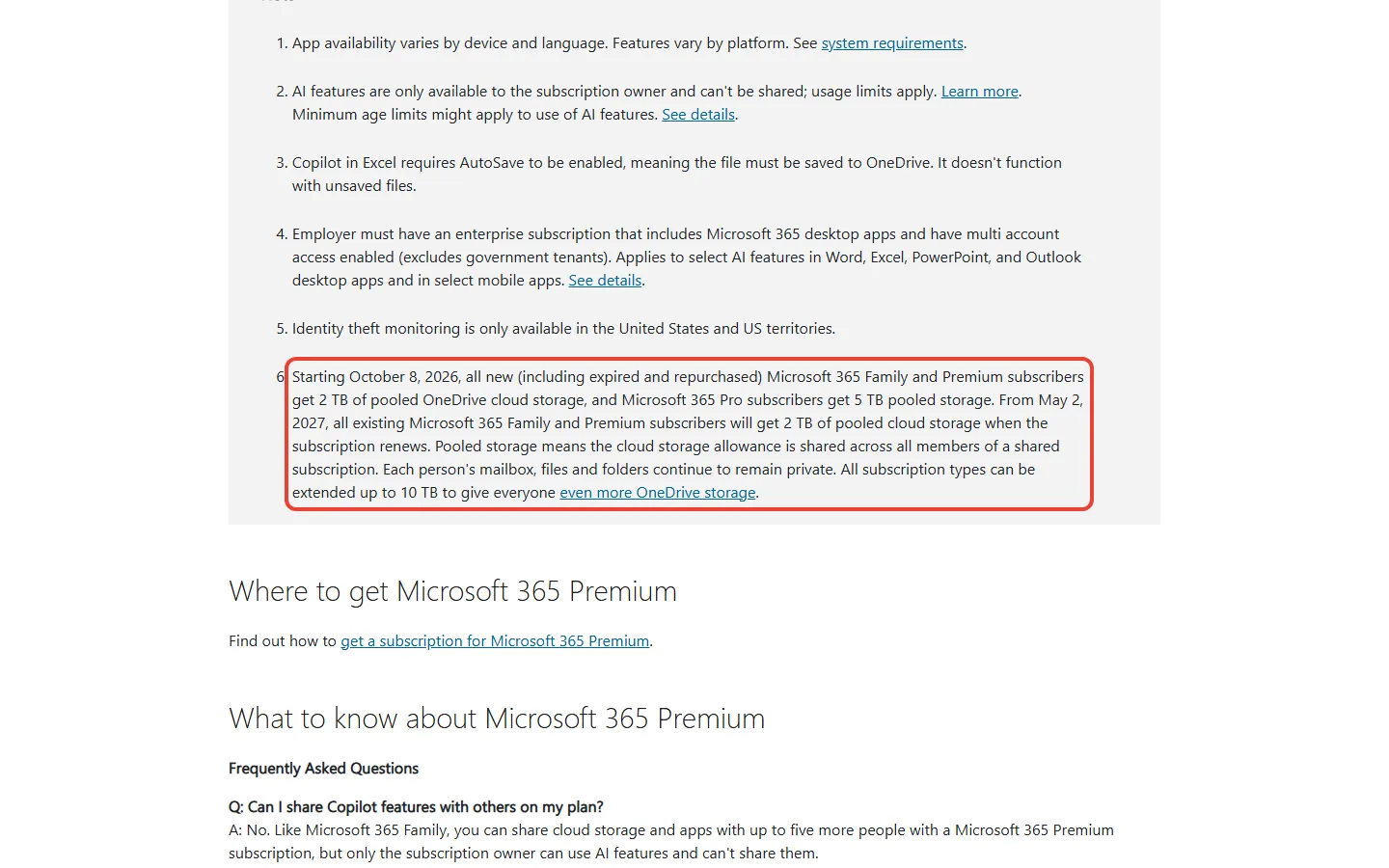
Since October 8, 2026, new Family and Premium subscribers get 2 TB of OneDrive storage pooled across everyone on the plan, and new Pro subscribers 5 TB. If you already have Family or Premium, you move to the 2 TB pool at your first renewal from May 2, 2027, according to Microsoft’s Premium support page. Before the change, Microsoft’s October 2025 launch table listed both Family and Premium at “Up to 6 TB (1 TB per person)”.
Say five people on your plan keep 500 GB each. That is 2,500 GB, or 500 GB more than a 2 TB (2,000 GB) pool. Check everyone’s OneDrive use before your first renewal from May 2, 2027. Microsoft says every plan type can be extended up to 10 TB, but the page we read on November 3, 2026 gives no price for the extra space.
Copilot in Excel needs OneDrive, and work files need your employer
- Excel files must live in OneDrive. AutoSave must be on, so the file has to be saved to OneDrive; Copilot in Excel won’t work on unsaved files.
- Work files depend on your employer. To use your home plan’s Copilot on work documents, your employer’s IT has to allow it.
Is Microsoft 365 Premium better value than ChatGPT Plus, Google AI Pro or Claude Pro?
At $19.99 a month, Premium costs about the same as the other big AI plans. ChatGPT Plus and Claude Pro are $20 a month billed monthly, and Google AI Pro is $19.99. The difference is what comes bundled: Premium includes the Office desktop apps and 2 TB of shared storage, while Google AI Pro includes 5 TB of storage.
If your day runs through Word and Outlook, any paid Microsoft 365 plan puts Copilot inside the files you already use. If you mostly chat with an assistant, compare the dedicated plans. Start with our ChatGPT Go vs Plus guide, our Claude subscription guide and our Google AI Ultra vs Pro comparison. Spreadsheet-heavy readers can also look at our Claude in Excel review, and Google’s cheaper tier is covered in our Google AI Plus review.
How do I cancel Copilot Pro?
If a Copilot Pro subscription still shows in your Microsoft account, Microsoft’s support page gives these steps to cancel it:
- Go to the subscriptions page of the Microsoft account you bought it with.
- Find your Copilot Pro subscription and select Manage.
- Select Cancel and follow the instructions on the page.
How do I try Premium or switch plans?
Personal, Family and Premium each have a one-month free trial that renews automatically at the regular price unless you cancel in your Microsoft account. If you only want to see whether Premium’s agents earn their keep, set a reminder a few days before the month ends.
To move up, say from Family to Premium, you buy the new plan on the same Microsoft account. The days left on your old plan are converted and added to the new one, which can be less time than you had left. For Family to Premium, Microsoft’s table credits 78% of the remaining time. To move down, you cancel and buy the cheaper plan, and you keep the old one until it expires.
Microsoft 365 Premium FAQ
Can I still upgrade to Copilot Pro?
No. Microsoft no longer sells Copilot Pro, and support for existing subscribers ended on August 1, 2026.
Is Microsoft 365 Premium worth it?
Mainly if you will use Researcher or Analyst, which Personal and Family don’t include. It also gives more voice, vision, image and Audio Overview use, and limited Cowork (a preview available only in the US and Canada). On yearly billing Premium costs $70 more than Family and $100 more than Personal.
How much is Microsoft 365 Premium a year?
$199.99 a year in the US. Paying $19.99 a month instead comes to $239.88 over twelve months.
Can my family use Copilot on Microsoft 365 Family or Premium?
No. As of November 3, 2026, Microsoft says the AI features on Family, Premium and Pro are only for the subscription owner and cannot be shared. Family members get the apps and storage. Two people who both want Copilot need two subscriptions under Microsoft’s current terms.
What is the difference between Microsoft 365 Premium and Pro?
Pro costs $99.99 a month to Premium’s $19.99. It adds the highest usage for Voice, Vision and Cowork (a preview available only in the US and Canada), plus 5 TB of storage instead of 2 TB.
Does Microsoft 365 Personal include Copilot?
Yes. Personal includes Copilot in Word, Excel, PowerPoint, Outlook and OneNote, with standard usage for voice, vision and images, and no Researcher or Analyst.
Sources and how we checked: on November 3, 2026 we read Microsoft’s US compare page, its Premium and Pro store pages and its AI credits and limits page (October 2026 version). We also read its support pages on Copilot Pro, Premium, Researcher, Analyst, Vision and switching plans. Background comes from its blog posts of October 1, 2025 and June 16, 2026, and from launch coverage in PCWorld and Thurrott.
Microsoft prices come from Microsoft’s US store and pages. ChatGPT Plus, Claude Pro and Google AI Pro prices come from their makers’ US pages, and Copilot Pro’s old price from PCWorld, all in US dollars. This page reports what Microsoft publishes.

Founder of AI Tool Analysis. Reads the pricing pages and help articles behind each claim. See how we research →
Stay Updated on AI Plans and Prices
Microsoft, Google and OpenAI change their plans and prices often. Get the changes that affect what you pay, straight from the vendors’ own pages.
- Plain Breakdowns: We read the vendors’ own pricing pages, docs and help centers
- Price Tracking: Know when plans change price, storage or limits
- Comparison Updates: As plans shift, we update our verdicts
- No Hype: Just the changes that matter for your wallet
Free, unsubscribe anytime.

Related Reading
- ChatGPT Go vs Plus: Is $8 Enough or Do You Need $20?
- Claude Subscription 2026: Free vs Pro vs Max vs Ultra
- Google AI Ultra vs Pro: Is $99.99 Worth It Over $19.99?
- Is Google AI Plus Worth It? Google AI Plus Review
- Claude in Excel Review 2026
- GitHub Copilot Pro+ Review: Pro vs Pro+ vs Max
Last Updated: November 3, 2026
Facts checked: November 3, 2026 (plans, prices, storage and Copilot limits against Microsoft’s own pages)
Next Review Update: November 17, 2026 (whether Microsoft’s plan pages and limits table have changed)
Have a tool you want us to cover? Suggest it here | Questions? Contact us