Meta Muse vs ChatGPT looks like a $20 against $20 decision, and on price it is: Muse Power and ChatGPT Plus both cost $20 a month, and Muse Maximum and ChatGPT Pro 100 both cost $100. What differs is where the always-working agent sits. Meta says Muse keeps working after you close the app, and Muse is free to start. ChatGPT’s always-on agent, Dot, needs Pro from $100 a month.
This guide puts every plan side by side using Meta’s and OpenAI’s own pages: what each agent does, what each plan includes, the yearly cost, and the catch that decides it for many people, which is where you live and what happens to your data. The short version: if you are in the US or Canada and want an agent for errands, start on Muse’s free plan. If you want one $20 plan for chat, documents and an agent with no ads, pick ChatGPT Plus. Skip Muse if you live anywhere else, because Meta lists only the US and Canada so far.

⚡ TL;DR: Meta Muse vs ChatGPT in 2026
🤖 What they are: Muse is Meta’s personal AI agent, free to start. ChatGPT’s agents are Work (on Plus) and Dot, the always-on one (on Pro).
💳 Price: Muse is free, then Power at $20 and Maximum at $100 a month. ChatGPT is free, Go at $8, Plus at $20, and Pro from $100. Both bill monthly only.
🎯 Best for: Muse for errands, if you are in the US or Canada. ChatGPT Plus for chat, documents and an agent in one $20 plan with no ads.
💡 Our take: it depends. Try Muse free first if you can, and pay $20 for Power only if you hit its limit. The $100 plans only make sense for heavy users.
⚠️ The catch: Muse’s browsing can shape the ads you see on Meta’s apps, and it is limited to the US and Canada. ChatGPT’s always-on Dot costs $100 a month.
📑 Quick Navigation
🤖 What Meta Muse Actually Is
Meta launched Muse on September 8, 2026 and calls it a personal AI agent that, in its words, "doesn’t just answer questions, it actually does the work". An agent here means software you hand a goal to, such as booking a table or watching a ticket price, instead of one you question and then act on yourself.
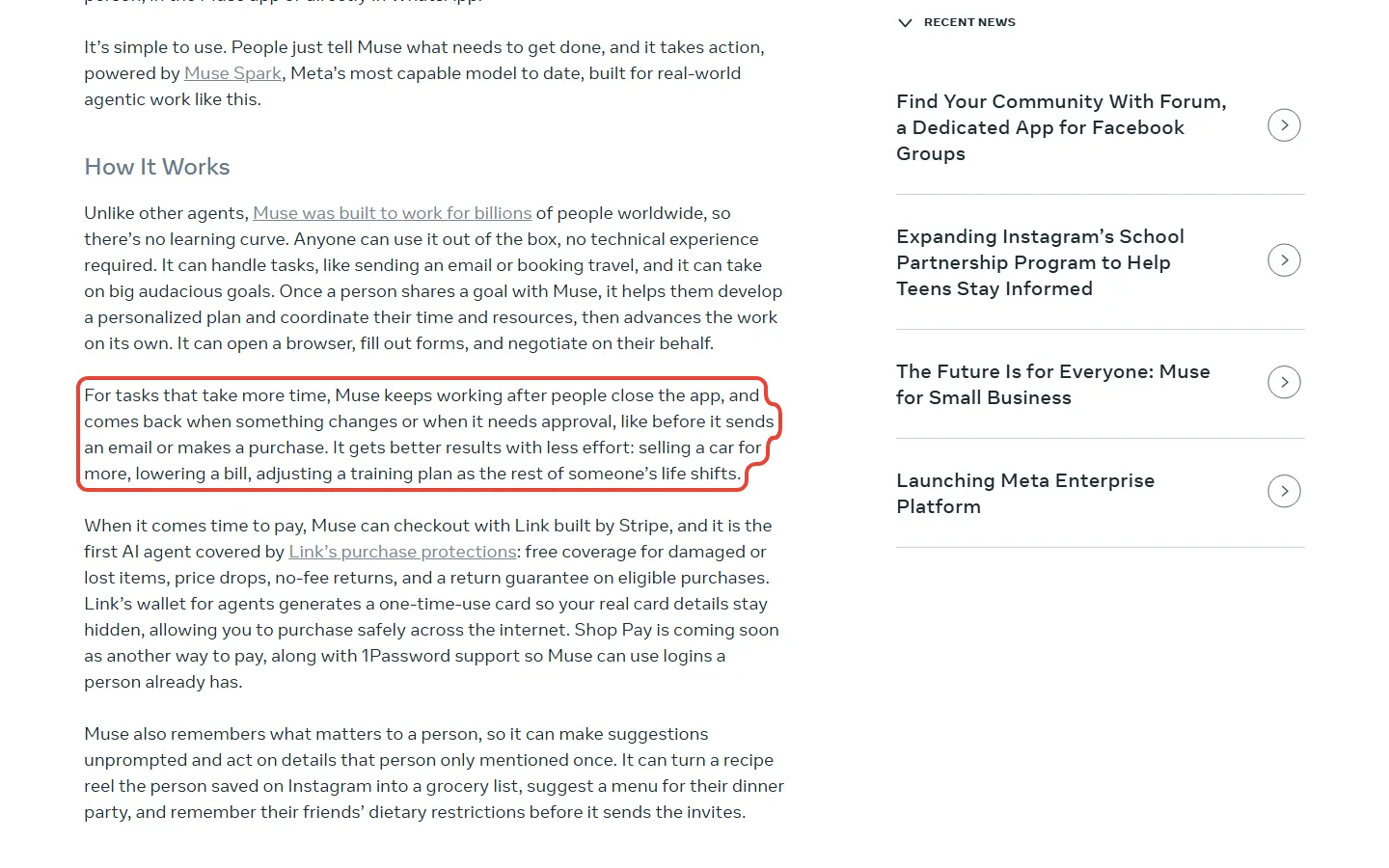
Think of it as a personal assistant who arrives with their own laptop. AP’s report on the launch says Muse runs on a dedicated, secure virtual machine that holds both the agent and your data, so it works in its own space instead of on your phone. Meta says it keeps working after you close the app and comes back when something changes or when it needs your approval, like before it sends an email or makes a purchase.
You reach it in the Muse app on iOS and Android, at muse.ai, or directly in WhatsApp, and Meta says AI glasses are coming soon. If you are comparing agents more widely, see how Google packages Gemini Spark and how Anthropic packages Claude Cowork.
What Your First Five Minutes Look Like
Going by the App Store listing’s own screenshots and Meta’s launch post, the first five minutes on the free plan look like this:
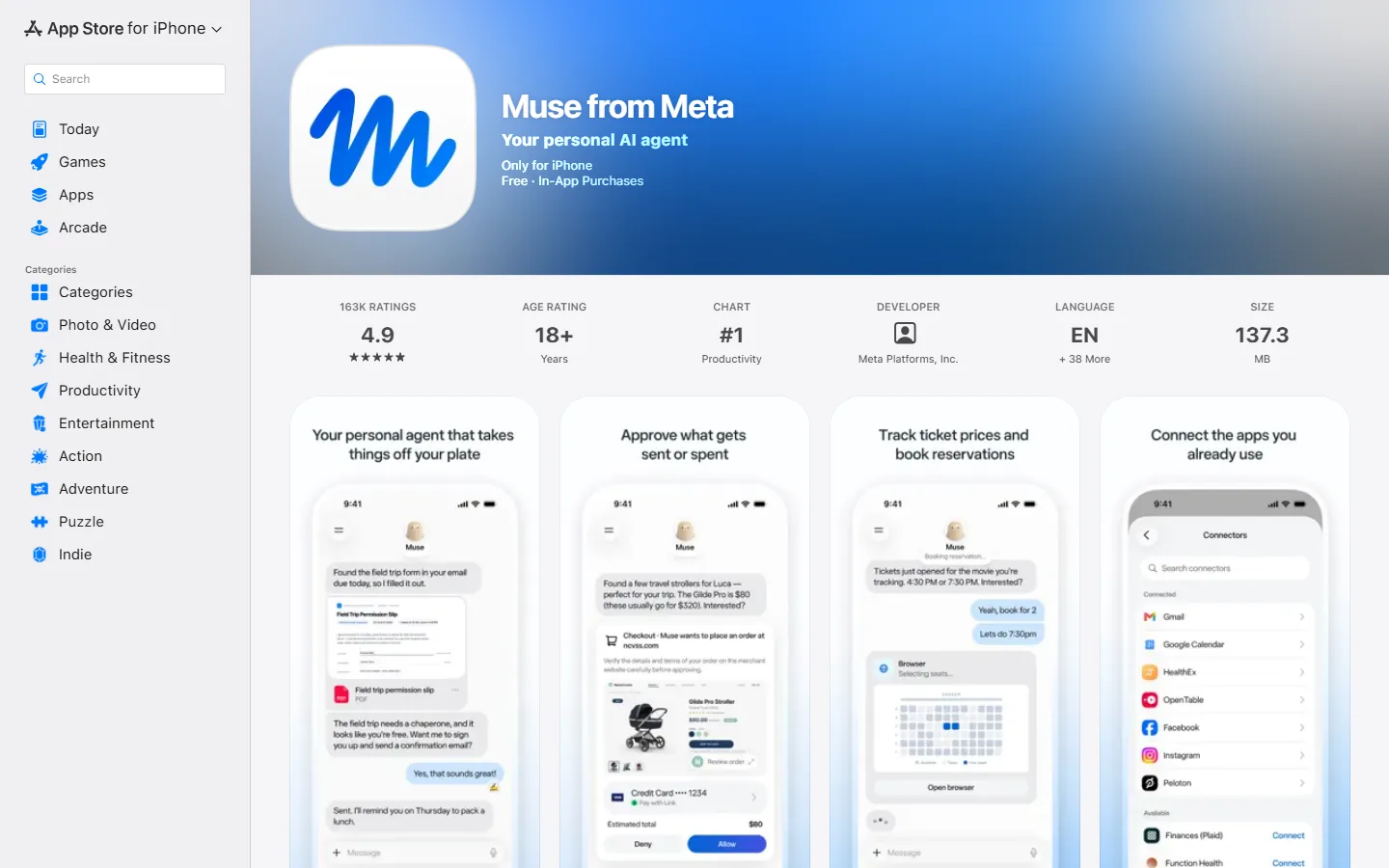
- Connect your apps. The listing’s caption reads "Connect the apps you already use," and its connectors screen shows Gmail, Google Calendar and OpenTable among the options. Muse can only act where you have connected it.
- Give it a job. The listing’s examples are tracking ticket prices and booking reservations. Meta says Muse keeps working on a job in the background and comes back when something changes.
- Approve what it sends or spends. The listing’s caption is "Approve what gets sent or spent," which matches Meta’s line that Muse asks before sending an email or making a purchase.
How far the free plan stretches is the open question. Meta says only that Muse is free with a usage limit, and it does not publish the number.
🔍 REALITY CHECK
The claim: “It’s free for most of what people need, with subscription plans for people who want to do more.”
The fine print: Meta’s help page says Muse is "free with a usage limit" and that when you reach it you can upgrade or wait for it to refresh. No allowance is given, and no refresh schedule. What the free plan covers for you depends on how much background work you hand over.
✅ Verdict: Free to start is true. Free for your whole workload is unknown until you hit the limit.
Safety is worth a line, because an agent that can spend money is a different risk from a chatbot. For payments, Meta says Muse can check out with Link by Stripe, and it calls Muse the first AI agent covered by Link’s purchase protections (Meta’s claim). The App Store listing itself adds a warning that Muse "may be inaccurate or take unexpected actions, so check in to keep it on track."
💳 Meta Muse Pricing: Free, Power and Maximum
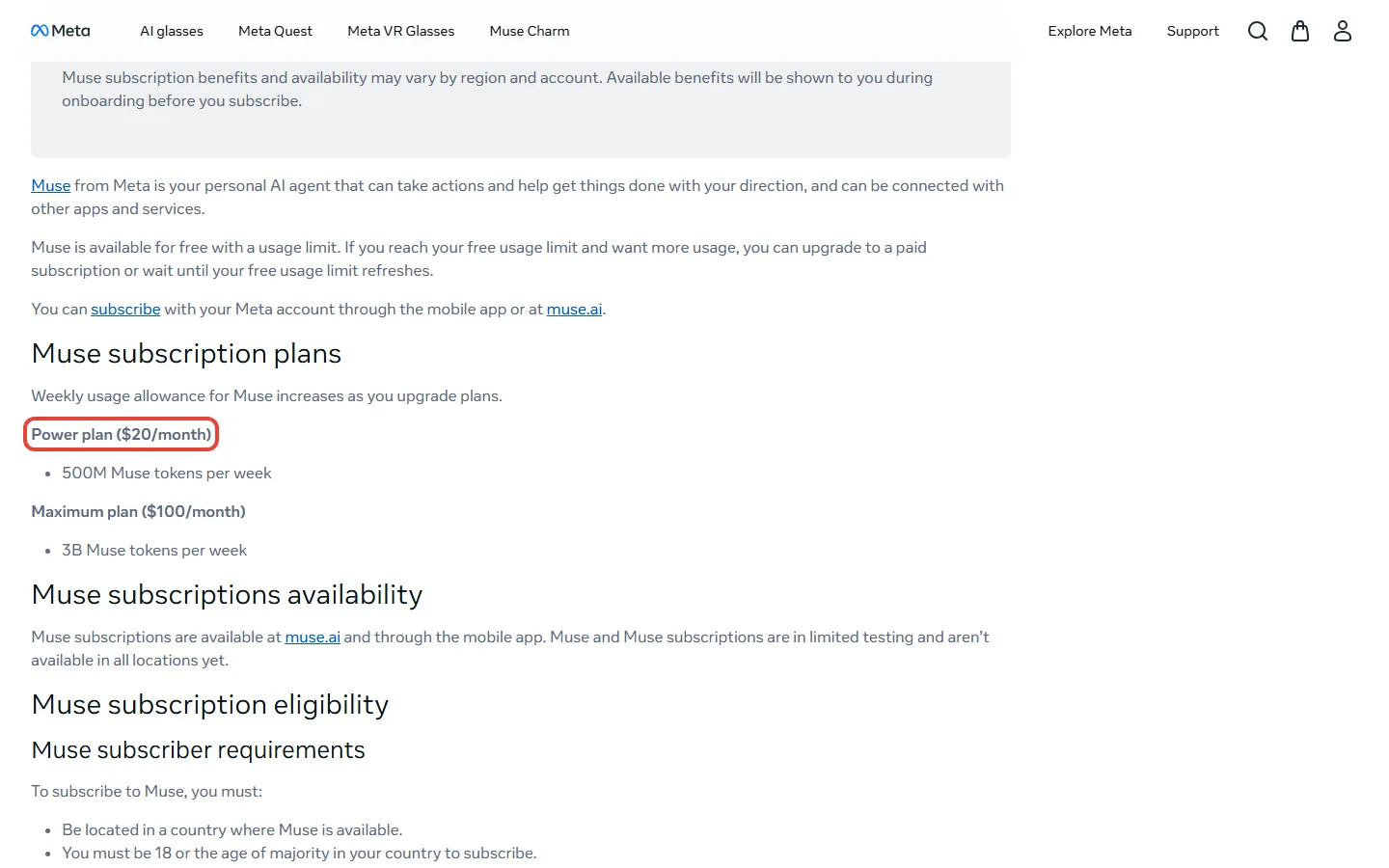
Muse has three rungs, according to Meta’s Help Center page on Muse subscriptions: a free plan with a usage limit, the Power plan at $20 a month, and the Maximum plan at $100 a month. Meta’s plan names are Power and Maximum, not Pro and Max.
| Plan | Price | Weekly allowance | Billing |
|---|---|---|---|
| Free | Free | A usage limit (number not published) | None |
| Power | $20 a month | 500M Muse tokens per week | Monthly, renews automatically |
| Maximum | $100 a month | 3B Muse tokens per week | Monthly, renews automatically |
The real-world cost math:
- Power: $20 ÷ 500M weekly tokens = $4.00 for every 100M weekly tokens
- Maximum: $100 ÷ 3B weekly tokens = about $3.33 for every 100M weekly tokens
- Maximum gives 6x Power’s tokens for 5x the price
- Per year, because Meta lists monthly prices only: Power is $240 and Maximum is $1,200
Here is the limit of that maths. Meta does not say how many tasks or messages a token buys, so $4.00 per 100M tokens is a price per unit of allowance, not per errand. It is like seeing a phone plan’s gigabytes without knowing how many videos they hold.
💡 Key Takeaway: Muse’s paid plans are priced in weekly tokens, and Meta does not say what a token buys. If you land on Power, treat your first week as the measurement: it is the only way to learn what 500M tokens covers for you.
To subscribe you need a Meta account (Facebook, Instagram, or an email or phone number), you must be 18 or the age of majority, and you must be in a country where Muse is available. Meta’s help page also says Muse and its subscriptions "are in limited testing and aren’t available in all locations yet."
🧰 ChatGPT’s Agents: Work and Dot
ChatGPT has two agents, and the plan decides which one you get. OpenAI’s pricing page lists ChatGPT Work as "Limited (desktop app)" on Free and Go, and on "Desktop, web, and mobile" for Plus and Pro. Press coverage describes Work as an agent that runs across your apps and files and hands back finished decks, sheets, docs and web apps. Our ChatGPT review covers the rest of what Plus includes.
Dot is the other one. The Pro card on the pricing page lists "Dot, your always-on agent." Android Authority reports that Dots keep working toward your goals in the background, each with its own cloud computer and browser, and that they rolled out from September 29 to Pro users outside the EEA, Switzerland and the UK. OpenAI’s own announcement pages could not be read for this post, so treat those details as reported.
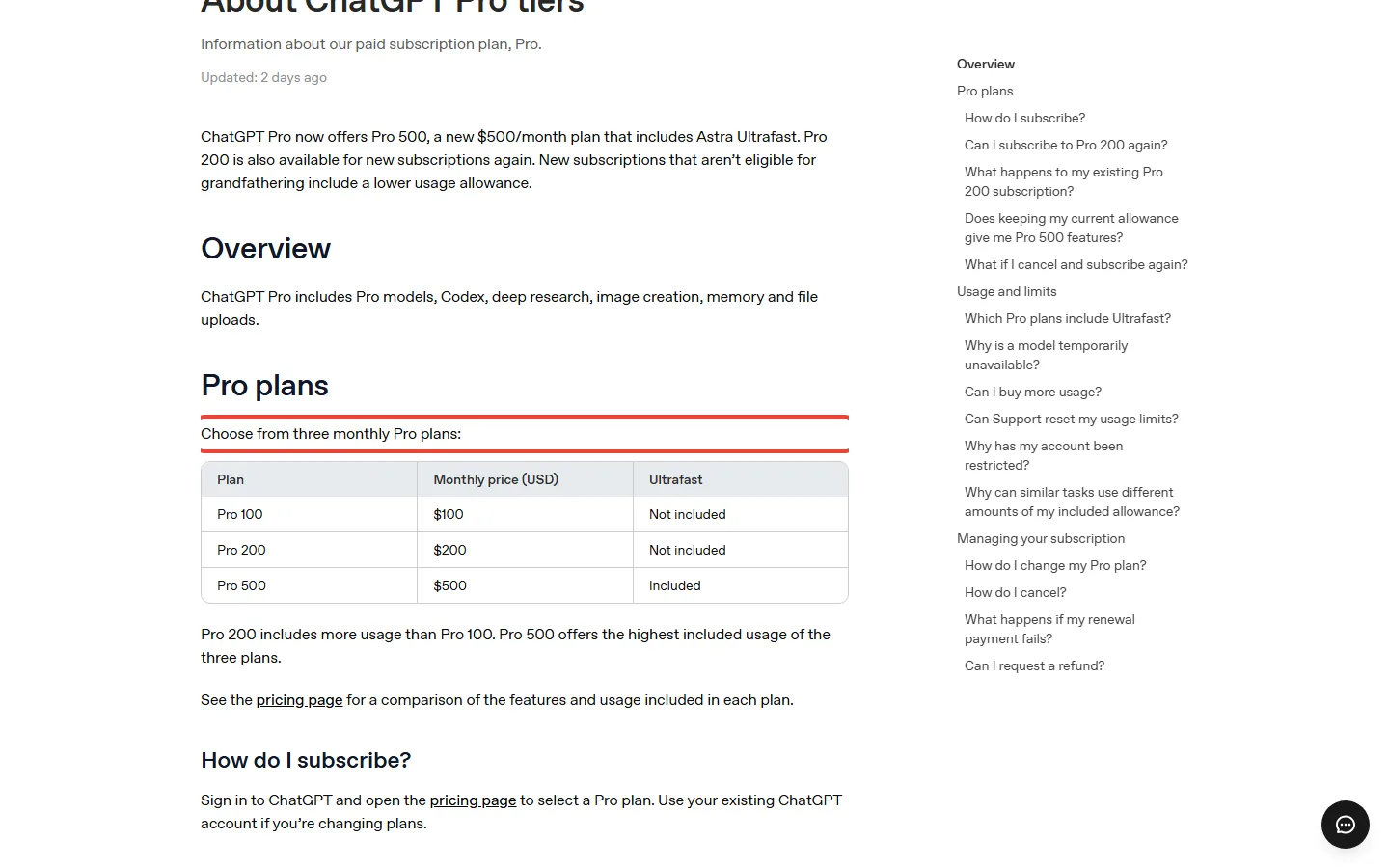
The prices come from OpenAI’s Pro tiers help page and its plan pages: Go is $8, Plus is $20, and Pro has three plans, Pro 100 at $100, Pro 200 at $200 and Pro 500 at $500. OpenAI sells no annual plan for Go, Plus or Pro, so all of them bill monthly.
| ChatGPT plan | Monthly price | Agent access | Ads |
|---|---|---|---|
| Free | Free | Limited Work, desktop app | May show ads |
| Go | $8 | Limited Work, desktop app | May show ads |
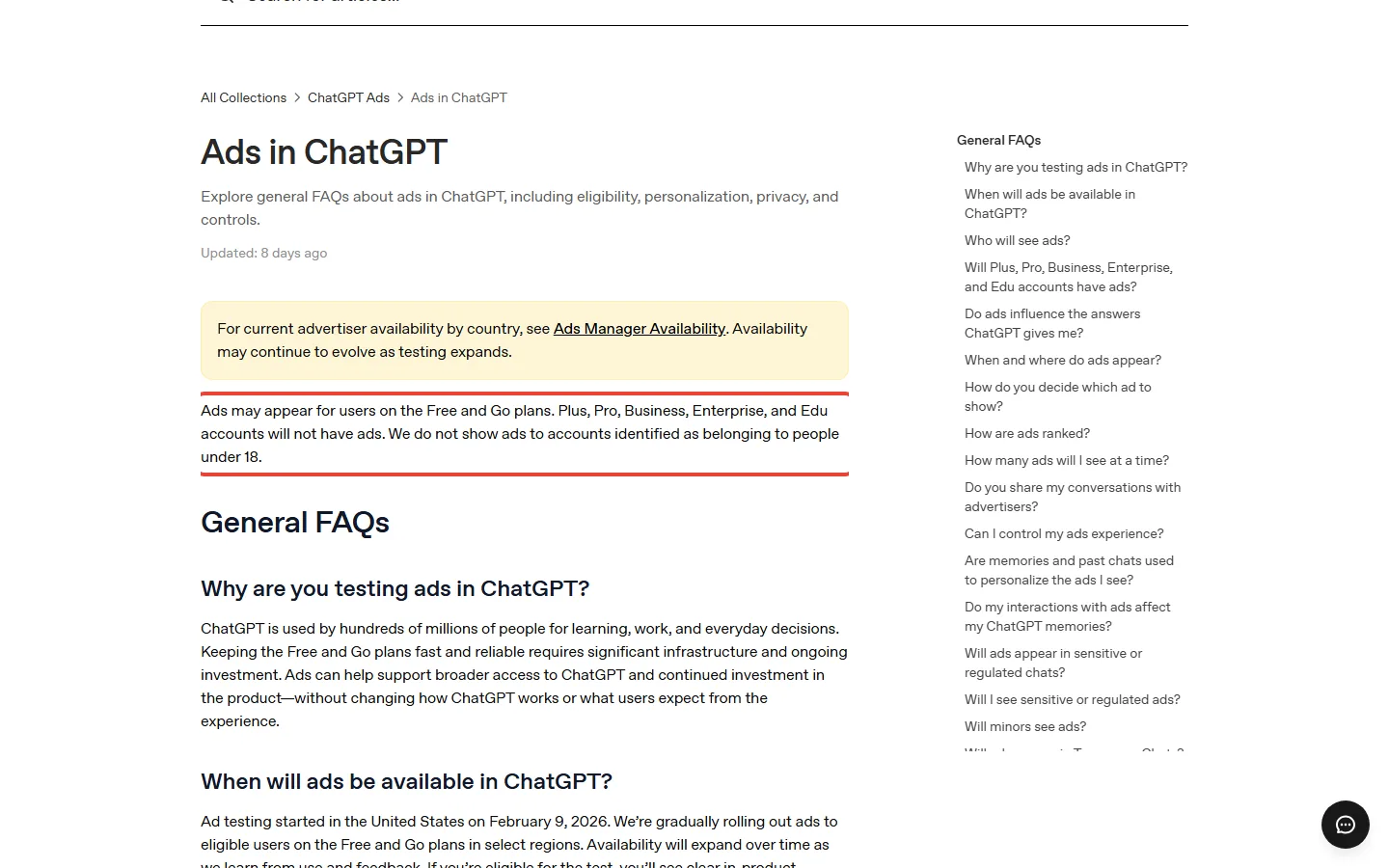
| Plus | $20 | Work on desktop, web and mobile; GPT-6 Astra in Work and Codex | No ads |
| Pro 100 | $100 | Work plus Dot; no five-hour limit in Work and Codex | No ads |
| Pro 200 | $200 | Same as Pro 100, with more included usage | No ads |
| Pro 500 | $500 | Same as Pro 100, with the highest included usage | No ads |
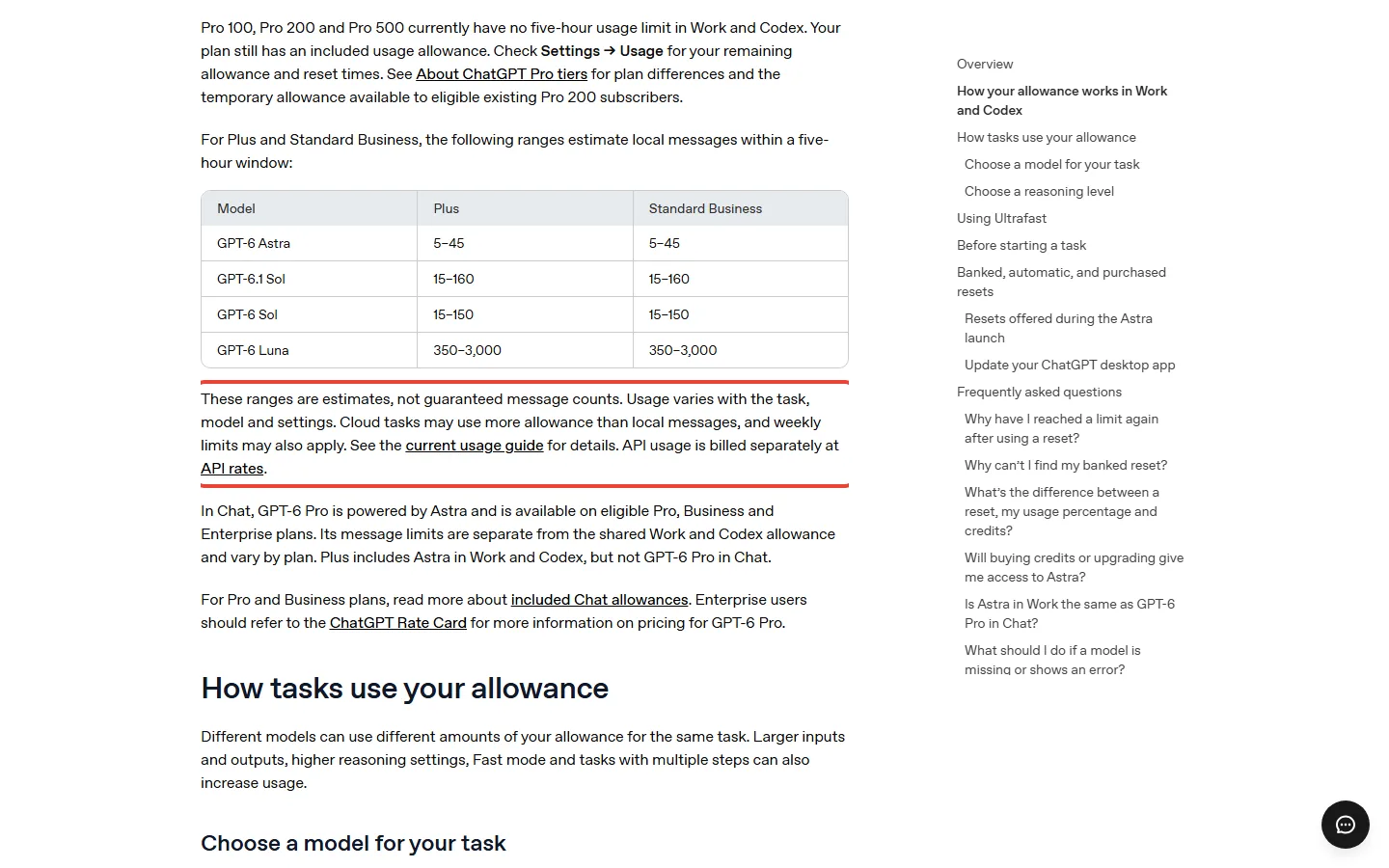
The limits are where the two companies differ most. On Plus, OpenAI’s usage page estimates your Work and Codex usage per five-hour window at 5 to 45 messages on GPT-6 Astra, 15 to 160 on GPT-6.1 Sol, 15 to 150 on GPT-6 Sol and 350 to 3,000 on GPT-6 Luna. The Pro plans currently have no five-hour limit in Work and Codex, though each still has an included allowance.
🔍 REALITY CHECK
The claim: “Expanded access to ChatGPT Work on desktop, web, and mobile.”
The fine print: That is the Plus card’s line on OpenAI’s pricing page. OpenAI’s usage page puts a number on it for Plus: 5 to 45 Astra messages per five-hour window, and it says outright that "these ranges are estimates, not guaranteed message counts." It also says your allowance does not correspond to a fixed number of messages or tasks.
✅ Verdict: Plus gets you the agent on every device, but plan for the low end of the range on the strongest model.
📬 Tracking AI price changes?
Get honest AI tool pricing analysis delivered weekly. No hype, no spam.
⚖️ Meta Muse vs ChatGPT, Plan by Plan
Line the two ladders up by price and the rungs match. What changes is what you get on each one.
Round 1: The free plans
Both free tiers include an agent. Muse’s runs on your phone, on the web and in WhatsApp, and Meta says it keeps working in the background. ChatGPT Free lists only limited Work access in the desktop app, and the Free plan may show ads. On features, Muse wins this round, with one caveat: its free limit is unpublished, so nobody outside Meta knows how much background work it covers.
Round 2: $20 against $20
Power gives you 500M Muse tokens a week of agent time. Plus gives you Work on every device and the rest of ChatGPT: the pricing page lists reasoning models with GPT-6, image creation, expanded deep research and expanded Codex usage, with no ads. If your list is errands, Muse is the more direct fit. If your list is documents, spreadsheets and everything else, Plus is the broader plan. The Plus limits are published as message estimates, which are clearer than tokens even when they are wide.
Round 3: $100 against $100
Maximum gives you 3B tokens a week. Pro 100 gives you Dot, no five-hour limit in Work and Codex, and GPT-6 Pro in chat on eligible Pro plans. Both cost $1,200 a year. This is the round where the always-on agent is a paid feature on ChatGPT and a free-plan feature on Muse, within Muse’s unpublished usage limit. That is the whole story of this comparison.
| Criteria | Meta Muse | ChatGPT | Edge |
|---|---|---|---|
| Free agent | Yes, with an unpublished usage limit; phone, web, WhatsApp | Limited Work, desktop app only | Muse |
| $20 plan | Power: 500M tokens a week | Plus: Work on every device, plus chat, images, deep research, Codex | Depends |
| $100 plan | Maximum: 3B tokens a week | Pro 100: Dot, no five-hour limit in Work and Codex, GPT-6 Pro chat | Depends |
| Cost per year at $20 and $100 | $240 and $1,200 | $240 and $1,200 | Tie |
| Cheaper entry plan | None | Go at $8 a month ($96 a year) | ChatGPT |
| How limits are published | Weekly tokens only | Message estimates per five hours, plus an allowance | ChatGPT |
| Ads | Chats not shared with ad systems, but Muse’s browsing can shape ads on Meta’s apps | Free and Go may show ads; Plus and above have none | ChatGPT Plus |
| Availability | US and Canada, in limited testing | Go is available in all supported ChatGPT countries; Dot is outside the EEA, Switzerland and the UK, as reported | ChatGPT |
🧭 Cheapest Monthly Price for Each Kind of Agent (USD)
Put the yearly costs side by side and the symmetry is almost exact. Both companies bill monthly only, so a year on the $20 rung is $240 and a year on the $100 rung is $1,200, whichever logo is on it. Only ChatGPT has a rung below $20: Go at $8 a month is $96 a year, and Muse has no equivalent.
💸 What a Year Costs on Each Rung (USD, Monthly Billing)
🔒 The Catch: Privacy, Ads and Where You Live
An agent that reads your email and spends your money is a bigger privacy decision than a chatbot, so this section decides it for many readers. Here is what each company says.
Muse: chats, ads and training
- Ads. Meta says Muse "doesn’t share a person’s conversations or the data in their VM with Meta’s ad systems." Its safety blog adds that how you use Muse can still influence the ads you see: when Muse browses the internet it appears as your activity, so a shop you send Muse to could show you an ad on Instagram.
- Training. Conversations and tool calls are used to train Meta’s model by default, with key personal information removed first. You can opt out with a switch in Muse settings.
- Later this year. Meta says it will introduce Muse Confidential VM, encrypted with a key only you hold, so not even Meta can access it. That is a promise, not a feature today.
- Where. Meta’s September 29 post calls Muse "available in the US and Canada." Meta’s pages name only those two countries, so for readers in Pakistan, India or the UK, Muse is not officially available today.
🔍 REALITY CHECK
The claim: “Muse doesn’t share a person’s conversations or the data in their VM with Meta’s ad systems.”
The fine print: Meta’s own safety blog says there are legitimate scenarios where how you use Muse can influence the ads you see, because Muse’s web browsing appears as your activity. Meta also says training on your chats is on by default.
✅ Verdict: Both halves are true. Your chats stay out of the ad systems, but your errands can still leave a trail that shapes ads.
ChatGPT: ads and training
OpenAI’s ads help page says ads may appear for Free and Go users, and that Plus, Pro, Business, Enterprise and Edu accounts will not have ads. It also says conversations are not shared with advertisers and ads do not influence ChatGPT’s answers. On training, OpenAI’s Go page says it may use conversations to improve its models, and that you can opt out at any time. So both companies train on chats by default and both give you an off switch.
🗣️ What the Press and the App Store Say
Three camps have formed around Muse since launch:
- The traction camp. Fox Business reported on September 22 that Muse ranked as the top free app in Apple’s US App Store, ahead of ChatGPT. The listing itself, on October 6, shows #1 in Productivity and 4.9 stars from 163K ratings. Ratings measure first impressions, not trust.
- The trust camp. TechCrunch framed the launch around whether people will trust Meta with their personal information again, pointing to the company’s past privacy penalties.
- The wait-and-see camp. AP’s report ended on the question of whether people will actually use it, and the App Store listing’s own warning says Muse may take unexpected actions.
The dominant thread is trust, not features. Muse’s free price removes the cost barrier, so the question is how much of your inbox and wallet you will hand to Meta.
🎯 Who Should Pick Which
Choose Muse (free) if you are in the US or Canada, you want an agent to handle errands such as bookings and price tracking, and you are comfortable with Meta’s privacy terms. Move to Power at $20 only when you hit the free limit.
Choose ChatGPT Plus if you want one $20 subscription for chat, images, deep research, Codex and an agent that builds documents, with no ads. Our Codex review covers the coding side, and our agent mode review covers the earlier agent.
Choose a $100 plan if you keep running out on $20. Pro 100 if you want Dot and GPT-6 Pro in chat. Maximum if Muse is already your daily agent.
Skip both if you only chat occasionally: both have free plans. If you are outside the US and Canada, ChatGPT is the only one of the two you can officially buy. Comparing other agents on price? See Genspark, Grok Bot and SuperGrok’s plans.
🔭 What Could Change This
Treat these as signals, not predictions. Meta says AI glasses support is coming soon and that Muse Confidential VM arrives later this year. Muse’s help page still describes limited testing, so a wider rollout is the change to watch, along with a published free allowance. On the ChatGPT side, OpenAI’s Pro tiers page now lists a Pro 500 plan and a lower allowance for new Pro 200 subscriptions, so check it again before paying $100. The update banner at the top shows when we last re-checked both sides.
❓ Meta Muse vs ChatGPT: FAQs
Q: Is Meta Muse free?
A: Yes, with a usage limit. Meta says Muse is free with a usage limit, and you can upgrade or wait for it to refresh. Meta does not publish the allowance.
Q: How much does Meta Muse cost?
A: Muse is free, Power is $20 a month for 500M weekly tokens, and Maximum is $100 a month for 3B weekly tokens. Meta lists monthly prices only, so a year is $240 or $1,200.
Q: Is Meta Muse better than ChatGPT?
A: It depends on the job. Muse is built for errands and its agent is in the free plan; ChatGPT Plus is the broader $20 plan, with Work, Codex, deep research and no ads.
Q: Does ChatGPT have an agent like Muse?
A: Partly. ChatGPT Work handles documents and apps on Plus, and Dot, the always-on agent, is on Pro from $100 a month. Dot’s launch excluded the EEA, Switzerland and the UK, as reported.
Q: Is Meta Muse available in Pakistan, India or the UK?
A: Not officially. Meta’s pages list the US and Canada, and say Muse is in limited testing. This post does not recommend workarounds.
Q: Does Meta use my Muse chats for ads or training?
A: Meta says chats are not shared with its ad systems, but Muse’s browsing can influence the ads you see. Training on conversations is on by default, and you can switch it off in Muse settings.
Q: Which is cheaper over a year?
A: They tie at $20 ($240 a year) and at $100 ($1,200 a year). ChatGPT also has Go at $8 a month, or $96 a year, and Muse has no plan below $20 except free.
Q: Does ChatGPT Plus have ads?
A: No. OpenAI says ads may appear on Free and Go, and that Plus, Pro, Business, Enterprise and Edu accounts will not have ads.
🏆 Final Verdict: It Depends
Verdict: DEPENDS. The prices match, so the choice is about the agent and the catch. If you are in the US or Canada and want an agent for errands, start on Muse’s free plan and pay for Power only when you hit the limit. If you want one $20 plan that does a bit of everything, with no ads and GPT-6 inside Work, ChatGPT Plus is the safer pick. The $100 plans are for heavy users, and Dot is the reason to cross from $20 to $100 on ChatGPT.
The deciding factors are where you live and how you feel about your data. Outside the US and Canada, ChatGPT is the only option of the two. Inside them, Muse costs nothing to try, which makes it a low-risk way to test an agent before paying. Whichever you choose, set a reminder to review the plan after the first month, because the limits on both sides are still moving.
✅ Where Muse Wins
- ✓ A background agent in the free plan
- ✓ Runs on phone, web and WhatsApp
- ✓ Maximum gives 6x Power’s tokens for 5x the price
- ✓ Meta says chats stay out of its ad systems
✅ Where ChatGPT Wins
- ✓ Available in many more countries
- ✓ An $8 Go plan, and Plus has no ads
- ✓ Limits published as message estimates
- ✓ A broader $20 plan: Codex, deep research, images
Try Muse first if you are in the US or Canada and want errands handled. Choose ChatGPT Plus if you want one subscription for everything. Related: our Google AI Pro free guide and Perplexity review compare other plans in the same price range.

Founder of AI Tool Analysis. Reads every pricing page, help article and footnote so you don’t have to. Covering AI tools since 2025. See how we research →
Related Reading
- ChatGPT Review 2026
- ChatGPT Codex Review
- ChatGPT Agent Mode Review
- Gemini Spark Review: Google’s 24/7 AI Agent
- Claude Cowork Review
- Genspark AI Review
- Grok Bot Review
- SuperGrok Subscription Price 2026
- Google AI Pro Free: Every Legit Offer
- Perplexity AI Review
Stay Updated on AI Tool Pricing
Don’t overpay for AI tools. Get weekly pricing updates, new tier alerts, and honest reviews delivered to your inbox. No hype, no spam.
- ✅ Price-change alerts for every major AI tool
- ✅ New tier announcements as they happen
- ✅ Honest comparisons that cut through marketing
- ✅ Safety updates on the tools you rely on
Free, unsubscribe anytime.

Last Updated: October 6, 2026 | Facts checked: October 6, 2026 (plans, prices and limits against Meta’s and OpenAI’s own pages) | Next Review Update: October 20, 2026, when Muse’s rollout and plan details are re-checked.
Have a tool you want us to cover? Suggest it here | Questions? Contact us