
Latest Update (November 10, 2026): Cursor’s pages no longer publish yearly prices or the 3x and 20x Agent limits of its old Pro+ and Ultra plans, so this comparison now shows only their monthly prices, which Cursor’s legacy plans page still lists. Before that, Anthropic renamed its $200 Max 20x plan Ultra (existing subscribers move to it automatically, with no price change). Ultra gives 10x Pro’s usage every week, with no 5-hour limit for verified accounts; the $100 plan is now just Max, with 5x Pro’s usage every 5 hours and every week. Both include Claude Code. Earlier, Cursor’s old plans, including the $20 Pro plan, closed to new sign-ups on October 12. New customers now get The X Subscription (Free, Plus at $8, Premium at $30, Super at $100 and Ultra at $200 a month). Plus covers Grok models only, and Claude models in Cursor are billed separately at API list prices. If you already pay for Cursor, you keep your plan and price for now. See what a new Cursor sign-up gets.
The Bottom Line
Claude Code vs Cursor comes down to one question: do you want an AI that does the work while you review it, or an AI that helps while you type? Claude Code is Anthropic’s agent-first coding tool. It runs in your terminal, your IDE, a desktop app and the web, and from Claude Code v2.1.280 its default model on paid plans is Claude Opus 5.5. Cursor is an AI-first code editor built on VS Code, with as-you-type Tab completions, an Agent, cloud agents and models from several vendors. Claude Pro and the Cursor Pro plan existing subscribers keep both start at $20 a month (Cursor’s plans for new sign-ups changed on October 12, see the update above), and both top out at $200 a month with a plan called Ultra: Cursor’s old Ultra plan includes more usage than Pro (Cursor no longer publishes how much more), and Claude Ultra (the former Max 20x) gives 10x Pro’s usage every week, with no 5-hour limit for verified accounts. This comparison covers what each one does, what each plan costs, and which one fits your work, with prices checked on October 4, 2026 and Cursor’s new plans on October 13.
Free vs. Paid: Cursor has a Free plan ($0) with limited agent requests. Claude Code needs a paid Claude plan (Pro, Max, Ultra, Team or Enterprise) or Anthropic API credits: it isn’t included in Claude Free. Biggest limit: Claude’s usage limits are shared between the Claude app and Claude Code; Cursor’s usage depends on which models you pick. Best for: developers who want to hand off multi-step tasks (Claude Code) or who want AI inside every keystroke of their editor (Cursor). Skip if: you’re a complete beginner. Both tools assume you can read and review code. For a broader look at the field, see our top AI agents for developers 2026 guide.
⚡ TL;DR: The Bottom Line
What They Are: Claude Code is Anthropic’s agent-first coding tool (terminal, IDE, desktop and web), defaulting to Opus 5.5 on paid plans. Cursor is an AI code editor built on VS Code with Tab completions, an Agent, cloud agents and models from OpenAI, Anthropic, Google and more.
Best For: Claude Code for handing off multi-file tasks and automating work from the terminal or CI. Cursor for fast, interactive coding inside the editor.
Price: Claude Pro $20 (Max $100, Ultra $200). New Cursor sign-ups since October 12: Plus $8 (Grok models only), Premium $30, Super $100, Ultra $200, with Claude models billed separately at API list prices. Existing Cursor Pro subscribers keep $20 (Pro+ $60, Ultra $200).
Our Take: Pick by workflow first. For existing Cursor subscribers the price ladders are almost the same; a new Cursor sign-up who wants Claude models pays for Premium at $30 plus API usage. If you already pay for Claude Pro, Claude Code costs you nothing extra. If you live in your editor, Cursor fits better. You can even run Claude Code inside Cursor; Anthropic’s help center says your plan covers it.
⚠️ The Catch: Neither $20 plan is unlimited. Claude’s limits are shared with your normal Claude chats, and Cursor’s docs say: “Daily Agent users: Typically $60–$100/mo total usage”.
📑 Quick Navigation
🤖 What Claude Code and Cursor Actually Do
Here’s the simplest way to tell them apart. Cursor is a co-pilot in the seat next to you: it suggests the next line, fills in code as you type, and fixes what you point at. You’re still flying. Claude Code is closer to handing the flight plan to another pilot: you describe where you want to go, it plans the route, makes the changes and shows you the result to review.
Claude Code is Anthropic’s agentic coding tool. According to the Claude Code docs, it runs in the terminal, as VS Code and JetBrains extensions, in a desktop app and on the web. You describe a task in plain English and it reads the relevant code, plans the approach, edits files across your project, runs commands and works with git, right up to opening a pull request. On Pro, Max, Team and Enterprise its default model is Claude Opus 5.5. Claude Code is included in Claude Pro and Max.
Cursor is a code editor built on VS Code. Its Tab feature predicts your next edit as you type, including multi-line and cross-file edits. Its Agent handles multi-file changes from a plain-language request, and cloud agents run tasks in their own virtual machines. Cursor offers models from OpenAI, Anthropic, Google, SpaceXAI and more, including Claude Opus 5.5, GPT-5.6 Sol, Gemini 3.8 Flash, Grok 4.7 and its own Composer 2.5. It also has a CLI, so the old terminal vs IDE line is blurrier than it was.
The two tools now overlap a lot. But the core idea is still different: Claude Code is agent-first (the AI drives, you review), and Cursor is editor-first (you drive, the AI assists). For more on Claude Code alone, see our Claude Code review 2026.
💡 Key Takeaway: If you want AI to do the work while you review the results, start with Claude Code. If you want AI to help while you stay in control of every keystroke, start with Cursor. They’re different ways of working, not just different feature lists.
🚀 What Your First Five Minutes Look Like

Claude Code
- Minute 1: make sure you have a paid Claude plan (Pro, Max, Ultra, Team or Enterprise) or Anthropic API credits. Claude Code isn’t part of Claude Free.
- Minute 2: install it. On macOS, Linux or WSL the docs give one command:
curl -fsSL https://claude.ai/install.sh | bash. Windows has a PowerShell command, and there are Homebrew and WinGet options. Requirements include macOS 13 or newer, Windows 10 1809 or newer, or a recent Linux, and 4 GB of RAM. - Minute 3: open a terminal in your project folder, type
claudeand log in with your Claude account when asked. - Minute 4: describe a small task in plain English. Claude Code plans it, edits the files and shows you the changes. If your project has a
CLAUDE.mdfile, it reads that first for your coding conventions. - Minute 5: run
/statusto see how much of your plan’s usage is left. Remember it’s the same allowance your Claude chats use.
Prefer an editor? Anthropic’s help article on Claude Code with Pro and Max says your plan also covers Claude Code in VS Code, Cursor and other VS Code forks, and JetBrains IDEs.
Cursor
- Minute 1: download Cursor. The Free plan costs $0 and includes a starter allowance for Cursor’s coding agents.
- Minute 2: open an existing project. Because Cursor is built on VS Code, the layout and shortcuts will feel familiar.
- Minute 3: start typing. Tab suggestions appear as grey text ahead of your cursor; press Tab to accept, and press it again to jump to the next predicted edit.
- Minute 4: open the Agent and ask for a multi-file change in plain language. The Free plan includes limited agent requests; paid plans extend the limits.
- Minute 5: check your usage dashboard. On paid plans, the model you choose decides how fast your included usage goes.
The learning curve for both is less about the tool and more about writing clear instructions. Vague requests produce vague code in either one. For a deeper look at Cursor alone, read our Cursor 2.0 review.
⚡ Claude Code vs Cursor: Features That Actually Matter

Where they run
Claude Code: terminal, VS Code and JetBrains extensions, a desktop app, the web, and the Claude mobile apps for checking on tasks. Cursor: its own VS Code-based editor, the Cursor CLI, and cloud agents you can start from the web, mobile, Slack, GitHub or the API. Both work in JetBrains: Claude Code through its official plugin, Cursor’s agent through the Agent Client Protocol (ACP) on paid plans. Cursor’s docs also list Neovim and Zed as ACP clients. Tab autocomplete stays in Cursor’s own editor.
Autocomplete
This is Cursor’s clearest edge. Tab is built for as-you-type suggestions: multi-line edits, missing imports, and jumps to the next place you’ll need to change. Paid Cursor plans include unlimited Tab completions. Claude Code’s VS Code extension is built around inline diffs, plan review and conversation history rather than as-you-type completions, so if autocomplete is what you want most, Cursor is the better fit.
Models
Claude Code uses Anthropic’s models: Opus 5.5 by default on paid plans, with Sonnet 5.5 and others available through the model picker. Cursor lets you choose across vendors: Claude Opus 5.5 and Sonnet 5.5, GPT-5.6 Sol, Gemini 3.8 Flash, Grok 4.7 and its own Composer 2.5. If you want to switch vendors for different jobs, Cursor gives you that in one subscription.
Agents and automation

Both tools now run work in parallel and in the cloud. Claude Code can run several agents on different parts of a task, run in CI to review code or triage issues, and run on a schedule in the cloud even when your computer is off. Cursor’s cloud agents run in isolated virtual machines, as many in parallel as you want, and open pull requests when they’re done; its CLI has a print mode built for scripts and CI pipelines.
Customization
Claude Code reads a CLAUDE.md file at the start of every session for your project’s rules, and supports skills, hooks and MCP connections to tools like Jira, Slack and Google Drive. Cursor’s paid plans list MCPs, skills and hooks too, and Teams adds a shared marketplace for internal rules, skills and plugins. On this point the two are close.
🔍 REALITY CHECK
The Pitch: Both start at $20 a month.
What the Fine Print Says: True, but neither is a flat $20 for heavy use. Claude Pro’s usage is shared between Claude chats and Claude Code, and when you hit the limit you either wait, upgrade, turn on paid usage credits, or switch to API credits. Cursor’s included usage depends on the models you pick, and its own docs say: “Daily Agent users: Typically $60–$100/mo total usage”.
Verdict: Treat $20 as the right plan for light or occasional use. If you’ll run agents every day, budget for the mid tier on either side.
📊 Monthly Price by Tier: Claude vs Cursor (October 2026)
📬 Enjoying this comparison?
Get plain-English AI coding tool updates weekly: prices, plans and new features.
💰 Pricing Breakdown: What You’ll Actually Pay
Cursor’s new pricing since October 12: what a new sign-up gets
On October 12, Cursor’s old plans closed to new customers. xAI’s announcement introduced The X Subscription: one plan for Grok, Cursor and X, with Grok and Cursor drawing from one weekly usage pool. Cursor’s pricing page now lists Free ($0), Plus ($8 a month), Premium ($30, marked “Most popular”), Super ($100) and Ultra ($200), with Teams from $30 per user. Plus covers Grok models only. Premium is the closest match to the old $20 Pro plan: xAI says it carries the benefits of Cursor Pro, SuperGrok and X Premium+.
For this comparison, the big change is Claude. Using Claude Opus in Cursor, or any other Claude or GPT model, is no longer part of a new plan’s included usage. On Premium and above these models are “billed separately at API list prices, through top-ups”, and Cursor’s help center says that applies “from the first use”. So a new Cursor user who wants Claude models pays $30 a month plus API usage, while Claude Pro at $20 a month includes Claude Code with Opus 5.5 as its default model. Running Claude Code itself inside Cursor is a different matter: Anthropic’s help center says your Claude Pro or Max plan covers it. If you already pay for Cursor Pro, nothing changes unless you switch: you keep $20 a month and your included third-party usage until you move to The X Subscription.
Both price ladders (Cursor plans existing subscribers keep)
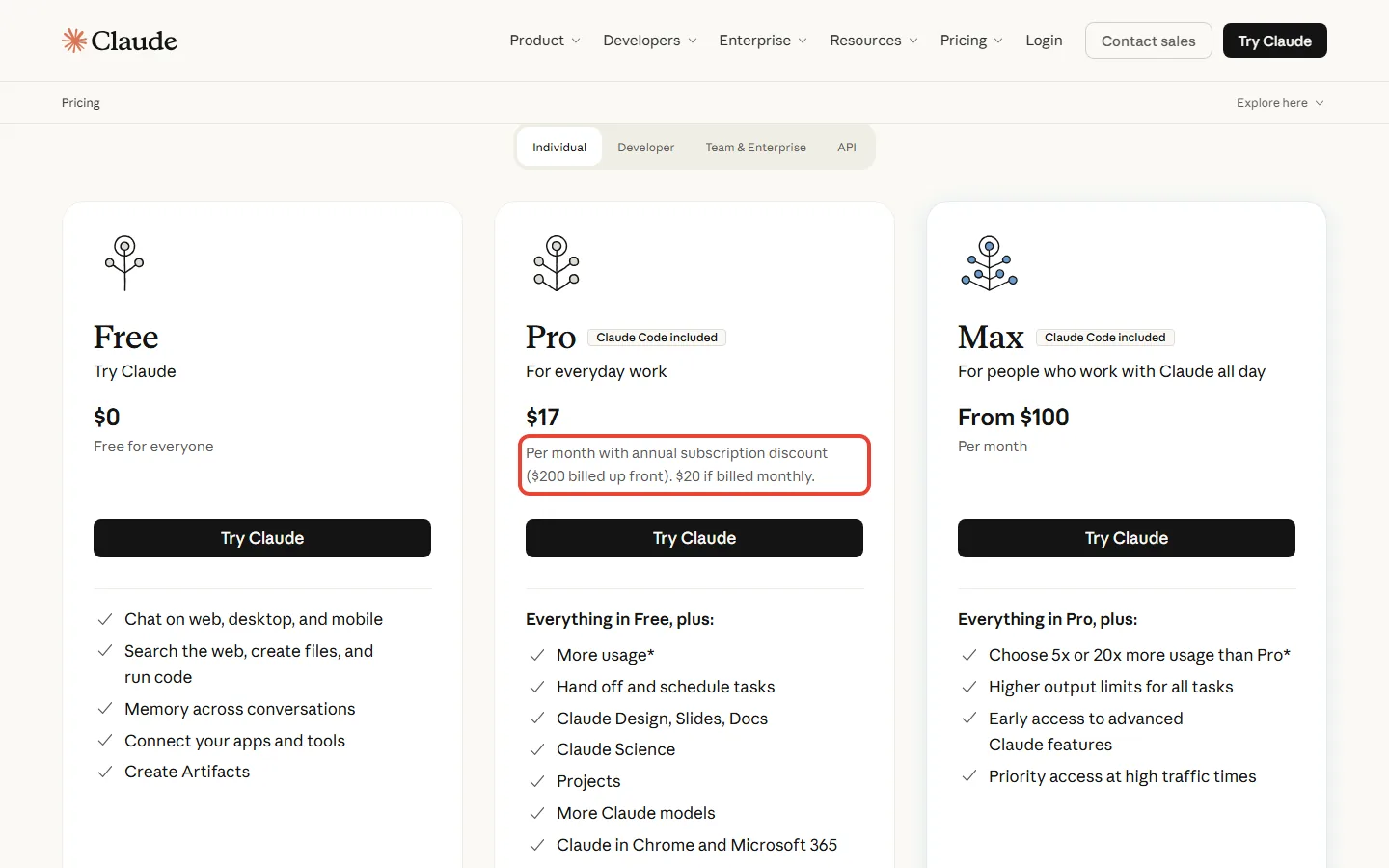
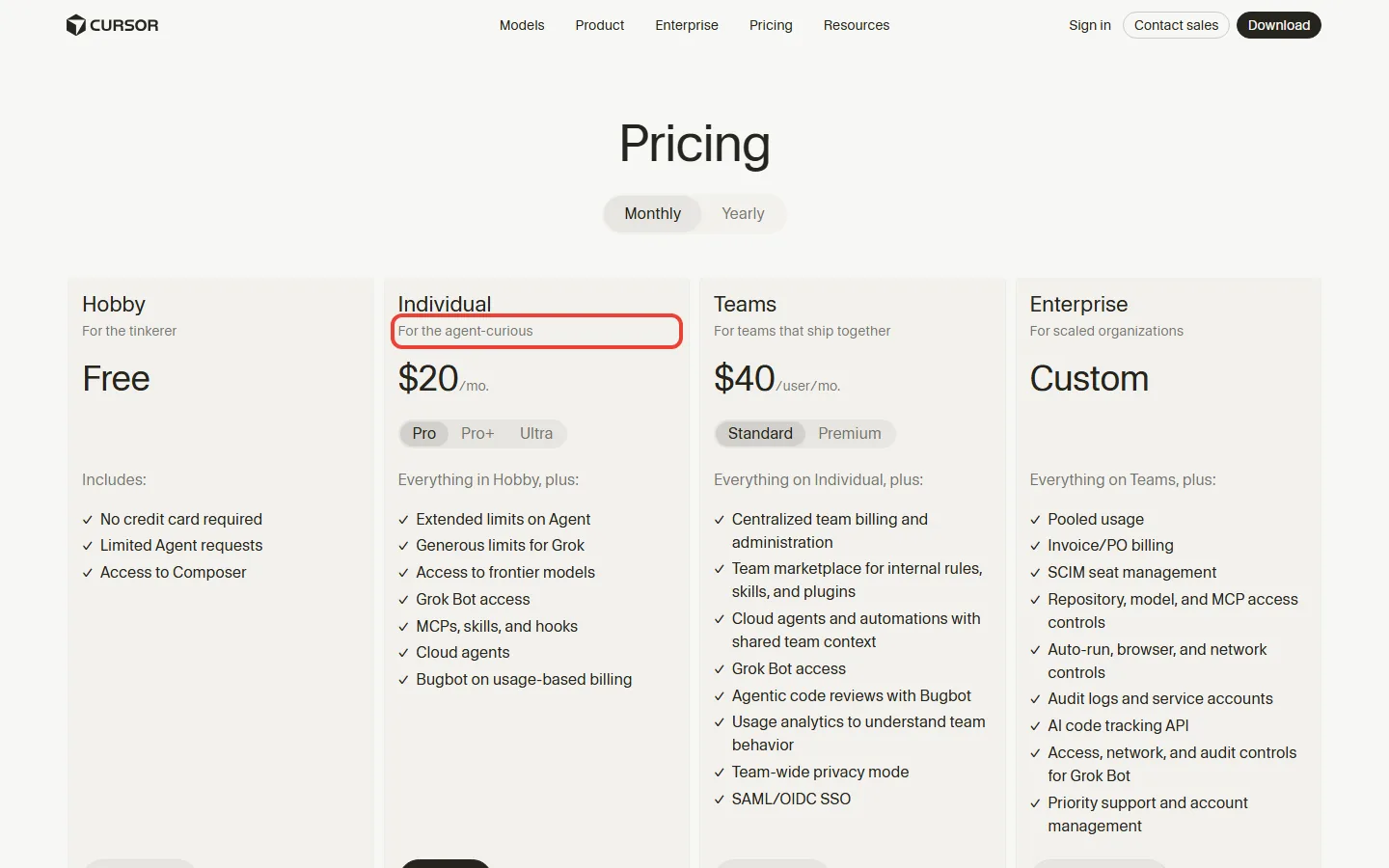
Here are both price ladders: Claude’s from Claude’s pricing page (October 4, Ultra and Max rechecked November 1, 2026), and the old Cursor plans existing subscribers keep, from Cursor’s legacy plans page (November 10, 2026). Cursor no longer publishes yearly prices or usage multiples for those plans.
| Plan level | Claude (Claude Code) | Cursor |
|---|---|---|
| Free | Claude Free: no Claude Code | Hobby (free): Agent, Chat and Tab with limited usage |
| Entry | Pro: $20 a month, or $17 a month billed yearly ($200 up front) | Pro: $20 a month; unlimited Tab, both usage pools, cloud agents, Bugbot |
| Middle | Max: $100 a month, 5x Pro’s usage every 5 hours and every week | Pro+: $60 a month, more of each usage pool than Pro |
| Top | Ultra (formerly Max 20x): $200 a month, 10x Pro’s usage every week, no 5-hour limit for verified accounts | Ultra: $200 a month, more of each usage pool than Pro |
| Teams | Team and Enterprise plans (Claude Code supported) | Teams Standard $40 per user, Premium $120 per user with 5x the Standard allowance |
The hidden costs you need to know
Claude’s shared limit: Pro and Max usage limits are shared across Claude and Claude Code, so a heavy chat day leaves less for coding. When you hit the limit, Anthropic’s help article on Claude Code with Pro and Max lists four options: upgrade (Pro to Max, or Max to Ultra), enable usage credits, switch to API credits billed at standard API rates, or wait for the reset. One trap: if an ANTHROPIC_API_KEY environment variable is set on your machine, Claude Code uses it and bills the API instead of your subscription.
Cursor’s two pools: paid Cursor plans split usage into a Cursor Models pool (Grok 4.7, Grok 4.6, Grok 4.5 and Composer 2.5, with significantly more included usage) and an Other Models pool for third-party models like Claude and GPT, charged at each model’s API price. Past your included usage you can add on-demand usage at the same rates or upgrade. Cursor’s own guidance, word for word: “Daily Tab users: Typically stay within included usage”, “Limited Agent users: Often stay within included usage”, “Daily Agent users: Typically $60–$100/mo total usage”. Power users running several agents or automation often spend $200 or more.
The real cost calculation: if you already have Cursor Pro, both $20 plans are fine for light use (new Cursor sign-ups start at $8 for Grok models only, or $30 for Premium). For daily agent work, compare Cursor Pro+ at $60 with Claude Max at $100. And if you need both and already have Cursor Pro, Cursor Pro plus Claude Pro costs $40 a month billed monthly. Yearly billing saves $40 a year on Claude Pro. For a cheaper option in the same space, see our GitHub Copilot Pro+ review: Copilot Pro is $10 a month with $15 of AI credits.
🔍 REALITY CHECK
The Pitch: Cursor Pro costs $20 a month (existing subscribers; new sign-ups pay $30 for Premium), and Claude Code comes with Claude Pro at $20 a month.
What the Fine Print Says: True for existing Cursor subscribers. But Cursor’s $20 includes a usage allowance that third-party models spend at API prices, and Claude’s $20 shares one allowance between chat and coding. Neither vendor publishes a fixed number of agent tasks per month.
Verdict: Start on $20, watch your usage for two weeks, then decide.
💡 Key Takeaway: Price won’t decide this one: for existing Cursor subscribers the ladders match at $20 and $200. Decide by workflow, then pick the tier from your actual usage. If you already pay for Claude Pro, try Claude Code first, since it costs nothing extra.
🔄 Which Tool Fits Which Job
Instead of a scoreboard, here is how each tool’s documented features map to common jobs. Where both do the job, we say so.
| Job | Better fit | Why (from each vendor’s docs) |
|---|---|---|
| As-you-type autocomplete | Cursor | Tab predicts multi-line and cross-file edits; unlimited on paid plans |
| Hand off a multi-file feature in plain English | Both | Claude Code plans, edits across files and runs commands; Cursor’s Agent does multi-file changes too |
| Commits, branches and pull requests from a prompt | Both | Claude Code works directly with git and opens pull requests; Cursor cloud agents push changes and open pull requests |
| Run in CI or scripts | Both | Claude Code can run in CI for code review and issue triage; Cursor CLI has a print mode for CI pipelines |
| Long tasks while your computer is off | Both | Claude Code scheduled tasks and web sessions run in the cloud; Cursor cloud agents run in their own VMs |
| Mix models from several vendors | Cursor | Models from OpenAI, Anthropic, Google, SpaceXAI and more in one plan |
| Work in JetBrains IDEs | Both | Claude Code has an official plugin; Cursor’s agent works in IntelliJ IDEA, PyCharm, WebStorm and other JetBrains IDEs through ACP on paid plans (Tab autocomplete stays in Cursor’s own editor) |
| You already pay for Claude Pro or Max | Claude Code | Included in the plan you already have, in the terminal and in your IDE |
The pattern: Claude Code is the stronger fit when you want to delegate whole tasks and you already live in Anthropic’s ecosystem. Cursor is the stronger fit when you want AI woven into your typing, with a choice of models. Neither is universally better.
👤 Who Should Use This (And Who Shouldn’t)
Choose Claude Code if…
You like describing tasks and reviewing the result. You work in the terminal, VS Code or JetBrains. You want AI in CI, on a schedule, or in scripts. You already pay for Claude Pro or Max, so Claude Code costs nothing extra. You want Anthropic’s newest Opus model, Opus 5.5, as the default without picking it each time.
Choose Cursor if…
You live in your editor and want AI in every keystroke. Fast Tab completions matter more to you than handing off whole tasks. You want to switch between Claude, GPT, Gemini and Grok models in one tool. You like visual diffs and staying in control of each change. For another editor comparison, see our Antigravity vs Cursor review.
Use both if…
You want Cursor’s Tab for daily typing and Claude Code for bigger hand-offs. If you already have Cursor Pro, Cursor Pro plus Claude Pro costs $40 a month billed monthly. You don’t even need to switch windows: Anthropic’s help center confirms your Pro or Max plan covers Claude Code inside Cursor and other VS Code forks.
Look elsewhere if…
You’re on a tight budget. GitHub Copilot Pro costs $10 a month, half the entry price of either tool, and works in most editors. ChatGPT Plus subscribers already get OpenAI’s Codex for $20 a month. We also cover Google Antigravity and Windsurf as other options; check their current pricing pages before you decide.
💡 Key Takeaway: Using both can be a sensible setup: Cursor for the editor, Claude Code for the heavy lifting. Start with whichever one matches how you work today, and add the second only if you feel the gap.
💬 What Developers Run Into

We don’t repeat anonymous forum claims as facts, and the benchmark and revenue figures in our earlier version have aged out with the models they described. What’s worth knowing is where people most often get stuck, and what each vendor now offers for it.
Running out of usage
On Claude, the usual surprise is that chat and Claude Code share one allowance. Anthropic’s answer: watch the in-app warnings, check /status, and choose between waiting, upgrading, paying for usage credits, or switching to API credits. On Cursor, the usual surprise is how fast frontier third-party models spend the Other Models pool. Cursor’s answer: the Cursor Models pool (Grok and Composer) has significantly more included usage, and on-demand usage is billed at the same API rates.
Picking the right model
In Claude Code, the default is Opus 5.5 and you can switch models in the model picker. In Cursor, model choice directly sets your cost, because third-party models are charged at their API price. If you also use OpenAI’s tools, our ChatGPT Codex review covers the third big option.
🛣️ What to Watch Next
Claude Code: Anthropic ships model and feature updates often, and newer models require newer Claude Code versions (Opus 5.5 needs v2.1.280 or later). Run claude update if a model doesn’t appear. Anthropic also notes that prices and plans are subject to change at its discretion.
Cursor: pricing is now built around usage pools rather than request counts. Max Mode, for example, only exists on legacy request-based plans. Expect the pool rules and included models to keep moving.
Our next check: we re-check both pricing pages monthly and update this comparison when either ladder changes.
❓ FAQs: Your Questions Answered
Q: Is there a free version of Claude Code or Cursor?
A: Cursor has a Free plan ($0) with limited agent requests and a starter allowance for its coding agents. Claude Code isn’t included in Claude Free; you need a paid Claude plan (Pro at $20 a month or $17 a month billed yearly, Max, Ultra, Team or Enterprise) or Anthropic API credits.
Q: How much do Claude Code and Cursor cost in 2026?
A: Claude Code comes with Claude Pro at $20 a month, Max at $100 and Ultra (formerly Max 20x) at $200. Cursor changed its plans on October 12: new sign-ups get The X Subscription, with Plus at $8 a month (Grok models only), Premium at $30, Super at $100, Ultra at $200 and Teams from $30 per user, and Claude or GPT models in Cursor are billed separately at API list prices. Existing Cursor subscribers keep their plan and price: Pro at $20, Pro+ at $60 and Ultra at $200, with Teams from $40 per user a month.
Q: Can I use Claude Code inside Cursor?
A: Yes. Anthropic’s help center says a Pro or Max plan covers Claude Code in supported IDEs, including VS Code, Cursor and other VS Code forks, and JetBrains IDEs. Cursor also offers Claude models in its own model picker.
Q: Which model does Claude Code use?
A: On Pro, Max, Ultra, Team and Enterprise, Claude Code defaults to Claude Opus 5.5 (Claude Code v2.1.280 or later). You can switch models in the model picker.
Q: Which models does Cursor offer?
A: Cursor offers models from OpenAI, Anthropic, Google, SpaceXAI and more, including Claude Opus 5.5, Claude Sonnet 5.5, GPT-5.6 Sol, Gemini 3.8 Flash, Grok 4.7 and its own Composer 2.5.
Q: Do Claude Code limits count against my Claude chat usage?
A: Yes. Pro and Max usage limits are shared across Claude and Claude Code, so all activity in both counts against the same allowance.
Q: Is Cursor’s usage unlimited on Pro?
A: Tab completions are unlimited on Pro, Pro+ and Ultra. Agent usage has limits: third-party models draw from an included pool at API prices, and you can add on-demand usage or upgrade when it runs out.
Q: Can Claude Code or Cursor replace a human developer?
A: No. Both are built for you to review their changes. They take on planning, editing and repetitive work, but you still decide what ships.
🏁 Final Verdict
If you keep an existing Cursor plan, Claude Code and Cursor cost the same at both ends: $20 to start and $200 at the top, a plan called Ultra on both (more usage than Pro on Cursor, with no published multiple; 10x Pro’s usage every week on Claude). New Cursor sign-ups start paid plans at $8 for Grok models only and pay $30 for Premium plus API list prices to use Claude models, so if Claude models are what you want, Claude Pro at $20 is the simpler buy. Beyond price, the choice is about how you like to work. Claude Code is the better pick for delegating whole tasks, automating work in CI or on a schedule, and anyone who already pays for Claude. Cursor is the better pick for fast, editor-first coding with Tab completions and a choice of models.

🔵 Claude Code Strengths
- ✓ Included with Claude Pro and Max, no extra subscription
- ✓ Opus 5.5 by default on paid plans
- ✓ Runs in terminal, VS Code, JetBrains, desktop and web
- ✓ Git, pull requests, CI and scheduled tasks built in
- ✓ Works inside Cursor and other VS Code forks
- ✗ Not in Claude Free; limits shared with Claude chat
🟢 Cursor Strengths
- ✓ Fast Tab completions, unlimited on paid plans
- ✓ Models from OpenAI, Anthropic, Google, SpaceXAI and more
- ✓ Free plan to start ($0)
- ✓ Cloud agents in their own VMs, in parallel
- ✓ Familiar VS Code-based editor
- ✗ Third-party models spend usage at API prices
The smartest move? Start with the one that matches how you work. If you already pay for Claude Pro, install Claude Code today; it’s included. If you want AI in your editor, start Cursor on the Free plan and move to Plus (Grok models only) or Premium when you hit the limits. Add the other tool only when you feel the gap, and pick tiers from your real usage.
Use Claude Code if: you want to hand off multi-file tasks, automate work in CI or on a schedule, or already pay for Claude.
Stick with Cursor if: you live in your editor, want built-in as-you-type Tab completions, or want to switch between models from different vendors.
Try Claude Code: curl -fsSL https://claude.ai/install.sh | bash (needs a Claude Pro or Max plan)
Try Cursor: download Cursor (Free plan)
Founder of AI Tool Analysis. Reads every pricing page, help article and footnote so you don’t have to. Covering AI tools since 2025. See how we research →
Stay Updated on AI Coding Tools
Don’t miss the next major update. Subscribe for plain-English AI coding tool updates, price changes and feature launches every Thursday at 9 AM EST.
- ✅ Sourced Facts: Every price and limit checked against the vendor’s own pages
- ✅ Price Tracking: Know when tools drop prices or add free tiers
- ✅ Feature Launches: Major updates covered within days
- ✅ Comparison Updates: As the market shifts, we update our verdicts
- ✅ No Hype: Just the AI news that actually matters for your work
Free, unsubscribe anytime.
Want AI insights? Sign up for the AI Tool Analysis weekly briefing.
Newsletter

📚 Related Reading
Explore more AI coding tool reviews and comparisons:
- Claude Code Review 2026
- Cursor 2.0 Review
- Top AI Agents For Developers 2026
- GitHub Copilot Pro+ Review 2026: Pro vs Pro+ vs Max
- Google Antigravity Review: Free Agent-First IDE
- Windsurf Review: Wave 13 Makes SWE-1.5 Free
- ChatGPT Codex Review 2026: OpenAI’s AI Coding Agent
- Best AI Developer Tools 2025: Complete Guide
- Antigravity vs Cursor: Which AI IDE Should You Choose?
- DeepSeek V3.2 vs ChatGPT-5
Last Updated: November 10, 2026 | Facts checked: November 10, 2026 (Claude plans and limits against claude.com/pricing and Anthropic’s help center; Cursor’s new plans as of October 13, its old plans against Cursor’s legacy plans page on November 10, 2026) | Next Review Update: December 10, 2026, or on the next pricing change.
Have a tool you want us to review? Suggest it here | Questions? Contact us