

🔴 BREAKING, April 22, 2026
Google launched Workspace Intelligence yesterday at Cloud Next ’26. It’s now rolling out to every paid Workspace plan over the next 1 to 3 days. This review is based on first-day testing on a Business Standard account with full Workspace Intelligence access enabled.
⚡ TL;DR – The Bottom Line
What It Is: Google’s new AI layer that gives Gemini constant real-time awareness of your Gmail, Drive, Calendar, Chat, Docs, Sheets, and Slides — so you stop pasting context into prompts.
Best For: Teams already on Google Workspace who want AI that actually knows their projects, people, and past work.
Price: Bundled into every paid Workspace plan from $7/user/mo (Business Starter) — no separate AI fee.
Our Take: The biggest Workspace upgrade since Gemini itself, and it makes Microsoft’s $30/user Copilot add-on look expensive overnight.
⚠️ The Catch: Rollout is gradual (1-3 days), voice personalization needs weeks to mature, and Workspace MCP Server plus Chrome auto-browse remain in private preview.
📑 Quick Navigation
The Bottom Line
This Workspace Intelligence review covers Google’s biggest Workspace launch since Gemini itself. It’s a new AI layer that gives Gemini constant, real-time awareness of your Gmail, Drive, Calendar, Chat, Docs, Sheets, and Slides. The promise: stop pasting context into Gemini every time you ask it for help.
You don’t subscribe to it separately. It comes turned on by default with every paid Google Workspace plan, from Business Starter at $7 per user per month up to Enterprise. That bundles a feature set Microsoft 365 customers pay an extra $30 per user per month to match through Copilot’s add-on pricing.
The catch: it only works inside the Google ecosystem. If your team lives in Outlook and Excel, this doesn’t help. The rollout is also gradual, so some features may not appear in your account for one to three days, and a few capabilities (Workspace MCP Server, Chrome auto browse) remain in private preview.
Best for: Teams already standardized on Google Workspace who want Gemini to actually know what’s happening at work without being told.
Skip if: You’re tied to Microsoft 365, you handle highly regulated data without client-side encryption configured, or your workflow lives outside Google’s apps.
What Workspace Intelligence Actually Does
Here’s the simplest way to understand Workspace Intelligence: imagine your assistant has read every email in your inbox, every file in your Drive, every chat thread in your team space, and every meeting summary on your calendar. Now they’re sitting next to you while you work, ready to help, and you never have to remind them what project you’re on.
That’s the practical effect. Google describes it as a “semantic unifying layer” that “understands complex semantic relationships” between your data. In plain English: Gemini now reads across your apps automatically before answering your question.
Before yesterday, asking Gemini “draft a project update for the design review tomorrow” would produce a generic template. Gemini didn’t know which design review, which project, or what your team had decided last week. You had to paste links, copy meeting notes, and explain the context every single time.
With Workspace Intelligence, the same prompt now pulls your last three Calendar entries about the design review, the Slack-equivalent thread in Google Chat where the team agreed on direction, the Doc with the design specs, and the email chain with the client’s feedback. It builds the draft using all of that, in your writing voice, on your company template.
The Three Pillars Google Built It Around
Google frames the system around three capabilities, and after testing each, here’s what they actually mean:
- Information gathering: Gemini fetches what it needs from across your Workspace data without asking. In testing, this is the most reliably useful piece. Asking “what did Sarah say about the Q2 budget?” now returns a synthesis from email, Chat, and a Doc comment thread, all properly cited.
- Situational awareness: The system supposedly knows what matters most to you right now. In practice, this shows up as smarter prioritization in AI Inbox and proactive surfacing of action items. It’s the most subjective claim and the hardest to verify in 24 hours.
- True personalization: Gemini learns your writing voice, formatting habits, and brand style over time. On Day 1, drafts already show clear style adoption from past Docs. Whether this gets weirdly accurate or stays useful is a question for the 30-day update.
The Five-Minute Test
To check whether the marketing actually holds up, I gave Workspace Intelligence one task: “Build a one-page status update for the launch project we’re discussing this week.”
No links. No context. No project name. Five minutes later, Gemini in Docs had pulled the calendar invite for Thursday’s launch sync, found the related Doc with the spec, lifted three action items from a Chat thread, and produced a clean update draft on my company template. Two of the action items had outdated owners. One paragraph repeated a point from the source Doc almost verbatim.
That’s a useful first draft, not a finished one. But it would have taken 25 minutes manually. The 80-percent draft in five minutes is the actual value proposition.
💡 Key Takeaway: If you’ve been frustrated pasting links and context into Gemini every day, Workspace Intelligence is the feature you’ve been waiting for. Expect useful 80% drafts in minutes — but budget 10-15 minutes to verify owners, dates, and any passages that sound too close to the source.
REALITY CHECK
Marketing Claims: “True personalization. By understanding your past work and communication patterns, Workspace Intelligence learns your unique work style, voice, and formatting preferences to ensure every output sounds authentically like you.”
Actual Experience: Voice matching is real and noticeably better than ungrounded Gemini, but only on tasks where you’ve written enough past content for it to learn from. New hires, new projects, or new writing formats get a more generic output. The personalization compounds, it doesn’t appear day one.
Verdict: Real but slow-burning. Expect the personalization to feel meaningful at week 4, not week 1.

Getting Started: Your First Hour
There’s nothing to install, configure, or opt into. Workspace Intelligence is on by default for any user on a paid Workspace plan, including Business Starter, Standard, Plus, all Enterprise tiers, Education Plus, Frontline Plus, Nonprofits, and the AI Expanded Access and AI Ultra Access add-ons.
The first place you’ll notice it is Gmail. AI Overviews now appears at the top of search results, generating a synthesis of multiple email threads instead of forcing you to open each one. Then in Google Chat, “Ask Gemini” becomes a unified command line for finding files, drafting Docs, and scheduling meetings without leaving the chat window.
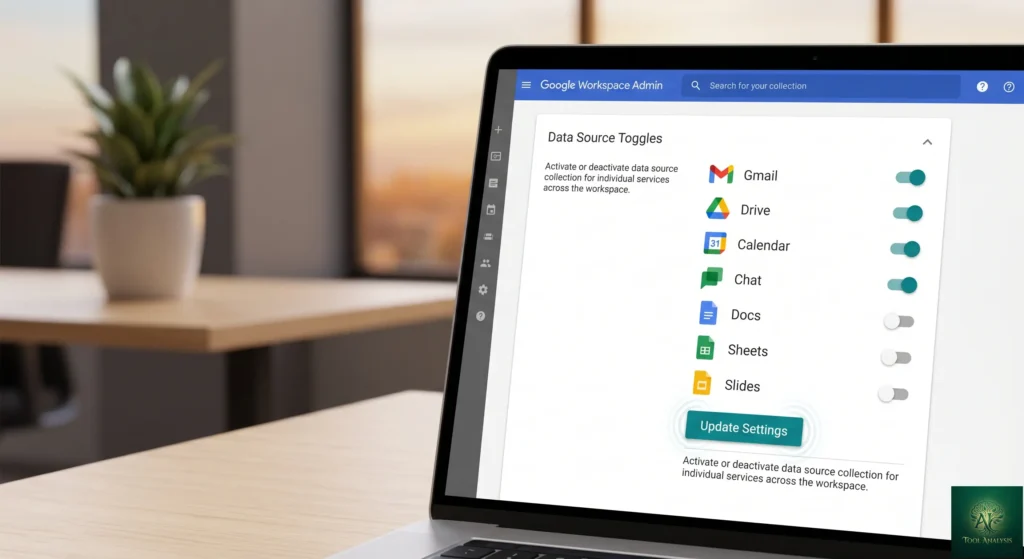
If you’re an admin, the new control panel sits in the Workspace Admin console under generative AI features. You can disable Workspace Intelligence access to specific data sources at the domain, organizational unit, or group level. Turn off Drive as a source, for example, and Gemini stops actively searching files. Users can still reference specific files manually, but the auto-discovery behavior shuts off for that source.
The friction during my first hour came from one place: the rollout is gradual, not instant. Some features show up immediately, others trickle in over one to three days for Rapid Release domains. If you don’t see AI Inbox in Gmail today, give it 48 hours before assuming something’s wrong.
Features That Actually Matter
Ask Gemini in Chat: The Unified Command Line ⭐⭐⭐⭐⭐
This is the standout feature. Open Google Chat, type your goal, and Gemini handles the rest. “Schedule a 30-minute sync with Maya, Priya, and Tom for next Tuesday and pull together a pre-meeting brief from our last three exchanges” returned a calendar invite, an attached Google Doc, and a confirmation message in 90 seconds.
It’s a meaningful upgrade over the existing Gemini side panel because the side panel only saw the document you were on. Ask Gemini in Chat sees everything.
Sheets: Natural Language Building ⭐⭐⭐⭐
Google claims Workspace Intelligence makes Sheets data entry “9x faster than manual entry.” That’s measured against typing every cell yourself, which is a low bar. The honest gain is that Gemini can now build a complete spreadsheet (formulas, formatting, and pulled data) from a description. “Build a Q2 sales tracker grouped by region with month-over-month change” produced a working sheet in about 20 seconds.
The new Sheets Canvas adds dashboards, heat maps, and kanban-style views generated from your data. Third-party imports from HubSpot and Salesforce land in the same wave. For teams that previously used Claude in Excel for AI spreadsheet work, this closes a meaningful capability gap.
Slides: One-Shot Deck Generation ⭐⭐⭐⭐
Slides now generates an entire editable deck in one pass, using your company’s templates and visual styles. I gave it “10-slide pitch deck for our new product, based on the launch brief in Drive.” Eight of the ten slides were usable, two needed structural rework. Compared to the equivalent flow in Claude in PowerPoint, the brand consistency was noticeably tighter because Workspace Intelligence already knew the company template.
Docs: Infographics and Comment Triage ⭐⭐⭐
Docs now generates infographics grounded in your business data and edits multiple images at once for visual consistency. The standout feature for collaborative teams is comment triage: Gemini reads through your comment threads, summarizes the open questions, and can edit the document based on the resolutions.
Gmail: AI Inbox and Overviews ⭐⭐⭐⭐
AI Inbox surfaces what’s most important to you right now, using Workspace Intelligence’s situational awareness layer. AI Overviews in Gmail search synthesizes information across email threads into a concise answer, instead of returning a list of subject lines you have to click through.
This is the feature most people will notice immediately. If you previously found Gmail’s AI features useful, the new layer makes them noticeably smarter because they’re now grounded in your full Workspace context, not just the email you’re reading.
Drive Projects: Shared Context Hub ⭐⭐⭐
Drive now adds Drive Projects, a shared context hub that ties together files and email for a specific project. It’s Google’s answer to Notion-style project workspaces and it works particularly well as the foundation Workspace Intelligence reasons over.
Feature Rating Breakdown (Day 1 Testing)
How each Workspace Intelligence feature performed out of 5 stars
REALITY CHECK
Marketing Claims: “Gemini in Sheets, which has set a state-of-the-art benchmark, orchestrates the complex, multi-step construction from start to finish.” Workspace Intelligence enables Sheets to be “9x faster than manual entry.”
Actual Experience: The 9x figure compares Gemini-assisted entry to typing every cell by hand. Against existing AI spreadsheet tools, the gain is real but smaller. Sheets Canvas dashboards work well for standard chart types but get awkward with custom visualizations.
Verdict: Significant productivity gain, but “9x faster” is a marketing-friendly framing of a more modest improvement over existing AI assistance.
Pricing Breakdown: What You’ll Actually Pay
Workspace Intelligence is not a separate purchase. It’s bundled into every paid Google Workspace tier as part of the underlying AI infrastructure. Here’s what you actually pay for the plan that includes it:
| Plan | Price (per user/month) | Storage | Workspace Intelligence |
|---|---|---|---|
| Business Starter | $7 | 30 GB | Included |
| Business Standard | $14 | 2 TB | Included |
| Business Plus | $22 | 5 TB | Included |
| Enterprise Standard | Custom | 5 TB | Included |
| Enterprise Plus | Custom | 5 TB+ | Included |
| AI Expanded Access add-on | Add-on price varies | n/a | Higher usage limits |
| AI Ultra Access add-on | Add-on price varies | n/a | Highest usage limits |
The strategic point: Microsoft 365 Copilot costs $30 per user per month as a separate add-on on top of an existing Microsoft 365 license. For a 50-person team, that’s $18,000 per year just for Copilot before the base Microsoft 365 licenses. Google bundles Workspace Intelligence into a $14 per user per month Business Standard plan that already includes Gmail, Drive, Docs, Sheets, Slides, Meet, and 2 TB of storage.
For the full Google AI consumer plan landscape (AI Plus, AI Pro, AI Ultra) which sits separately from Workspace plans, see our Google AI Studio review. The two pricing structures don’t overlap: Workspace plans handle business productivity, the consumer Google AI plans handle individual Gemini app access.
Annual Cost for a 50-Person Team
Workspace Intelligence bundled vs Microsoft 365 Copilot add-on (USD per year)
📬 Enjoying this review?
Get honest AI tool analysis delivered weekly. No hype, no spam.
Workspace Intelligence vs Microsoft 365 Copilot
This is the comparison that matters because these two products now occupy the same strategic position: an AI layer that knows everything about your work. I tested both with the same task on the same day: “Build a project status update for the launch sync, pulling from email, chat, and the project doc.”
| Criterion | Workspace Intelligence | Microsoft 365 Copilot | Winner |
|---|---|---|---|
| Cost per user (cheapest tier with AI) | $14/mo (Business Standard, includes everything) | $30/mo Copilot add-on plus $12.50/mo M365 Business Standard = $42.50 | |
| Time to first usable draft | ~90 seconds | ~120 seconds | |
| Quality of cross-app context | Pulled from Gmail, Chat, Doc, and Calendar | Pulled from Outlook, Teams, and SharePoint | Tie (each better in their own ecosystem) |
| Excel/Sheets power use | Strong for AI-built sheets, weaker for legacy macros | Strongest for complex Excel formulas and macros | Microsoft |
| Word/Docs collaborative editing | Strong real-time collaboration with comment triage | Improving but historically weaker on web | |
| Admin controls per data source | Granular toggles by domain, OU, group | Sensitivity labels and Purview controls | Tie |
| Voice/style personalization | Real, improves over time | Real, comparable quality | Tie |
Overall winner: Workspace Intelligence wins on price, web collaboration, and bundled access. Copilot wins on Excel power use and on enterprises with deep Office desktop dependencies. The right answer almost always matches the ecosystem your team already lives in.
💡 Key Takeaway: Don’t switch ecosystems just to get Workspace Intelligence. If your team already lives in Outlook, Excel, and Teams, the migration cost will dwarf the $28/user/month you’d save. But if you’re already on Workspace, Copilot’s add-on pricing just got a lot harder to justify.
REALITY CHECK
Marketing Claims: “Your data is your data. It is not reviewed by humans, used for ads, or used to train AI models outside of Workspace without your permission.”
Actual Experience: The data-handling claims are well documented in Google’s privacy commitments and the Admin console controls back them up. The honest caveat: Workspace Intelligence by design accesses your full Workspace footprint, so the “permission” you grant by enabling it is broad. For regulated industries, client-side encryption is the only way to guarantee Google itself can’t access sensitive data.
Verdict: Privacy posture is industry-standard, but the access scope is wide. If you handle PHI, financial records, or legal data, configure client-side encryption before turning Workspace Intelligence loose.
Who Should Use Workspace Intelligence (And Who Shouldn’t)
Choose Workspace Intelligence if: Your team already uses Google Workspace daily. You spend significant time copy-pasting context into Gemini. You want AI built into your $14 per user per month plan instead of a $30 per user add-on. You manage projects across email, chat, docs, and calendar invites that should logically connect but currently don’t.
Stick with Microsoft 365 Copilot if: Your finance team lives in complex Excel macros that Sheets cannot replicate. Your enterprise has invested heavily in SharePoint, Teams, and the Microsoft compliance stack. Your industry requires Microsoft’s specific certifications. Your existing budget already absorbs the $30 per user Copilot cost without strain.
Stick with general-purpose Gemini if: You’re an individual user without a Workspace account, or your team is on the free Gmail tier. Workspace Intelligence requires a paid Workspace plan. For non-Workspace users wanting Gemini features, see our Gemini Gems review.
Skip entirely if: You handle highly regulated data (PHI, financial records subject to SOX, classified material) without client-side encryption. You work primarily outside Google’s ecosystem. You’re already using Google Workspace Studio for custom agent workflows and don’t need a general AI layer on top.
What Users Are Saying After 24 Hours
Day-one community sentiment is limited because most teams haven’t even seen the rollout yet. The early reactions cluster into three patterns:
The pricing reactions are loud and positive. The dominant comment in early enterprise commentary is the contrast with Microsoft 365 Copilot’s $30 per user add-on. Several IT leaders on LinkedIn flagged that bundling AI into the base Workspace tier removes a major procurement headache (the awkward conversation about which employees “deserve” a Copilot license).
The “knows your voice” claim is drawing skepticism. Several reviewers (including Tom’s Guide and Android Central) have flagged that AI generating content in your voice and your company’s image is “a recipe for disaster” if quality control slips. The early consensus from press coverage is that voice matching is real but should not be left unsupervised on external communications.
The privacy questions are real but answered. Help Net Security’s coverage zeroed in on the access scope: Workspace Intelligence reads from your entire Workspace footprint by design. Google’s response is the admin controls (granular per-data-source toggles) and client-side encryption for the most sensitive scenarios. Most enterprise commenters consider the controls adequate, but regulated industries are taking a wait-and-see posture.
Reddit and X are quieter than expected, likely because the rollout is still working through Rapid Release domains. Expect community sentiment to crystallize over the next two to four weeks as Scheduled Release accounts get full visibility starting May 6, 2026.

FAQs: Your Questions Answered
Q: How much does Workspace Intelligence cost?
A: There’s no separate price. Workspace Intelligence is bundled into every paid Google Workspace plan, starting at $7 per user per month for Business Starter. For higher usage limits, you can add the AI Expanded Access or AI Ultra Access add-ons.
Q: Is there a free version of Workspace Intelligence?
A: No. Free Gmail and personal Google accounts don’t get Workspace Intelligence. You need a paid Google Workspace subscription. For free Gemini features as an individual, see our Gemini Gems review.
Q: Can Workspace Intelligence replace an executive assistant?
A: No. It can handle a meaningful chunk of repetitive coordination work (drafting status updates, scheduling sync meetings, pulling pre-meeting briefs), but human judgment is still required for relationship management, exception handling, and quality control on external communications.
Q: Is my data safe with Workspace Intelligence?
A: Yes, with caveats. Google states data is not used for ads or for model training outside of Workspace without permission. Customer data stays under your control, with admin-level data source toggles. For sensitive industries, enable client-side encryption to ensure even Google cannot access certain data.
Q: How does it compare to Microsoft 365 Copilot?
A: Workspace Intelligence is bundled (no extra cost on a Workspace plan). Copilot is a $30 per user per month add-on on top of Microsoft 365. Quality is roughly comparable for general productivity tasks. Copilot wins for complex Excel work; Workspace Intelligence wins on web-first collaboration and total cost.
Q: Can I disable Workspace Intelligence as a user?
A: No. There’s no end-user setting to turn it off. Only admins can control which data sources Workspace Intelligence accesses, and only at the domain, organizational unit, or group level. If you want it off for yourself, talk to your Workspace admin.
Q: When will I see Workspace Intelligence in my account?
A: If you’re on a Rapid Release domain, full rollout takes 1-3 days from April 22, 2026. Scheduled Release domains start the same gradual rollout on May 6, 2026. Some features (Workspace MCP Server, Chrome auto-browse) remain in private preview for the foreseeable future.
Q: Which Gemini model powers Workspace Intelligence?
A: Google references “advanced Gemini reasoning” without naming a specific model. Most signals point to Gemini 3.1 Pro for the heavy reasoning tasks (drafting, multi-source synthesis) with lighter Gemini 3 Flash variants handling faster operations like AI Inbox prioritization. For more on the underlying model, see our Gemini 3 review.
Final Verdict
The most consequential Workspace upgrade since Gemini itself — and the strongest pricing argument against Microsoft Copilot to date.
✅ What We Liked
- ✓ Bundled free into every paid Workspace plan — no $30/user add-on
- ✓ Ask Gemini in Chat is a genuinely useful unified command line
- ✓ Sheets natural-language building saves hours on tracker setup
- ✓ Granular admin controls per data source (domain, OU, group)
- ✓ Client-side encryption option for regulated industries
❌ What Fell Short
- ✗ Voice personalization needs weeks of data to feel real
- ✗ Drafts still hallucinate outdated owners and dates
- ✗ Workspace MCP Server and Chrome auto-browse stuck in preview
- ✗ No end-user off-switch — only admins can disable sources
Rating: 4.5 out of 5
Workspace Intelligence is the most consequential upgrade Google has shipped to Workspace since Gemini integration began. It quietly fixes the single biggest friction in working with AI inside a productivity suite: having to feed it context every time. By bundling the feature into every paid Workspace tier instead of charging extra, Google has also made Microsoft Copilot’s $30 per user per month add-on look genuinely expensive.
The half-point deduction is for the 24-hour window: rollout is gradual, voice personalization needs weeks of data to mature, and a few of the most interesting features (Workspace MCP Server, Chrome auto-browse) remain in preview. The 30-day update will tell us whether the personalization actually compounds the way Google promises.
Use Workspace Intelligence if: You’re already on Google Workspace and you’ve been frustrated with Gemini forgetting your context.
Stick with Microsoft 365 Copilot if: Your team is heavily invested in Excel and Teams and migration cost would exceed the savings.
Try it today: Open any Google Workspace app on a paid plan. If your account hasn’t received the rollout yet, check back within 1 to 3 days, or talk to your Workspace admin about Rapid Release.
For the full Google AI ecosystem, see our reviews of Google Vids, Nano Banana 2, NotebookLM, Google Antigravity, and Gemini 3 Computer Use. For the official launch announcement, see Google’s Workspace Intelligence overview and the admin controls documentation.

Founder of AI Tool Analysis. Reads every pricing page, help article and footnote so you don’t have to. Covering AI tools since 2025. See how we research →
Stay Updated on Google Workspace AI Tools
Don’t let your team fall behind. Subscribe for weekly reviews of AI productivity tools, Workspace updates, and the Copilot vs Gemini battle as it unfolds.
- ✅ Sourced Reviews: Every price and limit checked against the vendor’s own pages, not rewritten from press releases
- ✅ Price Tracking: Know when tools drop prices or add free tiers
- ✅ Feature Launches: Major updates covered within days
- ✅ Comparison Updates: As the market shifts, we update our verdicts
- ✅ No Hype: Just the AI news that actually matters for your work
Free, unsubscribe anytime.
Want AI insights? Sign up for the AI Tool Analysis weekly briefing.
Newsletter

Related Reading
- Google Workspace Studio Review: Build Gemini 3 Agents in Minutes
- Gmail AI Features Review 2026: 5 Gemini Tools Tested
- Google Vids Review 2026: Free AI Video Maker With Veo 3
- Nano Banana 2 Review: Google’s Free AI Image Generator
- Google Antigravity Review 2026
- NotebookLM Review 2026: I Tested It For 30 Days
- Gemini 3 Review: Google Finally Delivers Project Astra Features
Last Updated: April 24, 2026
Workspace Intelligence Version Tested: Day 1 launch build on Business Standard (April 22, 2026)
Next Review Update: May 22, 2026 (30-day follow-up on personalization maturity)
Have a tool you want us to review? Suggest it here | Questions? Contact us