
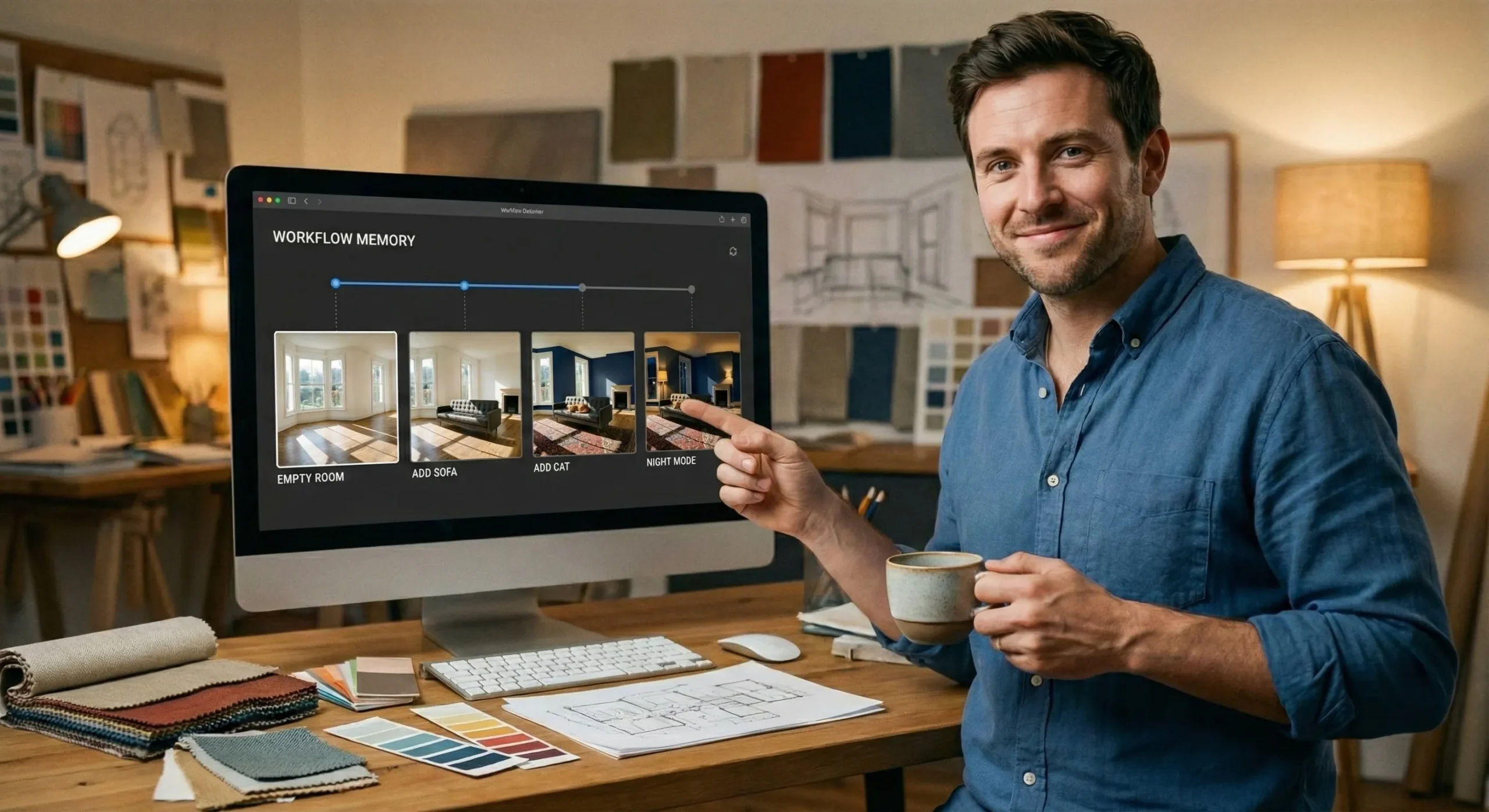
🆕 Latest Update (December 16, 2025): GPT-Image-1.5 has officially replaced DALL-E 3 as the default engine, bringing 4x speed, parallel generation, and hidden character consistency tools.
The AI image generation wars have officially become exhausting. Just last week, we were analyzing the gritty realism of Nano Banana Pro, and Google was making massive waves with Gemini 3. The pace of innovation has shifted from “monthly updates” to “daily breakthroughs,” leaving most creators with subscription fatigue and a sense of whiplash.
Now, OpenAI has decided to flip the table again. Yesterday, without much warning, they dropped GPT-Image-1.5. This isn’t just a minor patch or a speed boost; it is a fundamental restructuring of how ChatGPT handles visual media. They are clearly tired of letting other tools steal the creative spotlight. While Nano Banana Pro captured the hearts of artists with its film-like grain and emotional lighting, OpenAI is striking back with a different weapon: pure utility.
I didn’t want to just run the standard “cute puppy” prompts found in the press release. To truly understand if this update matters for professionals, I designed five brand-new, “impossible” stress tests. I tried to force the model to create accurate restaurant menus with prices, edit wedding photos without hallucinations, and maintain character consistency across wildly different art styles.
Does it actually work, or is it just faster at making mistakes? Let’s dig in.
- 🚀 What Actually Changed? (Speed & Interface)
- 👤 Test 1: The “LinkedIn to Cyberpunk” Pipeline
- 🎨 Test 2: The “Wedding Crasher” Removal
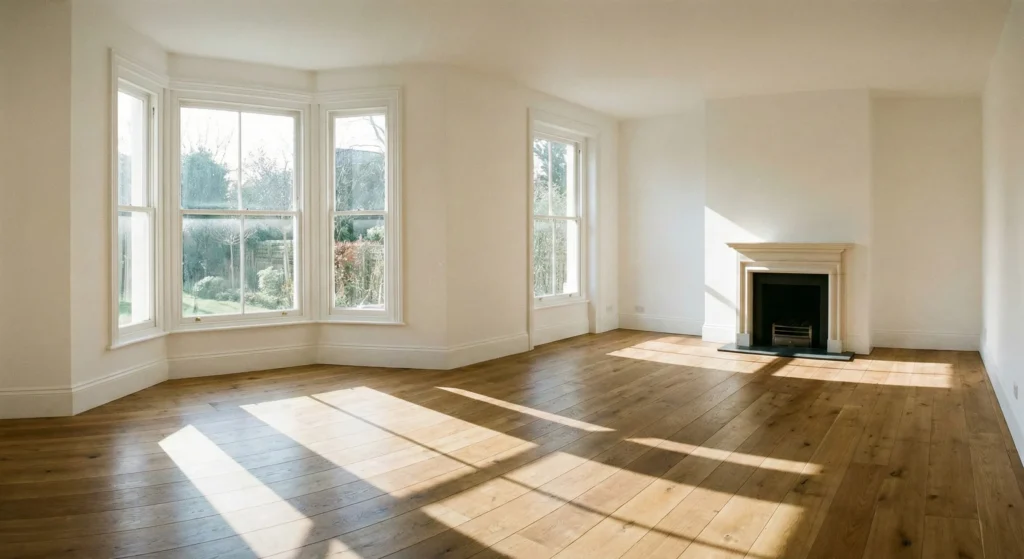
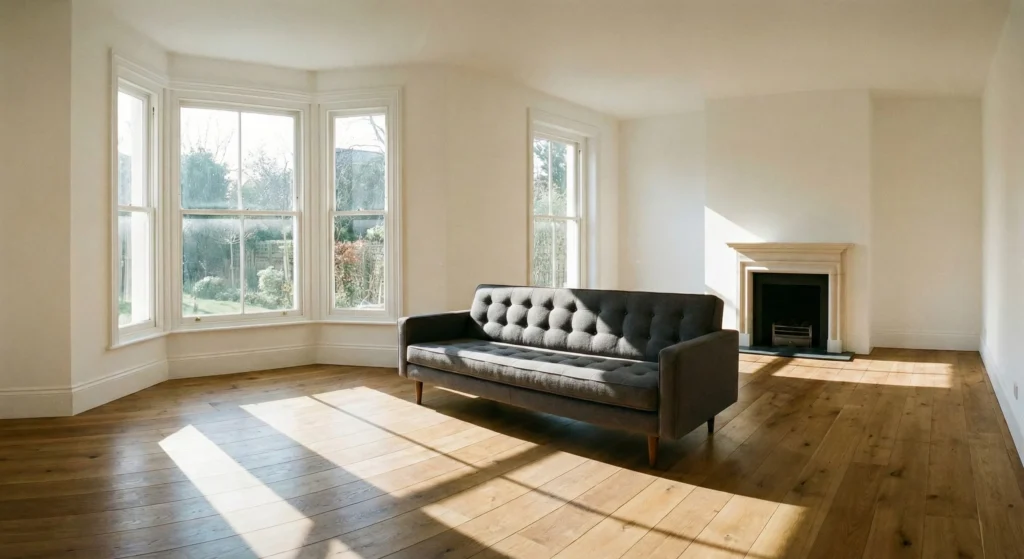
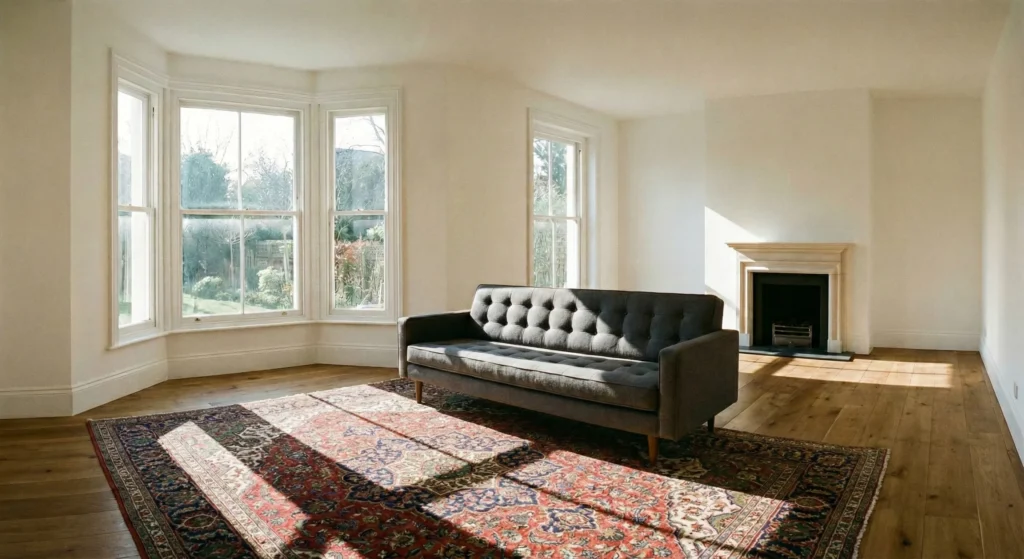
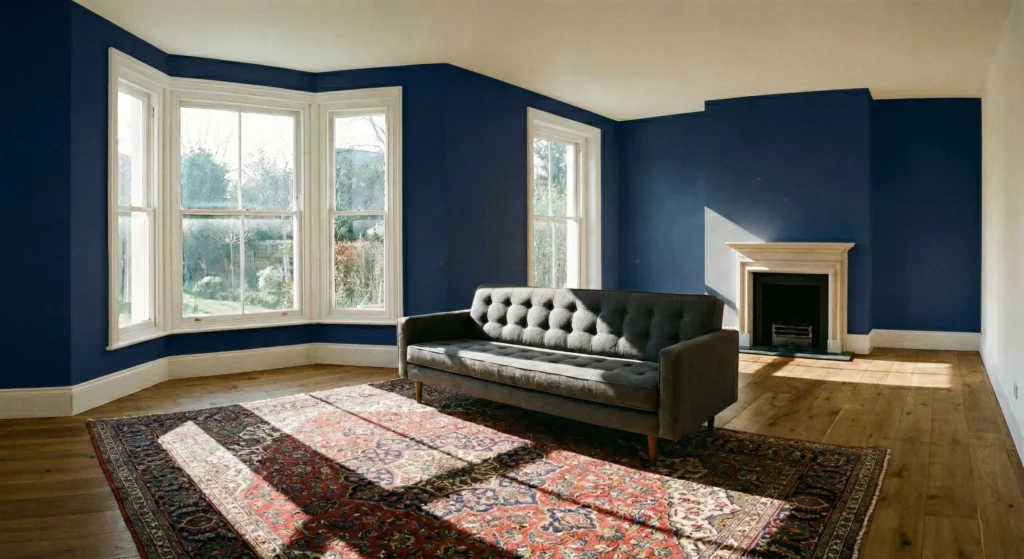
- 🔄 Test 3: The “Empty Room” Renovation
- 📝 Test 4: The Sushi Menu Challenge
- 📐 Test 5: The Bento Box Logic Test
- 🏢 Test 6: The Neon Energy Brand Kit
- 🛠️ Troubleshooting: Fixing the “Plastic” Look
- ⚔️ Head-to-Head: GPT-Image-1.5 vs The World
- 💰 Pricing & Value
- 🏁 Final Verdict
- ❓ FAQs
The Bottom Line
GPT-Image-1.5 is a massive utility upgrade over DALL-E 3. It
prioritizes function over artistic flair. The new Likeness Retention feature finally solves the
“consistent character” problem for creators, and its text rendering is now class-leading (it can spell complex menu
items correctly). However, for pure photorealism and texture, Nano Banana Pro still creates more
believable “human” images.
Use GPT-Image-1.5 for mockups, typography, and iterative
editing.
Use Nano Banana Pro for high-end artistic visuals.
What Actually Changed? (Speed & Interface)
Before we get to the stress tests, we need to address the user experience, because it has shifted dramatically. If you log into ChatGPT today, the “DALL-E” branding is quieter, replaced by a generic but powerful Images Tab in the sidebar. This signals that image generation is no longer a plugin or a secondary feature—it is a core modality of the AI.
The “Pinterest-ification” of Prompting
OpenAI has introduced a visual selector for styles. Instead of needing to know technical photography terms like “bokeh,” “f/1.8 aperture,” or “volumetric lighting,” you can select presets. This is clearly a move to democratize high-quality outputs for non-technical users. I tested a few:
- “Sugar Cookie”: Surprisingly detailed. It turned my request for a “futuristic car” into a baked good with icing details that followed the aerodynamic lines perfectly. The texture of the cookie crumble was startlingly real.
- “Fisheye”: Gave that classic 90s skate video vibe instantly, distorting the edges of the frame accurately without breaking the subject in the center.
- “3D Glam Doll”: A weird name, but it produces that highly polished, plastic toy aesthetic that is popular in social media avatars. It smooths out all imperfections, for better or worse.
The Speed Upgrade is Real
OpenAI claims it’s 4x faster. In my testing, images that used to take 40-50 seconds are now popping up in about 10-12 seconds. This changes the psychology of using the tool. When generation takes a minute, you hesitate to refine your prompt. You settle for “good enough.” When it takes 10 seconds, you iterate. You try 10 variations.
More importantly, Parallel Generation is finally here. I queued up four different variations of a logo design back-to-back without hitting a “please wait” error. For workflow momentum, this is the biggest quality-of-life improvement in the update. It feels like working with a team of artists rather than a single slow one.
Test 1: The “LinkedIn to Cyberpunk” Pipeline
One of the most significant hidden features—one that OpenAI curiously buried in the fine print—is Likeness Retention. This allows you to upload a reference photo (like a selfie) and instruct the model to “learn” that face for the duration of the session.
Creators have been begging for this. Until now, maintaining a consistent character across a comic book or a YouTube channel required training complex LoRA models or using third-party face-swapping software. GPT-Image-1.5 attempts to make this native.
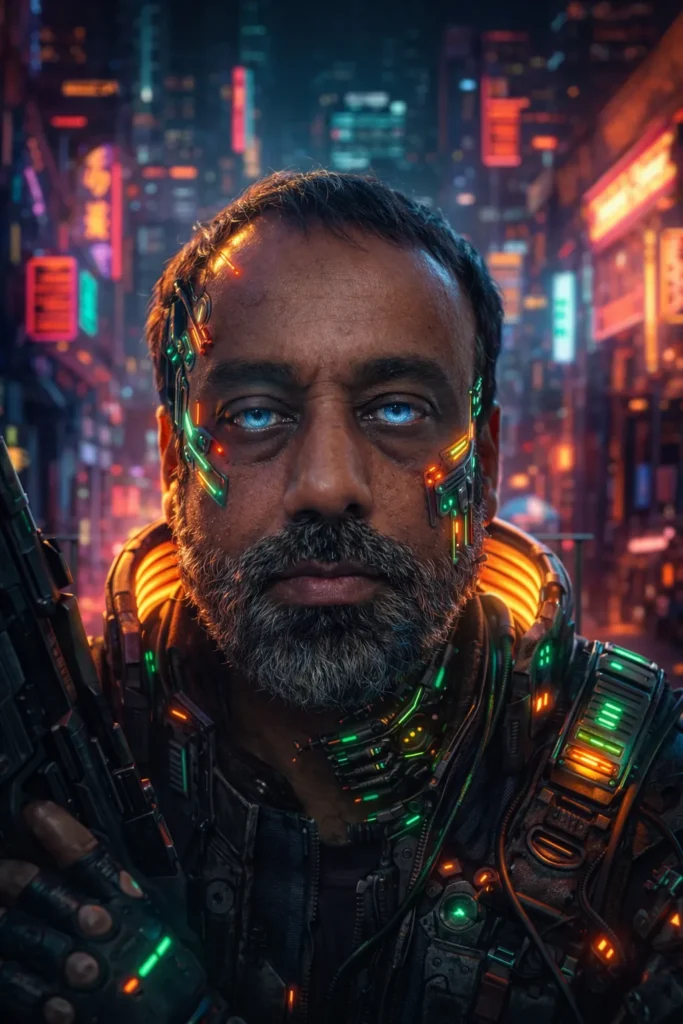
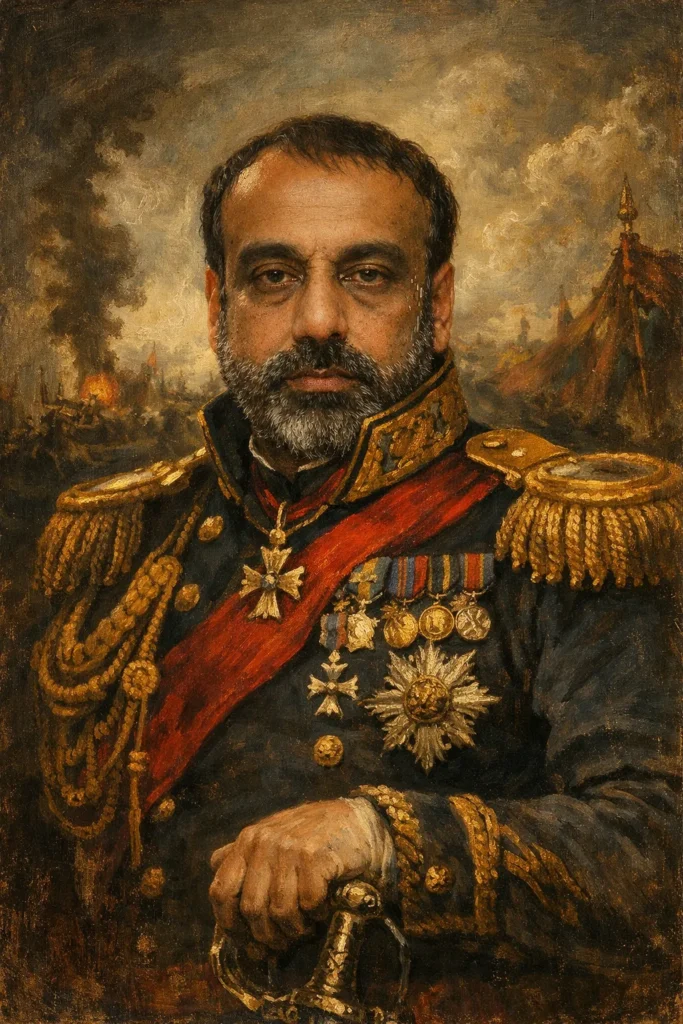
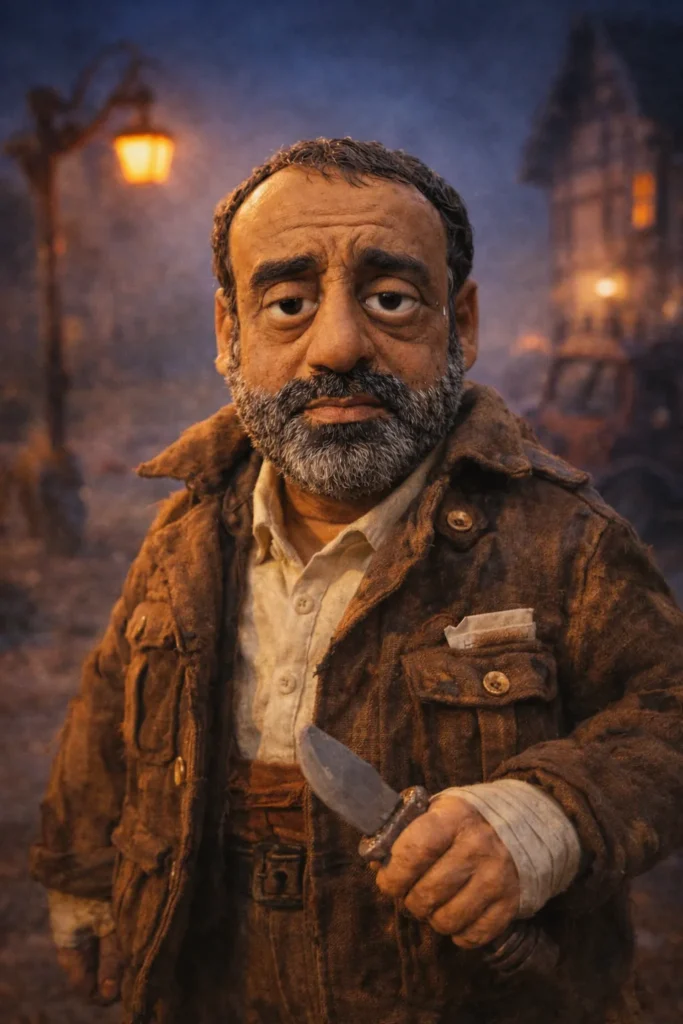
To test this, I uploaded my photo of a man in a normal suiting (let’s call him “Gary”). I didn’t want simple portraits; I wanted to see if it could keep his facial structure while completely changing the reality around me.
My Prompts:
- “Generate this person as a gritty Cyberpunk 2077 mercenary with neon implants.”
- “Generate this person as a 19th-century oil painting general.”
- “Generate this person as a claymation character in a stop-motion movie.”
The Result: The consistency was shocking. Even in the claymation version, which simplifies features, the “character” was undeniably Gary. It captured the specific shape of his nose and jawline. In previous versions (and in current Midjourney models without complex reference setups), the clay version would look like a generic “man.” Here, it was a caricature of the specific input.

🔍 REALITY CHECK
The Limit: While it kept the face, it struggled slightly with accessories. Gary wears glasses in the reference photo. In the “General” painting, it removed them (historically accurate), but in the Cyberpunk version, it turned them into glowing goggles. It interprets the “vibe” of your accessories rather than copying them pixel-perfectly. It is semantic retention, not pixel cloning.
Test 2: The “Wedding Crasher” Removal
We’ve all been there: you take a great photo, but there is a distracting element in the background. Can GPT-Image-1.5 fix it without ruining the rest of the shot?
The Challenge: I uploaded a staged wedding photo of a couple. In the background, there was a waiter awkwardly dropping a tray. I asked GPT-Image-1.5 to:
“Remove the waiter in the background. Keep the couple exactly the same. Change the groom’s tie from blue to emerald green.”
GPT-Image-1.5 Performance
It successfully erased the waiter and filled in the background with a convincing floral arrangement that matched the depth of field of the original shot. The groom’s tie turned green. Crucially, the bride’s dress details—often a struggle for AI due to intricate lace—remained untouched. It felt like using Photoshop with a voice command.
Nano Banana Pro Performance
I ran the same test in Nano Banana Pro. It struggled with the specificity. It removed the waiter but also changed the groom’s entire suit color to match the new tie, losing the contrast. It seems GPT-Image-1.5 has a better grasp of semantic segmentation—knowing where “tie” ends and “shirt” begins.
Test 3: The “Empty Room” Renovation
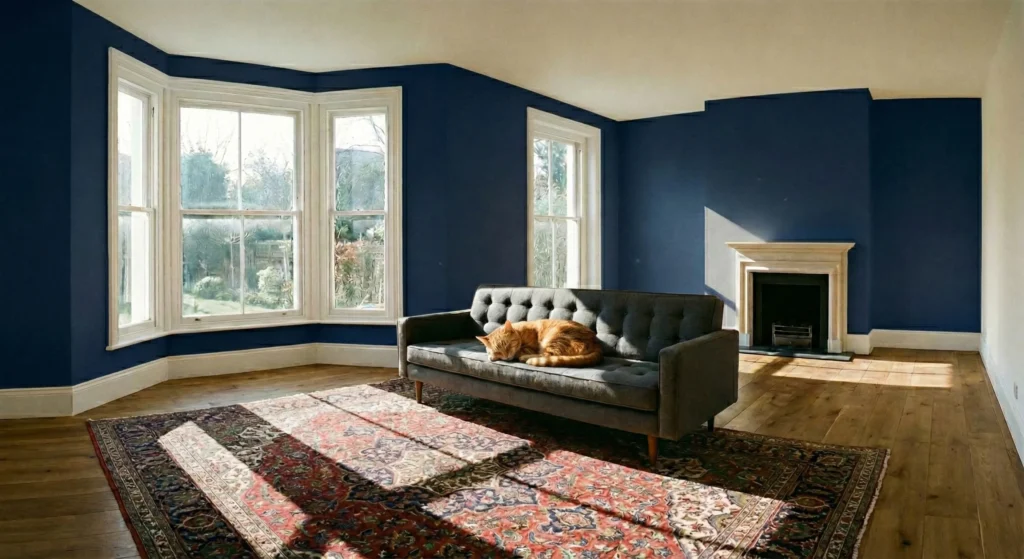
I wanted to test the model’s “memory” over a long conversation. Could it evolve a scene step-by-step without forgetting the baseline? This is crucial for interior designers and storyboard artists.
The Workflow:
- Input: Generate an empty, sunlit living room with white walls and wooden floors.
- Edit 1: “Place a mid-century modern grey sofa in the center.”
- Edit 2: “Add a large Persian rug underneath the sofa.”
- Edit 3: “Paint the back wall a deep navy blue.”
- Edit 4: “Put a sleeping orange cat on the sofa.”
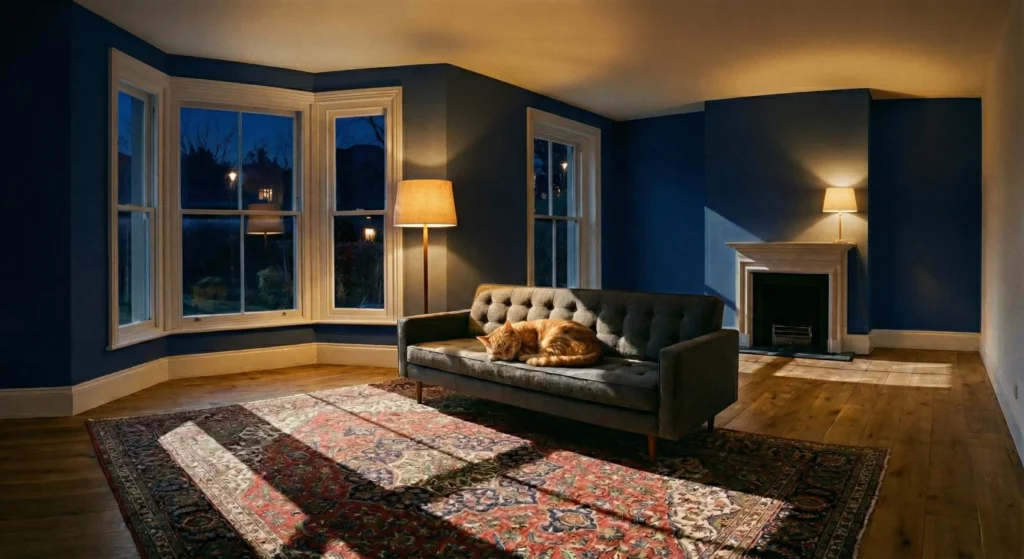
- Edit 5: “Change the time of day to night, adding warm lamp lighting.”
The Result: GPT-Image-1.5 was masterful here. By step 5, I had a navy-walled room at night, with the exact same grey sofa and rug I asked for in steps 1 and 2. The consistency was eerie. It didn’t generate a new sofa; it lit the existing sofa differently. This implies the model is building a sort of internal 3D representation of the scene.
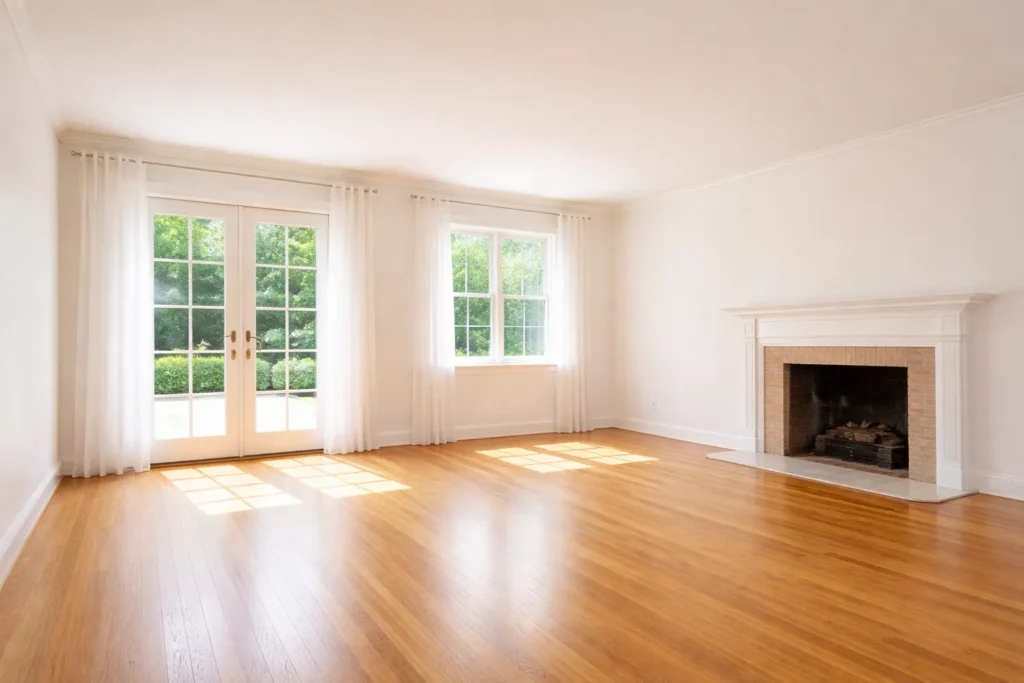
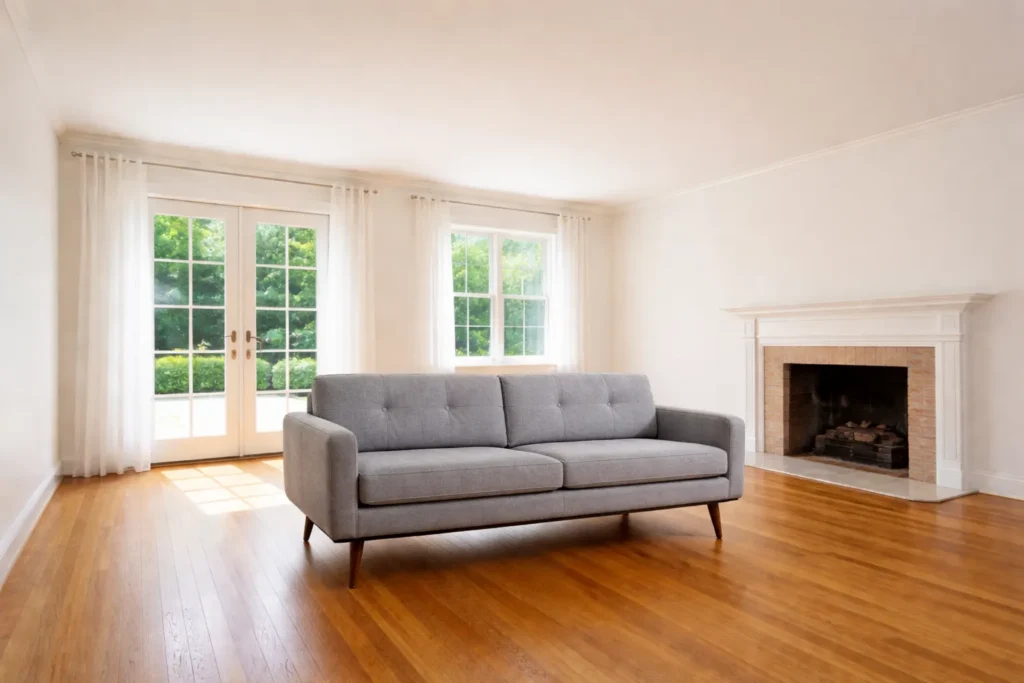
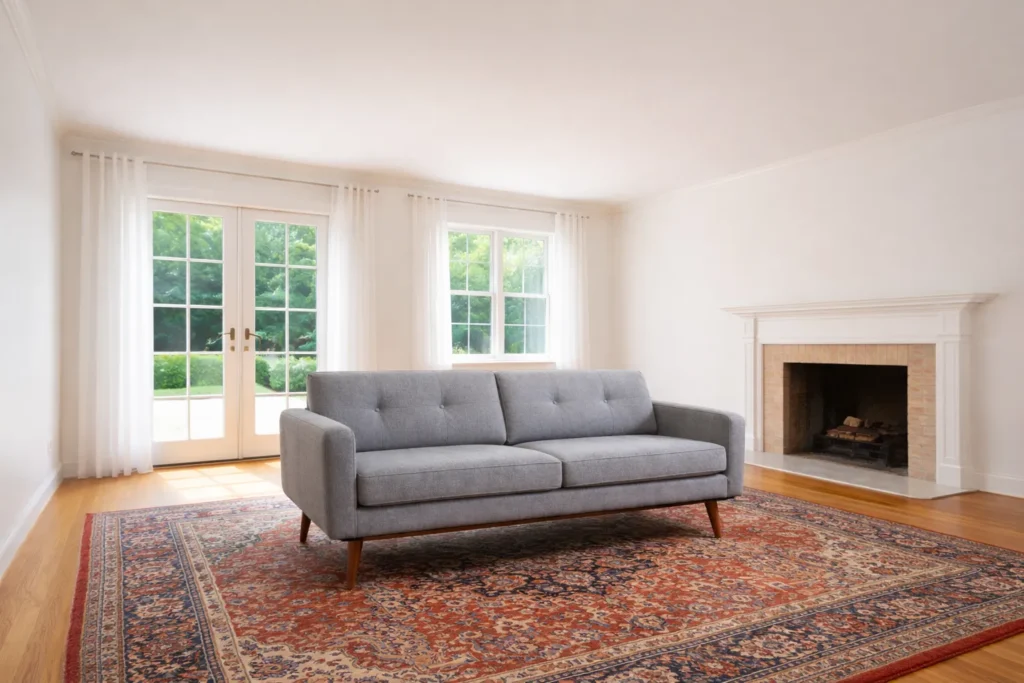


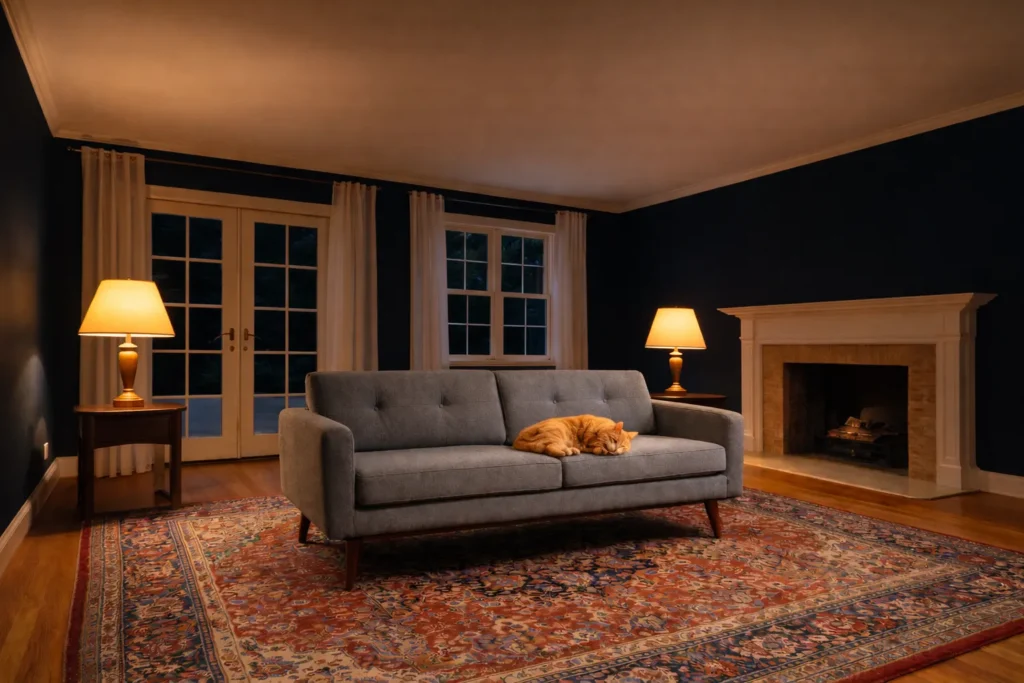
Comparison: When I tried this in Nano Banana Pro, it looked beautiful at every step, but it drifted. When I asked for the “night scene,” it failed to remove sun light, and did not match the color quality with GTP. So winner it GPT-Image-1.5. Nano Banana is a dreamer; GPT is a contractor.
Test 4: The Sushi Menu Challenge
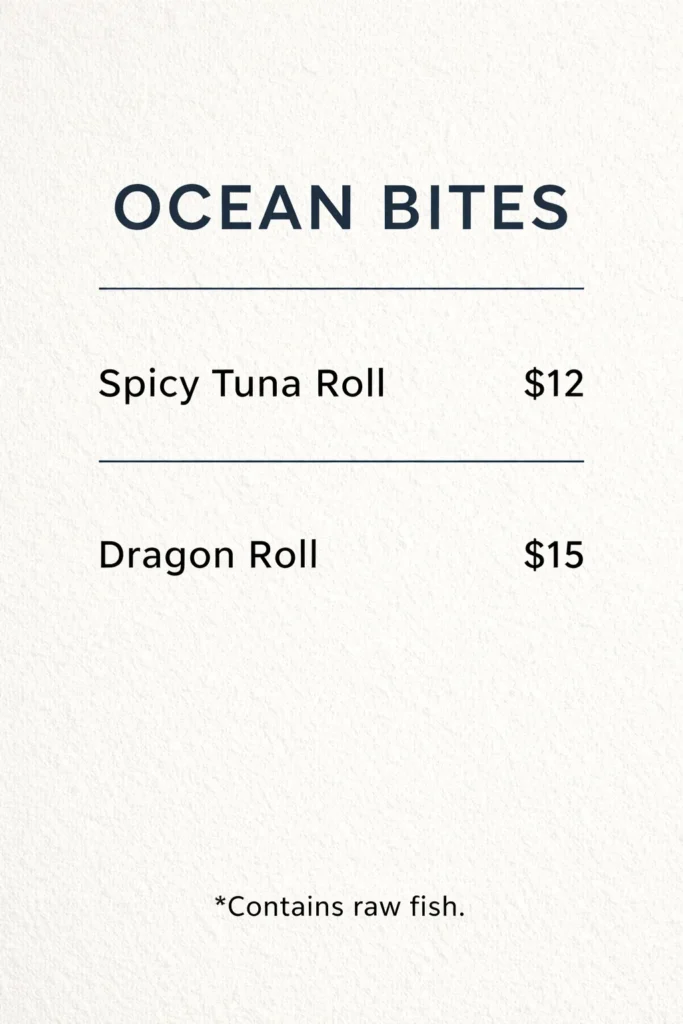
AI struggles with text. It usually gives you “Burger – $9.@5”. I wanted to see if GPT-Image-1.5 could handle a structured layout with prices and ingredients.
The Prompt:
“A minimalist sushi menu on textured paper. Title: OCEAN BITES. Item 1: Spicy Tuna Roll – $12. Item 2: Dragon Roll – $15. Footer: *Contains raw fish.”
The Verdict
GPT-Image-1.5: Nailed it. The title was bold and centered. The prices were correct ($12 and $15, not random symbols). It even put the asterisk on the footer. The font choice was clean and appropriate for a sushi place. I could take this image, crop it, and use it in a client presentation immediately.
Nano Banana Pro: It created a beautiful, moody image of a menu that looked photographically real. But the text? The font for the prices was not as clear as GPT.
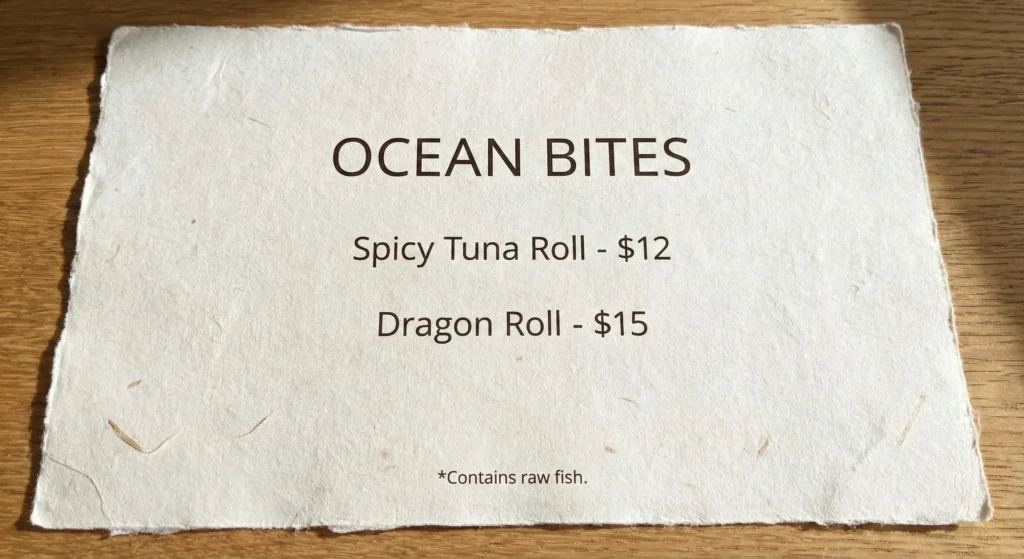
This is the “killer app” for GPT-Image-1.5. If you need text in your image—logos, posters, book covers—there is currently no competition.
Test 5: The Bento Box Logic Test
OpenAI claims improved spatial reasoning. To test this, I didn’t use a simple grid; I used a “Bento Box” challenge, which requires understanding relative position and containment.
The Prompt:
“Top-down view of a 4-compartment bento box. Top Left: White Rice. Top Right: Pickled Ginger. Bottom Left: 3 Gyoza dumplings. Bottom Right: Soy sauce dipping bowl.”
The Result:
- Rice (Top-Left): ✅ Correct.
- Ginger (Top-Right): ✅ Correct.
- Soy Sauce (Bottom-Right): ✅ Correct.
- Gyoza (Bottom-Left): ❌ Partial Failure. It placed the dumplings correctly in the bottom left, but it gave me four dumplings instead of three.
It seems the model understands placement (where things go) much better than counting (how many things). However, compared to DALL-E 3, which would often just jumble everything in the middle or blend the rice into the sauce, this is a massive improvement in boundary logic.
Test 6: The Neon Energy Brand Kit
For my final test, I simulated a branding gig. I invented a fictional energy drink called “VOLT” with a yellow lightning bolt logo.
I asked for three assets in a single prompt:
- A sleek aluminum can.
- A billboard on a highway displaying that can.
- A gym towel with the logo.
The Result: GPT-Image-1.5 generated a composite image showing all three. The logo was consistent. The yellow was the exact same hex code (visually speaking) across the can and the billboard. Previous models would have hallucinated three different versions of a “yellow bolt.” This brand consistency makes it a viable tool for ad agencies pitching concepts.
Troubleshooting: Fixing the “Plastic” Look
If there is one major downside to GPT-Image-1.5, it’s the aesthetic. Out of the box, it tends to produce images that look “smooth,” “glossy,” and distinctly “AI.” It lacks the grain and imperfection of real photography.
Here is how I fixed it during my testing:
- The “Amateur” Keyword: Adding “amateur photography” or “taken on an iPhone” forces the model to introduce noise and bad lighting, which paradoxically makes it look more real.
- Texture Overrides: Explicitly asking for “film grain,” “dust particles,” and “harsh flash” helps break up the perfect smooth surfaces.
- Avoid the Presets: Do not use the “Hyperrealism” preset if you want actual realism. That preset tends to add a weird HDR filter. Stick to raw prompting.
Head-to-Head: GPT-Image-1.5 vs Nano Banana Pro
I’ve pitted GPT-Image-1.5 against the two biggest competitors in the space right now.
| Feature | GPT-Image-1.5 | Nano Banana Pro | Gemini 3 |
|---|---|---|---|
| Text Accuracy | Best in Class (Perfect spelling) | Poor (Pixelated/Typo prone) | Good (Short phrases only) |
| Photorealism | Good (Slightly plastic) | Best in Class (Cinematic) | Great (Very sharp) |
| Instruction Following | Excellent (Complex edits) | Moderate (Gets creative) | Good (Misses details) |
| Character Consistency | High (Likeness Feature) | Medium (Needs training) | Medium |
| Speed | Fastest (<12s) | Average (~30s) | Fast (~15s) |
💡 Swipe left to see all features →
Pricing & Value
One of the strongest selling points for GPT-Image-1.5 is the integration. It isn’t just another $20 charge on your credit card.
- If you pay for ChatGPT Plus ($20/mo): You get this model included. You get the 4x speed, the parallel generation, and the likeness retention.
- If you use the API: The price has dropped by roughly 20% compared to DALL-E 3. Standard quality images are now roughly $0.032 per generation.
Compared to Midjourney (which requires a separate $10-$60 subscription and a Discord login) or Nano Banana Pro (which often requires a credit-based sub), the value consolidation here is aggressive. OpenAI is trying to make dedicated image tools redundant for the 80% of users who aren’t professional artists.
Final Verdict
GPT-Image-1.5 is not an artist; it is an incredibly competent design assistant. It lacks the “soul” and texture that makes Nano Banana Pro or Midjourney outputs look like award-winning photography. If you are looking to create emotional, high-art imagery, you might find GPT-1.5 a bit sterile and “too perfect.”
However, if your goal is utility—if you need to mock up a website, create a consistent YouTube character, design a menu, or edit a presentation slide—GPT-Image-1.5 is now the best tool on the market. It listens better, spells better, and remembers better than anything else available.
Use GPT-Image-1.5 if:
- You need precise text rendering (menus, posters, UI).
- You need to keep a character’s face consistent across multiple images.
- You want to perform specific edits (“change the tie to red”) without ruining the rest of the image.
Stick with Nano Banana Pro if:
- You need hyper-realism that fools the human eye (skin texture, imperfect lighting).
- You want artistic “happy accidents” rather than strict instruction following.
FAQs: Your Questions Answered
Q: How do I access the ‘Likeness Retention’ feature?
A: It is triggered by uploading a clear photo and instructing the chat to “use this face.” Some users may also see a specific “Character Reference” upload slot in the new interface.
Q: Can GPT-Image-1.5 generate text in languages other than English?
A: It handles major Latin-based languages (Spanish, French) well, including accents. It still struggles with intricate non-Latin scripts compared to specialized models.
Q: Is the copyright of the images mine?
A: Yes. You own the commercial rights to the images you generate, subject to OpenAI’s terms.
Q: Why do my images look ‘plastic’?
A: The model defaults to a polished aesthetic. Use keywords like “film grain,” “harsh lighting,” and “noise” to add realism.
Q: Does the parallel generation cost more credits?
A: No. It counts against your usage cap normally; it just saves you time by running simultaneous tasks.
Q: Can it edit photos I took on my phone?
A: Yes. It is excellent at specific edits like object removal, though lighting matching can sometimes be imperfect.
Q: Is there a negative prompt feature?
A: Not as a UI button, but natural language constraints (e.g., “ensure no cars are visible”) work very effectively now.
Q: How does it compare to Midjourney?
A: Midjourney offers better artistic texture and “vibe.” GPT-Image-1.5 wins on text rendering, specific instruction following, and chat integration.
Stop Wasting Credits on Bad Prompts
Join 50,000+ creators who get our weekly “Prompt Recipes.” We test every new model (so you don’t have to) and send you the exact words that unlock the best results.
- ✅ Weekly Benchmarks: Which model is winning right now?
- ✅ Copy-Paste Prompts: Tested recipes for logos, UI, and art.
- ✅ Hidden Features: Tutorials on tools like “Likeness Retention.”
- ✅ No Fluff: Just actionable advice.
→ Subscribe to AI Tool Analysis Weekly
Free, unsubscribe anytime
Related Reading
- Nano Banana Pro Review: The Photorealism King
- Gemini 3 Review: Google’s Multimodal Powerhouse
- Best AI Image Generators 2025: The Definitive Ranking
- Midjourney vs The World: Is It Still Worth It?
- Advanced Guide: AI Image Editing Workflows
- ChatGPT 5.2: The Brain Behind The Images
Last Updated: December 17, 2025
Tool Version: GPT-Image-1.5 (Initial Launch)
Next Review Update: January 20, 2026