

🆕 Latest Update (February 19, 2026): Google Labs launched Photoshoot, transforming smartphone product photos into studio-quality marketing images using the Nano Banana model. The announcement hit 23 million views on X within days. This review now covers Photoshoot, improved campaign workflows, and product URL integration.
The Bottom Line
What it is: Pomelli is a free AI marketing tool from Google Labs and DeepMind that analyzes your website, builds a “Business DNA” profile of your brand, and generates on-brand social media campaigns, ad creatives, and now studio-quality product photography.
Free vs paid: Completely free during the beta period. No credit card, no waitlist, no usage limits on generations. Comparable tools like Canva Pro cost $15/month ($120/year) and Adobe Express runs $9.99/month.
One major limitation: Only available in the US, Canada, Australia, and New Zealand. English only. No direct publishing to social media platforms.
Best for: Small business owners, e-commerce sellers, and solopreneurs who need professional marketing materials but lack the budget for designers or agencies. If you already use Google’s AI ecosystem, Pomelli fits naturally into your workflow.
Skip if: You run a multi-brand enterprise needing complex campaign workflows, you’re outside the four supported countries without a VPN, or you need direct social media scheduling. For comprehensive AI tool comparisons across categories, check our complete AI tools guide.
⚡ TL;DR – The Bottom Line
What It Is: Free AI marketing tool from Google that scans your website, learns your brand, and generates complete social media campaigns and product photography.
Best For: Small business owners, e-commerce sellers, and solopreneurs who need professional marketing materials without a designer budget.
Price: Completely free during beta. No credit card, no limits. Canva Pro costs $120/year for comparison.
Our Take: The Photoshoot feature alone makes this worth trying — it turns phone photos into catalog-quality product shots for free.
⚠️ The Catch: Only available in US, Canada, Australia, and New Zealand. No direct social media publishing. It’s a Google Labs beta — could be sunsetted at any time.
📑 Quick Navigation
What Pomelli Actually Does
Imagine if you could hand a marketing agency your website URL and get back a complete set of branded social media posts, product photos, and ad creatives in under five minutes. That’s essentially what Pomelli does, except the agency is free and powered by the same AI behind Google’s Gemini.
Here’s the three-step process. First, you enter your website URL. Pomelli’s AI spends about five to eight minutes scanning your entire site, extracting your brand colors, fonts, writing tone, visual style, and imagery. Google calls this your “Business DNA” profile. Think of it as a digital fingerprint of your brand that ensures everything Pomelli creates actually looks and sounds like you.
Second, you tell it what campaign you need. Type something like “promote my spring jewelry collection on Instagram” or pick from suggested campaign concepts. Pomelli generates multiple campaign variations, complete with captions, images, and platform-specific formats.
Third, you edit, download, and post. Every asset is customizable. Change the text, swap images, adjust sizing for different platforms. Then download everything as PNG or JPG files ready for upload to Instagram, Facebook, LinkedIn, or wherever you post.
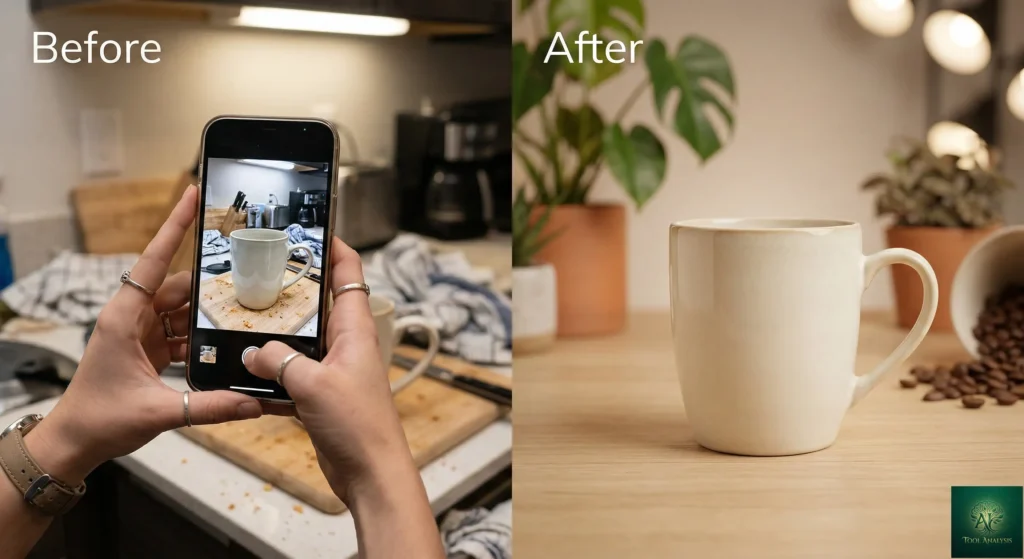
The new Photoshoot feature (launched February 19, 2026) takes this further. Upload any product photo, even a shaky smartphone shot taken on your kitchen table, and Photoshoot transforms it into studio-quality marketing imagery. You choose from templates like “Studio,” “Floating,” “Ingredient,” and “In Use” (which adds AI-generated models). The results use the same Nano Banana image generation model that powers Google’s image AI features.
🔍 REALITY CHECK
Marketing Claims: “Easily generate on-brand photos and marketing campaigns that feel authentic and professional.”
Actual Experience: The Business DNA analysis genuinely captures brand colors and visual style with impressive accuracy. However, multiple testers report that tone of voice analysis sometimes misses the mark, requiring manual refinement. One digital marketing professional noted that the initial scan got parts of their brand profile wrong and needed polish. The Photoshoot feature produces results one tester described as making a kitchen-table candle photo look catalog-ready.
Verdict: A powerful accelerator, not an autopilot. Plan to spend 10-15 minutes refining your Business DNA on the first use. After that, campaign generation is genuinely fast and mostly on-brand.

Getting Started: Your First 30 Minutes
Setup is remarkably simple. Go to labs.google.com/pomelli, sign in with any Google account (personal Gmail works fine), and enter your business website URL. No installation, no downloads, no credit card.
The Business DNA scan takes five to eight minutes. During this time, Pomelli analyzes your site’s text, images, logos, color palette, fonts, and messaging. When it finishes, you’ll see a profile showing your brand’s tone (formal, playful, technical), color palette, typography choices, and key images.
Here’s the important step most people skip: review and edit your Business DNA carefully. The AI gets about 80% of things right, but the 20% it misses matters. Check that your brand tone description matches how you actually communicate. Make sure the selected images represent your current offerings, not outdated products. This 10-minute refinement dramatically improves every campaign you generate afterward.
Once your DNA is set, you can start generating campaigns immediately. Type a campaign goal like “promote our new artisan coffee blend” or pick from Pomelli’s suggested campaigns. Within 60 seconds, you’ll have multiple campaign variations with images, captions, and formatting for different social platforms. The whole process from URL to first finished campaign takes under 15 minutes.
For the Photoshoot feature, click “Create a Product Photoshoot,” upload a product image (any quality works), choose your shot template, and watch the AI transform it. Results typically generate in under 30 seconds.
💡 Key Takeaway: Don’t skip the Business DNA review step. Spending 10 minutes refining your brand profile on first setup will dramatically improve every campaign you generate afterward — it’s the single highest-ROI action in the entire tool.
Pomelli Review: Features That Actually Matter
Business DNA Profile ⭐⭐⭐⭐
This is the core differentiator. While tools like Canva require you to manually set up brand kits (uploading logos, selecting brand colors, choosing fonts), Pomelli automates the entire process from your website URL. The color palette extraction is remarkably accurate. Font matching works well for common web fonts. The tone analysis is the weakest element, sometimes describing a casual brand as “professional and informative.” You’ll need to tweak it, but starting from 80% accurate beats starting from zero.
Photoshoot (New February 2026) ⭐⭐⭐⭐⭐
This is the feature that went viral for good reason. Professional product photography typically costs $500 to $5,000 per product depending on complexity. Photoshoot generates comparable results for free. The “Studio” template adds professional lighting and clean backgrounds. “Lifestyle” places your product in realistic environmental settings. “In Use” creates AI-generated models interacting with your product. The quality isn’t perfect for luxury brand catalogs, but for social media, e-commerce listings, and digital ads, it’s genuinely impressive. The Nano Banana model handles lighting, shadows, and reflections with real sophistication.
Campaign Generation ⭐⭐⭐⭐
Pomelli generates complete campaign packages including visual creatives, captions, and platform-specific formatting in about 60 seconds. You can now paste a product URL directly and Pomelli pulls images, titles, and descriptions from your site to generate campaigns grounded in your actual inventory. The campaigns feel genuinely on-brand after proper Business DNA setup. One limitation: you can only work on one campaign at a time before starting another. For marketers running multiple promotions simultaneously, this creates friction.
Image Editing and Styling ⭐⭐⭐
Since the February 2026 update, Pomelli supports natural language image editing (“change my background to a forest”), style reference transfers (restyle one image to match another’s aesthetic), and improved prompt accuracy. These additions push Pomelli closer to Canva’s editing capabilities, though it still lacks the depth of Canva’s template library and drag-and-drop precision. If you want more control over creative design, tools like Kimi AI offer deeper customization for specific content types.
🔍 REALITY CHECK
Marketing Claims: “Generate scalable, on-brand social media campaigns” with “high-quality, customized product shots.”
Actual Experience: The “scalable” claim holds up — you can generate dozens of variations quickly. But “on-brand” depends entirely on the quality of your Business DNA profile. Websites with minimal content or inconsistent branding produce mediocre results. Some outputs still feel template-influenced rather than truly custom. The Photoshoot feature occasionally struggles with small text rendering, unusual product shapes, and skin texture realism on AI-generated models.
Verdict: Most valuable for businesses with well-established website branding. If your website is sparse or under construction, Pomelli won’t have enough to work with.
Pricing Breakdown: What You’ll Actually Pay
Here’s the pricing landscape for AI marketing tools as of March 2026:
| Tool | Monthly Cost | Annual Cost | AI Image Generation | Brand Analysis | Product Photography |
|---|---|---|---|---|---|
| Pomelli (Google Labs) | $0 (free beta) | $0 | Unlimited (beta) | Automatic from URL | Yes (Photoshoot) |
| Canva Free | $0 | $0 | ~50 total | Manual setup | No |
| Canva Pro | $15 | $120 | 500/month | Manual Brand Kit | No (basic bg removal) |
| Adobe Express | $9.99 | $99.99 | Limited | Manual | No |
| Canva Teams | $10/person | $120/person | 500/month pooled | Manual Brand Kit | No |
📈 What You’ll Actually Spend Over 12 Months
The pricing comparison is almost unfair. Pomelli offers unlimited generations, automatic brand analysis, AND studio-quality product photography for free. Canva Pro charges $120/year and still requires manual brand setup with capped AI generations. The catch? Pomelli is a beta experiment. Google hasn’t announced post-beta pricing, but possible models include integration into Google Workspace, bundling with Google Ads, or a freemium tier. For now, the smart move is to use it while it’s free and evaluate when pricing arrives.
If you’re comparing AI tools across your entire workflow, see how Claude Cowork handles document and file creation alongside marketing tasks.
📬 Enjoying this review?
Get honest AI tool analysis delivered weekly. No hype, no spam.
Head-to-Head: Pomelli vs Canva
Since Canva is the most direct competitor and the tool most readers will be comparing against, here’s how they stack up on identical tasks:
| Task | Pomelli | Canva Pro | Winner |
|---|---|---|---|
| Brand setup time | 5-8 min (automatic) | 30-60 min (manual) | Pomelli |
| Instagram campaign (5 posts) | ~2 min | ~15-20 min | Pomelli |
| Product photography | Yes (Photoshoot) | No (bg removal only) | Pomelli |
| Template variety | AI-generated, limited styles | 2M+ templates | Canva |
| Drag-and-drop editing | Basic text/image editing | Full design editor | Canva |
| Direct social publishing | No | Yes (8 platforms) | Canva |
| Video creation | Animated (via Veo) | Full video editor | Canva |
| Price | $0 | $15/month | Pomelli |
🕸️ Pomelli vs Canva Pro — Feature Strength Profile
The verdict: Pomelli wins on speed, price, and product photography. Canva wins on editing depth, template variety, and publishing integration. For a small business owner who just needs branded social content created fast, Pomelli is the better starting point. For a social media manager who needs pixel-perfect control and multi-platform scheduling, Canva Pro is still worth the investment. The ideal workflow? Use Pomelli for rapid campaign generation and product photography, then import into Canva for fine-tuning and scheduling.
For AI-generated video content to pair with your Pomelli campaigns, our Seedance review covers the latest options.
💡 Key Takeaway: If you’re choosing between the two, don’t — use both. Pomelli handles the heavy lifting of campaign creation and product photography, then import assets into Canva for pixel-perfect edits and direct social publishing.

Who Should Use This (And Who Shouldn’t)
Choose Pomelli if: You’re a small business owner creating your own social media content. You sell physical products and need affordable product photography. You’re in the Google ecosystem (Workspace, Ads, Analytics). You want professional-looking marketing materials without learning design software. You’re launching a new business and need branding consistency from day one.
Stick with Canva if: You need advanced design control with drag-and-drop precision. You create content for multiple brands simultaneously. You rely on direct social media scheduling and publishing. You need video editing beyond simple animations. If you’re evaluating broader creative AI tools, our AI tool reviews cover dozens of options.
Consider Adobe Express if: You’re already in the Adobe ecosystem and value Creative Cloud integration. You need more advanced photo editing than either Pomelli or Canva offers.
Skip entirely if: You’re outside the US, Canada, Australia, or New Zealand and don’t want to use a VPN. Your website has minimal content (Pomelli needs substantial site content for accurate Business DNA). You need non-English campaign materials. You require enterprise-level approval workflows, version control, or team collaboration features.
💡 Key Takeaway: If you sell physical products and currently photograph them yourself, Pomelli’s Photoshoot feature alone justifies signing up — it replaces what would cost $500-$5,000 per product at a professional studio.
What Users Are Actually Saying
Community sentiment is cautiously positive, with the Photoshoot feature generating the most excitement. The active community on Reddit’s r/labsdotgoogle discusses Pomelli regularly. Users on social media platforms praised the Photoshoot announcement, which racked up over 23 million views and 50,000+ likes and bookmarks on X within days of launch.
The most common praise: speed of campaign generation, the Business DNA concept eliminating manual brand setup, and the quality of Photoshoot results for the price (free). One marketing professional testing it for a dental practice noted it was a “powerful accelerator” that handled the most time-consuming parts of content creation, the initial brainstorming, layout, and drafting.
The most common complaints: tone of voice analysis needing manual correction, limited template variety compared to Canva’s 2 million+ options, no direct social media publishing, and geographic restrictions. Multiple testers noted that websites with sparse content or inconsistent branding produced mediocre results. As one reviewer put it: the tool is an exceptional copilot, not an autopilot.
Enterprise users flagged a specific limitation: Pomelli creates one Business DNA per website, meaning businesses with multiple sub-brands need workarounds (like using different landing pages for each brand). For developers interested in how Google builds these AI experiments, the team behind Pomelli shared that they made quality decisions right up to launch night, including swapping templates and adjusting image routing the day before release.
🔍 REALITY CHECK
Marketing Claims: “Pomelli creates tailored campaign ideas and marketing assets” — implying hands-off, automatic results.
Actual Experience: Community consensus across Reddit and marketing forums is clear: Pomelli is a “powerful accelerator,” not an autopilot. The 23 million views on X reflect genuine excitement, but real-world users consistently report needing 10-15 minutes of Business DNA refinement and per-campaign tweaks. Enterprise users with multiple sub-brands face real friction.
Verdict: Expect a 10x speed improvement over manual design, not full autopilot. That’s still a massive win for small businesses doing their own marketing.
The Road Ahead: What’s Coming
Short-term (1-3 months): Based on the development pace (Business DNA in October, animation via Veo in January, Photoshoot in February), expect continued rapid feature additions. Improved image model accuracy and expanded shot templates for Photoshoot are likely. The team has explicitly mentioned ongoing improvements to prompt following and image generation quality.
Medium-term (3-6 months): Global expansion beyond the current four countries seems probable given Google’s track record with Labs experiments. Multi-language support would dramatically expand the user base. Direct social media publishing integration would address the biggest user complaint.
Long-term (6-12 months): The most interesting question is monetization. Google could fold Pomelli into Google Workspace subscriptions, bundle it with Google Ads spend (creating powerful advertiser lock-in), or offer a freemium model. Previous Google Labs experiments like Search Generative Experience (SGE) followed a path from experiment to mainstream feature. If Pomelli follows that pattern, it could become a core part of Google’s business tools ecosystem, potentially integrated with Google Workspace Studio.

FAQs: Your Questions Answered
Q: Is Pomelli free?
A: Yes, completely free during the public beta. No credit card, no subscription, no usage limits on generations. Google hasn’t announced post-beta pricing. Use it now while it costs nothing.
Q: Can Pomelli replace a marketing agency?
A: Not entirely. Pomelli handles the time-consuming production work (creating visuals, writing captions, generating product photos) but it doesn’t replace marketing strategy, audience analysis, A/B testing, or platform-specific optimization. Think of it as replacing the $500-$2,000/month you’d spend on a junior designer, not the strategic thinking of a marketing director.
Q: Is my business data safe with Pomelli?
A: Pomelli operates under Google’s standard Privacy Policy. It only analyzes publicly available information from your website, not private data. Uploaded product photos are used for generation and aren’t shared with third parties according to Google’s terms. Standard Google data handling applies.
Q: How does Pomelli compare to ChatGPT or Claude for marketing?
A: Different tools, different purposes. ChatGPT and Claude generate text and can help with marketing copy, but they don’t create visual assets, build brand profiles from your website, or generate product photography. Pomelli is purpose-built for visual marketing content creation, not general-purpose AI assistance.
Q: What’s the learning curve?
A: Minimal. If you can type a website URL and describe a campaign in one sentence, you can use Pomelli. The entire process from first visit to first finished campaign takes under 15 minutes. The only learning curve is understanding how to refine your Business DNA profile for better results.
Q: Can I use Pomelli from outside the US/Canada/Australia/New Zealand?
A: Officially, no. Pomelli is restricted to those four countries during beta. However, users report that connecting through a VPN to a US server provides access. Google hasn’t announced a timeline for global expansion, but given their track record, broader availability in 2026 seems likely.
Q: Can I use Pomelli-generated content commercially?
A: Yes. Content created in Pomelli can be used for advertising, social media, websites, and any commercial materials, governed by Google’s Terms of Service. This includes Photoshoot-generated product images.
Q: Does Pomelli work without a website?
A: Technically yes. You can manually describe your brand and set up Business DNA yourself without a URL. However, the automated website analysis is the tool’s core strength. Without it, you lose the main advantage over competitors like Canva, which also lets you manually configure brand settings.
Final Verdict
A genuinely useful free tool that delivers on its core promise — especially the standout Photoshoot feature — held back by geographic limits and beta-stage gaps.
Pomelli is a genuinely useful tool that solves a real problem for millions of small businesses. The Business DNA concept is clever and well-executed. The Photoshoot feature is the standout, offering professional product photography that would cost hundreds of dollars per product, completely free. The campaign generation is fast and surprisingly on-brand once you dial in your profile.
The limitations are real but predictable for a beta: geographic restrictions, no direct publishing, single-campaign workflows, and English-only support. The biggest risk isn’t the tool itself but Google’s track record of sunsetting experiments. If Google commits to Pomelli long-term, this could become the default marketing tool for small businesses worldwide.
✅ What We Liked
- ✓ Completely free with unlimited generations
- ✓ Photoshoot turns phone photos into studio shots
- ✓ Business DNA auto-extracts brand identity
- ✓ 60-second campaign generation
- ✓ No learning curve — URL in, campaigns out
❌ What Fell Short
- ✗ Only 4 countries supported (US, CA, AU, NZ)
- ✗ No direct social media publishing
- ✗ Tone of voice analysis needs manual fixing
- ✗ Single-campaign workflow creates friction
Use Pomelli if you need branded marketing materials fast and free, especially product photography. Stick with Canva Pro if you need advanced design control and social scheduling. Use both together if you want the best of both worlds: Pomelli for rapid generation, Canva for polish and publishing.
Try it today: labs.google.com/pomelli (free, no credit card needed)
For more free AI tool reviews, check our coverage of Goose AI (free coding agent), Gemini Gems (free GPT alternative), and the Gemini CLI (free terminal AI). For weekly updates on the latest AI tool launches, visit our AI news hub.

Founder of AI Tool Analysis. Tests every tool personally so you don’t have to. Covering AI tools for 10,000+ professionals since 2025. See how we test →
Stay Updated on Creative AI Tools
Stay ahead of the creative AI curve. Weekly reviews of AI image generators, video editors, and design platforms — with honest testing, not press releases.
- ✅ Honest Reviews: We actually test these tools, not rewrite press releases
- ✅ Price Tracking: Know when tools drop prices or add free tiers
- ✅ Feature Launches: Major updates covered within days
- ✅ Comparison Updates: As the market shifts, we update our verdicts
- ✅ No Hype: Just the AI news that actually matters for your work
Free, unsubscribe anytime. 10,000+ professionals trust us.
Want AI insights? Sign up for the AI Tool Analysis weekly briefing.
Newsletter

Related Reading
Explore more AI creative and marketing tool reviews:
- Google Antigravity Review 2026: Free Agent-First IDE
- Gmail AI Features Review 2026: 5 Gemini Tools Tested
- Gemini Gems Review 2026: Free GPT Alternative
- Claude Cowork Review: AI Document Creation
- Seedance Review: AI Video Generator
- Kimi AI Review: AI Presentation Creator
- The Complete AI Tools Guide 2025
- Goose AI Review: Free Coding Agent
Last Updated: March 4, 2026
Pomelli Version Tested: Public Beta (February 2026 update with Photoshoot)
Next Review Update: April 4, 2026
Have a tool you want us to review? Suggest it here | Questions? Contact us