
If you remember nothing else: Claude Code Router is like putting a smart switchboard between Claude Code and every AI model on the planet. Instead of paying $20-200/month to be locked into Anthropic’s models, you install this free, open-source proxy and route your coding tasks to DeepSeek ($0.14/million tokens), Gemini, local Ollama models, or 400+ options through OpenRouter. The tool itself costs $0. You just pay for whichever AI models you choose to use, and many of them are free. With 26,000+ GitHub stars and active development (1,194+ issues as of February 2026), this is not some hobby project.
Best for developers who love Claude Code’s terminal interface but hate the price tag, or anyone who wants to mix and match AI models for different tasks. Skip if you’re not comfortable editing a JSON config file or if you need Claude’s native safety features and Constitutional AI guardrails. For the full picture on what Claude Code itself offers, check our Claude Code review. If you’re exploring free alternatives, our Google Antigravity review covers another cost-saving option.
TL;DR – The Bottom Line
What it is: A free, open-source proxy that sits between Claude Code and 400+ AI models. You keep Claude Code’s terminal interface but route requests to cheaper (or free) providers like DeepSeek, Gemini, Ollama, and OpenRouter.
Best for: Developers spending $100+/month on Claude Code who don’t need Opus-level intelligence for every task, or anyone who needs to keep proprietary code off cloud servers (via local Ollama models).
Key strength: Smart routing lets you assign different models to different task types. DeepSeek for daily coding ($0.14/M tokens), Gemini for long-context analysis, local models for sensitive code. One config file controls everything.
Real savings: $40-150/month for typical developer workflows. The “10x savings” marketing is overstated; expect 3-5x realistically with a mixed routing setup costing $15-40/month.
The catch: Not all models support tool-calling (file edits, git, terminal commands break without it). You lose Claude’s safety guardrails. Config complexity scales fast. Community-maintained, so Claude Code updates can temporarily break compatibility. This is a power-user tool, not plug-and-play.
Quick Navigation
What Claude Code Router Actually Does
Here’s the problem Claude Code Router solves. You love Claude Code’s terminal interface. The way it reads your codebase, makes multi-file changes, runs tests, and feels like pair-programming with a senior developer. But you’re paying $20/month minimum (or $100-200/month for Opus 4.5 access), and not every coding task needs the smartest, most expensive model on the planet.
Asking Claude to format a JSON file or rename a variable? That’s like hiring a brain surgeon to put on a Band-Aid.
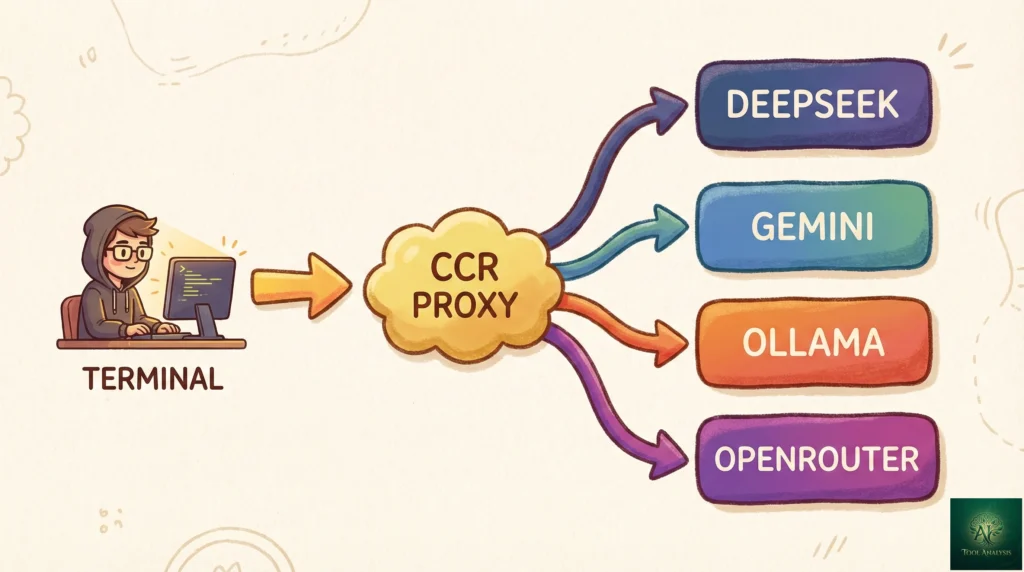
Claude Code Router (CCR) sits between Claude Code’s interface and the AI model doing the actual thinking. It intercepts every request and sends it to whichever model you’ve configured, based on rules you define. Simple tasks go to a cheap or free model. Complex reasoning goes to a premium one. Everything uses the exact same Claude Code terminal experience you already know.
Think of it this way: Claude Code is a luxury taxi service that only uses one car company. Claude Code Router lets you keep the same taxi app but choose between a Tesla, a Honda Civic, or your own bicycle depending on where you’re going.
The tool is 100% free, open-source (MIT license), and maintained by developer @musistudio on GitHub. It’s not affiliated with Anthropic. It currently supports 8+ AI providers including DeepSeek, Google Gemini, Groq, Ollama (for running models locally on your machine), OpenRouter (which gives access to 400+ models), VolcEngine, SiliconFlow, ModelScope, and DashScope.
REALITY CHECK
Marketing Claims: “Reduce API costs by 10x while maintaining quality for most tasks”
Actual Experience: Cost reduction depends entirely on which tasks you’re routing and to which models. For routine coding tasks (formatting, renaming, simple refactors), free models through Ollama or cheap DeepSeek calls genuinely save 90%+. For complex multi-file architecture work, cheaper models produce noticeably worse results. Realistic savings for a mixed workflow: 3-5x, not 10x.
Verdict: The savings are real but overstated. Expect to save $40-150/month on a typical developer workflow, not “10x everything.”
How It Works: The 2-Minute Explanation
Claude Code Router is a proxy server that runs on your machine. When you type a command in Claude Code, instead of going directly to Anthropic’s API, the request goes to CCR first. CCR looks at the request, checks your routing rules, and forwards it to the appropriate AI provider. The response comes back through CCR, gets transformed into the format Claude Code expects, and appears in your terminal as if nothing changed.
The flow looks like this:
You type in Claude Code → CCR intercepts → Routes to DeepSeek/Gemini/Ollama/etc. → Response transformed → Appears in Claude Code
The key insight: Claude Code doesn’t even know it’s happening. From its perspective, it’s still talking to “Claude.” Behind the scenes, you might be using Gemini for long-context analysis, DeepSeek for daily coding, and a local Ollama model for anything touching proprietary code you don’t want leaving your machine.
You control everything through a single JSON configuration file at ~/.claude-code-router/config.json. It
defines your providers (where requests can go), your router rules (which provider handles which type of task), and
optional transformers (for provider-specific compatibility tweaks).
Getting Started: Your First 10 Minutes
Setup requires Node.js and takes about 5-10 minutes if you already have API keys for your preferred providers. Here’s the step-by-step:
Step 1: Install Claude Code Router
npm install -g @musistudio/claude-code-routerStep 2: Create your configuration file
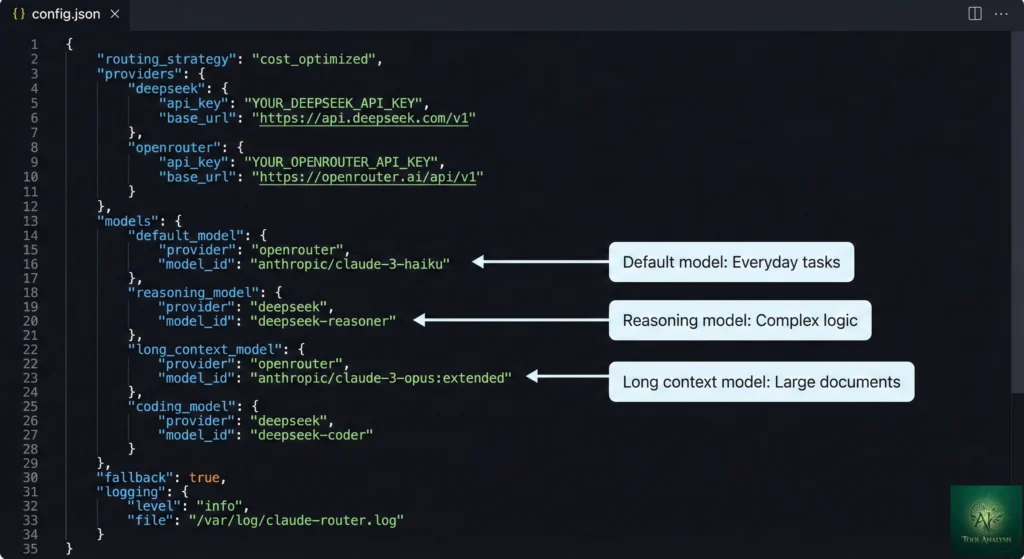
Create ~/.claude-code-router/config.json with your provider details. Here’s a minimal example using
DeepSeek as your default model (one of the cheapest options at $0.14/million input tokens):
{
  "Providers": [
    {
      "name": "deepseek",
      "api_base_url": "https://api.deepseek.com/chat/completions",
      "api_key": "your-deepseek-api-key",
      "models": ["deepseek-chat", "deepseek-reasoner"]
    }
  ],
  "Router": {
    "default": "deepseek,deepseek-chat",
    "think": "deepseek,deepseek-reasoner"
  }
}
Step 3: Start the router and launch Claude Code through it
ccr start
ccr code
That’s it. You’re now using Claude Code’s full interface powered by DeepSeek instead of Anthropic’s API. No Anthropic account required.
For a persistent setup, add eval "$(ccr activate)" to your shell configuration file (~/.zshrc or
~/.bashrc). This lets you run the regular claude command while automatically routing through CCR.
If you’re comparing this to other free coding tool options, our Gemini CLI review covers Google’s alternative that gives you 1,000 free requests per day without any routing setup.
Smart Routing: Match the Right Model to Each Task
This is where Claude Code Router gets genuinely powerful. Instead of using one model for everything, you assign different models to different task types. The Router section of your config.json supports these routing categories:
- default: Your everyday model for standard coding tasks
- background: For background processing and simple automated tasks
- think: For complex reasoning that needs a more capable model
- longContext: For tasks involving large files or extensive codebase analysis (triggered when
token count exceeds 60,000 by default, configurable via
longContextThreshold) - webSearch: For tasks requiring web search capabilities (model must support this natively)
- image: For image-related tasks (beta feature)
Here’s a real-world configuration that balances cost and quality. This setup uses cheap DeepSeek for everyday coding, Gemini’s massive context window for large projects, and DeepSeek Reasoner for complex problem-solving:
{
  "Providers": [
    {
      "name": "deepseek",
      "api_base_url": "https://api.deepseek.com/chat/completions",
      "api_key": "your-deepseek-key",
      "models": ["deepseek-chat", "deepseek-reasoner"]
    },
    {
      "name": "openrouter",
      "api_base_url": "https://openrouter.ai/api/v1/chat/completions",
      "api_key": "sk-or-your-key",
      "models": ["google/gemini-2.5-pro-preview"],
      "transformer": { "use": ["openrouter"] }
    }
  ],
  "Router": {
    "default": "deepseek,deepseek-chat",
    "background": "deepseek,deepseek-chat",
    "think": "deepseek,deepseek-reasoner",
    "longContext": "openrouter,google/gemini-2.5-pro-preview"
  }
}
You can also switch models mid-session using the /model command. Need to temporarily use a different
model for a specific task? Just type:
/model openrouter,anthropic/claude-3.5-sonnet
/model ollama,qwen2.5-coder:latest
/model deepseek,deepseek-chat
This flexibility is something you simply cannot get with standard Claude Code, where you’re locked to Anthropic’s model lineup. If you’re interested in how different AI models compare for coding tasks, our AI agents for developers guide benchmarks the top options.
Real Cost Comparison: Claude Code Router vs Paying Anthropic
Let’s put real numbers on this. The average Claude Code developer spends about $6/day or $100-200/month, according to Anthropic’s own cost management documentation. Here’s what the same workload looks like routed through cheaper providers:
| Setup | Monthly Cost | What You Get | Best For |
|---|---|---|---|
| Claude Pro | $20/month | Sonnet 4.5 with usage limits | Light use, learning |
| Claude Max | $100-200/month | Opus 4.5 with higher limits | Power users |
| CCR + DeepSeek only | $5-15/month | DeepSeek Chat for all tasks | Budget developers |
| CCR + Mixed routing | $15-40/month | DeepSeek default + Gemini for long context + premium model for complex tasks | Best value balance |
| CCR + Local Ollama | $0/month (electricity only) | Self-hosted models, unlimited use | Privacy-sensitive work |
💡 Swipe left to see all columns →
Monthly Cost Comparison: Claude Code vs Router Setups
The DeepSeek pricing deserves specific attention. At $0.14 per million input tokens and $0.28 per million output tokens, a task that costs $0.05 on Claude Sonnet costs less than $0.003 on DeepSeek Chat. For the kind of routine work that makes up 60-70% of a typical development session (formatting, refactoring, generating tests, writing documentation), the quality difference is often negligible. Our DeepSeek V3.2 analysis shows how competitive these budget models have become.
REALITY CHECK
Marketing Claims: “No Anthropic Account Required”
Actual Experience: True, technically. But Claude Code was designed around Claude’s specific capabilities, including tool-calling, streaming, and agentic behavior. Not every model supports these features. Models without tool-calling support will fail at file editing, git operations, and other core Claude Code functions. You’ll need models that explicitly support function calling for the full experience. Free Ollama models handle text generation fine but often choke on the agentic workflow parts.
Verdict: “Works without Anthropic” is accurate. “Works identically without Claude” is not. Model compatibility is the real bottleneck.
Supported Providers: Your Options Explained
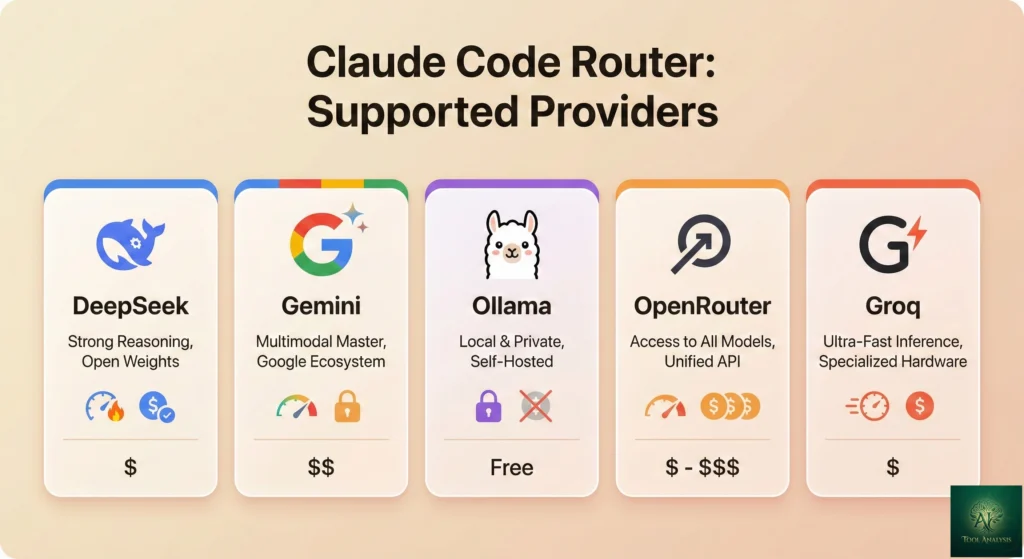
Claude Code Router supports 8+ providers out of the box. Here’s what each one actually gives you:
OpenRouter is the Swiss Army knife option. One API key gives you access to 400+ models from every major provider, including Claude models themselves (useful if you want Claude for complex tasks but cheaper alternatives for simple ones). Pay-as-you-go billing.
DeepSeek is the budget champion. DeepSeek Chat handles most coding tasks surprisingly well at a fraction of Claude’s cost. DeepSeek Reasoner adds chain-of-thought reasoning for harder problems. Both are excellent for the “default” and “think” routing slots.
Ollama is the privacy play. Run models entirely on your own machine. No data ever leaves your computer. Perfect for proprietary codebases or regulated industries. The trade-off: you need decent hardware (at least 16GB RAM for useful models), and local models are significantly less capable than cloud options.
Google Gemini shines for long-context tasks. Gemini 2.5 Pro offers a massive context window, making it ideal for the “longContext” routing slot where you need to analyze entire codebases at once.
Groq prioritizes speed. Their infrastructure runs open-source models at extremely high inference speeds. If latency matters more than model capability for background tasks, Groq is an excellent “background” router choice.
Other supported providers include VolcEngine, SiliconFlow, ModelScope, and DashScope, which are primarily used in the Chinese developer ecosystem.
If you’re drawn to the multi-model approach but prefer an all-in-one solution without manual routing, Goose AI from Block offers a similar “bring your own model” philosophy with a different interface. And GitHub Copilot Pro+ at $39/month lets you switch between Claude, GPT, and Gemini within one IDE without any proxy setup.
CCR Provider Comparison: Strengths by Category
What They Don’t Tell You: Limitations and Gotchas
Every review of Claude Code Router that I found buries the limitations. Here’s what you’ll actually run into:
Tool-calling compatibility is the biggest issue. Claude Code relies heavily on tool/function calling for file editing, git operations, terminal commands, and basically everything that makes it an “agent” rather than a chatbot. Many models, especially smaller open-source ones, either don’t support tool calling or support it poorly. If your model can’t do tool calling, Claude Code Router will still connect, but you’ll get empty responses or errors when Claude Code tries to edit files or run commands.
You lose Claude’s safety guardrails. When you route through non-Claude models, you lose Anthropic’s Constitutional AI safety layer. The replacement model’s safety characteristics apply instead. For most coding tasks this doesn’t matter, but it’s worth knowing if you’re building anything sensitive.
Debugging is harder. When something goes wrong, you’re troubleshooting across three layers: Claude
Code itself, the router proxy, and the downstream provider. Logs help
(~/.claude-code-router/claude-code-router.log), but the error messages aren’t always clear about where
the failure occurred.
Config complexity scales quickly. A simple single-provider setup is straightforward. But once you
start adding multiple providers, custom transformers, and routing rules, the config.json gets complex. There’s a web
UI (ccr web) that helps, but it’s basic.
No official support. This is a community project, not an Anthropic product. When Claude Code updates (and it updates frequently, with 1,096 commits in version 2.1.0 alone), CCR sometimes needs to catch up. The 1,194+ open GitHub issues suggest an active but busy project.
REALITY CHECK
Marketing Claims: “Get started in minutes with just one command. No complicated configuration required.”
Actual Experience: The installation command is simple. The configuration is not. You need API keys from your chosen providers, you need to understand JSON config format, and you’ll likely spend 20-30 minutes getting your first multi-provider setup working correctly. Single-provider setup is genuinely quick though.
Verdict: Quick to install, moderate to configure. Budget 30 minutes for your first real setup, not 2 minutes.
Who Should Use This (And Who Shouldn’t)
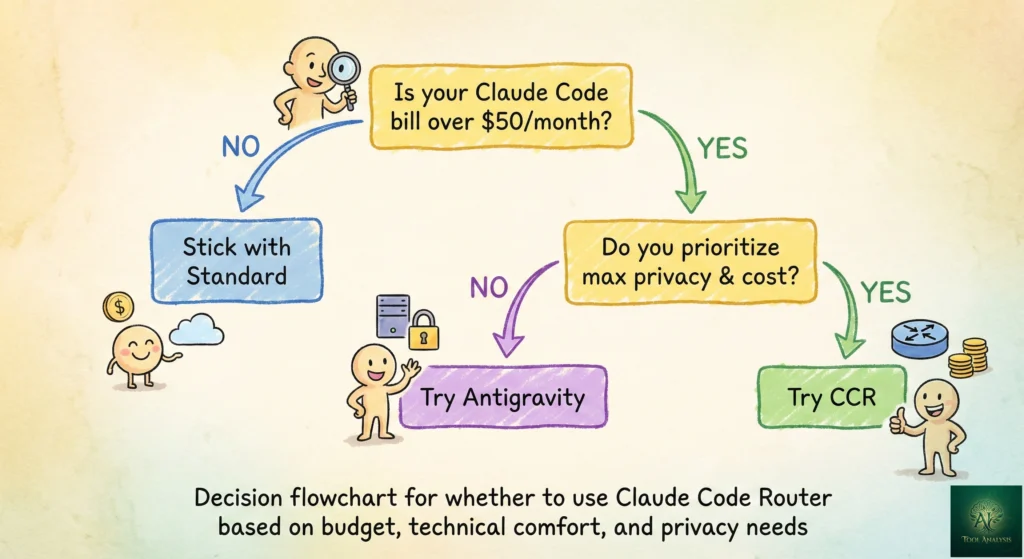
Use Claude Code Router if:
- You’re spending $100+/month on Claude Code and most of your tasks don’t need Opus-level intelligence
- You want to use Claude Code’s interface but with models from other providers
- Privacy requires keeping code local (Ollama integration)
- You’re a tinkerer who enjoys optimizing tools and doesn’t mind editing config files
- You hit Anthropic’s rate limits frequently and want fallback models
Skip Claude Code Router if:
- You need maximum coding accuracy and can afford Claude Opus ($100-200/month)
- You’re not comfortable with terminal tools and JSON configuration
- You need official support and guaranteed compatibility after Claude Code updates
- Your workflow depends on Claude’s specific features like Agent Teams or session teleportation
- You’d rather pay for simplicity than tinker for savings
Alternatives: Other Ways to Save on Claude Code
Claude Code Router isn’t the only way to reduce your AI coding costs. Here are the alternatives worth knowing about:
OpenRouter Direct (without CCR): You can point Claude Code at OpenRouter by setting environment
variables (ANTHROPIC_BASE_URL and ANTHROPIC_AUTH_TOKEN) without installing CCR at all. You
lose the smart routing features but gain basic model-switching with zero setup. The OpenRouter documentation has
step-by-step instructions for this approach.
Google Antigravity: Completely free during preview, with access to Claude Opus 4.5 and multiple Gemini models. The catch: it’s an IDE (VS Code fork), not a terminal tool. If you don’t mind switching from terminal to IDE, this might be the better deal. Read our full Antigravity review.
Gemini CLI: Google’s free, open-source terminal AI with 1,000 daily requests. It’s not Claude Code’s interface, but it’s a solid free alternative for terminal-based AI coding. See our Gemini CLI extensions review.
Goose AI: Block’s free, open-source agent that lets you bring any model. Similar “BYOM” (bring your own model) philosophy but with a different interface and MCP-first architecture. Check our Goose AI review for the comparison.
Windsurf Free Tier: 25 free credits per month with agentic features. Not terminal-based, but it’s an IDE with genuine AI agent capabilities at no cost. Our Windsurf review has the details.
What Developers Are Actually Saying
The developer community sentiment around Claude Code Router is cautiously positive, with a clear pattern: developers love the concept but acknowledge the rough edges.
On Hacker News, the discussion focuses on security concerns. Developers worry about running an intermediary proxy that touches all their code requests. One commenter wished for a vetting tool that could audit what CCR reads and writes before executing.
The most detailed real-world experience comes from developer Luis Gallardo, who wrote about using CCR to solve a specific pain point: Anthropic’s rate limits resetting at 6 PM Madrid time, right in the middle of his workday. His setup routes simple requests to free Qwen models while keeping premium models available for complex work. His key takeaway after a month of use: “Start with free models. You’d be surprised how capable they are for routine tasks.”
GitHub issues reveal the most common friction points: Ollama integration problems (models not responding to tool-calling requests), timeout issues with certain providers, and configuration confusion around transformers. The maintainer (@musistudio) is responsive but the issue count (1,194+) shows demand outpacing support capacity.
The project’s 26,400+ GitHub stars and 2,100+ forks suggest serious adoption, though it’s worth noting this audience skews heavily toward cost-conscious and privacy-focused developers rather than enterprise teams.
FAQs: Your Questions Answered
Q: Is Claude Code Router free?
A: Yes. Claude Code Router itself is 100% free and open-source under the MIT license. You only pay for the AI model providers you choose to route through. Some providers like Ollama (local models) are completely free. Others like DeepSeek charge fractions of a cent per request.
Q: Do I need an Anthropic account to use Claude Code Router?
A: No. Claude Code Router lets you use Claude Code’s interface without an Anthropic account or subscription. You only need API keys from your chosen alternative providers like DeepSeek, OpenRouter, or Google Gemini.
Q: Will Claude Code Router work with all Claude Code features?
A: Not all features work with all models. Claude Code relies on tool-calling for file editing, git operations, and terminal commands. Models that don’t support function calling will fail at these tasks. Advanced features like Agent Teams, session teleportation, and skills may not work with non-Claude models. Basic coding assistance and chat work with most models.
Q: Is my code safe when using Claude Code Router?
A: It depends on your routing configuration. Code routed to cloud providers (DeepSeek, OpenRouter, Gemini) is sent to third-party servers with their respective privacy policies. Code routed to local Ollama models never leaves your machine. CCR itself runs locally and doesn’t store or transmit your code independently.
Q: How does Claude Code Router compare to using OpenRouter directly?
A: OpenRouter direct setup is simpler but only connects you to one provider at a time. Claude Code Router adds intelligent routing between multiple providers, automatic model selection based on task type, dynamic mid-session switching, and local model support. If you only need one alternative, OpenRouter direct is easier.
Q: What happens when Claude Code updates and breaks Claude Code Router?
A: This is a real risk. Claude Code updates frequently, and CCR sometimes needs to catch up. The community typically responds within days, but temporary disruption is possible. You can pin Claude Code to a specific version to avoid surprise breakage.
Q: Can I use Claude Code Router in CI/CD pipelines?
A: Yes. CCR supports GitHub Actions integration. Start the router as a background service in
your workflow and set NON_INTERACTIVE_MODE: true in your config. This lets you use any
configured model for automated code reviews and PR analysis.
Q: Which model should I use as my default?
A: For most developers, DeepSeek Chat is the best default. It handles routine coding tasks well at $0.14/million input tokens. For reasoning, use DeepSeek Reasoner. For long-context analysis, route to Google Gemini 2.5 Pro through OpenRouter. This three-model setup covers 90% of use cases at roughly $15-30/month.
Final Verdict
Claude Code Router solves a real problem: Claude Code’s interface is excellent, but being locked to one provider at premium prices doesn’t make sense for every task. CCR gives you the freedom to match models to tasks, potentially saving $40-150/month depending on your usage patterns.
The trade-offs are genuine. You lose some feature compatibility (not all models support tool-calling), you take on configuration complexity, and you’re relying on community maintenance to keep pace with Claude Code’s rapid updates. It’s a power-user tool, not a plug-and-play solution.
Use Claude Code Router if you want Claude Code’s interface with the flexibility to choose your models and control your costs. The DeepSeek + Gemini + Ollama triple-routing setup is genuinely the best value in AI coding right now.
Stick with standard Claude Code if you value simplicity, need maximum accuracy from Opus 4.5, or use advanced features like Agent Teams. The $20-200/month buys you reliability, official support, and guaranteed compatibility.
Consider alternatives if you don’t need Claude Code specifically. Google Antigravity offers free Opus 4.5 access in an IDE. Cursor provides a polished GUI with multi-model support. Goose AI gives you a free, open-source alternative with a bring-your-own-model philosophy.
Ready to try it? Install with npm install -g @musistudio/claude-code-router, grab a DeepSeek API key (they offer free
credits for new accounts), and follow the setup guide above. You’ll know within 15 minutes whether the savings are
worth the setup effort for your workflow.
Stay Updated on AI Developer Tools
The AI coding tool market changes weekly. New models launch, prices drop, and features that cost $200/month become free overnight. Don’t miss the next game-changer.
Related Reading
- Claude Code Review 2026: The Complete Analysis
- Claude Agent Teams: Multiple AI Agents Working in Parallel
- Top AI Agents for Developers 2026: 8 Tools Tested
- Google Antigravity: Free Claude Opus 4.5 Access
- Goose AI Review: Block’s Free Open-Source Coding Agent
- Gemini CLI Extensions: Free Terminal AI with 1,000 Daily Requests
- GitHub Copilot Pro+ Review: Is the $39/Month Tier Worth It?
- Cursor 2.0 Review: The $9.9B AI Code Editor
- DeepSeek V3.2 vs ChatGPT-5: The $0.14 Model Showdown
- ChatGPT Codex Review: OpenAI’s $20 Coding Agent
Last Updated: February 18, 2026 | Claude Code Router Version: 1.0.8 | Claude Code Version: 2.1.x