
Kling AI pricing starts at $6.99 for the first month of Standard, then $8.80 a month, and as of October 17, 2026 it tops out at Ultra+ for $544.99 a month. Kling 3.0 spends your credits by the second, so a single 10-second 1080p clip with sound costs 120 credits. Our view: from Pro up, every plan costs between $0.96 and $1.09 per 100 credits from month two, so buy the smallest plan that covers your month, not the biggest one. This page lays out every plan as Kling’s membership page shows it, what one clip really costs, how it compares with Runway per second of video, and which plan fits how often you publish.
⚡ TL;DR: The Bottom Line
What It Is: Kling AI sells video generation through a free Basic plan and four paid tiers, all paid in credits that Kling 3.0 spends by the second.
Best For: Creators who publish short AI clips every week. Pro on yearly billing ($293.04, or $24.42 a month) is the sensible middle.
Price: Standard $8.80 and Pro $32.56 a month after a $6.99 or $25.99 first month. Premier runs from $80.96 (8,000 credits) to $376.99 (38,000 credits), and Ultra+ is $544.99 for 57,000 credits. Yearly: $79.20 for Standard, $293.04 for Pro, $728.64 for Premier 8K and $4,457 for the first year of Ultra+.
Our Take: Per second of video, Kling costs less than Runway or about the same at every tier we compared. Just budget with the month-two price, not the headline.
⚠️ The Catch: The “100 credits = $1.06” figure on the page uses the one-time first-month price, and monthly credits expire after 31 days.
📑 Quick Navigation
Kling AI subscription prices for every plan (October 2026)
Kling AI has a free Basic plan and four paid tiers on its international site, priced in USD: Standard, Pro, Premier and Ultra+. Each paid plan shows three numbers: a crossed-out list price, a first-month price, and the “then” price you pay every month after that. Premier now has a credit selector with four sizes, so it has four prices. Here are the Kling AI prices the membership page showed as of October 17, 2026, on both the monthly and the yearly tab:
| Plan | First Month | Then (Monthly) | Yearly | Credits/Month | Per 100 Credits (Month 2+ / Yearly Renewal) |
|---|---|---|---|---|---|
| Basic | $0 | $0 | No yearly plan | Monthly free credits (amount not listed) | Not applicable |
| Standard | $6.99 | $8.80 | $79.20 ($6.60 a month) | 660 | $1.33 / $1.00 |
| Pro | $25.99 | $32.56 | $293.04 ($24.42 a month) | 3,000 | $1.09 / $0.81 |
| Premier 8K | $64.99 | $80.96 | $728.64 ($60.72 a month) | 8,000 | $1.01 / $0.76 |
| Premier 18K (default) | $135 | $181.99 | $1,490 first year, then $1,639.99 | 18,000 | $1.01 / $0.76 |
| Premier 28K | $209 | $283.99 | $2,318 first year, then $2,550.99 | 28,000 | $1.01 / $0.76 |
| Premier 38K | $278 | $376.99 | $3,082 first year, then $3,389.99 | 38,000 | $0.99 / $0.74 |
| Ultra+ | $402 | $544.99 | $4,457 first year, then $4,902.99 | 57,000 | $0.96 / $0.72 |
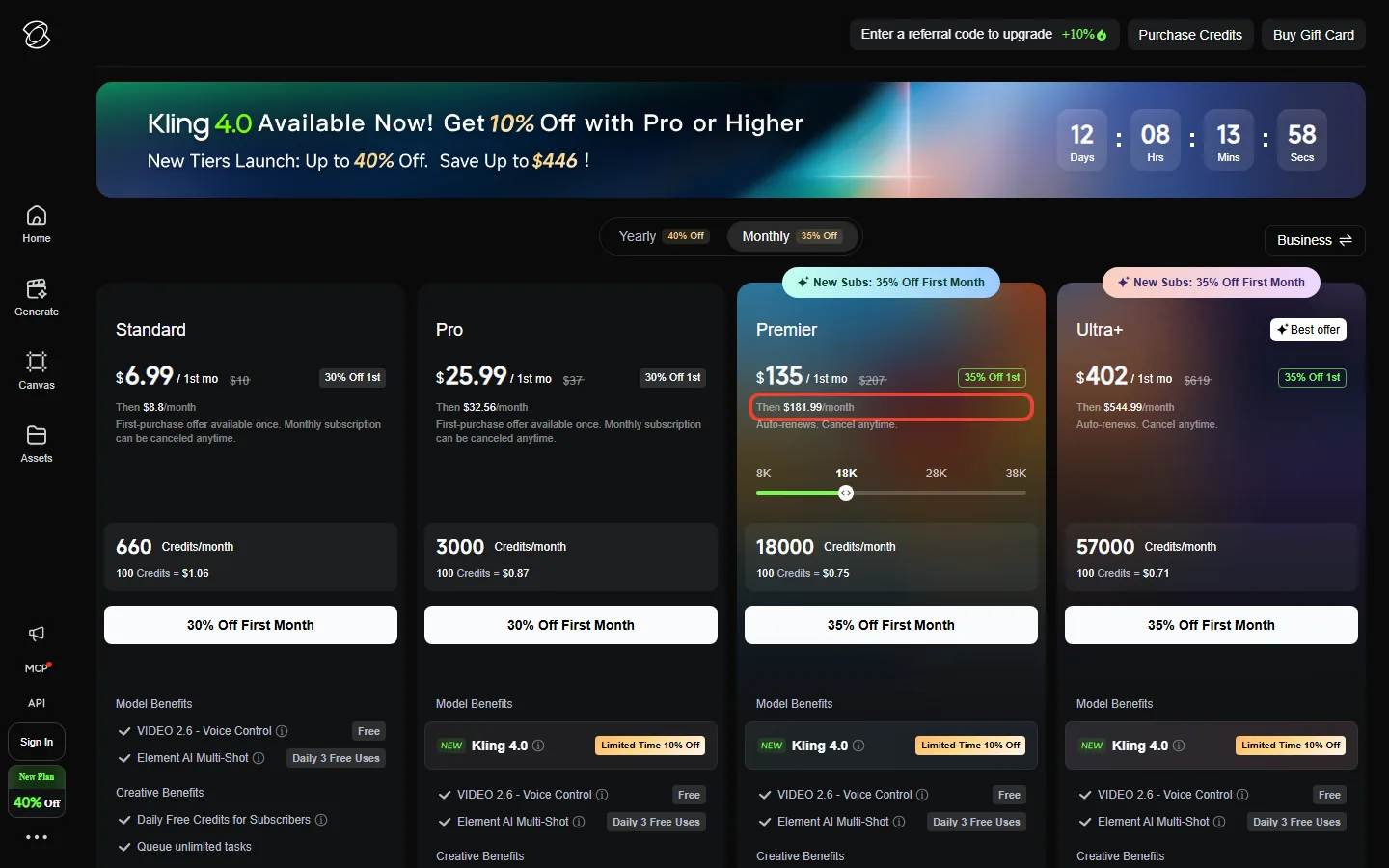
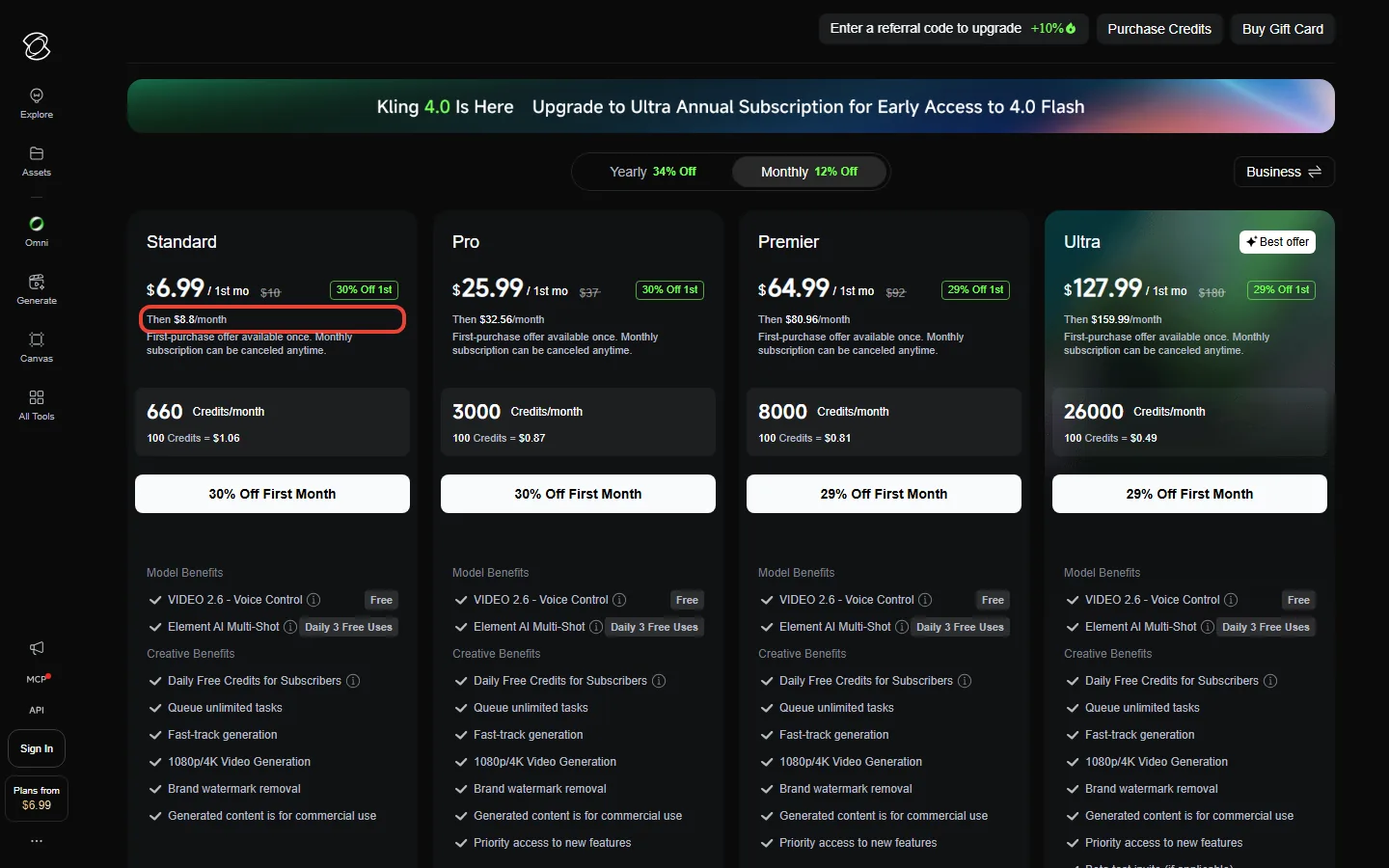
Four details in the small print matter more than the big numbers. First, the bold first-month price is for new subscribers only: Standard and Pro call it a “First-purchase offer available once”, and Premier and Ultra+ carry a “New Subs: 35% Off First Month” tag. Second, the “then” price is about 12% below the crossed-out list price on every plan, so $207 becomes $181.99 and $619 becomes $544.99. Third, the per-100-credit line on each monthly card is worked out from the first-month price: Ultra+ shows $0.71, but from month two its credits cost $0.96 per 100. Fourth, Premier’s price depends on the credit size you pick, and the page opens on 18,000 credits, not the single 8,000-credit size Premier had on October 4.
📊 Price per 100 Credits: What the Page Shows vs What You Pay
🎯 How the Credit System Works on Kling 3.0
Think of credits like a taxi meter that charges by the second and by the class of car. Kling 3.0 bills every second of video it makes, and the rate depends on resolution and whether you switch on native audio. Clips can run anywhere from 3 to 15 seconds. These are the rates in Kling’s official VIDEO 3.0 user guide:
Kling AI credits breakdown per model
Kling 3.0 is the model with published per-second rates, shown below, so every per-clip cost on this page uses Kling 3.0 pricing. The plans page shows no credit rate for Kling 4.0 as of October 17, 2026, only a limited-time 10% discount on it for Pro, Premier and Ultra+ subscribers.
| Mode | 720p | 1080p |
|---|---|---|
| No native audio | 6 credits/sec | 8 credits/sec |
| Native audio | 9 credits/sec | 12 credits/sec |
| Voice tone control add-on | +2 credits/sec | +2 credits/sec |
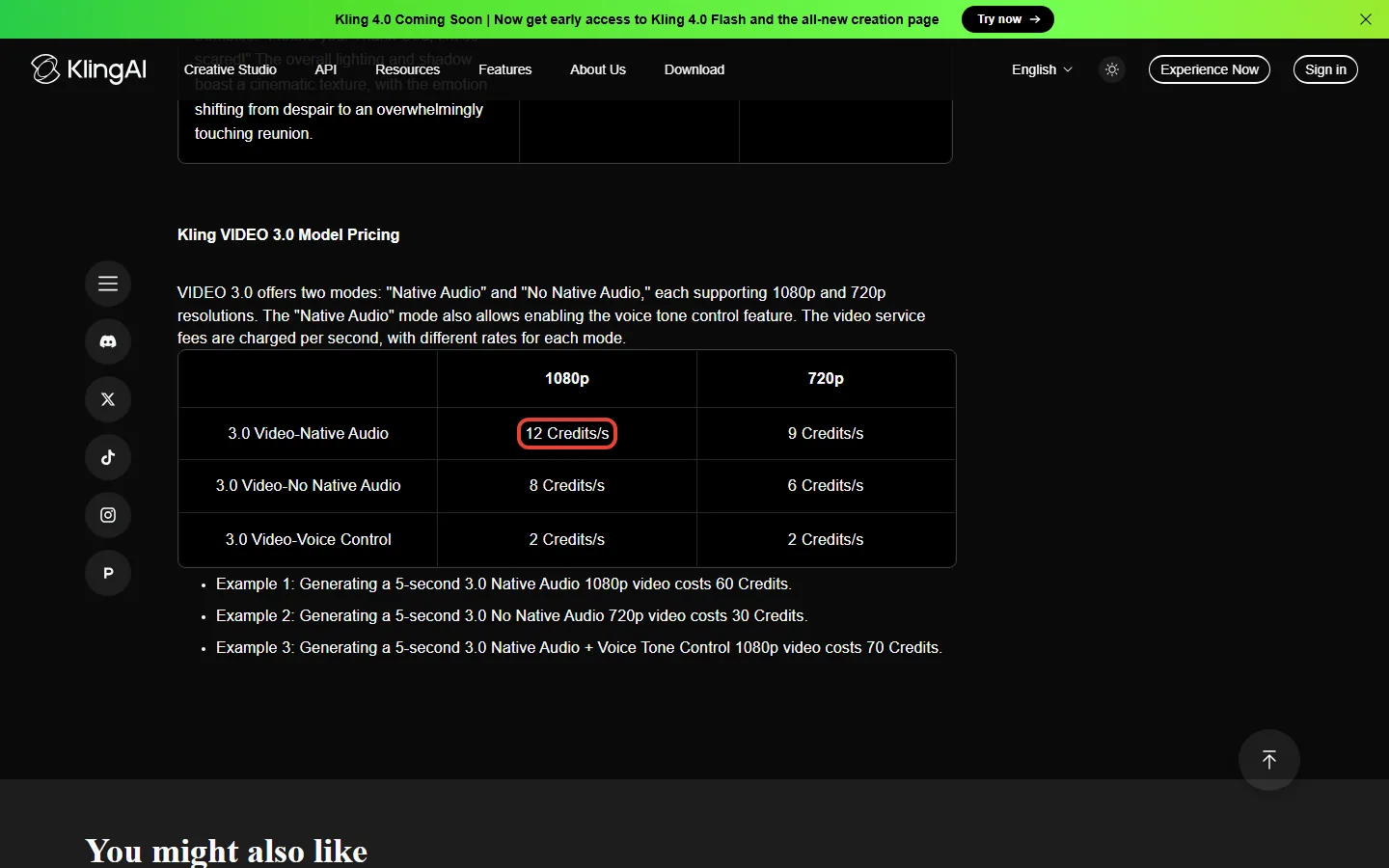
In plain numbers, using Kling’s own examples: a 5-second 720p clip without audio costs 30 credits, a 5-second 1080p clip with native audio costs 60, and adding voice tone control to that clip makes it 70. Double the length and you double the bill, so a 10-second 1080p clip with sound is 120 credits and a 15-second one is 180. Kling deducts credits per output as well as by model, length and resolution, so asking for four versions at once (paid plans allow up to four per generation) is charged as four outputs: 480 credits for four 10-second 1080p clips with sound. For how the 15-second cap and extensions work, see our Kling AI video length limits breakdown.
💡 Key Takeaway: If you budget one number, make it 120 credits per 10-second 1080p clip with sound. Multiply by the clips you want each month, then by how many takes you usually need, and pick the plan whose credits cover the total.
📊 Real Cost Per Video (The Math)
What one clip costs on each plan (price from month two / yearly renewal price, Kling 3.0 rates):
- 5-second 720p clip, no audio (30 credits): Standard $0.40 / $0.30; Ultra+ $0.29 / $0.22
- 5-second 1080p clip with audio (60 credits): Standard $0.80 / $0.60; Pro $0.65 / $0.49
- 10-second 1080p clip with audio (120 credits): Standard $1.60 / $1.20; Pro $1.30 / $0.98; Premier 18K $1.21 / $0.91; Ultra+ $1.15 / $0.86
- 15-second 1080p clip with audio (180 credits): Pro $1.95 / $1.47
Those prices assume you keep the first take. Most people don’t, and every clip Kling generates is billed, whether you keep it or not. Say you keep one clip in three. Three takes of a 10-second 1080p clip with sound use 360 credits, which is $3.91 on Pro monthly or $2.93 on Pro yearly. Standard’s 660 credits cover fewer than two finished clips at that rate, while Pro’s 3,000 credits cover eight. Swap in your own keep rate: the maths is just credits used times the per-credit price in the table above.
🔍 REALITY CHECK
Marketing Claims: “660 Credits/month, 100 Credits = $1.06” on the Standard card.
What It Really Means: $1.06 per 100 credits only holds for the one-time $6.99 first month. From month two you pay $8.80, which is $1.33 per 100. And 660 credits is five 10-second 1080p clips with sound, if every take is a keeper.
Verdict: Budget with the month-two price and your real keep rate, not the headline.
🆓 Free Tier vs Paid: What You Actually Get
The free plan is called Basic and costs $0. Kling’s FAQ now describes “Monthly Free Credits for Non-Subscribers”, claimed when you log in each month and valid for 31 days. Kling doesn’t publish the number. Daily bonus credits are a subscriber perk: they arrive on your first login each day and expire at midnight local time. Kling also shows signed-out visitors a “Trial Package” offer of limited-time free credits.
The bigger difference is what credits alone can’t buy. Kling’s FAQ says owning credits does not grant subscription benefits, and features such as watermark removal and 4K generation need an active subscription. Commercial use of what you generate is granted to paid subscribers. The comparison table also reserves 1080p and 4K video, video extension and image upscaling for paid plans, and lets paid plans make four videos per generation instead of one. So Basic output keeps Kling’s watermark and isn’t covered by the commercial-use grant, which makes it a way to try the model. Our full Kling AI review covers what the output is like, and the Kling AI complete guide walks through the features each tier unlocks.
📬 Enjoying this breakdown?
Get honest AI tool analysis delivered weekly. No hype, no spam.
⚔️ Kling vs Runway: Cost Per Second Compared
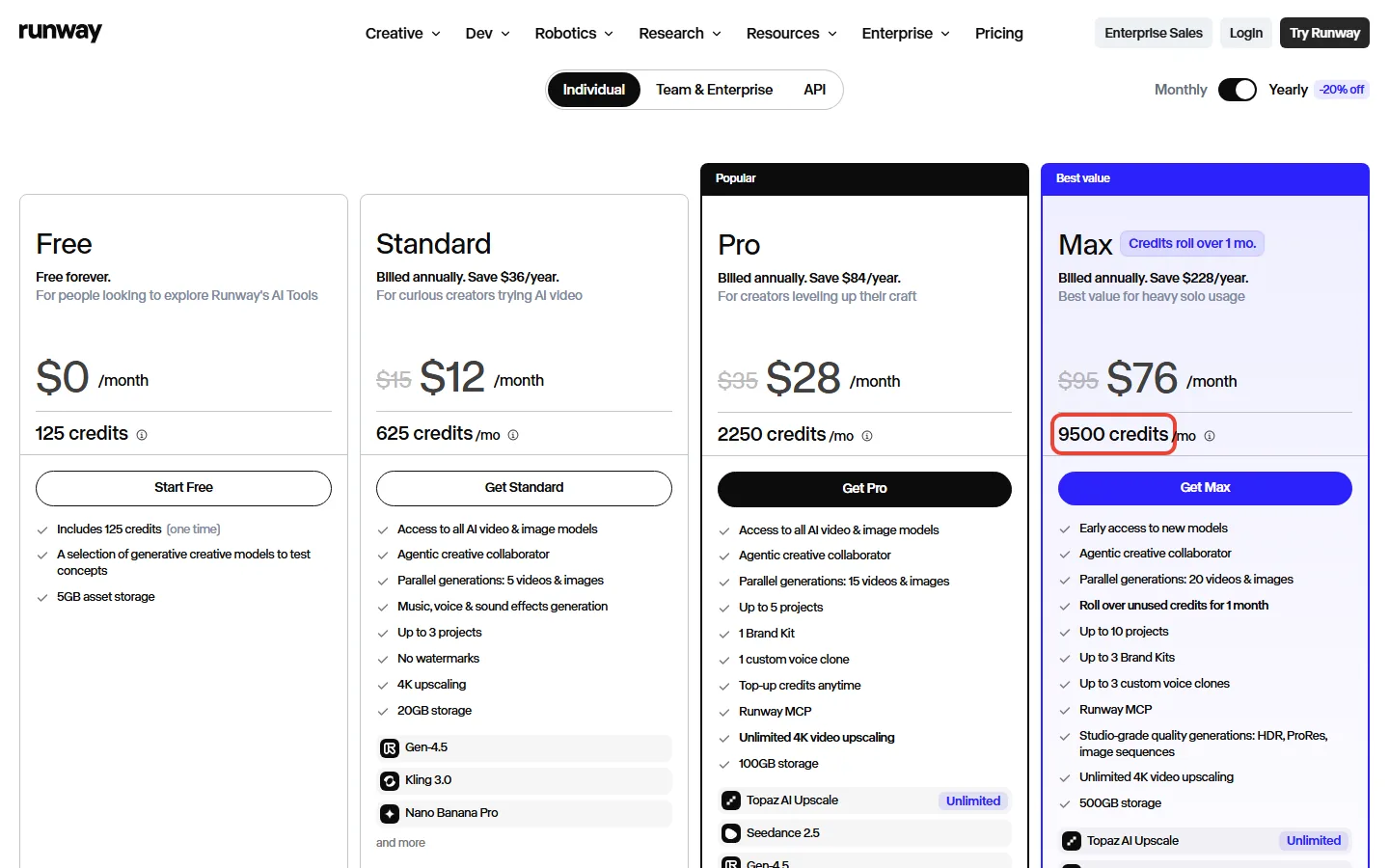
The old version of this page said Runway’s $95 plan had an unlimited mode that made retries free. That is no longer true for new subscribers. Runway’s pricing page now sells Free, Standard, Pro and Max, all on credits, and its help center says Unlimited is being replaced by Max, with access extended for eligible legacy Unlimited subscribers through November 30, 2026. “Unlimited” appears only next to 4K video upscaling and Topaz AI Upscale. Runway also lists Kling 3.0 among the models its paid plans can use.
| Criteria | Kling AI | Runway |
|---|---|---|
| Free plan | Monthly free credits, valid 31 days | 125 one-time credits |
| Entry plan | Standard: $8.80/mo after a $6.99 first month, 660 credits | Standard: $15/mo ($12 billed yearly), 625 credits |
| Middle plan | Pro: $32.56/mo, 3,000 credits | Pro: $35/mo ($28 billed yearly), 2,250 credits |
| Top solo plan | Ultra+: $544.99/mo, 57,000 credits (Premier from $80.96/mo for 8,000) | Max: $95/mo ($76 billed yearly), 9,500 credits |
| Seconds of video on the entry plan | 55 s at 1080p with native audio, 82 s without | 52 s of Gen-4.5 (720p, per Runway’s Gen-4.5 help page) |
| Unused credits | Monthly credits valid 31 days | Max rolls unused credits over for 1 month |
| Unlimited generation | None | Only for eligible legacy Unlimited subscribers, extended through November 30, 2026; not one of Runway’s current plans |
Runway prints how many seconds of its Gen-4.5 model each plan buys: 52 seconds on Standard, 187 on Pro and 791 on Max. Divide the monthly price by those seconds and compare it with Kling 3.0 at 1080p with native audio (12 credits a second). On these numbers Kling costs less per second at the entry and middle tiers and about the same at the top: $0.16 vs $0.29 a second on the entry plans, $0.13 vs $0.19 in the middle, and about $0.12 on both Kling Premier and Runway Max. Ultra+ comes in a little lower at $0.11 a second, but that rate comes with a $544.99 monthly bill. These are different models: Runway’s Gen-4.5 help page lists 720p output, and its pricing page doesn’t say whether that figure includes sound. Kling at 720p with native audio is 9 credits a second, cheaper again. Treat this as a price comparison, not a quality one. Our Runway review and Google Flow review cover the quality side.
📈 Cost per Second of Video (Kling 1080p With Audio vs Runway Gen-4.5, Monthly Price)
⚠️ Hidden Costs Nobody Mentions
- The first month is a one-time offer. Standard and Pro label their $6.99 and $25.99 first months “First-purchase offer available once”. New subscribers get 35% off the first month of Ultra+ ($402) and the larger Premier sizes ($135 at 18,000 credits), and 29% off the 8,000-credit Premier ($64.99). From month two you pay $8.80 on Standard, $32.56 on Pro, $80.96 to $376.99 on Premier depending on size, or $544.99 on Ultra+. The discounts sit under a “New Plan” banner with a countdown clock, so check the first-month price again on the day you pay.
- Monthly credits expire. They are valid for 31 days from the day they are issued, and any you haven’t used disappear when a subscription ends. Credits you buy separately last two years, and Kling spends the credits closest to expiring first, so bought credits are usually used after your monthly credits.
- Every output is billed. Every clip Kling generates is billed, whether you keep it or not, and four versions per generation are charged as four outputs.
- Credits don’t unlock features. Buying credits without a subscription does not give you watermark removal or 4K generation, by Kling’s own FAQ.
- Yearly plans auto-renew. The yearly cards say “Auto-renews. Cancel anytime.” Put the renewal date in your calendar.
🔍 REALITY CHECK
Marketing Claims: “Yearly 34% Off.”
What It Really Means: That 34% is measured against the crossed-out list prices ($120 a year for Standard). Against the $8.80 you would actually pay each month, yearly Standard saves $26.40 a year, about 25%. Every other plan works out at about 25% too; the larger Premier sizes and Ultra+ show 40% off only because their first year is discounted.
Verdict: Yearly is still the cheapest way to hold Kling. Just expect 25% off, not 34%.
Kling 4.0: what it changes for your plan
As of October 17, 2026, the plans page lists a limited-time 10% discount on Kling 4.0 for Pro, Premier and Ultra+ subscribers, and describes the model as supporting “native 30s-generation and multiple keyframes”. The yearly Ultra+ card adds early access to Kling 4.0 Flash, and as of October 22 the developer pricing page says its API packs are “not compatible with Kling 4.0 or Kling 4.0 Flash”. What the plans page doesn’t show is a Kling 4.0 credit rate, so Kling’s own numbers can’t yet tell you what a 4.0 clip costs.
Our advice: don’t buy yearly Ultra+ ($4,457 for the first year) for early access alone. Buy it only if you would use 57,000 credits a month on Kling 3.0 anyway. We will update this section when Kling publishes 4.0 rates.
Which Kling plan fits how much you make?
Choose Basic (free) if: you want to see the model’s output before you pay. Basic output keeps Kling’s watermark and isn’t covered by the commercial-use grant, so it suits trying the model.
Choose Standard ($8.80 a month, or $6.60 a month yearly) if: you make a handful of clips a month. 660 credits is five 10-second 1080p clips with sound if every take is a keeper, so this is the hobby tier.
Choose Pro ($32.56 a month, or $24.42 a month yearly) if: you post to Shorts, Reels or TikTok every week. 3,000 credits is 25 of those clips on first takes, or about eight if you keep one take in three.
Choose Premier if: Pro’s 3,000 credits run out before the month does. Pick the size by your monthly total: 8,000 credits for $80.96, 18,000 for $181.99, 28,000 for $283.99 or 38,000 for $376.99 a month after the first month. Per credit the four sizes cost almost the same ($0.99 to $1.01 per 100), so the smallest size that covers your month is the right one. At 8,000 credits, Runway Max ($95) costs about the same per second, and its credits roll over for a month, so compare the two on the model you prefer.
Say you want 40 finished 10-second 1080p clips with sound a month and keep one take in three. That is 40 x 3 x 120 = 14,400 credits. Premier 8K falls 6,400 credits short, while Premier 18K covers it with 3,600 to spare, at $181.99 a month from month two ($135 for the first month).
Choose Ultra+ ($544.99 a month after a $402 first month) only if: you need more than 38,000 credits a month. Its 57,000 credits cost $0.96 per 100 from month two, against $0.99 on Premier 38K, so Ultra+ is a volume plan rather than a cheaper rate. The yearly version ($4,457 for the first year, then $4,902.99) is the one that lists early access to Kling 4.0 Flash. If your videos are presenter-style talking heads rather than generated scenes, a purpose-built tool fits better: see our Synthesia review and HeyGen review.
Is yearly billing worth it? About 25% off in practice
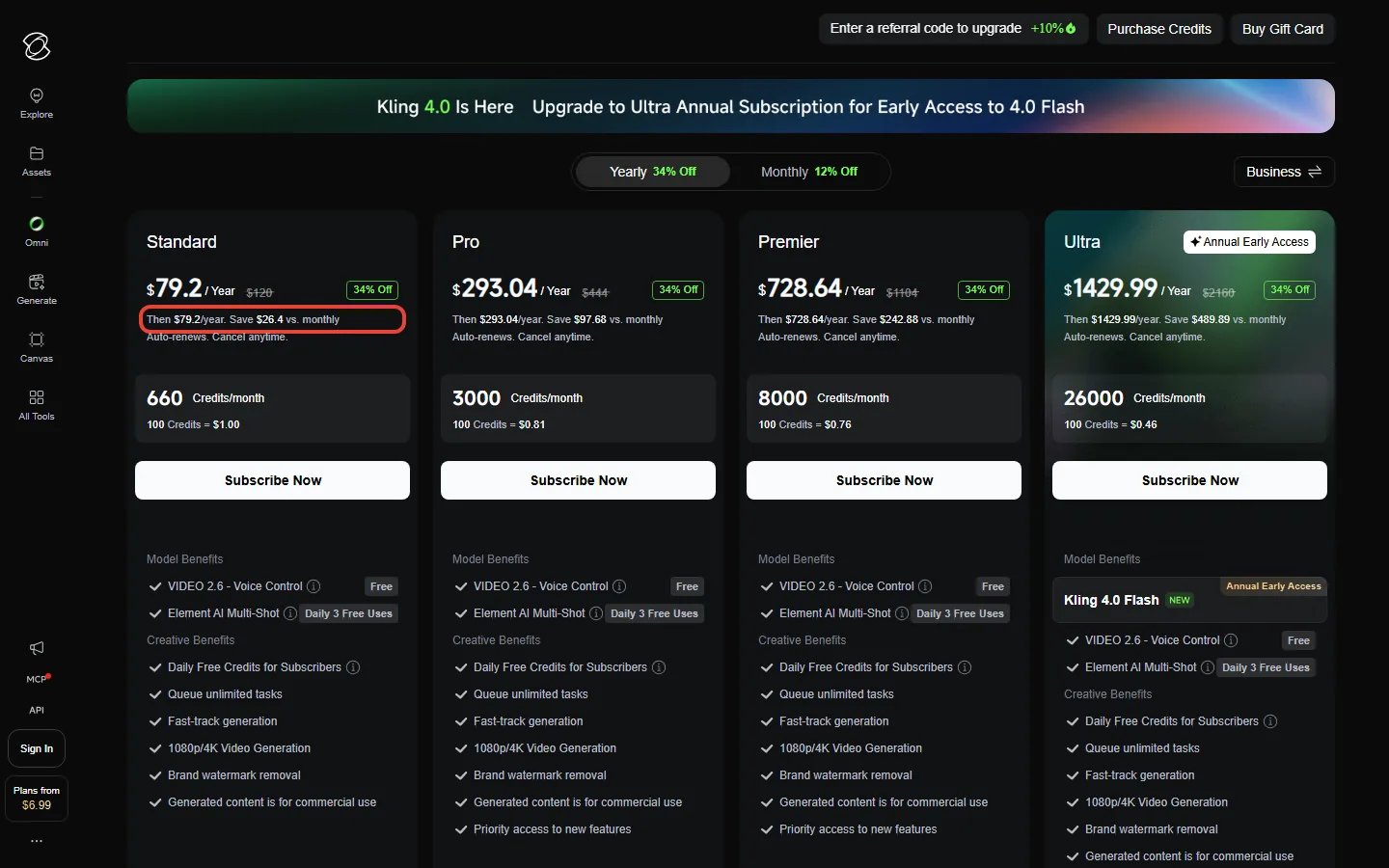
Billing cycle is still the biggest lever in Kling AI pricing. The yearly cards show how much you save against monthly billing: $26.40 on Standard, $97.68 on Pro, $242.88 on Premier 8K, $543.89 on Premier 18K and $1,636.89 on Ultra+. Each is about 25% of what twelve months at the “then” price would cost. The larger Premier sizes and Ultra+ also take 40% off the first year, so year two costs more: Premier 18K is $1,490 for the first year and $1,639.99 after that, and Ultra+ is $4,457, then $4,902.99. Kling’s FAQ also says that moving from a monthly plan to the yearly version of the same plan takes effect immediately, with the new plan’s monthly credits.
💡 Key Takeaway: Use the discounted first month as a cheap trial ($6.99 on Standard, $25.99 on Pro). If Kling fits how you work, switch to yearly before month two bills at $8.80 (or $32.56 on Pro).
💻 API Pricing for Developers
Kling API pricing is separate from the subscription plans: the developer API is sold on Kling’s developer pricing page, in prepaid packages of “units” at a list price of $0.14 a unit. The 180-day packages run from $700 for 5,000 units to $7,560 for 60,000 units (10% off, $0.126 a unit), with “no rollover or extension”. Kling 3.0 is billed per second: $0.084 at 720p without audio, $0.112 at 1080p without audio, $0.168 at 1080p with native audio, and $0.42 at 4K. That makes a 10-second 1080p clip with sound $1.68 through the API, compared with $1.30 on the Pro web plan. As noted above, the packages don’t support Kling 4.0 yet, and the page says “Kling 4.0 API access is not yet available”: the 4.0 rates it shows are “for preview purposes only”, with the launch date and pricing to be announced separately. If you are automating video inside a bigger workflow, our best AI video editing tools guide and AI tools guide map the surrounding stack.
❓ FAQs: Your Questions Answered
Q: Is Kling AI free to use?
A: Yes. The Basic plan costs $0, and Kling’s FAQ says non-subscribers can claim monthly free credits when they log in, valid for 31 days. Watermark removal, 4K generation and commercial use need a paid subscription.
Q: How much does Kling AI cost per month in 2026?
A: A Kling AI subscription costs $8.80 a month for Standard and $32.56 for Pro, after a first month of $6.99 or $25.99. Premier costs $80.96 to $376.99 a month depending on how many credits you pick (8,000 to 38,000), and Ultra+ is $544.99 for 57,000 credits after a $402 first month. Yearly billing is $79.20 for Standard, $293.04 for Pro, $728.64 for Premier 8K and $4,457 for the first year of Ultra+.
Q: Do unused credits roll over?
A: No. Monthly credits are valid for 31 days from the day they are issued. Credits you buy separately last two years, and Kling spends the credits closest to expiring first.
Q: What does one video actually cost?
A: A 10-second 1080p clip with native audio uses 120 credits. That is $1.60 on Standard monthly, $1.30 on Pro, $1.21 on Premier 18K and $1.15 on Ultra+, or $1.20, $0.98, $0.91 and $0.86 at the yearly renewal price. Multiply by the number of takes you need.
Q: Why does Kling show $10 but charge $8.80?
A: $10 is the crossed-out list price for Standard. From month two you pay $8.80, 12% below list, and the first month is 30% off once, at $6.99. Every plan follows the same pattern: the monthly price is about 12% below list (Ultra+ lists at $619 and bills $544.99), and the first-month discount is 30% on Standard and Pro, 29% on Premier 8K and 35% on the larger Premier sizes and Ultra+.
Q: Can I cancel any time?
A: Yes. The plans page says monthly plans can be canceled anytime, and yearly plans auto-renew with “Cancel anytime”. On the web it is Profile, then Manage Plan, then Cancel Subscription. When a subscription ends, unused monthly credits expire. The plans page doesn’t promise refunds.
Q: Is the API included in my subscription?
A: No. The API is sold separately, with 180-day prepaid packages from $700 (5,000 units) to $7,560 (60,000 units), valid for 180 days. Kling 3.0 at 1080p with native audio costs $0.168 a second there.
Q: Is Runway cheaper than Kling?
A: Not per second of video on today’s prices. Kling Standard works out to $0.16 a second against $0.29 for Runway Standard, and Kling Premier and Runway Max both come to about $0.12. Runway Max does roll unused credits over for a month, which Kling doesn’t.
Q: Does Kling 4.0 cost extra?
A: Kling hasn’t put a Kling 4.0 credit rate on its plans page as of October 17, 2026. The Pro, Premier and Ultra+ cards list a limited-time 10% discount on Kling 4.0, the yearly Ultra+ plan ($4,457 for the first year) adds early access to Kling 4.0 Flash, and the API packages don’t support Kling 4.0 yet.
Final Verdict: Is It Worth It?
Kling AI pricing in October 2026 is fairer than its plans page makes it look, but only once you read past the headline. Per second of video, Kling costs less than Runway or about the same at every tier we compared. The top of the range changed this month: Ultra+ ($544.99) replaced Ultra ($159.99), and its credits cost about 55% more than Ultra’s did. The other catches are in the small print: the bold price lasts one month, the per-credit figure on the page uses that one-time price, monthly credits expire after 31 days, and every take you throw away is billed.
Use Kling if: you publish short AI video every week. Start with the discounted first month on Pro, and if it fits, switch to Pro yearly ($24.42 a month). Plan on about 25 first-take 10-second 1080p clips a month, fewer once retries are counted.
Look elsewhere if: you want unused credits to carry over (Runway Max rolls them over for a month), you need presenter-style videos (Synthesia or HeyGen), or you already pay for a Google AI plan and want to try Google Flow first.
Check the current prices yourself on Kling’s membership page. Just do the credit maths from this page before you press the yearly button.

Founder of AI Tool Analysis. Reads every pricing page, help article and footnote so you don’t have to. Covering AI tools since 2025. See how we research →
Related Reading
- Kling AI Review: Quality, Features and Who It Suits
- Kling AI Complete Guide: Video Length, Credits, Everything
- Kling AI Video Length Limits Explained
- Runway Review
- Google Flow Review
- HeyGen Review: AI Avatar Video Pricing and Quality
- Synthesia Review: Training Video Costs Compared
- Best AI Video Editing Tools
Stay Updated on AI Video Tools
Stay ahead of the creative AI curve. Weekly pricing changes, new plans and plain-English breakdowns of AI image and video tools, straight from the vendors’ own pages.
- ✅ Honest Breakdowns: We read the pricing pages and footnotes, not press releases
- ✅ Price Tracking: Know when tools drop prices or add free tiers
- ✅ Feature Launches: Major updates covered within days
- ✅ Comparison Updates: As the market shifts, we update our verdicts
- ✅ No Hype: Just the AI news that actually matters for your work
Free, unsubscribe anytime.

Last Updated: October 22, 2026
Kling AI Version Covered: Kling 3.0 (VIDEO 3.0 / 3.0 Omni); Kling 4.0 Flash in early access on yearly Ultra+
Next Review Update: November 21, 2026
Have a tool you want us to cover? Suggest it here | Questions? Contact us