
This n8n review keeps getting easier to summarize and harder to caveat: the free self-hosted version is still genuinely unlimited, the cloud plans got more generous, and n8n has quietly become the default way technical teams wire AI agents into real business apps. Since our January n8n review, the pricing page switched to euros, a Business tier appeared between Pro and Enterprise, and the old per-plan user and workflow caps simply vanished. Here is what changed, what it costs now, and who should still pick ChatGPT-style assistants or a simpler tool instead.
⚡ TL;DR – The Bottom Line
What It Is: Open-source workflow automation with native AI agent nodes. Connect your apps, move real data, and bill by workflow run instead of per step.
Best For: Developers, technical founders, and agencies automating at volume. Self-host free forever, or take cloud from €20/month.
Price: Community Edition free (self-hosted); cloud Starter €20/mo, Pro €50/mo, Business €667/mo (annual billing; monthly costs 17% more).
Our Take: Our n8n review verdict: still the best value in automation. Execution-based billing means a 10-step workflow costs one execution, not ten tasks.
⚠️ The Catch: The learning curve is real, Starter allows only 5 concurrent executions, and the jump from Pro (€50) to Business (€667) is a cliff.
📑 Quick Navigation
🔧 What n8n Actually Does
Every n8n review starts with the same definition, so here is ours in plain English. n8n is a visual workflow builder that connects your real apps and moves real data between them. Think of it as plumbing for your software stack: a form submission flows into your CRM, triggers a Slack alert, updates a spreadsheet, and asks an AI model to draft the follow-up, all in one workflow. Unlike chat assistants, n8n runs unattended, on schedules or webhooks, thousands of times a month. And unlike most competitors, the entire engine is source-available: you can read the code, self-host it, and never pay a license fee for the Community Edition.
Who It’s Actually Aimed At
- The technical founder: comfortable with Docker, wants unlimited automation for the price of a €5 server.
- The agency ops lead: runs client workflows in n8n Cloud, needs shared projects and admin roles without per-user pricing.
- The AI tinkerer: wires ChatGPT, Claude, or local models into agent workflows that actually touch business data, not just chat.
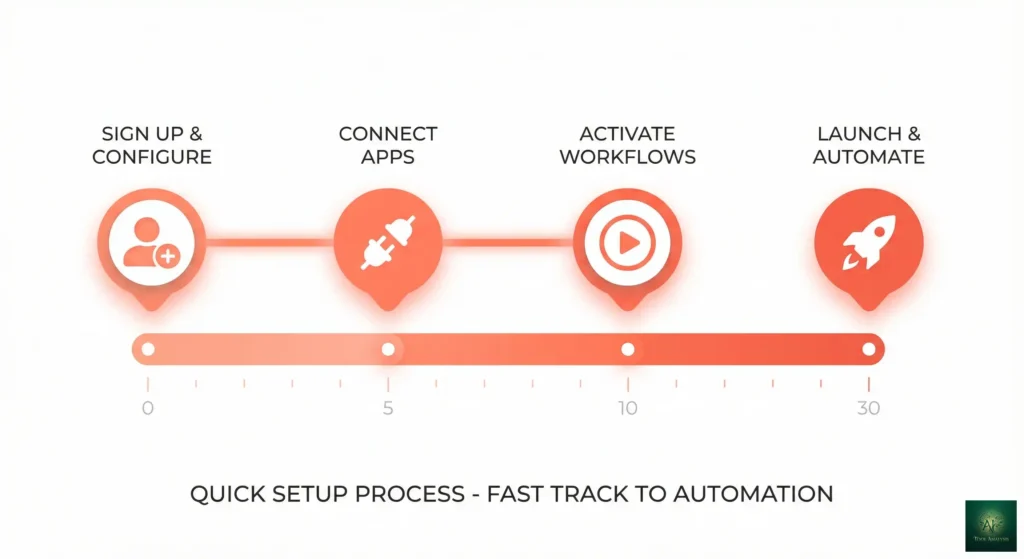
🚀 Getting Started: Your First 30 Minutes
Two very different first hours, depending on the path you pick. Cloud is genuinely instant: sign up, get a 14-day trial with Pro features, no credit card, and you are dragging nodes within five minutes. The 9,500+ template library means your first working workflow is usually an import and three credential connections, not a blank canvas. Self-hosting is where the honest n8n review caveat lives: you will need Docker basics, a $5-10/month VPS, and the willingness to own updates and backups yourself. Budget an evening, not 30 minutes, for a production-worthy self-hosted install.
🤖 AI Agents and the New Workflow Builder
This is why n8n’s GitHub stars went vertical. The AI Agent nodes let a model reason over your tools: give an agent access to your database node, your email node, and a search tool, and it decides which to call to complete a task. n8n’s own positioning has shifted to “building AI agents” as the lead use case, and the platform now bundles an AI Workflow Builder that generates workflows from plain-English prompts, with 50 credits/month on Starter, 150 on Pro, and 1,000 on Enterprise cloud plans.
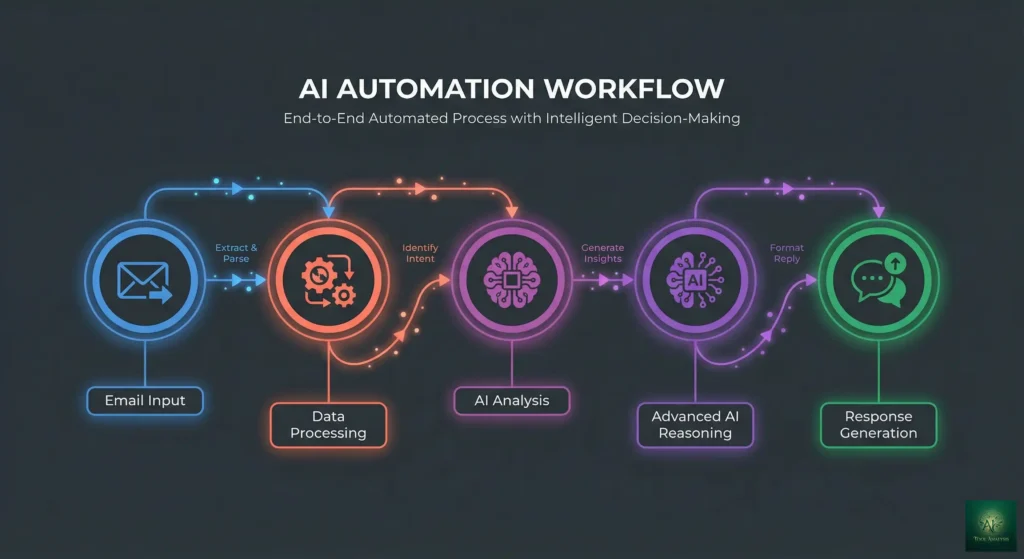
💡 Key Takeaway: If your AI experiments live in chat windows today, n8n is the bridge to automation that runs without you. Start with one agent workflow, a trigger, a model node, and two tools, before buying credits anywhere else. Our MCP explainer covers how tool-calling actually works under the hood.
⚡ Features That Actually Matter
Execution-Based Billing ⭐⭐⭐⭐⭐
One workflow run is one execution, whether it has 3 steps or 40. Per n8n’s own docs, a single execution can do what costs 10,000 operations in per-task tools. This single design decision is most of the savings story.
Code Steps in JS/Python ⭐⭐⭐⭐⭐
When the visual nodes run out, drop into real code. Custom API requests, cURL imports, and webhook triggers are on every plan, including free. This is the escape hatch Claude Code users appreciate: no-code until you need code.
Unlimited Users on Every Plan ⭐⭐⭐⭐
New this cycle: every cloud tier now includes unlimited users and unlimited active workflows. The tiers differ on executions, concurrency (5 on Starter, 20 on Pro, 200+ on Enterprise), shared projects, and governance features like SSO and Git version control (Business and up). Concurrency is the quiet limiter: on Starter, a burst of webhooks queues behind 5 simultaneous runs.
⚔️ n8n vs Zapier: The Billing-Model Math
Every n8n vs Zapier comparison comes down to one structural difference. Zapier bills per task, meaning every action step in every run. n8n bills per execution, meaning one complete workflow run. Take a 5-step lead-capture workflow that fires 1,000 times a month: on n8n that is 1,000 executions, still inside the €20 Starter plan. On a per-task platform it is 5,000 tasks, which pushes you multiple tiers up. The more steps your workflows have, the more lopsided the math gets.
📈 Units Billed per Month: 5-Step Workflow at Increasing Volume
| Criteria | n8n | Zapier | Winner |
|---|---|---|---|
| Billing model | Per execution (whole run) | Per task (every step) | n8n |
| Free option | Self-host, unlimited | Limited free tasks | n8n |
| Ease of first workflow | Steeper, more powerful | Easiest in category | Zapier |
| AI agents | Native agent nodes + AI builder | AI features, less agent-centric | n8n |
| Custom code | JS/Python on all plans | Restricted by plan | n8n |
| Non-technical team fit | Requires a technical owner | Anyone can maintain | Zapier |
🔍 REALITY CHECK
Marketing Claims: “Saves $500+/month vs Zapier” style headlines (including our own old one).
Actual Experience: The savings are real but conditional. They materialize at multi-step workflows and real volume, and they assume someone technical builds and maintains the thing. A 2-step Zap running 50 times a month saves you nearly nothing by switching.
Verdict: Count your steps and your runs first. Above roughly 1,000 multi-step runs a month, n8n’s model wins decisively.
💰 Pricing Breakdown: What You’ll Actually Pay
n8n’s pricing page now quotes euros, with annual billing as the headline rate and monthly billing costing 17% more. Verified July 2026 from the official n8n pricing page:
| Plan | Price (Annual Billing) | Executions/Month | Concurrency | Key Unlocks |
|---|---|---|---|---|
| Community (self-host) | Free | Unlimited | Your server’s limit | All integrations, AI agent nodes, code steps |
| Starter | €20/mo | 2,500 | 5 | Managed hosting, 1 project, 50 AI builder credits |
| Pro | €50/mo | 10,000 | 20 | 3 projects, admin roles, insights, 150 AI credits |
| Business | €667/mo | 40,000 | — | SSO/SAML, Git version control, environments |
| Enterprise | Custom | Custom | 200+ | Dedicated support with SLA, log streaming, 365-day insights |
The real-world cost math:
- Per execution on Starter: €20 ÷ 2,500 = €0.008 per workflow run (any number of steps)
- Per execution on Pro: €50 ÷ 10,000 = €0.005 per run
- Per execution on Business: €667 ÷ 40,000 = €0.017 per run (you pay extra for SSO and governance, not volume)
- Self-hosted: server only, roughly €5-10/month flat at any volume your hardware handles
📊 Executions per Euro by Cloud Plan (Annual Billing)
One caution before you anchor on any of those per-run numbers: what actually determines your tier is trigger frequency, not workflow count.
🔍 REALITY CHECK
Marketing Claims: “2,500 workflow executions” sounds like plenty for a Starter plan.
Actual Experience: n8n’s own pricing FAQ does the honest math: a workflow scheduled every 5 minutes consumes roughly 8,600-8,900 executions a month on its own. One busy chatbot or polling workflow can eat the entire Starter allowance.
Verdict: Audit your trigger frequency before choosing a tier. Schedules and chat workflows push you to Pro fast; webhook-driven workflows stretch Starter much further.
📬 Enjoying this review?
Get honest AI tool analysis delivered weekly. No hype, no spam.
👥 Who Should Use This (And Who Shouldn’t)
Choose n8n self-hosted if: you are comfortable with Docker, run high volumes, and want zero per-execution cost forever. This remains the best deal in automation, full stop.
Choose n8n Cloud if: you want the power without the DevOps. Starter (€20) suits webhook-driven solo use; Pro (€50) is the practical tier for teams and anything schedule-heavy.
Stick with Zapier if: nobody on the team is technical and your workflows are short and low-volume. Paying more for something the whole team can maintain is a legitimate trade.
Skip entirely if: you need one or two personal automations. A Workspace-level tool or even a scheduled script covers that without learning a platform.
🗣️ What Users Are Actually Saying
The “best value at scale” camp. The dominant thread across the n8n community forum and independent pricing teardowns is that execution-based billing plus free self-hosting is unbeatable for technical users. The 191,000+ GitHub stars are the loudest version of this signal.
The “learning curve is real” camp. The long-running consensus in every honest n8n review holds: expect friction in your first week. Data mapping between nodes, expressions, and error handling are genuinely harder than Zapier, and the payoff arrives only after that hump.
The “self-hosting isn’t free” camp. Independent write-ups on the real cost of self-hosting n8n in 2026 keep making the same point: the license is free, but updates, backups, security patches, and 2 a.m. debugging are paid for in your time. Teams that value their hours sometimes conclude Cloud is the cheaper option after all.
The synthesis: nobody disputes the value; the debate is only about who should be trusted to run it.
🔄 Alternatives Worth Considering
No n8n review is complete without naming the alternatives. Zapier remains the ease-of-use benchmark, and Make.com sits between the two on both price and complexity with per-operation billing. For AI-first automation, compare n8n’s agent nodes against the dedicated agent frameworks and the developer agent tools we have tested; n8n wins when the job is connecting agents to many business apps, while code-first frameworks win for deeply custom logic. If your automation lives inside coding workflows specifically, Claude Code or Replit Agent may fit better than a workflow canvas.
❓ n8n Review FAQs: Your Questions Answered
Q: Is n8n really free?
A: Yes. The self-hosted Community Edition has no execution, workflow, or user limits. Your only cost is a server, typically €5-10/month. Cloud plans are paid but include a 14-day trial without a credit card.
Q: How much does n8n Cloud cost in 2026?
A: Starter €20/month (2,500 executions), Pro €50/month (10,000), Business €667/month (40,000, adds SSO and Git), Enterprise custom. Those are annual-billing rates; paying monthly costs about 17% more.
Q: What counts as an execution?
A: One complete workflow run, regardless of steps or data volume. A 40-node workflow that runs once is one execution. This is the key difference from Zapier’s per-task model, where each action step bills separately.
Q: How many users and workflows do plans allow?
A: Unlimited users and unlimited active workflows on every plan, including Starter. Plans differ on executions, concurrency (5 on Starter, 20 on Pro), shared projects, and governance features instead.
Q: Can n8n build AI agents?
A: Yes, natively. AI Agent nodes let models call your other nodes as tools, and the AI Workflow Builder generates workflows from prompts (50-1,000 credits/month by cloud tier). Agent nodes work in the free self-hosted edition too.
Q: Can I move from Cloud to self-hosted later?
A: Yes. Workflows export as JSON and import into any n8n instance. You will re-connect credentials, but the logic transfers completely, so starting on Cloud is not a lock-in decision.
Q: How steep is the learning curve?
A: The most consistent complaint in any n8n review: steeper than Zapier, gentler than writing integrations by hand. Expect a week of friction around data mapping and expressions. The 9,500+ template library shortcuts most common patterns.
Q: Is my data safe with n8n?
A: Cloud data is hosted in the EU (Frankfurt). Self-hosting keeps data entirely on your infrastructure, which is the compliance argument for the free edition. SSO, SAML, and audit logging arrive at the Business tier.
🎯 Final Verdict
Our n8n review verdict strengthens with this update. The platform kept its unbeatable economics, removed its most annoying caps, and rode the AI agent wave better than any competitor in the category. The rating stays at 4.5 out of 5: the missing half star is the learning curve and the Pro-to-Business pricing cliff, where €50 jumps to €667 with nothing in between.
✅ What We Liked
- ✓ Self-hosted edition is genuinely free and unlimited
- ✓ Execution billing beats per-task pricing at any real volume
- ✓ Native AI agent nodes plus prompt-to-workflow builder
- ✓ Unlimited users and active workflows on every plan
- ✓ Code steps (JS/Python) and 9,500+ templates
❌ What Fell Short
- ✗ Week-one learning curve is real
- ✗ €50 Pro to €667 Business is a pricing cliff
- ✗ Starter’s 5 concurrent executions throttle bursts
- ✗ Dedicated support only at Enterprise
Use n8n if: you have one technical person and more than a handful of multi-step automations. Stick with Zapier if: ease of maintenance by non-technical staff is worth paying multiples for. Try it today: n8n.io offers a 14-day cloud trial with no credit card, and the self-hosting docs get the free edition running in an evening.

Founder of AI Tool Analysis. Reads every pricing page, help article and footnote so you don’t have to. Covering AI tools since 2025. See how we research →
Related Reading
- AI Agent Frameworks Compared
- Top AI Agents for Developers
- MCP Explained: How AI Tool-Calling Works
- Claude Code Review
- Replit Agent 3 Review
- Google Workspace Studio Review
- ChatGPT Review
- The Complete AI Tools Guide
Stay Updated on Automation Tools
Don’t let your team fall behind. Subscribe for weekly reviews of AI productivity tools, automation platforms, and business solutions.
- ✅ Sourced Reviews: Every price and limit checked against the vendor’s own pages, not rewritten from press releases
- ✅ Price Tracking: Know when tools drop prices or add free tiers
- ✅ Feature Launches: Major updates covered within days
- ✅ Comparison Updates: As the market shifts, we update our verdicts
- ✅ No Hype: Just the AI news that actually matters for your work
Free, unsubscribe anytime.

Last Updated: July 3, 2026
n8n Version Tested: n8n Cloud + Community Edition (July 2026 release line)
Next Review Update: October 2026 (or on major pricing change)
Have a tool you want us to review? Suggest it here | Questions? Contact us