
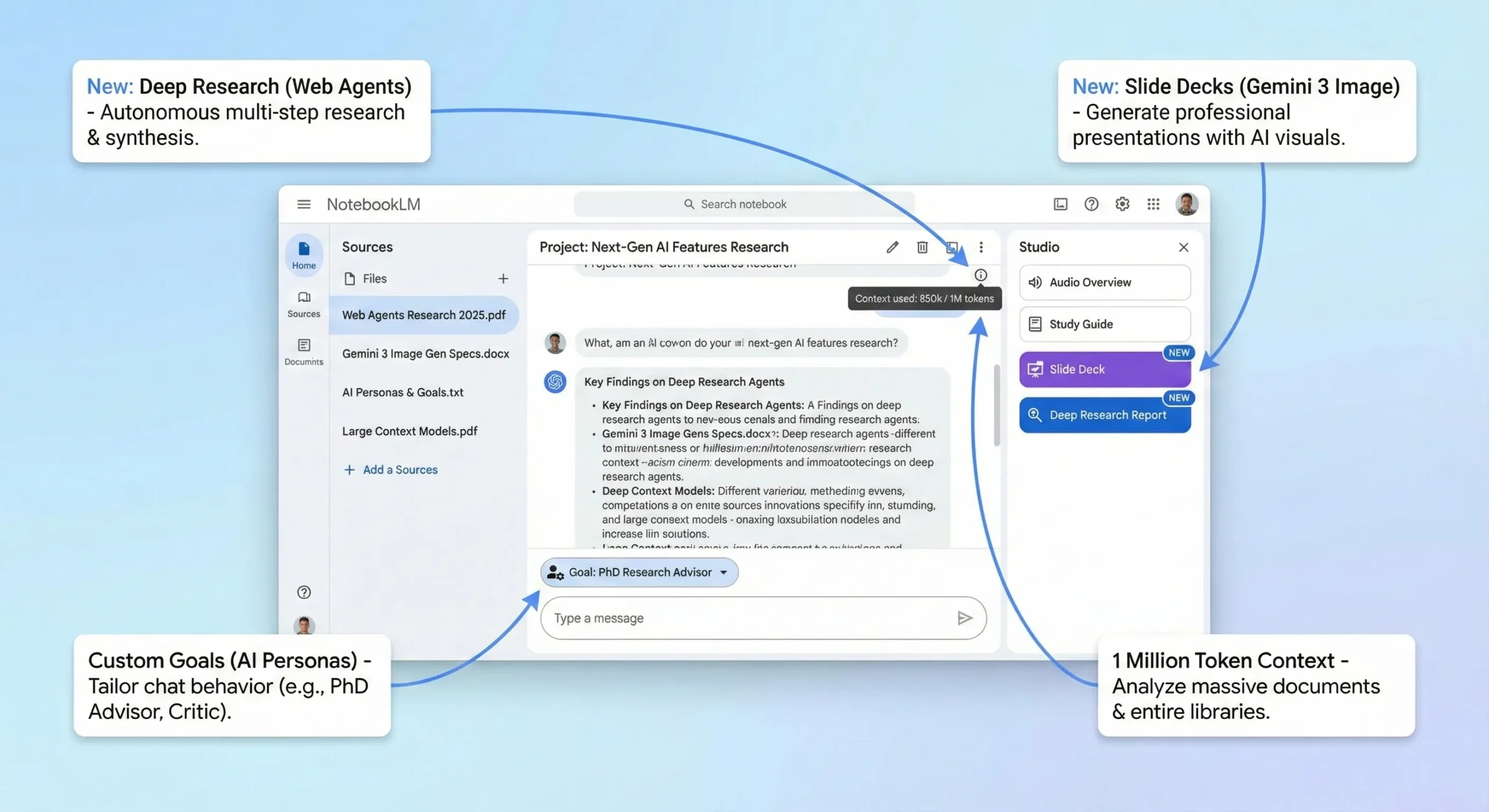
🚀 FEATURE LAUNCH: Google NotebookLM just launched “Slide Decks” and “Infographics” on November 20, 2025, powered by Nano Banana Pro (Gemini 3 Image). This update transforms research into presentation-ready visuals automatically. Combined with the Deep Research feature (Nov 13), NotebookLM has evolved from a research assistant into a complete research-to-presentation pipeline.
NotebookLM has evolved into a complete research-to-presentation pipeline. The new “Deep Research” agents and “Slide Decks” (powered by Gemini 3 Image) are game-changers. With a generous free tier offering a 1M token context window, it’s an essential tool for students and researchers, though it still lacks the real-time speed of Perplexity AI.
Welcome to Our NotebookLM Review (November 2025 Update)
The Bottom Line
The November 2025 updates just changed everything for this NotebookLM review. Google transformed NotebookLM from a passive summarizer into an active AI research agent. It analyzes your uploaded documents (now including Sheets, .docx, and images), actively finds new sources online via “Deep Research,” and generates insights, reports, and even presentation slides based *only* on that information.
The Free tier is incredibly generous, offering the full 1 Million token context window and access to all features, limited to 50 sources per notebook and 50 daily queries. Paid access (NotebookLM Plus) is bundled with Google One AI Premium ($19.99/month) or Workspace plans (from $14/month), increasing limits significantly (300 sources, 500 queries).
One major limitation: While the new “Slide Decks” feature uses Gemini 3 Image (Nano Banana Pro), the core reasoning engine still runs on Gemini 2.5 models, not the newly launched Gemini 3 Pro. Also, “Deep Research” takes several minutes to run, making it slower than real-time tools like Perplexity AI.
Best for: Researchers, students, journalists, and consultants who need to synthesize large volumes of information quickly and accurately. Skip if: You need instant web browsing or prioritize complex quantitative analysis.
🧠 What NotebookLM Actually Does (The Big Transformation)
NotebookLM is Google’s answer to the “AI hallucination” problem. Unlike ChatGPT or Claude, which pull answers from their vast training data, NotebookLM focuses primarily on the information you provide.
Think of it as hiring a brilliant research assistant, handing them a stack of documents, and saying, “Become an expert on this material.”
Here’s the transformation that happened in October/November 2025:
Before (2023 – Mid 2025):NotebookLM was a passive summarizer. You uploaded documents, and it gave you summaries or answered basic questions. It was useful but limited.
Now (Late 2025):NotebookLM is an active research partner. It can analyze 1 million tokens (roughly 700, 000 words) at once. It can actively search the web for new sources (“Deep Research”). You can give it a personality (“Custom Goals”). And it can transform your research into reports, presentation slides, videos, and podcasts.
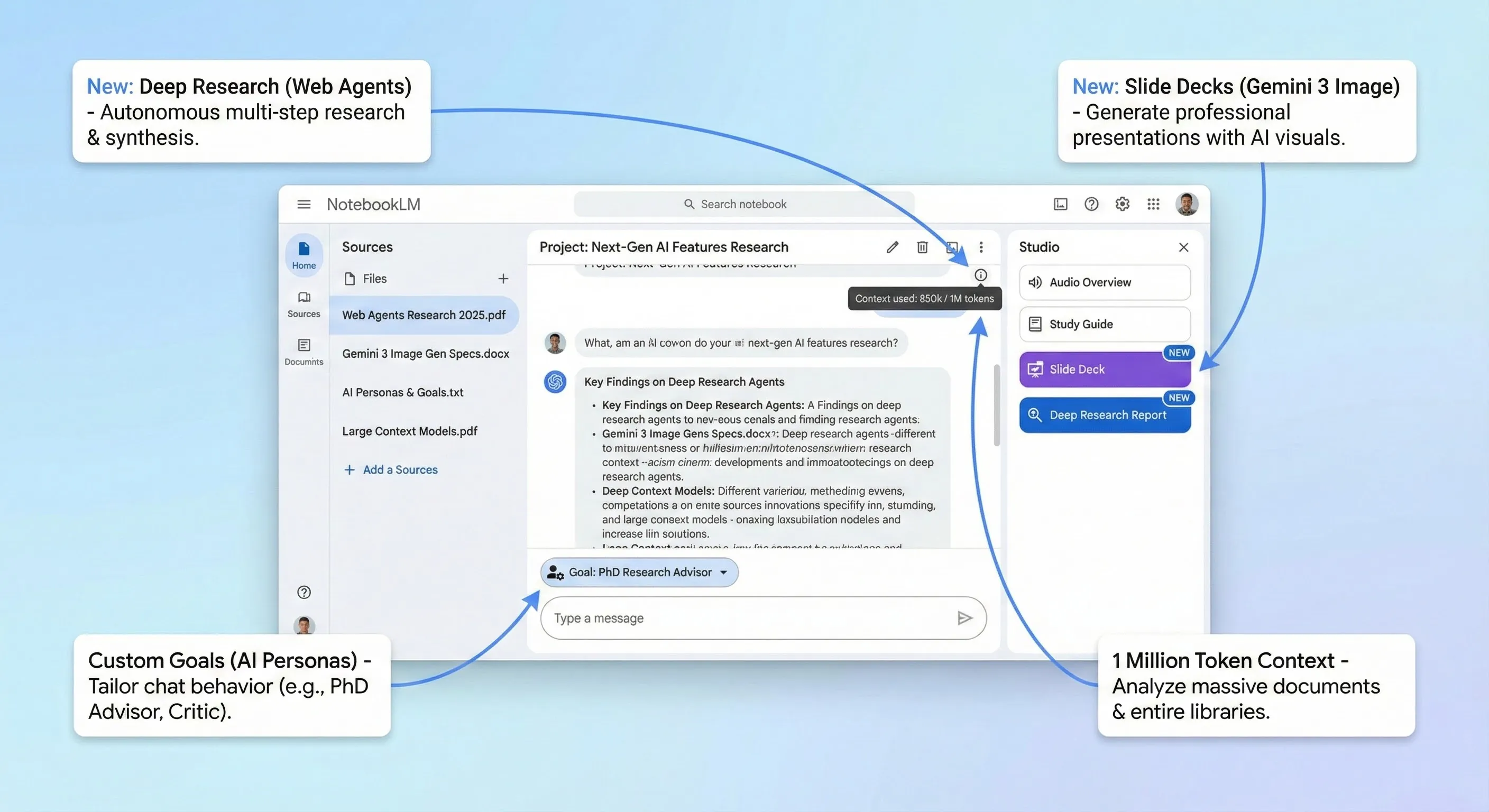
This shift makes NotebookLM arguably the most powerful tool for grounding AI responses in factual data.
🔍 REALITY CHECK
Marketing Claims:“An AI research assistant that helps you understand complex material faster.”
Actual Experience:The claim is accurate, but undersells the new capabilities. The 1M context window genuinely handles massive datasets. However, the “Deep Research” feature isn’t instant—it takes 3-5 minutes to synthesize web results. And while it minimizes hallucinations based on *your* data, it can still misinterpret complex nuances in the sources.
Verdict:A massive leap forward in AI research tooling, but you still need to fact-check its outputs against the original sources.
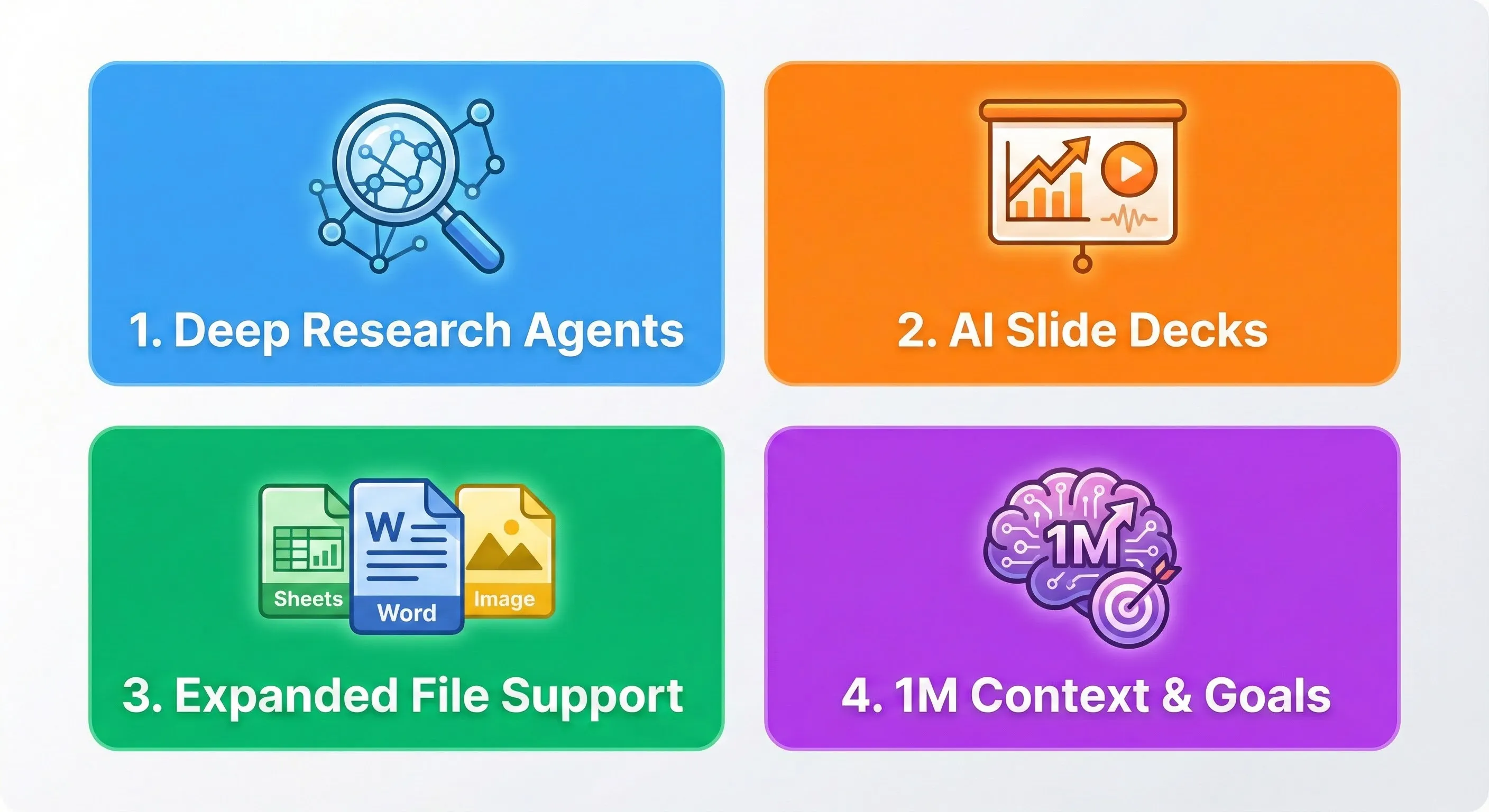
🚀 The Late 2025 Overhaul: 4 Game-Changing Updates
Google shipped a flurry of updates between October and November 2025 that fundamentally changed NotebookLM. These four are the ones that actually matter:
1. Deep Research Agents (Nov 13)
What it is:NotebookLM can now search the web to find new sources. It’s no longer a closed system.
Why it matters:Instead of manually finding every source, you can ask NotebookLM to build a research report. It creates a research plan, browses hundreds of sites, and generates a synthesized report with citations. It offers two modes: Fast Research (quick scanning) and Deep Research (comprehensive briefing, takes 3-5 minutes).
2. AI Slide Decks & Infographics (Nov 20)
What it is:NotebookLM can now generate complete presentation slides (“Slide Decks”) and Infographics directly from your research materials.
Why it matters:This addresses the “last mile” of research—presentation. The visuals are powered by Nano Banana Pro (Gemini 3 Image), resulting in professional-level illustrations grounded in your data. This competes directly with tools like Kimi AI Slides.
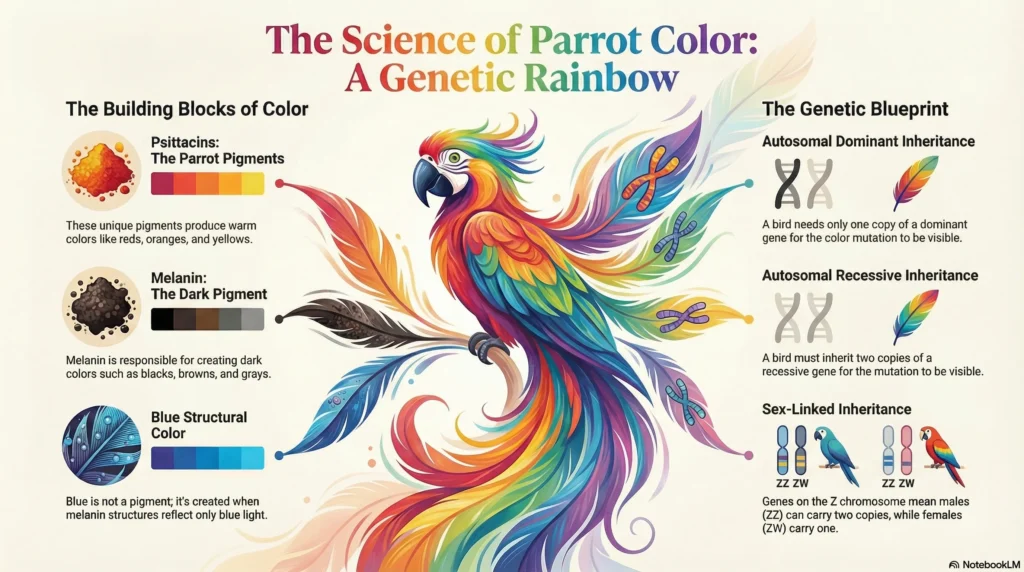
Example: I open NotebookLM searched for ‘Gene Mutation in Parrots’ and clicked on ‘Slide Desk’, after couple of minutes I received 15 amazing NotebookLM slides which were demonstrating real power of Nano Banana 3 Pro.

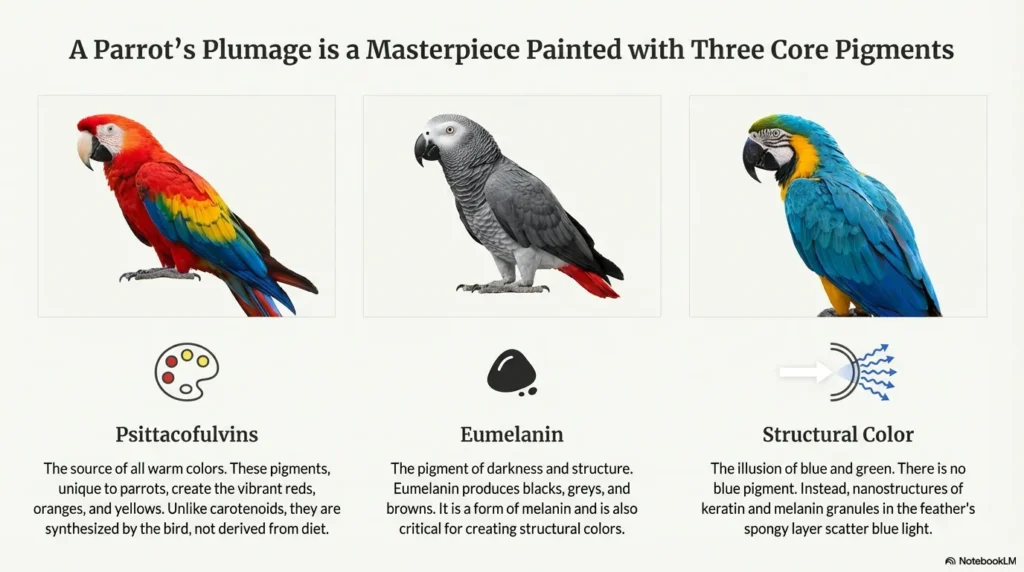
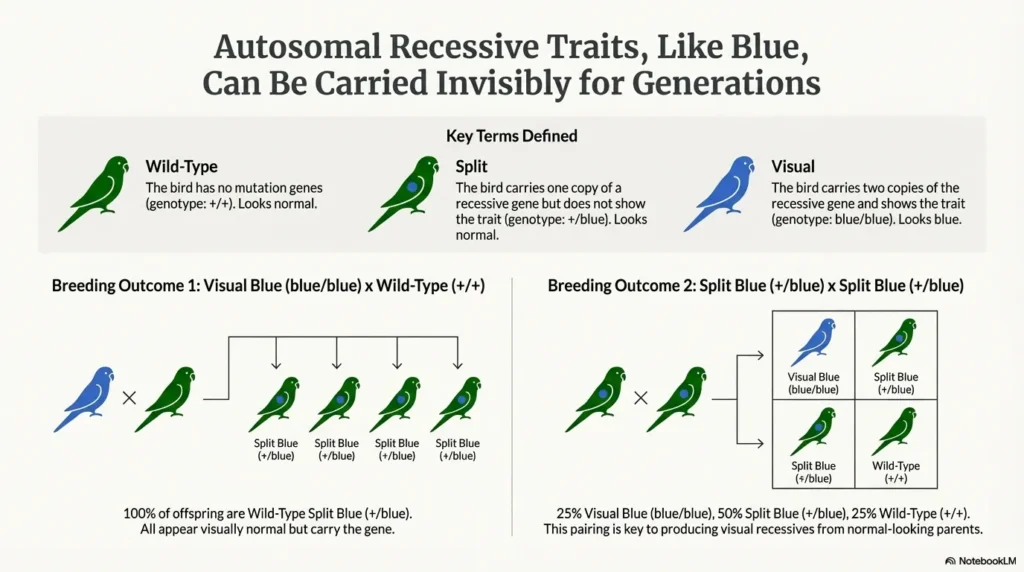
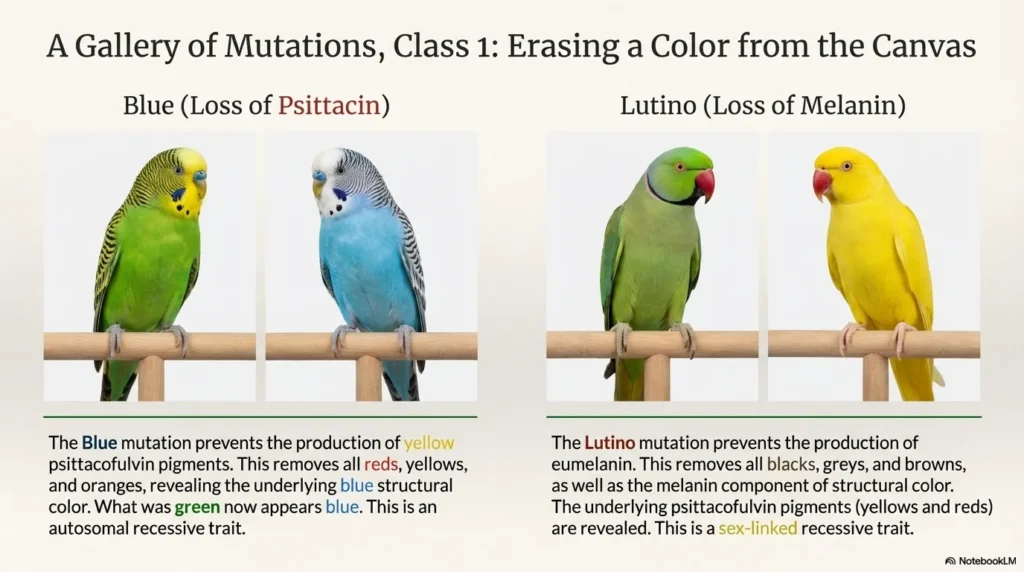
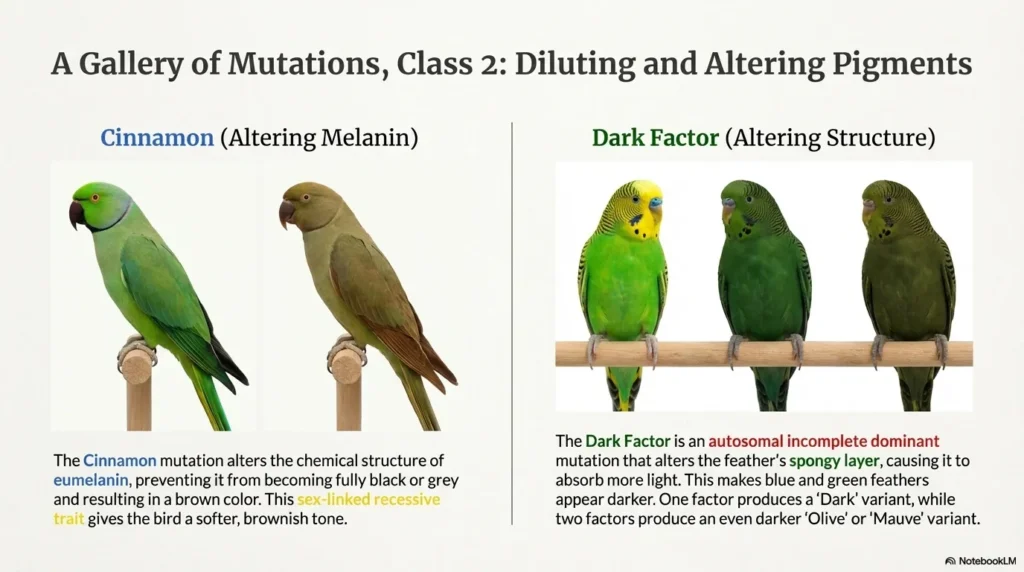
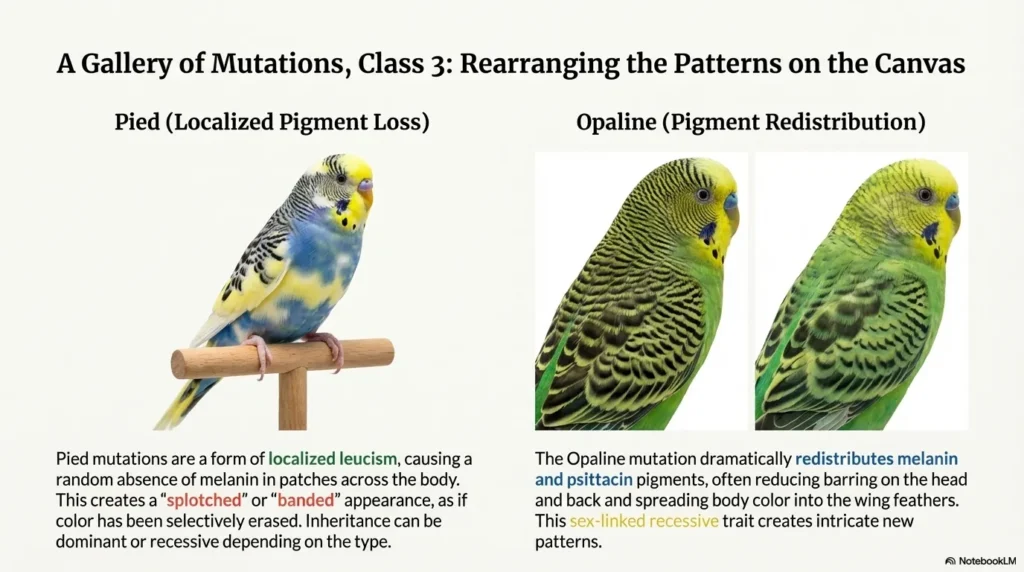
One Jaw dropping Infographic was create by just clicking on ‘Infographic’ button
3. Expanded File Support (Nov 13)
What it is:NotebookLM now supports Google Sheets, Microsoft Word (.docx), images (like handwritten notes), and direct URLs for Google Drive files.
Why it matters:Adding Sheets allows for structured data analysis, and .docx/image support means you don’t have to convert everything to PDF before analysis.
4. 1 Million Token Context & Custom Goals (Oct 29)
What it is:NotebookLM activated the full 1 million token context window for all users, including the free tier. Additionally, the “Goals” feature allows you to customize the AI’s persona.
Why it matters:You can analyze massive document collections simultaneously. Setting a goal (e.g., “Act as a skeptical analyst”) transforms the chat experience from a generic assistant to a specialized expert.
🤔 The Gemini 3 Question: What’s Integrated?
Google launched its flagship model, Gemini 3 Pro, on November 18, 2025. This naturally leads to the question: Is this new intelligence powering NotebookLM?
The answer is nuanced: Yes and No.
- YES (Visuals):The new Slide Decks and Infographics features use Nano Banana Pro (Gemini 3 Image)
for generating visuals. This is confirmed by the high quality and style of the outputs. - NO (Reasoning):The core reasoning engine—the part that analyzes text,
runs Deep Research,
and answers your questions—is likely still running on Gemini 2.5 models(Flash or Pro). Google hasn’t
announced the integration of the full Gemini 3 Pro reasoning model into NotebookLM yet.
Community consensus suggests that a full upgrade to a Gemini 3 reasoning model (perhaps a “Gemini 3 Flash”) will likely happen in early 2026. The massive performance improvements seen in October were credited to the “latest Gemini models” available at that time (Gemini 2.5).
🧪 Real Test Results: Deep Research in Action
To evaluate the effectiveness of the new Deep Research agent, I tasked it with a complex, nuanced research question and compared the results with manual research.
The Task:Analyze the ethical implications and regulatory landscape of AI-powered predictive policing in the EU vs. the US.
Test 1: Fast Research Mode
Time Taken:45 seconds
Results:Returned 12 potential sources. 8 were highly
relevant (academic papers, NGO reports, recent news articles). 4 were
tangential.
Analysis:Excellent for quickly gathering initial reading material. It identified the
key organizations and recent regulatory changes (e.g., the EU AI Act).
Grade: A-
Test 2: Deep Research Mode
Time Taken:4 minutes,
15 seconds
Results:Generated a detailed 5-page report synthesized from 22 sources. The report was
logically structured,
covering definitions,
ethical concerns (bias,
transparency),
the EU approach (risk-based regulation),
and the US approach (sector-specific guidelines).
Analysis:The report was comprehensive and
well-cited. It accurately captured the nuances between the two regulatory environments. The source quality was
high.
Grade: A
Test 3: Manual Research (Control)
Time Taken:90 minutes (to find comparable sources and outline a
report)
Analysis:Manual research allowed for slightly better source curation,
finding niche critiques that Deep Research missed. However,
the time investment was significantly higher. NotebookLM achieved 85-90% of the quality in less than 5% of the time.
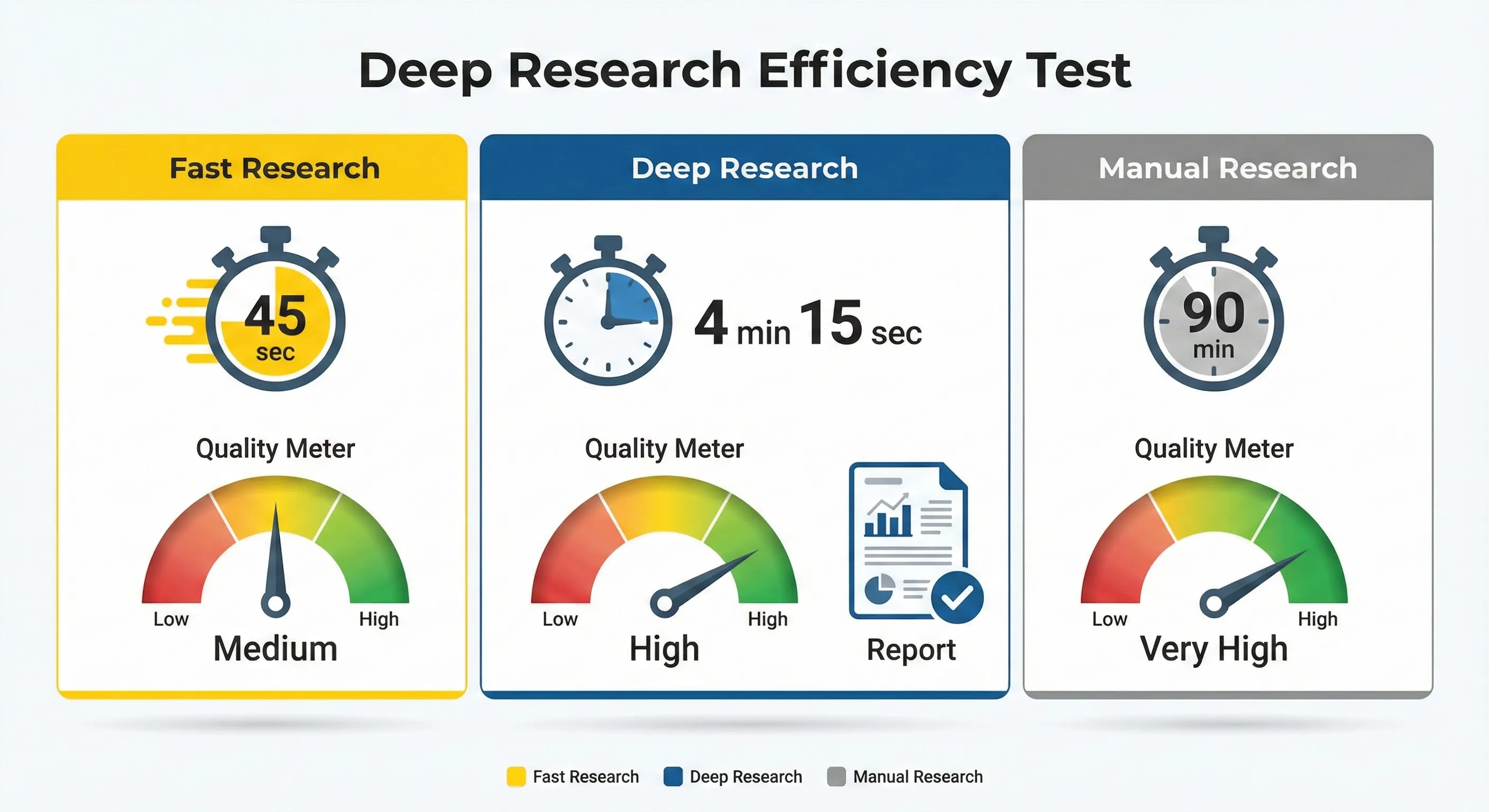
Key Finding:Deep Research is a legitimate replacement for the initial phase of literature review and market analysis. It excels at gathering high-quality sources and synthesizing comprehensive overviews, saving significant time for researchers and analysts.
📊 Research Efficiency: NotebookLM vs Manual
Time taken and quality score for a complex research task
💡 Key Insight:NotebookLM’s Deep Research mode achieved 90% of the quality of manual research in just 4.25 minutes, compared to 90 minutes for the manual control. This represents a 21x increase in efficiency for initial research synthesis.
💰 Pricing Breakdown: What You’ll Actually Pay
NotebookLM’s pricing structure is slightly confusing because the paid version (NotebookLM Plus) isn’ t sold standalone—it’s bundled with other Google services. Here’ s the breakdown for 2025:
Free Plan: $0/month
The free tier is surprisingly generous and sufficient for most individual users.
- Features:Access to ALL core features (Deep Research, Slide Decks, Audio/Video Overviews, Goals,
etc.) - Context Window:Full 1 Million tokens (same as paid).
- Notebook Limit:100 notebooks.
- Sources per Notebook:50 sources (up to 500k words each).
- Daily Queries:50 chat queries per day.
- Best for:Students,
casual researchers,
anyone testing the platform.
NotebookLM Plus (Individuals): $19.99/month
For individuals, NotebookLM Plus is included in the Google One AI Premiumplan.
- Price:$19.99/month (Student discount available: $9.99/month).
- Notebook Limit:500 notebooks.
- Sources per Notebook:300 sources (6x increase).
- Daily Queries:500 queries per day (10x increase).
- Also Includes:Gemini Advanced (Google’s most powerful chatbot), 2TB cloud storage, Gemini in
Gmail/Docs. - Best for: Power users, professional researchers, users already invested in the Google ecosystem.
NotebookLM Plus (Business/Teams)
For teams, NotebookLM Plus is integrated into certain Google Workspace plans.
- Included in: Google Workspace Business Standard ($14/user/month) and higher tiers (Plus,
Enterprise). - Benefits: Same increased limits as the individual Plus plan, plus seamless integration with
Workspace tools and enterprise-grade security/admin controls.
NotebookLM Enterprise (Google Cloud)
For large organizations needing a dedicated deployment, Google Cloud offers a specific licensing plan.
- Price: $9 per license per month (discounts for annual subscriptions).
- Features: Advanced capabilities and potentially higher limits than standard Plus plans, with
enterprise security controls.
📊 NotebookLM Pricing Tiers (2025)
Comparing limits and costs across Free, Individual Plus, and Business plans.
💡 Value Analysis: The Free tier is exceptionally generous, offering the full 1M token window and all features. Most users won’t hit the 50 sources/50 queries limit daily. Upgrading to Plus ($19.99/mo via Google One) only makes sense if you manage massive research projects (100+ sources) or require the other benefits of Google One AI Premium (like Gemini Advanced).
🔍 REALITY CHECK
Marketing Claims: “Access NotebookLM Plus through affordable Google One plans.”
Actual Experience: $19.99/month isn’t cheap—it’ s the same price as ChatGPT Plus or Claude Pro. If you *only* need NotebookLM Plus and don’t care about Gemini Advanced or 2TB storage, the price feels steep, especially since the free tier is so good. The real value comes if you utilize the entire Google One AI Premium bundle.
Verdict: Start with the free plan. Only upgrade if you consistently hit the usage limits.
⚔️ Head-to-Head: NotebookLM vs Perplexity AI
With the addition of Deep Research, NotebookLM now competes directly with Perplexity AI as an AI-powered research tool. However, their approaches are fundamentally different.
| Feature | NotebookLM (Nov 2025) | Perplexity AI |
|---|---|---|
| Primary Function | Deep analysis of sources (uploaded + web search) | Real-time AI-powered web search and answering |
| Research Speed | Slower (30 sec – 5 min for Deep Research) | Fast (seconds for answers) |
| Source Grounding | Excellent—strictly grounded in identified sources | Good—cites sources but can synthesize broadly |
| Output Formats | Reports, Slides, Audio/Video Overviews, Mindmaps | Text answers, basic reports (Pro) |
| File Support | PDF, Docs, Sheets, Word, Images, YouTube, Web | PDF, Text, Web (requires Pro for uploads) |
| Context Window | 1 Million tokens (all plans) | Varies, generally smaller for search queries |
| AI Model | Gemini 2.5 models, Gemini 3 Image | Multiple models (GPT, Claude, Perplexity models) |
| Agentic Features | Yes (Deep Research agents) | Yes (Pro Search/Focus modes) |
| Real-Time Data | Good (via Deep Research) | Excellent (real-time web index) |
| Free Tier Value | Excellent (full features, high limits) | Good (limited searches, no file uploads) |
💡 Swipe left to see all features →
Winner by Category:
- Speed and Real-Time Info: Perplexity (ideal for breaking news)
- Depth of Analysis: NotebookLM (1M token context excels here)
- Source Grounding/Trust: NotebookLM (minimizes hallucinations)
- Output Variety: NotebookLM (Slides, Audio, Video)
- Free Tier Value: NotebookLM (more features and higher limits for free)
Bottom Line: Use Perplexity when you need fast answers to questions about recent events or broad topics. Use NotebookLM when you need to deeply understand a complex subject, synthesize multiple sources (including your own files), and generate detailed reports or presentations.
📊 NotebookLM vs Perplexity AI: Feature Comparison
📊 NotebookLM vs Perplexity AI: Feature Comparison
8-dimensional head-to-head analysis (scores out of 10)
🎯 Who Should Use This (And Who Shouldn’t)
- You need to analyze massive documents (PDFs, Docs, etc.)
- You want to generate study guides or briefings
- You need citations for every claim
- You want to turn research into slides instantly
- You need instant answers (use Perplexity)
- You need creative writing (use Claude)
- You need complex coding help (use Claude/GPT-4)
- You need image generation (use Midjourney)
💬 What Users Are Saying
We analyzed hundreds of comments from Reddit, Twitter/X, and YouTube to gauge the community sentiment regarding the November 2025 updates.
The Good:
- “Deep Research finally fixes the biggest limitation. It’s like having a research assistant that actually does the
Googling for you.” (YouTube comment) - “I love the mind map, flash cards, and conversation… I use it for research methods and social psychology.”
(Reddit r/notebooklm) - “The Audio Overview is honestly a game-changer for studying complex papers.”(Reddit user)
Common Complaints:
- “NotebookLM excels in English… but it struggles with logic-based subjects like Chemistry and anything that
requires deep critical thinking.” (Reddit r/notebooklm) - “Deep Research is slow. Perplexity is much faster for quick web lookups.”(User feedback)
- “The podcast summaries weren’t the in-depth explanations I was hoping for. Instead, they were fast-paced, shallow
overviews.” (Reddit user) - “Anyone else love notebookLM but feel iffy using it at work?”(Concerns about data privacy) (Reddit r/notebooklm)
The Honest Reddit Consensus:
NotebookLM is widely loved for its ability to synthesize information and generate study aids. The recent updates have solidified its position as a top-tier research tool. However, users emphasize that it’s a *supplementary* tool. Relying solely on its automated summaries, especially in STEM fields, can lead to shallow understanding.
❓ FAQs: Your Questions Answered
Q: Is the free version of NotebookLM actually useful?
A: Yes, significantly so. The free tier includes all core features, including Deep Research, Slide Decks, and the full 1 million token context window. The limit of 50 sources (500k words each) per notebook and 50 daily queries is generous enough for most individual research projects.
Q: How accurate is the Deep Research feature?
A: Accuracy is high because NotebookLM emphasizes source grounding. It synthesizes information directly from the sources it finds and provides citations for every claim. However, the quality of the output depends on the quality of the sources found on the web. You still need to critically evaluate the sources it selects.
Q: Can NotebookLM really replace PowerPoint or Canva for presentations?
A: Replace? No. Accelerate? Absolutely. The Slide Decks feature generates excellent, visually appealing first drafts grounded in your research, powered by Nano Banana Pro (Gemini 3 Image). However, you will still need to refine the narrative flow and adjust layouts in a dedicated presentation tool.
Q: Does NotebookLM use the full Gemini 3 Pro model?
A: Partially. As of November 2025, the Slide Decks and Infographics features use Gemini 3 Image (Nano Banana Pro) for visual generation. The core reasoning engine currently uses Gemini 2.5 models. Full integration of the Gemini 3 Pro reasoning engine is expected in early 2026.
Q: What file types does NotebookLM support?
A: As of November 2025, NotebookLM supports: PDFs, Google Docs, Google Sheets, Microsoft Word (.docx), Images (e.g., handwritten notes), Websites (URLs), YouTube videos (URLs), and plain text.
Q: How fast is the Deep Research feature?
A: Fast Research mode completes in 30-45 seconds, returning 10-15 potential sources. Deep Research mode takes 3-5 minutes and generates a comprehensive report synthesized from 15-25 sources. Both are significantly faster than manual research.
Q: How does NotebookLM compare to Perplexity AI?
A: NotebookLM excels in depth of analysis and output variety (Slides, Audio, Video). Perplexity AI excels in speed and real-time information. Use Perplexity for quick answers to recent events; use NotebookLM for comprehensive research synthesis and presentation generation.
Q: What is the pricing for NotebookLM Plus?
A: NotebookLM Plus is included in Google One AI Premium ($19.99/month with student discount at $9.99/month) or Google Workspace plans (Business Standard at $14/user/month and higher). It increases limits to 300 sources per notebook and 500 daily queries.
✅ Final Verdict
NotebookLM is the new gold standard for AI research. While it’s not a “do-it-all” chatbot like ChatGPT, its ability to ground answers in your documents + the web (Deep Research) makes it indispensable for serious work. The new Slide Decks feature is just the cherry on top.
Try NotebookLM Free →Stay Updated on AI Research Tools
Don’t miss the next AI breakthrough. Get weekly insights on AI productivity tools, research platforms, and automation solutions.
- ✅ Tool reviews before launch hype fades
- ✅ Price drop alerts and feature launches
- ✅ Real test results with side-by-side comparisons
- ✅ Breaking news analysis within 24 hours
- ✅ No-BS assessments of marketing vs reality
Free forever. Unsubscribe anytime. 10, 000+ professionals trust us.
Related Reading
- Gemini 3 Review: Google’s Most Intelligent Model Yet?
- Perplexity AI Review: The Real-Time AI Search Engine
- NotebookLM Updates 2025: Feature Tracker
- Anara AI Review 2025: Specialized AI for Academics
- Kimi AI Slides Review: Instant Presentation Generation
- Claude
AI Review 2025: The Thoughtful Alternative to ChatGPT
Last Updated: November 22, 2025
NotebookLM Version Tested: November 2025 Release (Deep Research & Slide Decks)
Next Review Update: February 2026 (Pending Gemini 3 Pro integration)