
📹 Watch: Kling AI Complete Guide
Video length limits, pricing breakdown, and hands-on demo
The Bottom Line
If you remember nothing else: Kling AI video length depends entirely on your plan. Free users get 5-10 seconds per generation. Paid subscribers ($6.99-$180/month) can generate videos up to 2 minutes. The Extend feature pushes this to 3 minutes maximum, but quality degrades in longer sequences. That’s still 3-6x longer than Runway’s 16-second cap or Sora’s 35-second limit.
The catch? Kling AI uses a credit system. A 5-second video costs 10-35 credits depending on quality mode. Your 66 daily free credits get you 1-2 short videos. Paid plans don’t unlock unlimited generation; they just give you more credits. Check our complete Kling AI review for the full breakdown, or see how it compares in our AI video tools comparison.
⚡ TL;DR — Kling AI Video Length Guide
- Free Tier: 5-10 second videos, 66 daily credits (1-6 videos/day), 720p watermarked
- Paid Plans: $6.99-$180/month, up to 2 minutes initial + 3 minutes with Extend
- Key Advantage: 3-6x longer than Runway (40s max) or Sora (35s max)
- Quality Trade-off: Best under 30 seconds; degrades noticeably after 60 seconds
- Best For: Social media, product demos, concept videos where length matters more than polish
📑 Quick Navigation
📏 Kling AI Video Length: The Basics
Kling AI generates videos in two modes: Standard (5 or 10 seconds) and Professional (same lengths, higher quality). The base generation doesn’t go beyond 10 seconds in a single clip. For anything longer, you need the Extend feature, which adds 5 seconds at a time.
Here’s the video length hierarchy at a glance:
| Generation Type | Duration | Available On |
|---|---|---|
| Single generation (Standard) | 5 or 10 seconds | All plans |
| Single generation (Professional) | 5 or 10 seconds | Paid plans only |
| With Extend feature | Up to 2 minutes | Paid plans |
| Maximum possible | Up to 3 minutes | Paid plans (multiple extensions) |
Think of Kling AI video length like building with Lego blocks. Each generation gives you a 5-10 second block. The Extend feature snaps another 5-second block onto the end. You keep snapping until you hit the 2-3 minute ceiling, but each extension costs additional credits.
🆓 Free Tier Video Length Limits
Free users get 66 credits per day that reset every 24 hours. These credits don’t roll over, so use them or lose them. Here’s exactly what you can generate:
- 5-second video (Standard mode): 10 credits = 6 videos per day
- 10-second video (Standard mode): 20 credits = 3 videos per day
- Professional mode: Not available on free tier
- Extend feature: Limited; costs additional credits per extension
🔍 REALITY CHECK
Marketing Claims: “66 free credits daily, enough for basic 5-10 second videos”
Actual Experience: You’ll realistically get 1-2 usable videos per day. Failed generations still consume credits. Free tier videos are watermarked and limited to 720p resolution. Generation times can stretch to 30+ minutes during peak hours.
Verdict: Fine for testing, frustrating for real work.
The free tier’s video length ceiling is technically 10 seconds per generation. You can use the Extend feature if you have credits remaining, but with only 66 daily credits, you’ll run out fast. Most free users report getting 1-2 short clips before hitting their limit.
💰 Paid Plan Video Durations
Paid plans don’t increase the per-generation video length. You still max out at 10 seconds per clip. What they unlock is more credits, Professional mode, and the ability to use Extend aggressively.
| Plan | Monthly Cost | Credits | ~Videos (10s each) | Max Length w/Extend |
|---|---|---|---|---|
| Free | $0 | 66/day | 3/day | Limited |
| Standard | $6.99 | 660/month | ~33 | 2-3 minutes |
| Pro | $25.99 | 3,000/month | ~150 | 2-3 minutes |
| Premier | $64.99 | 8,000/month | ~400 | 2-3 minutes |
| Ultra | $180 | 26,000/month | ~1,300 | 2-3 minutes |
With Kling 2.0 and later versions, paid users can generate initial videos up to 2 minutes long directly, bypassing the 10-second limitation. The Extend feature then allows pushing this to a maximum of 3 minutes by adding 5-second increments.
🔄 The Extend Feature: Reaching 3 Minutes
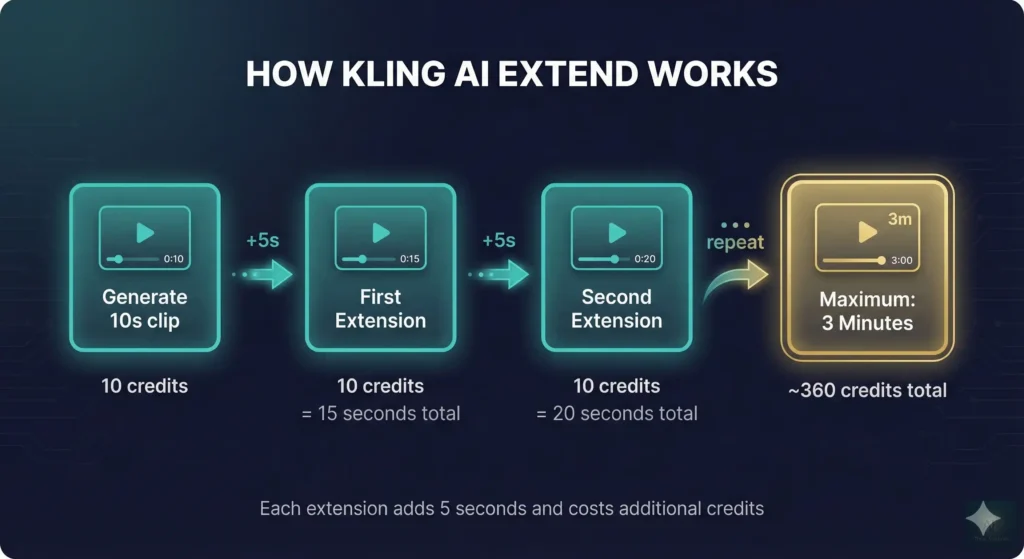
The Extend feature is how Kling AI achieves its video length advantage over competitors. Here’s how it works:
- Generate your initial 5-10 second clip
- Click “Extend” to add 5 more seconds
- Optionally add a text prompt to guide the extension
- Repeat until you hit 2-3 minutes or run out of credits
Each extension costs the same as generating a new 5-second clip (10-35 credits depending on mode). Kling AI analyzes the last frame of your existing video and continues the narrative, attempting to maintain visual consistency.
🔍 REALITY CHECK
Marketing Claims: “Create videos up to 3 minutes with seamless extensions”
Actual Experience: Quality degrades noticeably after 30-60 seconds of extensions. Characters may drift in appearance, lighting shifts unexpectedly, and motion becomes less natural. Extensions work best for simple scenes with minimal subject movement.
Verdict: Great for 30-second content. Use cautiously beyond that.
Pro tip: Use clear text prompts with each extension. Instead of just hitting “Extend,” describe what happens next. This gives Kling AI better guidance and improves continuity.
💳 Credit Cost Per Second (Real Math)
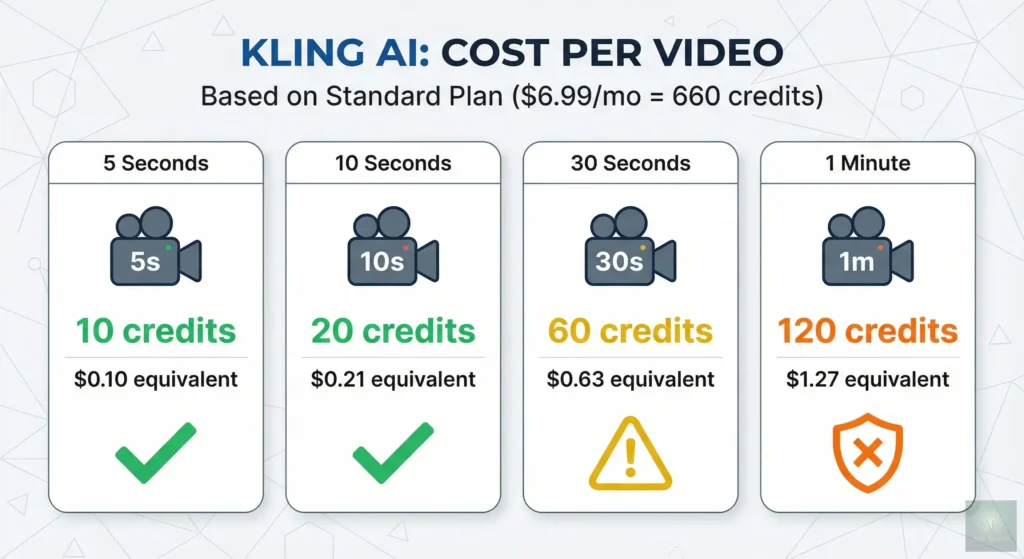
Understanding the Kling AI video length cost structure requires doing the math. Here’s what you’re actually paying per second of generated video:
| Mode | Duration | Credits | Cost/Second (Standard Plan) |
|---|---|---|---|
| Standard | 5 seconds | 10 | ~$0.02/second |
| Standard | 10 seconds | 20 | ~$0.02/second |
| Professional | 5 seconds | 35 | ~$0.07/second |
| Professional | 10 seconds | 70 | ~$0.07/second |
| Kling 2.5 Turbo | 10 seconds | 105 | ~$0.11/second |
On the Standard plan ($6.99/month for 660 credits), creating a 1-minute video through extensions would cost approximately 120 credits in Standard mode or 420 credits in Professional mode. That’s either 5-6 one-minute videos per month or just 1-2 in Professional mode.
For comparison, Runway Gen-4 charges by generation, and their $95 unlimited plan lets you create unlimited videos (in relaxed mode). If you’re generating 50+ videos monthly, Runway may actually be cheaper despite the higher sticker price.
⚔️ Kling vs Competitors: Video Length Comparison
Kling AI’s 2-3 minute maximum is its biggest competitive advantage. Here’s how the major AI video generators compare:
| Tool | Base Generation | Max with Extension | Resolution |
|---|---|---|---|
| Kling AI | 5-10 seconds | 2-3 minutes | 1080p |
| Runway Gen-4 | 5-16 seconds | ~40 seconds (stitching) | Up to 4K |
| Sora 2 | 20 seconds | 35 seconds (Pro tier) | 1080p |
| Google Veo 3 | 8 seconds | ~1 minute | 4K |
| Pika Labs | 3-4 seconds | ~25 seconds | 1080p |
| Luma Dream Machine | 5 seconds | ~20 seconds | 1080p |
Kling AI video length dominates on paper. A 3-minute maximum is 5x longer than Sora and almost 10x longer than Pika. But there’s a catch: longer doesn’t always mean better. Runway and Sora often deliver superior visual quality in their shorter clips.
⚠️ Quality vs Length: The Trade-Off
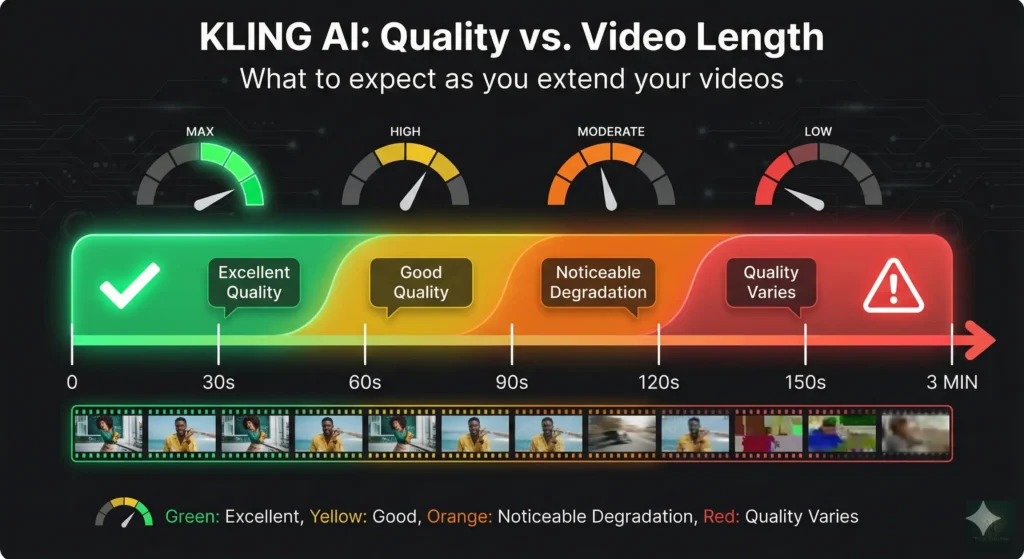
Here’s what nobody tells you about Kling AI video length: the longer you go, the worse it gets.
After testing dozens of extended videos, here’s the pattern:
- 0-30 seconds: Quality remains consistent. Character appearance stable. Motion natural.
- 30-60 seconds: Subtle drift begins. Lighting may shift. Background details change.
- 60-120 seconds: Noticeable degradation. Characters may morph slightly. Physics become less reliable.
- 120-180 seconds: Quality varies wildly. Some extensions work; others break the scene entirely.
For professional work, plan to keep individual shots under 30 seconds and edit them together in post-production. The full 3-minute Kling AI video length capability is better suited for experimental projects or content where slight inconsistencies don’t matter.
✅ Best Practices for Longer Videos
Want to maximize Kling AI video length while maintaining quality? Follow these guidelines:
1. Plan Your Shot List First
Don’t try to create a 2-minute continuous shot. Break your video
into 10-20 second segments with natural cut points. Generate each segment separately, then edit together.
2. Use Detailed Extension Prompts
Instead of generic extensions, specify exactly what happens
next: “Camera slowly pans right, revealing the cityscape. Man continues walking, turning to look over his shoulder.”
3. Test with Standard Mode First
Professional mode costs 3.5x more credits. Generate your concept
in Standard mode first. Only use Professional for final renders of approved concepts.
4. Start with 5-Second Clips
Shorter initial generations give you more control. You can always
extend, but you can’t shorten a clip that went wrong.
5. Monitor Quality After Each Extension
Check the result before extending again. If quality
dropped, regenerate that extension with a clearer prompt rather than pushing forward.
For more AI video creation strategies, see our complete AI tools guide.
❓ FAQs: Your Questions Answered
Q: What is the maximum video length in Kling AI?
A: Kling AI’s maximum video length is 3 minutes when using the Extend feature on paid plans. Single generations are limited to 5-10 seconds. Version 2.0 and later allow initial generations up to 2 minutes for paid subscribers.
Q: How long are Kling AI free tier videos?
A: Free tier users can generate videos of 5 or 10 seconds per generation. With 66 daily credits, you can create approximately 3-6 short videos per day. Videos are watermarked and limited to 720p resolution.
Q: How much does it cost to make a 1-minute Kling AI video?
A: A 1-minute video costs approximately 120 credits in Standard mode or 420 credits in Professional mode. On the Standard plan ($6.99/month), that’s roughly $1.27 per minute in Standard mode.
Q: Can I make videos longer than 3 minutes with Kling AI?
A: No. Kling AI caps at about 3 minutes. For longer content, generate multiple clips and stitch them together using video editing software like DaVinci Resolve or CapCut.
Q: How does Kling AI video length compare to Runway?
A: Kling AI offers significantly longer videos. Runway Gen-4 maxes out around 40 seconds with stitching. Kling AI can reach 2-3 minutes, making it 4-5x longer than Runway’s maximum.
Q: Does video quality decrease with longer Kling AI videos?
A: Yes. Quality stays consistent for about 30 seconds but degrades after 60 seconds of extensions. Keep individual shots under 30 seconds for best results.
Q: What resolution are Kling AI videos?
A: Up to 1080p at 30fps on paid plans. Free tier is limited to 720p. 4K output is not yet available.
Q: How long does it take to generate a Kling AI video?
A: Free users wait 5-30 minutes (sometimes hours during peak times). Paid subscribers with Turbo mode get results in 2-3 minutes.
🎯 Final Verdict: Is Kling Worth It for Long Videos?
Kling AI video length is its killer feature. At 2-3 minutes maximum, it outpaces every major competitor. If you need AI-generated videos longer than 30 seconds, Kling AI is currently your best option.
Use Kling AI if:
- You need videos longer than 30-60 seconds
- You’re creating social media content, product demos, or concept videos
- You’re willing to accept some quality degradation in exchange for length
- You generate 5-30 videos per month (sweet spot for credit economics)
Consider alternatives if:
- Visual quality matters more than length (try Runway Gen-4 or Veo 3)
- You need instant generation (Runway Turbo is faster)
- You generate 50+ videos monthly (Runway’s unlimited plan may be cheaper)
- You work with sensitive data (Kling AI is Chinese-owned)
Try it today: Start with the free tier at app.klingai.com to test video length limits yourself. Your 66 daily credits are enough to experience both the potential and the limitations firsthand.
Stay Updated on AI Video Tools
Don’t miss the next video generation breakthrough. Get weekly reviews of AI video tools with honest pricing breakdowns, quality comparisons, and practical tips for creators.
- ✅ Weekly tool reviews with real testing (not press releases)
- ✅ Price drop alerts when AI tools get cheaper
- ✅ Feature comparisons that actually help you choose
- ✅ Beginner guides to AI video creation
- ✅ No spam, just useful AI insights
Free forever. Unsubscribe anytime. 10,000+ professionals trust us.
Related Reading
- Kling AI Review 2025: The Complete Guide
- Best AI Video Editing Tools 2025: Complete Comparison
- Runway Gen-4 Review: Is It Worth the Premium?
- Google Veo 3.1 Review: The New Video AI Leader?
- HeyGen Review 2025: AI Avatar Videos Explained
- Complete AI Tools Guide 2025
- Free AI Tools That Actually Work
Last Updated: January 12, 2026
Kling AI Version: 2.5 Turbo
Next Review Update: February 15, 2026
Have questions about Kling AI video length? Contact us | Want a tool reviewed? Suggest it here