
Watch: Google VEO 3.1 & Flow Review
This Google VEO 3.1 review cuts through the hype surrounding Google’s flagship AI video model. Since its announcement, VEO has promised Hollywood-level quality and unprecedented control. With the release of VEO 3.1 in October, and critical updates to its interface, Google Flow, in November 2025, those promises are closer to reality—but accessing them isn’t cheap or easy.
Google is positioning VEO 3.1 not just as a text-to-video generator, but as an AI filmmaking suite. Unlike competitors that focus on generating single, impressive clips, VEO 3.1, used within Google Flow, is designed for continuity, editing, and narrative structure.
But does it deliver? I’ve spent the last month testing VEO 3.1’s new capabilities—including “Ingredients” for consistency, audio synchronization, and the brand-new post-generation editing tools—to see if it truly surpasses Runway Gen-4 and the elusive OpenAI Sora 2.
Click any section to jump directly to it
- 🎬 What VEO 3.1 and Flow Actually Do
- 🔧 The Director’s Toolkit: Features That Matter
- 🚀 Getting Started: Your First Hour in Flow
- 🥊 Head-to-Head: VEO 3.1 vs. Sora 2 vs. Runway Gen-4
- 💰 Pricing Breakdown: What You’ll Actually Pay
- 🧑🎨 Who Should (And Shouldn’t) Use VEO 3.1
- 🗣️ What Users Are Actually Saying
- ❓ FAQs: Your Questions Answered
- 🏁 Final Verdict
The Bottom Line
VEO 3.1 is the most controllable AI video model available today. The October 3.1 update significantly improved texture realism and audio synchronization. More importantly, the November updates to Google Flow fundamentally change the game, allowing you to edit generated videos—changing camera angles, inserting objects, or altering lighting—after the clip is rendered.
However, this power comes at a steep price. Access requires a Google AI Pro ($20/month) or Ultra ($250/month) subscription, and the Flow interface can be buggy and frustrating. While the 1080p cinematic quality is stunning for landscapes and objects, human emotions still often appear robotic compared to Sora 2.
Best for: Professional filmmakers, agencies, and creators prioritizing cinematic control and shot-to-shot consistency.
Skip if: You need highly realistic human emotions for social media, or if you are looking for the best AI video editing tool on a tight budget (try Kling AI instead).
What VEO 3.1 and Flow Actually Do (Not Just What Google Claims)
It’s crucial to understand that VEO 3.1 and Google Flow are two different things. Think of VEO 3.1 as the engine, and Flow as the car you drive it in.
VEO 3.1 is the underlying AI model developed by Google DeepMind. It’s trained to understand cinematic language, physics, and narrative structure. Its primary job is to take your inputs—text prompts, reference images, audio cues—and generate high-fidelity (1080p, 24fps) video clips, complete with synchronized sound.
Google Flow is the interface. It’s an AI-native video editor where you actually use VEO 3.1. Flow is where you manage projects, chain clips together, use advanced control features, and, as of November 2025, edit the generated footage.
The October Update (VEO 3.1 Launch)
When VEO 3.1 launched in mid-October, it brought three major improvements over the previous VEO 3.0:
- Richer Audio and Lip-Sync: VEO 3.0 had sound, but 3.1 significantly improved the quality, ambient awareness, and synchronization of dialogue. It can generate multi-person conversations and precisely timed sound effects.
- Enhanced Realism: Google emphasized “true-to-life” textures and better lighting physics. In my testing, this is noticeable in environmental shots, fabric movement, and skin textures.
- Narrative Comprehension: The model got better at understanding the context of a scene, leading to more coherent action.
The November Update (Flow Interface Overhaul)
The updates released in late November 2025 (part of the broader updates coinciding with the Gemini 3 review) are arguably more significant than the model update itself. These features fundamentally change the workflow, moving beyond simple generation into actual editing.
You can now:
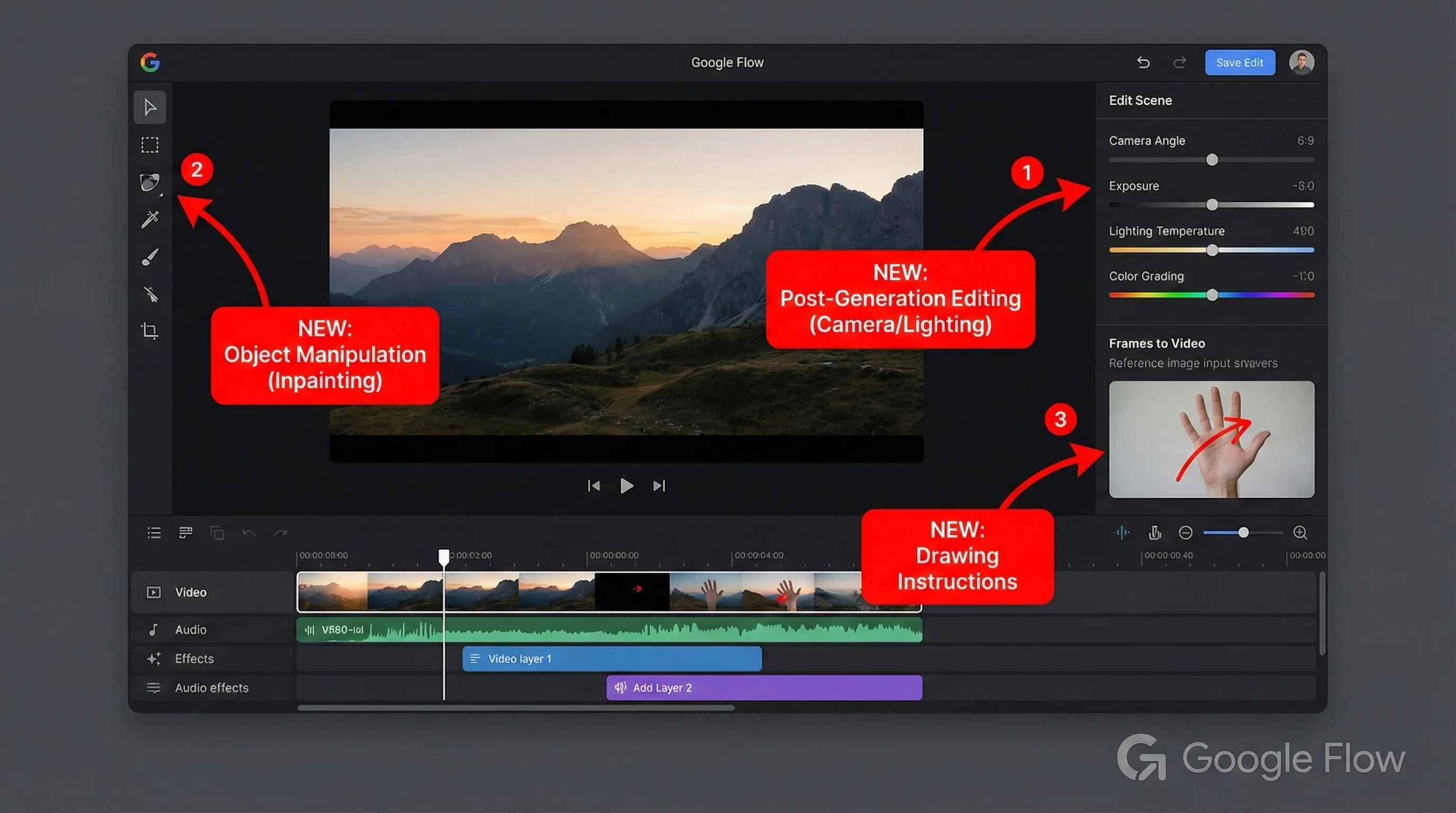
- Edit After Generation: This is the big one. You can change a character’s outfit, alter a pose, adjust the camera angle, or modify lighting without re-rendering the entire scene.
- Insert and Remove Objects: Need to add a coffee cup to the table? Need to remove a distracting pedestrian? Flow now supports context-aware object insertion and removal (video inpainting).
- Drawing Instructions: When using the “Frames to Video” feature, you can now draw directly onto the reference image to guide the AI. For example, drawing an arrow to indicate the desired direction of movement.
This Google VEO 3.1 review focuses on how these features combine to offer a genuinely new approach to AI filmmaking.
🔧 The Director’s Toolkit: Features That Matter
VEO 3.1’s strength isn’t just the quality of its output; it’s the control it gives you over that output. While other models rely heavily on prompt engineering luck, VEO 3.1 offers specific tools to dictate the scene.
1. Ingredients to Video (The Consistency Engine)
This is VEO 3.1’s approach to character and style consistency. Instead of just describing a character in text, you upload up to three reference images—”ingredients”—that the AI uses to generate the video.
How it works: I uploaded a reference image of a specific actor (generated using Nano Banana Pro), a photo of a vintage 1960s car, and a picture of a foggy San Francisco street. I prompted VEO 3.1 to have the character step out of the car onto the street.
The result: The generated video accurately depicted the character and the car within the specified environment. The consistency is impressive, far surpassing what you can achieve with prompt-based consistency tricks in other tools.
New in 3.1: This feature now generates audio contextually. The sound of the car door closing and the ambient fog horns were automatically added and synchronized.

2. First and Last Frame (The Transition Tool)
This feature allows you to define the exact start and end points of a shot, letting the AI figure out the transition.
How it works: You provide two static images. The first image is the starting frame, and the second is the ending frame. VEO 3.1 generates the video (4, 6, or 8 seconds) that moves between them.
Example: I provided a wide shot of a spaceship approaching a planet (First Frame) and a close-up shot of the cockpit window showing the planet’s surface (Last Frame). VEO 3.1 generated a smooth clip transitioning between these two points, effectively creating a complex camera movement complete with subtle engine sounds.
3. Scene Extension (Beyond 8 Seconds)
VEO 3.1 generates clips in 8-second increments by default. The “Extend” feature allows you to continue the action of a current clip or cut to a new scene that follows it.
Google claims this allows for continuous sequences up to (and sometimes beyond) 60 seconds. The extension maintains the context, lighting, and characters from the previous clip.
🔍 REALITY CHECK: Scene Extensions
Marketing Claims: “Create longer videos, even lasting for a minute or more, by generating new clips that connect to your previous video… This maintains visual continuity.”
Actual Experience: While you can extend clips significantly, coherence often degrades after 2 or 3 extensions (16-24 seconds). Objects may start to morph, or the action might become erratic. Furthermore, some users report frequent errors when trying to extend clips, particularly with the VEO 3.1 Fast model.
Verdict: Essential for storytelling, but don’t expect a perfect 60-second take yet. It requires patience and occasional re-rolling.
4. Post-Generation Editing (The November Game Changer)
As discussed earlier, the ability to edit clips after they are generated is VEO 3.1’s most revolutionary feature, introduced in the November Flow update.
Testing the “Reshoot” feature: I generated a clip of a woman walking down a hallway. After generation, I used the new Flow controls to adjust the camera angle from a medium shot to a low-angle shot. The AI successfully re-interpreted the scene from the new perspective without changing the character or the action.
Testing “Insert Object”: In the same hallway scene, I used the Insert tool to add a “modern art sculpture” to the background. The AI added the sculpture, matching the lighting and perspective of the original shot surprisingly well, although close inspection revealed some minor lighting inconsistencies.
These tools bridge the gap between AI generation and traditional Non-Linear Editing (NLE) workflows.
🚀 Getting Started: Your First Hour in Flow
Accessing VEO 3.1 requires navigating Google’s subscription ecosystem. You can’t buy VEO 3.1 directly; you need a Google AI subscription (Pro or Ultra) which grants you access to the model via Google Flow, the Gemini App, or Vertex AI (for developers).
Step 1: The Subscription Paywall
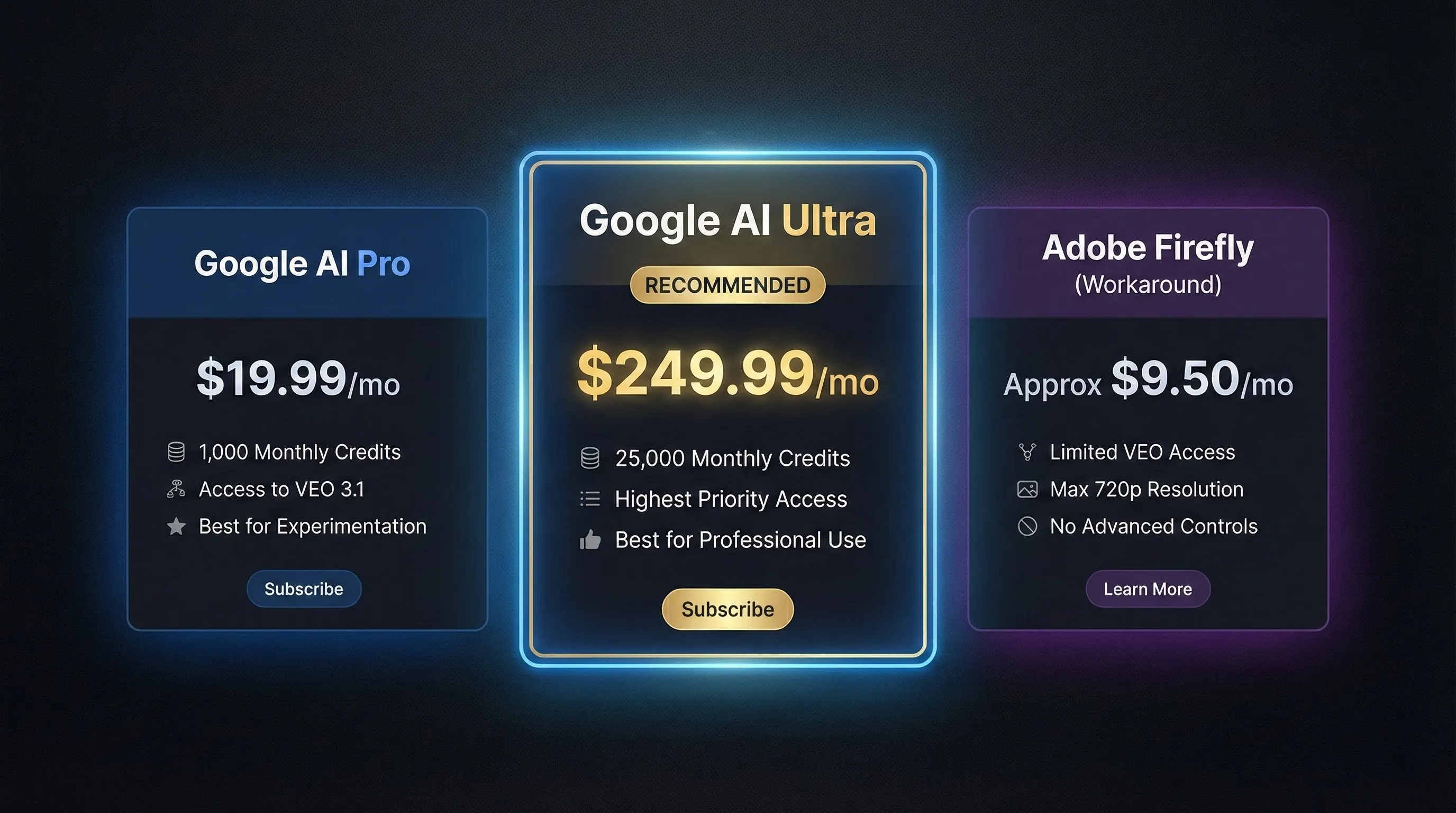
You’ll need to choose between Google AI Pro ($19.99/month) or Ultra ($249.99/month). The main difference is the number of pooled AI credits you receive (1,000 vs. 25,000). For serious video work, the Pro tier credits will disappear very quickly.
Step 2: Navigating the Flow Interface
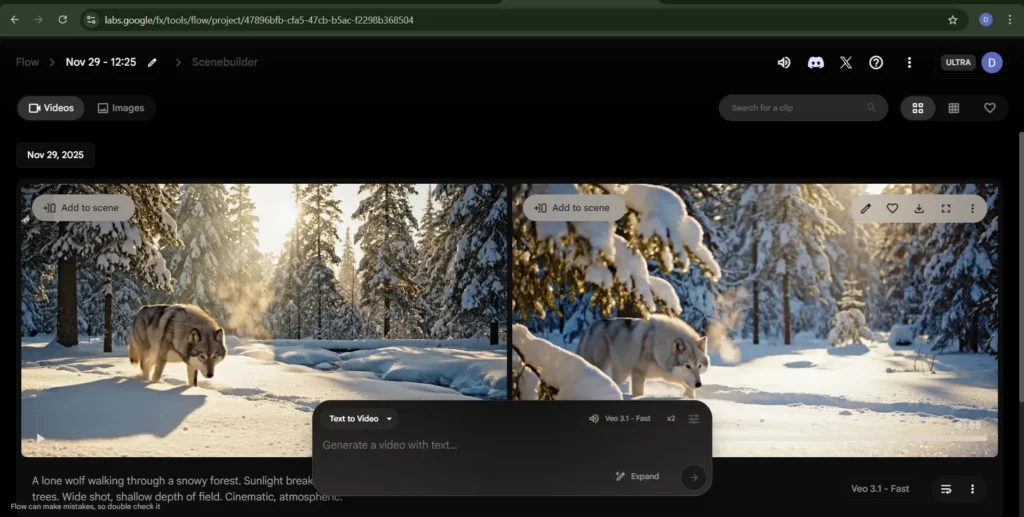
Once subscribed, you access Google Flow. The interface is relatively minimalist, focusing on the timeline and the generation panel.
You start a new project and are presented with different generation options:
- Text to Video: The standard generation mode.
- Frames to Video: Defining start and end points. This is where the new drawing instructions feature is located.
- Ingredients to Video: Uploading your reference images for consistency.
Step 3: Generating Your First Clip
I started with a cinematic prompt: “A lone wolf walking through a snowy forest. Sunlight breaking through the trees. Wide shot, shallow depth of field. Cinematic, atmospheric.”
I selected the VEO 3.1 Standard model (you can also choose VEO 3.1 Fast for quicker, slightly lower quality results), 1080p resolution, 16:9 aspect ratio, and 8-second duration.
The experience: Generation took about 2 minutes. The resulting clip was visually impressive, with realistic snow effects and lighting. The synchronized audio—the crunching of snow and wind—added significant immersion. The wolf’s movement was mostly realistic, though there was a slight uncanny valley effect in its gait.
Step 4: Editing and Extending
I then used the “Extend” feature to continue the shot. This took another 2 minutes. The transition was mostly seamless, continuing the wolf’s movement, though there was a slight shift in the background trees.
🔍 REALITY CHECK: The Flow Interface Experience
Marketing Claims: Google positions Flow as an intuitive, AI-native video editor designed to improve workflows.
Actual Experience: The community sentiment is highly polarized. While the layout is clean, many users (including myself) encounter frequent bugs, slow loading times, and confusing error messages. Some Reddit users have described the experience as “horrendous” and “experimental,” which is frustrating given the $250/month price tag for Ultra.
Verdict: Powerful features hampered by an inconsistent user experience. Google needs to improve the stability and responsiveness of Flow to match the quality of the VEO model.
🥊 Head-to-Head: VEO 3.1 vs. Sora 2 vs. Runway Gen-4
The AI video space is incredibly competitive in late 2025. While this Google VEO 3.1 review focuses on Google’s offering, it doesn’t exist in a vacuum. Here’s how it compares to its main rivals: OpenAI’s Sora 2 and Runway Gen-4.
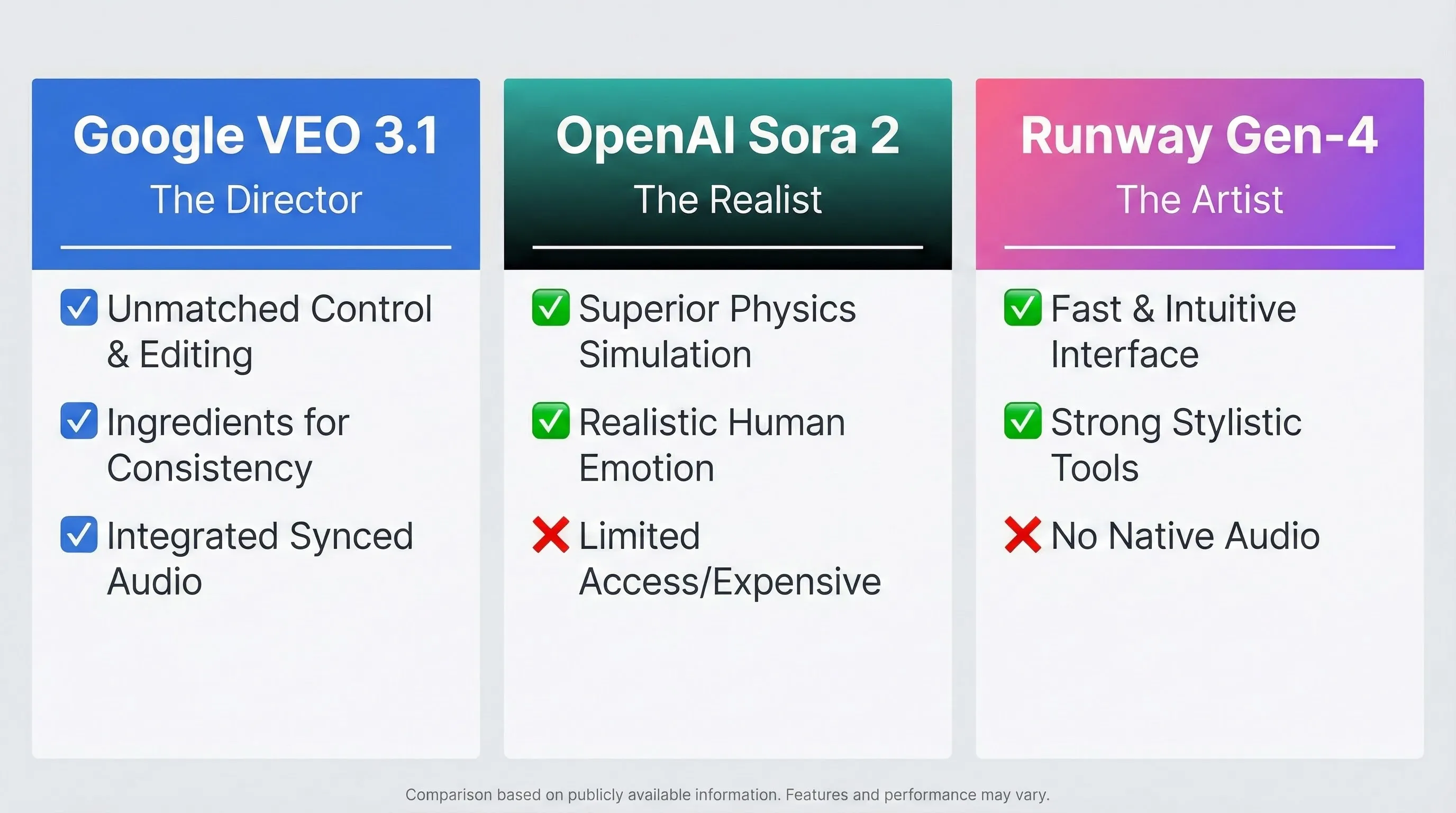
VEO 3.1: The Director (Control)
- Strengths: Unmatched control (Ingredients, First/Last Frame, Post-Gen Editing), integrated synchronized audio across all modes, accessible via subscription (no waitlist).
- Weaknesses: Expensive for high volume, robotic human emotions, buggy interface (Flow).
OpenAI Sora 2: The Realist (Physics and Emotion)
- Strengths: Superior physics simulation, highly realistic human emotions and expressions, longer base generation (up to 25s).
- Weaknesses: Limited access (invite-only or expensive ChatGPT Pro subscription), less granular control over scene elements.
Runway Gen-4: The Artist (Speed and Style)
- Strengths: Intuitive interface, fast generation, excellent for stylistic experimentation, strong suite of AI tools (Motion Brush).
- Weaknesses: Lacks native synchronized audio, shorter clip lengths, realism lags behind VEO 3.1 and Sora 2.
| Feature | Google VEO 3.1 (in Flow) | OpenAI Sora 2 | Runway Gen-4 |
|---|---|---|---|
| Max Resolution | 1080p | 1080p (4K rumored) | 1080p (Upscaled options) |
| Base Duration | 8 seconds | 15-25 seconds | 4 seconds |
| Max Duration (Extended) | 60+ seconds | 60+ seconds | 18 seconds |
| Native Synchronized Audio | ✅ Yes (Dialogue, SFX, Ambient) | ✅ Yes (Highly realistic) | ❌ No |
| Character Consistency | Excellent (via Ingredients) | Very Good | Good |
| Post-Generation Editing | Advanced (Camera, Lighting, Objects) | Basic | Moderate (Inpainting, Motion Brush) |
| Human Realism/Emotion | Moderate (Often Robotic) | Excellent | Moderate |
| Access | Paid Subscription (Google AI) | Invite/Expensive Subscription | Freemium/Paid Subscription |
💡 Swipe left to see all features →
💰 Pricing Breakdown: What You’ll Actually Pay
Pricing is one of the most confusing aspects of this Google VEO 3.1 review. Google doesn’t offer a standalone VEO subscription. Instead, it’s bundled into the broader Google AI plans.
The Subscription Tiers
1. Google AI Pro ($19.99/month)
- Access: VEO 3.1 and VEO 3.1 Fast.
- Credits: 1,000 monthly pooled AI credits (shared across Flow, Gemini, and other AI tools).
- Who it’s for: Casual users or those wanting to experiment. These credits go very fast when generating high-quality video.
2. Google AI Ultra ($249.99/month)
- Access: VEO 3.1 and VEO 3.1 Fast (highest priority).
- Credits: 25,000 monthly pooled AI credits.
- Who it’s for: Agencies, production studios, and serious creators who need high volume and reliability. This is the tier required for consistent professional work.
The Budget Workaround: Adobe Firefly
Interestingly, Google has licensed VEO technology to Adobe. You can access a version of VEO 3/3.1 within the Adobe Firefly Standard plan (approx. $9.50/month).
The Catch: The Firefly integration is severely limited. You only get 720p resolution, 8-second clips, and none of the advanced controls (no Ingredients, no First/Last Frame, no Flow editing). It’s good for quick B-roll but not for serious filmmaking.
🧑🎨 Who Should (And Shouldn’t) Use VEO 3.1
VEO 3.1 is not an all-purpose video generator. It’s a specialized tool aimed squarely at professional and semi-professional creators.
Who Should Use VEO 3.1?
- Independent Filmmakers: The control features (Ingredients, First/Last Frame) are invaluable for storyboarding, pre-visualization, and generating shots that require consistency.
- Advertising Agencies: For product shots and commercial campaigns where brand consistency is critical. The ability to insert specific products via Ingredients and edit the scene later is key.
- VFX Artists: VEO 3.1 can generate complex visual effects elements and environmental changes, which can then be composited into traditional footage.
Who Should Skip VEO 3.1?
- Casual Social Media Creators: If you need quick, trendy videos for TikTok or Reels, VEO 3.1 is overkill and too expensive. Tools like Runway or Kling AI are faster.
- Beginners: The learning curve for the advanced features in Flow is steep, and the interface frustrations can be discouraging.
- Creators Focused on Human Dialogue: If your content relies heavily on realistic human emotion and performance, VEO 3.1’s robotic tendencies might be a dealbreaker. Sora 2 is currently superior in this specific area. For audio synthesis, ElevenLabs remains the gold standard.
🗣️ What Users Are Actually Saying
Community sentiment for VEO 3.1 and Google Flow is sharply divided. While the potential is universally acknowledged, the actual user experience often falls short of expectations.
The Good: Cinematic Control
Professional creators report excellent results with the control features. The “Ingredients to Video” is frequently cited as a major advantage over Sora 2 for maintaining consistency.
One user on r/VEO3 noted, “I prefer [VEO 3.1] to Sora 2 because I feel I have more control over the output… Character/setting consistency is a HUGE one for me.”
Curious Refuge Labs, an AI review site, praised its “rich, cinematic imagery” and “natural and atmospheric” lighting, giving it a high score for Prompt Adherence (7.8/10).
The Bad: Inconsistency and Temporal Wobble
A significant portion of the community reports frustration with the model’s consistency. Curious Refuge Labs rated Temporal Consistency a low 6.8/10, noting that faster movements or crowd shots still reveal “small flickers and elastic distortions” or a “wobble.”
Others reported issues with basic instructions: “Multiple issues including people just disappearing from a scene or morphing into a different person… Seems to be worse than ever at following simple instructions.”
The Ugly: The Interface and Price
The high cost of the Ultra subscription combined with the buggy nature of Flow is the major pain point.
“The model itself I can’t even speak to because I haven’t been able to use it all day thanks to Flow being absolutely horrendous… people who paid $250 a month for a program that’s experimental,” criticized a frustrated subscriber.
The Consensus: VEO 3.1 is a powerful but temperamental tool. It requires patience, advanced prompting skills, and a high tolerance for interface bugs to achieve the results Google showcases.
❓ FAQs: Your Questions Answered
Is there a free version or trial of VEO 3.1?
No, Google does not currently offer a free tier for VEO 3.1 within Google Flow. You must have a paid Google AI Pro or Ultra subscription. Google sometimes offers introductory discounts for the subscription itself (e.g., 3 months at half price for Ultra).
Does VEO 3.1 generate 4K video?
No. Based on the latest documentation for VEO 3.1 and VEO 3.1 Fast, the maximum supported resolution is 1080p HD. All videos are generated at 24 frames per second.
Is VEO 3.1 better than Sora 2?
It depends on your use case. VEO 3.1 is better for cinematic control, shot-to-shot consistency (using Ingredients), and post-generation editing. Sora 2 is currently superior for realistic human emotions, expressions, and physics simulations. VEO 3.1 is also more widely accessible.
Can I use VEO 3.1 for commercial projects?
Yes. If you are accessing VEO 3.1 through a paid Google AI subscription (Pro or Ultra) or Vertex AI, you can generally use the generated content for commercial purposes, subject to Google’s terms of service.
What are the new editing features in Google Flow?
The November 2025 updates added the ability to edit generated videos without full re-rendering. This includes changing camera angles, adjusting lighting, altering poses, inserting or removing objects (video inpainting), and using drawing instructions to guide generation.
Does VEO 3.1 support vertical video?
Yes. VEO 3.1 supports both standard landscape (16:9) and vertical (9:16) aspect ratios, making it suitable for social media platforms.
How long can VEO 3.1 videos be?
Base generation is limited to 4, 6, or 8 seconds. However, using the “Extend” feature in Google Flow, you can chain these clips together to create sequences reportedly up to 60 seconds or longer, though coherence may degrade with multiple extensions.
How does the integrated audio work?
VEO 3.1 generates synchronized audio natively, including dialogue, sound effects, and ambiance, based on the context of the visual prompt. The audio quality is high, though precise control over the mix is limited.
🏁 Final Verdict
Google VEO 3.1, combined with the recent updates to Google Flow, represents a significant leap forward in AI filmmaking. The level of control offered by Ingredients, First/Last Frame, and the revolutionary post-generation editing features is unmatched by any other tool on the market.
The 1080p cinematic quality and synchronized audio make it a viable tool for professional production workflows.
However, this Google VEO 3.1 review cannot ignore the significant drawbacks. The high cost of the Ultra subscription ($250/month) puts it out of reach for many creators. The Flow interface is often buggy and frustrating. And critically, the model still struggles with realistic human emotions and complex physics, often producing robotic or wobbly results.
Use Google VEO 3.1 if:
- You prioritize cinematic control and shot-to-shot consistency above all else.
- You need integrated, synchronized audio directly from the generation step.
- You are a professional filmmaker or agency with the budget for the Ultra subscription.
Stick with Alternatives if:
- You need highly realistic human emotions and expressions (Wait for broader access to Sora 2).
- You need a fast, intuitive tool for social media content (Use Runway Gen-4).
- You are on a tight budget (Try Kling AI or the Adobe Firefly workaround).
VEO 3.1 is the future of AI-assisted directing, but the future is currently expensive and occasionally buggy.
Stay Updated on Creative AI Tools
Don’t miss the next major AI video launch. Stay ahead with weekly reviews of AI image generators, video editors, and creative platforms.
- ✅ Honest, hands-on reviews of new tools (like this VEO 3.1 review)
- ✅ Price drop alerts and hidden workarounds
- ✅ Breaking feature launches and updates
- ✅ Comparisons of major AI models (VEO, Sora, Runway)
- ✅ Real-world use cases and tutorials

Related Reading
AI Video Competitors
- Runway Gen-4 Review 2025: The Artist’s Choice for AI Video?
- Kling AI Review: The Best Budget Alternative to Sora and VEO?
Related Google AI Tools
- Google Gemini 3 Review: Powering the Next Wave of AI Tools
- Nano Banana Pro Review: Essential for Consistent Character Generation
- YouTube AI Tools and Features Review 2025
Guides and News
- The 10 Best AI Video Editing Tools in 2025 (Tested)
- AI News This Week: Major Updates in Video and Audio AI
- ElevenLabs Review: The State of AI Audio Generation
Last Updated: November 29, 2025
VEO Version Tested: VEO 3.1 / VEO 3.1 Fast
Google Flow Version: November 2025 Update
Next Review Update: January 2026 (AI Video tools update frequently)