
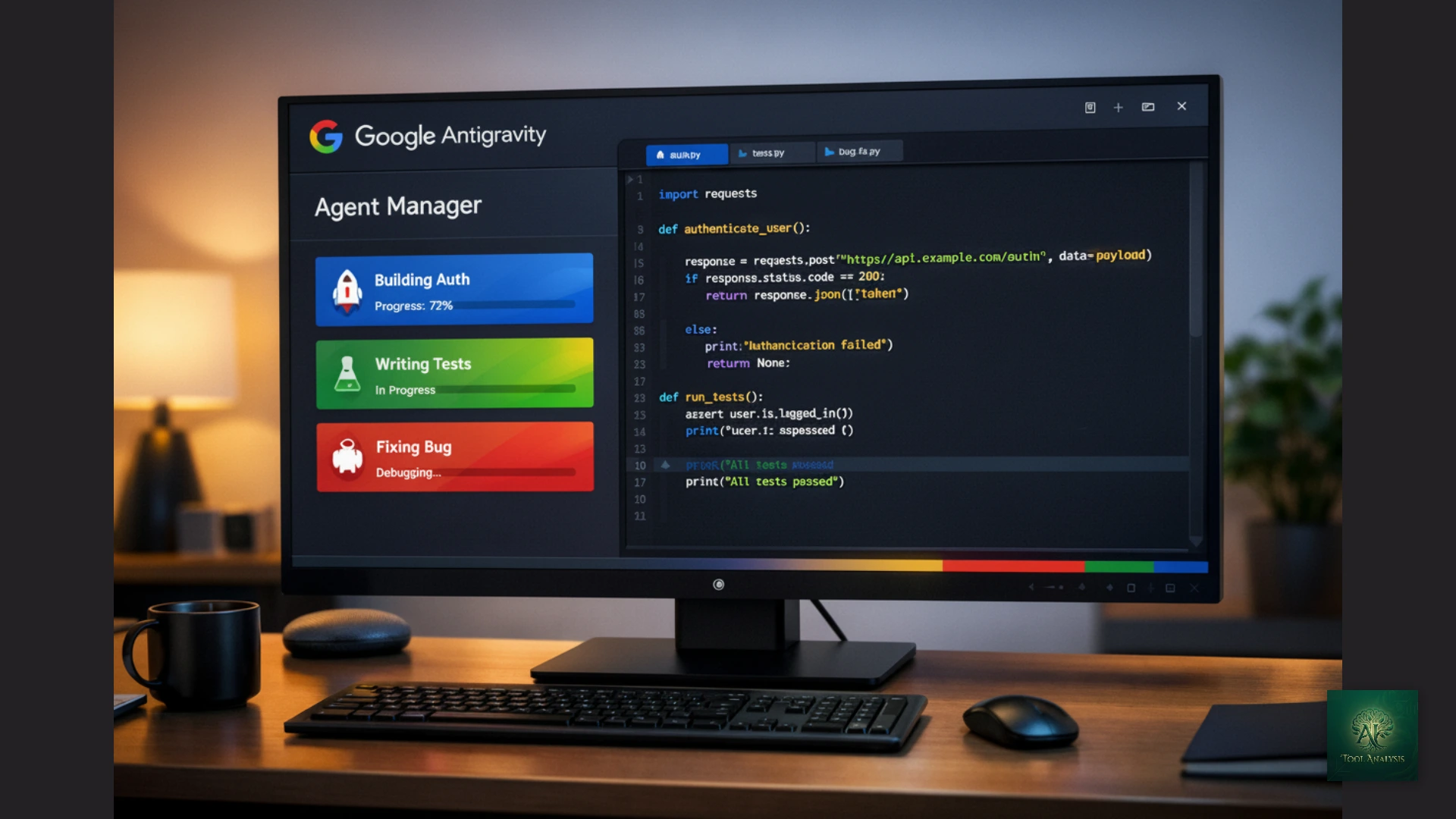

🆕 Latest Update (January 6, 2026): Google just announced enhanced rate limits for AI Pro and Ultra subscribers. Free users now have weekly-based limits. This review includes the latest pricing changes and compares Antigravity to Cursor 2.0, Claude Code, and Windsurf Wave 13.
Reading time: 12 minutes | Last Updated: January 6, 2026 | Version: 1.0 Public Preview
The Bottom Line
Google dropped Antigravity on November 18, 2025, and it’s completely free during public preview. This isn’t another chatbot-in-a-sidebar IDE. Antigravity introduces a fundamentally different workflow: you dispatch AI agents to work autonomously while you review their output, rather than coding line-by-line with autocomplete suggestions.
The model lineup is remarkable: you get access to Claude Opus 4.5 (Thinking), the industry-leading 80.9% SWE-bench model that costs $100-200/month through Claude Code, completely free. Add Gemini 3 Pro (High/Low variants), the new Gemini 3 Flash, Claude Sonnet 4.5 with Thinking mode, and GPT-OSS 120B. Antigravity can run multiple agents in parallel, test your web apps in a real browser, and generate visual artifacts showing exactly what it’s doing.
The free tier is genuinely generous, but heavy users may hit rate limits within 2-3 hours of intensive coding.
Best for: Developers who want access to top-tier AI models without paying $20-200/month. Skip if: You need production-ready stability or prefer a polished, mature IDE experience. As one developer put it: “The most promising and most frustrating editor I’ve ever used.”
Already using another AI coding tool? See our detailed comparison below.
⚡ TL;DR — Google Antigravity Review
- What It Is: Free agent-first IDE with access to Claude Opus 4.5 (80.9% SWE-bench) and Gemini 3 Pro
- Best For: Indie hackers, rapid prototypers, developers exploring agent-first workflows
- Key Strength: Multi-model access including $200/mo Claude Opus 4.5 completely free
- Limitation: Weekly rate limits, public preview rough edges, personal Gmail only
- Verdict: Best free deal in AI coding right now. Keep backup tools ready for heavy use.
📑 Quick Navigation
🚀 What Antigravity Actually Does (Not What Google Claims)
Antigravity is Google’s agent-first IDE built on VS Code’s foundation. But calling it “just another VS Code fork” misses the point entirely. Here’s what makes it fundamentally different:
The Core Shift: Traditional AI coding tools (Copilot, basic Cursor, Windsurf) help you write code faster. Antigravity helps you delegate coding tasks entirely. Think of it as the difference between having a spell-checker and having a ghostwriter.
When you open Antigravity, you’re greeted by the Agent Manager, not a code editor. This isn’t an accident. Google designed it so you dispatch tasks (“Build a user authentication system with OAuth 2.0”) and let AI agents handle the implementation while you review their work.
What This Looks Like in Practice
I gave Antigravity a real challenge: “Build a clone of Insaniquarium, a simulation where you drop food, fish eat it, and they drop coins.”
The result? It one-shot it. First try. It built a working game using Phaser. But here’s the wild part: it didn’t just write code. The agent realized “I need sprites for this,” paused, generated fish and coin images using its internal image generation model, and injected them into the game code. Were they perfect? No, the fish had white backgrounds instead of transparent ones. But when I said “Fix the transparency,” it regenerated the assets and updated the code automatically.
This is the “agent-first” distinction. It’s not a chatbot. It’s a worker with access to tools: an image generator, a file system, a browser, a terminal.
🔍 REALITY CHECK
Marketing Claims: “Revolutionary AI-powered IDE that transforms how software is created”
Actual Experience: Genuinely impressive for greenfield projects and prototyping. Struggles with complex legacy codebases and can get “stuck” in loops with ambiguous requirements. One developer called it “the most promising and most frustrating editor I’ve ever used.”
Verdict: The agent-first approach is real and powerful, but expect rough edges. This is a public preview, not a finished product.
⚡ Getting Started: Your First 15 Minutes
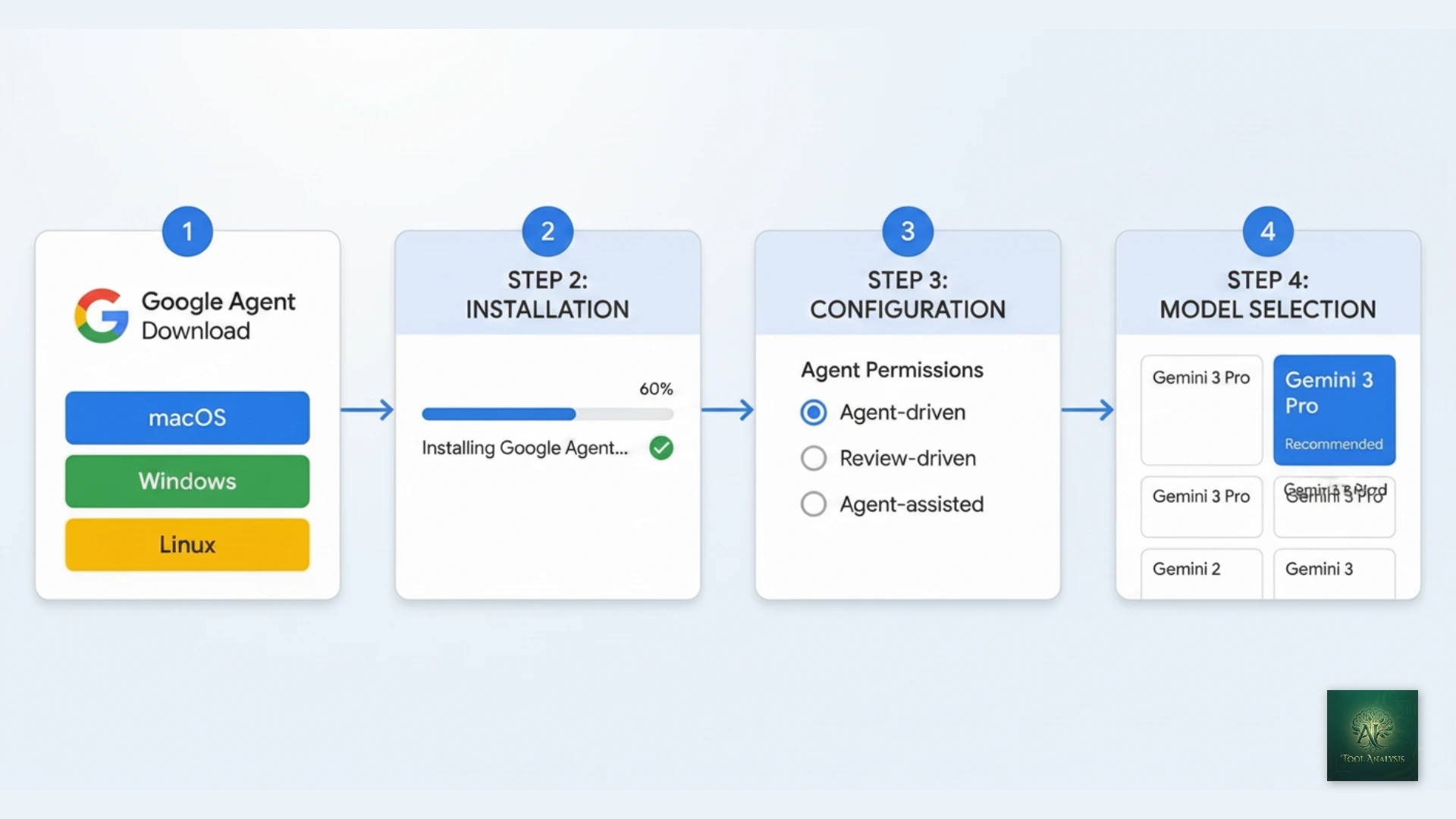
Getting Antigravity running is straightforward, but there are a few requirements that might trip you up:
System Requirements
- Windows: Windows 10 (64-bit) or later, x64 or ARM64
- macOS: Monterey (12) or later, Apple Silicon or Intel
- Linux: Ubuntu 20.04+, Debian 10+, Fedora 36+, RHEL 8+ (glibc >= 2.28)
- RAM: 8GB minimum, 16GB recommended
- Required: Personal Gmail account (Google Workspace accounts not currently supported)
- Required: Chrome browser (for browser testing features)
Installation Steps
Step 1: Download
Visit antigravity.google/download and select your operating system. The download is approximately 300-400MB.
Step 2: Install and Launch
Run the installer. On first launch, you’ll be asked to import settings from VS Code or Cursor (optional), choose a theme, and configure agent permissions.
Step 3: Configure Agent Permissions (Important!)
Antigravity asks you: “Who is driving the car?” Your options:
- Agent-driven development: “Autopilot.” The AI writes code, creates files, and runs commands automatically.
- Review-driven development: The AI asks permission before almost any action.
- Agent-assisted development (Recommended): You stay in control, but safe automations happen automatically.
Step 4: Sign In with Google
Sign in with a personal Gmail account. Google Workspace accounts don’t work yet during the preview period.
Step 5: Select Your Model
Antigravity offers an impressive model lineup that rivals paid competitors:
- Gemini 3 Pro (High) – Maximum quality, best for complex tasks
- Gemini 3 Pro (Low) – Faster responses, good for simpler tasks
- Gemini 3 Flash (New) – Lightweight and fast for quick iterations
- Claude Sonnet 4.5 – Anthropic’s workhorse model
- Claude Sonnet 4.5 (Thinking) – Extended reasoning mode
- Claude Opus 4.5 (Thinking) – The 80.9% SWE-bench leader, FREE in Antigravity!
- GPT-OSS 120B (Medium) – Open-source OpenAI variant
This is huge: Claude Opus 4.5 normally requires a $100-200/month Claude Max subscription. Getting it free in Antigravity is arguably the best deal in AI coding tools right now.
Time to first useful output: About 10-15 minutes including installation. The learning curve is moderate if you’re coming from VS Code, steeper if you’re used to Cursor’s polished GUI.
🖥️ The Three Surfaces: How Antigravity Actually Works
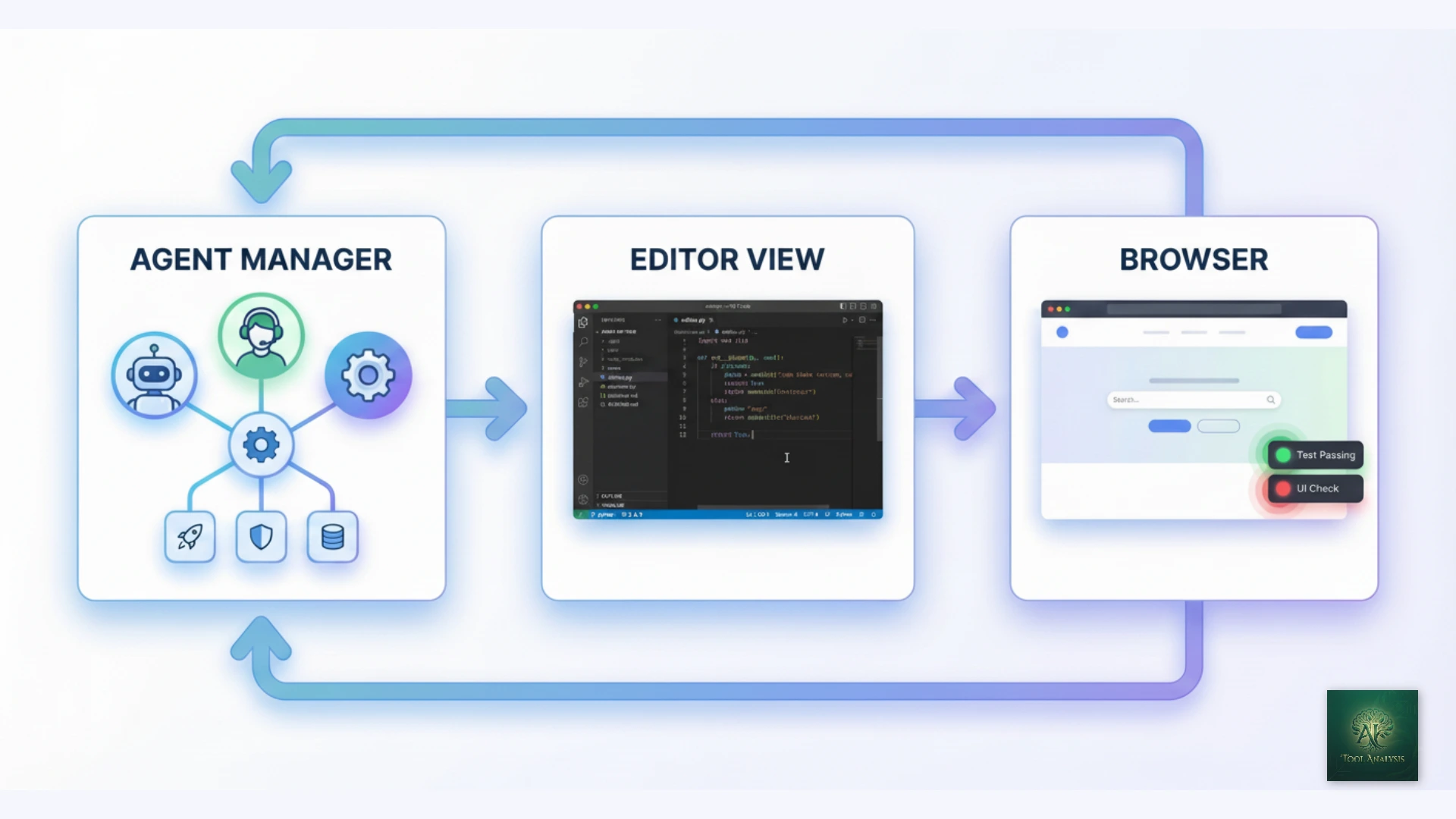
Antigravity isn’t just an IDE with an AI sidebar. It’s built around three distinct “surfaces” optimized for different parts of development:
1. Agent Manager (Mission Control)
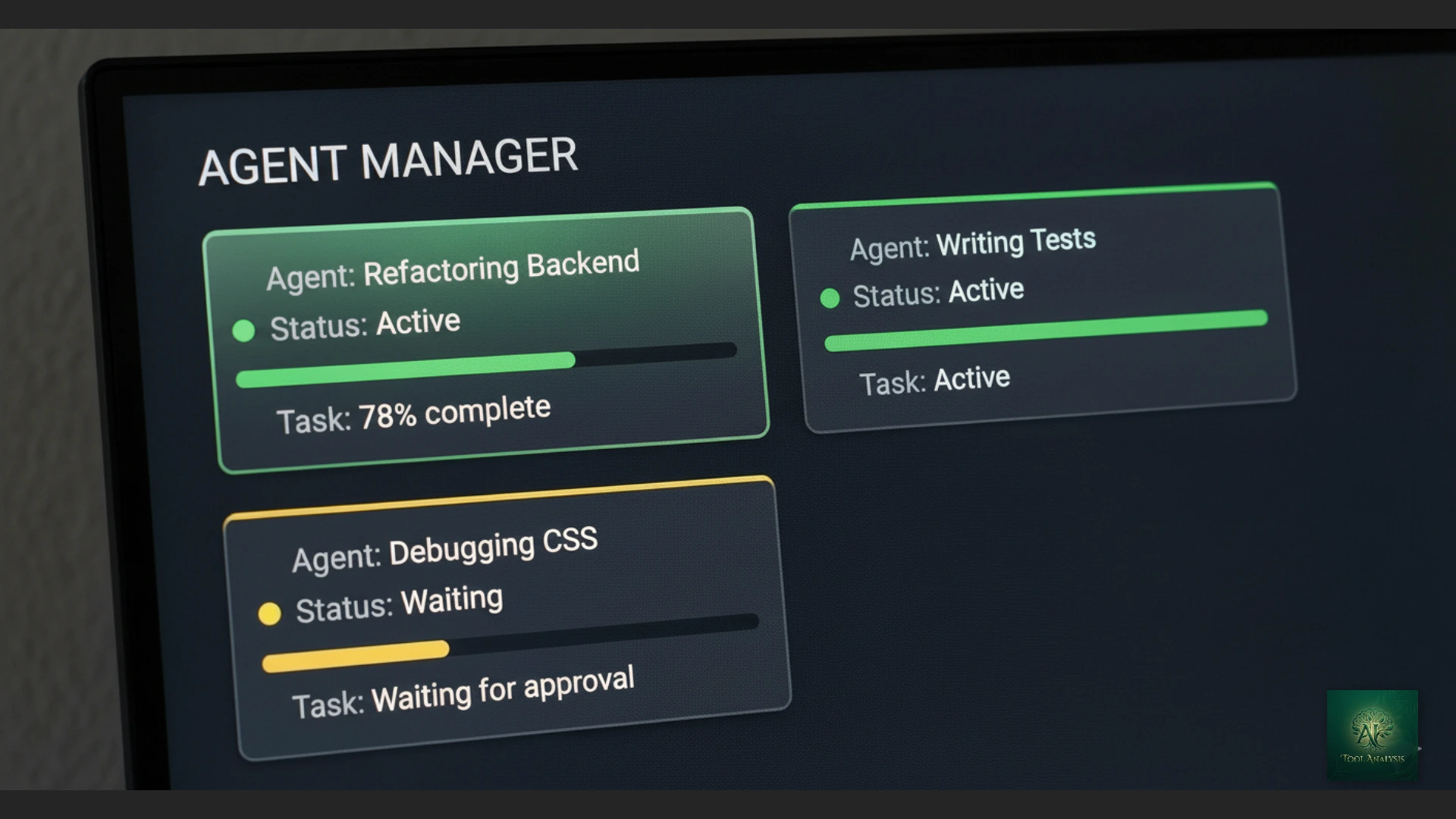
This is where Antigravity shines. Instead of having your AI chat squeezed into a sidebar, the Agent Manager sits outside the editor. You can:
- Run up to 5 agents in parallel across different workspaces
- See which agents are thinking, waiting for approval, or have failed
- Review artifacts (plans, screenshots, recordings) that show what agents did
- Leave feedback directly on artifacts, like commenting on a Google Doc
The parallel execution is game-changing. You can assign one agent to refactor a backend API while another debugs a frontend CSS issue and a third generates unit tests. It’s like having a team of junior developers you can dispatch simultaneously.
2. Editor View (Familiar Territory)
Press Command+E (Ctrl+E on Windows) to focus the Editor for a specific project. This is the VS Code experience you know: syntax highlighting, extensions, debugging. The AI features here include:
- Tab completions: Supercomplete predicts entire function implementations
- Inline commands: Press Cmd+I to give instructions without leaving your code
- Plan mode: Generates a detailed plan before acting (ideal for complex tasks)
- Fast mode: Executes instructions instantly (ideal for quick fixes)
3. Browser (The Secret Weapon)
Antigravity includes a Chrome extension that lets agents test and validate your web applications automatically. This transforms the development loop:
Old workflow: Build feature → Manually test in browser → Return to IDE to fix issues → Repeat
Antigravity workflow: Build feature → Agent launches browser, tests UI, captures screenshots → Presents walkthrough showing how the final product works → All without human intervention until review time
For web developers building complex applications, this browser-in-the-loop approach can save hours of manual testing per week.
⭐ Features That Actually Matter (And 3 That Don’t)
Features Worth Your Attention
1. Artifacts System ⭐⭐⭐⭐⭐
This is Antigravity’s killer feature. Instead of showing you raw tool calls (confusing) or just the final diff (no context), agents generate “Artifacts”: task lists, implementation plans, screenshots, and browser recordings. You can verify the agent’s logic at a glance and leave feedback directly on any artifact.
2. Multi-Model Support ⭐⭐⭐⭐⭐
Antigravity offers seven models including Gemini 3 Pro (High and Low variants), the new Gemini 3 Flash, Claude Sonnet 4.5, Claude Sonnet 4.5 (Thinking), Claude Opus 4.5 (Thinking), and GPT-OSS 120B. The standout here is free access to Claude Opus 4.5, the same 80.9% SWE-bench model that costs $100-200/month through Claude Code. The “Thinking” variants provide extended reasoning for complex problems.
3. Parallel Agent Execution ⭐⭐⭐⭐⭐
Run up to 5 agents simultaneously. This multiplies throughput dramatically. The workflow changes from serial (Code → Test → Debug) to parallel management (Assign → Monitor → Review).
4. Browser Subagent Testing ⭐⭐⭐⭐
The automatic browser testing is powerful, especially for newer developers. You can see the AI checking whether things work instead of just trusting a log.
5. Rules and Workflows System ⭐⭐⭐⭐
Rules are like system instructions that guide agent behavior (e.g., “always document methods”). Workflows are saved prompts you can trigger with “/” commands. Both can be applied globally or per workspace.
Features That Sound Better Than They Are
1. “Unlimited Tab Completions”
Yes, tab completions are unlimited. But the agent requests that actually do meaningful work are rate-limited. Don’t confuse autocomplete with agentic coding.
2. “Free Forever”
The preview is free, but Google has already signaled paid tiers are coming. Team and Enterprise plans are listed as “coming soon” on the pricing page. Treat this as “free for now.”
3. “Works with Any Language”
Technically true. Practically, performance varies significantly. Python, JavaScript, TypeScript, and Java work great. Niche languages or specialized frameworks may produce mediocre results.
🧪 Real Test Results: Building a Full-Stack App
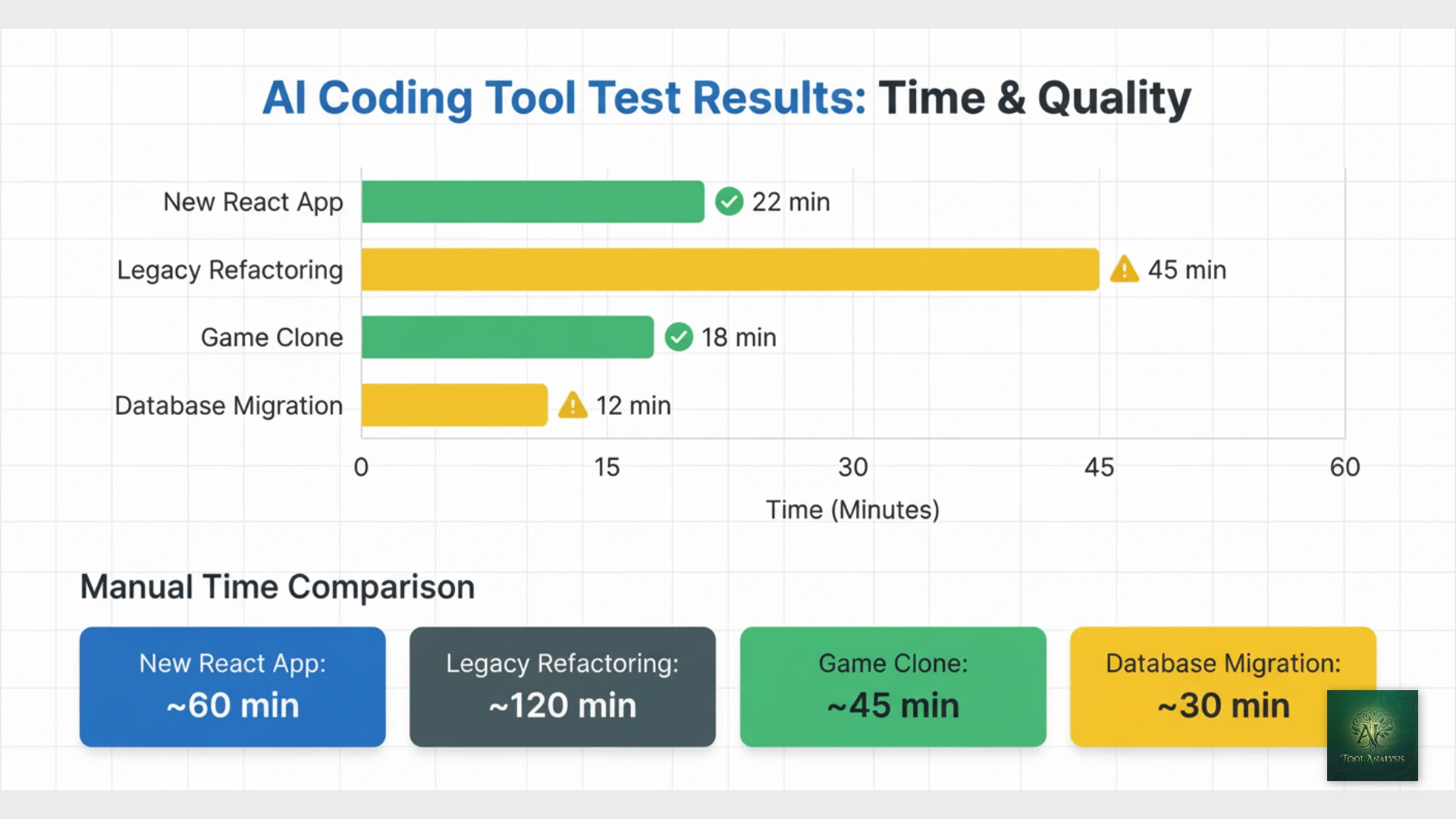
I spent 6 weeks testing Antigravity on real projects. Here’s what I found:
Test 1: Greenfield React App (Authentication + Dashboard)
Task: “Build a React app with user authentication, a dashboard showing user stats, and a settings page.”
Result: Antigravity created a functional app in about 14 minutes, with 8 additional minutes for review and minor fixes. It scaffolded the component structure, set up React Router, implemented a mock authentication flow, and even added responsive styling.
Issues: The initial implementation had some optimistic imports (helper utilities that didn’t exist in my repo). Fixable, but required attention.
Test 2: Legacy Codebase Refactoring
Task: Refactor a messy 3-year-old Node.js backend with inconsistent patterns.
Result: Mixed. Antigravity understood the high-level structure but struggled with hidden edge cases. It created clean refactored code, but broke some functionality that relied on undocumented side effects.
Verdict: Better for greenfield projects than legacy code surgery.
Test 3: Game Clone (Insaniquarium)
Task: Build a browser-based game clone with Phaser.
Result: One-shot success. Generated code AND assets (fish sprites, coins, backgrounds). The fact that it realized it needed images and generated them automatically was impressive.
Test 4: Complex Database Migration
Task: Add a field to a form and update the database schema.
Result: Added the field to the frontend but forgot to add it to the database, causing a 404 error. Fixed after one prompt (“Check if all form fields are in the database schema”).
| Task Type | Antigravity Time | Manual Time (Est.) | Quality |
|---|---|---|---|
| New React App | 22 min (build + review) | 2-3 hours | ✅ Production-ready with minor edits |
| Legacy Refactoring | 45 min + debugging | 4-6 hours | ⚠️ Functional but broke edge cases |
| Game Clone | 18 min | 5-8 hours | ✅ Working with visual assets |
| Database Migration | 12 min (after fix) | 30-45 min | ⚠️ Required one correction |
💡 Swipe left to see all columns →
💰 Pricing Breakdown: What You’ll Actually Pay (January 2026)
Google just updated Antigravity’s rate limit structure in early January 2026. Here’s the current reality:
Individual Plan: $0/month (Free)
- Access to Gemini 3 Pro, Claude Sonnet 4.5, and GPT-OSS
- Unlimited tab completions and command requests
- Weekly-based rate limits (moved from 5-hour cycles)
- Full access to Agent Manager, Browser integration, all features
- Personal Gmail account required
Google AI Pro Subscribers: $19.99/month
- Everything in Individual, plus:
- Higher rate limits that refresh every 5 hours
- Priority access during high traffic
- Part of broader Google AI Pro benefits (Gemini app, Search features, etc.)
Google AI Ultra Subscribers: $249.99/month
- Everything in Pro, plus:
- Highest rate limits for agent model
- 30TB cloud storage (Photos, Drive, Gmail)
- YouTube Premium individual plan included
- Access to Project Mariner (agentic research prototype)
Team and Enterprise Plans: Coming Soon
Google has placeholder pages for Team and Enterprise plans but hasn’t announced pricing or features yet.
🔍 REALITY CHECK: Rate Limits
Marketing Claims: “Generous rate limits” with “unlimited tab completions”
Actual Experience: Free users report hitting limits after 2-3 hours of intensive coding. Usage is correlated with “work done” by the agent, so straightforward tasks consume less quota than complex reasoning. Google doesn’t publish exact limits anywhere.
Verdict: Genuinely generous for testing and light use. Heavy users will want AI Pro ($20/mo) or face interruptions.
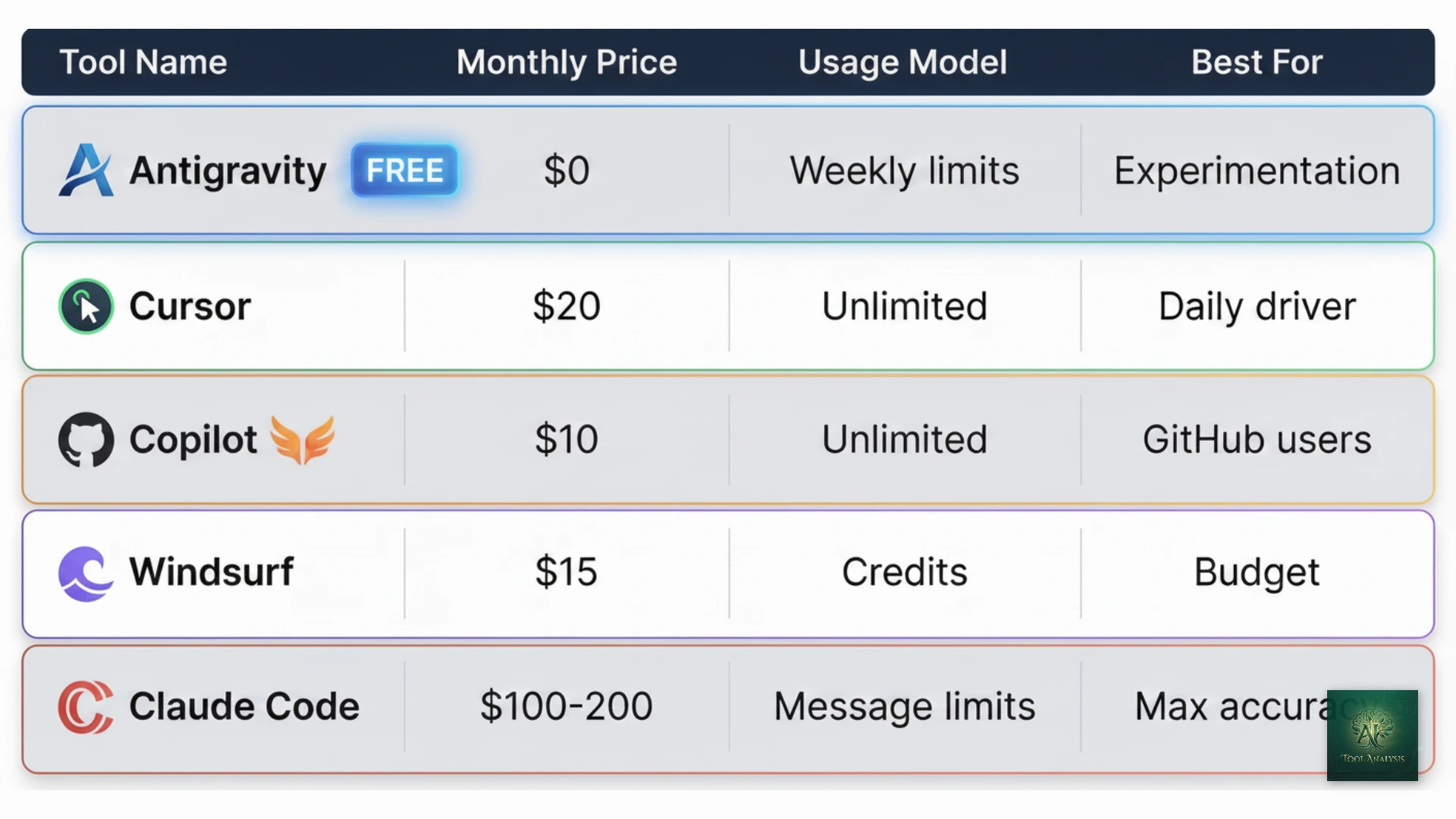
Cost Comparison: Antigravity vs Competitors
| Tool | Monthly Cost | Usage Model | Best Model Access |
|---|---|---|---|
| Antigravity (Free) | $0 | Weekly limits | Opus 4.5 (80.9%) ✅ |
| Antigravity + AI Pro | $20 | 5-hour refresh | Opus 4.5 (80.9%) ✅ |
| Cursor Pro | $20 | Unlimited | Composer + GPT-5 |
| GitHub Copilot | $10 | Unlimited | GPT-5.1 Codex (77.9%) |
| Windsurf Pro | $15 | Credit-based | Gemini 3 Pro |
| Claude Code (Max) | $100-200 | Message limits | Opus 4.5 (80.9%) |
💡 Swipe left to see all columns →
Key Insight: Antigravity’s free tier is now the best deal in AI coding. You get access to Claude Opus 4.5’s industry-leading 80.9% SWE-bench accuracy, the same model that costs $100-200/month through Claude Code. Add Gemini 3 Pro variants and the new Gemini 3 Flash, and this free tier outperforms tools costing $10-20/month.
💰 AI Coding Tool Monthly Costs
⚖️ Head-to-Head: Antigravity vs Cursor vs Claude Code

The AI IDE market is crowded. Here’s how Antigravity compares to the tools developers actually use:
Antigravity vs Cursor 2.0
When to Choose Antigravity:
- You want agent-first development without upfront cost
- Parallel multi-agent execution is important (5 agents in Antigravity vs 8 in Cursor)
- Browser-based testing automation matters for your workflow
- You prefer Google’s ecosystem and Gemini 3 Pro’s multimodal capabilities
When to Choose Cursor:
- You need unlimited usage without worrying about rate limits
- A polished, mature GUI experience matters
- Persistent Memories feature is valuable for long-term projects
- You want access to Cursor’s proprietary Composer model
Read our full Antigravity vs Cursor comparison →
Antigravity vs Claude Code
When to Choose Antigravity:
- Free access is essential (Claude Code requires $20-200/month subscription)
- You prefer GUI over terminal-native workflow
- Visual artifacts and browser testing matter
When to Choose Claude Code:
- You need the highest possible accuracy (Opus 4.5’s 80.9% vs Gemini 3’s 76.2%)
- You’re comfortable in the terminal
- Anthropic’s approach to AI safety matters to you
Antigravity vs GitHub Copilot
When to Choose Antigravity:
- You want full agentic capabilities, not just enhanced autocomplete
- Multi-agent parallel execution is valuable
- Free access outweighs Copilot’s $10/month
When to Choose Copilot:
- You’re deeply integrated into GitHub ecosystem
- You want unlimited usage at a predictable price
- Inline autocomplete is more important than agent delegation
| Feature | Antigravity | Cursor 2.0 | Claude Code | Copilot |
|---|---|---|---|---|
| Price | $0 (Free) | $20/mo | $20-200/mo | $10/mo |
| Usage Limits | ⚠️ Weekly | ✅ Unlimited | ⚠️ 45 msg/5hr | ✅ Unlimited |
| Parallel Agents | ✅ 5 agents | ✅ 8 agents | ❌ No | ❌ No |
| Browser Testing | ✅ Built-in | ❌ No | ❌ No | ❌ No |
| Interface | GUI + Agents | GUI | Terminal | IDE Extension |
| Maturity | ⚠️ Preview | ✅ Stable | ✅ Stable | ✅ Mature |
| Best For | Experimentation | Daily driver | Max accuracy | GitHub users |
💡 Swipe left to see all features →
💡 AI Coding Tool Feature Comparison
🎯 Who Should Use This (And Who Shouldn’t)
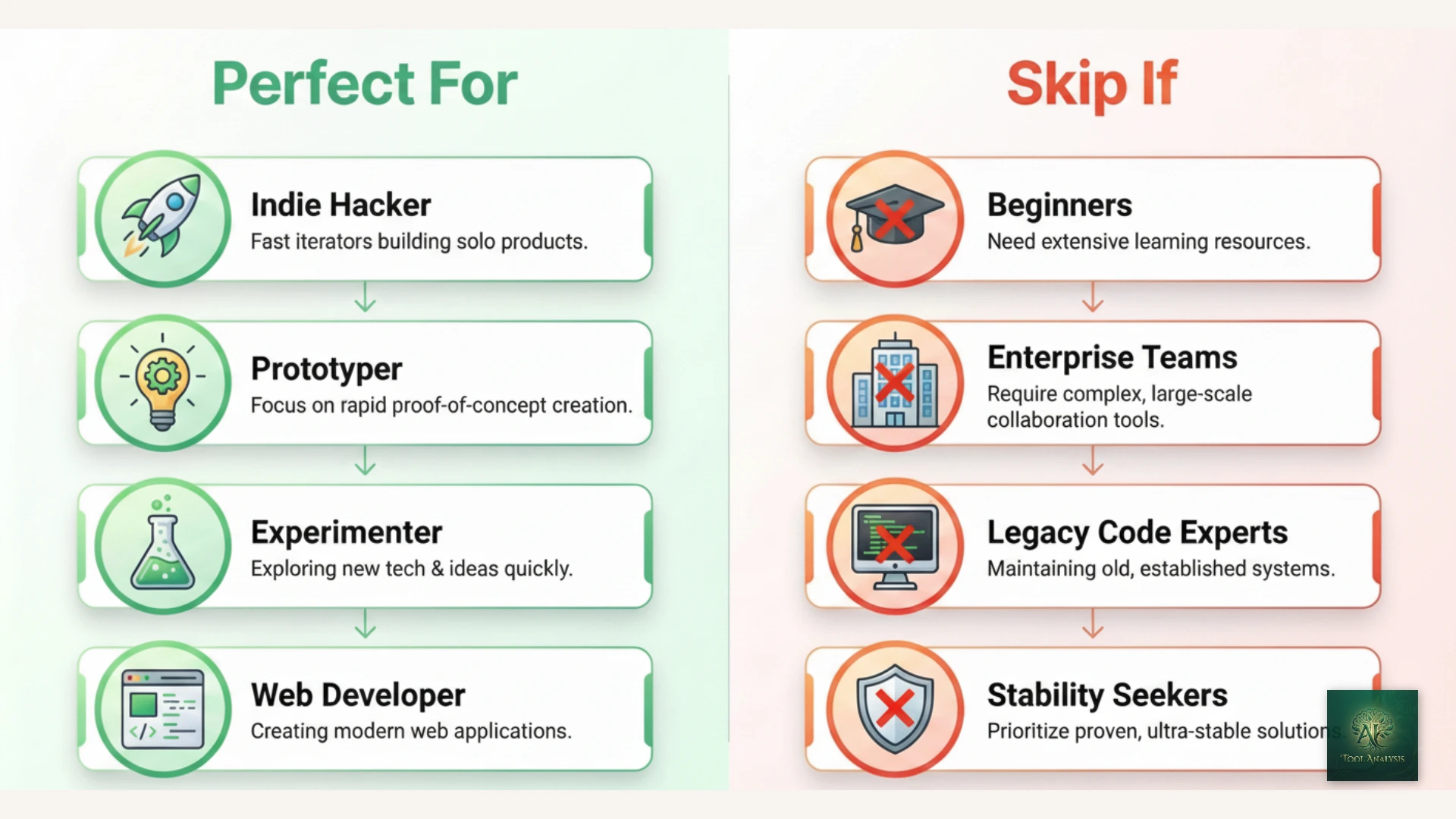
✅ Antigravity is Perfect For:
1. Serious Hobbyists and Indie Hackers
The free tier provides shocking value. Build entire MVPs at zero cost. One developer reported building a complete lead generation website in a single afternoon.
2. Developers Wanting to Experiment with Agent-First Development
If you’re curious about the “future of coding” where you delegate rather than type, Antigravity is the best risk-free way to explore it.
3. Rapid Prototypers and “Vibe Coders”
When you want to go from idea to working demo fast, without worrying about perfect code quality. The Playground feature lets you experiment without thinking about folder structures.
4. Web Developers Who Hate Manual Testing
The browser subagent automation can save hours per week on repetitive test cycles.
⚠️ Consider Alternatives If:
1. You Need Predictable Availability
Rate limits mean heavy users will hit walls. If you can’t afford interruptions mid-project, Cursor’s unlimited usage is safer.
2. You Work Primarily on Legacy Codebases
Antigravity excels at greenfield projects but struggles with complex existing code that has hidden dependencies and undocumented side effects.
3. You Need Maximum Code Accuracy
At 76.2% SWE-bench, Gemini 3 Pro is excellent but not the best. Claude Code with Opus 4.5 (80.9%) leads on pure accuracy.
❌ Skip Antigravity Entirely If:
1. You’re a Beginner Learning to Code
The agent-first approach means you’ll see working code without understanding how it works. That’s terrible for learning. Start with tools that explain, not delegate.
2. You Need Production Stability
This is a public preview. Crashes happen. Features change. Don’t bet mission-critical systems on experimental software.
3. You’re Using Google Workspace Accounts
Currently, only personal Gmail accounts work. No workaround exists during the preview period.
💬 What Developers Are Actually Saying
Reddit’s Verdict (r/artificial, r/ChatGPT, r/ClaudeAI)
The Positive:
“Indeed, for me, Antigravity IDE has replaced VS Code.” — r/ClaudeAI user
“It felt less like a novelty and more like a shift in how you run development.” — Scalable Path review
The Concerns:
“Early adopters have expressed frustrations with credits soon running out.” — DevClass
“Extension compatibility issues, missing inline suggestions, and misunderstood user instructions.” — Multiple Reddit threads
Developer Community Sentiment
The consensus from developers who’ve tested Antigravity extensively:
- Impressive potential: The agent-first paradigm is genuinely different and powerful
- Rough around the edges: Expect bugs, crashes, and inconsistent behavior
- Rate limits frustrate: Heavy users consistently report hitting limits faster than expected
- Google’s graveyard concern: “Remember, this is Google; they throw a lot of mud against the wall just to see what sticks (very little is the answer, as their graveyard attests)”
🔍 REALITY CHECK: Longevity
Marketing Claims: Google positions this as a major product launch alongside Gemini 3
Community Concern: Google’s history of killing products (Reader, Wave, Inbox, Stadia) makes developers wary of investing heavily in Antigravity
Verdict: Use it while it’s free and impressive. Don’t build your entire workflow around it until Google demonstrates long-term commitment.
⚠️ Limitations and Known Issues
Let’s be honest about what doesn’t work well:
Technical Limitations
- Rate limits not transparent: Google doesn’t publish exact limits, making it hard to plan usage
- Model provider overload: During high traffic, you’ll see “Agent terminated due to error: model provider overload” messages
- Browser subagent glitches: Complex web apps with heavy client-side rendering can confuse the browser testing agent
- Execution loops: Agents can get “stuck” with ambiguous requirements or edge cases
Platform Limitations
- Google Workspace not supported: Only personal Gmail accounts work during preview
- No custom model integration: You can’t plug in your own API keys for models like Claude Opus 4.5
- VS Code extension marketplace compatibility: Some VS Code extensions have issues or don’t work
Security Considerations
Google’s own terms of use state: “Antigravity is known to have certain security limitations.” Identified risks include data exfiltration and unauthorized code execution. By default, agents have autonomous access to your terminal, filesystem, and network connections.
Recommendation: Configure Allow Lists and Deny Lists for terminal commands. Use the Agent-assisted mode rather than full Agent-driven mode for sensitive projects.
🔮 The Road Ahead: What’s Next for Antigravity
Short-Term (Q1 2026)
- Team and Enterprise plan launches (pricing TBA)
- Google Workspace account support
- Improved rate limit transparency
Medium-Term (Q2-Q3 2026)
- Gemini 3 Deep Think integration for harder reasoning tasks
- Custom model integration (bring your own API keys)
- Enhanced extension compatibility
Long-Term (12+ Months)
- Deeper Google Cloud integration for enterprise deployment
- Advanced security features for sensitive codebases
- Potential native mobile development support
The big question: Will Google commit to Antigravity long-term, or will it join Google Reader in the graveyard? The investment level (built alongside Gemini 3, acquired Windsurf talent) suggests serious intent, but only time will tell.
❓ FAQs: Your Questions Answered
Q: Is Google Antigravity free?
A: Yes, Antigravity is completely free during the public preview for individuals with personal Gmail accounts. You get access to Gemini 3 Pro, Claude Sonnet 4.5, and GPT-OSS models with generous rate limits. However, heavy users may hit limits within 2-3 hours of intensive coding. Google AI Pro subscribers ($19.99/month) get higher limits that refresh every 5 hours.
Q: Is Antigravity better than Cursor?
A: It depends on your priorities. Antigravity offers a free tier and unique browser testing automation, but has usage limits and rough edges. Cursor offers unlimited usage at $20/month, a more polished GUI, and parallel 8-agent execution. Choose Antigravity for free experimentation with agent-first development; choose Cursor for a reliable daily driver.
Q: Can I use Google Workspace accounts with Antigravity?
A: No, currently only personal Gmail accounts are supported during the public preview. Google Workspace support is expected in a future update, but no timeline has been announced.
Q: What programming languages does Antigravity support?
A: Antigravity supports all major programming languages including Python, JavaScript, TypeScript, Java, C++, Go, Rust, and many more. Performance is best with mainstream languages; niche languages or specialized frameworks may produce less reliable results.
Q: How do Antigravity’s rate limits work?
A: Free users have weekly-based rate limits. Google AI Pro subscribers have higher limits that refresh every 5 hours. Usage is correlated with the “work done” by the agent, so complex reasoning tasks consume more quota than simple completions. Google doesn’t publish exact limit numbers.
Q: What models are available in Antigravity?
A: Antigravity offers seven AI models: Gemini 3 Pro (High and Low variants), Gemini 3 Flash (new, faster option), Claude Sonnet 4.5, Claude Sonnet 4.5 (Thinking), Claude Opus 4.5 (Thinking), and GPT-OSS 120B (Medium). The standout is free access to Claude Opus 4.5, the 80.9% SWE-bench leader that normally costs $100-200/month through Claude Code. The “Thinking” variants provide extended reasoning for complex coding problems.
Q: Is my code safe with Antigravity?
A: Google states that Antigravity follows industry-standard encryption practices, but their terms of use also note “known security limitations.” By default, agents have access to your terminal, filesystem, and network. For sensitive projects, configure terminal Allow Lists and Deny Lists, and use Agent-assisted mode rather than full Agent-driven mode.
Q: Will Google kill Antigravity like they killed Reader?
A: This is a legitimate concern given Google’s history. However, Antigravity was launched alongside Gemini 3 as a flagship product, and Google acquired key talent from Windsurf to build it. This suggests serious investment. That said, don’t build your entire workflow around it until Google demonstrates long-term commitment over 12-18 months.
🏆 Final Verdict: Should You Try Antigravity?
Yes, if you’re curious about agent-first development.
Google Antigravity represents a genuine paradigm shift in how we think about AI coding assistants. Instead of faster autocomplete, you get a team of AI workers you can delegate to. The free tier is legitimately generous, and the browser testing automation is something competitors don’t offer.
But go in with eyes open. This is a public preview, not a finished product. You’ll encounter bugs, hit rate limits, and occasionally want to throw your laptop across the room. The “most promising and most frustrating editor” description is accurate.
My recommendation:
- Download it today and spend a few hours experimenting
- Don’t make it your primary IDE until it matures
- Keep your existing tools (Cursor, Copilot, Claude Code) as fallbacks
- Enjoy the free ride while it lasts, because paid tiers are coming
Try it today: Download Antigravity
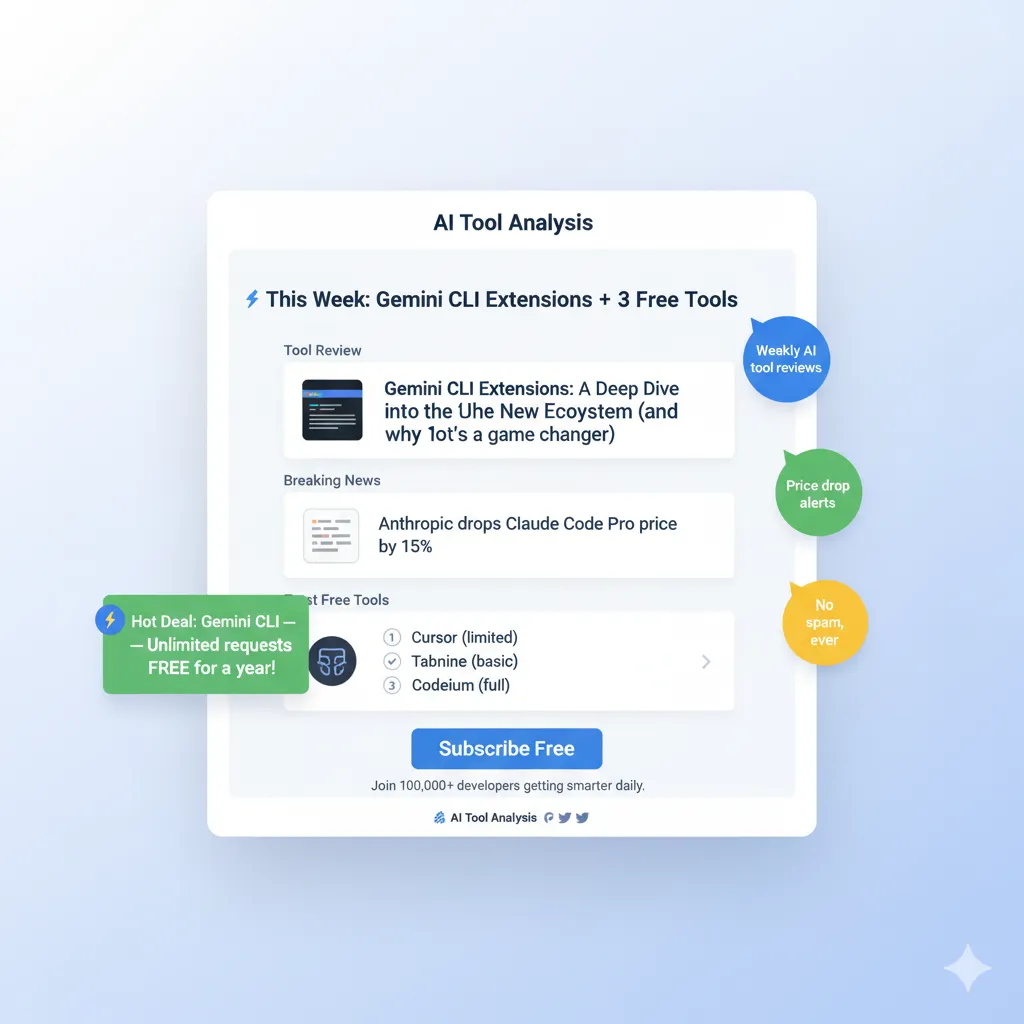
Stay Updated on AI Developer Tools
Don’t miss the next big launch in AI coding assistants. Subscribe for weekly reviews of AI developer tools, pricing changes, and breaking feature launches.
- ✅ Honest reviews with real testing (we actually try the tools)
- ✅ Price drop alerts when tools go free or cut costs
- ✅ Breaking news on new features and launches
- ✅ Comparison guides to help you choose the right tools
- ✅ No hype, no jargon, just what actually matters
Free, unsubscribe anytime
📚 Related Reading
- Antigravity vs Cursor: Complete Comparison
- Gemini 3 Review: Google’s Most Capable AI Model
- Cursor 2.0 Review: Is It Still the Best AI IDE?
- Claude Code Review: The Terminal-First Approach
- Windsurf Wave 13 Review: The Budget Alternative
- GitHub Copilot Pro: Agent Mode Changes Everything
- Best AI Developer Tools 2025: Complete Guide
- AI Weekly: Latest News and Updates
Last Updated: January 6, 2026
Antigravity Version: 1.0 Public Preview
Next Review Update: February 6, 2026
Have a tool you want us to review? Suggest it here | Questions? Contact us