

Reading time: 12 minutes | Last updated: February 20, 2026
The Bottom Line
If you remember nothing else: a GitHub Actions PR workflow is like hiring a tireless intern who checks every pull request for bugs, broken tests, and style violations before your team ever sees it. It is completely free for public repos and includes 2,000 minutes monthly on private repos. The setup takes about 10 minutes if you follow this guide, and it will save your team hours of manual code review every week. Best for any developer already using GitHub who wants automated testing on pull requests. Skip if you need complex multi-cloud pipelines (consider Jenkins or GitLab CI). For the broader picture of AI-powered developer tools that complement GitHub Actions, check our Best AI Developer Tools 2025 roundup, and if you want AI to write your code before CI tests it, see our GitHub Copilot Pro+ review.
TL;DR – The Bottom Line
What it is: GitHub Actions PR workflows automatically run tests, linting, and security scans on every pull request before code can merge.
Best for: Any developer or team already on GitHub who wants automated quality gates on every PR without managing external CI servers.
Key strength: Completely free for public repos, 2,000 minutes/month free for private repos, and setup takes under 10 minutes with a single YAML file.
Ecosystem: 10,000+ pre-built actions in the Marketplace, native GitHub integration, and growing AI tool compatibility with Copilot, Claude Code, and Gemini CLI.
Verdict: The easiest and most cost-effective CI/CD option for 90% of teams using GitHub. Enterprise-scale pipelines may need supplementing.
The catch: Complex multi-cloud pipelines with 50+ microservices may hit YAML complexity limits. December 2025 pricing controversy shook trust with power users, though self-hosted runner fees remain paused.
Quick Navigation
⚙️ What a GitHub Actions PR Workflow Actually Does
Think of a GitHub Actions PR workflow as a bouncer at a nightclub. Every time someone submits a pull request (a request to merge their code changes into your project), the bouncer checks their ID, pats them down, and decides whether they are allowed in. Except this bouncer checks for broken tests, security vulnerabilities, and code style violations instead of fake IDs.
Here is what happens behind the scenes when you set one up:
1. A developer opens a pull request on your GitHub repository.
2. GitHub Actions automatically spins up a virtual machine (Linux, Windows, or macOS, your choice).
3. Your workflow runs: it installs your project dependencies, runs your test suite, checks code formatting, scans for vulnerabilities, or whatever else you have configured.
4. Results appear directly on the PR as green checkmarks (passed) or red Xs (failed).
5. You can block merging until all checks pass, meaning broken code physically cannot get into your main branch.
The entire system runs on YAML configuration files stored in your repository at .github/workflows/. No
external service to sign up for, no credit card required for public repos, and no DevOps degree necessary.
REALITY CHECK
Marketing Claims: “Automate everything with world-class CI/CD!”
Actual Experience: For basic PR checks (run tests, check lint, verify builds), GitHub Actions is genuinely excellent and truly free for public repos. For complex enterprise pipelines with dozens of microservices, you will hit limitations around debugging, concurrent job management, and the YAML syntax can become unwieldy.
Verdict: Perfect for 90% of PR automation needs. Enterprise-scale pipelines may need supplementing with additional tools.
🤔 Why You Should Care (The Before and After)
Before GitHub Actions PR workflow:
Developer opens PR. Team lead manually pulls the branch. Runs tests locally (if they remember). Spots a typo in a config file three days later. Bug ships to production. Weekend ruined.
After GitHub Actions PR workflow:
Developer opens PR. Tests run automatically in 90 seconds. Linter catches the typo immediately. PR cannot merge until everything passes. Developer fixes it in 5 minutes. Weekend saved.
That is not hypothetical. GitHub reports that Actions now handles 71 million jobs per day, triple what it was in early 2024, after a complete re-architecture of their backend. Developers are using this because it works.
If you are building software with a team (or even solo), a GitHub Actions PR workflow eliminates an entire category of “I forgot to run the tests” bugs. And if you are using AI coding tools like Claude Code or Cursor to generate code, automated PR checks become even more critical because AI-generated code needs verification just like human-written code.
🚀 Setup Guide: Your First GitHub Actions PR Workflow in 10 Minutes
Here is the fastest path from zero to a working PR workflow. I will walk through setting up a Node.js project, but the pattern is identical for Python, Java, Go, or any other language.
Step 1: Create the workflow directory.
In your repository root, create the folder .github/workflows/. This is where GitHub looks for all
workflow files.
mkdir -p .github/workflowsStep 2: Create your first workflow file.
Create a file called pr-checks.yml inside that folder:
name: PR Checks

on:
  pull_request:
    branches: [main]
    types: [opened, synchronize, reopened]

jobs:
  test:
    runs-on: ubuntu-latest
    steps:
      - uses: actions/checkout@v4
      - uses: actions/setup-node@v4
        with:
          node-version: '20'
          cache: 'npm'
      - run: npm ci
      - run: npm test
      - run: npm run lint
Step 3: Push and open a PR.
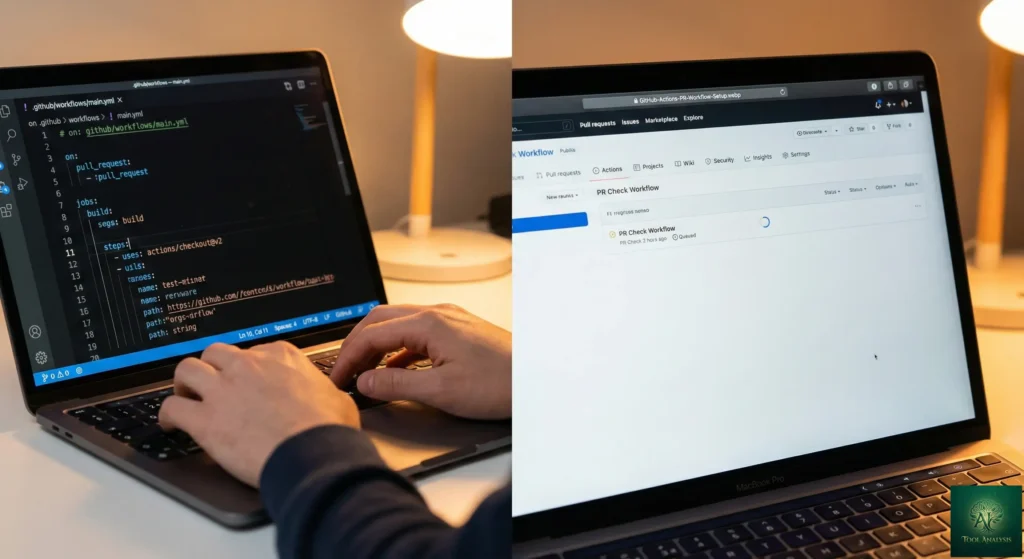
Commit this file, push it to a branch, and open a pull request against main. GitHub automatically
detects the workflow and runs it.
That is it. Three steps, under 10 minutes. Every future PR to main will now automatically run your tests
and linter.
📝 The YAML File Explained (No Jargon, Promise)
YAML files can look intimidating, but every GitHub Actions PR workflow follows the same basic recipe. Think of it like a cooking recipe: you have a name, a trigger (when to cook), and steps (what to do).
name: Just a label. Call it whatever helps you identify this workflow. “PR Checks” is
clear and simple.
on: pull_request: This is the trigger. It tells GitHub: “Run this workflow whenever
someone opens, updates, or reopens a pull request targeting the main branch.” You can also trigger on
push, schedule (cron jobs), or workflow_dispatch (manual trigger).
jobs: The actual work. Each job gets its own virtual machine. In our example, the
test job runs on ubuntu-latest (a free Linux VM from GitHub).
steps: Individual actions within a job. Each step either runs a command
(run:) or uses a pre-built action (uses:). The actions/checkout@v4 action
pulls your code into the VM. The actions/setup-node@v4 action installs Node.js. Then your custom
commands run tests and linting.
The beauty is that you pin everything to specific versions (@v4, node-version: '20'). This
means your CI builds are reproducible. The same workflow runs the same way every time, unlike running tests on your
laptop where “it works on my machine” is a daily frustration.
🔧 5 Real GitHub Actions PR Workflow Templates You Can Copy Today
1. Basic Test + Lint (Any Language)
The starter recipe. Runs your tests and checks code formatting. Swap the language setup step for Python, Java, or whatever you use.
name: PR Checks
on:
  pull_request:
    branches: [main]
jobs:
  test:
    runs-on: ubuntu-latest
    steps:
      - uses: actions/checkout@v4
      - uses: actions/setup-node@v4
        with:
          node-version: '20'
          cache: 'npm'
      - run: npm ci
      - run: npm test
      - run: npm run lint
2. Multi-Platform Matrix Build
Tests your code across multiple operating systems and language versions simultaneously. Like testing a recipe in three different kitchens at the same time.
name: Cross-Platform PR Checks
on:
  pull_request:
    branches: [main]
jobs:
  test:
    strategy:
      matrix:
        os: [ubuntu-latest, windows-latest, macos-latest]
        node-version: [18, 20, 22]
    runs-on: ${{ matrix.os }}
    steps:
      - uses: actions/checkout@v4
      - uses: actions/setup-node@v4
        with:
          node-version: ${{ matrix.node-version }}
          cache: 'npm'
      - run: npm ci
      - run: npm test
3. Python PR Workflow with Security Scan
For Python projects, this runs tests, checks formatting with Black, and scans for known vulnerabilities in your dependencies.
name: Python PR Checks
on:
  pull_request:
    branches: [main]
jobs:
  test:
    runs-on: ubuntu-latest
    steps:
      - uses: actions/checkout@v4
      - uses: actions/setup-python@v5
        with:
          python-version: '3.12'
          cache: 'pip'
      - run: pip install -r requirements.txt
      - run: python -m pytest --cov=src
      - run: black --check src/
      - run: pip audit
4. PR Preview Deployment
Every PR gets its own live preview URL so reviewers can click through the actual changes instead of reading code diffs. This is what separates professional teams from everyone else.
name: PR Preview Deploy
on:
  pull_request:
    types: [opened, synchronize, reopened]
jobs:
  deploy-preview:
    runs-on: ubuntu-latest
    permissions:
      pull-requests: write
      contents: read
    steps:
      - uses: actions/checkout@v4
      - uses: actions/setup-node@v4
        with:
          node-version: '20'
          cache: 'npm'
      - run: npm ci
      - run: npm run build
      - name: Deploy to preview
        id: deploy
        run: |
          # Your deployment command here
          echo "preview_url=https://pr-${{ github.event.number }}.preview.example.com" >> $GITHUB_OUTPUT
      - name: Comment PR with preview URL
        uses: actions/github-script@v7
        with:
          script: |
            github.rest.issues.createComment({
              owner: context.repo.owner,
              repo: context.repo.repo,
              issue_number: context.issue.number,
              body: '🚀 Preview deployed: ${{ steps.deploy.outputs.preview_url }}'
            })
5. Auto-Create PRs from Automation
Uses the peter-evans/create-pull-request action to automatically create PRs when your workflow makes
changes (like updating dependencies or generating files).
name: Auto Update Dependencies
on:
  schedule:
    - cron: '0 9 * * 1'  # Every Monday at 9 AM
jobs:
  update:
    runs-on: ubuntu-latest
    steps:
      - uses: actions/checkout@v4
      - run: npm update
      - uses: peter-evans/create-pull-request@v6
        with:
          title: 'chore: weekly dependency update'
          body: 'Automated dependency update from GitHub Actions.'
          branch: auto/dependency-update
          commit-message: 'chore: update dependencies'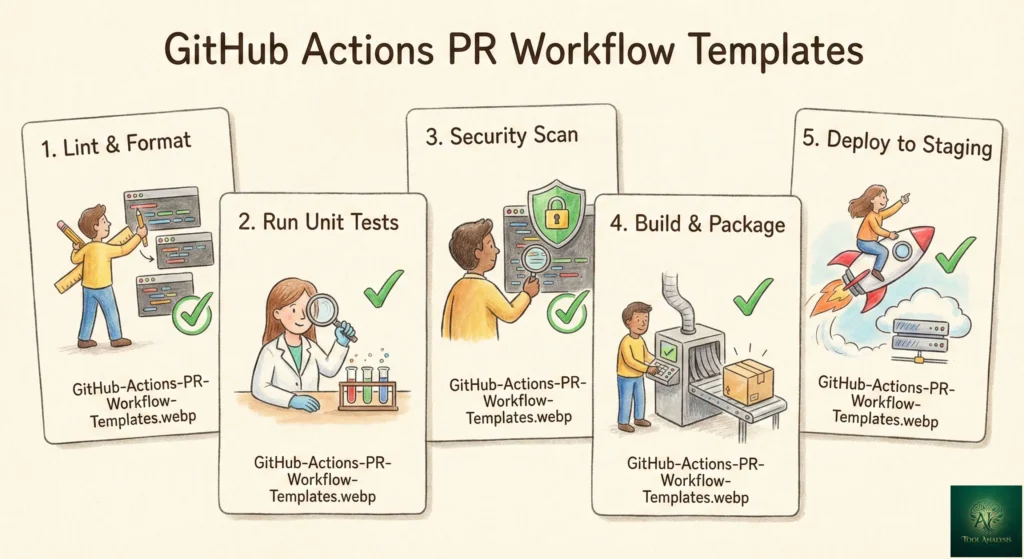
🧠 Advanced: Matrix Builds, Caching, and Concurrency
Dependency Caching: Without caching, every PR check downloads all your dependencies from scratch.
With caching, subsequent runs reuse downloaded packages. The difference? A Node.js project with 500 dependencies
goes from 45 seconds to 8 seconds on the install step. Just add cache: 'npm' to your
setup-node step (shown in the templates above).
Concurrency Control: If a developer pushes three quick commits to a PR, you do not want three separate workflow runs stacking up. Add a concurrency group to cancel redundant runs:
concurrency:
  group: pr-${{ github.event.pull_request.number }}
  cancel-in-progress: true
This tells GitHub: “If a new run starts for the same PR, cancel the old one.” Saves minutes and prevents confusion from stale results.
Path Filtering: No need to run your entire test suite when someone only updates the README. Filter workflows by changed files:
on:
  pull_request:
    paths-ignore:
      - '*.md'
      - 'docs/**'
Security Tip (December 2025 Update): GitHub recently enforced new security defaults for Actions workflows, particularly around
pull_request_target. If you accept PRs from forks (open-source projects), never use
pull_request_target with actions/checkout of the PR branch, as this runs untrusted code
with write access to your repo. Stick with the standard pull_request trigger for fork contributions.
REALITY CHECK
Marketing Claims: “YAML Anchors now available! DRY up your workflows!”
Actual Experience: YAML Anchors (launched late 2025) help reduce repetition in large workflow files, but they have a learning curve and limited IDE support for debugging. For most teams with 1-3 workflow files, the complexity is not worth it yet.
Verdict: Useful for teams managing 5+ workflow files. Skip for smaller projects.
💰 Pricing Breakdown: What You’ll Actually Pay for GitHub Actions
Here is the pricing reality as of February 2026, after GitHub’s January 2026 price reduction on hosted runners:
| Plan | Price | Free Actions Minutes | Storage | Best For |
|---|---|---|---|---|
| Free | $0 | 2,000 min/month | 500 MB | Solo devs, open source |
| Team | $4/user/month | 3,000 min/month | 2 GB | Small teams |
| Enterprise | $21/user/month | 50,000 min/month | 50 GB | Large organizations |
💡 Swipe left to see all features →
GitHub Actions: Free Minutes by Plan
Key details most guides miss:
Public repositories get unlimited free minutes on standard runners. If your project is open source, you pay nothing. Windows and macOS runners cost 2x and 10x the Linux rate respectively, so minute multipliers matter. A workflow that takes 5 minutes on Linux costs 5 minutes, but the same 5 minutes on macOS costs 50 minutes from your quota.
The pricing controversy: In December 2025, GitHub announced a $0.002/minute “platform fee” for self-hosted runners, sparking significant developer backlash. GitHub postponed this change, admitting they “missed the mark” on community feedback. The hosted runner price reduction (up to 39%) went live January 2026 as planned. Self-hosted billing remains paused while GitHub re-evaluates. If you rely heavily on self-hosted runners, budget for potential future costs but enjoy the free ride for now.
For context on developer tool pricing, our Claude Code Router review covers how developers are optimizing AI coding costs. Similar cost-conscious thinking applies to CI/CD minutes.
🤖 AI + GitHub Actions: The New Developer Stack
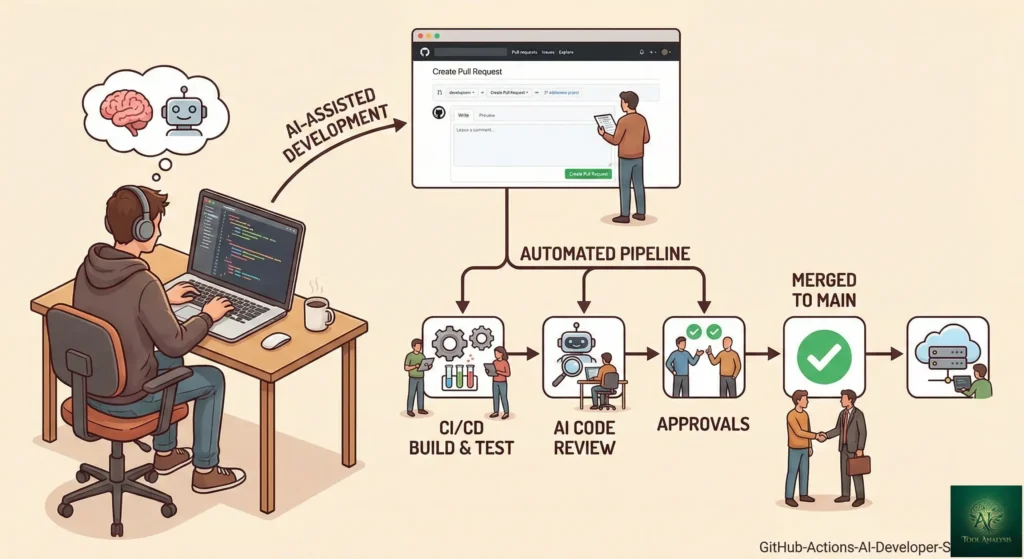
Here is where things get interesting for 2026. Developers are increasingly using AI coding agents to write code, and GitHub Actions PR workflows to verify it. The combination creates a safety net that makes AI-assisted development practical.
The workflow looks like this:
1. Claude Code, Cursor, or Google Antigravity writes the code.
2. Developer reviews the AI’s work and opens a PR.
3. GitHub Actions automatically runs tests, linting, and security checks.
4. If the AI’s code breaks something, you catch it before it merges.
GitHub Copilot’s Agent Mode can now generate workflow YAML files for you. And Gemini CLI with extensions can integrate directly into your CI pipeline to summarize PR changes or auto-fix failing tests. This is the direction developer tooling is heading: AI writes, automation verifies, humans approve.
For a complete picture of AI coding agents and how they fit into PR workflows, see our Top AI Agents for Developers 2026 comparison.
REALITY CHECK
Marketing Claims: “AI will auto-create YAML workflows! No DevOps needed!”
Actual Experience: GitHub Copilot can generate basic workflow files, and it does save time. But complex workflows with matrix builds, concurrency, caching, and conditional steps still require human understanding. AI-generated YAML often needs debugging.
Verdict: AI helps you start faster but does not replace understanding how workflows work. Use this guide to learn the fundamentals, then let AI speed up the repetitive parts.
🛠️ Common GitHub Actions PR Workflow Problems and How to Fix Them
Problem: Workflow does not trigger on PR.
Check three things: (1) your YAML file is in .github/workflows/, not github/workflows/, (2)
the branch name in your trigger matches your actual branch (e.g., main vs master), and (3)
the file is valid YAML (indentation matters, use spaces not tabs).
Problem: Tests pass locally but fail in CI.
Usually an environment difference. Pin your language version (node-version: '20.11.0' instead of
'20'), use npm ci instead of npm install (respects your lockfile), and check
for hardcoded paths or environment variables your local machine has but CI does not.
Problem: Workflows from forked PRs cannot access secrets.
By design. For security, pull_request events from forks do not have access to repository secrets. If you
need secrets for fork PRs (like API keys for testing), use the pull_request_target trigger carefully
and never check out the fork’s code with write permissions.
Problem: CI is too slow.
Enable dependency caching (cache: 'npm' or cache: 'pip'), add concurrency cancellation for
redundant runs, and use path filtering to skip unnecessary checks. For persistent slowness, consider GitHub’s larger runners
or third-party runner providers.
👤 Who Should Use GitHub Actions PR Workflows (And Who Shouldn’t)
Use GitHub Actions if:
You already host code on GitHub (this is the obvious one). You want automated checks on every PR without managing external CI servers. You work on a team where “did you run the tests?” is asked more than once a week. You contribute to open source and want free CI/CD. You are a solo developer who wants professional-grade automation without the enterprise price tag.
Consider alternatives if:
You are in a regulated industry requiring on-premises-only CI/CD (look at Jenkins or GitLab CI/CD self-hosted). Your pipeline involves 50+ microservices with complex interdependencies (look at enterprise CI platforms). You use GitLab, Bitbucket, or Azure DevOps as your primary code host (each has native CI/CD). You need sub-second billing precision (look at third-party runner providers like Depot or Blacksmith, which offer per-second billing).
For developers exploring free coding tools alongside GitHub Actions, our Goose AI review covers a free, open-source coding agent that pairs well with automated PR workflows.
💬 What Developers Are Actually Saying About GitHub Actions
Community sentiment is strongly positive for the core product but sharply divided on pricing direction.
Developer Sentiment on GitHub Actions (2026)
The fans: Developers consistently praise the native GitHub integration. No context switching, no separate dashboard. One engineering lead at Amplifon noted that adopting Actions led to “expedited deployments, improved release management, and enhanced code reuse.” The 10,000+ pre-built actions in the Marketplace mean most common tasks (deploy to AWS, post to Slack, label PRs) are one-liner additions.
The critics: The December 2025 pricing announcement ignited backlash across Hacker News, Reddit, and the GitHub Community forum. Developers objected to the proposed $0.002/minute fee for self-hosted runners, with one calling it “absolutely bananas.” GitHub listened and postponed the change, but the trust damage is real. Performance complaints persist, with some developers reporting their self-hosted runners are 10x faster than GitHub-hosted options.
The pragmatists: Most working developers use GitHub Actions because it is good enough, free enough, and integrated enough. It is not the fastest, cheapest, or most powerful CI/CD platform in any single category, but it wins on convenience for the 150+ million developers already on GitHub.
REALITY CHECK
Marketing Claims: “96% of customers will see no change to their bill.”
Actual Experience: True for the pricing change, but misses the point. The 4% who were affected are often the most vocal power users and open-source maintainers whose trust matters disproportionately. GitHub acknowledged this by postponing the self-hosted runner fee.
Verdict: For most developers setting up PR workflows, pricing is not an issue. The free tier is generous. Watch for future changes if you scale to heavy self-hosted usage.
❓ FAQs: Your Questions Answered
Q: Is GitHub Actions free for PR workflows?
A: Yes. Public repositories get unlimited free minutes on standard GitHub-hosted runners. Private repositories get 2,000 free minutes per month on the Free plan, 3,000 on Team, and 50,000 on Enterprise. For most teams, the free tier is sufficient for PR checks.
Q: How long does it take to set up a GitHub Actions PR workflow?
A: About 10 minutes for a basic test-and-lint workflow. Create a YAML file in
.github/workflows/, define your trigger (pull_request), add your build and test steps,
commit, and push. GitHub detects the file automatically.
Q: Can GitHub Actions block a PR from merging if tests fail?
A: Yes. Go to your repository Settings, then Branches, then add a Branch Protection Rule for your main branch. Enable “Require status checks to pass before merging” and select your workflow. Now PRs physically cannot merge until all checks pass.
Q: What is the difference between pull_request and pull_request_target triggers?
A: pull_request runs in the context of the PR branch with read-only access and no
secrets. pull_request_target runs in the context of the base branch with write access and secrets. Use
pull_request for standard checks. Only use pull_request_target if you need secrets for
fork PRs, and never check out the fork code with write permissions.
Q: How do I speed up slow GitHub Actions workflows?
A: Three quick wins: (1) Enable dependency caching using the cache option in setup
actions, (2) add concurrency groups with cancel-in-progress to stop redundant runs, and (3) use path
filtering to skip workflows when only documentation files change. These alone can cut CI time by 50-70%.
Q: Can I use GitHub Actions with AI coding tools like Copilot or Claude Code?
A: Yes, and this combination is increasingly common. AI tools generate code, developers open PRs, and GitHub Actions automatically verifies the AI output with tests and linting. GitHub Copilot can also generate workflow YAML files. Gemini CLI can integrate into CI pipelines to summarize PR changes.
Q: What happened with the GitHub Actions pricing controversy in December 2025?
A: GitHub announced a $0.002/minute platform fee for self-hosted runners. Developers strongly objected to paying for orchestration on their own hardware. GitHub postponed the change, reduced hosted runner prices by up to 39%, and opened a community discussion. Self-hosted runners remain free for now.
Q: Should I use GitHub Actions or Jenkins for PR automation?
A: GitHub Actions if your code is on GitHub and you want zero-setup CI/CD. Jenkins if you need complex multi-platform pipelines, are in a regulated industry requiring on-premises CI, or already have Jenkins infrastructure. For most teams starting fresh, GitHub Actions is simpler, cheaper, and better integrated.
🏁 Final Verdict
GitHub Actions is the easiest way to add automated quality gates to your pull requests. The free tier is generous, the integration with GitHub is seamless, and the ecosystem of pre-built actions means most common tasks are a copy-paste away.
Use GitHub Actions PR workflows if: You use GitHub, you want automated testing on every PR, and you value simplicity over maximum configurability.
Stick with Jenkins or GitLab CI if: You need on-premises CI/CD, complex multi-cloud pipelines, or are already deeply invested in another platform.
Ready to start? Copy the Basic Test + Lint template from Section 5, drop it into your repo at
.github/workflows/pr-checks.yml, and open your first automated PR. You will wonder how you ever merged
code without it.
Stay Updated on Developer Tools
The AI coding tool market changes weekly. New models launch, prices drop, and features that cost $200/month become free overnight. Do not miss the next game-changer.
- ✅ Weekly tool reviews with real testing, not marketing copy
- ✅ Price drop alerts when tools get cheaper or go free
- ✅ CI/CD and DevOps updates that affect your workflow
- ✅ AI coding tool comparisons with honest benchmarks
- ✅ Setup guides like this one delivered to your inbox
Free, unsubscribe anytime

📚 Related Reading
- Best AI Developer Tools 2025: Complete Comparison
- GitHub Copilot Pro+ Review: Is the $39/Month Tier Worth It?
- Claude Code Review 2026: The Reality After Opus 4.5
- Cursor 2.0 Review: $9.9B AI Code Editor Tested
- Gemini CLI Extensions: Free Terminal AI Gets 20+ Integrations
- Top AI Agents for Developers 2026: 8 Tools Tested
- Goose AI Review: Block’s Free Coding Agent
- Claude Code Router: Cut Your AI Coding Bill by 80%
- Google Antigravity Review: Free IDE with 7 AI Models
Last Updated: February 20, 2026 | GitHub Actions Platform Version: Re-architected infrastructure (71M jobs/day) | Next Review Update: March 20, 2026