
The next phase of the AI race has begun. On November 18th, Google didn’t just release a new model; they declared a shift from the “Era of Thinking” to the “Era of Action.” The launch of Gemini 3 isn’t about slightly better benchmarks. It’s about fundamentally changing how AI operates, introducing autonomous agents, AI-generated interfaces, and a brand-new developer platform called Antigravity.
But does Gemini 3 Pro—the model currently available—deliver on these promises? And what about the eyebrow-raising $249.99/month price tag for the new Ultra tier? This comprehensive Gemini 3 review digs into what’s actually available today.
I spent the last 72 hours testing Gemini 3 Pro across the Gemini App, the API, and the new Antigravity IDE to see what’s real and what’s marketing.
The Bottom Line: Gemini 3 Review
If you remember nothing else: Gemini 3 Pro is a major leap forward in agentic capabilities (AI that acts autonomously) and complex reasoning. The integration with the new Antigravity developer platform shows Google’s vision for AI acting as an autonomous architect, not just a code completer. For $19.99/month (Google AI Pro), you get a powerful, fast model that excels at multi-step tasks.
However, the consumer-facing Gemini app still feels experimental, and the new “Generative Interfaces” are hit-or-miss. The $249.99/month Ultra tier feels wildly overpriced for what it currently offers, banking heavily on features “coming soon.” If you’re comparing it to Claude or GPT, Gemini 3 Pro is now a top contender, especially for development and planning.
- Best for: Developers exploring agentic workflows (Antigravity), users needing advanced multimodal analysis, and anyone invested in the Google ecosystem (Workspace, Android).
- Skip if: You need the absolute best creative writing (Claude still often leads) or you’re looking for a polished, stable consumer AI assistant today.
Click any section to jump directly to it
- 🚀 The “Era of Action”: What Gemini 3 Actually Is
- 🧠 The Model Breakdown: Pro, Ultra, and Nano Banana Pro
- 🤖 The Agentic Revolution: Antigravity and Gemini Agent
- ✨ Generative Interfaces: The Future of Interaction?
- 🎨 Nano Banana Pro: The Creative Powerhouse
- 💻 Developer Deep Dive: Thought Signatures and Vibe Coding
- 💸 Pricing Breakdown: The $250 Elephant in the Room
- 👤 Who Should Upgrade (And Who Should Wait)
- 📣 What Users Are Actually Saying
- ❓ FAQs: Your Questions Answered
- 🏁 Final Verdict
🚀 The “Era of Action”: What Gemini 3 Actually Is
For the last two years, the AI race has focused primarily on “reasoning”—how well a model can think through a problem. With Gemini 3, Google is attempting to change the rules of the game.
Gemini 3 is designed not just to think, but to do. It’s built on a Sparse Mixture-of-Experts (MoE) architecture. Think of MoE like a massive toolbox where the model only grabs the specific tools (the “experts”) needed for a task, rather than carrying the whole heavy box. This allows Gemini 3 Pro to be incredibly powerful while remaining fast and relatively cost-efficient.
The real story here is the focus on agentic workflows. An “agentic workflow” means the AI doesn’t just answer your question; it executes a series of steps to achieve a goal.
Here’s what that means in practice:
- In the Gemini App: You ask it to “Plan a 3-day trip to Rome.” Instead of just giving you a list of places, Gemini 3 uses its new “Generative Interface” to create a dynamic, interactive itinerary that looks like a travel blog.
- For Developers: Using the new Antigravity platform, you tell the AI, “Build a Python script to monitor my server logs.” Gemini 3 doesn’t just write the script; it opens the terminal, runs tests, debugs issues, and confirms it works.
Google claims Gemini 3 Pro tops the LMArena Leaderboard with a breakthrough score of 1501 Elo, making it the current leading model by public consensus. While benchmarks don’t tell the whole story, the improvements in complex reasoning and tool use are immediately noticeable compared to Gemini 2.5 Flash.
🧠 The Model Breakdown: Pro, Ultra, and Nano Banana Pro
The Gemini 3 family isn’t a single model. Understanding the differences is crucial, as the capabilities (and costs) vary significantly.
Gemini 3 Pro (Available Now)
This is the workhorse model and the one most users will interact with. It’s available today in the Gemini App (for Google AI Pro subscribers), the API, Vertex AI, and the Gemini CLI.
- Context Window: 1 Million tokens (input), 64k tokens (output via API).
- Modalities: Text, Image, Audio, Video.
- Key Strengths: Advanced reasoning, agentic coding, multimodal understanding, and speed.
Gemini 3 Pro is what powers the new Generative Interfaces and the Antigravity platform. In my testing, it excels at synthesizing disparate pieces of information and following complex, multi-step instructions.
Gemini 3 Ultra / Deep Think
This is Google’s flagship model, positioned to compete with the absolute best. While the Google AI Ultra subscription ($249.99/month) is available now, many of the core features associated with the Ultra model (sometimes referred to as “Deep Think”—an enhanced reasoning mode) are still listed as “coming soon.”
Key upcoming features exclusive to Ultra:
- Deep Think: The most advanced reasoning model, currently in closed preview. It holds the top position on the “Humanity’s Last Exam” benchmark (Score: 37.4).
- Veo 3: Access to the latest video generation model.
- Gemini Agent: A new tool that orchestrates and completes complex, multi-step tasks (e.g., organizing your entire inbox autonomously).
- Highest Limits: Significantly higher usage caps across all Google tools.
We will update this Gemini 3 review as soon as the full Ultra model capabilities are released.
🔍 REALITY CHECK: The “Thinking” Visualization
Marketing Claims: Google emphasizes visualizing the model’s thought process (dynamic thinking) as a revolutionary step in transparency and reasoning.
Actual Experience: When you watch the “Thinking” visualization in the Gemini app, it shows the model planning, searching, and self-correcting. It’s fascinating to watch, providing insight into how the model arrived at an answer.
Verdict: While visualizing the process is helpful for transparency, some users argue that “Thinking” sometimes feels like extra steps added for show, rather than essential context, especially for simple problems. The actual reasoning *is* improved, but the visualization might be slightly oversold.
🤖 The Agentic Revolution: Antigravity and Gemini Agent
If Gemini 3 is the engine, Google Antigravity is the vehicle Google built to showcase its power. This is perhaps the most significant announcement for the future of software development.
Google Antigravity: The Agentic IDE
Antigravity is a new, downloadable “agentic development platform” (currently free preview for MacOS, Windows, and Linux). It looks like a traditional IDE (similar to VS Code or Cursor 2.0), but it operates fundamentally differently.
In a traditional IDE, the AI assists the developer. In Antigravity, the developer acts as the architect, while intelligent agents operate autonomously across the editor, terminal, and browser.
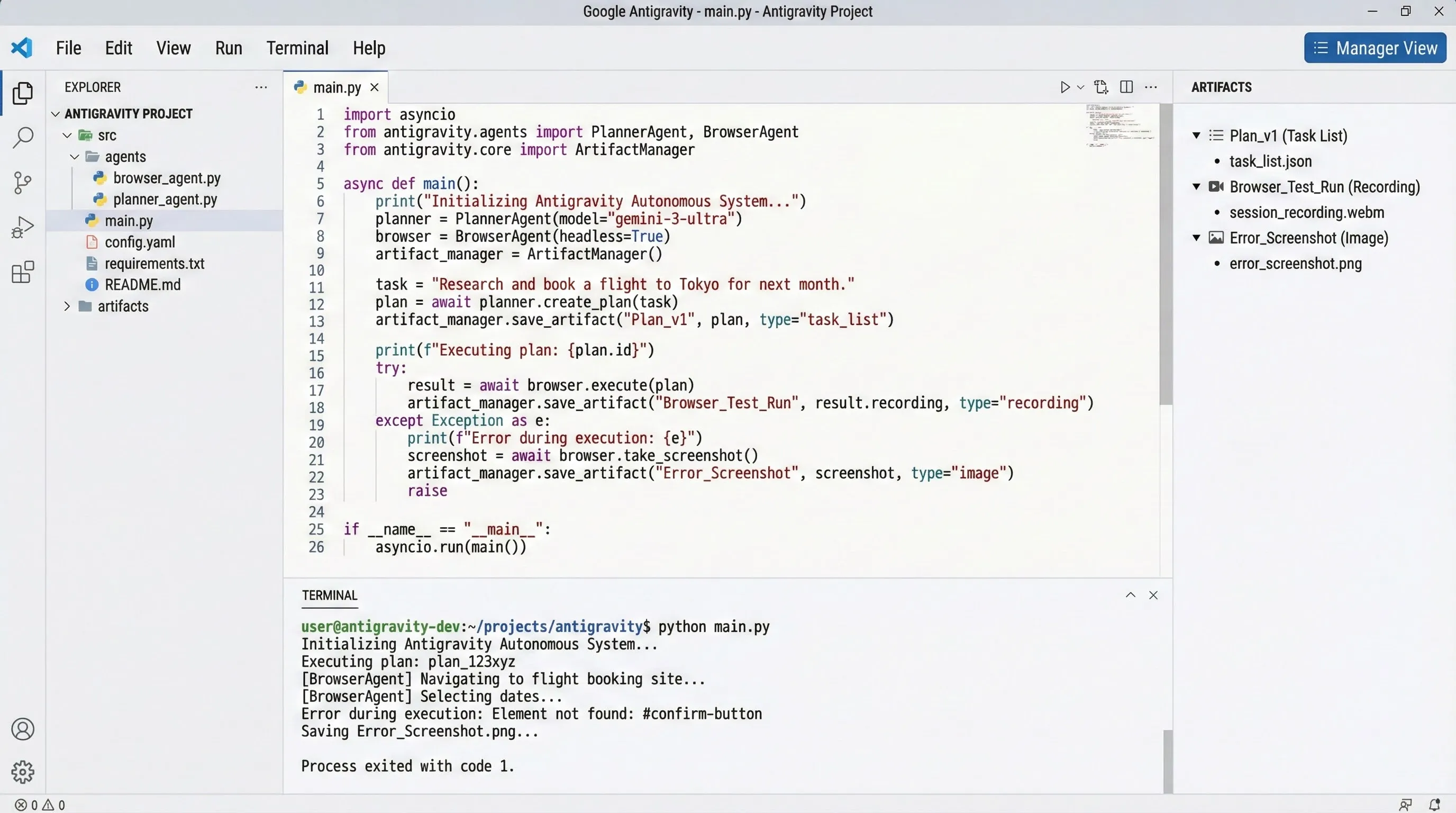
Here’s how it works:
- Define the Task: You give Antigravity a high-level goal (e.g., “Refactor this legacy Java application”).
- Agent Planning: The Gemini 3-powered agents create a plan, breaking the task down into manageable steps.
- Execution: The agents execute the plan, writing code, running tests, opening browser windows for research, and using the terminal. It supports multiple agents working in parallel.
- Review: The developer reviews and approves the work.
This elevates the developer from writing code to managing and reviewing the work of AI agents. It’s a profound shift, and while Antigravity is still in preview, it demonstrates the advanced agentic capabilities baked into Gemini 3 Pro.
Gemini Agent (Ultra Tier)
While Antigravity targets developers, the “Gemini Agent” is aimed at consumers and business users within the Gemini App. Rolling out first to Google AI Ultra subscribers, this agent is designed to handle complex, multi-step tasks on your behalf.
Examples might include: “Review all my emails from the last week, categorize them by priority, and draft responses to the urgent ones.” This level of autonomy is what differentiates Gemini 3 from previous generations.
✨ Generative Interfaces: The Future of Interaction?
One of the most visible changes in the consumer-facing Gemini App is the introduction of “Generative Interfaces.” This is a new concept where the AI doesn’t just respond with text; it designs and codes a custom user interface in real-time, perfectly suited to your prompt.
Google launched two experiments:
1. Visual Layout
This generates an immersive, magazine-style view complete with photos and modules. It’s designed for planning and exploration.
Example: I asked Gemini 3 Pro to “Plan a weekend hiking trip in the Catskills.” Instead of a bulleted list, it generated a Visual Layout with a large hero image, sections for different trails, embedded maps, and stylized text.
My experience: It looks beautiful. It feels like the AI instantly created a high-quality travel guide. The elements are interactive, allowing me to dive deeper into specific sections. It’s significantly more engaging than a standard text response.

2. Dynamic View
Dynamic View uses Gemini 3’s agentic coding capabilities to build interactive widgets and experiences.
Example: Asking Gemini to “Explain the solar system to a 5-year-old” might generate an interactive model of the planets that you can tap and explore.
My experience: This is more experimental. Sometimes the generated UI is incredibly useful; other times, it feels clunky or doesn’t add much value over a well-formatted text response.
Verdict: Generative Interfaces are a bold step forward. While still experimental, they showcase Gemini 3’s multimodal reasoning and coding abilities in a tangible way. Visual Layout, in particular, is a game-changer for research and planning.
🎨 Nano Banana Pro: The Creative Powerhouse
Just two days after the main launch, Google released Nano Banana Pro, their upgraded image generation model, built on the Gemini 3 Pro foundation. This is perhaps the most impressive part of the entire launch for creators.
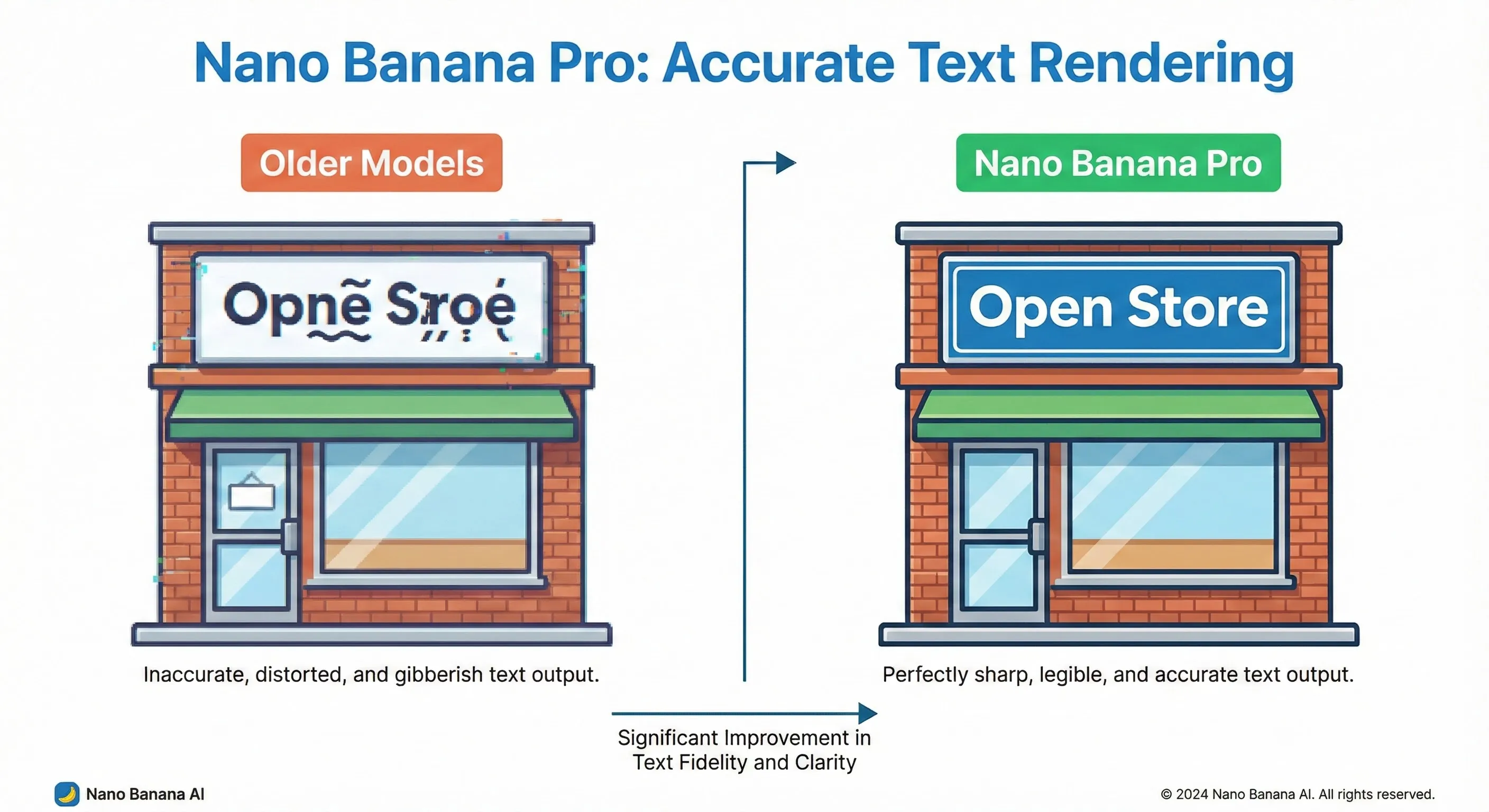
Perfect Text Rendering
This is the standout feature. Nano Banana Pro is arguably the best model on the market for accurate, legible text rendering within images. It can handle everything from short taglines to long paragraphs, different fonts, and even calligraphy. This makes it viable for creating posters, mockups, and marketing graphics.
Professional Controls and 4K Output
It supports exporting in 2K and 4K resolution. It also introduces studio-grade controls, allowing users to adjust lighting, camera angles, depth of field, and color grading using text prompts.
Consistency and Real-World Knowledge
It can maintain the identity of up to 5 people consistently across generations (useful for storyboarding) and blend multiple input images. Furthermore, it can connect to Google Search to generate images based on real-time info (e.g., creating a graphic showing today’s weather).
Note on Safety: All images include Google’s invisible SynthID watermark. Free and Pro users also get a visible “sparkle” watermark; only Ultra subscribers can remove the visible mark.
💻 Developer Deep Dive: Thought Signatures and Vibe Coding
Gemini 3 introduces several critical new features for developers using the API and tools like Gemini CLI.
Thought Signatures: The Key to Agentic Memory
This is arguably the most important technical innovation in the Gemini 3 API. To perform complex, multi-step reasoning (like an agent does), the model needs to maintain context across multiple API calls.
Gemini 3 uses “Thought Signatures” to achieve this.
Think of Thought Signatures as cognitive sticky notes. When the model executes a step (like calling a function or using a tool), it generates a signature—a compressed representation of its reasoning process up to that point. To keep the model’s train of thought intact, the developer must return these signatures back to the model in the next request.
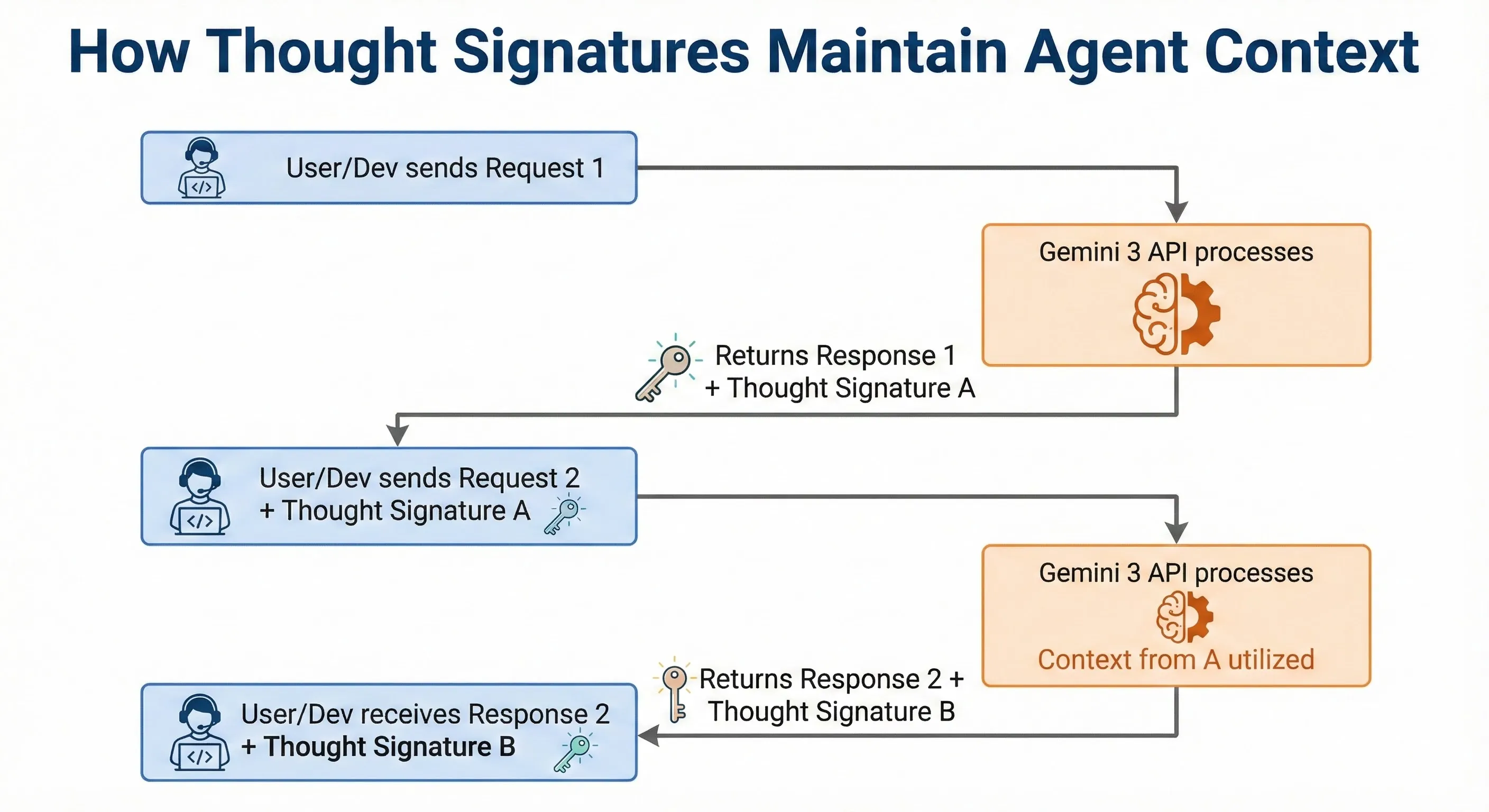
If you omit the signature, the model’s reasoning quality degrades significantly. The API enforces strict validation—missing signatures will result in an error. This mechanism is what allows Gemini 3 to handle sequential tasks (e.g., Check Flight -> Book Taxi) without forgetting the context of the first step.
Vibe Coding and Thinking Level Control
Google is leaning into the term “Vibe Coding”—the idea that you can create applications using natural language prompts and iterative refinement, relying on the model’s intuition.
Gemini 3 Pro is touted as the best “vibe coding” model yet. In practice, this means fewer prompts are needed to achieve the desired output, and the model is better at understanding the intent behind your request, especially for visual tasks like front-end development.
Additionally, the API introduces the thinking_config parameter. This lets developers control the
trade-off between reasoning depth and latency (High for accuracy, Low for speed).
🔍 REALITY CHECK: The 64k Output Limit
Marketing Claims: “With a 1M token context window… Gemini 3 outperforms previous generations and can consume entire code bases.”
Actual Experience: The 1M input window is excellent for analysis. However, the API documentation clearly states the output window is limited to 64k tokens. This means while Gemini 3 Pro can *read* your entire codebase, it cannot *rewrite* the entire thing in a single response.
Verdict: The 1M context is powerful for RAG and analysis, but the 64k output limit is a significant bottleneck for large-scale generation tasks.
💸 Pricing Breakdown: The $250 Elephant in the Room
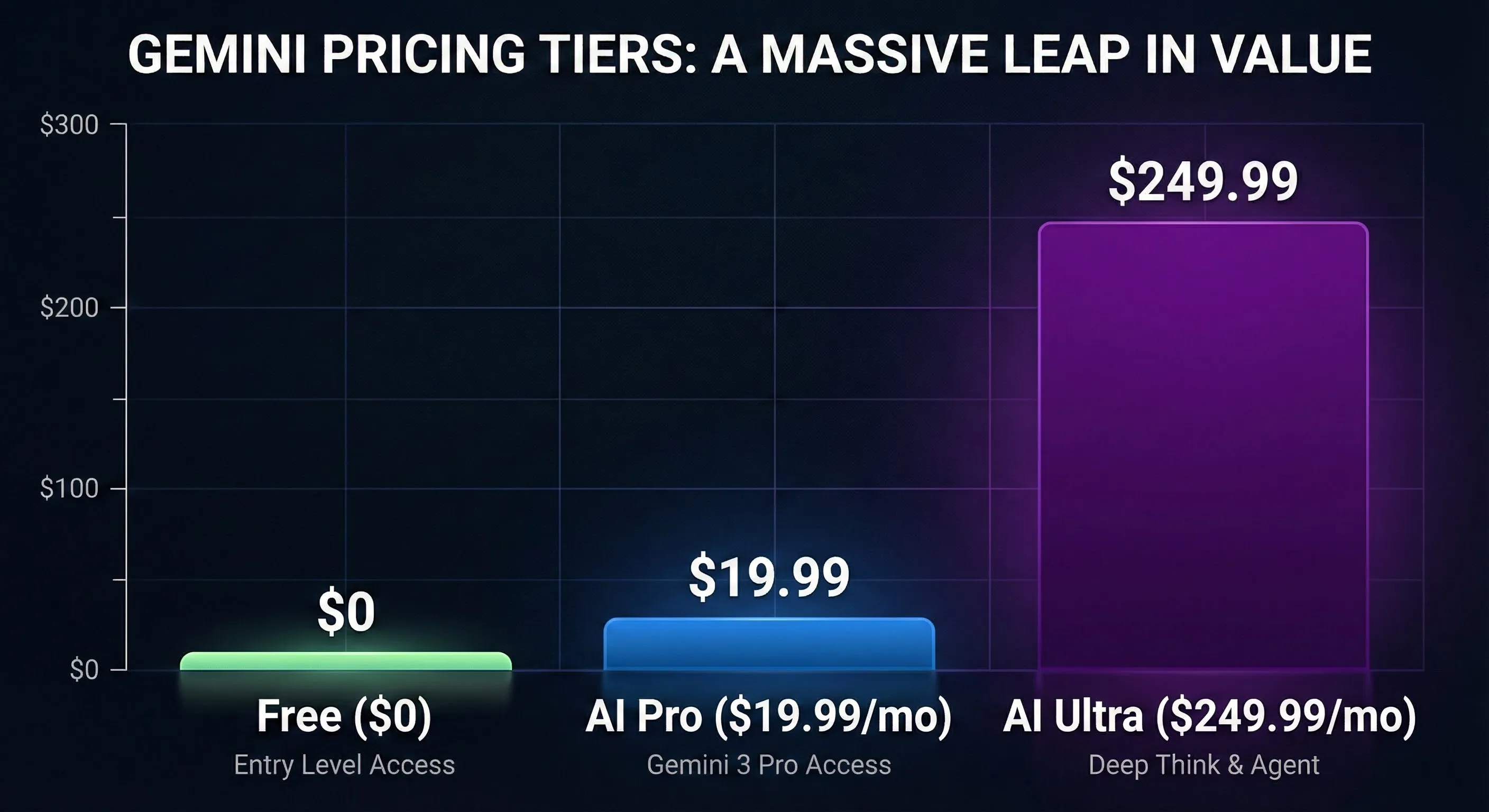
Gemini 3 pricing spans a wide range, from free access to enterprise-level costs. The most controversial aspect of the launch is the massive price jump for the Ultra tier.
Consumer Pricing (Google AI Subscriptions)
Google has restructured its consumer offerings:
- Free Tier: Access to a base Gemini model with limited access to Gemini 3 Pro (e.g., 5 prompts/day). Useful for everyday tasks.
- Google AI Pro ($19.99/month): This is the sweet spot. It grants priority access to Gemini 3 Pro, 2TB of storage, and integration with Google Workspace (Gmail, Docs, Slides). This is competitive with ChatGPT Plus and Claude Pro.
- Google AI Ultra ($249.99/month): Offers the highest limits, advanced agentic features (Gemini Agent), 30TB storage, YouTube Premium, and access to upcoming features like Deep Think and Veo 3.
| Volume | Input Price (per 1M) | Output Price (per 1M) | Best For |
|---|---|---|---|
| ≤ 200,000 Tokens | $2.00 | $12.00 | Standard chat, short summaries, coding tasks |
| > 200,000 Tokens | $4.00 | $18.00 | Deep research, complex codebase analysis |
💡 Swipe left to see all features →
Developers can access Gemini 3 Pro in Google AI Studio with rate limits free of charge for experimentation.
👤 Who Should Upgrade (And Who Should Wait)
With the launch of Gemini 3 Pro, the decision to upgrade depends heavily on your use case.
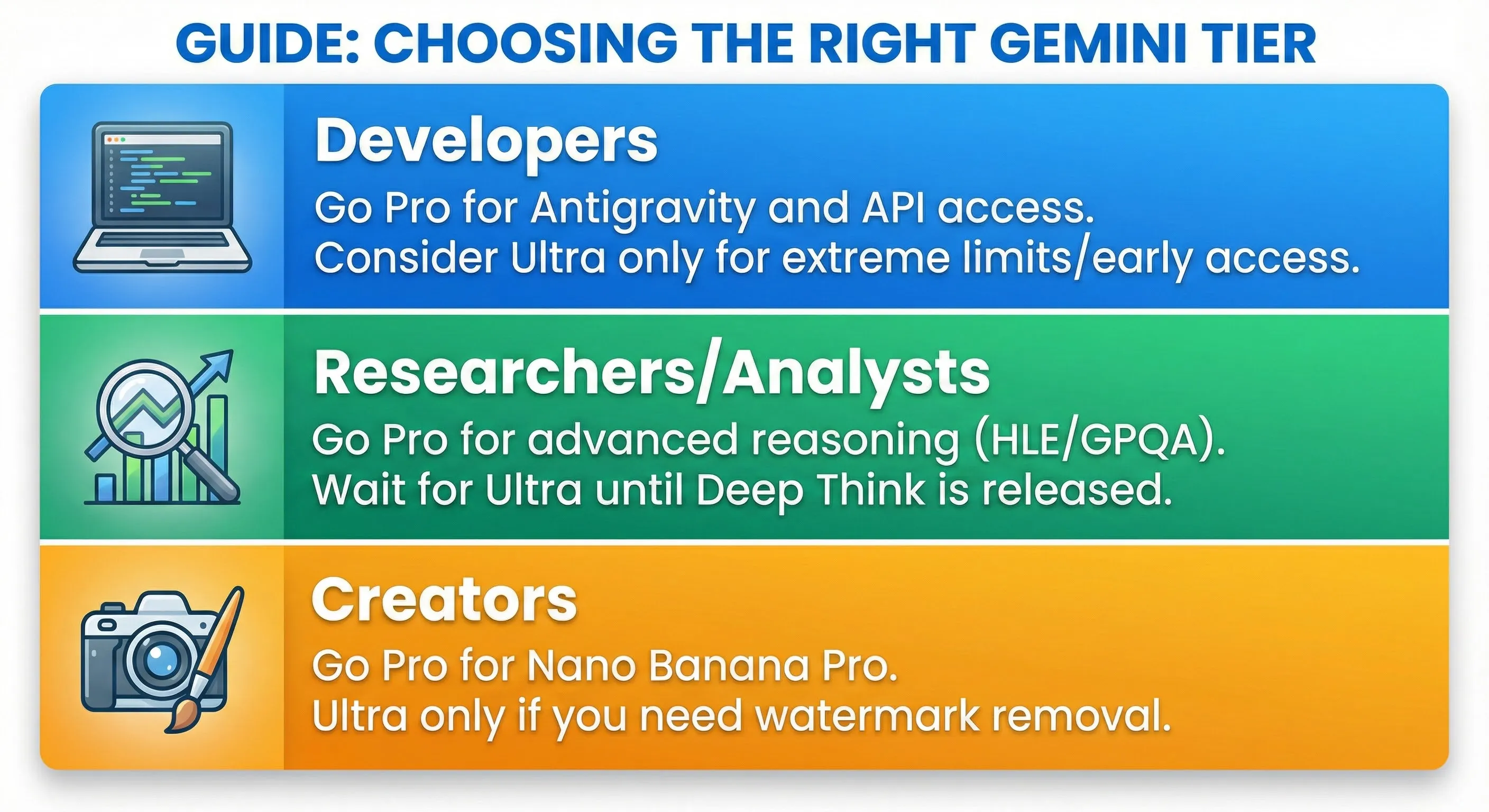
Upgrade to Google AI Pro ($19.99/month) if:
- You need advanced reasoning and planning: Gemini 3 Pro excels at complex, multi-step tasks. The new Generative Interfaces make planning significantly easier.
- You are deep in the Google Ecosystem: The integration with Workspace, Android, and tools like NotebookLM is seamless and powerful.
- You need better image generation: Nano Banana Pro is a massive upgrade, especially for text rendering and high-resolution outputs.
- You are a developer starting with AI: The Pro tier gives access to Gemini 3 Pro in the CLI and AI Studio, allowing you to explore agentic workflows.
Consider Google AI Ultra ($249.99/month) if:
- You are running agent-heavy workflows: You need the absolute highest limits and priority access for intensive use.
- You are a professional creative: You need the earliest access to Veo 3 (video) and the ability to remove visible watermarks from Nano Banana Pro images (Ultra exclusive).
- Budget is no concern: You want the absolute best Google has to offer, including the upcoming Deep Think model.
Stick with the Free Tier or Alternatives if:
- You prioritize creative writing: In my testing, Claude still holds the edge for nuance, tone, and emotional intelligence in creative prose.
- You need a simple, fast chatbot: The free tier or alternatives like ChatGPT might be sufficient for basic Q&A.
- You are waiting for stability: The Gemini App is undergoing rapid changes, and features like Generative Interfaces are still experimental.
📣 What Users Are Actually Saying
The community reaction to the Gemini 3 launch has been a mix of excitement, skepticism, and fascination with the new capabilities.
The “Thinking” Visualization is Wild
Many users on Reddit are captivated by the visualization of Gemini 3’s thought process. Watching the model plan, self-correct, and use tools in real-time feels like a glimpse into the future. One user noted, “Gemini 3’s thought process is wild, absolutely wild… Just crazy how far we’ve come.”
Excitement Over Agentic Capabilities
The developer community is buzzing about Antigravity and the improved agentic coding. The shift towards AI operating autonomously is seen as a major step forward. The improvements in “Vibe Coding” are also highly praised for accelerating development workflows.
The Ultra Price Shock
The $249.99/month price tag for the Ultra tier has been widely criticized as being out of touch with the consumer market. While some acknowledge the value for enterprise or extreme power users, many feel it prices out enthusiasts and solo developers.
Skepticism and Comparison Fatigue
Despite the impressive demos, some users are wary. Real-world comparisons suggest that while Gemini 3 is excellent for “one-shotting” tasks, it might still trail Claude in complex, multi-turn collaboration where the model needs to ask clarifying questions.
❓ FAQs: Your Questions Answered
Is Gemini 3 Pro better than GPT-5.1 and Claude 4.5?
It depends on the task. Gemini 3 Pro claims the top spot on the LMArena leaderboard (1501 Elo), suggesting it is currently the preferred model overall by public consensus. It excels at agentic workflows, complex reasoning, and multimodal understanding. However, Claude often still leads in creative writing nuance, while GPT remains incredibly fast and versatile.
Is the Google AI Ultra plan ($249.99/month) worth it?
For most users, no. The price is extremely high compared to the $19.99 Pro plan. Ultra is targeted at enterprise users or extreme power users who need the highest possible limits (30TB storage) and early access to features like Deep Think and Veo 3. For the average user or developer, the Pro plan offers the best value.
What is Google Antigravity?
Google Antigravity is a new “agentic development platform” (an IDE). Unlike traditional coding tools where AI assists the developer, Antigravity uses Gemini 3-powered agents to autonomously plan, execute, and debug complex software tasks across the editor, terminal, and browser. The developer acts as the architect, managing the agents.
What are Generative Interfaces?
Generative Interfaces (Visual Layout and Dynamic View) are a new feature in the Gemini App. Instead of responding with static text, Gemini 3 designs and codes a custom user interface in real-time based on the prompt. For example, asking for a travel plan generates an interactive, magazine-style itinerary.
Can I use Gemini 3 Pro for free?
Yes, but with limits. The free tier of the Gemini app offers limited access to Gemini 3 Pro. To get the full capabilities, the Google AI Pro subscription ($19.99/month) is recommended. Developers can use it free within rate limits in Google AI Studio.
What are Thought Signatures in the Gemini 3 API?
Thought Signatures are a mechanism Gemini 3 uses to maintain context and reasoning across multiple API calls, which is crucial for agentic workflows. They are compressed representations of the model’s thought process. Developers must return these signatures in subsequent API requests to ensure the model doesn’t lose its train of thought.
How good is the Nano Banana Pro image update?
It’s excellent. Built on Gemini 3 Pro, Nano Banana Pro is arguably the best model currently available for accurate, legible text rendering within images. It also offers 4K resolution output and professional creative controls.
What is the context window for Gemini 3 Pro?
Gemini 3 Pro offers a 1 Million token input context window. However, the output context window for the API is currently limited to 64k tokens.
🏁 Final Verdict
The launch of Gemini 3 marks a pivotal moment in the AI race. Google’s focus on the “Era of Action” is more than just marketing; the advancements in agentic capabilities, particularly demonstrated by the Antigravity platform and the new Thought Signatures API, are genuinely groundbreaking.
Gemini 3 Pro is a powerful, intelligent model that excels at complex reasoning and multimodal tasks. The Nano Banana Pro update is best-in-class for image generation. For $19.99/month, the Google AI Pro plan is highly competitive and strongly recommended.
However, the launch is marred by the confusing rollout of the Ultra tier and its exorbitant $249.99/month price tag. While the vision is clear, the execution in the consumer-facing Gemini app is still experimental.
Use Gemini 3 Pro if:
- You want to explore the future of agentic AI and autonomous workflows (Antigravity).
- You need advanced reasoning for complex planning and prefer interactive, visual responses (Generative UI).
- You rely heavily on the Google ecosystem (Workspace, Android).
- You need high-quality image generation with accurate text (Nano Banana Pro).
Stick with Alternatives (or Wait) if:
- Creative writing is your primary use case (Claude remains superior).
- You are deterred by the high price of the Ultra tier.
- You require an API output context window larger than 64k.
Try Gemini 3 Pro today and explore the new features in the Gemini App and Google AI Studio.
Stay Updated on Foundational AI Models
Don’t miss the next major model launch. Subscribe for weekly reviews of LLMs, AI coding assistants, APIs, and development platforms.
- ✅ Honest, hands-on reviews
- ✅ Benchmark analysis
- ✅ Price drop alerts
- ✅ Breaking feature launches
- ✅ Competitor comparisons
Related Reading
- Gemini 2.5 Flash Review: Speed vs Smarts
- Claude AI Review 2025: The Thoughtful Alternative (30-Day Test)
- Nano Banana Pro Review: The New King of AI Image Generation?
- Cursor 2.0 Review 2025: The AI-First Code Editor
- Gemini CLI Extensions 2025: Powering Up Your Terminal
- AI News (November 20, 2025): Gemini 3 Launch and More
- NotebookLM Updates 2025: Google’s AI Research Assistant
- ChatGPT Review: The Benchmark AI
Last Updated: November 22, 2025
Gemini Version Tested: Gemini 3 Pro (Preview)
Next Review Update: Upon the full release of Gemini 3 Ultra/Deep Think (Expected Dec 2025/Jan 2026).