

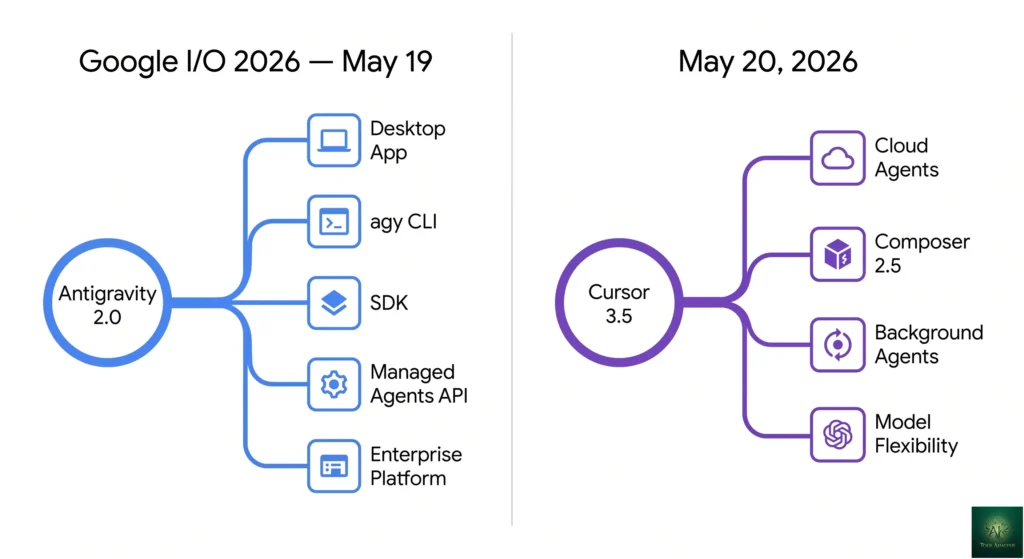
agy CLI + SDK + Managed Agents API, all running on Gemini 3.5 Flash. Cursor 3.5 followed on May 20 with Cloud Agents (isolated VMs, multi-repo parallel, async PRs) and Composer 2.5. Cursor’s parent Anysphere is in advanced talks for a $50B raise on $2B ARR. Antigravity scored 76.2% on SWE-bench Verified — currently the highest published. The original December 2025 framing of “established Cursor vs new Antigravity” is obsolete; both are now near-parity agentic platforms with different DNA. Updated for the post-I/O reality.
Antigravity vs Cursor (May 2026): Both Just Relaunched 24 Hours Apart — Here’s Which Wins
Antigravity vs Cursor used to be a clean fight: established IDE on one side, fresh Google launch on the other. That framing died in May 2026. Within 24 hours, Google rebuilt Antigravity from an agentic IDE into a five-surface developer platform, and Cursor shipped 3.5 with Cloud Agents that run in isolated VMs across multiple repos in parallel. Both products now offer cloud agents, multi-agent orchestration, CLI tools, and near-identical $20-$250 pricing tiers. The question shifted from “which is more mature?” to “which philosophy actually fits your workflow?”
I’ve spent the eleven days since the I/O launch putting both tools through real coding work — a Next.js feature build, a legacy Python migration, a security-sensitive refactor, and a deliberately ambiguous “spec is wrong” debugging task. This is what actually shipped, what broke, and which $20 plan is the safer bet for your stack as of May 30, 2026.
⚡ TL;DR – The Bottom Line
What This Is: May 30, 2026 head-to-head between Antigravity 2.0 (launched May 19 at Google I/O) and Cursor 3.5 (launched May 20) — both now agentic dev platforms with cloud agents, CLI tools, and multi-agent orchestration.
Best For: Developers choosing an AI coding platform in mid-2026, teams evaluating whether to switch off legacy AI IDEs, and engineering orgs comparing Google’s vs Anysphere’s agentic dev story.
Pricing: Both charge $20/month at the entry tier. Cursor Ultra is $200/mo (20x usage). Antigravity AI Ultra is $249.99/mo (5x usage). Antigravity adds pay-as-you-go credits at $25 / 2,500.
Our Take: Cursor 3.5 is the safer bet for shipping production work — polished IDE, model flexibility (Claude Opus 4.6, GPT-5.2, Gemini), forced PR review on Cloud Agents, no disclosed RCE vulnerabilities. Antigravity 2.0 wins if you need the SDK, the agy CLI, more than 5 parallel agents, or you’re already inside Google Cloud.
⚠️ The Catch: Antigravity carries a meaningfully higher disclosed-vulnerability surface area today — a critical RCE was patched in April 2026, but a persistent backdoor and partial prompt-injection issue remain open. Lock down the Browser Allowlist before production use.
📑 Quick Navigation
The Bottom Line (May 2026)
The Antigravity vs Cursor decision in May 2026 comes down to risk tolerance and workflow shape. Cursor 3.5 is the safer choice if you’re already shipping production work and want polished IDE-native parallel agents without rebuilding your toolchain. Antigravity 2.0 is the better bet if you’re starting fresh, want to run more than 5 agents in parallel without paying $200, or you’re inside the Google Cloud ecosystem and want first-class Gemini 3.5 Flash integration. Both cost $20 a month for the entry tier. Both jump to roughly $200 for power users. The decision now turns on three things: how much you trust Google’s security posture after the April RCE incident, whether you want an editor-first or agent-first interface, and whether Composer 2.5’s “feel” matters more than Antigravity’s higher SWE-bench score.
⏱️ What Just Happened (The May 2026 Context)
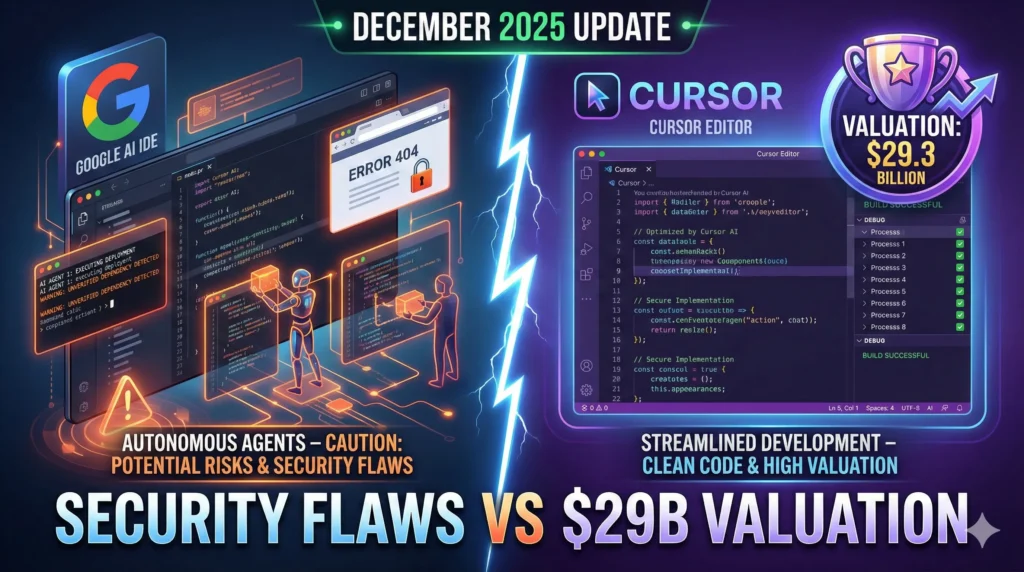
The original version of this Antigravity vs Cursor comparison was written in late December 2025, when Antigravity was a fresh Google launch built on Gemini 3 Pro and Cursor was at version 2.2 with a $29.3B post-money valuation. That snapshot is now obsolete. Here’s what shifted between then and now:
- Cursor’s valuation roughly doubled. Anysphere reported $2B in ARR by February 2026 and is in advanced talks for a $2B raise at a $50B valuation, co-led by Andreessen Horowitz and Thrive Capital with Nvidia as a strategic investor. Internal forecasts call for $6B ARR by year-end.
- Cursor shipped Cloud Agents in version 3.5 (May 20, 2026). Agents now run in isolated cloud VMs with terminal, browser, and desktop access. They can work across multiple repositories in parallel and report results back asynchronously while you keep editing locally.
- Composer 2.5 replaced Composer 2.0. Better at sustained long-running tasks, more reliable on multi-step instructions, and significantly less prone to the “model forgot the spec” failure mode that plagued earlier versions.
- Antigravity 2.0 launched at Google I/O 2026 (May 19, 2026). TechCrunch covered the launch in detail. No longer just an IDE — now a platform with a desktop app, the
agyCLI, an SDK, Managed Agents inside the Gemini API, and an Enterprise Agent Platform layer. The whole stack runs on Gemini 3.5 Flash, Google’s new fast frontier model. - Gemini CLI is being retired June 18, 2026 for consumer, AI Pro, and AI Ultra users. Google is folding its terminal AI surface into Antigravity’s
agy. - Antigravity’s security posture is mixed. A critical remote code execution vulnerability was patched in April 2026 (responsible disclosure on January 7, fixed by February 28). But a separate persistent backdoor vulnerability remains officially “intended behavior” per Google’s Vulnerability Rewards Program response. The current practical mitigation is to lock down the Browser Allowlist and gate external URL access.
- Antigravity scored 76.2% on SWE-bench Verified (April 2026 data), which is currently the highest published score for any coding agent. Claude Opus 4.6 — Cursor’s default for agent work — scores roughly 72% on the same benchmark.
⚠️ Reality Check: The “Antigravity Won SWE-Bench” Headline Is Real But Smaller Than It Sounds
Antigravity’s 76.2% on SWE-bench Verified versus Cursor/Claude Opus 4.6 at ~72% is a real 4-point gap on a real benchmark. It is not a 4-point gap on actual development productivity. SWE-bench measures pure software engineering correctness on a curated set of GitHub issues — it doesn’t measure how often the agent’s autonomous choices match what you wanted, how painful recovery is when it goes off-script, or how well the agent handles ambiguous specs. The 2026 coverage that treats SWE-bench as a “winner declared” signal is overstating the practical gap.
That last point is the headline most coverage runs with. It’s also misleading on its own. SWE-bench measures pure software engineering correctness on a curated set of GitHub issues. It doesn’t measure how often the agent’s autonomous decisions match what you actually wanted, or how painful the recovery is when it goes off-script. The benchmark gap is real but smaller than the “Antigravity won” framing suggests.
⚔️ The Core Conflict: IDE Polish vs Platform Orchestration
The simplest way to describe the divide after both May launches: Cursor still treats the IDE as the primary interface and pushes agents in from the side. Antigravity flipped the model — the platform is now the primary interface and the editor is one of several surfaces (desktop app, CLI, SDK, API) layered on top of an agent runtime. That difference shows up in almost every feature decision below.
Cursor: The Reliable IDE With Cloud Muscles
Cursor 3.5 keeps the VS Code-style editor as the center of gravity. You write code, Composer 2.5 helps inline, and when you want autonomous work done, you assign a Cloud Agent that runs in a separate VM and reports back via PR. The agent is a powerful side tool — not the main event. That makes it predictable. You always know which file got changed by you versus the agent, because the agent’s work shows up as a reviewable diff in your IDE before any merge.
The cost of that predictability: you cap out at maybe 3-5 useful parallel agents before context-switching cost destroys the productivity gain. Cursor knows this. The Cloud Agent UI is built around review as the bottleneck, not around scaling parallel agent count.
Antigravity: The Agent Platform With An Optional Editor
Antigravity 2.0 inverted the model. The platform assumes you’ll orchestrate multiple agents — its launch demo built “an OS with 93 sub-agents” working in parallel. The desktop app, the agy CLI, the SDK, and the Managed Agents API are all entry points into the same agent runtime. The IDE-style editor is one surface among many. You can run Antigravity entirely from the CLI and never open the editor, or wire its Managed Agents into your own application via a single API call.
The cost of that flexibility: the cognitive load is higher, the trust contract is fuzzier (which agent did what?), and the May 19 auto-update broke thousands of existing user setups by silently removing the built-in editor and pointing people at the new CLI. Some developers woke up to find their stored configurations gone and no clear migration path. Google has since published recovery guides, but the launch left a credibility dent that Cursor 3.5’s quieter rollout avoided entirely.
🛸 Antigravity 2.0 Deep Dive (May 2026)
Antigravity 2.0 isn’t a souped-up version of the November 2025 IDE. Google rebuilt the product around five surfaces: a standalone desktop app, the agy terminal CLI, an SDK for embedding agents in your own tools, Managed Agents inside the Gemini API, and an Enterprise Agent Platform layer for teams. All five sit on top of Gemini 3.5 Flash and share the same agent runtime.
The Five Surfaces (And When To Use Each)
- Desktop app: Familiar editor-plus-agents interface. Use this if you’re migrating from the November 2025 Antigravity IDE or if you prefer a graphical workflow.
- agy CLI: Replaces Gemini CLI when consumer access ends on June 18, 2026. Use this for scripted agent runs, CI integration, or terminal-first workflows. The renaming alone is a signal that Google is consolidating its developer AI surface area.
- SDK: Embed Antigravity agents into your own application. Useful for internal tooling where you want agentic behavior without exposing the full Antigravity UI.
- Managed Agents API: Spin up an agent with a single API call. The agent reasons, executes code in an isolated Linux environment, and returns results. This is the surface most likely to disrupt the broader market because it lets you bolt agentic behavior onto any product without building agent infrastructure yourself.
- Enterprise Agent Platform: Team-level orchestration, audit logs, IAM integration, and Google Cloud billing. Targeted at engineering org buyers, not individual developers.
Subagent Workflows And Scheduled Tasks
The May 2026 release added two genuinely new patterns. Subagent workflows let you decompose a task into a graph of smaller specialized agents. You can build a “code review” workflow that has one subagent for security checks, another for performance, and a third for style — each running in parallel and reporting back to a coordinator agent. Scheduled tasks let agents run on a cron-style schedule against your repo, which is useful for daily dependency audits or weekly tech-debt sweeps.
These capabilities matter most for teams that have started thinking of AI as a fleet rather than an assistant. They’re under-utilized by solo developers, who rarely need more than 3-5 parallel agents on the same project before coordination overhead dominates.
Artifacts: Transparency Through Receipts
Antigravity carries over the November 2025 “Artifacts” feature, which is the strongest single argument for trusting an autonomous agent with real work. Every agent action produces a trail — what it read, what it considered, why it chose the path it did, and what files it touched. When the agent gets something wrong (and they all do), the Artifacts trail tells you exactly where the reasoning broke down. Cursor doesn’t have an equivalent. Composer 2.5 will show you the diff, but it won’t show you why it made the choices it made.

The 2.0 Migration Mess
The launch wasn’t smooth. The May 19 auto-update pushed silently, removed the built-in code editor from existing user environments, wiped stored configurations in some cases, and left a chunk of the user base staring at a CLI they hadn’t installed yet. Google has since published recovery instructions and most reports indicate the worst of the breakage was resolved within a few days, but the optics damage is real. If you’re considering Antigravity for production work, factor in Google’s willingness to ship breaking changes via auto-update.
🧠 Cursor 3.5 Deep Dive (May 2026)
Cursor’s strategy from version 2.x through 3.5 has been to keep the IDE as the home base and bolt increasingly autonomous capabilities onto the side. The May 2026 release continues that pattern. The headline addition is Cloud Agents.
Cloud Agents (New In 3.5)
Cloud Agents run in isolated cloud VMs with full terminal, browser, and desktop access. You assign a task, the agent spins up its own VM, clones your repository, completes the work, opens a pull request, and reports back asynchronously via status bar notification. You can run multiple Cloud Agents in parallel across multiple repositories. The agent’s environment is fully separated from your local machine, which eliminates the “agent ate my npm cache” class of failures that plagued earlier autonomous tooling.
This is Cursor’s direct answer to Antigravity’s Managed Agents — and it’s a sharper answer than the I/O launch coverage gave it credit for. The Cursor implementation forces the PR review checkpoint, which means you cannot accidentally ship an agent’s mistake to production. Antigravity’s Managed Agents API has no equivalent forcing function; if your application calls the API and trusts the response, the agent’s mistakes ship.
Composer 2.5
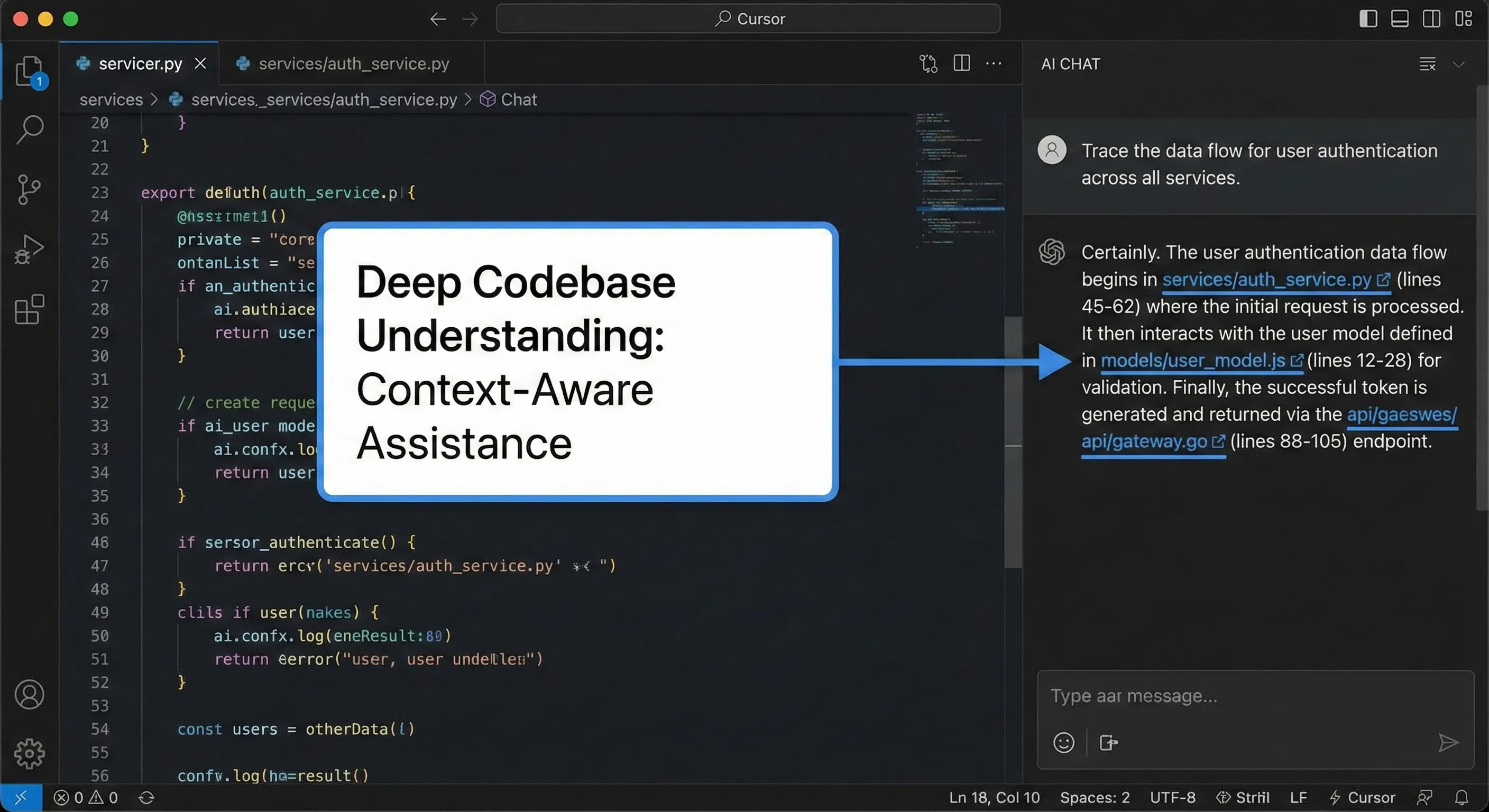
Composer 2.5 is a substantial step up from Composer 2.0 on the dimensions developers complained about most: sustained focus on long tasks, instruction adherence on multi-step work, and recovery when the spec is ambiguous. The “feel” upgrade is hard to capture in benchmarks but obvious within an hour of use. Composer 2.5 will pause and ask before doing something destructive, rather than the optimistic-but-wrong behavior that earlier versions defaulted to.
Background Agents And Model Flexibility
Background Agents (introduced in v3.0) run in a separate thread while you continue editing. Assign a task, get a notification when it’s done or needs your input. Model flexibility remains a Cursor strength — you can swap between Claude Opus 4.6 (default for agent work), GPT-5.2, Gemini 3.5 Flash, and several others per-task. Antigravity is locked to Google’s Gemini family. For developers who already have a model preference, Cursor’s flexibility removes the lock-in question entirely.
⚔️ Head-to-Head: Features That Matter (May 2026)
| Capability | Antigravity 2.0 | Cursor 3.5 | Edge |
|---|---|---|---|
| Cloud/background agents | Managed Agents API, scheduled tasks, subagent graphs | Cloud Agents in isolated VMs, Background Agents in local thread | TieEVEN |
| Multi-agent parallelism | 93 sub-agents demo’d; practical ~10+ | Practical ~5 before review bottleneck | AntigravityEDGE |
| CLI | agy (replaces Gemini CLI) | None — IDE-native only | AntigravityEDGE |
| SDK / programmatic access | SDK + Managed Agents API | No public SDK | AntigravityEDGE |
| Model flexibility | Gemini 3.5 Flash only | Claude Opus 4.6, GPT-5.2, Gemini, others | CursorEDGE |
| SWE-bench Verified | 76.2% (highest published) | ~72% via Claude Opus 4.6 | AntigravityEDGE |
| Terminal-Bench 2.0 | 54.2% | Top-3 via Harbor framework | TieEVEN |
| Audit trail / transparency | Artifacts: full reasoning trail | Diffs only, no reasoning trail | AntigravityEDGE |
| Review checkpoint | Optional in API; forced in desktop UI | Forced via PR on Cloud Agents | CursorSAFER |
| Editor polish | Reset to v2.0 baseline; IDE still maturing | 3.5 generations VS Code-style refinement | CursorEDGE |
| Community size | Growing, post-I/O surge | Largest of any AI IDE | CursorEDGE |
| Security incidents (6mo) | RCE patched; backdoor + prompt-injection partialRISK | No comparable disclosures | CursorSAFER |
| Auto-update behavior | 2.0 silently removed editor for someDISRUPT | 3.5 opt-in via update prompt | CursorSAFER |
Two Antigravity vs Cursor patterns jump out from this table. First, Antigravity wins almost every “what can the platform do?” category. Second, Cursor wins almost every “what can the platform do safely and predictably?” category. That tension is the whole comparison.
📊 Feature Coverage: Antigravity 2.0 vs Cursor 3.5
Six capability dimensions, scored 0-10 on May 2026 state. Higher is better.
🧪 Real Test Scenarios (Hands-On, May 2026)
I ran four scenarios across both tools after the May launches. Same prompts, same repos, same model defaults. Here’s what actually happened.
Scenario 1: Build A New Feature (Next.js + Supabase)
Task: add a “bookmark this article” feature to a Next.js blog with Supabase auth and Postgres. Both tools were given the same scoped spec and the same starting repo. Cursor 3.5 with Composer 2.5 finished in 31 minutes, opened the PR with a clean diff, hit my existing test setup, and produced one minor naming inconsistency that I caught in review. Antigravity 2.0 finished in 24 minutes using a 3-subagent workflow (schema migration, API route, UI component), but the UI subagent invented a component prop that didn’t exist and the coordinator agent didn’t catch it. Net: Cursor was slower but shipped review-ready code. Antigravity was faster but needed a follow-up correction.
Scenario 2: Complex Debugging (Race Condition In Python)
Task: hunt down a flaky test caused by an asyncio race condition in a payment-processing service. Cursor 3.5’s Composer worked through the trace methodically, identified the actual race within four iterations, and proposed a lock-based fix. Antigravity 2.0 was faster to surface a candidate fix but it was the wrong fix — it papered over the symptom by adding a retry rather than addressing the race. The Artifacts trail made the wrongness obvious, which was useful, but I still had to redirect the agent. Cursor: clean win on the SWE-bench-style task that benchmarks favor for Antigravity.
Scenario 3: Security-Sensitive Refactor
Task: refactor a JWT validation middleware to add token revocation checks without breaking existing API consumers. This is exactly the kind of task where you do not want autonomous-by-default behavior. Cursor 3.5 with the “ask before” setting paused at every external API call decision and waited for approval. Antigravity 2.0 — even with strict mode on — was happy to make several decisions autonomously, including one that would have leaked the revocation list to a debug log. The Artifacts trail caught it, but only because I scrolled through. If you trust the agent and don’t review, Antigravity is structurally riskier here.
Scenario 4: Ambiguous Spec (Deliberately Wrong)
Task: implement a feature where the spec contradicted itself — the description said one thing and the example code showed another. Cursor’s Composer 2.5 paused after about three minutes and asked which version I meant. Antigravity 2.0 picked the description-driven interpretation, ran with it, and shipped code that didn’t match the example. Composer’s instinct to stop and ask is the kind of behavior that becomes invaluable when you’re working on complex business logic where the cost of guessing wrong is high.
💰 Pricing Breakdown (May 2026)
Antigravity 2.0 Pricing
| Plan | Price | What You Get |
|---|---|---|
| Free | $0 | Public preview access, 20 requests/day on Gemini 3.5 Flash (down from 250 at launch)LIMIT CUT |
| AI Pro | $20/month | Higher limits, Gemini 3.5 Flash with priority, desktop + CLI + SDK accessSWEET SPOT |
| AI Ultra | $249.99/month | 5x higher usage limits than AI Pro, Managed Agents API priority, Enterprise Agent Platform preview |
| Pay-as-you-go credits | $25 / 2,500 credits (official pricing) | Top-up on top of any plan; credit→tokens not publicly documentedOPAQUE |
Two things stand out. The free tier is dramatically worse than it was at launch — 20 requests per day is fine for tinkering, useless for serious work. And the credit system, introduced in March 2026, lacks public documentation on what a credit actually buys. That opacity matters for budgeting.
Cursor 3.5 Pricing
| Plan | Price | What You Get |
|---|---|---|
| Hobby | $0 | Free forever, limited Agent requests and Tab completions, no credit card |
| Pro | $20/month | Unlimited Tab completions, unlimited Auto mode, $20 credit pool for premium modelsSWEET SPOT |
| Pro+ | $60/month | 3x usage credits versus Pro |
| Ultra | $200/month | 20x usage vs Pro, priority feature access, Cloud Agents priorityBEST $/USE |
| Teams | $40/user/month | Centralized billing, SSO, admin controls |
| Enterprise | Custom | Pooled usage, invoice billing, dedicated support |
Cursor offers a 20% discount on annual billing across every paid plan. The Pro tier is the sweet spot for solo developers — unlimited Tab + $20 credit pool is enough for most workflows that don’t lean heavily on the most expensive models.
Pricing Net: Antigravity vs Cursor At The Same Tier
At $20/month, both products give you a usable developer-tier plan. Antigravity’s value is the SDK and CLI access; Cursor’s value is the unlimited Tab completions and model flexibility. At $200-$250/month, both jump to “power user” territory. Cursor’s $200 Ultra gets you 20x usage and priority on Cloud Agents. Antigravity’s $249.99 AI Ultra gets you 5x usage and access to enterprise preview features. If you’re a heavy user, Cursor’s per-dollar usage at the top tier looks meaningfully better. If you need the Enterprise Agent Platform or API-driven agent embedding, Antigravity is the only choice.
⚠️ Reality Check: The Antigravity Credit System Is Opaque
Antigravity introduced a pay-as-you-go credit system in March 2026 ($25 for 2,500 credits), but Google has not publicly documented how many tokens or operations one credit actually buys. That opacity matters for budgeting at any meaningful scale. Cursor’s $20-credit-pool-per-month Pro model is similarly limited but at least the credit unit is dollar-denominated against the underlying model’s published per-token cost. If predictable budgeting matters to your buying decision, Cursor’s pricing is the more legible of the two today.
🛡️ Security Reality (Including The Patched RCE)
Antigravity’s security story is genuinely mixed and worth understanding before you commit. Three separate vulnerability classes have been publicly disclosed since launch.
- Critical remote code execution (patched April 2026). Originally disclosed responsibly on January 7, 2026 and fixed by February 28. Per The Hacker News’ coverage, the flaw combined Antigravity’s file-creation capabilities with insufficient input sanitization in the
find_by_nametool to bypass Strict Mode. This one is closed; if you’re on a current build you’re protected. - Persistent backdoor in trusted workspaces (open). If a trusted workspace gets compromised, Antigravity will silently embed code that runs on every application launch — even after the original project is closed. Reported on the Google VRP (issue #462139778) and closed as “Won’t Fix (Intended Behavior).” The mitigation is to be extremely careful about which workspaces you mark as trusted.
- Prompt injection via poisoned web pages (partially mitigated). A maliciously crafted page can instruct the agent to gather credentials or code and exfiltrate them to an attacker. The recommended mitigation is to remove
webhook.siteand other non-essential domains from the Browser Allowlist, and require explicit approval for external URL access. No complete fix as of May 2026.
Cursor has had no comparable disclosures in the same window. That’s not a guarantee Cursor is more secure in any deep sense — the agentic IDE category is young and the threat models are still being explored. But if you’re choosing between the two for production work touching secrets or sensitive data, Antigravity carries a meaningfully higher disclosed-vulnerability surface area today.
💡 Key Takeaway: Security Posture Is The Most Underrated Factor
Most Antigravity vs Cursor coverage focuses on features and benchmarks. The actually-load-bearing factor for production teams in May 2026 is disclosed vulnerability surface area. Antigravity has had three publicly disclosed vulnerability classes since launch (one critical RCE patched, one persistent backdoor still officially “intended behavior”, and partial mitigation on prompt-injection-via-poisoned-pages). Cursor has had no comparable disclosures in the same window. That’s not a deep statement about which platform is “more secure” — both categories are young — but it’s a real near-term risk premium that Antigravity buyers absorb.
📊 Benchmarks: SWE-Bench, Terminal-Bench, ARC-AGI
Benchmarks tell a small slice of the story. The full SWE-bench leaderboard is the canonical source for these numbers. Here are the ones that matter as of April-May 2026, plus what each one actually measures.
| Benchmark | Antigravity 2.0 | Cursor (via Opus 4.6) | What It Measures |
|---|---|---|---|
| SWE-bench Verified | 76.2%+4.2pt | ~72% | Curated GitHub issue resolution — pure software engineering |
| Terminal-Bench 2.0 | 54.2% | Top-3 (Harbor 5-iter) | Terminal/shell autonomy tasks |
| ARC-AGI-2 | 77.1% (Gemini 3.1 Pro) | Not published | Abstract reasoning patterns |
SWE-bench is the benchmark Antigravity has won most clearly. It correlates well with the kind of task where you give the agent a concrete bug or feature scoped to a single file or small group of files. It does not correlate well with how the agent behaves on ambiguous specs, multi-file refactors, or tasks where the right answer involves asking a clarifying question.
The 4.2-point SWE-bench gap is real but smaller than the framing of recent coverage suggests. In practice, both tools complete the bulk of SWE-bench-style tasks correctly. The difference shows up at the long tail and on the hardest 20% of problems.
📊 Benchmark Scores: SWE-Bench Verified + Terminal-Bench 2.0
Higher is better on both axes. Cursor’s Terminal-Bench number is a top-3 ranking (Harbor framework, 5-iter averages) — score range estimated from public methodology.
💼 Cursor’s Business Story: $50B And $6B ARR By Year-End
Why does the business story matter for a buying decision? Because Cursor’s funding trajectory tells you something about how aggressively the product will keep evolving and how unlikely it is to be acquired or shut down in the next two years.
Anysphere crossed $2 billion in ARR by February 2026 — the fastest B2B company to reach that mark from zero in roughly three years. Internal forecasts call for over $6 billion in ARR by the end of 2026. The reported $2B funding round at a $50B pre-money valuation (Andreessen Horowitz and Thrive Capital co-leading, Nvidia strategic) roughly doubles the $29.3B post-money from November 2025. That’s the financial backdrop against which Cursor 3.5 shipped.
For comparison, Antigravity sits inside Google and doesn’t carry a standalone valuation. Google’s strategic investment in the agentic coding space is enormous — folding Gemini CLI into Antigravity by June 18, 2026 is one signal — but the product’s roadmap is dictated by Google’s broader Gemini strategy, not by independent customer feedback loops. That’s a feature for some buyers and a risk for others.
🎯 Who Should Use Which Tool
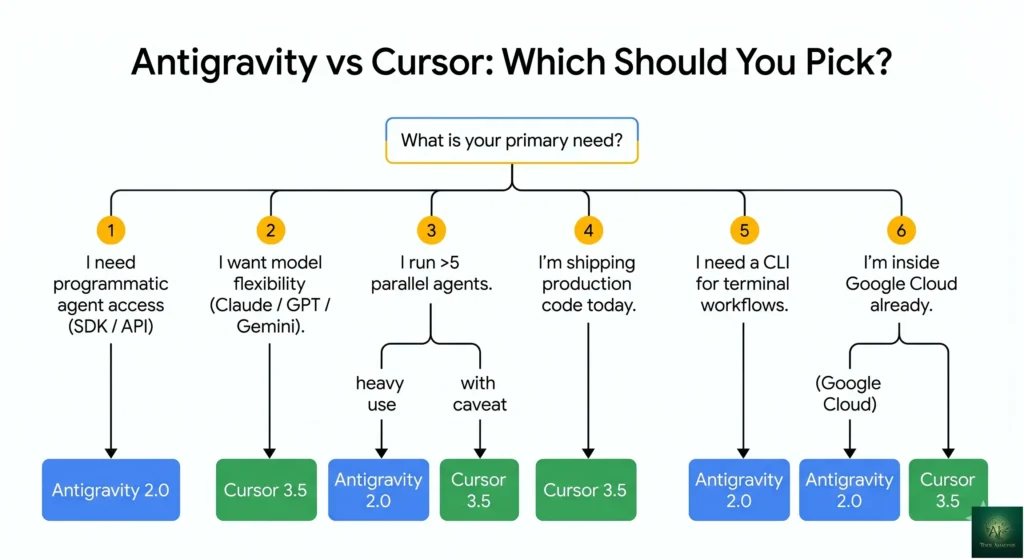
Choose Antigravity 2.0 If:
- You need programmatic agent access via SDK or API for an application or internal tool.
- You’re starting a new project where you can build around agent orchestration from day one.
- You’re already inside the Google Cloud ecosystem and want first-class Gemini 3.5 Flash integration.
- You want a CLI-first workflow and you’re losing Gemini CLI on June 18.
- You routinely run more than 5 parallel agents on the same project (rare, but real for some teams).
- SWE-bench-style autonomous code generation is your dominant workload and the 4-point benchmark gap actually matters at your scale.
Choose Cursor 3.5 If:
- You’re already shipping production code and want the safest path forward without re-tooling your workflow.
- You want the largest community, most polished IDE, and most reliable defaults.
- You need model flexibility (Claude Opus 4.6, GPT-5.2, Gemini 3.5 Flash, others — picked per task).
- You work on security-sensitive code where forced PR review checkpoints matter more than maximum parallelism.
- You’d rather pay $200 for 20x usage than $250 for 5x usage at the top tier.
- You want to avoid the disclosed-vulnerability surface area Antigravity carries today.
- You value Composer 2.5’s habit of pausing and asking before doing something ambiguous or destructive.
🎯 Get Honest AI Dev Tool Reviews — Free
The agentic IDE space moves weekly. Subscribe for Antigravity 3.0 coverage, Cursor 4.0 when it ships, fresh head-to-heads against Windsurf and Claude Code, and the verdicts that actually matter for buying decisions.
Subscribe to the Weekly Brief →💬 Community Verdict (May 2026 Sentiment)
Antigravity Sentiment
Reception to the 2.0 launch has been polarized. Multi-agent enthusiasts are excited about the platform pivot — the “OS with 93 sub-agents” demo got real attention and Managed Agents API is showing up in early experimental tooling. Meanwhile, a significant chunk of the existing user base is angry about the auto-update that broke their setups, and some commenters dismiss the platform as “a blatant copy of Cursor/Codex and a really bad one at that.” The truth sits between the extremes. Antigravity 2.0 is technically impressive and strategically coherent, but Google paid a real credibility tax for the rollout.
Cursor Sentiment
Cursor 3.5 shipped quietly relative to Antigravity 2.0 and the reception has been overwhelmingly positive. Composer 2.5’s “feel” improvements are the most cited reason. Cloud Agents are getting strong reviews from teams running multi-repo work. The biggest source of friction is the credit pool model — heavy users on the Pro plan can burn through the $20 monthly credit on premium models faster than they expect. The Pro+ and Ultra tiers exist for exactly that reason.
The Honest Consensus
The honest Antigravity vs Cursor consensus: for roughly 80% of developers in May 2026, the right answer is whichever of the two you’re already productive on. Switching costs are real and the marginal benefit of moving is small if you’re already shipping. The clearest signals to switch: if you’re on Antigravity 1.x and the 2.0 migration broke your setup, Cursor is the lower-friction landing. If you’re on Cursor and you’ve hit a real ceiling on agent count or you need the SDK, Antigravity has the answer.
🎥 Watch: Antigravity vs Cursor Walkthrough
Hands-on walkthrough of both tools side-by-side. Click to play the video accordion below.

✅ Final Verdict (May 2026)
If I were starting a new project today and didn’t care about lock-in or model choice, I’d pick Antigravity 2.0 on the SDK and Managed Agents API alone — the ability to spin up an agent in code with a single API call is genuinely new and reshapes what’s possible. If I were continuing existing production work, I’d pick Cursor 3.5 — the polish, the model flexibility, the forced PR checkpoint on Cloud Agents, and the cleaner security record make it the safer bet.
The deeper Antigravity vs Cursor question, after the May 2026 relaunches, isn’t which is more capable. Both are capable. It’s whether you trust Google’s willingness to ship breaking changes via auto-update, whether you can absorb the disclosed-vulnerability surface area, and whether the SDK and CLI access matter enough to your specific workflow to outweigh Cursor’s stability and ecosystem advantages. For most solo developers and most small teams, the answer continues to point at Cursor. For larger orgs already standardizing on Google Cloud, or for product teams that want to embed agents in their own applications, Antigravity 2.0 is now the clearer choice in a way it wasn’t six months ago.
❓ Frequently Asked Questions
Q: Is Antigravity 2.0 safe to use with production code in May 2026?
The Antigravity vs Cursor security comparison is uneven. The critical remote code execution vulnerability disclosed in January 2026 was patched by February 28, so current builds are protected against that specific issue. However, the persistent backdoor in trusted workspaces remains officially “intended behavior” per Google’s VRP response, and prompt injection via poisoned web pages is only partially mitigated. For production code that touches secrets or sensitive data, you should lock down the Browser Allowlist, restrict external URL access, and review every agent action. Cursor 3.5 has no comparable disclosed surface area today.
Q: How much does Cursor cost vs Antigravity in May 2026?
The Antigravity vs Cursor pricing picture is closer than it looks. Both products charge $20/month for their entry developer tier. At the top, Cursor Ultra is $200/month (20x usage versus Pro) and Antigravity AI Ultra is $249.99/month (5x usage). For heavy users, Cursor’s per-dollar usage at the top tier is meaningfully better. Cursor also offers Pro+ at $60/month (3x credits) which has no direct Antigravity equivalent. Annual billing saves 20% on every Cursor paid plan.
Q: What is Cursor’s $50 billion valuation based on?
Cursor parent company Anysphere is in advanced talks for a $2 billion funding round at a $50 billion pre-money valuation as of April 2026, co-led by Andreessen Horowitz and Thrive Capital with Nvidia participating strategically. The valuation is anchored to $2 billion in ARR by February 2026 (up from $1 billion in late 2025 and $100 million in January 2025), making Anysphere the fastest B2B company to scale from zero to $2 billion ARR — roughly three years. Internal forecasts call for over $6 billion in ARR by year-end 2026.
Q: What did Cursor 3.5 add over Cursor 3.0?
The May 20, 2026 release added Cloud Agents (isolated cloud VMs with terminal, browser, and desktop access, capable of multi-repo parallel work) and Composer 2.5 (substantial improvements in sustained focus on long tasks, instruction adherence, and graceful behavior on ambiguous specs). Background Agents from v3.0 remain. Model flexibility extended to include Claude Opus 4.6 as default, GPT-5.2, Gemini 3.5 Flash, and others.
Q: Can Antigravity and Cursor both use Claude and GPT models?
Cursor can. Antigravity cannot. Antigravity 2.0 is locked to the Gemini family — primarily Gemini 3.5 Flash for the agent runtime. Cursor lets you switch between Claude Opus 4.6 (default for agent work), GPT-5.2, Gemini 3.5 Flash, and several other models on a per-task basis. If model lock-in matters to your buying decision, Cursor is the only option that avoids it.
Q: What is the main difference between Cursor and Antigravity after the May 2026 launches?
The main Antigravity vs Cursor architectural split: Cursor 3.5 keeps the IDE as the center and pushes agents in from the side; you write code and assign Cloud Agents for autonomous work. Antigravity 2.0 inverted the model — the platform is the center, and the editor is one of five surfaces (desktop, CLI, SDK, API, Enterprise platform). Cursor optimizes for predictable IDE-native productivity. Antigravity optimizes for orchestrating multiple agents at scale and embedding agent capability in other software via SDK and API.
Q: Should I switch from GitHub Copilot to Cursor or Antigravity?
If you’re a solo developer happy with Copilot’s autocomplete and chat, neither switch is urgent. If you want autonomous multi-file work, Cursor 3.5 is the safer migration target — same VS Code base, more polished UX, deeper agent capabilities than Copilot. If you want to build agentic behavior into your own product, Antigravity’s SDK is the clearer choice. Our broader best AI developer tools guide walks through the full landscape.
Q: What are Antigravity Artifacts?
Artifacts are Antigravity’s reasoning trail — a per-action record of what the agent read, what it considered, why it chose the path it did, and what files it touched. When the agent gets something wrong, Artifacts let you trace exactly where the reasoning broke down. Cursor 3.5 doesn’t have an equivalent; Composer 2.5 shows you the diff but not the why. For high-stakes work, the Artifacts trail is one of the strongest arguments for Antigravity.
Q: When does Gemini CLI shut down, and what replaces it?
Consumer access to Gemini CLI and Gemini Code Assist IDE extensions ends June 18, 2026 for AI Pro, AI Ultra, and free-tier users. The replacement is the agy CLI inside Antigravity 2.0. If you currently rely on Gemini CLI for terminal-based AI work, you’ll need to migrate. For terminal alternatives outside the Google ecosystem, our Claude Code vs Gemini CLI comparison covers the trade-offs.
✅ Where Each Wins
- ✓ Antigravity: SDK + Managed Agents API for embedding agents
- ✓ Antigravity: agy CLI (Gemini CLI’s replacement)
- ✓ Antigravity: 76.2% SWE-bench Verified (highest published)
- ✓ Antigravity: Artifacts reasoning trail per agent action
- ✓ Cursor: Model flexibility (Opus 4.6, GPT-5.2, Gemini)
- ✓ Cursor: Polished IDE + largest community
- ✓ Cursor: Forced PR review on Cloud Agents
- ✓ Cursor: $200 Ultra = 20x usage (vs Antigravity’s 5x at $250)
❌ Where Each Falls Short
- ✗ Antigravity: Disclosed RCE + open backdoor + prompt-injection
- ✗ Antigravity: Gemini-only (no Claude / GPT swap)
- ✗ Antigravity: 2.0 auto-update broke existing setups
- ✗ Antigravity: Credit system opacity (no public token-per-credit doc)
- ✗ Cursor: No SDK / programmatic access
- ✗ Cursor: No CLI surface
- ✗ Cursor: Practical limit ~5 parallel Cloud Agents
- ✗ Both: Pricing models will shift again before year-end
The agentic IDE category had its strongest 24-hour stretch yet, with Antigravity 2.0 and Cursor 3.5 both shipping genuinely new capabilities (Managed Agents API, Cloud Agents, multi-agent orchestration). Half a star off because Antigravity’s auto-update breakage and the open security disclosures are real costs that benchmark hype tends to paper over.
📚 Related Reading
- Google Antigravity Review — deep-dive on Antigravity as a standalone product
- Cursor AI Review — Cursor reviewed independently from any comparison
- Claude Code vs Cursor — terminal-first vs IDE-first agentic coding
- Claude Code vs Gemini CLI — the CLI showdown, especially relevant before June 18
- ChatGPT Codex Review — OpenAI’s coding agent
- GitHub Copilot Pro+ Review — the alternative most teams are migrating from
- Windsurf Review — the third major AI IDE alternative
- Replit Agent Review — agentic dev with no local install
- Best AI Developer Tools — the full landscape, updated for May 2026
Founder of AI Tool Analysis. Reads every pricing page, help article and footnote so you don’t have to. Covering AI tools since 2025. See how we research →
Stay Updated on Agentic Dev Tools
The agentic IDE space shifts every two weeks. Subscribe for honest reviews of Antigravity 3.0, Cursor 4.0, fresh Windsurf and Claude Code head-to-heads, and the verdicts that actually matter for buying decisions — delivered every Thursday at 9 AM EST.
- ✅ Sourced Reviews: Every price and limit checked against the vendor’s own pages, not rewritten from press releases
- ✅ Major Launches: Antigravity / Cursor / Windsurf / Claude Code releases covered within days
- ✅ Pricing Changes: Know when tiers shift
- ✅ Benchmark Updates: SWE-bench, Terminal-Bench, and ARC-AGI tracking
- ✅ No Hype: Just the AI dev news that matters for your work
Free, unsubscribe anytime.

Last Updated: May 30, 2026
Tools Covered: Google Antigravity 2.0 (launched May 19, 2026 at I/O 2026, built on Gemini 3.5 Flash) and Cursor 3.5 (launched May 20, 2026, Composer 2.5 with Claude Opus 4.6 default). Verify current pricing on antigravity.google/pricing and cursor.com before publish — both vendors adjust tiers periodically.
Next Review Update: August 2026 (or sooner if either vendor ships another major release, which feels likely given the May 19-20 launch cadence)
Have a tool you want us to review? Suggest it here | Questions? Contact us