

This Kimi AI Slides review tests the May 2026 product — Moonshot AI’s free slide generator powered by Kimi K2 Thinking and the OK Computer agent mode. The headline question for buyers in 2026 isn’t “does Kimi work” — it does — but “is the free output good enough that paying for Gamma or NotebookLM doesn’t pay back.” This kimi ai slides review answers that honestly across the dimensions that actually matter: output quality vs paid competition, template variety, brand-consistency controls, and the honest verdict for the personas who reach for AI slide generators (knowledge workers prepping internal decks, students producing class presentations, content creators ideating outline-to-deck workflows). Spoilers: yes for internal/casual use, mixed for client-facing or brand-sensitive work.
Watch: Kimi AI Slides Complete Review
See K2 Thinking and OK Computer in action
⚡ TL;DR – The Bottom Line
What This Is: Honest Kimi AI Slides review of the May 2026 free product — slide generation via Kimi K2 Thinking + OK Computer agent.
Best For: Internal decks, student presentations, casual creators, anyone needing a quick slide outline who doesn’t want to pay for Gamma or NotebookLM.
Pricing: Free for core slide generation. Verify whether Moonshot has introduced paid tiers — pricing structure may have shifted in 2026; the late-2025 product was fully free.
Our Take: Genuinely best-free-option in the AI slides category. Output quality matches paid Gamma for many use cases. Polish, template variety, and brand controls lag paid competition. Right pick for casual/internal work; wrong pick for client-facing decks.
⚠️ The Catch: Templates and design polish trail Gamma meaningfully. If your output needs to look professionally designed, the time you save in generation gets reinvested in polish — and you might as well have paid for Gamma.
📑 Quick Navigation
The Bottom Line
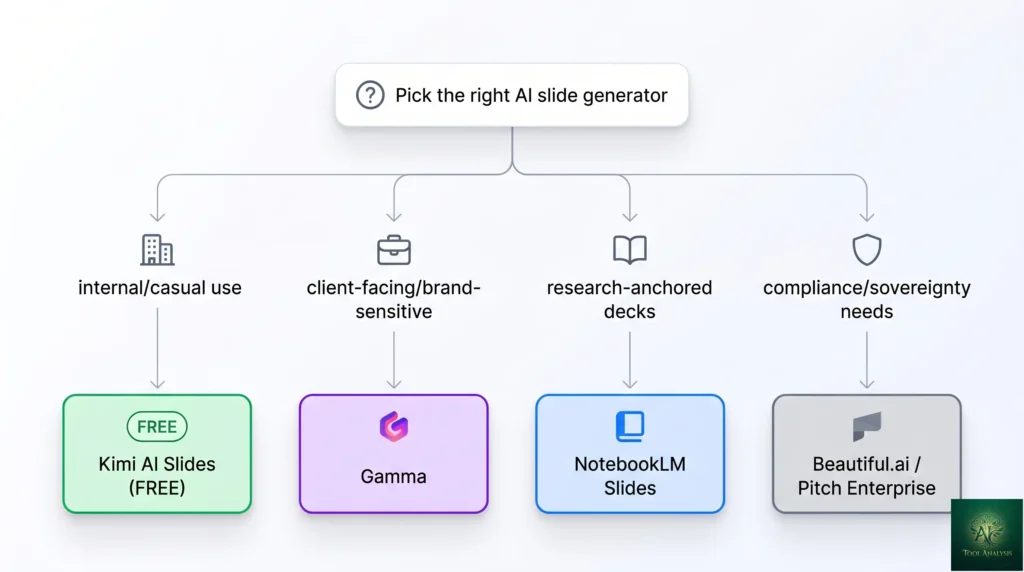
- You need a free AI slide generator for internal/casual use: Yes, this kimi ai slides review unambiguously recommends it. Best free option in the category by a meaningful margin — Gamma’s free tier is much more limited; NotebookLM Slides is bundled with broader products. For internal decks, knowledge-worker presentations, student work, Kimi delivers genuinely useful output at $0.
- You’re producing client-facing or brand-sensitive presentations: Skip Kimi, pay for Gamma. Template variety, brand-consistency controls, and design polish meaningfully better in Gamma. The time you’d save in generation gets reinvested in polishing Kimi output up to client-ready — and you might as well have started in Gamma.
- You want slide generation tightly integrated with research/notes: Use NotebookLM Slides instead. The “deep dive into source documents → presentation” workflow is what NotebookLM is built for; Kimi is more general-purpose.
- You need offline or enterprise deployment: Skip Kimi entirely. Western alternatives (Beautiful.ai, Tome, Pitch) offer enterprise tiers with on-prem or compliance options Kimi doesn’t currently match.
- You want to test the K2 Thinking model itself: Kimi AI Slides is one of the best free entry points to experience K2 Thinking + OK Computer agent mode in production use — pick it up even if you don’t need slides specifically.
K2 Thinking: What’s Under The Hood
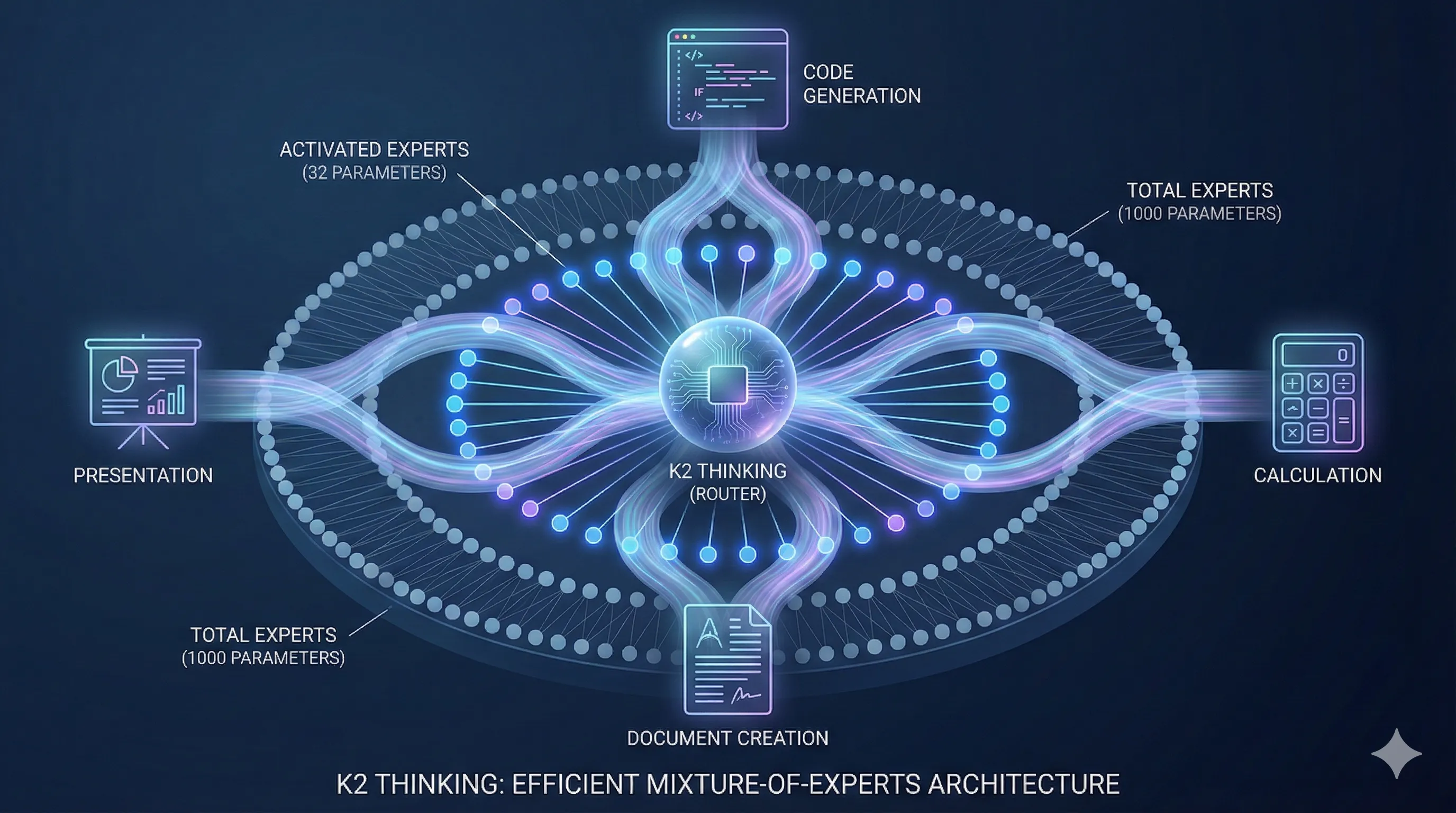
Kimi AI Slides runs on Kimi K2 Thinking — Moonshot AI’s reasoning model that launched in late 2025 and held its competitive position through 2026. K2 Thinking is structurally similar to Claude’s “extended thinking” mode and OpenAI’s o-series reasoning models: longer compute budget per query, explicit chain-of-thought before final output, meaningfully better at multi-step reasoning than non-thinking peers. For slide generation specifically, this matters because building a coherent deck from a prompt is a multi-step reasoning task — outline structure, slide-level content allocation, narrative flow, visual layout suggestions — that benefits directly from the thinking-mode compute.
OK Computer: The Agent Mode That Generates Slides
“OK Computer” is Moonshot’s branded agent mode for Kimi — the agentic interface that handles multi-step tasks like slide generation, web research compilation, and document drafting. For Kimi AI Slides specifically, OK Computer is what orchestrates the prompt → outline → slide-by-slide content → assembled deck workflow. You see the agent’s progress as it works (slide-by-slide generation visible in real time), which builds trust in the output and lets you intervene mid-generation if the direction is wrong.
The genuinely useful thing about OK Computer for slide generation: you can interrupt mid-way and say “the angle on slide 4 should be X instead” and the agent re-routes the rest of the deck around your correction. Most competing tools require regenerating from scratch when the direction is wrong.

What Changed Since Late 2025
- K2 Thinking matured. The thinking-mode reasoning improved through 2026 — slide outlines now feel genuinely structured rather than padded, and the slide-level content allocation is meaningfully better at long-form decks (15+ slides). Less “generic AI bullet points,” more “this slide makes a specific point.”
- OK Computer agent more reliable. The mid-generation interrupt-and-correct workflow that was patchy in late 2025 became production-grade in early 2026. You can now interrupt at any slide and re-route without losing the rest of the deck.
- Pricing structure intact. Free for core slide generation as of May 2026. Verify whether Moonshot has introduced paid tiers — this is the area most likely to have shifted; Chinese AI tools often introduced paid tiers through 2026 as competition intensified.
- Templates expanded modestly. Template variety improved but still trails Gamma and paid Western competition meaningfully. The gap is smaller than late 2025 but still real.
- Western competitive pressure. Gamma launched stronger free tier features through 2026; NotebookLM’s slides feature integrated more deeply with the broader notebook workflow; ChatGPT added basic slide generation. Kimi’s “best free option” position narrowed but held.
Your First Deck in 10 Minutes
The first-deck workflow is genuinely fast. Sign up for Kimi (free), open a new chat, type “/slides” or use the slides shortcut button, describe the deck you want (“10-slide overview of {topic} for {audience}, with {tone} tone”), pick a template, click Generate. OK Computer takes 3-5 minutes to assemble the deck — you watch the slides build in real time. First usable deck for a 1-2 minute description lands in ~10 minutes total.
The genuinely useful onboarding pattern: pick one upcoming presentation you’d otherwise build manually, describe it to Kimi, generate, then export to PowerPoint or Google Slides for final polish. The 30-minute investment exposes you to all three input methods (prompt, document upload, URL ingestion) and the OK Computer interrupt workflow.
Three Input Methods That Actually Work
Kimi Prompt-to-deck (the default)
Type a description of the deck you want. Best for: ideation, internal presentations, anything where you want Kimi’s K2 Thinking to handle structure decisions. Quality scales with prompt specificity — vague prompts get generic decks; detailed prompts (audience, tone, key points, slide count target) get meaningfully better output.
Document-to-deck (upload a file)
Upload a Word doc, PDF, or text file and Kimi extracts the structure into a deck. Best for: turning research papers, reports, or long-form docs into presentations. The K2 Thinking reasoning shines here — the model identifies what’s actually presentation-worthy in a long document rather than just chunking it linearly.
URL-to-deck (web ingestion)
Paste a URL and Kimi reads the page, generates a deck summarizing or analyzing it. Best for: news article briefings, competitor analysis, blog-post-to-presentation workflows. Caveat: paywalled or JS-heavy pages don’t always work; static content is much more reliable.
🔍 REALITY CHECK
Marketing Claims: “Generate beautiful AI presentations instantly.” (The standard pitch from Kimi and every competing AI slide tool.)
Actual Experience: “Generate” is honest — Kimi produces decks fast. “Beautiful” oversells the design polish. The decks Kimi outputs are functional and structurally sound, with reasonable layouts and typography, but they don’t compete with paid Gamma’s design quality. Brand-consistent decks need manual tweaking. For internal use where structural soundness matters more than design polish, this is a non-issue. For client-facing decks where polish is part of the message, plan for cleanup time or use a paid tool instead.
Verdict: “Generate” is true; “beautiful” is marketing exaggeration. Match expectations to use case (internal good, client-facing OK with polish, brand-sensitive needs work).
Kimi AI Slides Review: Pricing Reality
As of May 2026, Kimi AI Slides is fully free for the core slide-generation workflow. No daily limits comparable to Gamma’s free tier. No watermarks on exported decks. No paid tier required for the K2 Thinking + OK Computer combination that powers slide generation. This is the most defensible competitive advantage Kimi has — and the reason “best free option” keeps showing up in this kimi ai slides review.
| Tool | Free Tier | Entry Paid | Notes |
|---|---|---|---|
| Kimi AI SlidesFREE | Fully free for core slide gen | N/A as of May 2026 | K2 Thinking + OK Computer included |
| Gamma | Limited (10 credits) | $10/mo Plus, $20/mo Pro | Best design polish; brand controls in paid tiers |
| NotebookLM Slides | Bundled with NotebookLM (free) | $19.99/mo Google AI Pro for higher limits | Best for source-document → deck workflow |
| ChatGPT (basic slides) | None | $20/mo Plus minimum | Slide generation is secondary feature; less polished |
| Beautiful.ai | None (trial only) | $12/mo Pro | Strong template variety; weak AI generation |
Pricing tip: if your slide work is internal/casual, start with Kimi (free) and upgrade only if you hit specific limits. If your slide work is client-facing, skip Kimi and pay for Gamma directly — the time you’d spend polishing Kimi output up to client-ready will exceed Gamma’s monthly cost within a few presentations.
📬 Find this Kimi AI Slides review useful?
Get our weekly AI presentation tool reviews — Kimi updates, Gamma releases, NotebookLM features, and pricing changes.
Kimi vs Gamma vs NotebookLM Slides
| Dimension | Kimi AI Slides | Gamma | NotebookLM Slides |
|---|---|---|---|
| Free tier generosity | Fully freeWIN | Limited (10 credits) | Bundled with NotebookLM |
| Output quality (structure) | Excellent (K2 Thinking) | Excellent | Strong (research-anchored) |
| Output quality (design polish) | Good | ExcellentWIN | Functional |
| Template variety | Modest | Best in class | Limited |
| Brand controls | Limited | Strong (paid tiers) | Limited |
| Source-doc → deck workflow | Strong | Good | Best in classWIN |
| URL-to-deck | Strong (OK Computer) | Good | Limited |
| Mid-generation interrupt | Yes (OK Computer agent) | No | No |
| Best for | Internal/casual, free use | Client-facing, brand-sensitive | Research-driven decks |
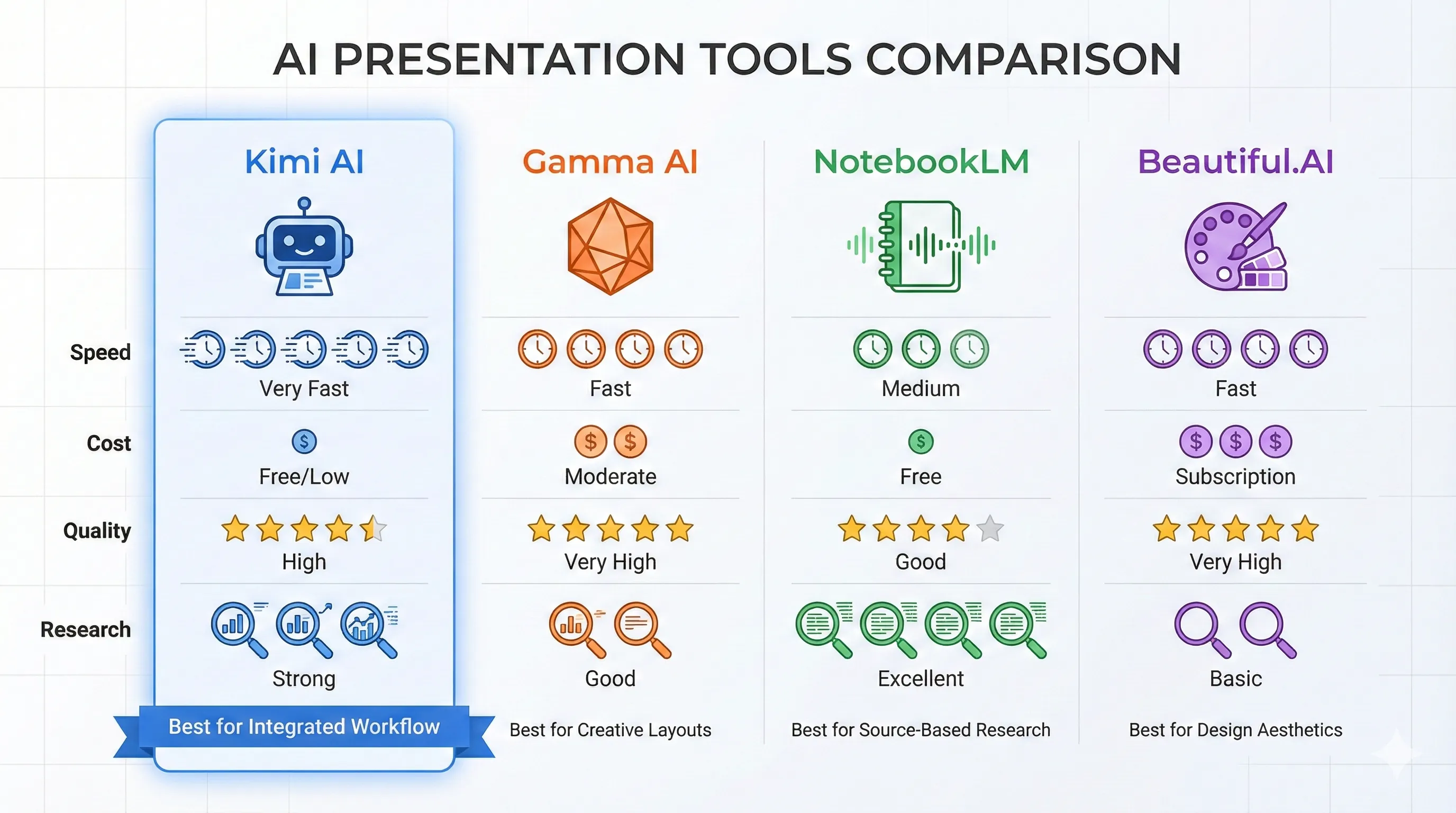
The honest May 2026 verdict: each tool wins a different lane. Kimi for free-tier and agentic generation. Gamma for polish and brand-sensitive output. NotebookLM for research-anchored decks where the underlying sources are first-class citizens. Most professional slide workflows benefit from picking based on the specific use case rather than committing to one tool exclusively.
Who Should Use It
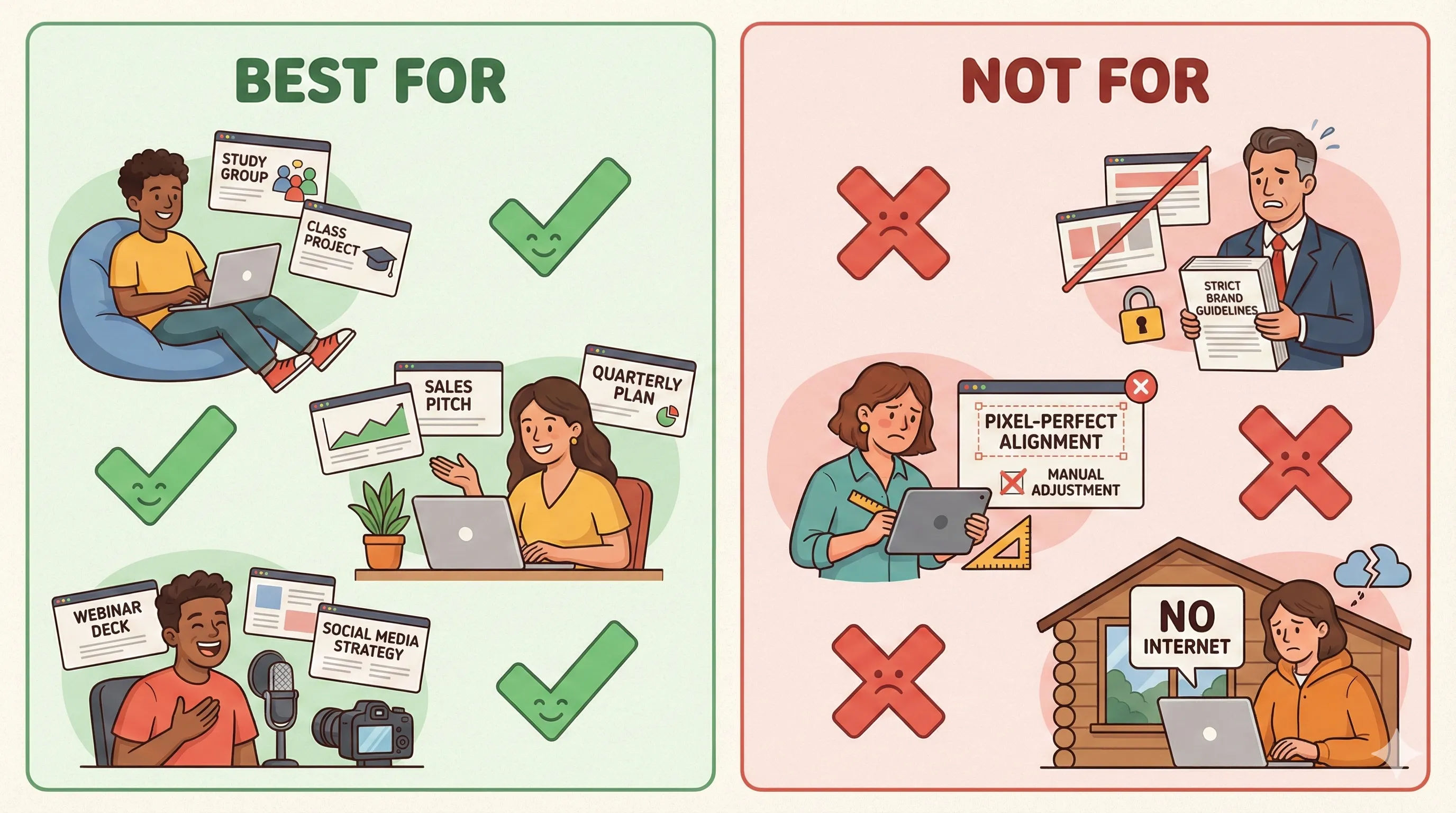
- Knowledge workers prepping internal decks: Yes. Free, structurally sound output, fast turnaround. Skip the polish round most internal audiences won’t notice.
- Students producing class presentations: Yes. Free is the right price point; the structural quality is academic-appropriate; the OK Computer interrupt workflow is genuinely useful for “actually I want to argue X instead” mid-build pivots.
- Content creators ideating outline-to-deck flows: Yes. URL-to-deck and document-to-deck inputs make Kimi useful as an outline-extraction tool even if you build the final deck elsewhere.
- Developers / technical staff producing internal architecture decks: Yes. Structural reasoning from K2 Thinking handles technical content well; design polish doesn’t matter for technical reviews.
- Sales / marketing producing client-facing decks: Skip Kimi, use Gamma. Polish is part of the message; Kimi’s design lag doesn’t pay back the savings.
- Researchers anchoring decks to source documents: Skip Kimi, use NotebookLM Slides. Better for “deep dive into these sources, then present” workflow.
- Anyone needing offline, on-prem, or compliance-controlled deployment: Skip Kimi entirely. Western paid alternatives (Beautiful.ai, Pitch enterprise) cover those requirements.
💡 Key Takeaway: Kimi AI Slides’ moat is the combination of “free for the core workflow” + K2 Thinking reasoning quality + OK Computer agent’s interrupt-and-correct interaction. No competitor matches all three. Where Kimi loses is design polish — and that’s a known, bounded weakness.
FAQs
Is Kimi AI Slides really free?
Yes, as of May 2026 — fully free for the core slide-generation workflow. K2 Thinking and OK Computer agent are included at no cost. No daily limits comparable to Gamma’s free tier. Verify whether Moonshot has introduced paid tiers; the Chinese AI tool space has been adding paid tiers through 2026 as competition intensified.
Is Kimi AI Slides better than Gamma?
For free use and structural output quality, yes. For design polish and brand-sensitive client work, no — Gamma wins on both. The “better” answer depends entirely on your use case. Internal/casual: Kimi. Client-facing: Gamma. Most professional creators end up using both for different jobs.
What is K2 Thinking?
Moonshot AI’s reasoning model — structurally similar to Claude’s “extended thinking” mode and OpenAI’s o-series. Longer compute budget per query, explicit chain-of-thought before final output, meaningfully better at multi-step reasoning than non-thinking peers. Powers Kimi AI Slides under the hood.
What is OK Computer?
Moonshot’s branded agent mode for Kimi — the agentic interface that handles multi-step tasks like slide generation, research compilation, and document drafting. For Kimi AI Slides, OK Computer orchestrates the prompt → outline → slide-by-slide → assembled deck workflow with a useful mid-generation interrupt feature.
Can Kimi AI Slides export to PowerPoint?
Yes — export to PPTX (PowerPoint), PDF, and Google Slides formats are supported. Most users export to PPTX or Google Slides for final polish in their preferred deck tool, treating Kimi as the structural-generation step.
How long does Kimi take to generate a deck?
3-5 minutes for a 10-slide deck from a detailed prompt. Longer decks (20+ slides) take 5-10 minutes. The OK Computer agent shows progress in real time so you can interrupt and redirect mid-generation if the angle is wrong.
Does Kimi AI Slides handle non-English content?
Kimi was built primarily for Chinese-language workflows but handles English well. Other languages are supported with quality varying by language — major European languages work reasonably; smaller languages may have weaker output. For multilingual deck workflows specifically, test with your target languages before committing.
Is my data safe with Kimi?
Kimi is a Chinese AI tool — your inputs and generated content sit on Moonshot AI’s infrastructure. For personal/internal use this is unlikely to matter; for confidential business information or anything covered by data sovereignty requirements (EU, US enterprise compliance), use a Western alternative with on-prem or compliance options instead. Standard enterprise data hygiene applies.
✅ What Kimi AI Slides Wins At
- ✓ Fully free for core slide generation (no daily limits)
- ✓ K2 Thinking reasoning quality (structural soundness)
- ✓ OK Computer agent’s mid-generation interrupt
- ✓ Three input methods (prompt, document, URL)
- ✓ Export to PowerPoint, PDF, Google Slides
❌ Where Kimi AI Slides Falls Short
- ✗ Design polish trails Gamma meaningfully
- ✗ Template variety lags paid Western competition
- ✗ Brand-consistency controls limited
- ✗ Data sovereignty concerns for enterprise / compliance contexts
Best free AI slide generator in May 2026 — K2 Thinking reasoning + OK Computer agent + zero cost. Half a star off because design polish trails paid Gamma and data sovereignty concerns make it a poor fit for compliance-sensitive enterprise contexts.
The Final Verdict
Kimi AI Slides in May 2026 is the right answer to the specific question “I want a free AI slide generator that produces structurally sound output.” K2 Thinking handles the multi-step reasoning that slide generation actually is; OK Computer’s visible agent workflow with mid-generation interrupts beats every competing tool’s “regenerate from scratch” approach; the price (zero) is competitive with no one. For internal decks, student presentations, technical reviews, and ideation workflows, this kimi ai slides review unambiguously recommends Kimi.
Final kimi ai slides review verdict: pick Kimi if you’re cost-sensitive and your decks don’t need to be visually impressive (internal, student, technical, casual). Pick Gamma if your decks are client-facing or brand-sensitive. Pick NotebookLM Slides if your work is research-anchored and the underlying sources are first-class citizens of the deck. Skip Kimi if you have data sovereignty requirements or need offline / enterprise compliance options. Match the tool to your specific need and you’ll be happy — Kimi serves “free + good enough for internal use” better than anything else.
Related Reading
- NotebookLM Review — Google’s research-first notebook (also has slides feature)
- NotebookLM Slides Deep Dive — focused look at the slides workflow
- ChatGPT Review — has basic slide generation as a feature
- Perplexity AI Review — research-anchored alternative for deep-dive content
- Best AI Developer Tools 2026 — for the broader Kimi K2 Thinking context
- Nano Banana Pro Review — for slide visuals + image generation pairing
- The Complete AI Tools Guide — buyer’s guide for picking the right tool from 200+ tested
Founder of AI Tool Analysis. Reads every pricing page, help article and footnote so you don’t have to. Covering AI tools since 2025. See how we research →
Stay Updated on AI Presentation Tools
The AI presentation tools landscape shifts every quarter. Subscribe for honest reviews of new Kimi / Gamma / NotebookLM releases, pricing changes, and feature drops — delivered every Thursday at 9 AM EST.
- ✅ Sourced Reviews: Every price and limit checked against the vendor’s own pages, not rewritten from press releases
- ✅ New Releases: Kimi / Gamma / NotebookLM updates covered within days
- ✅ Pricing Changes: Know when free tiers shift (especially relevant for Kimi)
- ✅ Output Comparisons: Side-by-side deck quality as the field evolves
- ✅ No Hype: Just the AI presentation news that matters for your work
Free, unsubscribe anytime.

Last Updated: May 1, 2026
Tool Tested: Kimi AI Slides (May 2026 product, powered by Kimi K2 Thinking + OK Computer agent), with comparison context to Gamma, NotebookLM Slides, and ChatGPT slide generation. Verify whether Moonshot has introduced paid tiers before publish — the Chinese AI tool space has been adding monetization through 2026.
Slug Note: Slug preserved at /kimi-ai-slides/ — already evergreen under the no-version-numbers policy. Title updated to drop the “2025” framing and add “Review 2026” for SERP freshness.
Next Review Update: August 2026 (or sooner when Moonshot ships a major Kimi release)
Have a tool you want us to review? Suggest it here | Questions? Contact us