

Welcome to our Claude Agent Teams Review
The Bottom Line
If you remember nothing else: Claude Agent Teams turns Claude Code from a single assistant into a coordinated AI development squad. Instead of one agent working through tasks one by one, you can spin up multiple Claude instances that message each other, share a task list, and tackle different parts of your codebase in parallel. Anthropic stress-tested it by having 16 agents build a C compiler from scratch capable of compiling the Linux kernel. The catch? Each teammate is a full Claude instance, so a 5-person team burns roughly 5x the tokens. This is experimental, with known limitations around session resumption and shutdown behavior. Best for developers running complex, parallelizable tasks where the speed gain justifies the token cost. Skip if you’re doing simple sequential work or watching your API budget closely. For context on Claude Code itself, see our Claude Code review.
TL;DR – The Bottom Line
What it is: A research preview feature that lets multiple Claude instances work together on your codebase, communicating directly with each other through a shared task list.
Best for: Parallel code reviews, multi-module features, debugging with competing hypotheses, and research exploration where agents can work independently.
Key strength: Agents message each other directly and self-coordinate—no human middleman required for inter-agent communication.
The proof: Anthropic had 16 agents build a 100,000-line C compiler that compiles the Linux kernel ($20K in API costs).
The catch: Each teammate burns full Claude tokens (5 agents = ~5x cost). Experimental status means no session resumption for in-process teammates, and the lead sometimes implements instead of delegating.
Quick Navigation
🤖 What Claude Agent Teams Actually Are (And What They’re Not)
Think of Agent Teams like hiring a small development squad instead of a single contractor. Before this feature, Claude Code worked like a solo developer: talented, but handling everything one task at a time. If you asked it to review a PR, it would go file by file, sequentially.
Agent Teams changes that. You describe the team structure you want in plain English, and Claude spawns multiple independent instances. One agent might analyze your authentication module while another reviews your API endpoints and a third stress-tests your database queries, all simultaneously.
Each teammate gets its own context window, loads your project’s configuration files (CLAUDE.md, MCP servers, skills), and works independently. The key difference from everything that came before: teammates talk directly to each other. They can challenge each other’s findings, share discoveries, and coordinate through a shared task list, no human middleman required.
This launched February 5, 2026 alongside Claude Opus 4.6 as a research preview. The feature was actually discovered hidden in Claude Code’s binary earlier that week by a developer who ran a simple strings command and found a fully-built multi-agent orchestration system, feature-flagged off. The community had already been building DIY multi-agent solutions, and Anthropic essentially productized those patterns into a native feature.
⚙️ How Agent Teams Work: The 3-Part Architecture
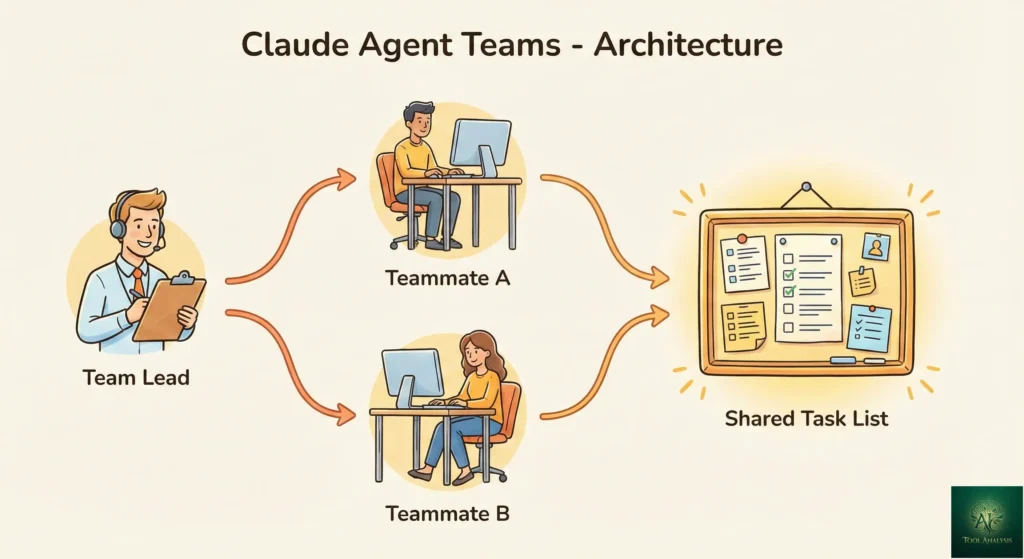
Every agent team has three components working together:
Team Lead: Your main Claude Code session. It creates the team, spawns teammates, assigns tasks, and synthesizes results. Think of it as the project manager who delegates but can also roll up their sleeves.
Teammates: Separate Claude Code instances, each with its own context window. They load your project context automatically and work independently. Unlike subagents (which just report back), teammates message each other directly.
Shared Task List: A central list of work items with three states: pending, in progress, and completed. Tasks can have dependencies, and blocked work unblocks automatically when dependencies finish. This prevents two agents from accidentally working on the same thing.
You can interact with teammates directly using Shift+Up/Down to select them, or watch them all work simultaneously in split panes (requires tmux or iTerm2). The in-process mode works in any terminal including VS Code.
🚀 Getting Started: Setup in Under 5 Minutes
Agent Teams are disabled by default. Here’s how to enable them:
Step 1: Add this to your Claude Code settings.json:
{
  "env": {
    "CLAUDE_CODE_EXPERIMENTAL_AGENT_TEAMS": "1"
  }
}
Or set it as an environment variable: export CLAUDE_CODE_EXPERIMENTAL_AGENT_TEAMS=1
Step 2: Tell Claude to create a team in natural language. That’s it. Here’s an example that works well because the three roles are independent:
I'm designing a CLI tool that helps developers track TODO comments.
Create an agent team to explore this from different angles:
- One teammate on UX
- One on technical architecture
- One playing devil's advocate
Claude creates the team, spawns teammates, coordinates work, and synthesizes findings. The lead’s terminal shows all teammates and what they’re working on.
Display modes: In-process mode (default) runs all teammates in your terminal, navigable with Shift+Up/Down. Split-pane mode gives each teammate its own visible pane but requires tmux or iTerm2, and does not work in VS Code’s integrated terminal, Windows Terminal, or Ghostty.
🎯 When Agent Teams Are Worth the Token Cost (And When They’re Not)
Agent Teams add coordination overhead and use significantly more tokens than a single session. The key question isn’t “can I use this?” but “should I?”
Use Agent Teams for:
Parallel code reviews with different focus areas (security, performance, maintainability). Multiple reviewers catch more issues than one sequential pass.
Debugging with competing hypotheses. One agent investigates the database layer, another the API, another the frontend. They converge on answers faster than sequential investigation.
Multi-module feature development. Frontend, backend, and tests each owned by a different teammate who can coordinate without stepping on each other.
Research and architecture exploration. Multiple perspectives on a design problem, with agents challenging each other’s findings.
🔍 REALITY CHECK
Marketing Claims: “Instead of one agent working through tasks sequentially, you can split the work across multiple agents, each owning its piece and coordinating directly with the others.”
Actual Experience: This is accurate, but the coordination overhead is real. Agent Teams shine on read-heavy tasks (reviews, research, analysis). For write-heavy tasks where agents might conflict on the same files, a single agent is still more reliable. As one developer noted: “Agent teams work best when teammates can operate independently.”
Verdict: Worth it for parallelizable work. Token-wasteful for sequential tasks.
Don’t use Agent Teams for: Sequential tasks, same-file edits, work with heavy dependencies between steps, or simple bug fixes. A single Claude Code session handles these faster and cheaper.
🔀 Agent Teams vs Subagents: Which Should You Use?
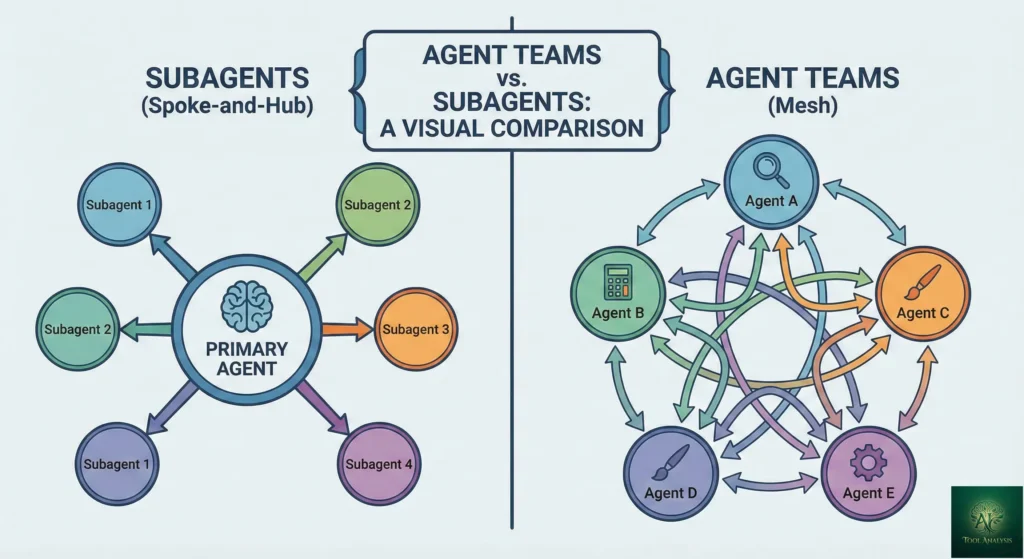
This distinction matters because choosing wrong wastes tokens. Both let you parallelize work, but they operate differently.
Subagents run within a single session and only report back to the main agent. Think of them as quick, focused workers you send on errands: “Go research X and tell me what you find.” They can’t talk to each other.
Agent Teams are independent sessions that communicate directly, share a task list, and self-coordinate. Think of them as colleagues in a meeting room, discussing, debating, and building on each other’s work.
The rule is simple: if your workers need to share findings, challenge each other, and coordinate on their own, use Agent Teams. If you just need quick results reported back, subagents are faster and cheaper. For a broader look at AI coding tools with agent capabilities, see our AI agents for developers guide.
🧪 The $20,000 Stress Test: 16 Agents Build a C Compiler
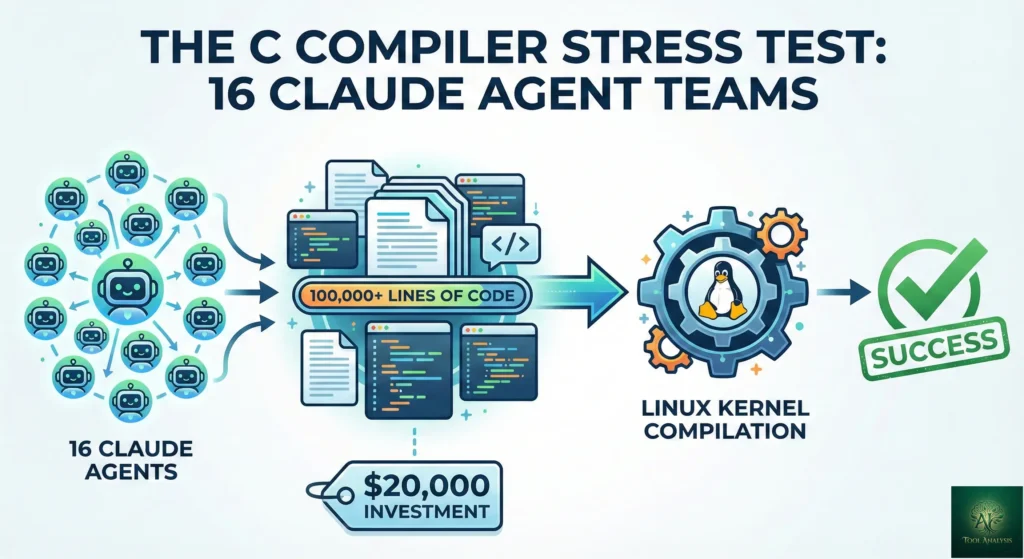
Before launching Agent Teams publicly, Anthropic researcher Nicholas Carlini stress-tested the system with an ambitious task: 16 Claude agents building a Rust-based C compiler from scratch, capable of compiling the Linux kernel.
The results over nearly 2,000 Claude Code sessions across two weeks:
Input: 2 billion input tokens, 140 million output tokens. Cost: Just under $20,000. Output: A 100,000-line compiler that builds Linux 6.9 on x86, ARM, and RISC-V. It also compiles QEMU, FFmpeg, SQLite, PostgreSQL, Redis, and passes 99% of the GCC torture test suite. And yes, it can compile and run Doom.
This was a clean-room implementation. Claude had no internet access. It depended only on the Rust standard library.
🔍 REALITY CHECK
Marketing Claims: “Agent Teams dramatically expand the scope of what’s achievable with LLM agents.”
Actual Experience: The compiler project is genuinely impressive, but $20,000 in API costs puts this firmly in “research demonstration” territory, not everyday development. The practical lessons, like writing high-quality tests and designing harnesses for autonomous agents, are more valuable than the compiler itself.
Verdict: Proves the concept works at scale. Your daily tasks will cost far less.
The key insight from Carlini’s writeup: when 16 agents started compiling the Linux kernel, they all hit the same bug and overwrote each other’s fixes. The solution was using GCC as an oracle to randomize which files each agent compiled, enabling true parallelism. Lesson: good task decomposition matters more than throwing more agents at a problem.
💰 Pricing Breakdown: What You’ll Actually Pay
Agent Teams don’t have separate pricing. Each teammate is a full Claude instance billed at standard rates. The math is straightforward but worth understanding:
API users: Opus 4.6 costs $5 per million input tokens, $25 per million output tokens. A 5-person team uses roughly 5x the tokens of a single session. Anthropic’s documentation states Agent Teams use approximately 7x more tokens than standard sessions when teammates run in plan mode.
Subscription users (Pro/Max): Agent Teams count against your existing usage limits. A Claude Max subscription ($100-$200/month) is the practical minimum for regular Agent Teams usage since you’ll burn through Pro limits quickly.
According to Anthropic’s cost management docs, the average Claude Code developer spends about $6/day ($100-200/month with Sonnet 4.5). Agent Teams will push that higher depending on team size and task complexity. If you’re comparing this to your current Cursor or Windsurf costs, factor in the multiplier effect.
Cost optimization tips: Start with smaller teams (2-3 agents). Use Sonnet for teammates and reserve
Opus for the lead. Keep tasks small and self-contained. Use /cost to monitor token consumption in real
time.
Token Cost Multiplier: Single Agent vs Teams
⚔️ Claude Agent Teams vs OpenAI Codex: Different Approaches to Parallel AI
OpenAI launched GPT-5.3-Codex just 27 minutes after Anthropic’s Opus 4.6 announcement on February 5, 2026. Both enable parallel AI development, but the philosophies differ significantly. GPT-5.3-Codex is notable for being the first model that helped create itself—the Codex team used early versions to debug its own training and manage deployment.
| Feature | Claude Agent Teams | OpenAI GPT-5.3-Codex |
|---|---|---|
| Architecture | Local-first, terminal-based | Cloud-first, app + CLI + IDE extension |
| Multi-agent approach | Agents communicate with each other directly | Interactive steering while agent works |
| Best for | Complex, decomposable parallel tasks | Long-running tasks with real-time feedback |
| Context window | 1M tokens (Opus 4.6, beta) | 400K tokens + 128K output limit |
| Key differentiator | Shared task list, peer-to-peer messaging | Progress updates, steer without losing context |
| Pricing | $5/$25 per MTok (API) or subscription | ChatGPT Plus ($20/mo), API pricing TBA |
| Status | Research preview (experimental) | Public release (first self-bootstrapped model) |
| Terminal-Bench 2.0 | 65.4% | 77.3% (state-of-the-art) |
| SWE-Bench Pro | Not reported | 56.8% |
| Speed | Standard | 25% faster than GPT-5.2-Codex |
💡 Swipe left to see all features →
Claude Agent Teams vs GPT-5.3-Codex: Feature Comparison
The bottom line: Agent Teams is stronger for well-defined, decomposable tasks where multiple agents need to coordinate and share findings autonomously. GPT-5.3-Codex’s interactive steering excels at long-running tasks where you want to guide the AI in real-time without losing context—a paradigm shift from “wait for output” to “collaborate while working.” GPT-5.3-Codex also edges ahead on benchmarks (77.3% vs 65.4% Terminal-Bench) and runs 25% faster. Many developers will use both: Agent Teams for parallel code reviews and multi-module features, Codex for exploratory work and complex debugging sessions. For a broader comparison of all AI coding tools, check our complete developer tools guide.
⚠️ Known Limitations (The Honest List)
This is a research preview, and the rough edges are real:
No session resumption for in-process teammates. If you use /resume or /rewind, teammates that were running in-process won’t come back. The lead may try to message teammates that no longer exist. Fix: tell the lead to spawn new teammates.
Task status can lag. Teammates sometimes fail to mark tasks as completed, blocking dependent tasks. If something seems stuck, check whether the work is actually done and update manually.
Shutdown can be slow. Teammates finish their current request before shutting down, which can take time.
One team per session. A lead can only manage one team at a time. Clean up before starting a new one.
No nested teams. Teammates cannot spawn their own teams. You can’t go recursive.
Split panes require tmux or iTerm2. Not supported in VS Code’s integrated terminal, Windows Terminal, or Ghostty.
The lead sometimes implements instead of delegating. Tell it explicitly: “Wait for your teammates to complete their tasks before proceeding.” Or use delegate mode (Shift+Tab) to restrict the lead to coordination-only tools.
🔍 REALITY CHECK
Marketing Claims: “Coordinate multiple Claude Code instances working together as a team.”
Actual Experience: It works, but expect to babysit the first few runs. The lead agent has a tendency to start doing the work itself rather than delegating, task status tracking isn’t always reliable, and you’ll burn tokens while agents figure out their coordination patterns. These are solvable problems, just know they exist going in.
Verdict: Usable today for specific workflows. Not yet a “set it and forget it” feature.
💬 What Developers Are Actually Saying
Agent Teams launched less than 48 hours ago, so early feedback is limited but informative:
Addy Osmani (Google engineering leader) wrote an extensive analysis noting that the single-agent model has a well-known failure mode: “You ask Claude to do something complex, refactor authentication across three services, and it gets maybe 60% of the way there before context degrades.” Agent Teams address this by giving each agent a narrow scope and clean context.
However, he also cautioned: “I’ve seen developers lose the plot, spending more time configuring orchestration patterns than thinking about what they’re building. Let the problem guide the tooling, not the other way around.”
Early developer consensus points to Agent Teams being most effective for research and review tasks, and less suited for write-heavy coding where file conflicts become an issue. The community that previously built DIY multi-agent solutions using tools like claude-flow, ccswarm, and Gastown is cautiously optimistic that a native implementation will be more reliable.
One notable detail: OpenAI released GPT-5.3-Codex just 27 minutes after Opus 4.6’s announcement, scoring 77.3% on Terminal-Bench 2.0 versus Claude’s 65.4%. GPT-5.3-Codex is also the first model classified as “High capability” for cybersecurity under OpenAI’s Preparedness Framework—and uniquely, it helped create itself during training and deployment. The AI coding race is now a full sprint. For our take on the broader competitive landscape, see our Google Antigravity review (which offers free Opus 4.5 access).
✅ Final Verdict: Should You Enable Agent Teams Today?
Use Claude Agent Teams if: You’re working on complex, parallelizable tasks (code reviews, multi-module features, debugging with competing hypotheses), you’re comfortable with experimental features, and your budget can handle the token multiplier.
Stick with single-session Claude Code if: Your tasks are sequential, you’re budget-conscious, you work primarily on single-file edits, or you need session resumption reliability.
Consider GPT-5.3-Codex if: You want real-time interactive steering without losing context, prefer faster execution (25% speed boost), need higher benchmark performance (77.3% Terminal-Bench), or want to start with ChatGPT Plus ($20/mo) before committing to API costs.
Agent Teams represents a genuine architectural shift from “AI helps me code” toward “AI team codes for me.” It’s not there yet, but the direction is clear. Start with a simple 2-3 agent team on a review task, learn the patterns, and scale up from there.
Ready to try it? Enable Agent Teams with one setting change:
export CLAUDE_CODE_EXPERIMENTAL_AGENT_TEAMS=1❓ FAQs: Your Questions Answered
Q: What are Claude Agent Teams?
A: A research preview feature in Claude Code that lets you run multiple Claude instances in parallel on a shared codebase. One session acts as team lead while teammates work independently and communicate directly with each other through a shared task list and messaging system.
Q: How much do Claude Agent Teams cost?
A: Each teammate is a full Claude instance billed separately. A 5-person team uses roughly 5x the tokens of a single session. Teams in plan mode use approximately 7x more tokens. API pricing: $5/$25 per million input/output tokens for Opus 4.6. Subscription users deplete their limits faster.
Q: How do I enable Claude Agent Teams?
A: Set CLAUDE_CODE_EXPERIMENTAL_AGENT_TEAMS=1 in your settings.json or environment.
Then describe the team structure you want in natural language.
Q: What’s the difference between Agent Teams and subagents?
A: Subagents report results back to the main agent only. Agent team teammates message each other directly, share a task list, and self-coordinate. Use subagents for focused tasks, Agent Teams for work requiring inter-agent collaboration.
Q: What are the best use cases for Claude Agent Teams?
A: Parallel code reviews with different focus areas, debugging with competing hypotheses, multi-module feature development, and research exploration. Avoid for sequential tasks or same-file edits.
Q: Can I use Agent Teams in VS Code?
A: Yes, in in-process mode (all teammates run in your terminal). Split-pane mode requires tmux or iTerm2 and does not work in VS Code’s integrated terminal.
Q: How do Claude Agent Teams compare to GPT-5.3-Codex?
A: Claude Agent Teams run locally with true inter-agent communication—agents message each other directly and coordinate via shared task lists. GPT-5.3-Codex offers interactive steering where you can guide the AI in real-time without losing context. Agent Teams have a larger context (1M vs 400K tokens), while Codex leads on benchmarks (77.3% Terminal-Bench vs 65.4%) and runs 25% faster. Codex is available on ChatGPT Plus ($20/mo); Agent Teams requires Claude API or subscription.
Q: What are the current limitations?
A: No session resumption for in-process teammates, task status can lag, slow shutdown, one team per session, no nested teams, split panes need tmux/iTerm2, and the lead sometimes implements instead of delegating.
Stay Updated on AI Developer Tools
Don’t miss the next major coding tool launch. Claude Agent Teams is just the beginning. Subscribe for weekly reviews of AI coding assistants, agentic workflows, and developer platforms, delivered every Thursday at 9 AM EST.
- ✅ Honest testing: We actually use these tools, not just read press releases
- ✅ Price tracking: Know when tools drop prices or add free tiers
- ✅ Feature launches: Agent Teams, Codex updates, and more covered within days
- ✅ Comparison updates: As the market shifts, we update our verdicts
- ✅ No hype: Just the AI news that actually matters for your work
Free, unsubscribe anytime. 10,000+ professionals trust us.

📚 Related Reading
- Claude Code Review 2026: The Reality After Claude Opus 4.5
- Top AI Agents for Developers 2026: 8 Tools Tested
- Cursor 2.0 Review: AI Code Editor Running 8 Agents at Once
- Google Antigravity Review: Free Claude Opus 4.5 Access
- Windsurf Review 2025: The $15 Cursor Alternative
- Antigravity vs Cursor: Google’s AI IDE Tested
- Kimi K2.5 Review: 100 Free AI Agents
- Moltbot Review 2026: Open-Source AI Assistant
Last Updated: February 6, 2026 | Claude Agent Teams Status: Research Preview | Opus 4.6 Version: claude-opus-4-6 | Next Review Update: March 6, 2026 (or sooner if Agent Teams exits research preview)
How We Researched: This review synthesizes Anthropic’s official documentation, the Opus 4.6 launch announcement, Nicholas Carlini’s C compiler stress test writeup, independent developer analyses from Addy Osmani, Marco Patzelt, and Robert Matsuoka, and community discussion from GitHub, Hacker News, and DEV Community. Agent Teams launched less than 48 hours before publication; we will update this review as we conduct hands-on testing and as the feature matures.