
Welcome to our Adobe Firefly Review
🆕 Breaking Update (December 18, 2025): Adobe announced multi-year Runway partnership bringing Gen-4.5 video model to Firefly. Unlimited generations extended through January 15, 2026 for Pro subscribers.
TL;DR – The Bottom Line
If you remember nothing else: Adobe Firefly is like having a legally bulletproof creative assistant that plugs directly into Photoshop and Illustrator. The December 2025 Runway partnership just made it a serious video generation contender, and unlimited generations through January 15 means now is the perfect time to test it. The $10/month Standard plan works for casual creators, but the $20/month Pro tier pays for itself if you’re generating more than 40 images weekly.
Click any section to jump directly to it
🔥 What Adobe Firefly Actually Does (December 2025 Update)
Adobe Firefly is Adobe’s AI creative suite that generates and edits images, video, and audio using text prompts. Think of it as having an AI assistant that speaks Photoshop fluently. You type “sunset over mountains in watercolor style” and get back four images in 30 seconds. But unlike standalone AI tools, Firefly lives inside the apps you already use.
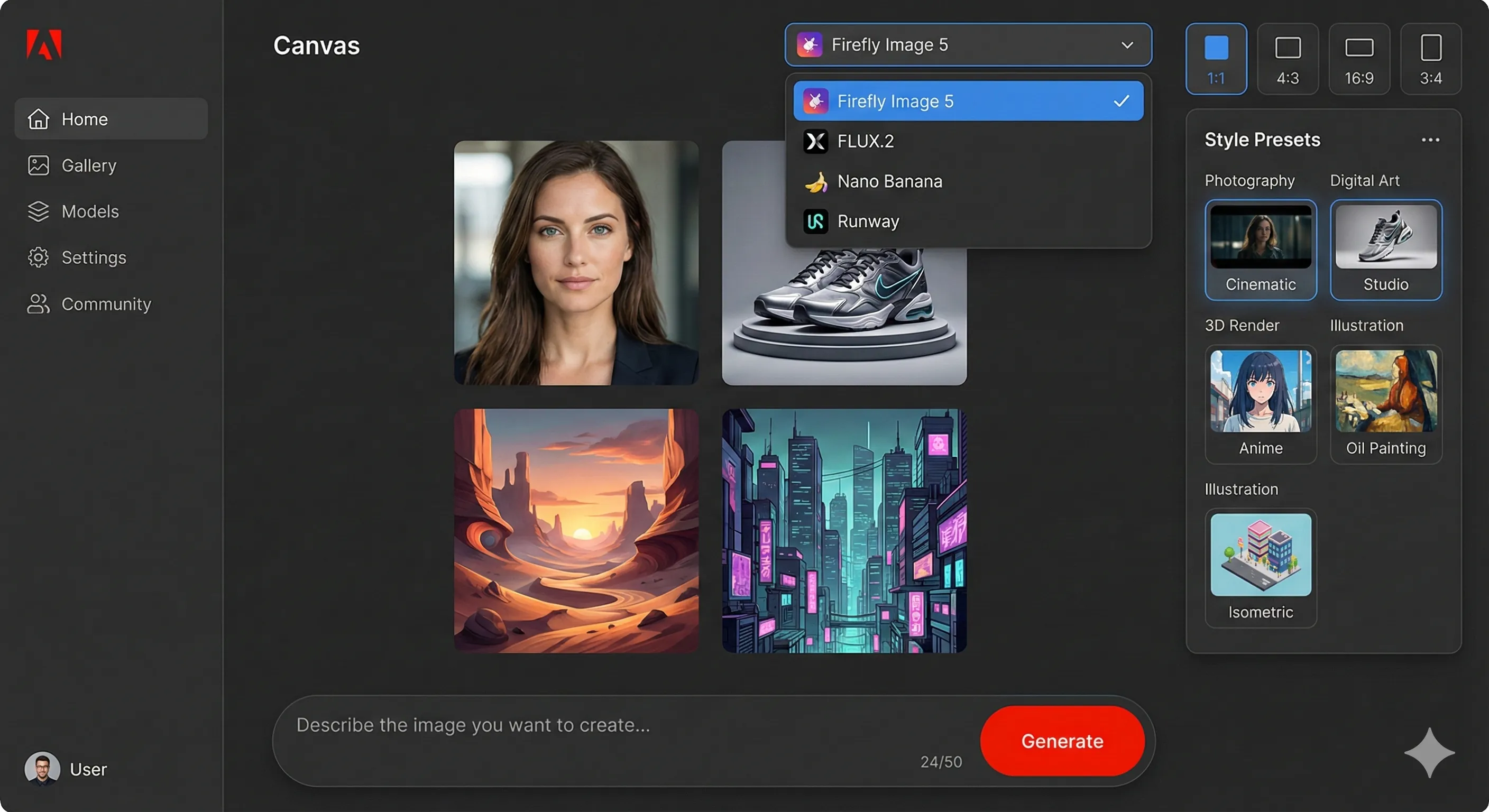
The December 2025 update is the biggest since launch. Adobe partnered with Runway to bring Gen-4.5 video generation to Firefly, added Black Forest Labs’ FLUX.2 for image generation, and launched a full video editor in beta. Translation: you can now generate videos, edit them with text prompts, and upscale to 4K without leaving your browser.
What sets Firefly apart is commercial safety. Every image is trained on Adobe Stock, licensed content, and public domain material. No scraped internet images, no copyright lawsuits. For businesses and agencies, this is the killer feature. Midjourney might produce more artistic results, but Firefly won’t get you sued.
The Partner Model Ecosystem
Adobe isn’t just building their own AI anymore. The Firefly app now includes models from Google (Nano Banana Pro), OpenAI, FLUX.2, Runway, Luma AI, ElevenLabs, and Topaz Labs. You pick the model that fits your task. Need photorealistic results? Use Nano Banana. Want stylized video? Choose Runway. Text-heavy designs? FLUX.2 excels there.
🔍 REALITY CHECK
Marketing Claims: “Create stunning visuals with simple words.”
Actual Experience: Simple prompts work for basic images. Complex scenes with multiple subjects, specific camera angles, or detailed environments still require prompt refinement and multiple generations. The quality is “professional stock photo” level, not “award-winning photography.”
Verdict: Great for marketing assets and product mockups. Not replacing your photographer for campaign hero shots.
🚀 Getting Started: Your First 10 Minutes
In five minutes with Adobe Firefly, here’s what I accomplished: generated four product mockups, removed a background from an uploaded photo, and extended an image beyond its original borders. The learning curve is almost flat if you’ve used any AI image tool before.
Minute 1-2: Account Setup
Visit firefly.adobe.com and sign in with your Adobe ID (or create a free account). No
credit card required for the free tier. You get 25 generative credits monthly to start experimenting.
Minute 3-5: First Generation
Click “Text to Image” and type a description. I tried: “Professional
headshot of a woman in a blue blazer, soft studio lighting, neutral background.” Result: Four options in 25 seconds.
Two were immediately usable, one needed slight cropping, one missed the mark entirely. Typical hit rate for AI
generation.
Minute 6-8: Generative Fill
Upload any photo, select an area with the brush, and describe what
you want there. I selected the background of a product shot and typed “minimalist concrete surface.” The blend was
seamless. This feature alone justifies Photoshop’s AI integration.
Minute 9-10: Video Generation
With the new Firefly Video Model, I uploaded a product image and
prompted “slow rotation, soft shadows, white background.” Five seconds of video in about two minutes. Quality was
adequate for social media B-roll. Not cinematic, but usable.
⚡ Features That Actually Matter (And Three That Don’t)
Features Worth Your Credits
Text to Image (Firefly Image Model 5)
The core feature generates 4MP images at native resolution.
Firefly Image Model 5 launched at MAX 2025 with significant improvements in photorealism and prompt-based editing.
You can now describe edits in everyday language rather than technical prompts.
Generative Fill (In Photoshop)
Select any area in Photoshop, type what you want, and Firefly
fills it contextually. This is Firefly’s strongest integration point. Removing objects, extending backgrounds,
adding elements. It works about 70% of the time without refinement.
Partner Models Access
One subscription gets you access to Google’s Nano Banana Pro (excellent for
realistic edits), FLUX.2 (best text rendering), Runway’s video models, and ElevenLabs for audio. This model
marketplace approach is unique among AI image tools.
Firefly Boards
A collaborative moodboarding tool where you can brainstorm with AI. Upload
reference images, generate variations, organize concepts, and share with clients. For agency workflows, this bridges
ideation and execution.
Features That Don’t Justify Extra Credits
Custom Models (Enterprise Only)
Train Firefly on your brand assets to generate on-brand content.
Sounds amazing. Reality: it’s enterprise-only, requires significant asset libraries, and results are inconsistent.
Unless you’re a Fortune 500, skip this.
Text Effects
Generate stylized text with AI. Fun for a minute, rarely practical. The results feel
more “word art from 2005” than “cutting-edge design.” Use a proper typography tool instead.
Vector Graphics Generation
Illustrator’s AI can generate vectors, but they’re often
over-complicated and need significant cleanup. Traditional vector creation is still faster for most tasks.
🎬 The New Video Editor: Game Changer or Gimmick?
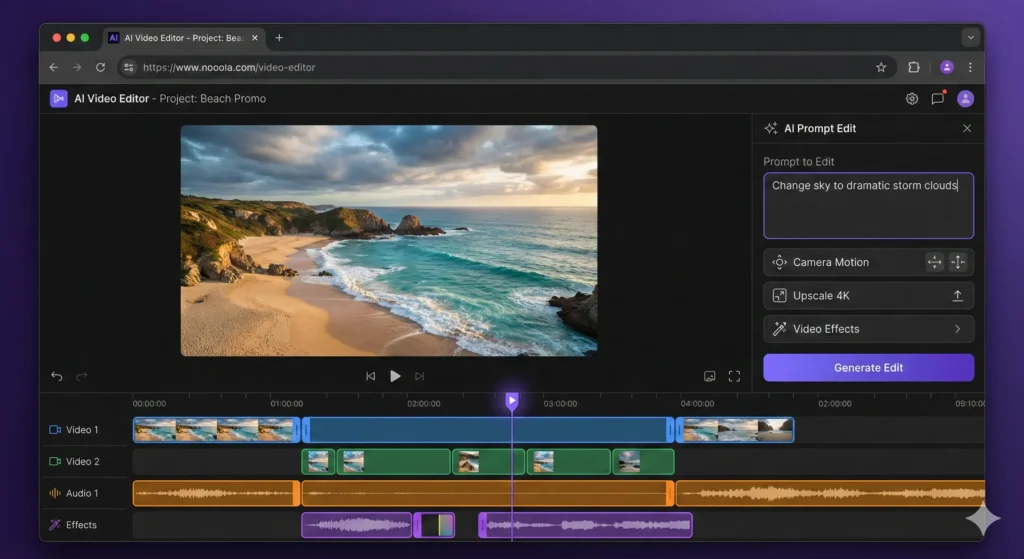
Adobe launched the Firefly video editor in public beta on December 16, 2025. This isn’t just generation anymore. It’s a browser-based editing workspace where you can refine AI-generated clips without regenerating everything.
Prompt-to-Edit: The Real Innovation
Previously, if Firefly generated a video with the wrong sky color, you’d regenerate the entire clip. Now you can type “change the sky to overcast” and Firefly edits just that element. I tested this by generating a beach scene, then prompting “add dramatic storm clouds.” The edit took 30 seconds and maintained continuity with the original footage.
Camera Motion Reference
Upload a reference video showing the camera movement you want, plus your starting frame. Firefly recreates that motion with your content. This is genuinely useful for matching existing footage styles or creating consistent B-roll.
Topaz Astra Integration
Low-resolution AI video can now be upscaled to 1080p or 4K using Topaz Labs’ Astra model directly in Firefly Boards. The upscaling quality is impressive. It transformed muddy smartphone-quality clips into footage usable for commercial projects.
🔍 REALITY CHECK
Marketing Claims: “Direct your AI video instead of just generating it.”
Actual Experience: The editing tools work, but complex edits still require multiple attempts. “Change the subject’s shirt color” worked. “Move the subject slightly left while maintaining eye line” failed spectacularly.
Verdict: Significant improvement over regenerate-and-hope. Not yet replacing human editors for complex work.
🤝 The Runway Partnership: What It Really Means
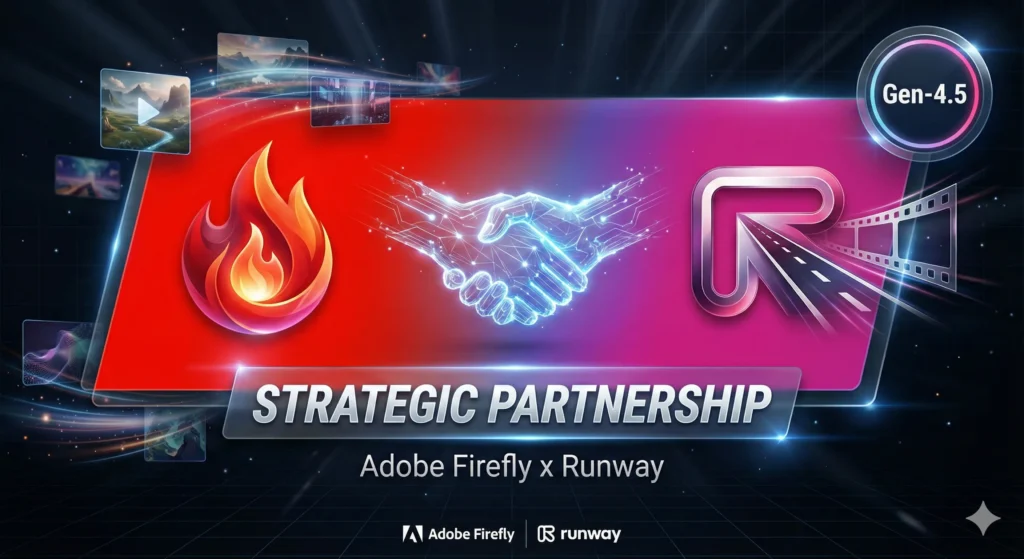
On December 18, 2025, Adobe announced a multi-year strategic partnership with Runway. This isn’t just a licensing deal. The companies will co-develop video AI capabilities exclusive to Adobe applications.
What You Get Now:
Runway’s Gen-4.5 model is available in Firefly immediately. It’s the same model
powering Runway’s own platform, now accessible within Adobe’s ecosystem. For Firefly Pro subscribers, unlimited
Gen-4.5 generations run through December 22, 2025.
What’s Coming:
The partnership promises “specialized AI capabilities for professional video
workflows” exclusive to Adobe apps, starting with Firefly. Expect deeper Premiere Pro and After Effects integration
in 2026.
Why It Matters:
Adobe is positioning Firefly as a model marketplace, not just their own AI. By
partnering with Runway (video), Google (Nano Banana for images), Black Forest Labs (FLUX.2), and others, they’re
betting that curation beats competition. Use any model, stay in Adobe’s ecosystem, pay one subscription.
This strategy directly challenges tools like Kling AI and other standalone video generators. If you’re already paying for Creative Cloud, the Runway integration removes the need for additional subscriptions.
💰 Pricing Breakdown: What You’ll Actually Pay
Adobe’s pricing structure has gotten complicated. Here’s what each tier actually gives you:

| Plan | Monthly Cost | Credits/Month | 5-Second Videos | Best For |
|---|---|---|---|---|
| Free | $0 | 25 | ~2 | Testing only |
| Standard | $9.99 | 2,000 | ~20 | Casual creators, freelancers |
| Pro | $19.99 | 4,000 | ~40 | Active creators, small agencies |
| Premium | $199.99 | 50,000 | Unlimited | High-volume production |
| Creative Cloud Pro | $69.99 | 4,000 | ~40 | Photoshop/Premiere users |
💡 Swipe left to see all features →
Understanding Credits
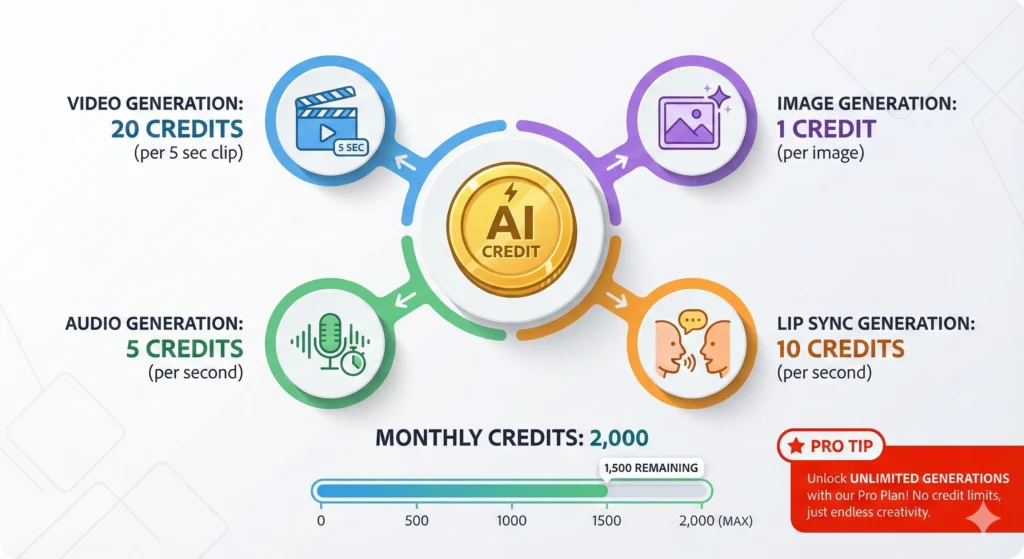
One credit equals one standard image generation. But premium features cost more:
- Image generation: 1 credit
- Video generation: ~20 credits per 5-second clip
- Audio translation: ~5 credits per second
- Lip sync: ~10 credits per second
The Hidden Value: Unlimited Generations Promotion
Through January 15, 2026, Pro, Premium, and Creative Cloud Pro subscribers get unlimited generations on all image models and the Firefly Video Model. This is the time to experiment heavily and build your asset library.
Cost Per Image Calculation
At Standard tier ($9.99/month for 2,000 credits): $0.005 per image generation. At Pro tier with unlimited (current promotion): effectively $0 per image. Compare to Midjourney’s Basic ($10/month for ~200 images): $0.05 per image. Firefly is 10x cheaper on a per-generation basis.
⚔️ Adobe Firefly vs Midjourney vs GPT-Image-1.5: Real Tests
I ran the same five prompts through Firefly, Midjourney V7, and OpenAI’s new GPT-Image-1.5 (released December 16, 2025) to see how they compare in real-world scenarios. Note: GPT-Image-1.5 replaced DALL-E 3 as OpenAI’s flagship image model, offering 4x faster generation and significantly improved editing capabilities.
| Test | Adobe Firefly | Midjourney V7 | GPT-Image-1.5 |
|---|---|---|---|
| Photorealistic Portrait | A (Best skin tones) | B+ (Artistic, less natural) | A (Excellent likeness) |
| Product Mockup | A (Clean, usable) | B (Over-stylized) | A (Precise control) |
| Artistic Illustration | B (Conservative) | A+ (Stunning) | A- (Versatile styles) |
| Text in Image | C (Struggles) | D (Rarely works) | A+ (Best in class) |
| Speed | 25-30 sec | 45-60 sec | 8-12 sec (4x faster) |
| Commercial Safety | A+ (Guaranteed) | B (User responsibility) | A (C2PA metadata) |
| Image Editing | A (Via Photoshop) | B+ (Vary Region) | A+ (Native editing) |
💡 Swipe left to see all features →
Key Insight
Firefly wins on commercial safety and Adobe ecosystem integration. Midjourney dominates artistic expression and cinematic aesthetics. GPT-Image-1.5 excels at text rendering, prompt accuracy, and speed. The December 2025 GPT-Image-1.5 release closed much of the quality gap, making this comparison tighter than ever.
For a deeper dive into image generators, see our Best AI Image Generators 2025 comparison covering all major players including Nano Banana Pro and FLUX.
👤 Who Should Use This (And Who Shouldn’t, Basing on this Adobe Firefly Review)
Use Adobe Firefly If:
- You already pay for Creative Cloud (Firefly integration is seamless)
- You need commercial-safe images for client work
- You want AI that works inside Photoshop, not as a separate app
- You’re generating marketing assets, product mockups, or social content
- You need video generation without learning a new platform
- Your legal team has concerns about AI image rights
Skip Adobe Firefly If:
- You want the most artistic, stylized output (Midjourney wins)
- You need precise text rendering in images (GPT-Image-1.5 wins)
- You’re looking for a completely free solution (limited credits restrict exploration)
- You work offline or in restricted environments
- You need consistent character generation across images (Nano Banana excels here)

💬 What Users Are Actually Saying
The Positive
“Integration with Photoshop and Illustrator makes my workflow faster. I can generate AI content and instantly refine it without switching tools.” (G2 Review, verified user)
“Commercial safety is the killer feature. My agency can use Firefly output in client campaigns without the legal anxiety we had with other tools.” (Adobe Community Forums)
The Criticism
“Firefly ignores most of my prompt and gives me simple low quality images that don’t even make sense.” (Adobe Community Forums, October 2025)
“Not competitive with alternatives like Midjourney or Leonardo, which offer better results or value.” (Reddit r/artificial sentiment analysis)
The Video Generation Reality
“The current model allows almost zero opportunity for customers to get any feel for how it works. I did not get good results from the couple of attempts I had to generate a measly 5-second video.” (Adobe Community, February 2025)
🔍 REALITY CHECK
Marketing Claims: “The industry’s top AI models in one place.”
Actual Experience: Community sentiment is mixed. Power users in Adobe’s ecosystem love the integration. Standalone AI enthusiasts find quality lacking compared to specialized tools. The confusing credit system draws consistent complaints.
Verdict: Great tool, wrong expectations. It’s a productivity enhancer for existing Adobe users, not a Midjourney replacement.
❓ FAQs: Your Questions Answered
Q: Is there a free version of Adobe Firefly?
A: Yes. Free accounts get 25 generative credits per month, enough for about 25 images or 1-2 short videos. The free tier lets you test all features but runs out quickly for serious use. For unlimited standard image generation, you need a paid plan starting at $9.99/month.
Q: Can Adobe Firefly replace Midjourney?
A: Not entirely. Firefly excels at photorealistic product shots, marketing assets, and commercial-safe content. Midjourney produces more artistic, stylized, and emotionally compelling images. GPT-Image-1.5 now offers the best text rendering and fastest generation. If you need stock-photo-quality commercial images inside Adobe apps, Firefly wins. If you want award-winning visual art, Midjourney remains superior.
Q: Is Adobe Firefly safe for commercial use?
A: Yes, this is Firefly’s core value proposition. Adobe trains Firefly exclusively on Adobe Stock, licensed content, and public domain material. No scraped internet images. Adobe explicitly guarantees commercial safety, making it the safest choice for agencies and businesses concerned about copyright issues.
Q: How does the Runway partnership work?
A: Runway’s Gen-4.5 video model is now available directly in the Firefly app. Firefly Pro subscribers can access it using their existing credits. The partnership also promises exclusive AI video capabilities for Adobe apps in 2026, meaning features that won’t be available on Runway’s standalone platform.
Q: What’s the difference between Firefly Standard and Pro?
A: Standard ($9.99/month) gives you 2,000 credits, up to 20 video generations, and 6 minutes of audio translation. Pro ($19.99/month) doubles those limits to 4,000 credits, 40 videos, and 13 minutes of audio. Both include unlimited standard image features. Pro makes sense if you generate more than 100 images weekly.
Q: Does Adobe Firefly work offline?
A: No. Firefly requires an internet connection for all generation features. The models run on Adobe’s servers. While Photoshop works offline for traditional editing, any Firefly-powered features (Generative Fill, Generate Image, etc.) need connectivity.
Q: Can Firefly generate text in images accurately?
A: Firefly struggles with text generation. In testing, text often appears garbled, misspelled, or stylized beyond readability. For accurate text in images, GPT-Image-1.5 or the FLUX.2 model (available in Firefly through partner integration) perform significantly better. Plan to add text in Photoshop rather than generating it.
Q: What happened to the unlimited generations offer?
A: Adobe extended unlimited generations through January 15, 2026 for Pro, Premium, and Creative Cloud Pro subscribers. This covers all Firefly and partner image models plus the Firefly Video Model. After January 15, your account reverts to standard monthly credit allowances.
🏆 Final Verdict
Adobe Firefly earns a 4 out of 5 for 2025. It’s not the most artistic AI image tool (that’s Midjourney), nor the fastest with the best text rendering (that’s GPT-Image-1.5). But it might be the most practical for working professionals.
The December 2025 updates changed Firefly from “nice to have inside Photoshop” to “genuine creative production tool.” The Runway partnership, FLUX.2 integration, and video editor beta signal Adobe’s commitment to making Firefly a comprehensive AI creative suite rather than a bolt-on feature.
Use Adobe Firefly if:
- You’re already in Adobe’s ecosystem and want seamless integration
- Commercial safety is non-negotiable for your work
- You need one subscription covering image, video, and audio AI
- You generate high volumes of marketing assets
Stick with alternatives if:
- Artistic quality matters more than legal safety (choose Midjourney)
- You need precise text rendering and fastest generation (choose GPT-Image-1.5)
- You want character consistency across images (choose Nano Banana Pro)
- Budget is extremely tight (explore free tiers of competitors first)
Try it today: firefly.adobe.com (Free to start, no credit card required)
Stay Updated on AI Creative Tools
The AI creative landscape changes weekly. New models, price drops, feature launches. Don’t miss what matters for your work.
- ✅ Weekly reviews of AI image generators, video editors, and creative platforms
- ✅ Price drop alerts so you never overpay for AI tools
- ✅ Honest testing with real results, not marketing hype
- ✅ Comparison guides to help you choose the right tool
- ✅ Breaking news when major updates launch
Free, unsubscribe anytime
Related Reading
- Best AI Image Generators 2025: Complete Comparison
- Midjourney V7 Review: Video Generation + Real Tests
- AI Image Editing Tools: Nano Banana vs Adobe vs Luminar
- Kling AI Review: AI Video Generation That Actually Works
- Cursor 2.0 Review: The $9.9B AI Code Editor
- Perplexity AI Review: The AI Search Engine
Last Updated: December 28, 2025
Firefly Version Tested: December 2025 (Image Model 5, Video Editor Beta)
Next Review Update: January 28, 2026