


Welcome t o our AI Agents for Developers Review
🆕 Latest Update (January 2026): Claude Cowork launched January 12th, OpenAI Codex added GPT-5.2-Codex, and Cursor 2.0’s background agents are now production-ready. This guide reflects all January 2026 developments.
The Bottom Line
TL;DR – 30 Second Summary
- Best for Accuracy: Claude Code with Opus 4.5 (80.9% SWE-bench) – $100-200/mo for Max tier
- Best IDE Integration: Cursor 2.0 – $20/mo Pro, runs 8 agents in parallel
- Best Value: GitHub Copilot Pro+ at $39/mo – multi-model access (Claude, GPT-5, Gemini)
- Best Free Option: Google Antigravity – Claude Opus 4.5 free during preview
- Best for Defined Tasks: Devin – $20/mo minimum, excels at migrations & bulk refactoring
- Best Open Source: Cline/Roo Code – Free + API costs, bring your own keys
If you remember nothing else: AI coding agents have fundamentally shifted from autocomplete helpers to autonomous teammates. By end of 2025, 85% of developers regularly use AI tools for coding. The difference in 2026? These tools now plan, write, test, and debug entire features with minimal human input. Cursor leads for IDE integration ($20/month), Claude Code leads for accuracy (80.9% on SWE-bench with Opus 4.5), and GitHub Copilot Pro+ offers best value at $39/month with multi-model access. Skip Devin unless you have well-defined, repetitive tasks. The free option? Google Antigravity offers Claude Opus 4.5 completely free during preview, but expect rate limits.
📑 Quick Navigation
🔄 What Changed in AI Agents for Developers in 2026
The AI coding landscape looks radically different than it did just 12 months ago. Here’s what shifted:
Agentic workflows became the standard. Tools like Claude Code, Cursor, and GitHub Copilot no longer just suggest code. They understand repositories, make multi-file changes, run tests, and iterate on tasks with minimal human input. You’re not writing code anymore. You’re reviewing AI-generated pull requests.
The pricing wars intensified. GitHub Copilot introduced Agent Mode to all VS Code users. Devin slashed prices from $500/month to $20/month. Google launched Antigravity completely free. Meanwhile, Cursor’s controversial switch to credit-based pricing left some developers with unexpected bills.
Model choice exploded. You’re no longer locked into one AI model. GitHub Copilot Pro+ ($39/month) lets you switch between Claude Opus 4.5, GPT-5, and Gemini 3 Pro without managing separate API keys. Cursor supports 8+ models including their proprietary Composer model.
🔍 REALITY CHECK
Marketing Claims: “AI will replace developers! Autonomous agents work 24/7 without supervision!”
Actual Experience: Even the best AI coding agents achieve only 60% overall accuracy on Terminal-Bench, dropping to 16% on hard tasks. Claude Opus 4.5 leads at 80.9% on SWE-bench, but that still means 1 in 5 tasks need human intervention.
Verdict: AI agents are “super-assistants,” not replacements. They handle 25-50% of routine coding work while you focus on architecture and review.
🤖 AI Agents vs Copilots: The Critical Difference
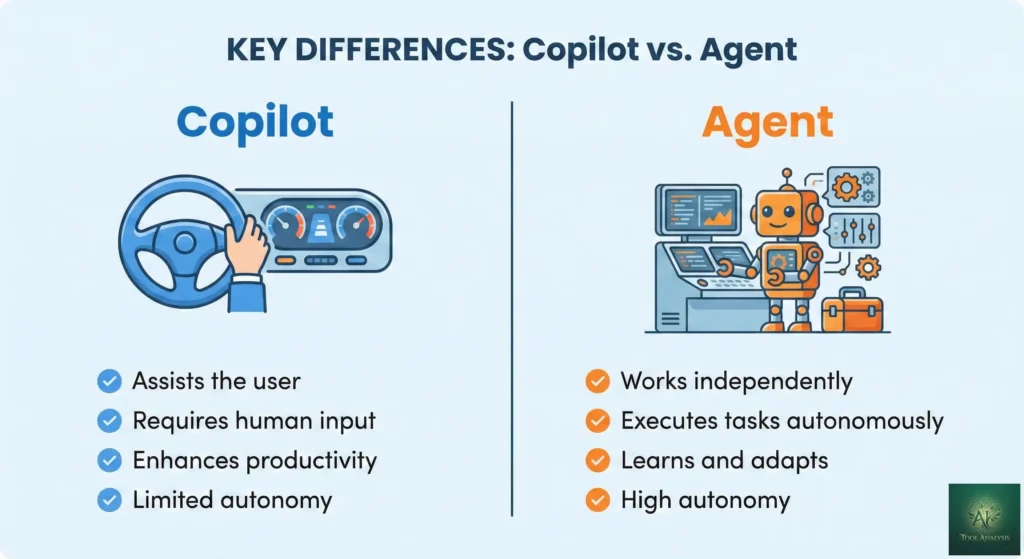
Before we dive into specific tools, you need to understand what makes an “agent” different from a “copilot.” This distinction determines which tool fits your workflow.
Copilots assist. Agents execute.
Think of a copilot like a spell-checker that suggests the next word. It reacts to what you’re typing, offers completions, and waits for you to accept or reject. GitHub Copilot’s basic autocomplete works this way. You’re still driving.
An agent is different. It’s like hiring a junior developer who can take an entire ticket, break it into subtasks, write the code, run tests, and submit a pull request. You describe what you want (“Build user authentication with OAuth 2.0”) and review the result. The AI handles the implementation.
The key differences:
- Autonomy: Agents work independently after receiving instructions. Copilots need constant human input.
- Task complexity: Agents handle multi-step workflows and complete features. Copilots provide single suggestions.
- Decision making: Agents plan and execute solutions. Copilots assist with your decisions.
- Context retention: Agents remember project details across sessions. Copilots work moment-to-moment.
In 2026, the lines are blurring. GitHub Copilot now has “Agent Mode.” Cursor runs up to 8 agents in parallel. Even tools that started as copilots are racing to add agentic capabilities.
🏆 The Top 8 AI Agents for Developers (Ranked)
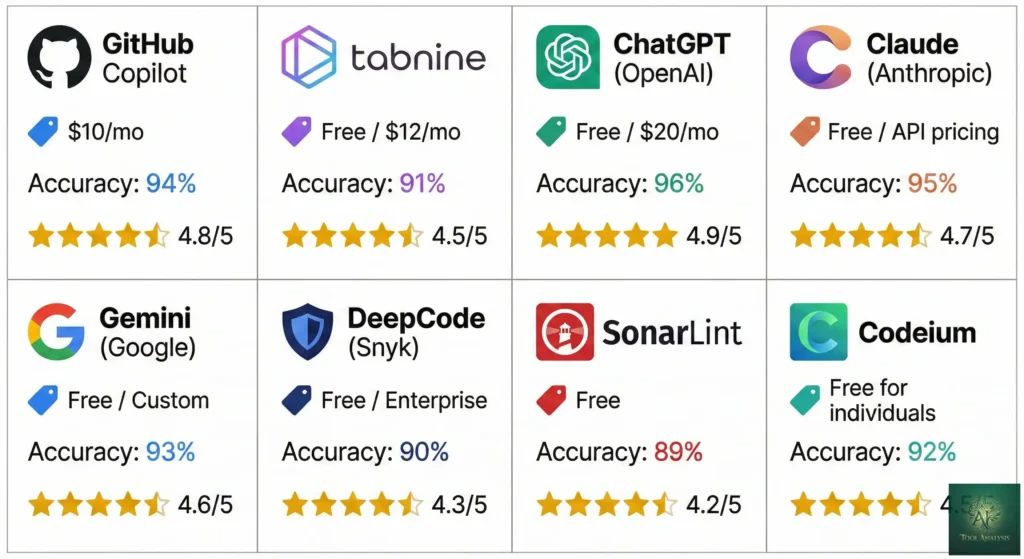
After testing these tools on real codebases, reading hundreds of Reddit threads, and analyzing benchmark data, here’s how the top AI agents stack up in January 2026.
1️⃣ Claude Code: Best for Accuracy
What it is: Anthropic’s terminal-based coding agent that runs locally on your machine. Think of it as a senior developer who lives in your command line.
Why it leads: Claude Opus 4.5 achieves 80.9% accuracy on SWE-bench Verified, the highest of any model. When you need code that works on the first pass, Claude Code delivers. It generates correct code more consistently than competitors, which means fewer debugging cycles and less wasted money on failed agent runs.
What’s new in January 2026:
- Claude Cowork: Launched January 12th, this is “Claude Code for the rest of your work.” Non-developers can now use agentic capabilities through a desktop app interface instead of the terminal.
- Subagents: Create specialized AI assistants (code reviewer, debugger, security auditor) that Claude delegates tasks to automatically.
- Session teleportation: Start work on your laptop, continue on your desktop without losing context.
- Skills system: Hot-reload custom automations without restarting sessions.
The workflow: You run claude in your terminal, describe what you want, and Claude
writes code, creates files, runs commands, and tests its work. It’s conversational, but everything happens through
text. If you’re comfortable in the terminal, it feels natural. If you prefer clicking buttons in a GUI, look at
Cursor instead.
Pricing reality:
- Pro ($20/month): Access to Claude Sonnet 4.5, ~45 messages per 5-hour window
- Max ($100-200/month): Access to Claude Opus 4.5 (the 80.9% accuracy model), 5x-20x higher limits
🔍 REALITY CHECK
Marketing Claims: “Perfect memory and unlimited context.”
Actual Experience: “It doesn’t really do a good job remembering things you ask (even via CLAUDE.md).” You’ll need to repeat context often. The 3x memory improvement in version 2.1 helps but doesn’t fully solve this. You’re still bound by Claude’s 200k context window (vs competitors’ 400k-1M).
Verdict: Best raw accuracy, but terminal-first workflow isn’t for everyone. Ideal for developers who already live in the command line.
Best for: Developers who value accuracy over convenience, terminal-native workflows, teams that can afford Max tier for Opus 4.5 access.
Skip if: You prefer GUI-based editors, need tight IDE integration, or can’t justify $100+/month for the best model.
Read our full Claude Code review →
2️⃣ Cursor: Best IDE Integration
What it is: A VS Code fork rebuilt around AI. Everything you know from VS Code works, but AI is baked into every interaction. It’s the closest thing to having a pair programmer who understands your entire project.
Why developers love it: At the time of writing, Cursor remains the most broadly adopted AI coding tool among individual developers and small teams according to Reddit. Its deep contextual awareness and multi-file editing capabilities make complex refactors feel manageable.
What’s new in 2026:
- Cursor 2.0: Launched with Composer, their proprietary coding model that’s 4x faster than competitors.
- Parallel agent execution: Run up to 8 agents simultaneously on different tasks.
- Background agents: Agents clone your repo in the cloud, work while you’re away, and open pull requests.
- Debug Mode: A human-in-the-loop debugging workflow where the agent instruments your code with logging to find root causes.
The workflow: You’re working in a familiar VS Code environment. Press Cmd+K for inline AI edits, use the chat panel for complex questions, or switch to Agent Mode for autonomous multi-file changes. Cursor shows diffs before applying changes so you stay in control.
The pricing controversy: Cursor quietly switched from “$20 for 500 requests” to “$20 credit pool that depletes based on which AI model you use.” Some developers hit unexpected bills. CEO Michael Truell apologized publicly: “We didn’t handle this pricing rollout well.”
Current pricing:
- Hobby: Free (limited usage)
- Pro ($20/month): $20 credit pool for premium models, unlimited “Auto” model
- Pro+ ($60/month): 3x usage
- Ultra ($200/month): 20x usage, priority access to new features
🔍 REALITY CHECK
Marketing Claims: “State-of-the-art performance on coding benchmarks.”
Actual Experience: Cursor finished faster but solved fewer problems correctly than Copilot in independent benchmarks. Speed doesn’t equal quality. You’ll be reviewing AI code constantly, not relaxing while it works.
Verdict: Best overall developer experience if you can navigate the credit-based pricing. Not “unlimited” anymore at $20.
Best for: Professional developers spending 20+ hours/week coding, teams wanting AI-first editing without leaving VS Code, those who value speed over perfect accuracy.
Skip if: You’re budget-conscious, prefer terminal workflows, or need predictable monthly costs.
Read our full Cursor 2.0 review →
3️⃣ GitHub Copilot: Best Value
What it is: The original AI pair programmer, now evolved into a full agentic platform. It’s integrated into VS Code, JetBrains, Eclipse, Xcode, and more. If you’re already in the GitHub ecosystem, Copilot fits seamlessly.
Why it’s the value leader: At $39/month for Pro+, you get 1,500 premium requests, access to Claude Opus 4.5, GPT-5, and Gemini 3 Pro, plus Agent Mode and code review. No other tool offers this model variety at this price point.
What’s new in 2026:
- Agent Mode with MCP support: Now available to all VS Code users. Copilot can complete entire tasks across multiple files, suggest terminal commands, and self-heal runtime errors.
- Copilot coding agent: Assign issues directly from GitHub, Slack, or Linear. Copilot works in the background and submits pull requests.
- Multi-model access: Claude 3.5/3.7 Sonnet, Gemini 2.0 Flash, GPT-5, and more. Switch models mid-conversation.
- Code review agent: Used by over one million developers. Catches bugs that static analysis misses.
The pricing tiers:
- Free: 50 premium requests/month, 2,000 inline suggestions
- Pro ($10/month): 300 premium requests, unlimited base model chat
- Pro+ ($39/month): 1,500 premium requests, all models including Claude Opus 4.5
- Business ($19/user/month): Centralized management, IP indemnity
- Enterprise ($39/user/month): 1,000 premium requests, custom models trained on your codebase
🔍 REALITY CHECK
Marketing Claims: “The world’s most widely adopted AI developer tool.”
Actual Experience: Some Reddit posts note: “I stopped using Copilot and didn’t notice a decrease in productivity.” The basic autocomplete can feel generic. The value is in Pro+ with Agent Mode and multi-model access, not the $10 tier.
Verdict: Best value at Pro+ tier. The $10 Pro tier is underwhelming compared to Cursor at the same price.
Best for: Teams already using GitHub, developers who want multi-model flexibility without API key management, those who value stability over cutting-edge features.
Skip if: You need deep codebase understanding (Cursor is better), or you want terminal-native workflows (Claude Code is better).
Read our full GitHub Copilot Pro+ review →
4️⃣ OpenAI Codex CLI: Best Terminal Experience
What it is: OpenAI’s coding agent that runs locally in your terminal. It’s open source, built in Rust for speed, and integrates with ChatGPT Plus, Pro, Business, and Enterprise plans.
Why it matters: If Claude Code is Anthropic’s terminal agent, Codex CLI is OpenAI’s answer. It reads, changes, and runs code on your machine. The key differentiator? It now uses GPT-5.2-Codex, a model specifically optimized for agentic coding.
What’s new in January 2026:
- GPT-5.2-Codex: Improvements on long-horizon work through context compaction, stronger performance on large refactors and migrations, and significantly stronger cybersecurity capabilities.
- Agent skills: Reusable bundles of instructions that help Codex reliably complete specific
tasks. Type
$skill-nameto invoke. - IDE extension: Now works in VS Code, Cursor, and Windsurf, not just the terminal.
- Web search: Use Codex to search the web and get up-to-date information for your task.
The workflow: Install via npm i -g @openai/codex, run codex, and start a
conversation. It creates branches, makes code changes, runs tests, and opens pull requests. You can also run
/review to get code review before committing.
Pricing: Included with ChatGPT Plus ($20/month), Pro ($200/month), Business, Edu, and Enterprise plans. No separate subscription needed.
🔍 REALITY CHECK
Marketing Claims: “One agent for everywhere you code.”
Actual Experience: Strong integration with OpenAI’s ecosystem, but you’re locked into their models. No Claude, no Gemini. If you’re already paying for ChatGPT Pro, this is an excellent addition. If not, Cursor offers more model flexibility.
Verdict: Best terminal agent for OpenAI loyalists. If you’re already in their ecosystem, it’s a natural fit.
Best for: ChatGPT subscribers who want terminal-based coding, developers who prefer OpenAI’s models, teams standardizing on the OpenAI platform.
Skip if: You want multi-model flexibility, prefer GUI editors, or aren’t already paying for ChatGPT.
5️⃣ Devin: Best for Defined Tasks
What it is: The “fully autonomous AI software engineer” from Cognition Labs. Devin operates in its own sandboxed environment with a shell, code editor, and browser. You assign a task via Slack or their web app, and Devin works independently.
The hype vs reality: Devin made headlines in 2024 as the first AI to pass real software engineering interviews. The reality? In real-world testing, it completed just 3 out of 20 tasks successfully. It excels at repetitive, well-defined tasks but struggles with ambiguity.
What’s new with Devin 2.0:
- Massive price drop: From $500/month to $20/month starting tier.
- Interactive Planning: Collaborate with Devin to scope detailed task plans before execution.
- Devin Search: Ask questions about your codebase and get detailed responses citing relevant code.
- DeepWiki: Free documentation generator from your repos, no subscription required.
Where Devin actually shines:
- High-volume, repetitive migrations (Nubank split a 6 million line monolith)
- Systematic technical debt cleanup
- Framework upgrades across hundreds of files
- Initial prototyping and boilerplate scaffolding
Pricing (ACU-based):
- Core ($20/month minimum): Pay-as-you-go at $2.25 per ACU (Agent Compute Unit)
- Team ($500/month): 250 ACUs included, $2.00 per additional ACU
- Enterprise: Custom pricing with advanced security
🔍 REALITY CHECK
Marketing Claims: “Hire an AI software engineer to replace your junior developers.”
Actual Experience: From real testing: “From 20 tasks, Devin failed 14 times, succeeded 3 times, and showed unclear results for 3 others.” It’s not replacing anyone. It’s handling specific, repetitive tasks while you supervise.
Verdict: Excellent for migrations and bulk refactoring. Not ready for open-ended development. The unpredictable ACU costs make budgeting difficult.
Best for: Teams with repetitive engineering tasks (migrations, upgrades, cleanup), organizations willing to invest time in fine-tuning for their specific workflows.
Skip if: You need creative problem-solving, work on novel codebases, or want predictable monthly costs.
6️⃣ Windsurf: Best for Flow State
What it is: An AI-native IDE (formerly Codeium) built to keep developers in “flow state.” Its central feature, Cascade, combines deep codebase understanding with real-time awareness of your actions to orchestrate complex coding tasks.
Why it’s different: While Cursor added AI to VS Code, Windsurf was built AI-first. The Cascade agent doesn’t just suggest code. It tracks your files, terminal history, clipboard, and browsing actions to anticipate what you need next.
What’s new in January 2026:
- GPT-5.2-Codex support: Multiple reasoning effort levels with discounted credit usage.
- Claude Sonnet 4.5: Now with 1M context window.
- JetBrains plugin: Native integration for IntelliJ, PyCharm, and more.
- Supercomplete: Predicts developer intent, not just the next token.
The standout feature: Cascade auto-iterates until code actually works. Combined with built-in live preview and one-click extension setup, it’s particularly beginner-friendly while still powerful for experienced devs.
Pricing:
- Free: 25 prompt credits/month
- Pro ($15/month): Higher limits, priority access
- Enterprise: Custom pricing
🔍 REALITY CHECK
Marketing Claims: “The best AI for coding.”
Actual Experience: Trustpilot reviews highlight “wasted credits, unstable performance, login issues, and inconsistent AI output.” Reddit developers admire the vision but criticize the execution. Crashes appear during long-running agent sequences.
Verdict: Innovative approach with strong potential, but stability issues persist. Wait for maturity if you need production reliability.
Best for: Developers who want an AI-first IDE experience, those frustrated by context-switching between tools, teams willing to tolerate some rough edges for cutting-edge features.
Skip if: You need rock-solid stability, work on mission-critical code, or can’t afford the learning curve.
7️⃣ Google Antigravity: Best Free Option
What it is: Google’s agent-first IDE built on VS Code’s foundation. The key differentiator? Claude Opus 4.5, which normally requires a $100-200/month Claude Max subscription, is completely free during the preview period.
Why it matters: Getting the 80.9% SWE-bench accuracy leader for free is arguably the best deal in AI coding tools right now. You’re not just getting a free IDE. You’re getting premium model access that costs $200/month elsewhere.
The approach: When you open Antigravity, you’re greeted by the Agent Manager, not a code editor. This isn’t an accident. Google designed it so you dispatch tasks and let AI agents handle implementation while you review. It’s “managing AI agents” rather than “writing code with AI help.”
Available models (all free during preview):
- Gemini 3 Pro (Flash) – Fast iteration
- Gemini 3 Pro (Thinking) – Complex reasoning
- Claude Opus 4.5 (Thinking) – The 80.9% SWE-bench leader
- GPT-OSS 120B – Open-source OpenAI variant
Critical limitation: Only personal Gmail accounts work. Google Workspace accounts don’t work during the preview period.
🔍 REALITY CHECK
Marketing Claims: “The future of development is agent-first.”
Actual Experience: Security researchers found Antigravity’s agents can be manipulated into stealing credentials through prompt injection attacks. Google classified these as “intended behavior.” Rate limits mean heavy users will hit walls mid-project.
Verdict: Best free deal available, but use only for non-sensitive experimentation. Disable auto-execute settings. Not production-ready.
Best for: Budget-conscious developers, those wanting to try Claude Opus 4.5 without paying $200/month, experimentation and learning.
Skip if: You work on sensitive code, need production stability, or can’t use personal Gmail accounts.
Read our full Google Antigravity review →
8️⃣ Cline/Roo Code: Best Open Source
What it is: VS Code extensions that bring agentic capabilities to your existing editor without switching to a new IDE. Cline and its fork Roo Code are frequently praised for their ability to index repositories, track dependencies, and maintain multi-step reasoning.
Why developers choose them: You bring your own API keys (OpenAI, Anthropic, or local models), which means complete control over costs and data privacy. No subscription lock-in. No credit-based surprises.
The trade-off: You need to manage API keys and understand token costs. But for developers who want maximum flexibility and transparency, this is a feature, not a bug.
Roo Code’s advantage: Its structured modes and tighter context handling resonate with developers burned by hallucinating agents. It’s “Cline but more disciplined.”
Pricing: Free (you pay only for API usage)
🔍 REALITY CHECK
Marketing Claims: “Full agentic capabilities without vendor lock-in.”
Actual Experience: Setup requires more technical knowledge than hosted solutions. API costs can be unpredictable if you’re not monitoring usage. But for developers who understand the model, it’s genuinely liberating.
Verdict: Best choice for developers who want control. Not for those who want turnkey solutions.
Best for: Developers who want API cost control, teams with strict data privacy requirements, those who prefer open-source tools.
Skip if: You want a managed experience, don’t want to think about API keys, or need enterprise support.
📊 Head-to-Head Comparison Table
| Tool | Best For | Starting Price | Accuracy (SWE-bench) | Interface | Model Choice |
|---|---|---|---|---|---|
| Claude Code | Raw accuracy | $20/mo (Pro) | 80.9% (Opus 4.5) | Terminal | Anthropic only |
| Cursor | IDE integration | $20/mo (Pro) | ~75% | VS Code fork | 8+ models |
| GitHub Copilot | Value + ecosystem | $10/mo (Pro) | 56% (Agent Mode) | Extension | 5+ models (Pro+) |
| OpenAI Codex | OpenAI users | Included w/ChatGPT | ~70% | Terminal + IDE | OpenAI only |
| Devin | Defined tasks | $20/mo (Core) | 13.86% (autonomous) | Web + Slack | Proprietary |
| Windsurf | Flow state | $15/mo (Pro) | ~76% | Standalone IDE | 6+ models |
| Google Antigravity | Free access | Free (preview) | 80.9% (Opus 4.5 free) | VS Code fork | 7 models free |
| Cline/Roo Code | Open source | Free + API costs | Depends on model | VS Code extension | Any (BYO keys) |
💡 Swipe left to see all features →
📊 SWE-bench Accuracy Comparison
💰 Monthly Pricing Comparison (Starting Tiers)
🎯 Tool Capability Comparison (Top 4)
💰 Complete Pricing Breakdown
Here’s what you’ll actually pay for each tool, including hidden costs and gotchas:
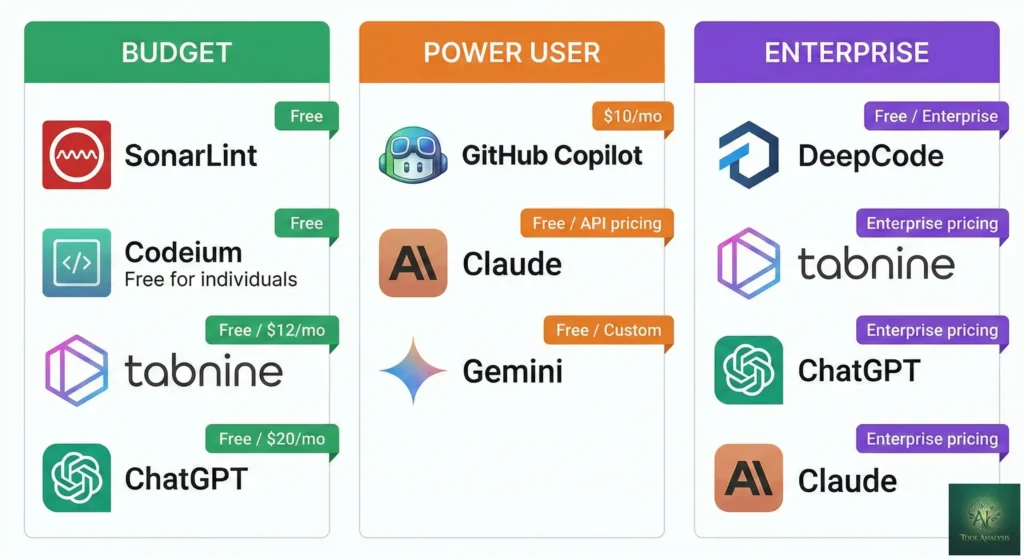
Budget Option: $0-20/month
- Google Antigravity: $0 (free preview, includes Claude Opus 4.5)
- GitHub Copilot Free: $0 (50 premium requests/month)
- Cline/Roo Code: Free + ~$5-20/month API costs
- GitHub Copilot Pro: $10/month (limited to 300 premium requests)
- Windsurf Pro: $15/month
- Cursor Pro: $20/month (credit-based, can exceed)
- Claude Code Pro: $20/month (Sonnet only)
- Devin Core: $20/month minimum (ACU-based, unpredictable)
Power User: $39-60/month
- GitHub Copilot Pro+: $39/month (best value, 1,500 premium requests, all models)
- Cursor Pro+: $60/month (3x usage)
Enterprise/Heavy Use: $100-500+/month
- Claude Code Max: $100-200/month (Opus 4.5 access)
- Cursor Ultra: $200/month (20x usage)
- Devin Team: $500/month (250 ACUs)
My recommendation: Start with Google Antigravity (free) or GitHub Copilot Pro+ ($39). If you need maximum accuracy and can afford it, Claude Code Max ($100+) with Opus 4.5 is worth it for production work.
💬 What Reddit Really Thinks
I analyzed hundreds of Reddit threads from r/artificial, r/OpenAI, r/ClaudeAI, and r/ChatGPT. Here’s the unfiltered developer sentiment:
On Claude Code:
“Top AI assistants like Claude Code that generate correct code on the first pass and fit naturally into existing workflows earn praise; whereas tools that require constant correction quickly lose favor.”
“Claude Code has an enormous amount of value that hasn’t yet been unlocked for a general audience.”
On Cursor:
“Cursor remains the most broadly adopted AI coding tool among individual developers and small teams.”
“The credit-based pricing caused a stir in the community.” Many developers feel misled by the change from request-based to credit-based billing.
On Copilot:
“I stopped using Copilot and didn’t notice a decrease in productivity” captures a sentiment echoed repeatedly across Reddit. But others counter: “Agent Mode with MCP support changes everything.”
On Devin:
“From 20 tasks, Devin failed 14 times, succeeded 3 times.” The hype hasn’t matched reality for most developers.
On the market overall:
“One of the loudest conversations among developers is no longer ‘which tool is smartest?’ Now it’s ‘which tool won’t torch my credits?'” Cost-effectiveness is now debated as intensely as capabilities.
❓ FAQs: Your Questions Answered
Q: What is the best AI agent for developers in 2026?
A: There’s no single best. Claude Code leads on accuracy (80.9% with Opus 4.5), Cursor leads on IDE integration, and GitHub Copilot Pro+ offers best value at $39/month with multi-model access. Choose based on your workflow: terminal users should try Claude Code, VS Code users should try Cursor, and budget-conscious developers should start with Google Antigravity (free).
Q: Will AI agents replace developers?
A: No. Even the best AI coding agents achieve only 60% overall accuracy on complex benchmarks, dropping to 16% on hard tasks. AI agents handle 25-50% of routine coding work (boilerplate, refactoring, documentation) while developers focus on architecture, design decisions, and complex problem-solving. They’re powerful assistants, not replacements.
Q: Is GitHub Copilot worth it in 2026?
A: At $10/month (Pro), Copilot is underwhelming compared to alternatives. At $39/month (Pro+), it’s excellent value with 1,500 premium requests, access to Claude Opus 4.5, GPT-5, and Gemini 3 Pro, plus Agent Mode and code review. The free tier (50 premium requests) is good for testing.
Q: Should I use Cursor or Claude Code?
A: Cursor if you prefer a GUI-based IDE experience with visual diffs and multi-file editing in a familiar VS Code interface. Claude Code if you’re comfortable in the terminal and prioritize accuracy over convenience. Many professional developers use both: Copilot for quick autocomplete, Claude Code for complex tasks.
Q: Is Devin AI worth the price?
A: Only for specific use cases. Devin excels at repetitive, well-defined tasks like code migrations, framework upgrades, and technical debt cleanup. It struggles with novel, ambiguous problems. At $20/month minimum with unpredictable ACU costs, most developers get better value from Cursor or GitHub Copilot Pro+.
Q: What’s the difference between AI agents and AI copilots?
A: Copilots assist by suggesting code completions while you drive. Agents execute by taking entire tasks, breaking them into subtasks, writing code, running tests, and submitting pull requests autonomously. Copilots need constant input; agents work independently after receiving instructions.
Q: Is my code safe with AI coding agents?
A: It depends on the tool. Some companies block cloud-based assistants over IP concerns. For maximum privacy, use Cline/Roo Code with self-hosted models or local LLMs. Enterprise tools like GitHub Copilot Business and Claude Code offer data retention controls. Always check privacy policies and consider compliance requirements.
Q: Can AI agents handle large codebases?
A: Yes, but with limitations. Tools like Cursor and Claude Code can index entire repositories and maintain multi-step reasoning across files. However, you’re still bound by context window limits (200K-1M tokens). Large codebases (10,000+ files) require strategic focus. The AI can’t understand everything at once.
Final Verdict: Which AI Agent Should You Choose?
For most developers: Start with GitHub Copilot Pro+ ($39/month). It offers the best balance of value, model flexibility, and ecosystem integration.
For accuracy-first developers: Claude Code with Opus 4.5 ($100-200/month) delivers the highest benchmark accuracy. Worth it if code quality matters more than cost.
For IDE-native workflows: Cursor ($20/month) provides the deepest VS Code integration and fastest iteration speed.
For budget-conscious exploration: Google Antigravity (free) gives you Claude Opus 4.5 access at no cost. Perfect for learning, but not production-ready.
For specific, repetitive tasks: Devin ($20/month+) handles migrations and bulk refactoring better than general-purpose tools, if you can define the task clearly.
The AI agent landscape will keep evolving. The best strategy? Pick one tool, master it, and stay open to switching as the market matures. The developers who thrive in 2026 won’t be those who use AI. They’ll be those who use AI well.
Stay Updated on Developer Tools
The AI coding landscape changes weekly. Get honest reviews, price drop alerts, and breaking feature launches delivered to your inbox.
- ✅ New tool launches tested and reviewed within 48 hours
- ✅ Pricing changes that actually matter to your budget
- ✅ Benchmark updates as models improve
- ✅ Community insights from Reddit and developer forums
- ✅ No hype just honest testing from a real developer
Free, unsubscribe anytime. 10,000+ professionals trust us.
Related Reading
- Claude Code Review 2026: The Reality After Claude Opus 4.5 Release
- Cursor 2.0 Just Launched: $9.9B AI Code Editor Now Runs 8 Agents At Once
- GitHub Copilot Pro+ Review: Is The New $39/Month Tier Actually Worth It?
- Google Antigravity Review: Why Pay $200 For Claude Opus 4.5 When It’s Free Here?
- Antigravity vs Cursor: Google’s AI IDE Tested
- Best AI Developer Tools 2025: The Definitive Guide
- The Complete AI Tools Guide 2025
Last Updated: January 15, 2026
Tools Tested: Claude Code 2.1, Cursor 2.0, GitHub Copilot (Agent Mode), OpenAI Codex CLI 0.84, Devin 2.0, Windsurf, Google Antigravity, Cline, Roo Code
Next Review Update: February 15, 2026