

GitHub Copilot used to be the default AI coding assistant — bundled with the developer toolchain most people already used, priced cheap enough that the decision was effectively no decision. In April 2026 the picture is more complicated. Copilot Pro and Pro+ sign-ups are paused for new buyers as of April 20, the entire billing model shifts from request-based to usage-based on June 1, and the competitive field (Cursor, Claude Code, OpenAI Codex, Google Antigravity) has matured enough that the “default” framing no longer fits. This review covers GitHub Copilot’s current state in April 2026, the implications of both the sign-up pause and the upcoming billing change, and the honest verdict for current GitHub Copilot Pro subscribers, prospective Pro+ upgraders, and developers weighing alternatives.
⚡ TL;DR – The Bottom Line
What It Is: GitHub’s AI coding assistant, now a 5-surface ecosystem (autocomplete + chat + agent mode + code review + Spark) with 16+ models from 3 vendors.
Best For: Developers in any of 6+ supported editors, anyone in the GitHub workflow, and current Pro subscribers who got grandfathered access during the April 20 sign-up pause.
Price: Free / Pro $10 / Pro+ $39 (Pro and Pro+ paused for new sign-ups) / Business $19/user / Enterprise $39/user.
Our Take: Copilot Pro at $10 is the best price-per-quality entry point in AI coding tools — but new sign-ups are paused until late June at the earliest, and June 1 brings a major billing model change.
⚠️ The Catch: June 1, 2026 transitions all paid tiers from request-based to usage-based billing. Heavy agent-mode users may see 2-5x higher bills under the new model.
📑 Quick Navigation
The Bottom Line: 60-Second Verdict
Three quick recommendations depending on your situation:
- Already on GitHub Copilot Pro ($10/month)? Stay on it. The $10 tier remains the best price-per-quality entry point in the AI coding category, and you have grandfathered access during the sign-up pause. Watch for the June 1 billing transition — most light users won’t be affected, but heavy agent-mode users may pay more under usage-based pricing.
- Already on GitHub Copilot Pro+ ($39/month)? Worth keeping if you actively use Claude Opus 4.7 (the Pro+ exclusive). If you mostly use GPT-5.4 or Sonnet 4.6, you can downgrade to Pro and save $29/month with no meaningful capability loss.
- New buyer, sign-ups paused? Bookmark a refresh-status page and use Cursor Pro ($20/month) or Claude Code (bundled with Claude Pro $20/month) in the interim. Both are fully open for new sign-ups and roughly competitive with Copilot Pro on capability. Switch to Copilot when sign-ups reopen if you specifically need GitHub workflow integration.
The rest of this review walks through what changed since the December 2025 Pro+ launch, how Copilot stacks up against the four credible competitors, and what the June 1 billing transition actually means for your monthly bill.
What’s Happening in April 2026
Two events define the last eight days of GitHub Copilot’s history and matter for any buying decision in late April 2026.
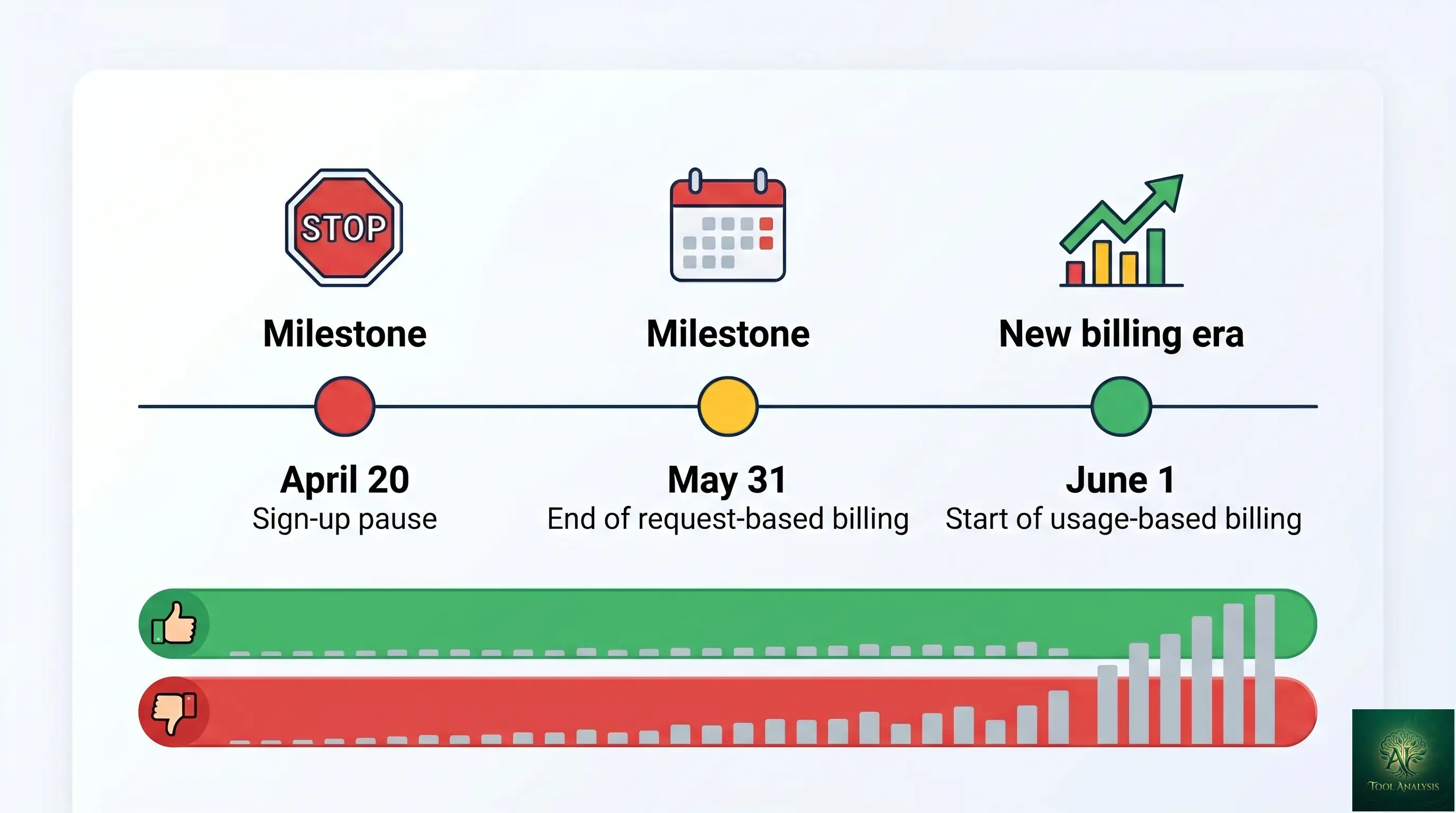
April 20, 2026: New sign-ups paused for Pro, Pro+, and Student plans
GitHub announced a temporary pause on new individual paid sign-ups, citing the coming billing transition and a need to onboard existing customers cleanly into the new model. The pause does NOT affect existing subscribers — anyone already on GitHub Copilot Pro, Pro+, or the Student tier retains full access including all model capabilities. Business and Enterprise sign-ups remain open. There’s no firm timeline for when individual sign-ups reopen; GitHub has indicated “after the June 1 billing transition stabilizes,” which implies late June or July at the earliest.
June 1, 2026: Billing moves from request-based to usage-based
Until now, paid Copilot tiers gave you a fixed allowance of “premium requests” per month — Pro got 300, Pro+ got unlimited (with rate limits). Starting June 1, billing shifts to a per-token usage model similar to how Cursor’s credit system works. The implication: light users (a few completions per day, occasional chat queries) will probably pay less or roughly the same. Heavy users running multi-step agent tasks across large codebases — the workflow Copilot has been pushing hardest in 2026 — will likely see meaningfully higher bills. GitHub has published a calculator at the docs site to help estimate the change for your usage pattern.
What GitHub Copilot Actually Does in 2026
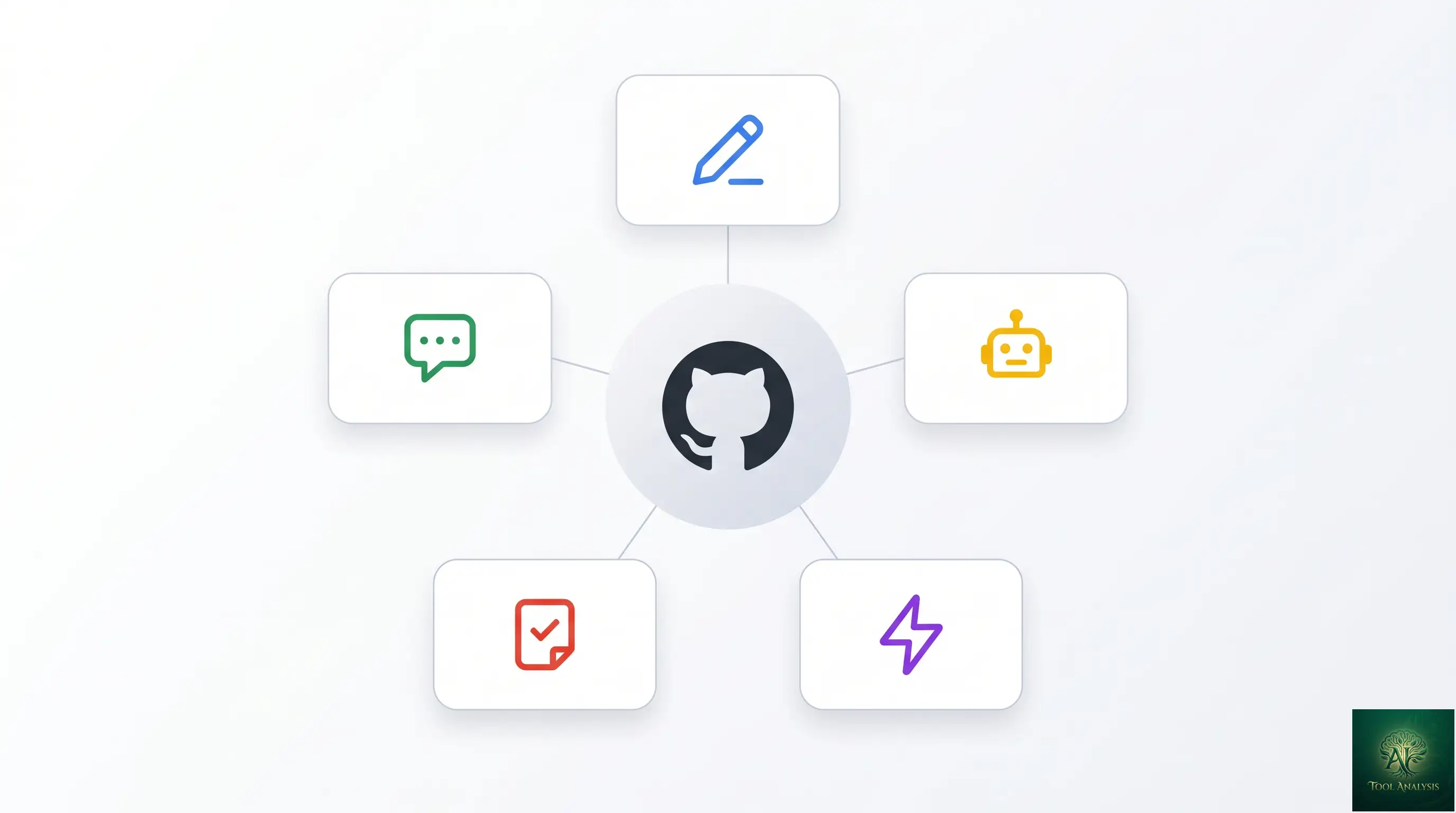
Three years ago, GitHub Copilot was an autocomplete tool. Today it’s a multi-model agentic coding ecosystem with five distinct surfaces — autocomplete, chat, agent mode, code review, and Spark (the no-code app builder) — all integrated into the GitHub workflow you probably already use.
The five Copilot surfaces
- Autocomplete (the original): inline suggestions in your editor as you type. Uses smaller faster models (GPT-5-mini, Claude Haiku 4.5) for sub-second completions. Free tier gets 2,000/month, paid tiers get unlimited.
- Copilot Chat: conversational interface inside your IDE for asking questions, explaining code, generating snippets. Premium models (Sonnet 4.6, Opus 4.7, GPT-5.5) consume your premium-request allowance.
- Agent Mode: the 2026 headliner. Describe a feature in natural language; Agent Mode plans the work, creates files, writes code, runs terminal commands, fixes errors, and iterates until the task is done. Integrates with GitHub workflow — creates branches, opens pull requests, responds to code review.
- Code Review: Copilot reviews pull requests, flags potential issues, and suggests improvements. Available on Business and Enterprise tiers; opt-in for Pro+.
- GitHub Spark: the no-code curveball — describe a small web app in plain English, Spark builds and deploys it inside the GitHub ecosystem. Lightweight alternative to Replit Agent or Lovable for prototyping.
The structural advantage Copilot still holds over competitors: IDE breadth. Six editors and counting (VS Code, Visual Studio, JetBrains family, Vim/Neovim, Xcode, Eclipse) plus the GitHub.com web interface, plus the CLI. Cursor, by contrast, only runs in its own forked-VS-Code editor.
The Five-Minute Test (What It Feels Like in April 2026)
The fastest way to evaluate the current GitHub Copilot experience is to take an existing project, open it in VS Code with the Copilot extension installed, and try three tasks: an autocomplete-friendly task (write a function), a chat-friendly task (explain a chunk of legacy code), and an agent-friendly task (add a new feature that touches multiple files). The results will tell you whether the $10 or $39 tier is worth your monthly spend.
What you’ll notice first: the autocomplete latency. Sub-second responses on most edits, with the small-model tier handling the typing-speed work for GitHub Copilot autocomplete. The default model picker now intelligently routes — short completions go to the fast tier, multi-line suggestions invoke the larger models. You can override per-request, but the routing is good enough that most users leave it on auto.
What you’ll notice second: chat is dramatically more capable than it was twelve months ago. The same chat window in 2025 felt like a stripped-down GPT-3.5 wrapper; in 2026 it routes to Sonnet 4.6 or GPT-5.4 by default and produces explanations and refactoring suggestions on par with what you’d get from Claude.ai or ChatGPT directly — without leaving your editor.
What you’ll notice third: Agent Mode is genuinely useful but slower than the alternatives. A task that takes Cursor’s Composer ~63 seconds to complete on average takes Copilot’s Agent Mode ~90 seconds — a 30%+ speed disadvantage that matters when you’re iterating. Copilot’s agent does, however, score higher on SWE-bench Verified (56% vs Cursor’s 51.7%), so the trade-off is “slower but more accurate.”
Getting Started: Plans & Access (April 2026)
Five GitHub Copilot tiers exist, with the two consumer tiers currently paused for new sign-ups. Here’s the full lineup as of April 28, 2026.
- Copilot Free — 50 agent requests per month, 2,000 completions per month. Limited model choice (no Opus, no GPT-5.5). Open for new sign-ups. Best for: evaluating the product before paying, occasional users.
- Copilot Pro ($10/month) — 300 premium requests/month, unlimited completions, all standard models including Sonnet 4.6 and GPT-5.4. NEW SIGN-UPS PAUSED. Existing subscribers retain access.
- Copilot Pro+ ($39/month) — unlimited premium requests (rate-limited), exclusive Claude Opus 4.7 access, plus all Pro models. NEW SIGN-UPS PAUSED. Existing subscribers retain access.
- Copilot Business ($19/user/month) — Pro features plus admin controls, audit logs, IP indemnity, organization-wide policies. Open for new sign-ups.
- Copilot Enterprise ($39/user/month) — Business features plus custom models trained on your codebase, knowledge bases, and dedicated support. Open for new sign-ups.
The pause specifically affects Pro, Pro+, and the Student plan. Business and Enterprise are unaffected — if you’re a team of 2+ developers, the Business tier ($19/user) is currently your only path to a Pro-tier-equivalent experience until individual sign-ups reopen.
💡 Key Takeaway: The April 20 sign-up pause is a unique market moment. Existing GitHub Copilot Pro subscribers are sitting on grandfathered $10/month access that new buyers can’t get right now. If you have it, keep it; if you don’t, use Cursor Pro or Claude Code in the interim and switch back when sign-ups reopen.
Features That Actually Matter
Agent Mode (the 2026 headliner)
GitHub Copilot’s Agent Mode launched in early 2025 and matured significantly through 2026. The pattern: describe what you want in natural language, Agent Mode plans the work into discrete steps, executes each step (creating files, running terminal commands, modifying multiple files), reports back, and iterates if you push back. The integration with GitHub’s broader workflow is the killer feature — Agent Mode can create a branch, commit changes, open a pull request, respond to review comments, and merge once approved, all without leaving the chat window.
Where it shines: standard CRUD work, refactoring, adding tests for existing code, documentation generation, dependency upgrades. Where it struggles: architectural decisions in complex codebases (Cursor’s Composer is consistently better here), debugging non-trivial production issues, and anything requiring deep context that doesn’t fit in the agent’s working memory.
Model picker (16+ models in one subscription)
The 2026 Copilot model lineup includes 16+ models you can choose between per request: Anthropic’s Haiku 4.5, Sonnet 4 / 4.5 / 4.6, Opus 4.5 / 4.6 / 4.7 (Pro+ only); Google’s Gemini 2.5 Pro; OpenAI’s GPT-5-mini, GPT-5.2, GPT-5.2-Codex, GPT-5.3-Codex, GPT-5.4, GPT-5.4-mini, and GPT-5.5. The auto-routing default works for most cases; manual selection matters when you have model-specific reasons (Opus 4.7 for hard reasoning, GPT-5-Codex variants for coding-specific work, Haiku 4.5 for speed-critical interactions).
The Opus 4.7 exclusivity is the main thing locking heavy users into Pro+ at $39/month. If your workflow doesn’t specifically benefit from Opus 4.7’s reasoning quality (most don’t, day-to-day), Pro at $10 is the better economic choice.
Copilot Workspace
Workspace is GitHub’s “agent-in-the-cloud” surface — a browser-based environment where Copilot can spin up an isolated dev environment, work on a task autonomously, and present the diff for your review. Useful for “kick off this refactor while I do something else” workflows, especially for smaller well-scoped tasks. Less useful for anything that requires real-time interaction with your local dev environment. Available on Pro+ and Business tiers and up.
GitHub Spark (the no-code curveball)
Spark is GitHub’s bet on the no-code app builder space — describe a small web app in natural language, Spark generates and deploys it. Direct competitor to Replit Agent, Lovable, and v0 (Vercel). Best for: prototyping internal tools, weekend projects, demos. Not a replacement for “real” development work but increasingly the right tool for “I need a quick web form” use cases. Spark access is bundled into Pro+ and Business tiers.
IDE breadth (the structural moat)
This is GitHub Copilot’s most underrated advantage. Six editors plus GitHub.com plus CLI means a Copilot subscription works wherever you work — VS Code on your Mac, JetBrains on your work laptop, Vim/Neovim on the server, Xcode for iOS work, GitHub.com for code review on your phone. Cursor, by comparison, only works inside Cursor (its own VS Code fork). For teams with mixed editor preferences or developers who switch contexts often, this matters more than any individual feature.
🔍 REALITY CHECK
Marketing Claims: “Copilot Pro+ gives you exclusive access to Claude Opus 4.7” (GitHub’s positioning around the $39 tier).
Actual Experience: Technically true, but most developers don’t use Opus 4.7 enough to justify the $29/month upcharge over Pro. Opus 4.7 is genuinely the best model for hard reasoning tasks — but the average developer hits “hard reasoning” maybe 10-15 times per month. The other 95% of your work runs equally well on Sonnet 4.6 (Pro tier) or GPT-5.4 (also Pro tier). The Pro+ pitch is real for full-time AI-assisted developers working on complex codebases. For everyone else, Pro is the right answer.
Verdict: Subscribe to Pro+ if you can articulate why Opus 4.7 specifically matters for your work. If you can’t, Pro at $10/month covers 95% of value at 25% of the cost.
Pricing Breakdown: Pro vs Pro+ vs Business (April 2026)
| Tier | Monthly | Premium Requests | Best Model | Sign-ups | Best For |
|---|---|---|---|---|---|
| Free | $0 | 50/month | GPT-5-mini, Haiku 4.5 | OPEN | Evaluation, occasional use |
| ProVALUE | $10 | 300/month | Sonnet 4.6, GPT-5.4 | PAUSED Apr 20 | Individual developers |
| Pro+ | $39 | Unlimited (rate-limited) | Claude Opus 4.7 (exclusive) | PAUSED Apr 20 | Heavy AI-assisted devs |
| Business | $19/user | Unlimited (rate-limited) | Sonnet 4.6, GPT-5.4 | OPEN | Teams of 2+ |
| Enterprise | $39/user | Unlimited (rate-limited) | All models + custom | OPEN | Large orgs |
The GitHub Copilot price-per-quality math is clearer than it’s been in years. Pro at $10/month is the best deal in AI-assisted coding tools, period — half the cost of Cursor Pro ($20/month) for roughly equivalent capability on standard work. Pro+ at $39/month is real value if you’re running Opus 4.7 for hours per day; otherwise it’s a luxury. Business at $19/user is the right answer for teams while individual sign-ups remain paused. Enterprise’s custom-model-on-your-codebase feature is the only thing that makes the $39/user tier worth it for most organizations.
📊 Entry-Tier Monthly Cost (April 2026)
Lowest paid tier across the four main AI coding tools. Lower is better.
📬 Find this review useful?
Get our weekly developer-tool reviews — pricing changes, model updates, sign-up reopenings.
Copilot vs Cursor vs Claude Code vs Codex (Head-to-Head)
| Specification | GitHub Copilot Pro | Cursor Pro | Claude Code | OpenAI Codex |
|---|---|---|---|---|
| Monthly price | $10 | $20 | $20 (Claude Pro) | $20 (ChatGPT Plus) |
| SWE-bench Verified | 56.0% | 51.7% | ~75% | ~62% |
| Avg task time | 89.9s | 62.9s | varies (CLI) | ~70s |
| Editor support | 6+ editors + web + CLI | Cursor only | Terminal / CLI | Web + IDE plugins |
| Agent mode | Yes | Yes (Composer) | Yes (CLI) | Yes (Codex agent) |
| Models available | 16+ across 3 vendors | ~10 (similar lineup) | Anthropic only | OpenAI only |
| GitHub workflow integration | Best-in-class (native) | Good (via extension) | Manual (you create PRs) | Limited |
| New sign-ups | PAUSED | Open | Open | Open |
Reading the matrix: Copilot Pro wins on price ($10 vs $20 across the field), on raw SWE-bench accuracy (56% beats Cursor’s 51.7%), and on editor breadth (6+ editors vs everyone else’s 1-2 surfaces). Cursor wins on speed (30% faster per task) and on senior-developer-style architectural reasoning in complex codebases. Claude Code wins on raw coding-benchmark scores (~75% SWE-bench, the highest in the category) and on terminal-first workflows. OpenAI Codex wins on integration with the broader OpenAI ecosystem (Custom GPTs, Agent Mode, etc).
For most individual developers who can sign up freely, the realistic 2026 stack is two tools alongside GitHub Copilot: a primary AI coding assistant (Cursor Pro at $20 or Copilot Pro at $10 if you have grandfathered access) plus an occasional specialist (Claude Code for hard tasks, or Codex for OpenAI-ecosystem work). The “one subscription handles everything” framing doesn’t match how most professional developers actually work in 2026.
📐 Capability Profile: 4 Tools Compared
Subjective 0-10 scoring across the dimensions that matter for AI-assisted coding. Higher is better.
Who Should Use What (April 2026 Decision Guide)
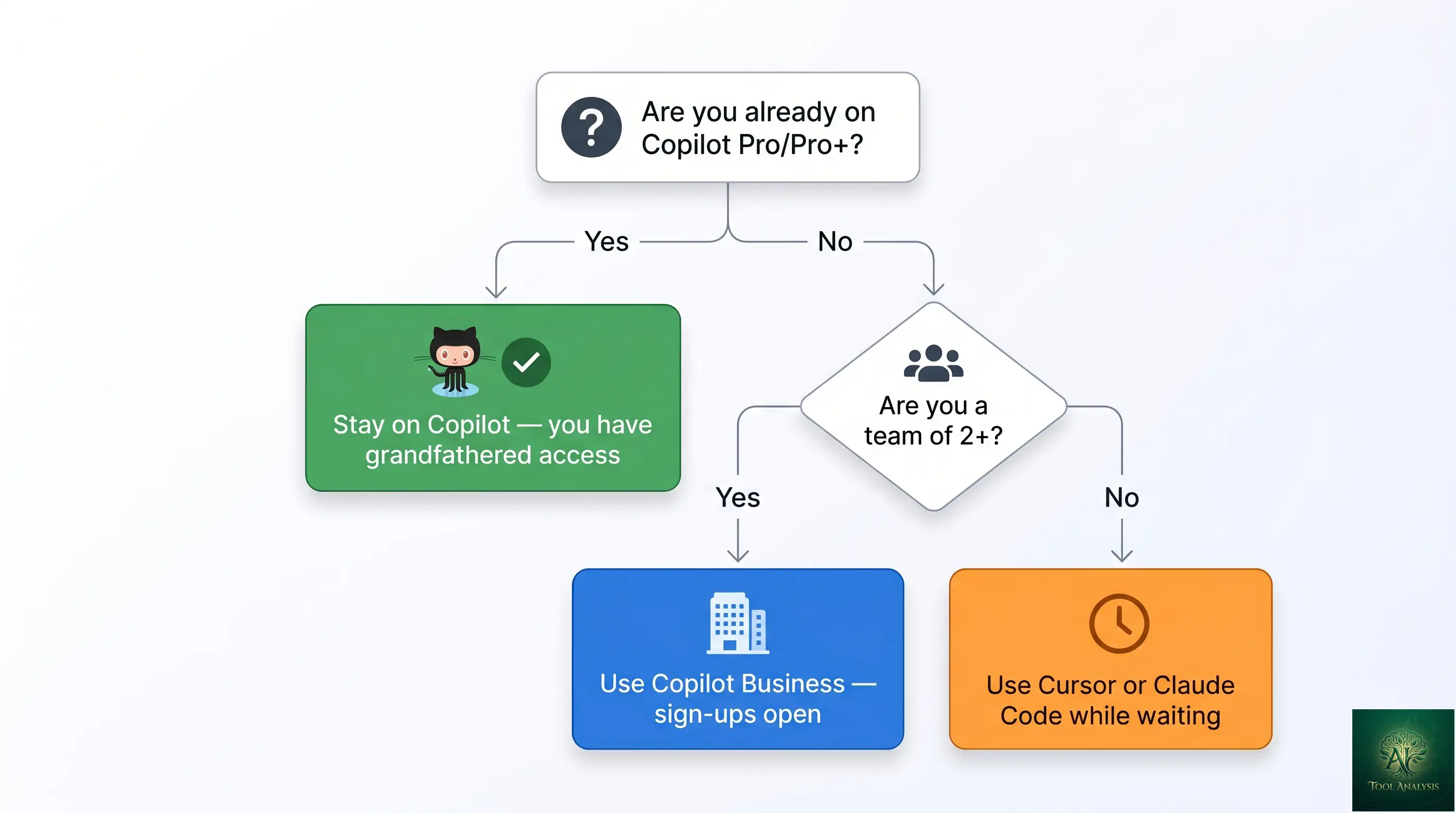
- You’re already on GitHub Copilot Pro or Pro+: Stay. The grandfathered access during the sign-up pause is a real benefit. Watch the June 1 billing transition and adjust.
- You’re a new buyer waiting for sign-ups to reopen: Use Cursor Pro ($20) or Claude Code (bundled with Claude Pro $20) in the interim. Both are credible substitutes for short-term use; switch when Copilot reopens if GitHub workflow integration matters to your team.
- You’re a 2+ person team: GitHub Copilot Business at $19/user is open and gives you Pro-equivalent capability with org-level controls. Probably the right answer for any team that values the GitHub-native integration.
- You need the absolute best coding model: Claude Code (with Claude Pro $20 or Max $100) gives you Opus 4.7 access at the best benchmark scores. Copilot Pro+ also has Opus 4.7 but at higher cost and with sign-ups currently paused.
- You’re deep in the OpenAI ecosystem: ChatGPT Codex (bundled with ChatGPT Plus $20) is the right specialist tool. Don’t switch your primary stack just for OpenAI integration unless you specifically use it.
- You write code in an IDE other than VS Code or Cursor: Copilot is your only realistic option. The IDE breadth advantage is decisive here.
🔍 REALITY CHECK
Marketing Claims: “GitHub Copilot Pro is just $10/month” (GitHub’s marketing positioning around the entry tier).
Actual Experience: True for the next ~5 weeks of your existing subscription. After June 1, 2026, the entire billing model changes from request-based to usage-based — meaning the “$10/month” framing only applies if your usage stays below the new free-tier-included threshold. Heavy agent-mode users in particular should expect bills that scale with how much code the agent generates and how many tools it invokes. GitHub published a calculator at the docs site to estimate your bill under the new model; we strongly recommend running yours through it before May 31.
Verdict: The $10 price tag is real today and through May 31. After that, it’s a “starts at $10” with usage-based add-ons. Light users won’t notice; heavy users may pay 2-5x what they did under the request-based model.
The Coming Billing Change (June 1, 2026)
The June 1 billing transition is the most consequential change to GitHub Copilot’s pricing structure in years. Here’s what you need to know to prepare.
What changes: Premium-request allowances (Pro: 300/month, Pro+: unlimited-with-rate-limits) become legacy. After June 1, all paid tiers shift to a usage-based model where the base subscription gives you a credit allowance, and overages bill per-token (similar to OpenAI/Anthropic API billing).
Who wins under the new model: Light users — those who use Copilot for a few completions per day, occasional chat queries, and infrequent agent runs. The base allowance under the new pricing is generous enough to cover this usage pattern entirely.
Who loses under the new model: Heavy agent-mode users, especially developers running multi-step agent tasks across large codebases. Agent runs that previously consumed one premium request will now bill per-token across input prompts, intermediate tool calls, and final outputs — the same way Cursor Auto-mode bills today. Expect 2-5x cost increases for users in the heaviest decile of agent consumption.
What you should do before June 1: Run your own usage through GitHub’s billing calculator (linked from the Copilot docs). If you’re a heavy user and the new model would meaningfully raise your bill, consider whether Cursor Pro ($20 with credit pool) or Claude Code (flat $20 with Claude Pro) becomes more economic for your specific workload pattern.
FAQs
Can I still buy GitHub Copilot Pro in April 2026?
No, not as a new individual subscriber. GitHub paused new Pro, Pro+, and Student sign-ups on April 20, 2026. Existing subscribers retain full access. Business and Enterprise sign-ups remain open. The pause is expected to lift after the June 1 billing transition stabilizes — likely late June or early July, though no firm date is published.
What changes for GitHub Copilot on June 1, 2026?
All paid Copilot tiers shift from request-based to usage-based billing. Light users will see similar or lower bills; heavy agent-mode users may see 2-5x cost increases. GitHub has published a billing calculator at the docs site to estimate your bill under the new model.
Is GitHub Copilot Pro+ worth $39/month over Pro at $10?
Only if you actively use Claude Opus 4.7 (the Pro+ exclusive) for hard reasoning tasks. For most developers — even AI-heavy ones — Sonnet 4.6 and GPT-5.4 (both included in Pro) cover 95% of value. Subscribe to Pro+ if you can articulate why Opus 4.7 specifically matters for your work; otherwise Pro is the right answer.
Can I use GitHub Copilot with models other than GPT?
Yes. The 2026 Copilot lineup includes 16+ models across three vendors: Anthropic (Haiku 4.5, Sonnet 4 / 4.5 / 4.6, Opus 4.5 / 4.6 / 4.7), Google (Gemini 2.5 Pro), and OpenAI (GPT-5-mini, GPT-5.2, GPT-5.2-Codex, GPT-5.3-Codex, GPT-5.4, GPT-5.4-mini, GPT-5.5). You can pick per request or use the auto-router.
How does GitHub Copilot compare to Cursor in 2026?
Copilot wins on price ($10 vs $20), on raw SWE-bench accuracy (56% vs 51.7%), and on editor breadth (6+ editors vs Cursor-only). Cursor wins on speed (30% faster per task) and on architectural reasoning in complex codebases. For most individual developers, the right answer depends on which IDE you live in and whether you need the GitHub workflow integration.
Does GitHub Copilot read my private code?
Yes — that’s how it works. GitHub Copilot reads the file you’re in plus relevant context from open files and (in Agent Mode) the broader project. GitHub’s data policy on consumer plans (Free, Pro, Pro+) allows opt-out of training. Business and Enterprise plans never use your code for training and add IP indemnification. For sensitive proprietary work, the Business tier is the right choice.
Can I use GitHub Copilot in editors other than VS Code?
Yes — six editors and counting: VS Code, Visual Studio, the JetBrains family (IntelliJ, PyCharm, WebStorm, etc.), Vim/Neovim, Xcode, and Eclipse. Plus GitHub.com web interface and the Copilot CLI. This breadth is Copilot’s biggest structural advantage over Cursor.
What is GitHub Spark and is it included?
Spark is GitHub’s no-code app builder — describe a small web app in natural language, Spark builds and deploys it. Direct competitor to Replit Agent and Lovable. Bundled with Pro+ and Business tiers; not available on Free or Pro. Best for prototyping and small internal tools.
✅ What We Liked
- ✓ Best price-per-quality at $10/month (Pro tier)
- ✓ 16+ models from Anthropic, Google, OpenAI in one subscription
- ✓ 56% SWE-bench Verified (beats Cursor Pro’s 51.7%)
- ✓ Six editors plus web plus CLI — unmatched IDE breadth
- ✓ Native GitHub workflow integration (branches, PRs, reviews)
❌ What Fell Short
- ✗ New sign-ups paused April 20 (Pro, Pro+, Student)
- ✗ Agent Mode is 30% slower than Cursor’s Composer
- ✗ June 1 billing change may raise heavy-user bills 2-5x
- ✗ Pro+ tier value depends entirely on Opus 4.7 usage
The best price-per-quality entry point in AI coding tools, with unmatched editor breadth. One full star off because new sign-ups are currently paused and the June 1 billing transition adds real uncertainty for heavy users.
💡 Key Takeaway: Run your usage through GitHub’s billing calculator before May 31. Light users won’t notice the June 1 transition; heavy agent-mode users on multi-step tasks across large codebases may see 2-5x bill increases. Knowing your projected new bill in advance lets you choose between staying, downgrading, or switching to a flat-rate alternative.
The Final Verdict
GitHub Copilot remains the default choice for AI-assisted coding in 2026 — for the developers who can still buy it. The $10 Pro tier is the best price-per-quality entry point in the category, the 6+ editor support is unmatched, and the GitHub workflow integration is the killer feature for any team that already lives in pull requests and code reviews. The April 20 sign-up pause and the coming June 1 billing transition complicate the buying decision but don’t fundamentally change what Copilot is good at.
The honest weaknesses: Copilot’s Agent Mode is slower than Cursor’s Composer for most tasks, the chat experience trails Claude.ai’s standalone polish, and the heaviest agent-mode users are about to see meaningfully higher bills under the usage-based model. None of these GitHub Copilot weaknesses are dealbreakers — they’re trade-offs in a tool category where every option has trade-offs. For most developers in April 2026, the question isn’t “Copilot or not” but “which Copilot tier” and “should I lock in before the June 1 transition.” Existing subscribers should stay; new buyers should wait or use Cursor Pro / Claude Code in the interim.
Related Reading
- Claude Code Opus 4.7 Review — the CLI-first competitor with the highest SWE-bench scores
- Cursor AI Review 2026 — the IDE competitor with the speed advantage
- Claude Code vs Cursor 2026 — head-to-head between the two main alternatives to Copilot
- Google Antigravity Review — Google’s agentic IDE entry
- ChatGPT Codex Review — OpenAI’s coding agent
- Lovable Review — the no-code app builder competing with GitHub Spark
- Gemini CLI Extensions — Google’s terminal AI
- The Complete AI Tools Guide — buyer’s guide for picking the right tool from 200+ tested
Founder of AI Tool Analysis. Tests every tool personally so you don’t have to. Covering AI tools for 10,000+ professionals since 2025. See how we test →
Stay Updated on AI Coding Tools
The AI coding category is shifting fast. Subscribe for honest reviews of new releases, pricing changes, and benchmark updates — delivered every Thursday at 9 AM EST.
- ✅ Honest Reviews: We actually test these tools, not rewrite press releases
- ✅ Price Tracking: Know when tools drop prices or restructure tiers
- ✅ Sign-up Reopenings: First to know when paused tiers reopen
- ✅ Comparison Updates: Side-by-side benchmarks as the market shifts
- ✅ No Hype: Just the AI news that actually matters for your work
Free, unsubscribe anytime. 10,000+ professionals trust us.

Last Updated: April 28, 2026
Tools Tested: GitHub Copilot Free / Pro / Pro+ / Business / Enterprise — all 5 tiers, with all 16+ supported models
Next Review Update: June 2026 (after the billing transition stabilizes) or sooner if sign-ups reopen
Have a tool you want us to review? Suggest it here | Questions? Contact us