
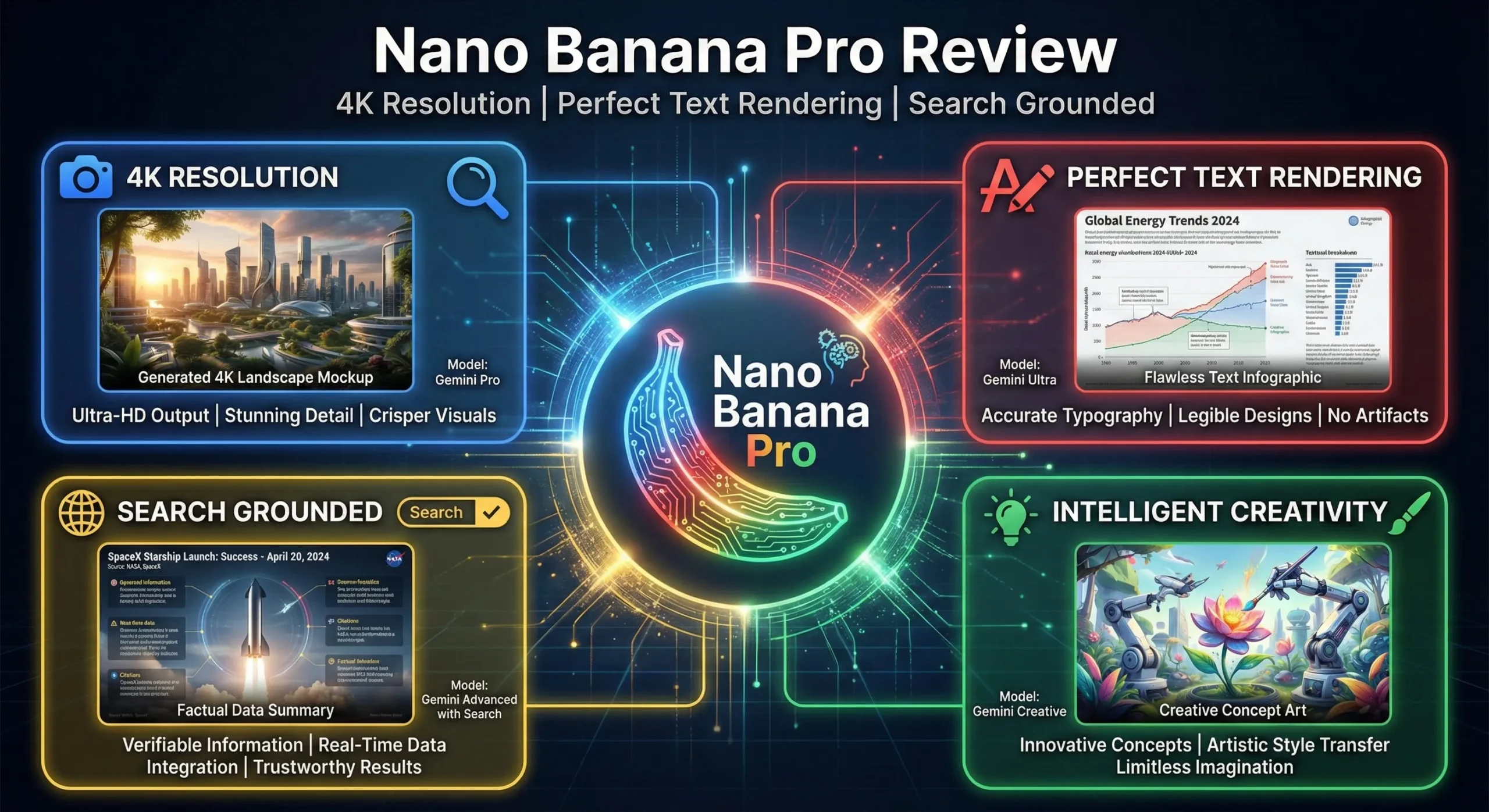
🚀 LAUNCH NEWS: Google DeepMind officially launched Nano Banana Pro (Gemini 3 Pro Image) yesterday, November 20, 2025. This marks a historic milestone in AI image generation—for the first time, an AI can render multilingual text perfectly, integrate with Google Search for factual accuracy, and support 4K resolution natively.
Google just dropped a bombshell on the AI image generation world.
Just months after the original Nano Banana went viral for its speed and expressive edits, Google DeepMind has launched Nano Banana Pro. This isn’t a minor update; it’s a complete overhaul, moving the system from the fast-but-simple Gemini 2.5 Flash model to the powerful, reasoning-capable Gemini 3 Pro.
The claims are bold: studio-quality visuals, perfect text rendering, real-world knowledge integration, and unprecedented creative control. But does it live up to the hype? I spent the last 24 hours testing the new model to bring you this comprehensive Nano Banana Pro review.
The Bottom Line
Nano Banana Pro is a massive leap forward, specifically for professional use cases. The upgrade to Gemini 3 Pro means it can reason about your requests, leading to drastically better prompt adherence and composition.
The standout features are its near-perfect multilingual text rendering—making it the first AI image generator truly viable for posters, mockups, and infographics—and its integration with Google Search for real-time data visualization. While Midjourney might still win on pure aesthetic “vibe,” Nano Banana Pro is now the tool to beat for functional, accurate, and controllable AI imagery. It is significantly more expensive for API users and has limits on the free tier, but for Google AI subscribers, it’s an essential upgrade.
Click any section to jump directly to it
- 🚀 What Nano Banana Pro Actually Is
- 🎯 The Three Upgrades That Actually Matter
- 📊 Chart: The Quality Leap (Original vs Pro)
- 🧭 Getting Started: Your First 10 Minutes
- 🔧 Advanced Features: Fusion and Consistency
- 💰 Pricing Breakdown: What You’ll Actually Pay
- 🥊 Nano Banana Pro vs. The Competition
- 👤 Who Should Use This (And Who Shouldn’t)
- 📣 What the Community is Saying
- ❓ FAQs: Your Questions Answered
- ⚖️ Final Verdict
🚀 What Nano Banana Pro Actually Is (And Why It Matters)
Nano Banana Pro is Google DeepMind’s new flagship image generation and editing model. Officially known as Gemini 3 Pro Image, it serves as the high-end option alongside the original Nano Banana (based on Gemini 2.5 Flash Image).
To understand why this Nano Banana Pro review is so important, you have to understand the shift in the underlying technology.
The Shift from Speed to Reasoning
The original Nano Banana was built for speed. It was fantastic for quick edits, swapping backgrounds, or rapid ideation. It was fun, fast, and accessible.
But it had serious limitations:
- It often misinterpreted complex prompts.
- Text rendering was usually garbled and unusable.
- It struggled with consistent aspect ratios.
- The maximum resolution was low (1K).
Nano Banana Pro is built on Gemini 3 Pro. This means the image generator now has access to advanced reasoning capabilities and a vast storehouse of world knowledge.
Think of it this way: If the original Nano Banana was a talented street artist who could sketch you something quickly, Nano Banana Pro is a trained studio designer with access to the internet. It plans the composition, understands context, checks facts, and ensures the details are correct.
This shift moves Nano Banana Pro from a “creative toy” to a “production-ready tool.” It’s designed for tasks where accuracy, control, and clarity matter: marketing materials, educational diagrams, product mockups, and brand campaigns.
🎯 The Three Upgrades That Actually Matter
The launch announcement was packed with features, but in my testing for this Nano Banana Pro review, three upgrades fundamentally change the game for AI image generation.
1. Text Rendering That Actually Works (Finally)
This is the big one. Historically, AI image generators have been notoriously bad at text. You ask for a poster that says “SALE,” and you get “SLAE” or unrecognizable alien script. This limitation has kept tools like Midjourney and DALL-E out of many professional workflows.
Nano Banana Pro solves this. It renders text clearly, accurately, and legibly, even in multiple languages.
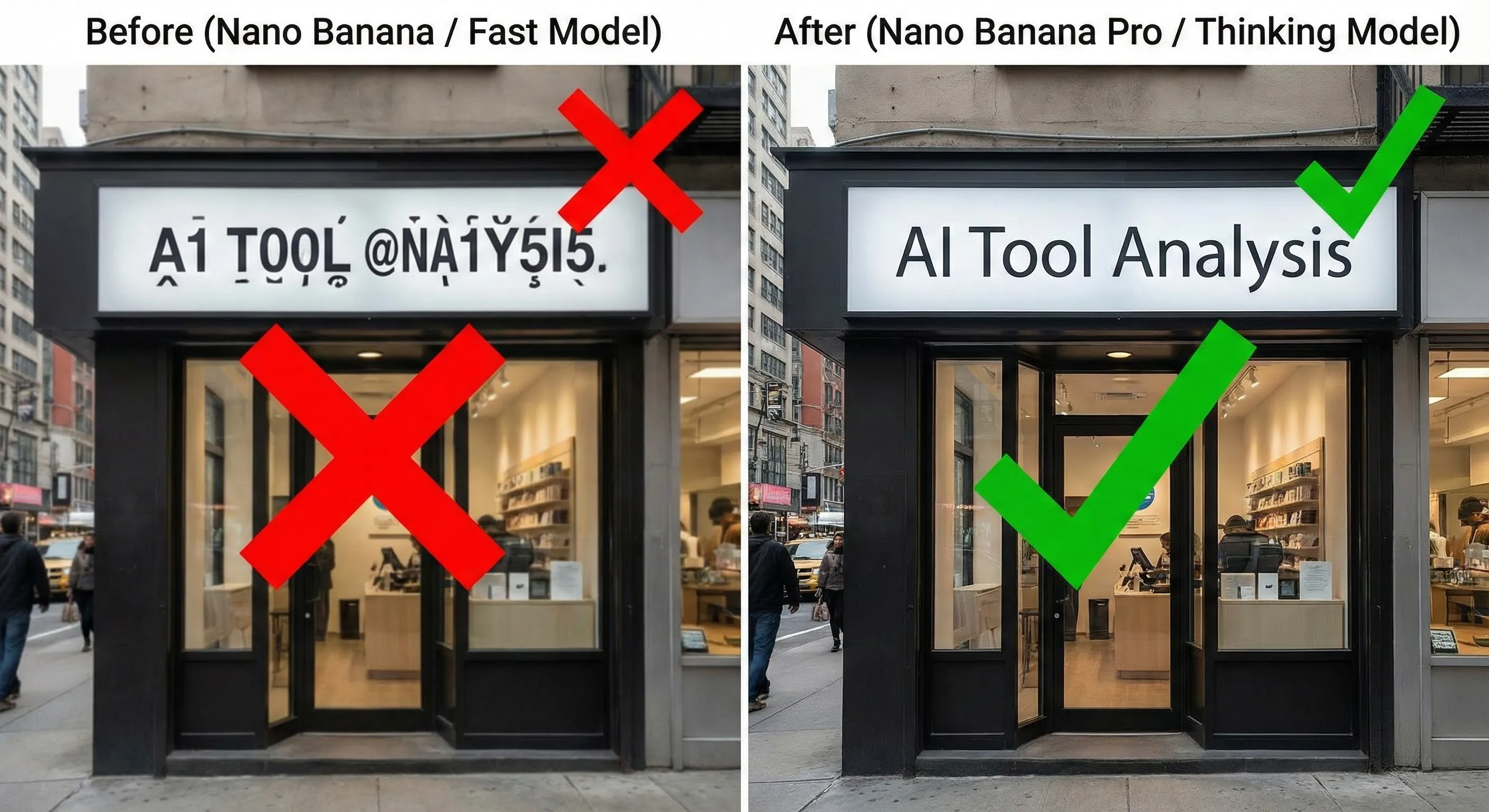
I tested this extensively. I asked it to create:
- A product mockup for a bottle with a complex label. Result: Perfectly legible text, correctly wrapped around the bottle.
- A poster with a headline, subheading, and paragraph of text. Result: Clear typography, correct spelling, and sensible layout.
- An image with English text, then asked it to translate the text within the image to Korean. Result: The image regenerated with accurate Korean text while maintaining the visual style (a feature Google calls localization).
This feature alone unlocks countless use cases: social media ads with readable taglines, UI mockups where the buttons make sense, and localized marketing campaigns. It’s a massive step forward.
2. Grounding with Google Search (Real-World Knowledge)
Most AI image generators create visuals in a vacuum. They don’t know what happened five minutes ago, and they can’t verify facts.
Nano Banana Pro integrates directly with Google Search. This allows it to pull real-time information and world knowledge directly into the image generation process. This is called “grounding.”
What does this look like in practice?
You can ask it to “Create an infographic that shows how to make elaichi chai.” The model uses Google Search to find the steps and ingredients, reasons about how to present the information visually, and generates a factually grounded infographic.
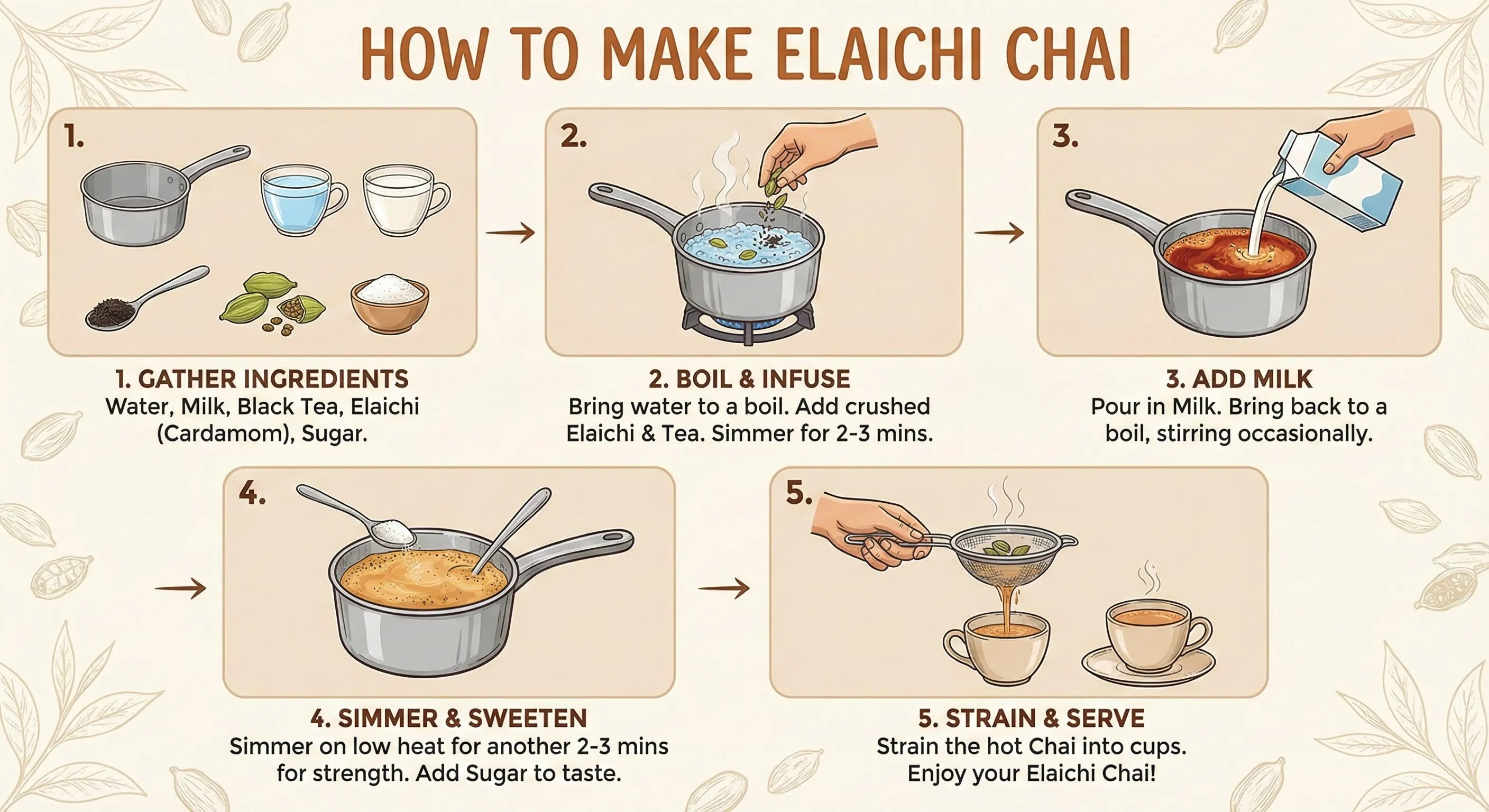
Other examples include:
- Generating a graphic showing the current weather conditions in your city.
- Creating educational diagrams based on accurate technical specifications.
- Visualizing data or statistics.
This feature makes Nano Banana Pro incredibly useful for educators, content creators, and anyone who needs visuals that reflect reality.
🔍 REALITY CHECK
Marketing Claims: “Generate maps, diagrams, and infographics that get the facts and details right.” (Google Cloud Blog)
Actual Experience: The grounding feature is impressive for summarizing common knowledge (like recipes or simple processes). However, Google acknowledges the model isn’t infallible. When visualizing complex data or highly nuanced information, it can still make mistakes, misalign labels, or misinterpret the context.
Verdict: It’s a powerful tool for rapid visualization, but you MUST fact-check any data-driven visuals before publication. It’s an assistant, not an infallible source of truth.
3. Studio Controls and 4K Resolution
The third major upgrade caters directly to creative professionals who need fine-grained control over the output.
Nano Banana Pro introduces “studio-grade” controls that you can manipulate using natural language prompts. Instead of just describing what you want to see, you can now direct the shot.
You can specify:
- Lighting: “Change this scene from daytime to nighttime,” or “Apply an intense chiaroscuro effect.”
- Camera Angle: “Show this from a low angle,” or “Change to a bird’s-eye view.”
- Focus and Depth of Field: “Focus on the flowers in the foreground and blur the background (bokeh).”
- Color Grading: Apply specific color palettes or moods.

Furthermore, Nano Banana Pro supports high-resolution outputs. While the original model capped at 1K (1024px), the Pro model supports 2K and 4K resolution (up to 5632 x 3072 pixels in some tests). This makes the generated images suitable for print, professional websites, and high-definition displays.
Crucially, it also finally supports different aspect ratios (16:9, 4:3, 1:1, etc.) natively.
📊 Chart: The Quality Leap (Original vs Pro)
Comparing key capabilities across the Fast (Original) and Thinking (Pro) models. (Scale 0-10)
🧭 Getting Started: Your First 10 Minutes
Google is rolling out Nano Banana Pro across its ecosystem, including Vertex AI, Google Workspace, Google Ads, and even partner tools like Adobe Firefly. But the easiest place to try it right now is the Gemini app (web or mobile).
Here’s how to access it, and the critical setting you need to know.
Accessing the Pro Model
- Open the Gemini app (gemini.google.com).
- Select the “Create images” tool (often represented by an icon).
- Crucial Step: Look for the model selection menu. You will see two options: “Fast” and “Thinking.”
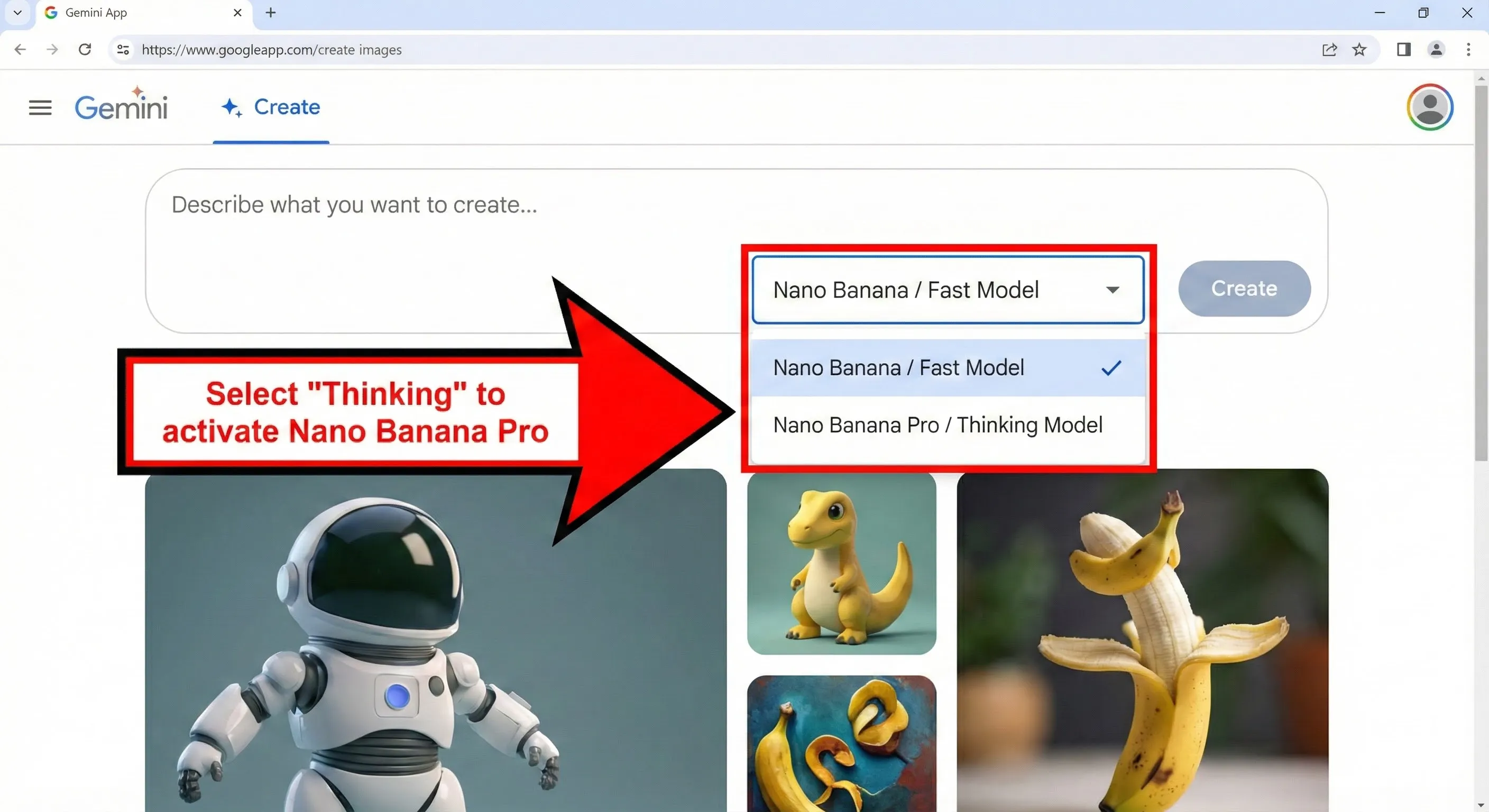
Fast vs. Thinking: Choosing the Right Model
Google hasn’t retired the original Nano Banana; they’ve repositioned it.
- Fast (Original Nano Banana / Gemini 2.5 Flash Image): Choose this for quick, casual creativity. It’s faster and ideal for simple edits, character consistency tests, and rapid ideation. Resolution is lower.
- Thinking (Nano Banana Pro / Gemini 3 Pro Image): Choose this for professional outputs and precise control. It takes slightly longer because the model is reasoning about your request, planning the composition, and potentially using Google Search. This is where you access the advanced text rendering, 4K resolution, and studio controls.
Your First Prompt
When using the “Thinking” model, you can be much more specific and demanding than with previous image generators.
Instead of just “A cat napping,” try specifying the details, style, and controls:
Create a 4K image of a Siamese cat napping in a sunbeam on a wooden windowsill. Use a 16:9 aspect ratio. The lighting should be warm afternoon light, with soft focus on the background.
If you want to test the text rendering, try:
Design a minimalist poster for a jazz festival. The headline should clearly say "JAZZ NIGHTS 2025". Include smaller text below with the date "November 25th". The style should be retro blue note.
🔧 Advanced Features: Fusion and Consistency
Beyond the core upgrades, Nano Banana Pro introduces powerful features aimed at complex creative workflows, particularly branding and storytelling.
Multi-Image Fusion (The 14-Image Input)
One of the most impressive new capabilities is the expanded visual context window. Nano Banana Pro allows you to upload up to 14 reference images simultaneously.
This isn’t just about blending images together. It’s about providing the model with comprehensive context.
Think of this as “few-shot prompting” for designers. You can upload an entire brand style guide—logos, color palettes, character turnarounds, product shots, and example layouts—and ask the model to generate new assets that match that exact identity.
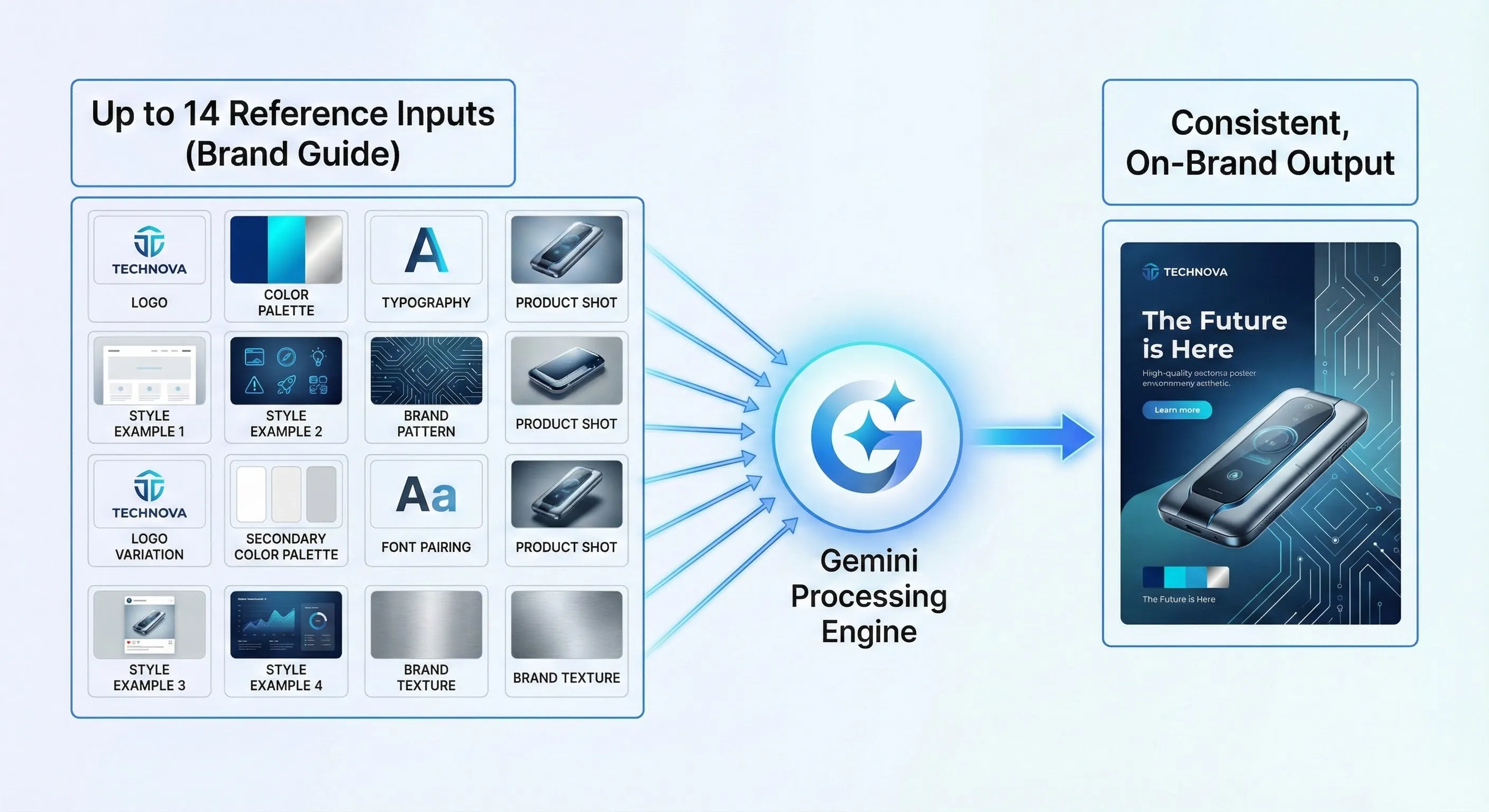
This is a game-changer for marketing teams who need to maintain strict brand fidelity across campaigns. It allows the AI to understand the nuances of a visual style far better than text prompts alone.
Character and Subject Consistency
Maintaining the consistency of a character or object across different images has been a major challenge in AI. Nano Banana Pro significantly improves this.
The model can maintain the identity and look of up to five people or subjects consistently across a series of generations. This is crucial for creating storyboards, fashion editorials, or multi-scene narratives where the characters need to remain recognizable.
💰 Pricing Breakdown: What You’ll Actually Pay
The advanced capabilities of Nano Banana Pro come with a more complex pricing structure. Whether you can use it for free depends on how you access it and how much you use it.

The Free Tier (Limited Access)
You can access Nano Banana Pro for free via the Gemini app by selecting the “Thinking” model. However, there’s a catch.
Free users have a limited number of Pro-level image generations. Google hasn’t specified the exact limit, but once you hit it, the system automatically defaults back to the original Nano Banana (“Fast” model) until your quota resets.
Note on Watermarks: Images generated on the free tier include a visible Gemini sparkle watermark in the corner, in addition to the invisible SynthID watermark.
Google AI Subscriptions (Higher Limits)
Users subscribed to Google AI Plus, Pro, and Ultra plans receive significantly higher usage limits for Nano Banana Pro within the Gemini app.
If you rely on AI image generation daily, a subscription is likely necessary to use the Pro model consistently.
Watermarks for Subscribers: Plus and Pro tier subscribers still have the visible watermark. Google AI Ultra subscribers and users of Google AI Studio receive clean exports with no visible watermark, which is essential for professional use.
Enterprise and Developer (API/Vertex AI) Pricing
For developers accessing Nano Banana Pro via the Gemini API or enterprises using Vertex AI, the costs are significantly higher than the original model, reflecting the increased quality and computational resources required.
Based on the Google AI Developer pricing page and news reports, here is the breakdown:
- Original Nano Banana (1K image): Approx. $0.039 per image
- Nano Banana Pro (1K/2K image): $0.134 – $0.139 per image
- Nano Banana Pro (4K image): $0.24 per image
This pricing makes Nano Banana Pro one of the more expensive image generation APIs on the market, positioning it as a premium offering.
💰 AI Image Generation API Cost Comparison
Cost per image via API/Vertex AI (November 2025). Competitor pricing estimated based on HD/2K equivalents.
🥊 Nano Banana Pro vs. The Competition
The AI image generation landscape is crowded. How does Nano Banana Pro stack up against the established leaders like Midjourney, DALL-E 4, and the speed-focused Flux Pro? This Nano Banana Pro review wouldn’t be complete without a head-to-head comparison.
| Feature | Nano Banana Pro (Google) | Midjourney v6.1 | DALL-E 4 (OpenAI) |
|---|---|---|---|
| Text Rendering | ✅ Excellent (Multilingual, clear) | ⚠️ Moderate (Improving but inconsistent) | ✅ Good (Reliable for short phrases) |
| Resolution | ✅ Up to 4K Native | ✅ Up to 4K (via upscale) | ✅ Up to 4K |
| Search Grounding | ✅ Yes (Integrated with Google Search) | ❌ No | ⚠️ Partial (via ChatGPT integration) |
| Studio Controls | ✅ Advanced (Lighting, Camera, Focus) | ✅ Advanced (Vary Region, Zoom, Pan) | ✅ Good (Inpainting, basic edits) |
| Multi-Reference Fusion | ✅ Up to 14 images | ✅ Up to 4 images (Style Reference) | ✅ Up to 6 images |
| Aesthetic/Vibe | ✅ Realistic, professional, structured | ✅ Highly stylized, artistic, cinematic | ✅ Versatile, slightly illustrative |
| Ease of Use | ✅ High (Integrated in Gemini app) | ⚠️ Medium (Requires Discord/Web Alpha) | ✅ High (Integrated in ChatGPT) |
💡 Swipe left to see all features →
🎯 Use Case Suitability: Where Does Each Tool Excel?
Comparing strengths across different creative needs. (Scale 0-10)
When to Choose Nano Banana Pro
Nano Banana Pro excels when structure, accuracy, and functionality are paramount. It is the best choice if you need:
- Images containing legible text (posters, ads, mockups).
- Infographics or diagrams grounded in real-world facts.
- Strict adherence to brand guidelines using multi-image references.
- Realistic product visualizations or architectural renderings.
When to Choose Midjourney
Midjourney remains the king of “vibe.” It excels at creating highly stylized, artistic, and emotionally resonant images. Choose Midjourney if you need:
- Surreal concept art or purely aesthetic exploration.
- Cinematic stills with a unique, recognizable style.
- Images where emotional impact matters more than perfect accuracy or text.
🔍 REALITY CHECK: Is Nano Banana Pro better than Midjourney?
Marketing Claims: Google is positioning Nano Banana Pro as a direct competitor for professional creative workflows currently dominated by Midjourney and Adobe.
Actual Experience: They serve different purposes. Nano Banana Pro is vastly superior for functional design (text, layout, grounding). Midjourney is still superior for pure artistry and unique aesthetics. Many creators will likely use both.
Verdict: Nano Banana Pro is “better” for business and functional creativity, but it hasn’t killed Midjourney’s artistic edge.
👤 Who Should Use This (And Who Shouldn’t)
In this Nano Banana Pro review, it’s clear that the tool is targeting a specific demographic: professionals who need reliable, high-quality AI visuals.
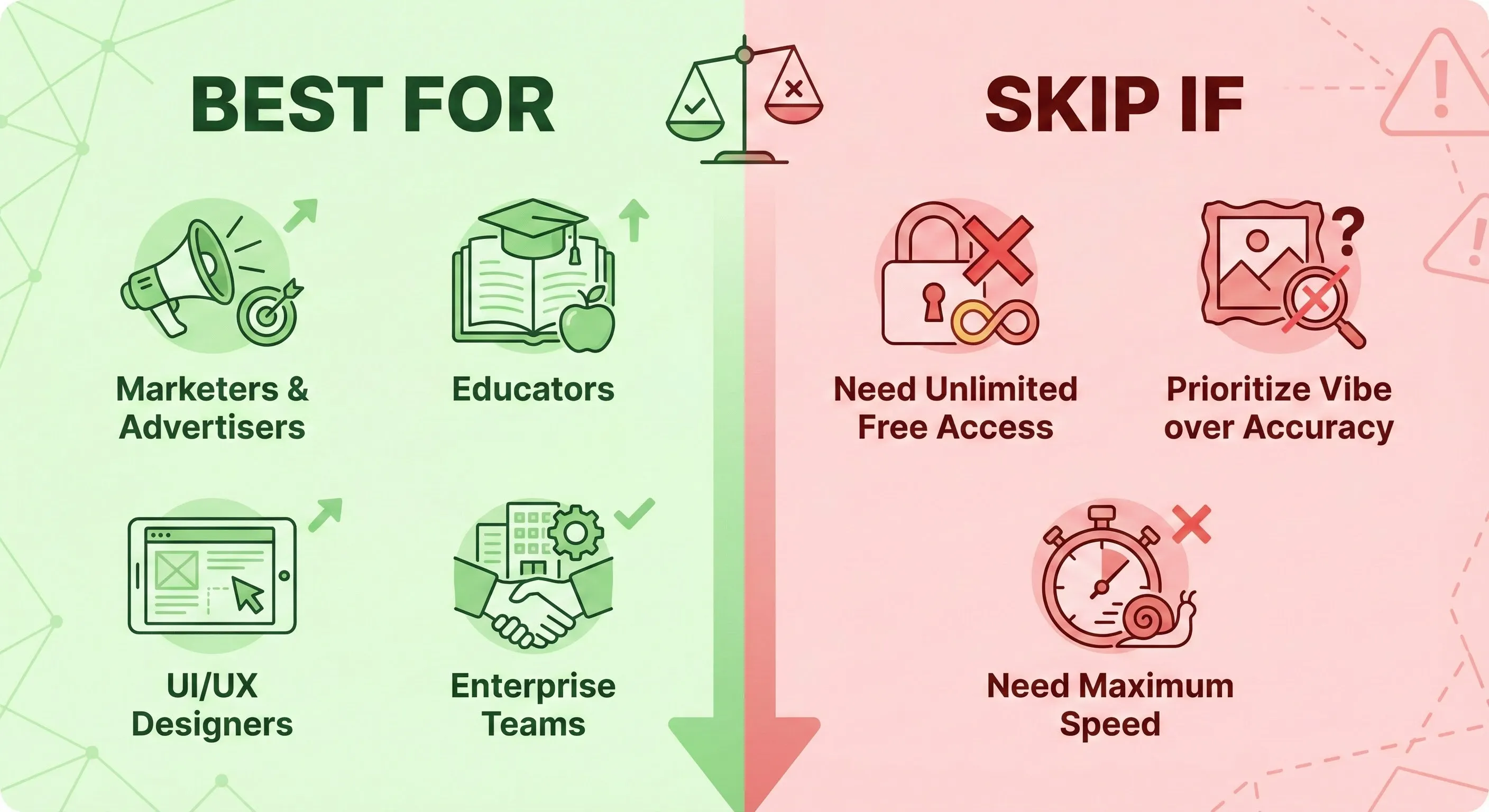
Best For
- Marketers and Advertisers: The combination of perfect text rendering, 4K resolution, and brand consistency (via 14 reference images) makes it ideal for creating ad mockups, social media assets, and localized campaigns. The integration into Google Ads streamlines this further.
- Educators and Content Creators: The Google Search grounding feature is revolutionary for creating accurate diagrams, infographics, and educational materials quickly.
- Designers and UI/UX Professionals: Excellent for creating realistic product mockups, UI concepts, and presentation slides where text legibility and layout matter.
- Enterprise Teams: With availability in Vertex AI and Workspace, it provides a scalable, enterprise-grade solution for visual asset creation that integrates with existing workflows.
Skip If
- You Need Unlimited Free Access: The free tier is limited. If you need high volume image generation without a subscription, you might need to look at other AI image generators or stick to the “Fast” model.
- You Prioritize Pure Artistic Vibe Over Accuracy: If you’re looking for surreal, highly stylized art where technical accuracy is secondary, Midjourney might still be a better fit.
- You Need Maximum Speed: The “Thinking” model is slower than the “Fast” model or ultra-fast competitors like Stable Diffusion Turbo variants.
📣 What the Community is Saying
Nano Banana Pro launched just 24 hours ago, but the initial reception from AI experts and the community has been overwhelmingly positive, often highlighting how it fixes the frustrations of the original model.
Praise for Reasoning and Usability
Initial reviews emphasize the impact of the Gemini 3 Pro foundation. India Today noted the significant leap from the original model, praising its ability to “take whatever concept you have in mind and turn it into something organised,” thanks to improved reasoning.
The Text Rendering Hype
The improvement in text rendering is universally acclaimed. The Times of India highlighted that the model can now “render text in multiple languages and styles, from headlines to longer paragraphs, while maintaining better accuracy in spelling and layout.”
On Reddit (r/OpenAI, r/singularity), users are sharing impressive examples of typography and infographics, though some nitpick minor details (like the positioning of clock hands in generated images), indicating the bar for realism is now incredibly high.
Known Limitations
Despite the praise, early testing and Google’s own documentation acknowledge some limitations:
- The model may still struggle with very small faces or extremely fine details.
- Multilingual text generation may still make grammar mistakes or miss specific cultural nuances.
❓ FAQs: Your Questions Answered
Here are the most common questions about the new Nano Banana Pro model.
Is Nano Banana Pro free?
Yes, but with limits. You can access Nano Banana Pro for free in the Gemini app using the “Thinking” model. However, free users have a limited quota of Pro generations. Once the limit is reached, you will be defaulted back to the original, lower-quality Nano Banana model (“Fast”).
What is the difference between Nano Banana and Nano Banana Pro?
The original Nano Banana (Gemini 2.5 Flash Image) is optimized for speed and casual creativity. Nano Banana Pro (Gemini 3 Pro Image) is optimized for quality, control, and professional use. Pro offers 4K resolution (vs 1K), vastly superior text rendering, Google Search integration, advanced studio controls, and the ability to use up to 14 reference images.
How do I access Nano Banana Pro?
It’s available globally in the Gemini app (select “Create images” and choose the “Thinking” model). It is also rolling out to Google Workspace (Slides, Vids), Google Ads, NotebookLM, the Gemini API, Google AI Studio, Vertex AI, and partner tools like Adobe Firefly.
Is Nano Banana Pro better than Midjourney?
It depends on your needs. Nano Banana Pro is significantly better for tasks requiring legible text, factual grounding (via Google Search), and strict brand consistency. Midjourney is generally considered better for purely artistic, stylized, or cinematic images where “vibe” is the priority.
Does Nano Banana Pro watermark images?
Yes, in two ways. All images include Google’s invisible SynthID watermark to identify them as AI-generated. Additionally, images generated by Free, Plus, and Pro tier users have a visible Gemini sparkle watermark. Google AI Ultra subscribers and AI Studio users receive clean exports with no visible watermark.
Can Nano Banana Pro generate accurate infographics?
Yes, it can generate infographics by leveraging Google Search for information. The text rendering is excellent. However, you should always fact-check the data and ensure the visualization is accurate before publishing, as the model can still make errors in interpretation.
What resolution does Nano Banana Pro support?
It supports 1K, 2K, and 4K resolutions, with some outputs reaching up to 5632 x 3072 pixels. It also supports multiple aspect ratios natively (e.g., 16:9, 1:1, 4:3).
How much does the Nano Banana Pro API cost?
Via Vertex AI or the Gemini API, Nano Banana Pro costs approximately $0.134-$0.139 per 1K/2K image and $0.24 per 4K image. This is significantly higher than the original model’s cost.
⚖️ Final Verdict
The launch of Nano Banana Pro marks a significant moment in AI image generation. By building it on the reasoning capabilities of Gemini 3 Pro, Google has successfully pivoted from creating fun, viral images to delivering a powerful, production-ready tool.
The standout achievements—near-perfect text rendering, integration with Google Search, and advanced creative controls—address the biggest pain points for professional users. While it’s more expensive for API access and still has minor limitations with fine details, it sets a new standard for functional AI creativity.
Use Nano Banana Pro if:
- You need AI-generated images with clear, legible text for marketing or design.
- You want to create infographics or diagrams grounded in real-world knowledge.
- You need 4K resolution and precise control over lighting, camera angles, and composition.
- You are a Google AI subscriber looking for the highest quality output.
Stick with Alternatives if:
- You prioritize unique artistic style and “vibe” over functional accuracy (use Midjourney).
- You require unlimited free access (the Pro model is limited on the free tier).
- You need the fastest possible generation speed (use the original Nano Banana “Fast” model).
Overall, this Nano Banana Pro review finds that Google has delivered a truly impressive upgrade that will immediately impact professional creative workflows.
Try it today: Open the Gemini App and select the “Thinking” model.
Stay Updated on Creative AI Tools
Don’t miss the next major AI launch. Stay ahead of the curve with weekly reviews of AI image generators, video editors, and creative platforms delivered straight to your inbox.
- ✅ Honest, hands-on reviews
- ✅ Breaking feature launch alerts
- ✅ Price drop notifications
- ✅ Head-to-head comparisons
- ✅ Real-world use case analysis
AI Image Generator Reviews
Last Updated: November 21, 2025
Nano Banana Pro Version: Launch Version (Gemini 3 Pro Image Preview)
Next Review Update: December 21, 2025 (AI image models update frequently)