
The Bottom Line
If you remember nothing else: n8n is basically Zapier without the astronomical bills. It connects your apps, automates repetitive tasks, and now includes AI nodes that let you plug ChatGPT, Claude, or local LLMs directly into your workflows. The free self-hosted version genuinely works for small teams, but you’ll need some technical comfort to set it up. Best for developers and tech-savvy businesses who want automation without paying $600+/month. Skip if you need something that “just works” out of the box.
Unlike Google Opal’s drag-and-drop approach, n8n gives you serious power with real complexity. And compared to the ChatGPT custom GPTs many businesses use for automation, n8n actually connects to your real apps and moves real data.
⚡ TL;DR — n8n Review 2026
- What It Is: Open-source workflow automation platform with 400+ integrations and native AI support
- Best For: Developers, tech-savvy teams, and cost-conscious businesses automating complex workflows
- Key Strength: Self-host for FREE with unlimited workflows, or cloud from $20/mo — saves $500+/mo vs Zapier
- Limitation: Steeper learning curve than Zapier, requires technical comfort for advanced features
- Verdict: The best value in workflow automation. Worth the learning curve for serious users.
📑 Quick Navigation
🔧 What n8n Actually Does (Not What They Claim)
The Five-Minute Reality
In five minutes with n8n, here’s what I accomplished: Connected my Gmail to a Google Sheet, set up a trigger that fires whenever I get an email with “invoice” in the subject line, and automatically logged the sender, date, and subject to my spreadsheet. No coding required for that basic workflow.
n8n is a workflow automation platform that connects your apps and services, letting them “talk” to each other automatically. Think of it like building a digital assembly line where data flows from one app to the next, with each station doing something useful to it along the way.
The platform offers over 400 integrations out of the box. Everything from Google Workspace and Slack to obscure CRMs you’ve never heard of. And here’s the kicker: it’s open-source, meaning you can self-host it for free or pay for their cloud version.
🔍 REALITY CHECK
Marketing Claims: “The most flexible automation platform that’s easier than Zapier”
Actual Experience: More flexible? Absolutely. Easier? Not quite. n8n has a steeper learning curve than Zapier, but once you’re past it, you can build things Zapier simply can’t do.
Verdict: Worth the learning curve if you’re automating anything complex.
Before and After: The Real Transformation
Before n8n: I manually copied data from form submissions into our CRM, then created Trello cards, then sent welcome emails. 15 minutes per lead, 20+ leads per week. That’s 5+ hours of mind-numbing work.
After n8n: New form submission hits, data automatically flows to CRM, Trello card appears, personalized email sends. Time spent: zero. The workflow took about an hour to build, and it’s run flawlessly for months.
🚀 Getting Started: Your First 30 Minutes
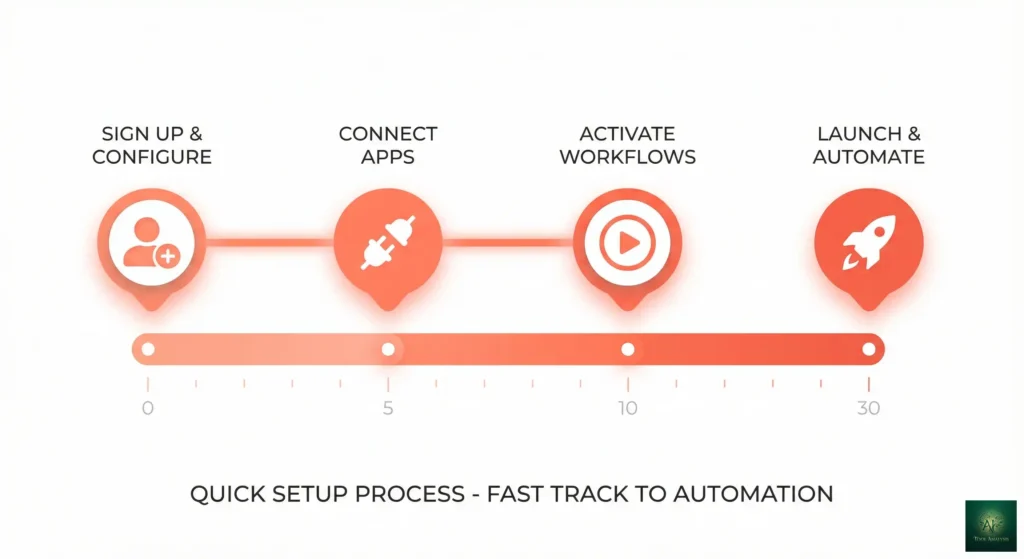
Two Paths: Cloud or Self-Hosted
Path 1: n8n Cloud (Easier)
- Visit n8n.io and click “Get Started Free”
- Sign up with email or Google (30 seconds)
- You’re in the workflow editor immediately
- Free tier gives you 5 active workflows
Path 2: Self-Hosted (Cheaper Long-term)
- You’ll need Docker installed on a server or local machine
- Run:
docker run -it --rm --name n8n -p 5678:5678 n8nio/n8n - Open localhost:5678 in your browser
- Completely free, unlimited workflows
For most beginners, start with Cloud. You can always migrate later.
🤖 AI Features: The Game-Changer for 2026
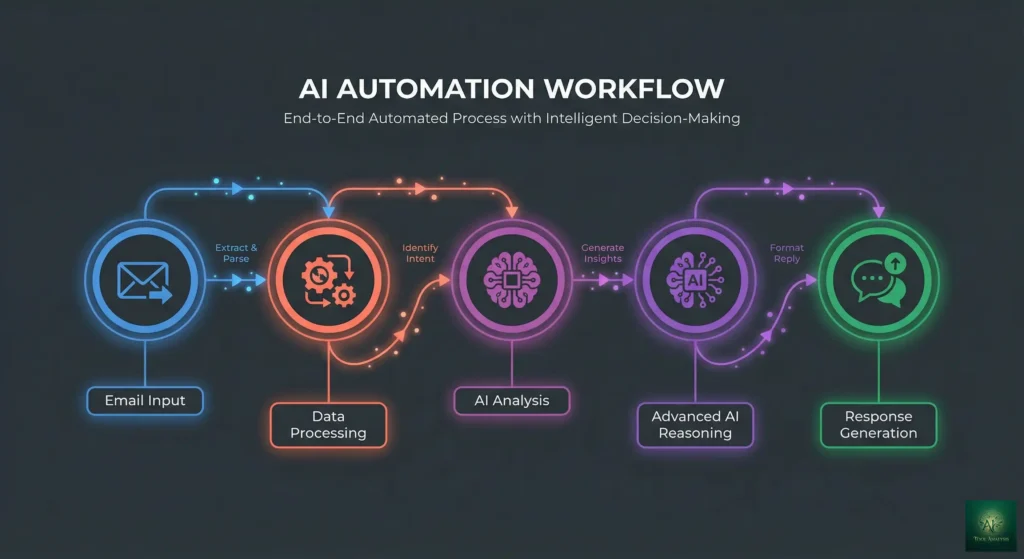
This is where n8n gets interesting in 2026. The platform now includes native AI nodes that let you plug large language models directly into your workflows.
What You Can Actually Do With n8n’s AI Nodes
1. OpenAI/ChatGPT Integration – Drop an OpenAI node into any workflow. Use it to summarize incoming emails before they hit your CRM, generate responses to customer inquiries, or classify support tickets by urgency.
2. Claude Integration – Same deal with Anthropic’s Claude. This is particularly useful if you need longer context processing.
3. Local LLM Support – Here’s where n8n shines for privacy-conscious teams: you can connect to locally-hosted models via Ollama. Your data never leaves your server.
4. AI Agents – The AI Agent node creates an AI that can use your other nodes as “tools,” letting an AI decide which actions to take based on input.
🔍 REALITY CHECK
Marketing Claims: “Build AI-powered automations with no code”
Actual Experience: The AI nodes genuinely work without coding, but getting them to work well requires prompt engineering skills. Also, AI API costs add up fast if you’re processing high volumes.
Verdict: Legitimately powerful, but budget for API costs and time spent optimizing prompts.
⚡ Features That Actually Matter (And Three That Don’t)
Features That Actually Matter
1. Visual Workflow Builder – The node-based editor is genuinely intuitive. You see exactly how data flows from one step to the next.
2. Code Node – When the visual builder isn’t enough, drop in a code node and write JavaScript or Python.
3. Sub-Workflows – Build reusable workflow components. Update it once, all workflows benefit.
4. Self-Hosting Option – Run n8n on your own server for complete data control.
Features That Don’t Matter (Despite the Hype)
1. “400+ Integrations” – Half are niche tools you’ll never use. What matters is whether YOUR tools are supported.
2. “Enterprise Security Features” – If you’re that security-conscious, you’re probably self-hosting anyway.
3. “Templates Gallery” – Most templates need significant customization. I’ve found it faster to build from scratch.
⚔️ n8n vs Zapier: The Real Comparison
This is the question everyone asks. Here’s my honest assessment after using both extensively:
| Feature | n8n | Zapier | Winner |
|---|---|---|---|
| Ease of Use | Moderate learning curve | Very beginner-friendly | 🏆 Zapier |
| Pricing (100 workflows) | $50/mo cloud or $0 self-hosted | $588/mo (Professional) | 🏆 n8n |
| Workflow Complexity | Unlimited branching, loops, code | Limited branching, no true loops | 🏆 n8n |
| AI Integration | Native AI nodes + local LLM support | Basic AI actions | 🏆 n8n |
| Data Privacy | Self-host for complete control | Cloud only | 🏆 n8n |
| Debugging | Excellent: see data at every step | Good but less transparent | 🏆 n8n |
| Support | Community + docs | Excellent official support | 🏆 Zapier |
| Mobile App | None | Yes | 🏆 Zapier |
💡 Swipe left to see all features →
📊 n8n vs Zapier Feature Comparison
💰 Pricing Breakdown: What You’ll Actually Pay
n8n Cloud Pricing (January 2026)
| Plan | Price | Active Workflows | Executions/Month | Best For |
|---|---|---|---|---|
| Free | $0 | 5 | Unlimited (limited) | Testing/Learning |
| Starter | $20/mo | 20 | 2,500 | Individual use |
| Pro | $50/mo | Unlimited | 10,000 | Small teams |
| Enterprise | Custom | Unlimited | Custom | Large organizations |
Self-Hosted: The Free Option
Self-hosting n8n is completely free. Forever. No limits on workflows or executions.
But you’ll pay for:
- Server hosting: $5-20/month for a basic VPS (DigitalOcean, Hetzner, etc.)
- Your time setting it up and maintaining it
- SSL certificates (free with Let’s Encrypt)
The Real Cost Comparison
For a business running 100 active workflows:
- n8n Cloud: $50/month
- n8n Self-Hosted: ~$15/month (server costs)
- Zapier: $588/month (Professional plan)
- Make: $99/month (Teams plan)
The savings are real, especially at scale.
💰 Monthly Cost Comparison (100 Workflows)
👥 Who Should Use This (And Who Shouldn’t)
n8n is Perfect For:
Developers and Technical Teams – If you’re comfortable with code (even just basic JavaScript), n8n becomes incredibly powerful.
Cost-Conscious Businesses – Once you’re running more than a handful of workflows, n8n saves serious money.
Privacy-Focused Organizations – Self-hosting means your data never touches third-party servers.
AI-Forward Teams – The native AI integrations make building AI-powered workflows straightforward.
Skip n8n If You Are:
Complete Non-Technical Users – If “self-hosting” and “code node” sound intimidating, stick with Zapier.
Running Simple, Low-Volume Automations – If you need 2-3 basic Zaps and cost isn’t a concern, Zapier’s ease of use might be worth the premium.
Needing Mobile Access – n8n has no mobile app.
🗣️ What Users Are Actually Saying
Reddit’s Take
The n8n subreddit and r/selfhosted communities are generally positive. Common themes:
Praise: “Switched from Zapier, saving $400/month with zero lost functionality” is a recurring sentiment.
Complaints: Documentation could be better for advanced use cases. Some integrations are community-maintained and occasionally break.
Most upvoted tip: “Spend time learning the expression editor. It’s confusing at first but incredibly powerful once you get it.”
🔄 Alternatives: What Else Does The Same Thing
Zapier ($29-$750+/month) – The industry standard. Easier to use, more polished, much more expensive.
Make (formerly Integromat) ($9-$99+/month) – Similar to n8n in complexity. Cloud-only, no self-hosting.
Activepieces (Free/Paid) – Another open-source alternative. Newer, less mature, but worth watching.
Pipedream (Free tier available) – Developer-focused with strong code integration.
Microsoft Power Automate ($15-$40/user/month) – Best if you’re deep in the Microsoft ecosystem.
❓ FAQs: Your Questions Answered
Q: Is n8n really free?
A: Yes, the self-hosted version is completely free with no limits. n8n Cloud has a free tier with 5 active workflows, then paid plans start at $20/month.
Q: How hard is it to self-host n8n?
A: If you can follow a tutorial to set up Docker, you can self-host n8n. The basic setup takes about 30 minutes.
Q: Can n8n replace Zapier?
A: For most use cases, yes. n8n can do everything Zapier does plus more. The main trade-off is ease of use.
Q: Does n8n work with ChatGPT and Claude?
A: Yes, n8n has native integrations for OpenAI (ChatGPT) and Anthropic (Claude). You’ll need API keys and will pay for API usage.
Q: What’s the learning curve for n8n?
A: Plan for 2-4 hours to build your first useful workflow. A week of casual use to feel comfortable. A month to master advanced features.
Q: Is my data safe with n8n?
A: If you self-host, your data never leaves your servers. For maximum privacy, self-hosting is the way to go.
Q: Can I use n8n for AI agents?
A: Yes, n8n has a dedicated AI Agent node that lets you build autonomous agents that can use your other workflow nodes as tools.
🎯 Final Verdict
n8n represents the rare open-source project that genuinely competes with (and often beats) its commercial rivals. The combination of visual workflow building, code flexibility, native AI integration, and self-hosting capability makes it uniquely powerful.
The platform isn’t for everyone. If you want something that “just works” with minimal learning, Zapier remains the simpler choice. But if you’re willing to invest a few hours learning n8n’s approach, you’ll be rewarded with capabilities that simply aren’t available elsewhere, at a price point that makes enterprise automation accessible to everyone.
🏆 The Bottom Line
Use n8n if: You’re building complex workflows, budget matters, you need AI integration with data control, or you have some technical comfort.
Stick with Zapier if: You need the simplest possible solution, your automations are straightforward, or you value official support.
Try it today: Start with n8n Cloud’s free tier at n8n.io. Build your first workflow in 30 minutes.
Stay Updated on Automation Tools
Don’t miss the next workflow automation breakthrough. Get weekly reviews of AI tools, automation platforms, and business solutions that actually work.
- ✅ Honest reviews of workflow automation tools
- ✅ AI integration tips for business workflows
- ✅ Price drop alerts on productivity tools
- ✅ Tutorial breakdowns for complex setups
- ✅ Zero hype, just what actually works
Related Reading
- Google Opal Review: No-Code
AI App Builder - ChatGPT Review: 847 Conversations Later
- Perplexity
AI Review: Free AI Search Engine - Claude Code Review: AI Coding Assistant
- NotebookLM Review: 30 Days of Testing
Last Updated: January 9, 2026
n8n Version Tested: 1.x (January 2026)
Next Review Update: February 2026